Ever launched an exciting new feature in your app, only to find most users haven’t even noticed?
While your dev team spends weeks building something great, getting users to actually try it is quite a challenge. Unless you build a smart new app feature announcement strategy.
Let’s explore how to make your app updates impossible to miss and irresistible to try. We’ll cover specific strategies you can use to boost new feature adoption right away.
What are app feature announcements?
App feature announcements are targeted messages that promote your latest mobile app updates to users.
You can use them to highlight new features, UI improvements, and other useful tweaks.
These announcements can take various forms:
- In-app messages that appear when users open your app;
- Push notifications that reach users even when they’re not active;
- Email updates for bigger feature releases;
- Interactive walkthroughs that guide users through new functionality.
Here’s what it might look like:
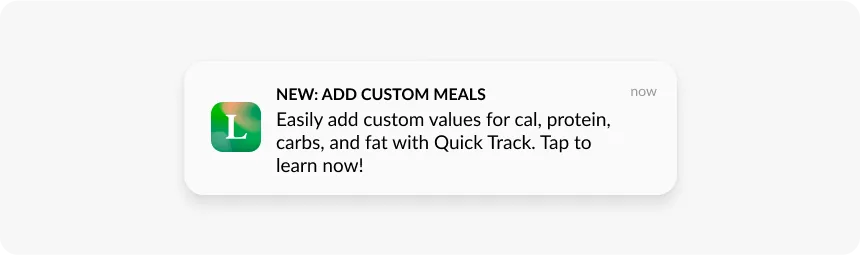
The goal? To design and time your announcements so that new features don’t just get noticed—they get used.
Why do you need to announce new app features
No matter how brilliant your new feature is, it won’t deliver results if users don’t know about it or understand its value.
Here’s what you can achieve with a strong feature announcement strategy:
- Speed up feature adoption: Instead of waiting for users to discover new functionality by chance, guide them there directly. The sooner they find it, the faster they’ll start using it.
- Boost adoption rates: When you showcase the real value of your new feature and explain how it tackles your users’ pain points, they’re much more likely to explore it.
- Increase daily (DAU) and monthly active (MAU) users: New features give people a reason to open your app. A well-timed announcement can turn occasional users into daily visitors.
- Re-engage dormant users: New features give you the perfect reason to reach out to users who haven’t opened your app in a while. Instead of sending another generic “we miss you” message, you can share something genuinely valuable.
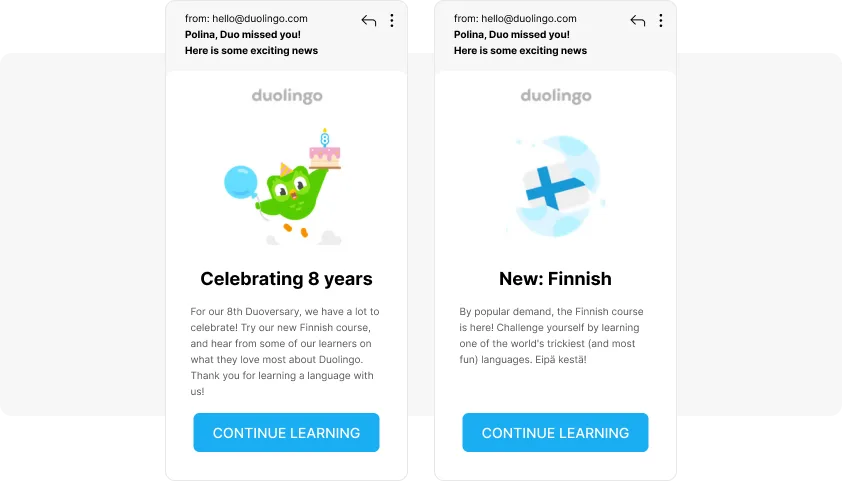
For example, here’s how Duolingo used a new course announcement to re-engage inactive users:
How to announce new app features with Pushwoosh
Pushwoosh lets you automate new feature announcements and design smart strategies to achieve your target metrics.
Let’s look at two key approaches you can use: a basic broadcast announcement and a more sophisticated personalized strategy.
Both can be effective—choose based on your feature’s complexity and your users’ engagement patterns.
Basic approach: Broadcasting to all users
The simplest way to announce your feature is to reach your entire user base at once. Here’s how:
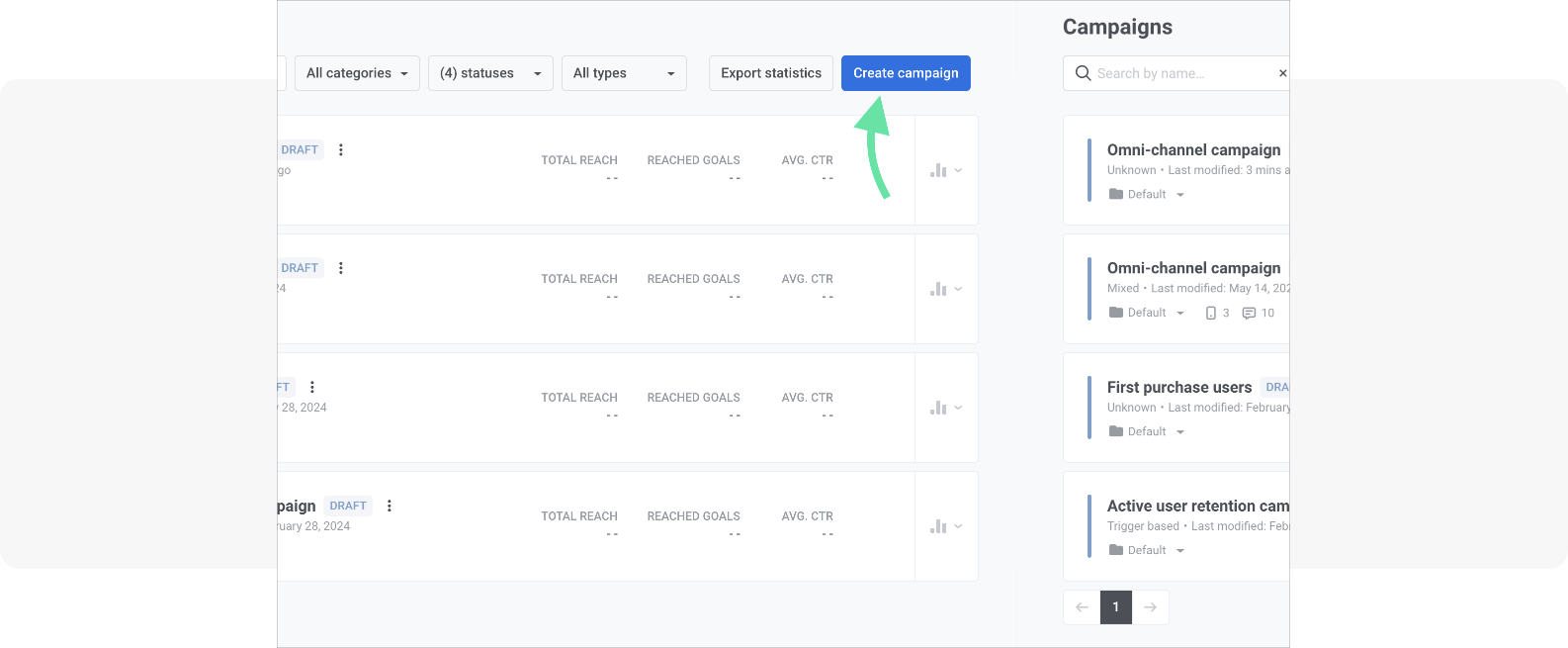
Head to Pushwoosh’s Customer Journey Builder (available even on free plans) and click “Create campaign” to get started.
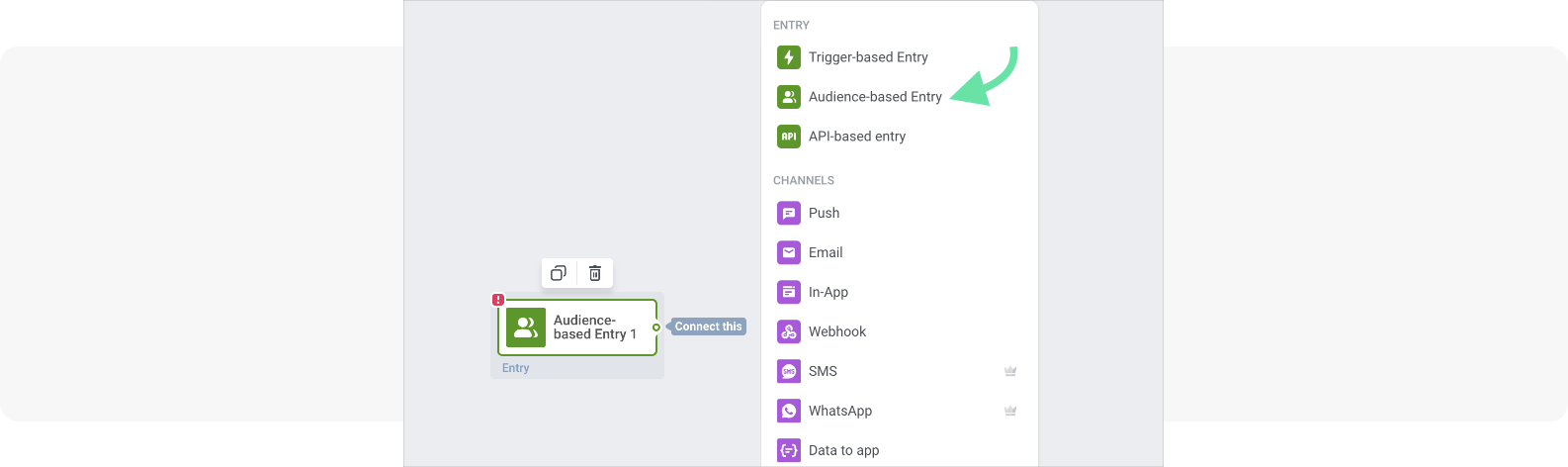
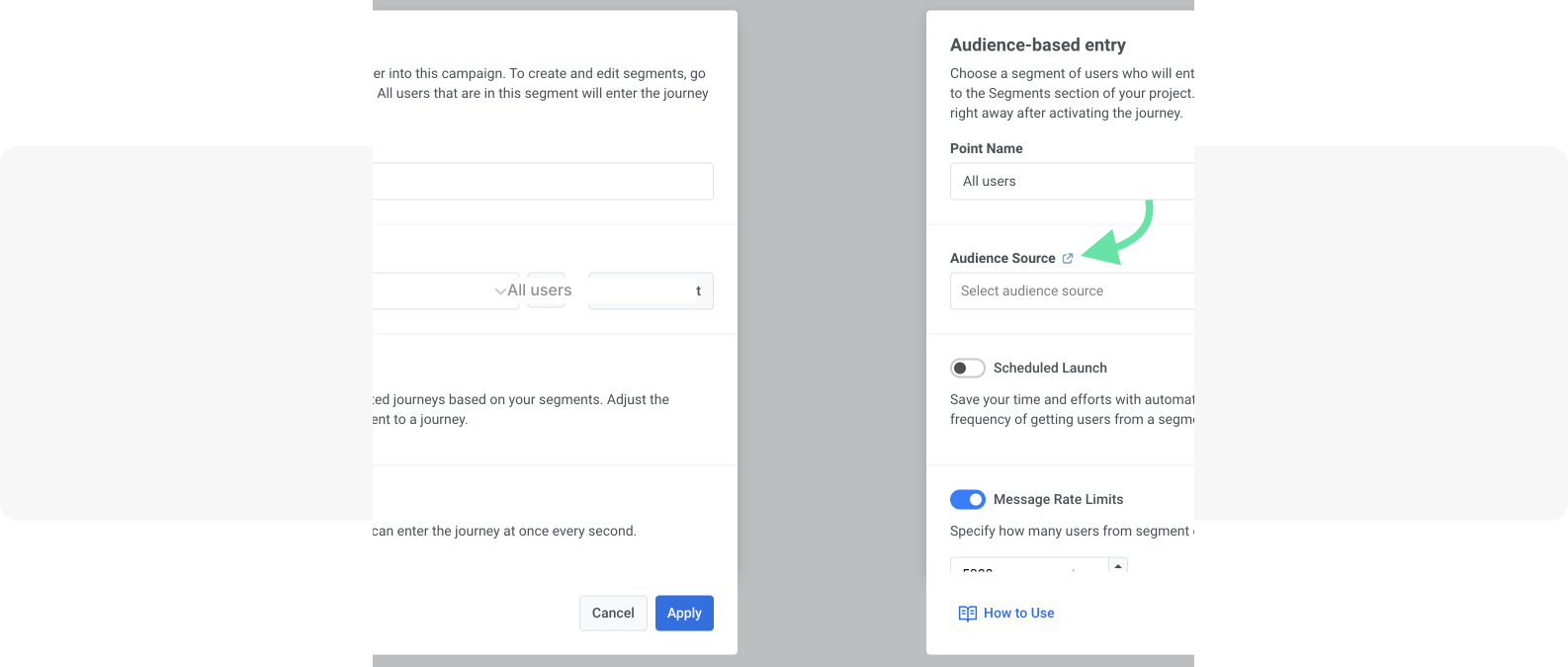
Add an Audience-based entry point to your journey canvas. This lets you start your campaign with a specific user segment.
Then, click on the element added to the canvas, select the “All Users” segment as the audience source, and click “Apply.”
This lets you target all users in your contact base.
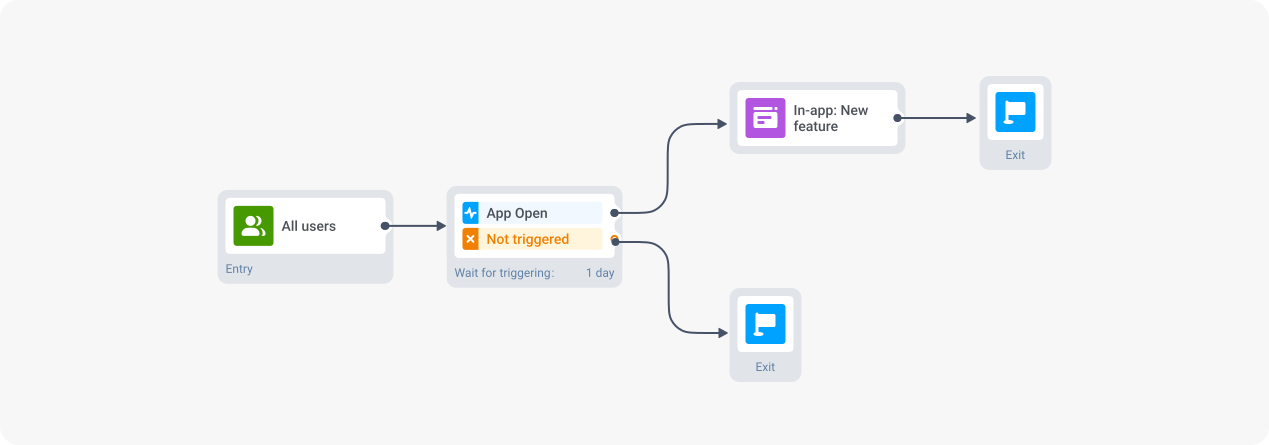
Finally, set up an in-app message to appear when users open your app.
For example, it could be a banner showcasing the feature and inviting the user to give it a try.
🔥Pro tip:
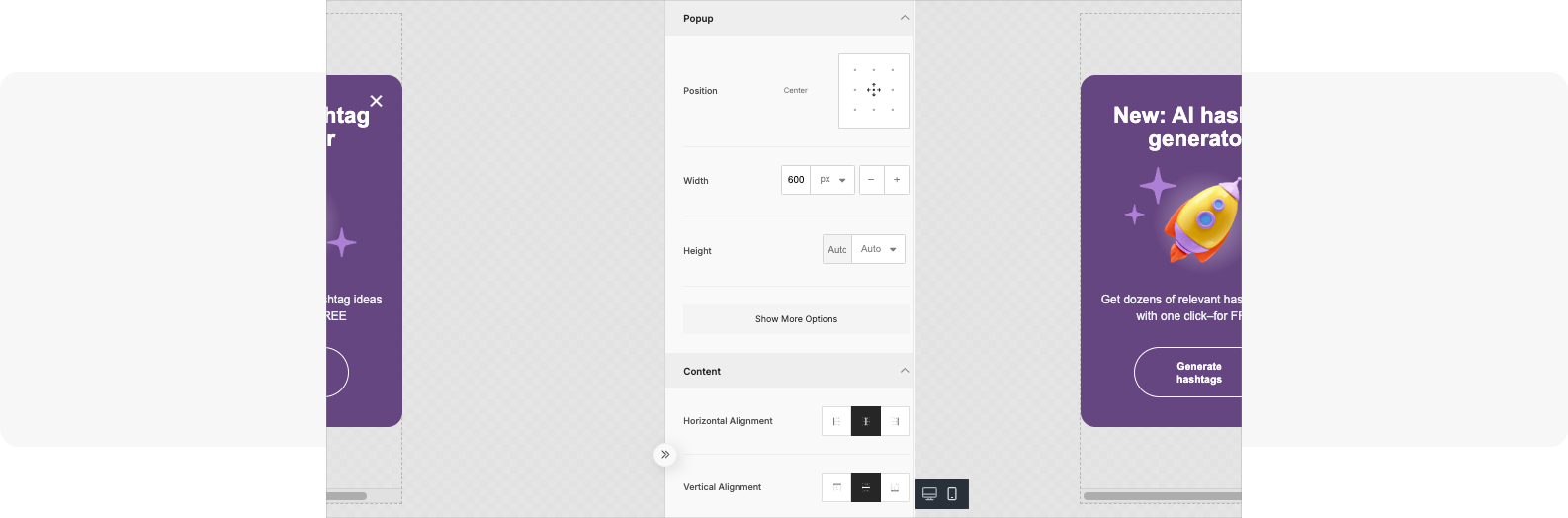
Create in-app messages using Pushwoosh’s ready-made templates. They let you design high-quality and visually attractive banners without any coding.
Let’s look at an example. Imagine you want to promote a new feature in your app—an AI hashtag generator.
You could then use Pushwoosh’s template to create in-app banners like this one:
Alternatively, explore other in-app formats you can use to promote your new features.
Advanced approach: Personalized feature announcements
You can also create more complex sequences to boost engagement and get more clicks. For example, tailor your announcements based on user behavior.
- Target users who haven’t opened the app since the new feature release.
Following up with users who never saw the feature helps you re-engage them and drive more traffic to your app.
Here’s how to set it up with Pushwoosh’s Customer Journey Builder.
Start by creating the same audience-based entry and use the “All Users” segment.
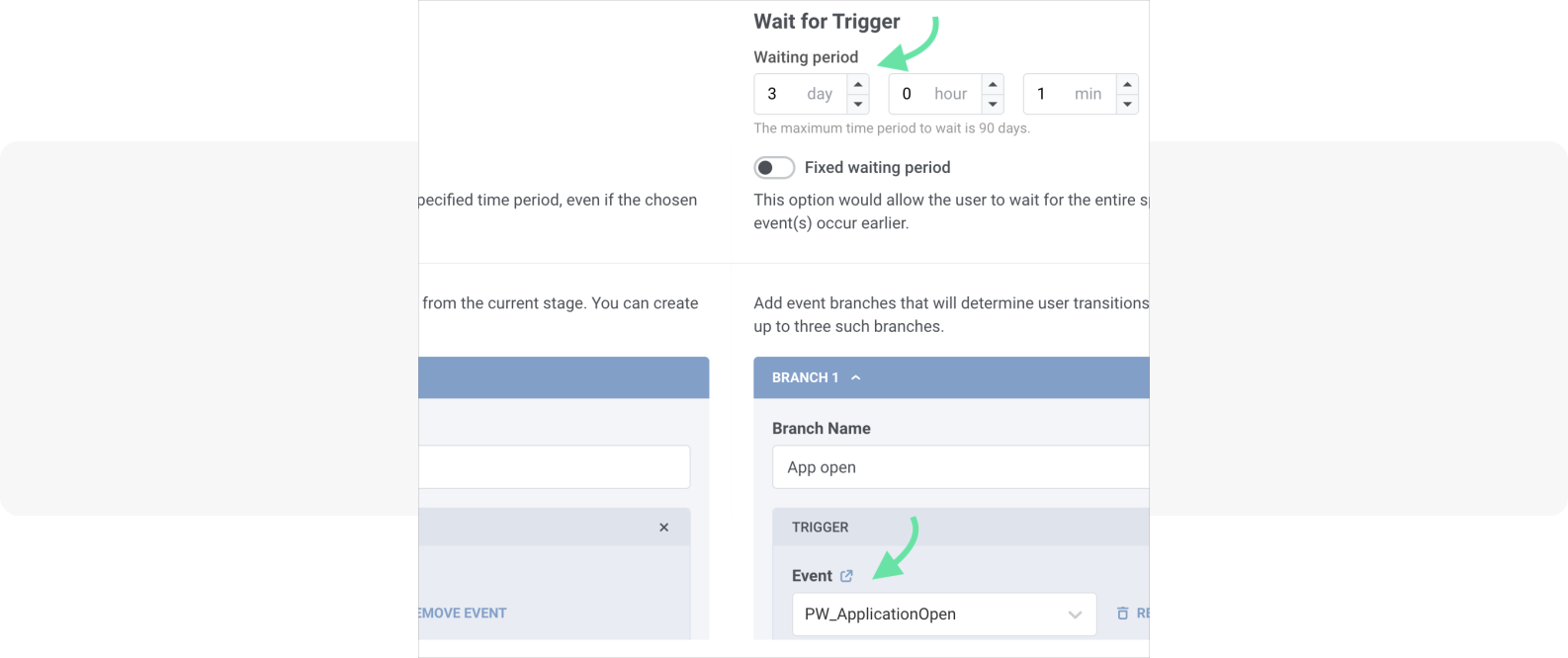
Then, add a new “Wait for trigger” element to your canvas.
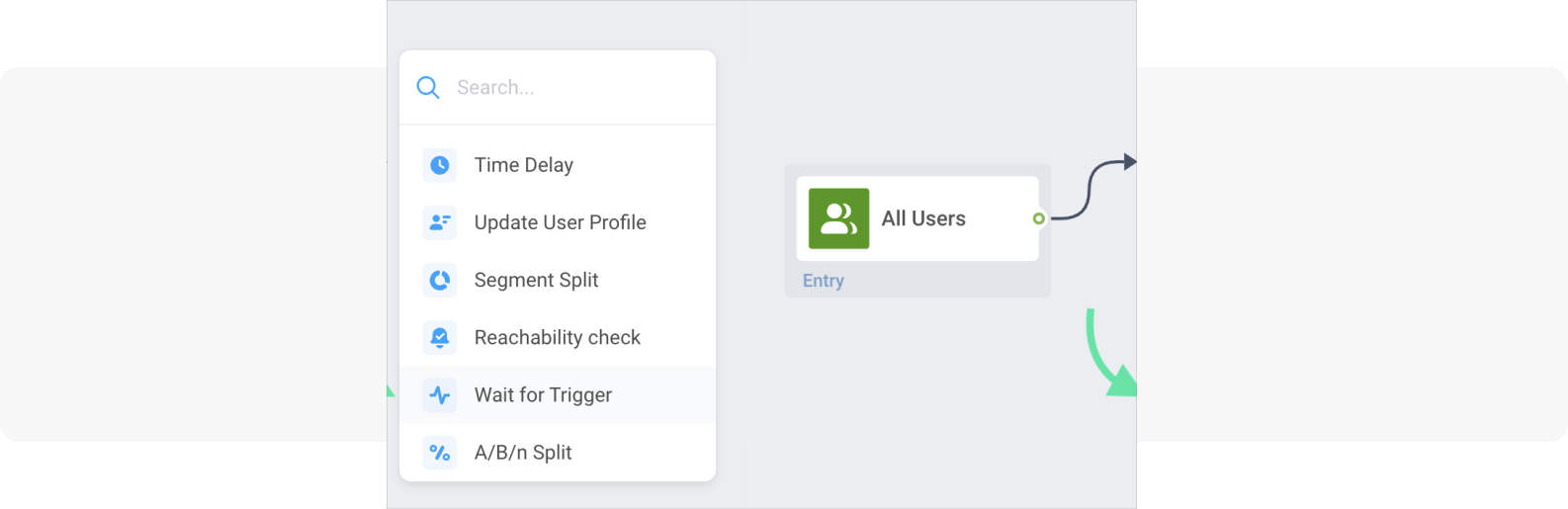
In its settings, select the default event: PW_ApplicationOpen and add a time frame (e.g., 3 days).
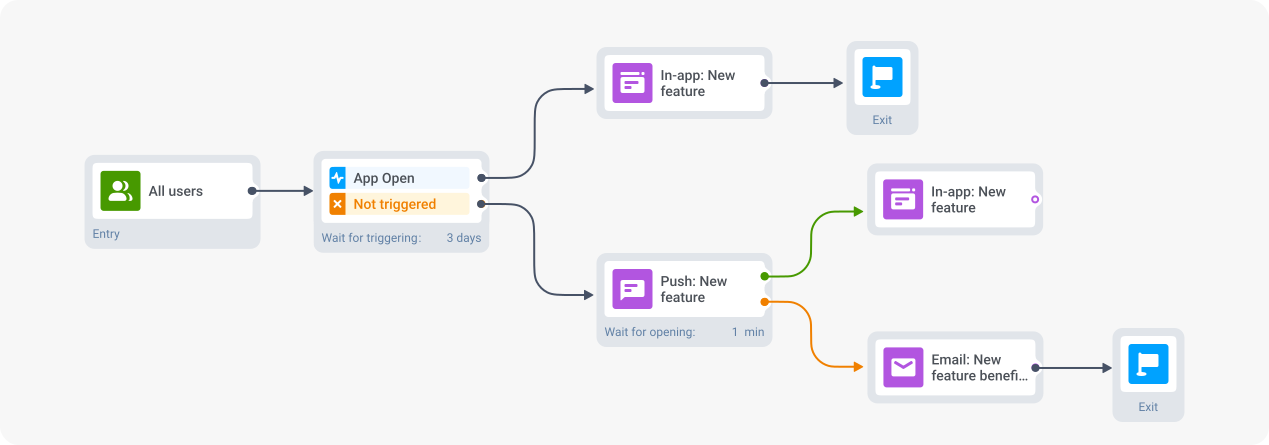
From here, you can build a strategy based on how each user has been interacting with your app and notifications. For example:
- If a user hasn’t opened the app in three days, engage them with a push notification;
- For users who are unreachable through push notifications or didn’t open your push, schedule an email to reach them via this channel instead.
- Target users who already tried the new feature.
Would you like your active users to keep exploring the new feature or take other steps? In this case, engage with them through follow-up messages.
Go back to Customer Journey Builder and use the same audience-based entry with “All Users” as your segment.
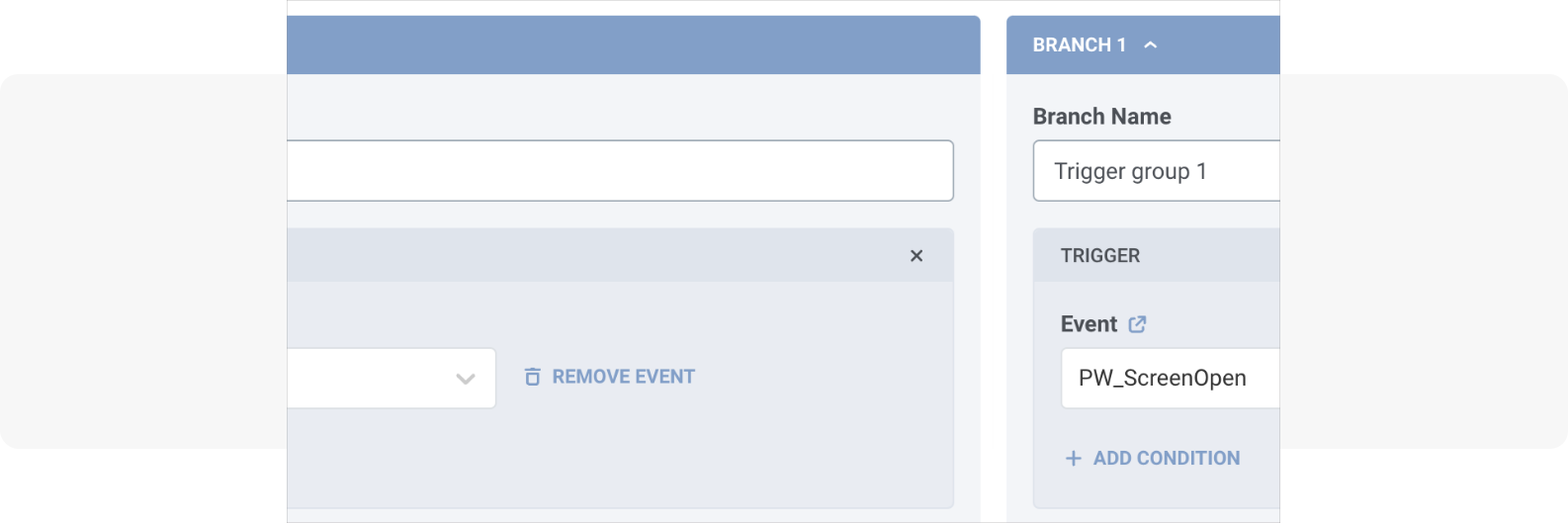
From here, add a “Wait for trigger” element and select the default event “PW_ScreenOpen.”
This lets you target only those users who interacted with specific sections of your app (e.g., the new feature).
Specify the screen you want to track as your target event and click “Apply.”
Alternatively, you can set up and use a custom event triggered by a specific user action related to the new feature.
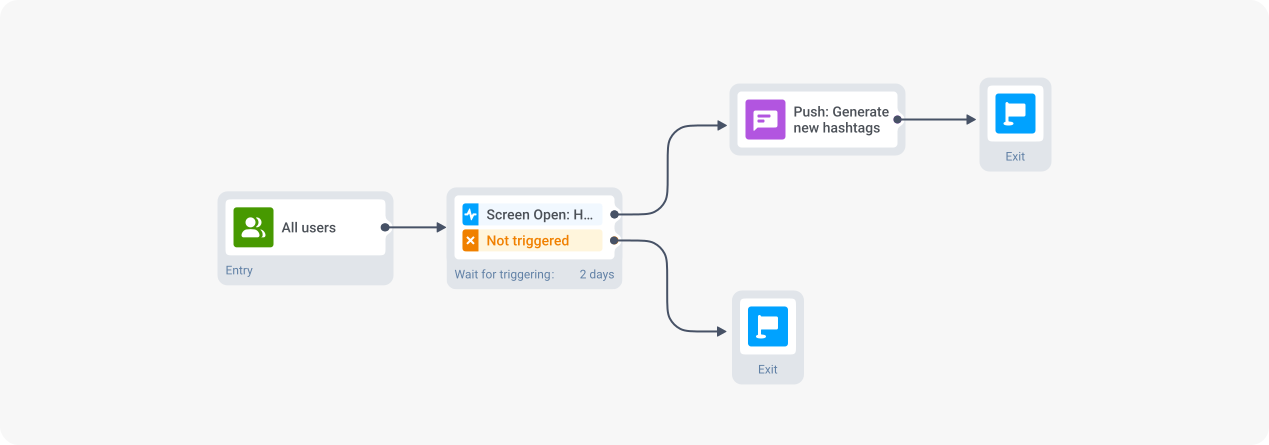
For example, if your new functionality allows generating hashtags in your app, you can use the “Hashtags_Generated” as the target event.
From here, create a workflow to further engage these users.
For example, send a push notification inviting them to use the feature again after a couple of days.
🔥Pro tip:
Whichever path you choose, you can integrate the product analytics tool you use to track feature usage with Pushwoosh’s Customer Journey Builder.
For example, the Amplitude integration lets you seamlessly upload your data to Pushwoosh and optimize your campaigns based on real-time performance.
Top types of new app feature announcements
So, what are the best channels and formats you can use to promote your app updates?
Let’s find out.
Sticky in-app announcements
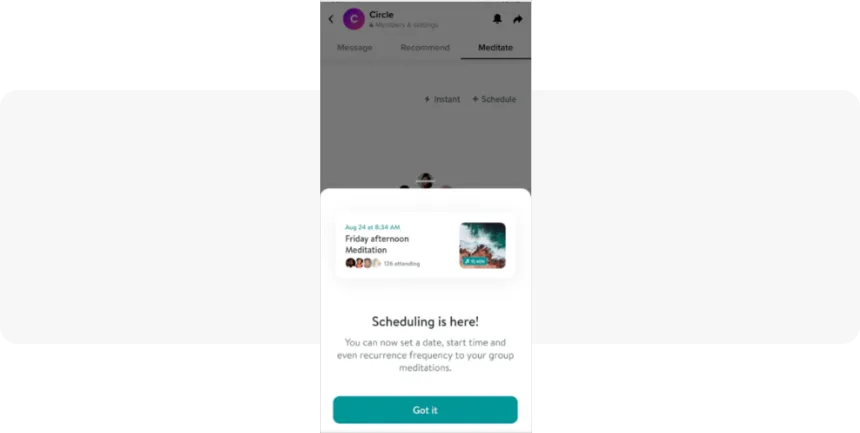
Example of a sticky in-app
In-app messages help you announce new features to users who already opened your app.
Sticky in-apps are non-intrusive banners that typically appear at the top or bottom of your app’s screen.
They’re perfect for smaller updates or as gentle reminders about new features.
Since they don’t interrupt the user experience, they can stay visible longer without annoying users.
💡You can also build them directly in Pushwoosh for Android and iOS.
Interstitial and full-screen cover in-apps
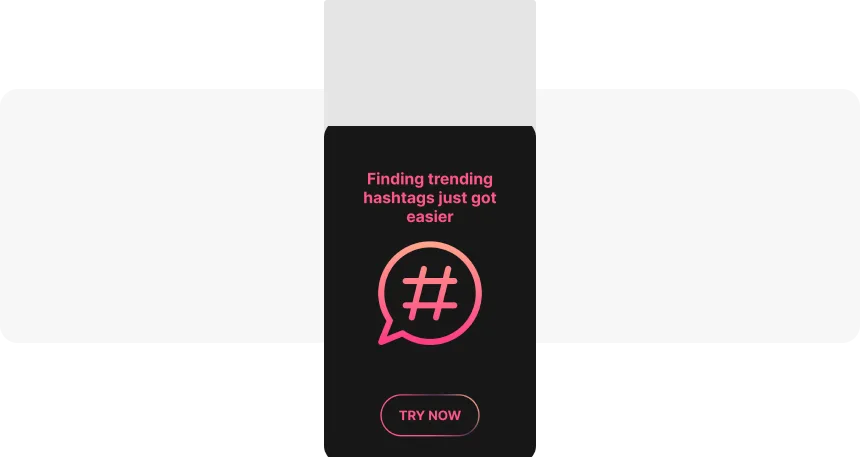
An example of an interstitial in-app message
These types of in-app messages are best for announcing important app features and major updates. Here’s how they work:
- Interstitial and half-interstitial messages are windows that overlay your app content while still keeping some of the background visible
- Full-screen covers take over the entire app screen
Remember, such banners can disrupt the user experience. So it’s key to design and time them effectively.
Think of the best touchpoints and develop a message that resonates to keep them relevant. And make sure that any user can easily close these banners without confusion.
💡Similarly, you can build and implement this type of in-apps using Pushwoosh.
In-app stories
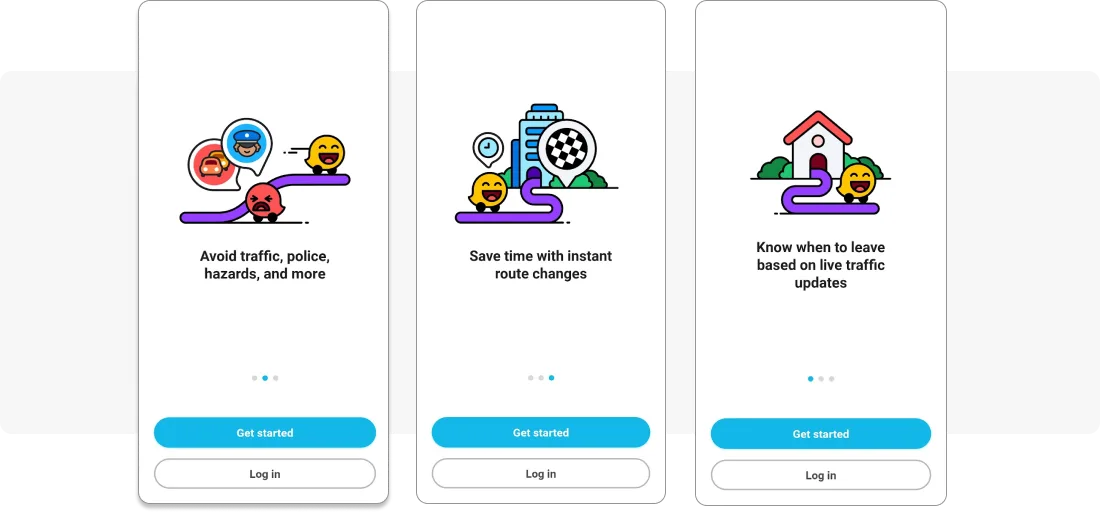
In-app onboarding stories by Waze
In-app stories bring a familiar social media format to your app’s feature announcements. They’re perfect for:
- Walking users through complex features step by step
- Showcasing multiple benefits of a new update
- Letting users consume information at their own pace
- Adding interactive elements like swipes and taps
Choose this format for important features that offer multiple benefits and involve a multi-step setup.
💡Just like with other formats, you can use in-app stories in Pushwoosh.
Push notifications

An example of push notifications promoting new features
Push notifications help you engage users who are yet to open your app.
They’re perfect for sharing quick feature announcements and generating immediate engagement.
Make sure to:
- Keep your push notifications short and on point
- Use emojis strategically to drive users’ attention
- Create urgency using words like “Now,” “Be one of the first..”, “Hurry,” etc.
- Include a clear call to action
- Personalize them based on user attributes and actions
For example, you can send personalized announcement push messages to users who used to interact with similar functionalities in the past.
Email announcements
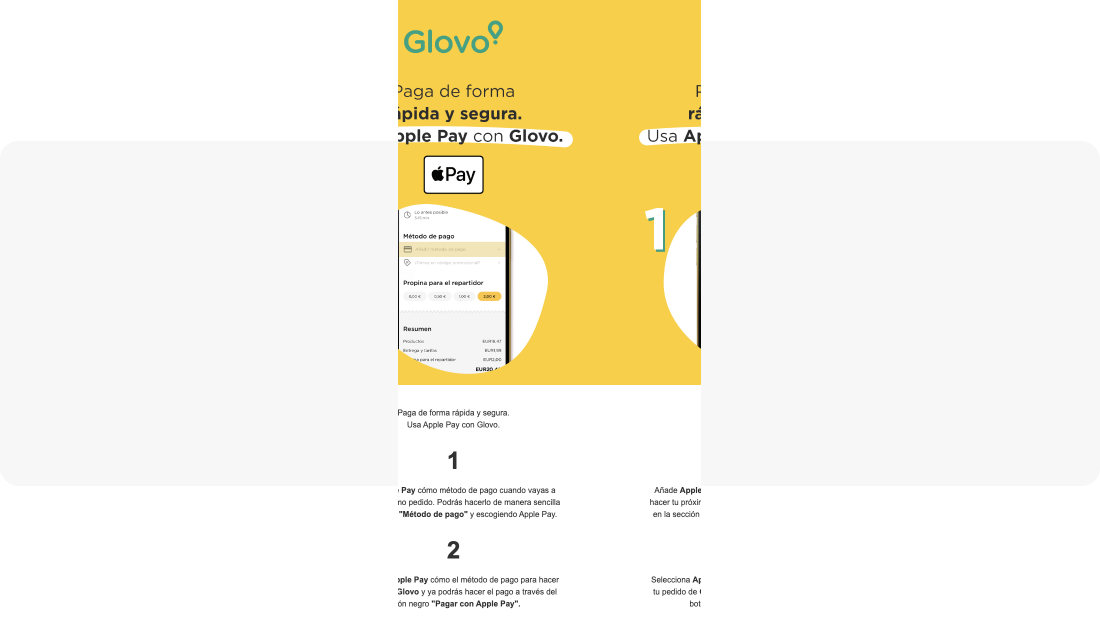
An email announcement by Glovo, a food delivery app. It promotes a new way to pay for orders via Apply Pay
Email is a great tool when you need more space to tell your story or reach users who ignore you on other channels.
As we saw above, they can also be useful when you can’t reach users via other channels.
Use them to:
- Dive deeper into complex features
- Show multiple screenshots and explain use cases
- Reach users who haven’t opened your app recently
- Include step-by-step tutorials
Email announcements can also be personalized based on users’ subscription statuses, attributes, and past behavior.
Social media posts
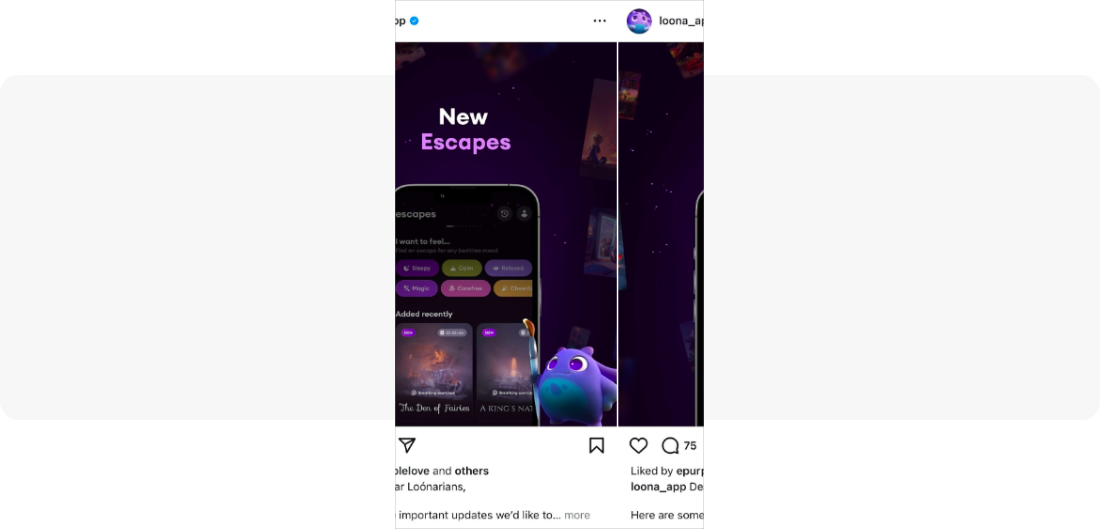
An Instagram post by the Loona app announcing new “sleep escapes” available in the app.
Social media is another powerful channel for promoting your new features.
Unlike other options, you can’t personalize posts on social platforms. But it’s still an excellent way to reach more people and boost online engagement.
Each social media platform offers unique ways to showcase your new features.
- On Twitter, you can create threads that break down complex functionality into digestible bits
- LinkedIn is perfect for sharing the strategic thinking behind your feature if you work with B2B audiences
- Instagram and TikTok let you get creative with visual storytelling and show your feature in action
Other digital channels
You can also leverage other digital channels to promote new features, such as:
- Integrate new feature descriptions in your educational blog posts
- Engage the PR channel and write a press release
- Write an update in your corporate newsroom
- Use paid channels like social media ads
- Create banners on your website
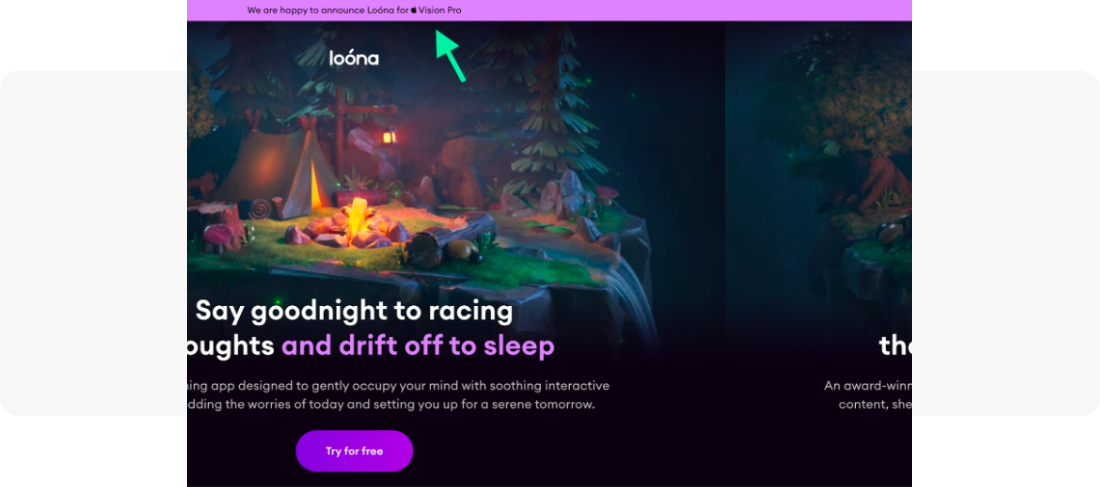
For instance, here’s how the Loon app announces an update on its web home page:
How to track new mobile app feature adoption
Once you’ve announced your new feature, you need data to understand if it helps you achieve the desired results.
Here’s what to measure and when:
Message performance metrics
Track these immediately after launch to assess whether your feature announcement message is effective.
- Push notification CTR = (clicks ÷ delivered notifications) × 100
- In-app message CTR = (interactions ÷ impressions) × 100
- Email open and click rates to measure announcement reach via this channel
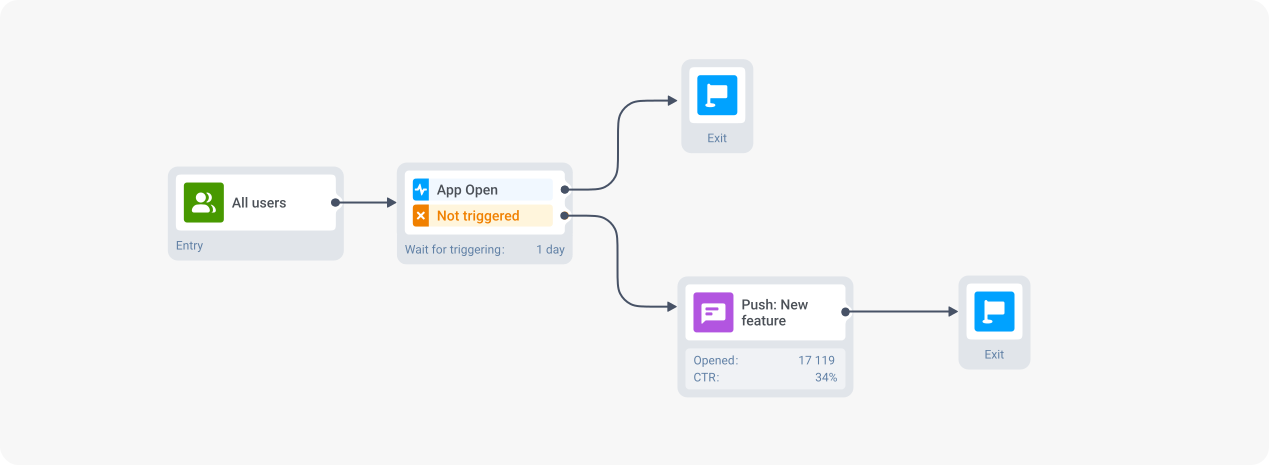
💡Track all campaign metrics directly in Pushwoosh Customer Journey Builder. For example, you can see performance metrics for your push, in-app, and email messages directly on your journey canvas.
Feature adoption metrics
Start measuring these within the first week to see if your messages trigger the desired product interactions.
Feature adoption rate = (users who tried the feature ÷ total active users) × 100
- Track daily for the first week
- Weekly for the first month
- Monthly after that
Example: If 2,000 users out of your 10,000 active users tried the feature in week one, that’s a 20% adoption rate.
Time-to-adopt = Average time between feature discovery and first use
- Helps you identify friction points in your user journey
- Compare it across user segments to spot patterns
Example: If most users take 3+ days to try a feature meant for daily use, you might need better onboarding
User activity indicators
These metrics help you understand if the new feature encourages people to use your app more actively.
Daily Active Users (DAU): The number of unique users who open your app each day
- Track the trend 2 weeks before and after feature launch
- Calculate impact: (DAU after - DAU before) ÷ DAU before × 100
- Example: DAU jumps from 5,000 to 5,500 = 10% growth
Monthly Active Users (MAU): Unique users who open your app within a 30-day period
- Compare 2-3 months before and after launch
- Look for sustained growth
- Example: MAU increase from 50,000 to 57,500 = 15% stable growth
Re-engagement metrics
These metrics help you understand if your feature announcement successfully reactivates dormant users—and if it keeps them engaged:
Monitor these 60-90 days post-launch:
- Return rate = % of dormant users who came back
- Retention impact = % of returned users who stayed active
Example: If 100 dormant users return and 40 remain active after 30 days, that’s a 40% retention impact.

Daniel Korczyński
Head of Product at Survicate
“To get meaningful feedback after the release, it’s essential to understand the context in which the feature is being used successfully. Having events or attributes that enable you to ask relevant, contextual questions is key.
In our experience, tying feedback requests to specific usage scenarios leads to higher response rates and more actionable insights.
So, when thinking about go-to-market, we don’t just focus on success in terms of usage and ROI, but also on gathering meaningful feedback that will drive further improvements.”
What to do when your new feature announcement falls flat
Not getting the adoption rates you hoped for? Don’t worry, there’s always room for optimization when it comes to new feature announcements.
💡Remember, always start with detailed analytics and look for bottlenecks. For example, you can create a conversion funnel in Pushwoosh to see what holds you back.
Head to the Conversion Funnel tool in the Conversion tab and choose the campaign steps you want to track.
For example, you might see some steps in your flow don’t convert at an optimal rate:
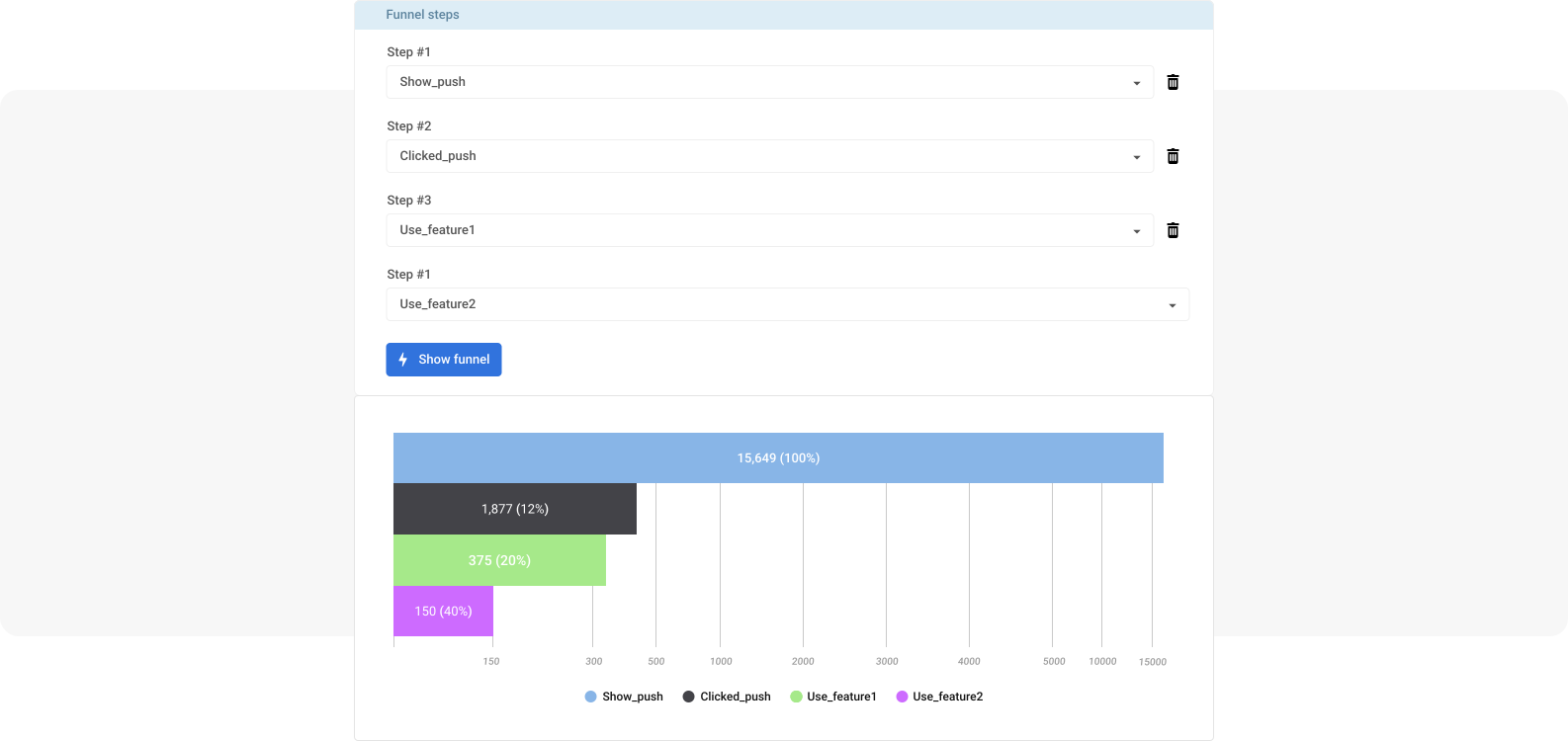
From here, you can test various strategies for improving performance.
Refine your messaging
⚡Revise your messages if they don’t generate high CTRs. Try A/B testing different approaches:
- Test various headlines and CTAs
- Experiment with the timing of announcements
- Try different visual formats
- Involve other channels (like email)
⚡Adjust your targeting. Instead of broadcasting to everyone, try segmenting your audience based on:
- Feature relevance to user behavior
- App usage patterns
- User attributes like demographics and interests
⚡Revise the UI and user flow in your app:
- Make the feature more visible in your UI
- Reduce the number of steps to access it
- Add visual cues to guide users
- Consider repositioning the feature in your navigation
But here’s the thing—don’t get too stuck on perfecting your feature announcements. While they’re important, they’re just one of many ways to engage your users.
Create effective new app feature announcements
A successful feature announcement strategy combines the right timing, channels, targeting, and messaging. Here’s what makes it work:
- Choose the best format—from subtle sticky in-apps to attention-grabbing full-screen messages
- Create a smart announcement sequence combining multiple channels
- Target different user segments with personalized approaches
- Design distinct message sequences based on past user behavior
- Track and optimize based on metrics like adoption rate and user engagement
Ready to make your next feature a total hit? Contact the Pushwoosh team for an expert call today!