Most teams pick customer retention software the wrong way. They search for a “top 10 tools” list, skim the feature grids, and choose whichever platform sounds most complete. Weeks later, they’re paying enterprise prices for capabilities they don’t use, while the one workflow that actually matters to their app is awkward or missing.
The problem isn’t the platforms. It’s the mismatch between tool and strategy.
A media app with a churn problem on Day 3 needs a different solution than a fintech app that’s losing users during onboarding. A gaming company sending daily event pushes has different requirements than an e-commerce app trying to win back lapsed buyers. Buying the most feature-rich platform doesn’t fix a strategy mismatch.
This guide works differently. Before comparing any tools, we’ll help you identify your retention DNA, the primary motion your app relies on to keep users coming back. Then we’ll match each customer retention software to the scenarios where it actually performs best.
What is customer retention software?
If you’re comparing customer retention platforms, it helps to start with a clear definition.
What is customer retention software? In simple terms, customer retention management software is a system designed to help businesses reduce churn, increase repeat purchases, and grow customer lifetime value (CLV). Unlike acquisition tools that focus on attracting new users, a customer retention system is built to nurture relationships with existing customers, especially paying ones, through targeted communication, personalization, and behavioral insights.
To define customer retention software more precisely: it combines data tracking, segmentation, and automated messaging to encourage continued engagement and revenue generation from customers who have already converted.
At its core, customer retention software exists to minimize churn, strengthen loyalty, and systematically increase long-term revenue from your existing audience.
The customer retention problem is real - and expensive
Business of Apps reports that a mobile app loses around 77% of its users within the first 3 days after install. At the same time, increasing customer retention by just 5% can increase profitability by 25% to 95%, according to research by Frederick Reichheld and Bain & Company. The math is unforgiving: acquisition costs are rising, and the window to build a habit is short.
But throwing a powerful customer retention software at the problem doesn’t automatically solve it. The platform has to match how your users churn and where your retention leverage actually lives.
Step 1: Know your retention DNA before you evaluate any tool
Your retention DNA is determined by two things: where you lose users and what you’re equipped to do about it. There are three primary retention motions. Most apps rely on one or two of them, and your platform must support whichever ones you depend on.
Motion 1: Out-of-app re-engagement (Push / Email / SMS)
This is the right primary motion if your users install the app, use it once or twice, and disappear before forming a habit. Your retention lever is bringing them back from outside the app through timely, relevant messaging.
What you need from a platform: reliable push notifications delivery at speed, multi-channel orchestration (push, email, SMS, WhatsApp), event-triggered automation, and RFM-based segmentation to distinguish dormant users from churned ones.
Typical fit: media apps, mobile games, news apps, e-commerce.
Motion 2: In-app experience (Onboarding / Feature adoption / UX)
This is the right primary motion if users open the app regularly but don’t reach the activation moment, the point at which they understand your app’s core value. Retention here is won or lost inside the app, not in the inbox.
What you need from a platform: a capable in-app messaging builder, onboarding flow automation, template libraries, and the ability to trigger in-app messages based on user behavior.
Typical fit: fintech, subscription apps, SaaS tools, productivity apps.
Motion 3: Behavioral analytics (Understand before you act)
This motion underpins both of the above. If you don’t know which segments are at risk, which messages convert, or how retention metrics shift over time, your campaigns are guesswork. Analytics is the foundation that makes re-engagement and in-app work worth running.
What you need from a platform: DAU/MAU tracking, cohort analysis, conversion tracking, A/B testing, and automated reporting.
Typical fit: any app at scale where iteration speed matters.
Use the diagnostic below to identify your primary motion. This will tell you which platform criteria to weight most heavily:
| Your primary symptom | Your primary retention motion | Must-have platform feature |
|---|---|---|
| Users install but don't return after Day 3 | Out-of-app re-engagement | Automated push/email triggers, RFM segmentation |
| Users open the app but don't reach the activation moment | In-app experience | In-app messaging builder, onboarding flows |
| You're messaging users, but conversion is flat | Behavioral analytics | Conversion tracking, cohort analysis, A/B testing |
| Users churn after an initial engagement period | Both re-engagement + analytics | Journey automation + behavioral data depth |
Step 2: How to choose customer retention management software (key features)
Once you know your retention motion, you can evaluate customer retention platforms against the criteria that actually matter for your use case. A full-stack customer retention tool should be able to cover all three motions, but your team’s priorities should determine where you focus during evaluation.
- Out-of-app messaging features: Push notifications, email, SMS, WhatsApp, and web push. Look for event-triggered automation, not just broadcast scheduling. Multi-channel journey builders are table stakes at scale.
- In-app messaging tools: A no-code drag-and-drop builder is important for marketing team autonomy. Without it, every in-app update becomes a developer dependency. Template libraries and HTML upload options extend your flexibility.
- Data storage capabilities: How long event and user data is stored determines how far back your segmentation can reach. Longer retention means more nuanced re-engagement segments.
- User segmentation and personalization: Behavior-based, attribute-based, and RFM segmentation cover fundamentally different use cases. Custom tags add another dimension. The more layers available, the more precisely you can target.
- Behavioral analytics: DAU/MAU tracking, campaign performance dashboards, conversion tracking, and A/B testing are the core set. Journey analytics and automated reporting reduce manual overhead.
- Integrations: Your customer retention platform needs to talk to your MMP (Adjust, AppsFlyer), analytics stack (Google Analytics, Amplitude), CDP (mParticle), and in-app purchase tools (Adapty, Apphud). Gaps here create dev cycles, not quick wins.
- UI and ease of use: A platform that requires developer support to run campaigns defeats the purpose. Marketer-operable tools are a real competitive advantage for agile teams.
- Vendor expertise: Customer success managers who understand retention benchmarks by vertical, not just product onboarding, add meaningful value. So does an active content and education program.
Step 3: Run the integration checklist before you sign anything
The most common cause of a “6-month dev cycle” for a new platform isn’t the platform itself. It’s discovering, after signing, that your stack doesn’t connect cleanly. Run this checklist before you evaluate any vendor:
- Mobile measurement partner: Does the platform have a native integration with your MMP (Adjust, AppsFlyer, Branch)? Without it, in-app event data for targeting stays siloed.
- Analytics stack: Can the platform send and receive data from your product analytics tool (Amplitude, Mixpanel, GA4)? Bidirectional data flow is what enables closed-loop optimization.
- CDP or data warehouse: If you’re running mParticle, Segment, or Snowflake, confirm the platform has a maintained connector, not a webhook workaround.
- In-app purchase data: For apps where monetization is tied to retention (games, subscriptions, e-commerce), a direct integration with Adapty, Apphud, or RevenueCat enables RFM segmentation based on real purchase behavior.
- CRM or support tools: If your customer success team works in a CRM, check whether user events from the retention platform can flow there for coordinated outreach.
- SDK maintenance: Look at the platform’s SDK release history. Slow SDK updates mean your developers will be blocked by compatibility issues when iOS or Android releases change.
For reference, Pushwoosh’s integration ecosystem currently includes Adjust, AppsFlyer, Google Analytics, mParticle, Adapty, Apphud, and OutSystems, with the list continuing to expand. You can use it as a benchmark when evaluating alternatives.
7 best customer retention management software platforms matched to your needs
| Platform | Best for | Pricing from | Free plan | Channels | In-app builder | RFM segmentation |
|---|---|---|---|---|---|---|
| Pushwoosh | Mid-market apps, all retention motions | $0 push + in-app | Yes | Push, email, SMS, WhatsApp, web | Yes (no-code) | Yes |
| Airship | Enterprise: airlines, retail, telecom | Up to $35K reported | Yes (trial) | Push, email, web (no WhatsApp) | No dedicated builder | No |
| Batch | EU retail, media, GDPR-first teams | Not disclosed | Yes (freemium) | Push, SMS, email (no WhatsApp) | No drag-and-drop | No |
| Braze | Large enterprises, 170+ integrations | ~$65K floor reported | No | Push, email, SMS, WhatsApp | Yes (two editors) | No |
| CleverTap | Gaming, fintech, subscription apps | From $75/month | Yes (trial) | Push, SMS, MMS, email, WhatsApp | Yes (drag-and-drop) | Yes |
| MoEngage | Enterprise e-commerce, onboarding focus | ~$999 reported | No | All major channels | Yes (no-code + HTML) | Yes |
| OneSignal | Indie devs, mobile games, push-first | From $19/month | Yes | Push, email, in-app (no WhatsApp) | Yes (drag-and-drop) | No |
1. Pushwoosh
Best for: Mid-market B2C apps that need full-stack retention (out-of-app messaging, in-app experience, and analytics) without enterprise pricing or implementation overhead.
⭐ Capterra: 4.4, G2: 4.4. Read Pushwoosh reviews.
💰 Pricing: starting from $0/month for push notifications and in-app messages. The price is estimated proportionally to the subscriber count, platform usage, and data growth. Pushwoosh also has a free plan for projects below 1k subscribers.
Pushwoosh is an omnichannel customer engagement and retention platform trusted by over 80,000 businesses worldwide. It’s an all-in-one customer retention platform that can be used for out-of-app messaging, in-app messaging, and precise analytics.
Out-of-app messaging features
Pushwoosh has all the necessary features for helping you reach your audience across mobile and web channels, including push notifications, email, SMS, and WhatsApp.
The platform enables you to set up automated campaigns triggered by specific user actions or time-based events. For example, you can configure messages to be sent after a certain period of users’ inactivity.
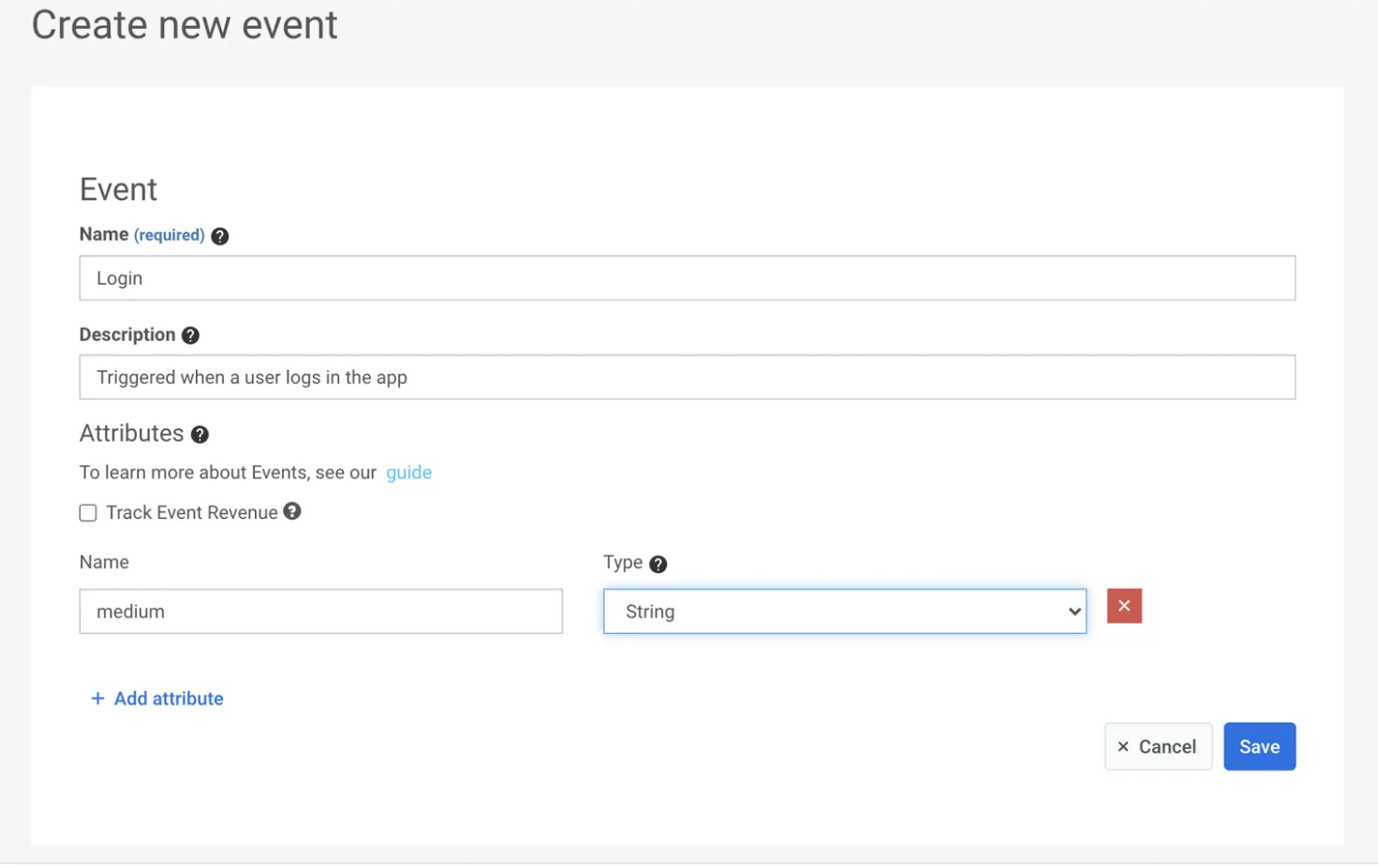
You can create custom events tailored to specific user behaviors or actions within the app and then trigger automated messages based on these events.
Pushwoosh also supports iOS Live Activities by providing real-time notifications and updates to users, keeping them engaged with the app’s content even when they are not actively using it.
In-app messaging tools
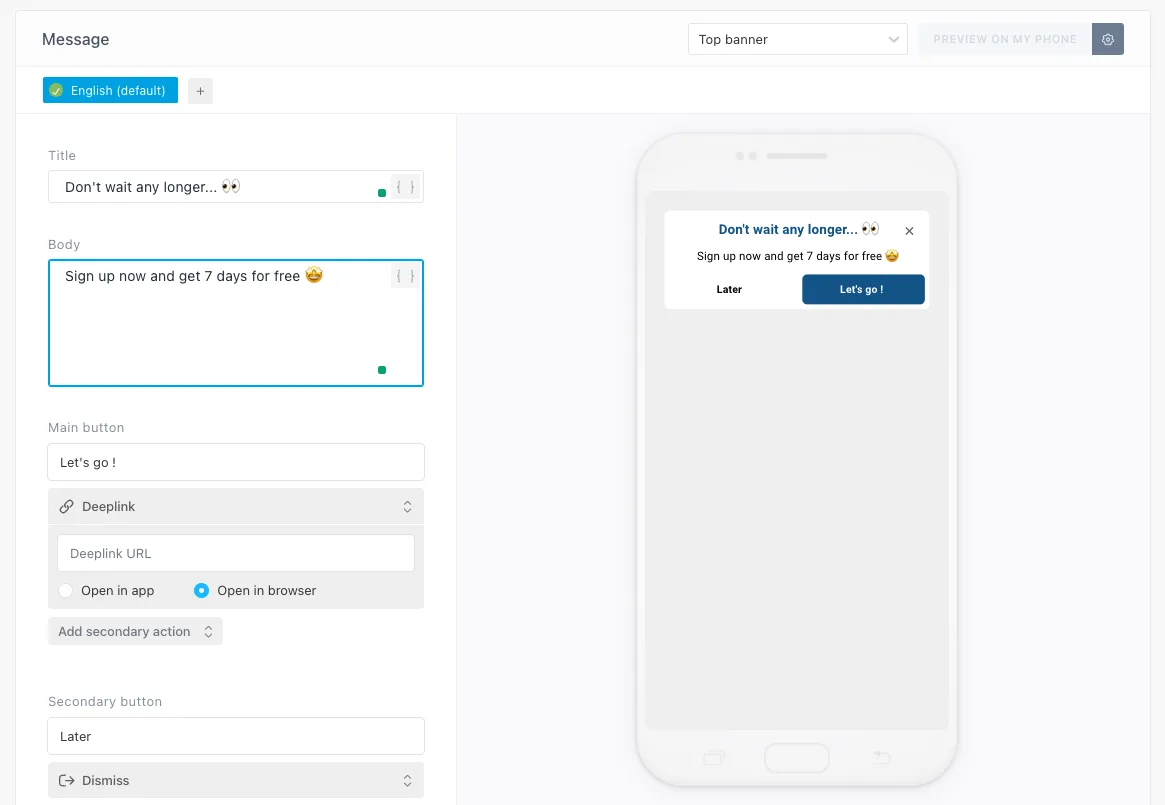
Retention through better user experience is an objective you can achieve with Pushwoosh. The platform allows you to onboard users, announce new feature releases, and gather feedback via in-app messaging.
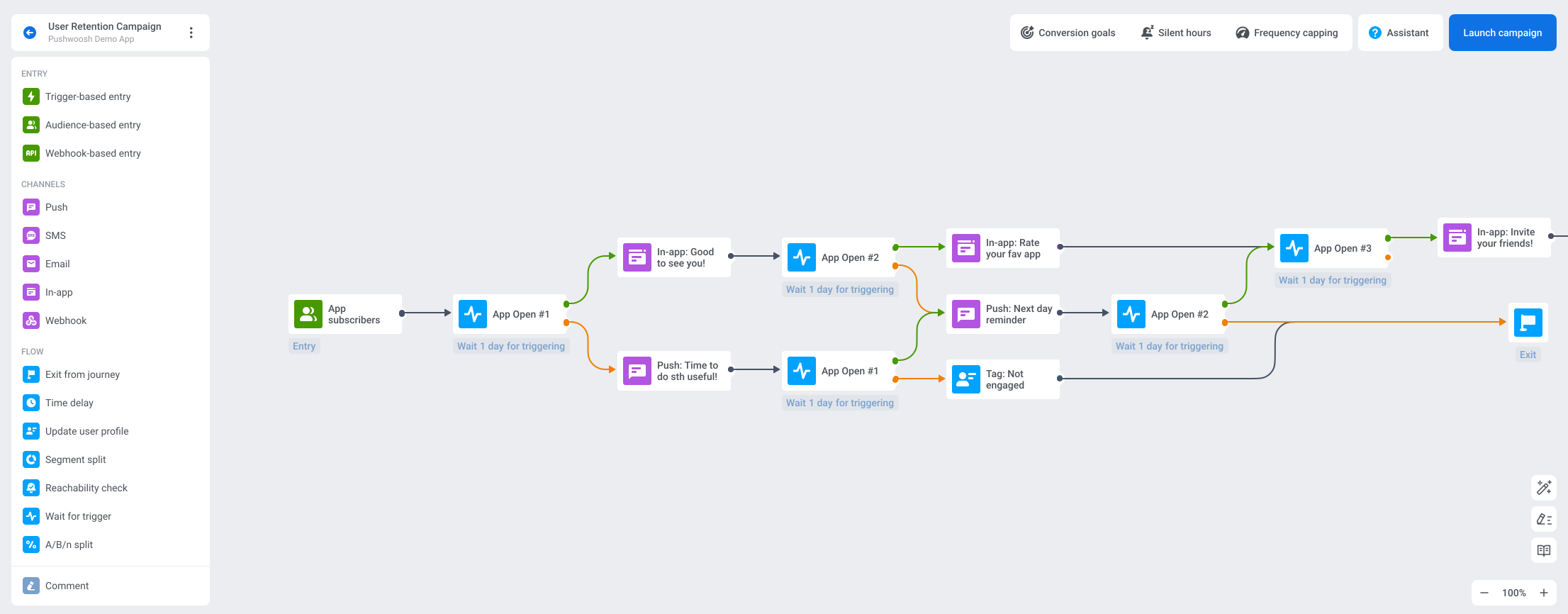
Pushwoosh Customer Journey Builder allows you to sew in-app messaging into automated workflows in a minute.
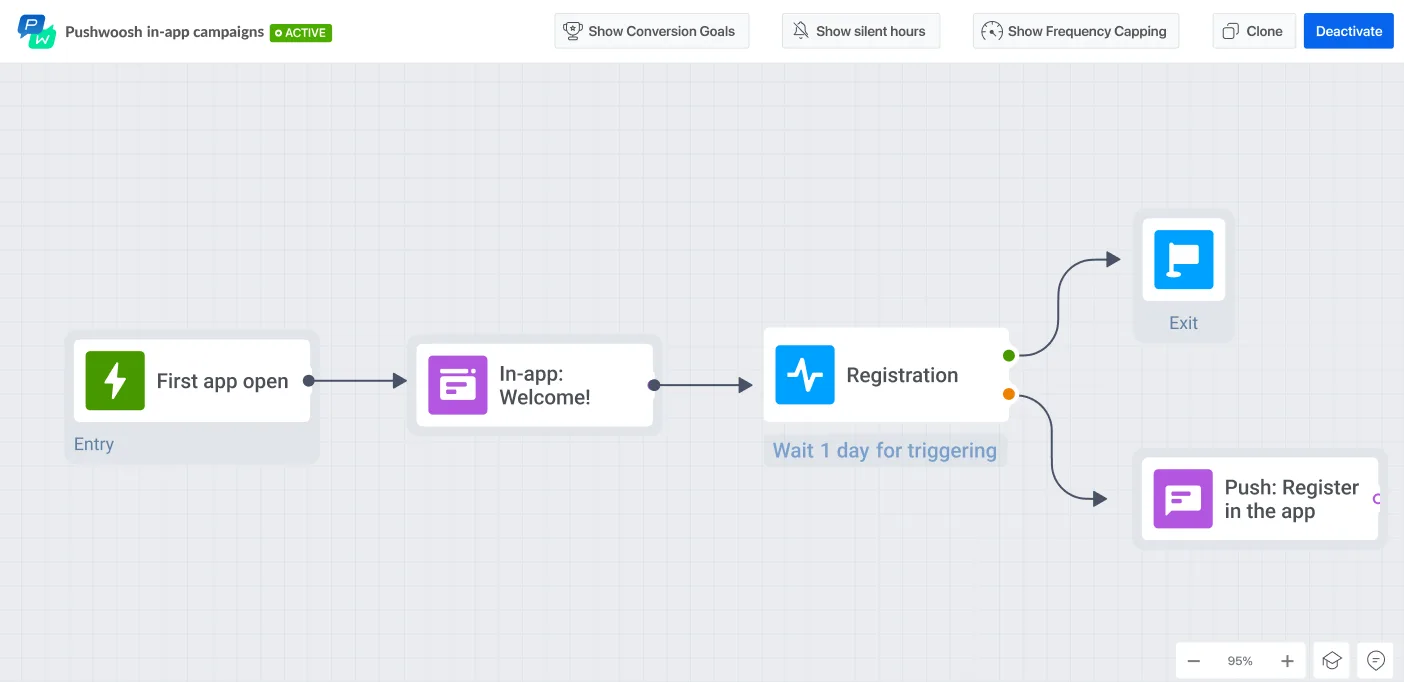
And you can create chains of engaging messages via Pushwoosh’s no-code drag-and-drop in-app editor without the designer’s input.
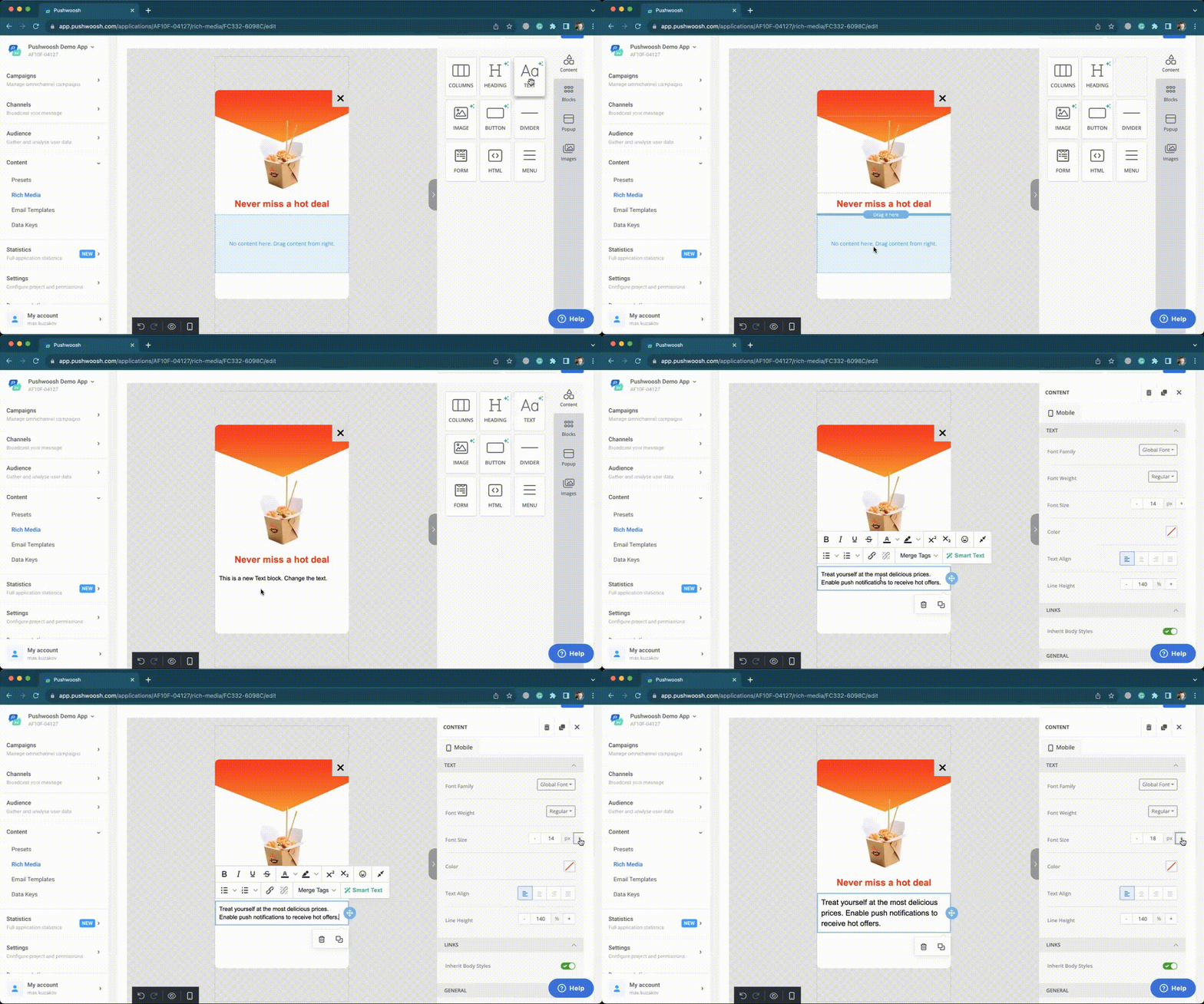
There is also a collection of ready-to-use templates. All you have to do is pick one and customize it to your liking. If you want to use your own HTML design, Pushwoosh allows you to upload it.
Data storage capabilities
Pushwoosh retains device and first-party user data indefinitely, as long as users continue opening the app. Event and message history are stored for 1 year by default, with the option to extend the retention period.
In terms of data safety, Pushwoosh is a totally secure platform thanks to privately-owned servers. All the customers’ data is safely kept in the Pushwoosh Enterprise Cloud.
🔐 Get more details on how Pushwoosh takes care of customer data.
User behavior & messaging performance analytics
To ensure the way you do customer retention for mobile apps is effective, you have to constantly analyze your data and messaging performance.
Pushwoosh offers detailed analytics for tracking campaign performance and user engagement in real time. Dashboards provide at-a-glance insights into channels’ statistics and app growth, including daily active users (DAU) and monthly active users (MAU). Journey statistics, A/B/n test analytics, and automated reporting further improve campaign optimization.
User segmentation & personalization options
Segmentation drives user retention by increasing the relevance of your communications. When personalizing campaigns to specific users’ behavior and interests, you can expect higher conversions and deeper connections in the long term.
Pushwoosh covers five layers of user segmentation, including RF(M) segmentation, dividing app users into groups according to the recency, frequency, and monetary value of their actions. The monetary component can be omitted, and the resulting RF analysis can serve you for engagement- and retention-based segments creation.
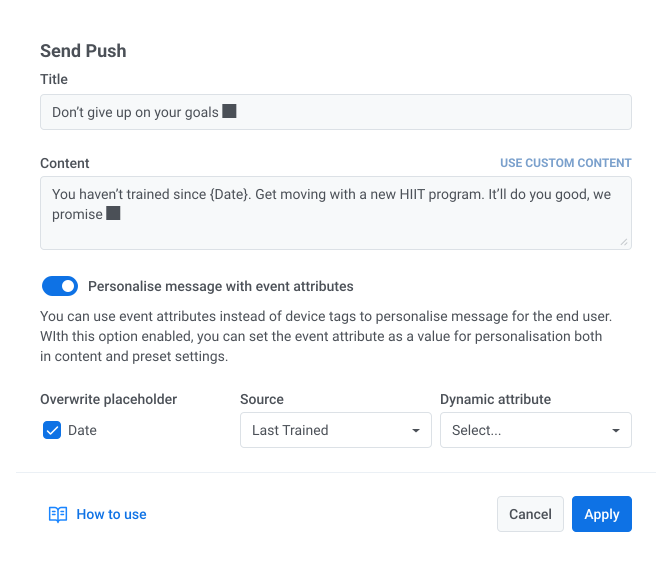
Pushwoosh then allows you to personalize messages with custom tags and past event attributes, adding a personal touch to your customer interactions.
For example, a fitness app can send motivational reminders to users who haven’t opened it for a while. In a push notification, the app can refer to the date when the user last trained. This can be easily done with Pushwoosh: you just edit placeholders in the push preset settings and select attributes from relevant trigger events.
Integrations
A customer retention platform should have integrations with 3rd party tools that can help you spot new opportunities or give you a broader perspective of your campaign and app performance.
For example, an integration with a mobile measurement partner (MMP) enriches a customer retention service with in-app events data that can be used to refine targeting and send more effective communications to users. The list is comprehensive for user retention tasks and continues to expand.
Pushwoosh has integrations with various solutions for data streaming (mParticle), marketing and product analytics (Adjust, AppsFlyer, Google Analytics), CMS and low-code solutions (OutSystems), and in-app purchases (Adapty, Apphud).
User interface and ease of use
Pushwoosh is praised for its user-friendly interface, making it accessible to non-technical teams, particularly marketers. You don’t have to waste days learning to navigate it; the whole layout is in the palm of your hand.
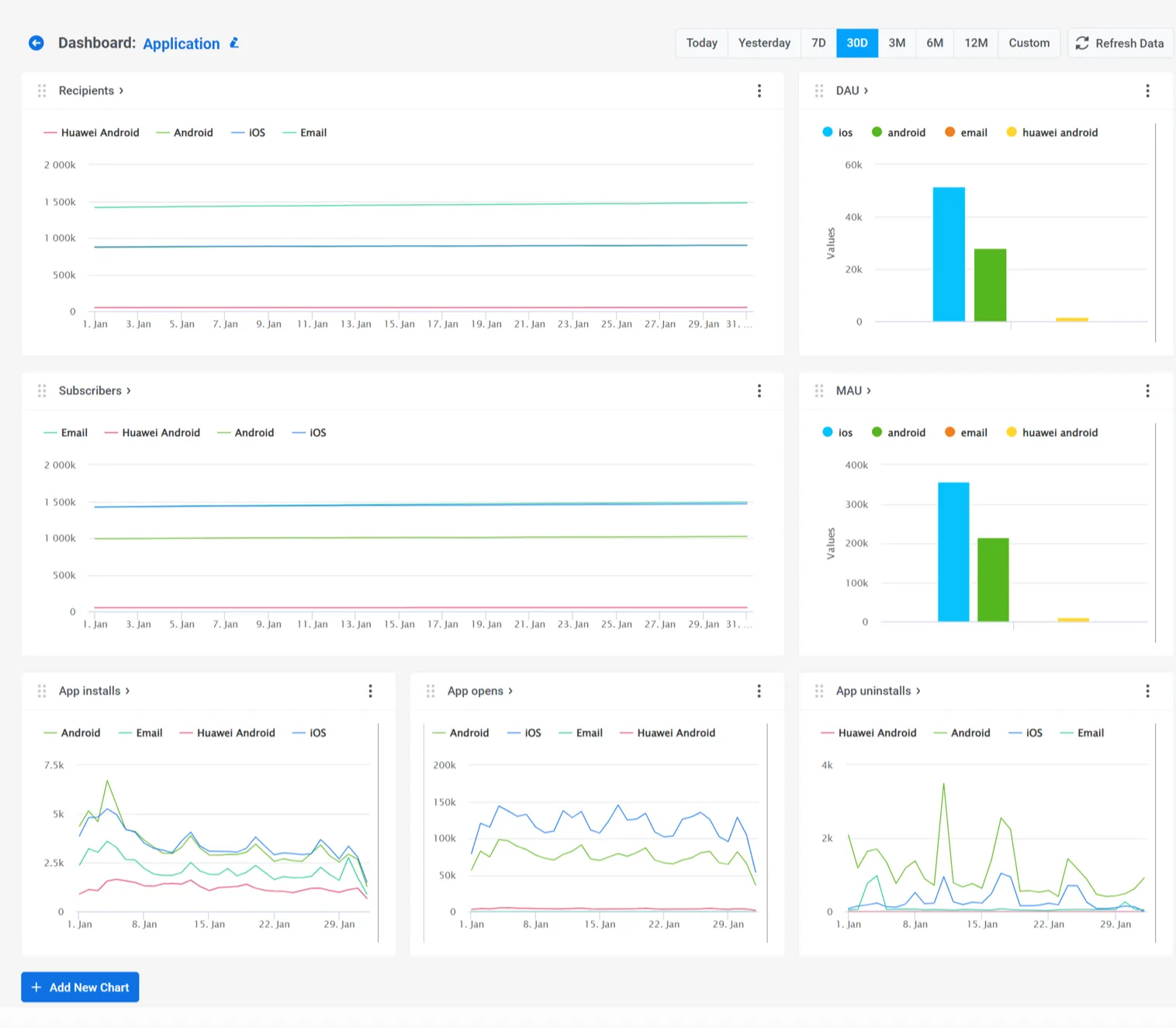
Looking at Pushwoosh’s Dashboards, for example (we’re proud of this recent release), you can grasp trends in app installs, opens, and uninstalls at one glance. Customizable graphs show the changes in data over a specified period. There’s no need to switch between tabs; you can quickly assess the data.
Company’s expertise in customer retention
When exploring multifaceted solutions, it’s preferable to choose one experienced specifically in helping customers with user retention cases.
This can involve customer success managers able to help with setting up a user retention workflow. Another aspect is content. A true expert company in user retention educates its customers to help them achieve their best possible results.
Pushwoosh’s customer success managers have first-hand experience with different user retention cases. They can navigate you through the user retention benchmarks and provide insights into your particular case.
Pushwoosh also regularly provides informative content, including blog posts, guides, and webinars. Our User Retention Benchmarks, for instance, is a great source of valuable (and up-to-date) info about user retention for various mobile app categories.
🌟 More guides and insights in our user retention hub.
2. Airship
Best for: Enterprises in airlines, retail, and telecom that prioritize scalable push and email delivery, have dedicated technical teams, and don’t rely heavily on in-app experience building.
⭐ Capterra: 3.8, G2: 4.0.
💰 Pricing: Two packages, AXP Essentials and AXP Enterprise. No prices are specified; however, clients’ reports say pricing can reach up to $35,000 plus an onboarding fee. A free trial is available.
Airship’s retention rate software helps you reach users outside and inside the app. As a well-established martech provider, Airship is mostly used by enterprises such as airlines, retail, and telecom.
Here’s a closer look at Airship’s features:
- Out-of-app messaging features: Airship offers a suite of reliable tools for communicating with users via web, email, and push notifications, including iOS Live Activities and Android Live Updates. You can also configure your own Open Channels. There’s no WhatsApp support, however.
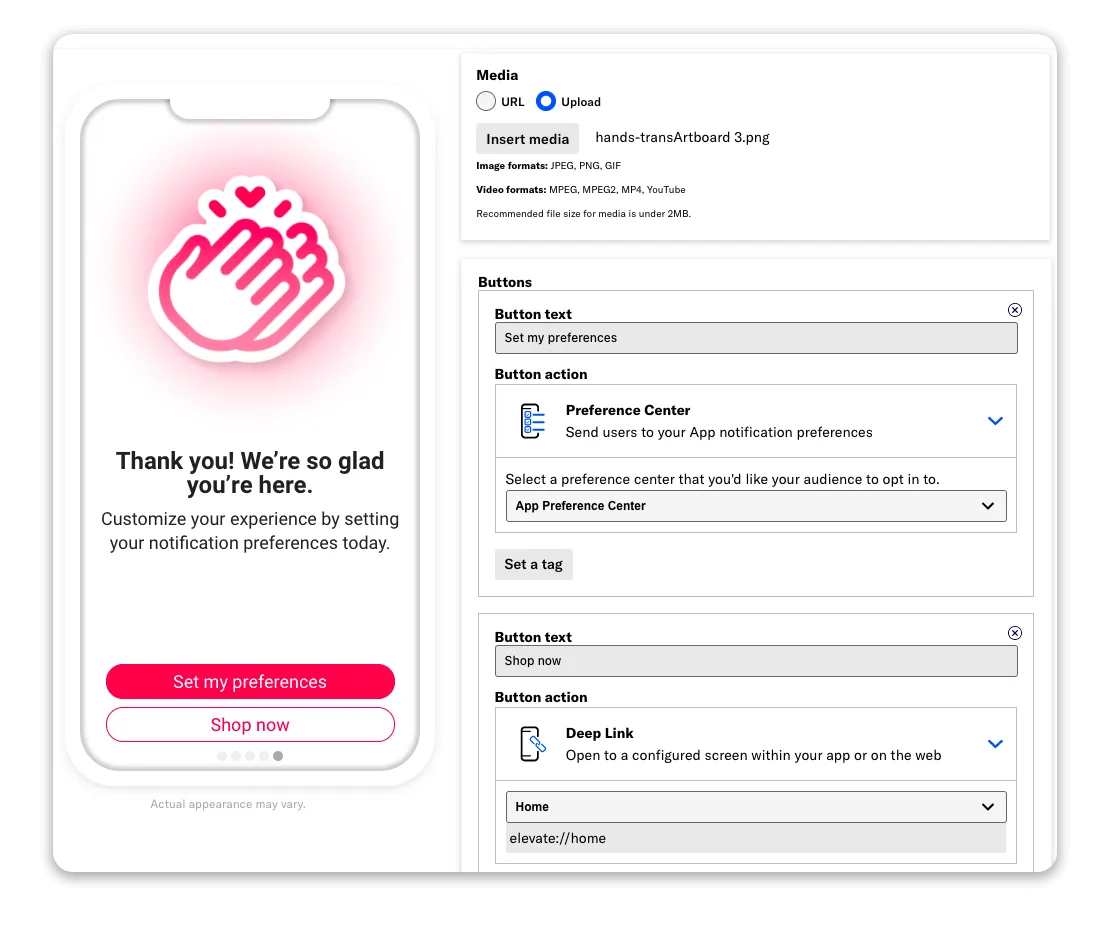
- In-app messaging tools: Real-time in-app experiences are streamlined via Scenes, a feature based on customer attributes that’s triggered to engage new users with a certain behavior pattern. The downside is the absence of a dedicated in-app messaging builder.
- Data storage capabilities: Airship stores basic recipient data, performance analytics, and message content for up to 13 months. However, the maximum data storage for real-time analytics is 7 days, which can be limiting for prompt re-engagement campaigns and paying customer retention. At the very least, the opt-in and opt-out data can be stored for up to 4 years, allowing you to stay in touch with your subscribers over time.
- User segmentation & personalization options: Airship offers AI algorithms that can identify high-value segments and predict future actions of your audience.
- User behavior & messaging performance analytics: Users have been praising Airship’s analytics tools and reports. All the relevant data can be viewed in one central dashboard. Aside from the classic DAU and MAU metrics, Airship also tracks WAU (weekly active users). Real-time analytics is available. You can create custom reports and dashboards.
- Integrations: Since Airship is focused on enterprises, it’s no surprise they have many integrations with other martech solutions, such as Adjust, AWS, and Google Analytics.
- User interface and ease of use: Their G2 and Capterra reviews feature complaints about the product’s UI/UX, marking it as complex in terms of usability.
- Company’s expertise in user retention: Airship is known for its reliability and scalability. However, if you go through their reviews on G2 or Capterra, you’ll see complaints about their customer support service.
3. Batch
Best for: European retail, luxury, and media companies that prioritize GDPR compliance, clean CRM orchestration, and ease of use, and don’t need WhatsApp or deep behavioral analytics.
⭐ Capterra: 4.7, G2: 4.6.
💰 Pricing: Batch doesn’t disclose pricing publicly. A free trial and freemium model are available.
Batch is a cross-platform solution that can help you build customer loyalty for your app. It’s a French company with a client base mostly originating from Europe. Retail, luxury, and media businesses have chosen Batch for its easy-to-use CRM orchestration and personalization options.
Here’s a quick recap of Batch’s features for user retention:
- Out-of-app messaging features: Batch is an omnichannel solution. Push notifications, web pushes, SMS, and emails are all there, yet WhatsApp is not included. The platform doesn’t provide a reachability check, meaning some of the users you planned to retain can miss your communications.
- In-app messaging tools: Batch enables you to create highly personalized customer journeys across many channels in a couple of clicks. The only downside is the absence of a drag-and-drop in-app editor. In-app experiences are provided in the form of individual in-app messages and mobile landings, in-apps triggered by push open. Pushwoosh customers know this combination as “push to in-app”.
- Data storage capabilities: Batch doesn’t disclose their data storage capabilities. As for safety, they’re serious about protecting customer data. The company has exclusive contracts with two EU-based publicly-traded hosting providers: OVHcloud and Scaleway.
- User segmentation & personalization options: Batch provides engagement-based user segmentation under the name of Smart Segments and custom Audiences Management. Smart Segments automatically divide your user base into groups (New, Engaged, Dormant, One Time, Imported) depending on their engagement level. Attribute-based segmentation is possible with Batch’s Audience Management, where you can upload static segments from your base or third-party services. You can also assign custom tags to selected user groups. This retention rate software supports your personalization efforts with a number of features, such as prebuilt re-opt-in scenarios, A/B testing, and message previews.
- User behavior & messaging performance analytics: Batch’s detailed statistics include metrics such as devices synced, displayed, clicked, and click rate. Conversion and behavior tracking are missing.
- Integrations: They have integrations with Adjust, AppsFlyer, Adobe, and many other marketing and analytics solutions. Batch also connects with tag managers, CDPs, and DMPs.
- User interface and ease of use: Clients love Batch for its friendly UI and ease of use. It’s simple to navigate and use even for a newbie.
- Company’s expertise in user retention: While their documentation is easy to read even for a beginner, it could have been more detailed. Batch also doesn’t invest much time into developing insightful content on a regular basis.
4. Braze
⭐ Capterra: 4.7, G2: 4.5.
Best for: Large enterprises with 170+ integration requirements, complex personalization needs, and dedicated technical resources to manage the platform.
💰 Pricing: Only available upon request. The reported ‘floor’ price is around $65,000, and the ultimate sum depends greatly on platform usage.
A powerful customer retention platform is Braze’s bread and butter. With a long-standing presence in the market, Braze indeed has a lot to offer, but not many app businesses can afford such a lavish solution.
Here’s a closer look at its user retention tools:
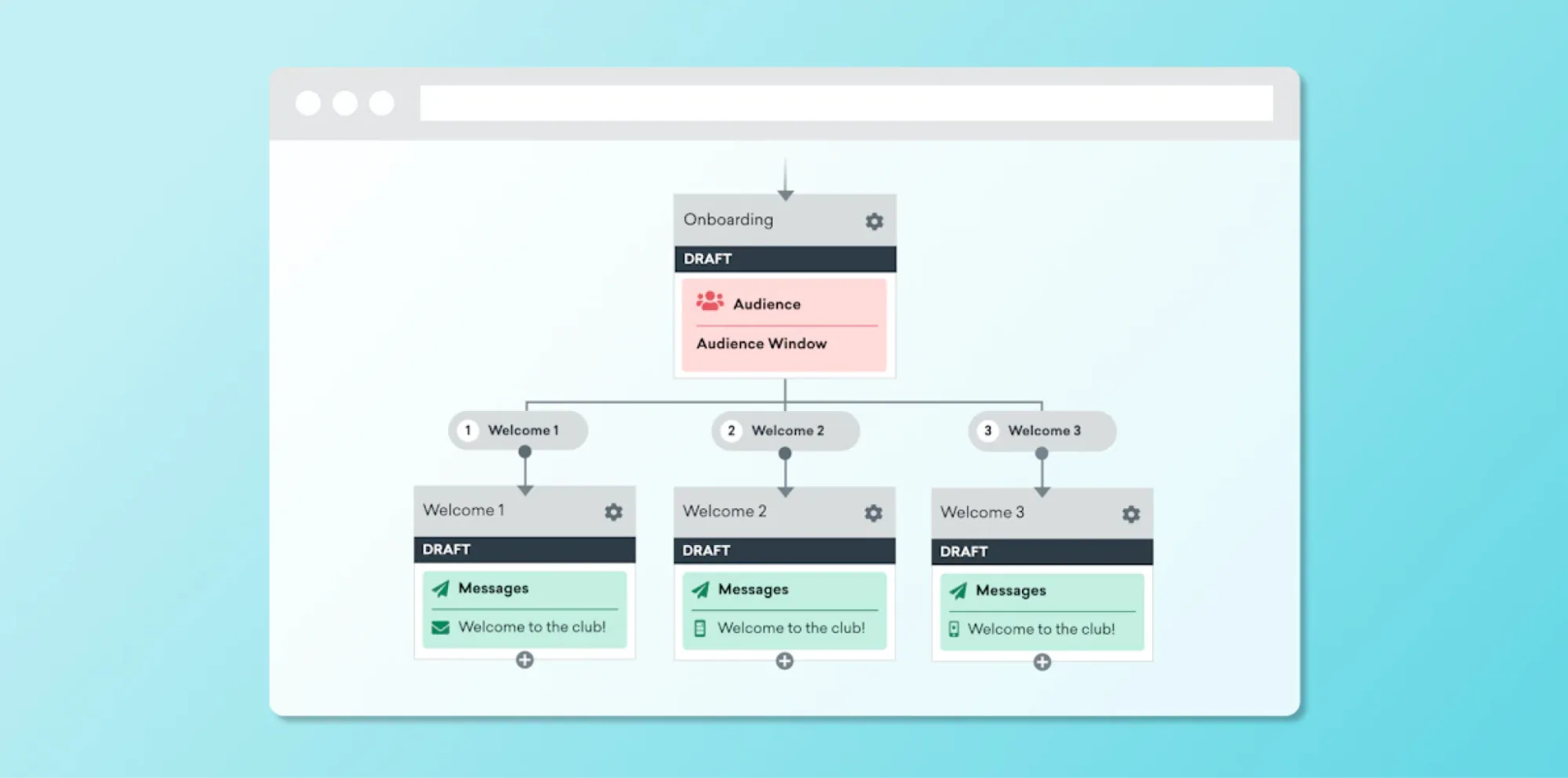
- Out-of-app messaging features: Braze supports you on every channel: push notifications, emails, WhatsApp, and SMS. And yet it lacks high-speed notifications, making it not the best fit for media and sports. Customer journeys are built via Braze Canvas, a unified interface where you can create multiple messages at the same time. Being an effective builder, Braze Canvas nevertheless can be hard to navigate. Speaking of the reachability check, Braze doesn’t appear to offer this feature.
- In-app messaging tools: For creation of in-app messages, Braze offers two editors, a drag-and-drop editor and a traditional one. G2 and Capterra reviewers praise the editors for their simplicity; however, some say the editors could have been more sophisticated. A feature called Content Cards delivers interactive content (videos, images, personalized recommendations) directly within your mobile app, which is pretty unique and convenient.
- Data storage capabilities: According to the company’s internal rules, Braze can keep customer data up to 90 days.
- User segmentation & personalization options: Segments can be set dynamic or static, depending on your choice. Deep linking, silent hours, and dynamic content are at your disposal. Surprisingly, there’s no RFM segmentation. As for personalization, the AI copywriter is a great tool. It suggests personalized message content and subject lines, improving message effectiveness.
- User behavior & messaging performance analytics: Braze’s analytics is a truly powerful tool. You will benefit from aggregated statistics on campaign performance and app usage. They also have conversion, revenue, and ARPU tracking as well as real-time and automated reporting.
- Integrations: They have more than 170 integrations with various tools, such as AWS, Shopify, and WhatsApp. This is an attractive offering if you’re using these services.
- User interface and ease of use: As mentioned, Braze Canvas does not have an intuitive UI. Capterra and G2 reviewers share a similar complaint about reporting dashboards.
- Company’s expertise in user retention: This is a powerful platform that cares about its reputation and customers. They have an interactive benchmarks dashboard enabling website visitors to check real-time data on message engagement, app retention, paid UA, and purchasing behavior. Braze even has a separate program, Customer Champions, encouraging clients to share their success stories with a larger audience. And Braze’s blog is regularly updated with user retention insights and success stories, much like Pushwoosh’s.
5. CleverTap
Best for: Mobile gaming, fintech, and subscription apps that need sophisticated journey automation, RFM segmentation, and AI-powered retention analytics.
⭐ Capterra: 4.4, G2: 4.6.
💰 Pricing: starting from $75/month.
CleverTap positions itself as a universal customer engagement and customer retention service and claims to support more than 10,000 apps. Their solutions are focused on mobile gaming, e-commerce, finance, and subscription-based apps.
Time to explore CleverTap’s features:
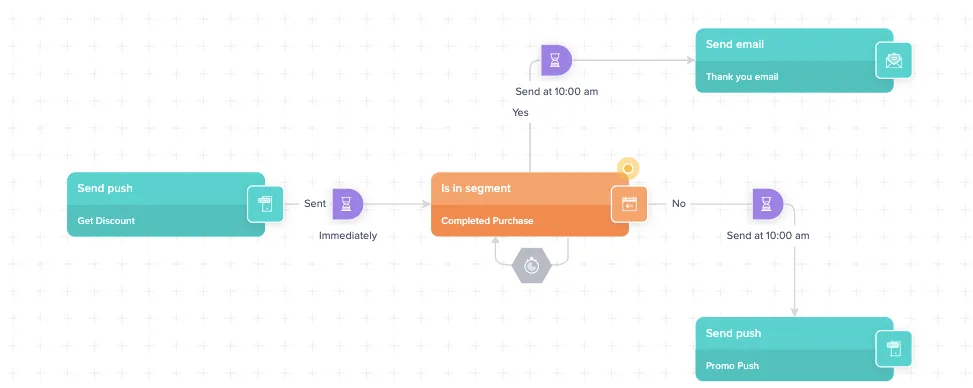
- Out-of-app messaging features: Among CleverTap’s supported channels are push notifications (except for high-speed pushes), web messaging, SMS, MMS, email, and WhatsApp. The company’s Journeys are simple to use. The platform has a reachability check.
- In-app messaging tools: CleverTap has a drag-and-drop editor for in-app messages. It gets the job done, but don’t expect much customization or creativity from it. The platform’s collection of templates is also quite limited.
- Data storage capabilities: These depend heavily on the pricing plan. For example, CleverTap’s Essential plan stores user history just for a year, while the Advanced package entails an impressive three-year data storage.
- User segmentation & personalization options: CleverTap can segment users by their past actions and add them to an existing segment once they meet its requirements. Beware that you can’t filter data by specific user profile info. Personalization by custom tags, unfortunately, isn’t available since you can’t create them with CleverTap.
- User behavior & messaging performance analytics: CleverTap has introduced their generative AI solution, Clever.AI, to equip customers with AI recommendations for user engagement and retention analytics. The analytics toolset is diverse, but reviewers on G2 and Capterra have noticed inconsistencies in conversion goal calculation.
- Integrations: They have many integrations with marketers’ favorite tools, such as Zapier, Amplitude, and mParticle.
- User interface and ease of use: CleverTap’s UI/UX is intuitive. The only exception is their drag-and-drop in-app messaging editor, which is a bit rigid and requires time to get accustomed to.
- Company’s expertise in user retention: CleverTap is committed to customer support and education. Their website features an insightful blog full of user retention articles and white papers. CleverTap experts regularly appear as webinar and podcast hosts.
6. MoEngage
Best for: Enterprise e-commerce and finance companies focused on onboarding, personalized reactivation, and omnichannel campaign automation.
⭐ Capterra: 4.3, G2: 4.5.
💰 Pricing: MoEngage has two packages, for SMB and enterprises. However, they don’t disclose this information on their website. Customers say the starting pricing is $999.
MoEngage is a user engagement and retention rate software that helps businesses build customer loyalty through personalized messaging, onboarding, user reactivation, and automation. They have a wide array of clients, from mobile app developers to big e-commerce and finance companies, with most of them being enterprises looking to improve retention through onboarding and personalized messaging.
User retention features for mobile apps include:
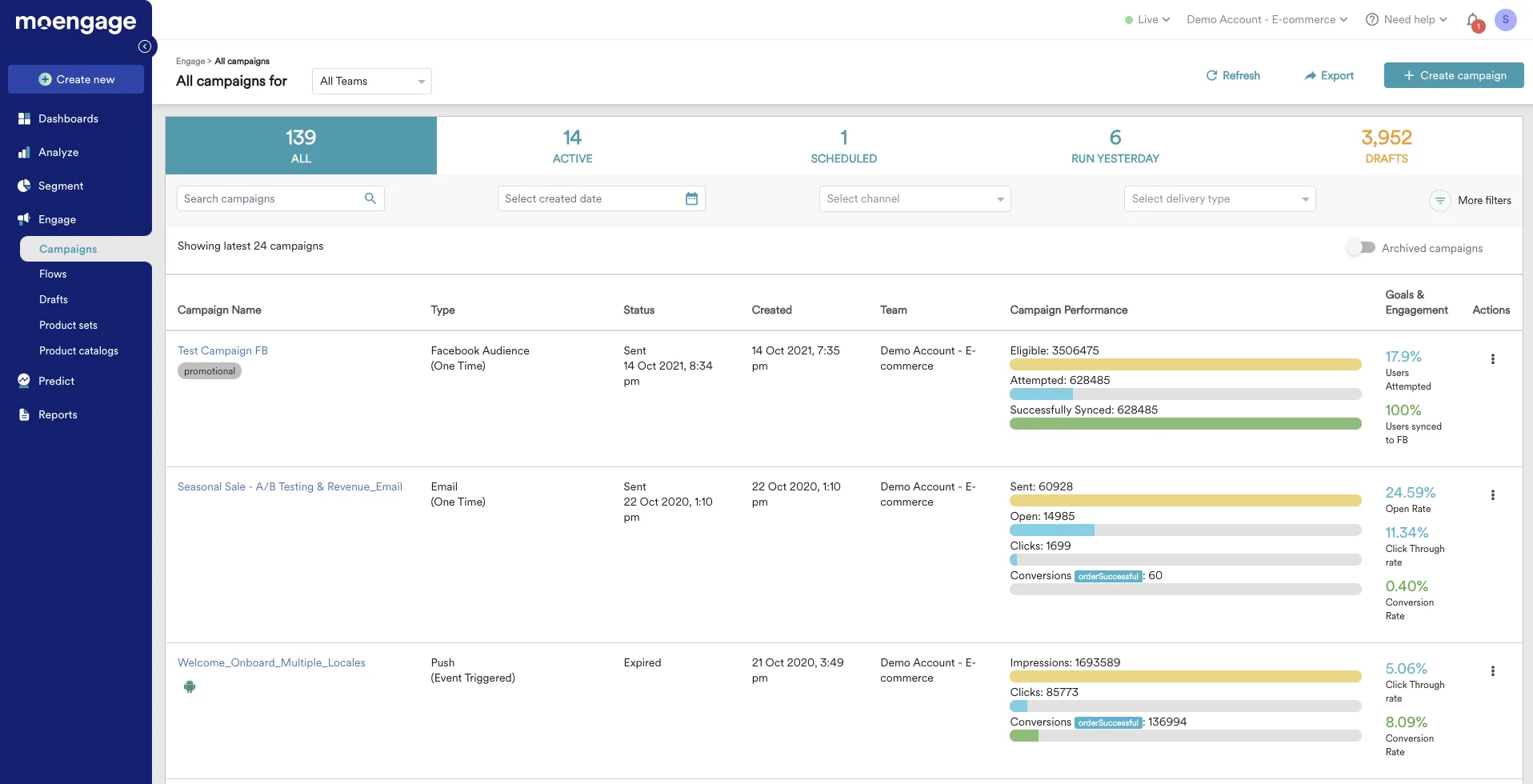
- Out-of-app messaging features: All the major communication channels are supported. You can create multichannel journeys via Flows, although it has some limitations compared to Pushwoosh Customer Journey Builder. To name a few, Flows can start with only one entry segment or event, and it can’t be changed in a launched campaign. This puts restrictions and pressure on marketing specialists responsible for segmented campaigns. Reachability check is available.
- In-app messaging tools: MoEngage provides all the necessary tools for marketers to create in-app messages tailored to their app’s brand and current campaign goals: a no-code drag-and-drop editor, an HTML editor, and a collection of customizable templates for various use cases.
- Data storage capabilities: MoEngage retains data for 1-2 years depending on the plan. As for safety, there’s a data privacy concern as MoEngage uses a third-party public cloud service.
- User segmentation & personalization options: You can view graphical and tabular retention reports for different cohorts. Segmentation tools include RFM segmentation, segment transitions, and custom tags. So-called ‘Affinity Segments’ is a mixed segmentation feature allowing you to group users with certain traits and in-app behavior by their affinity to a product or action; Pushwoosh’s advanced segment builder serves a similar purpose.
- User behavior & messaging performance analytics: MoEngage has Open Analytics, a built-in feature that enables customers to get the latest real-time data. In general, their analytics system is pretty good and contains all the necessary metrics to track, such as sent, delivered, and clicked.
- Integrations: MoEngage integrates with various third-party services, including data systems, personalization platforms, and marketing automation tools. Jasper.ai, SurveyMonkey, and Heap are some of the names that come to mind.
- User interface and ease of use: MoEngage’s user interface is one of the best things about this user retention service. The platform is easy to handle, judging by the reviews and trial experience.
- Company’s expertise in user retention: MoEngage actively participates in the app marketing community. They’re keen on sharing knowledge with customers and provide detailed guides and research to ensure your app’s success.
7. OneSignal
Best for: Indie developers and mobile game studios that need a fast, developer-friendly, affordable push-first solution with solid in-app messaging.
⭐ Capterra: 4.7, G2: 4.7.
💰 Pricing: has a free plan. Other packages start from $19/month.
OneSignal is a well-known customer retention service comparable to Pushwoosh in terms of functionality and pricing but trailing in some aspects. OneSignal specializes in push notifications, in-app messaging, and email marketing. Their clients include businesses in media, e-commerce, fintech, and mobile apps, particularly games. More than 30,000 mobile games use this platform to drive user retention by sending timely and engaging game updates and reminders.
Let’s assess OneSignal’s features for user retention:
- Out-of-app messaging features: This user retention tool doesn’t support WhatsApp and high-speed push notifications; SMS is only available via a particular 3rd-party provider. OneSignal allows you to create various Journeys within a single dashboard; however, campaigns can only be targeted at pre-assembled audience segments and not by trigger events. The absence of a reachability check is one of OneSignal’s biggest limitations.
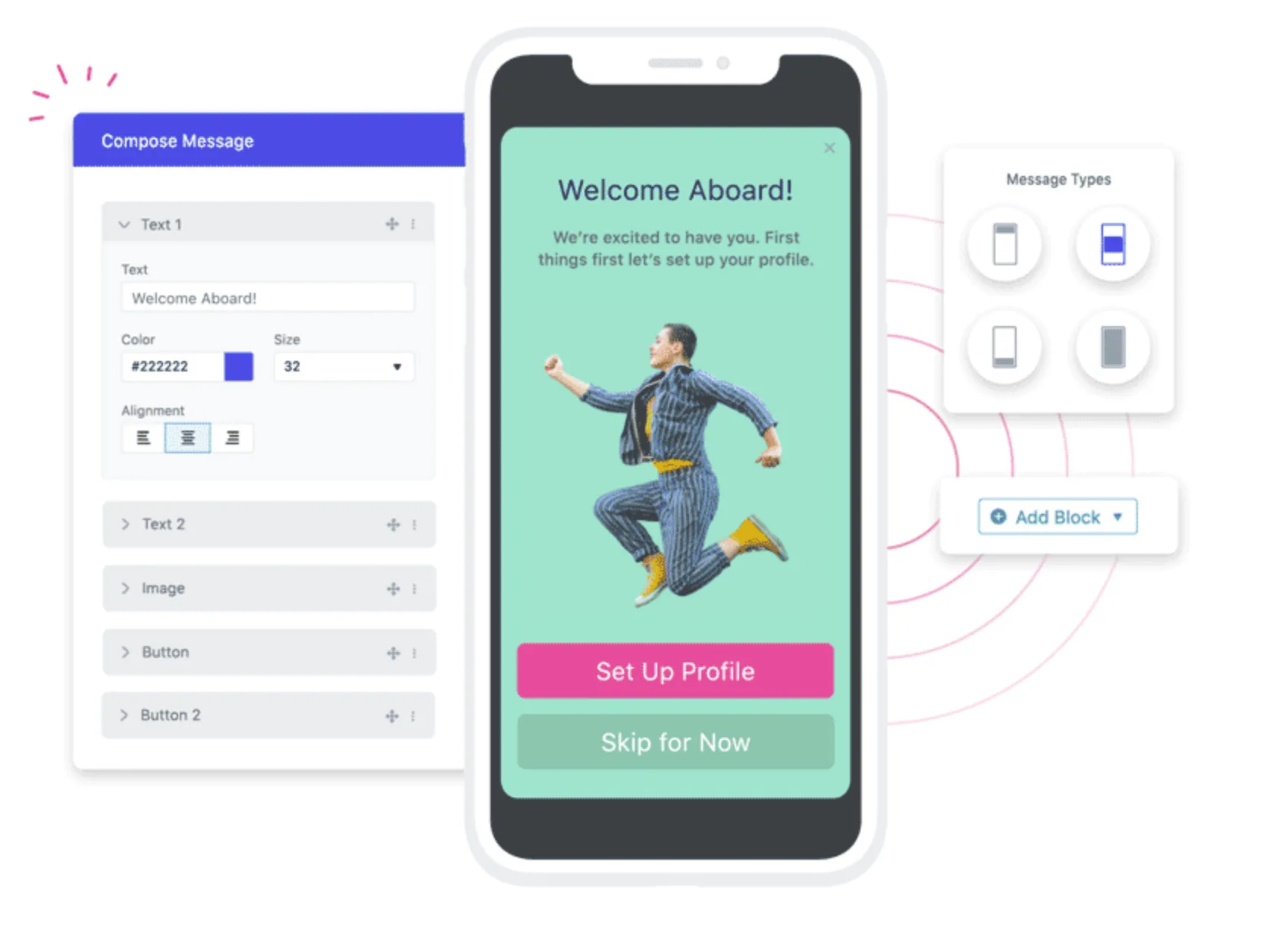
- In-app messaging tools: OneSignal has a vast collection of templates for in-app messages. In-app carousels are the highlight of this collection. The tool’s drag-and-drop editor is straightforward, and you won’t have any problems navigating it.
- Data storage capabilities: Messages sent through OneSignal’s API, Journeys, and Automated Messages are stored for 30 days max. Since the platform doesn’t store any event data, targeting based on past events is impossible with OneSignal.
- User segmentation & personalization options: OneSignal segments users only by user attributes. No RFM or event-based segmentation is available. As for personalization, OneSignal offers multilingual messaging and dynamic content.
- User behavior & messaging performance analytics: With OneSignal analytics, you can monitor the basic messaging metrics (sent, delivered, opened, clicked). More advanced insights such as app revenue metrics and app usage statistics are missing, and there is no automated or real-time reporting.
- Integrations: In this context, OneSignal has been doing a great job. It has integrations with tools like Snowflake, Google Analytics, and HubSpot.
- User interface and ease of use: It doesn’t take long to master OneSignal. It boasts a straightforward interface that works the way customers expect it to.
- Company’s expertise in user retention: OneSignal positions itself as a mobile-first company, and they live up to this name by constantly delivering great content about app engagement and retention strategies and trends. G2 and Capterra reviewers speak positively about their customer success team and documentation.
Match the customer retention software to your strategy, not a wish list
You now have everything you need to make a tool decision that reflects your actual retention strategy, not a feature grid ranking.
Here’s the short version of the matching logic:
- Out-of-app re-engagement as your primary motion? Pushwoosh, Braze, or CleverTap are your strongest options. Pushwoosh leads on pricing and data depth for mid-market teams; Braze suits enterprises with complex integration requirements.
- In-app experience and onboarding as your primary motion? Pushwoosh, MoEngage, and Braze all offer strong in-app tooling. MoEngage is worth evaluating if enterprise onboarding is your core use case.
- Push-first with a small team or limited budget? OneSignal is the fastest, most cost-effective entry point. Pushwoosh’s free plan is also a genuine option and offers a clearer upgrade path to a full customer retention platform.
- European market with GDPR as a hard requirement? Batch is the natural first evaluation. Pushwoosh is also GDPR-compliant and offers more functionality.
- Enterprise with 100+ integrations needed? Braze. No other platform comes close on integration breadth, though the price reflects it.
If you want to test the all-stack approach (out-of-app messaging, in-app experience, and analytics in one platform) Pushwoosh’s free plan covers push and in-app messaging with no subscriber cap up to 1K. It’s a meaningful starting point to validate whether the platform fits your retention motion before committing to a paid plan.