A high email open rate can look great on a dashboard, yet still do nothing for retention or revenue. What actually matters is whether users click and, more importantly, whether that click moves them closer to conversion.
In this guide, we’ll break down what email CTR really tells you, what a good click-through rate looks like, and how to improve email click-through rate with proven strategies.
Plus, you’ll see how Pushwoosh helps automate email marketing and reach higher overall email performance.
What is email CTR (click-through rate)
Email CTR (or email click-through rate) is the percentage of recipients who clicked a link or CTA in your email out of all delivered emails. On a basic level, it shows how many users moved from reading a message to taking action.
In the product or growth context, email CTR tells you whether your message successfully pushed users to the next meaningful step in their lifecycle — opening the app, exploring a feature, completing a purchase, or returning after inactivity.
A low CTR often signals a mismatch between message, timing, audience, or even channel choice, not just weak email copy.
Email CTR formula
Email CTR (click-through rate) measures how often recipients click a link or call to action in an email.
Here is the formula to calculate email click-through rate:
Email CTR (%) = (Unique clicks ÷ Emails delivered) × 100
For example, if an email is delivered to 10,000 users and 300 of them click a link, the email CTR is 3%.
CTR vs CTOR: what’s the difference?
CTR may often be confused with click-to-open rate (CTOR), but they answer different questions.
- CTR measures how many recipients clicked out of the total number who received the email.
- CTOR measures how many people clicked after opening the email.
From the product perspective, CTR is usually more useful because it reflects the full funnel: delivery, open, and action. CTOR is helpful when you want to evaluate the email content itself, but it ignores users who never opened — which often matters when you’re optimizing journeys, not just copy.
How to track email CTR
The easiest way to measure email click-through rates is through email marketing platforms that usually calculate CTR automatically.
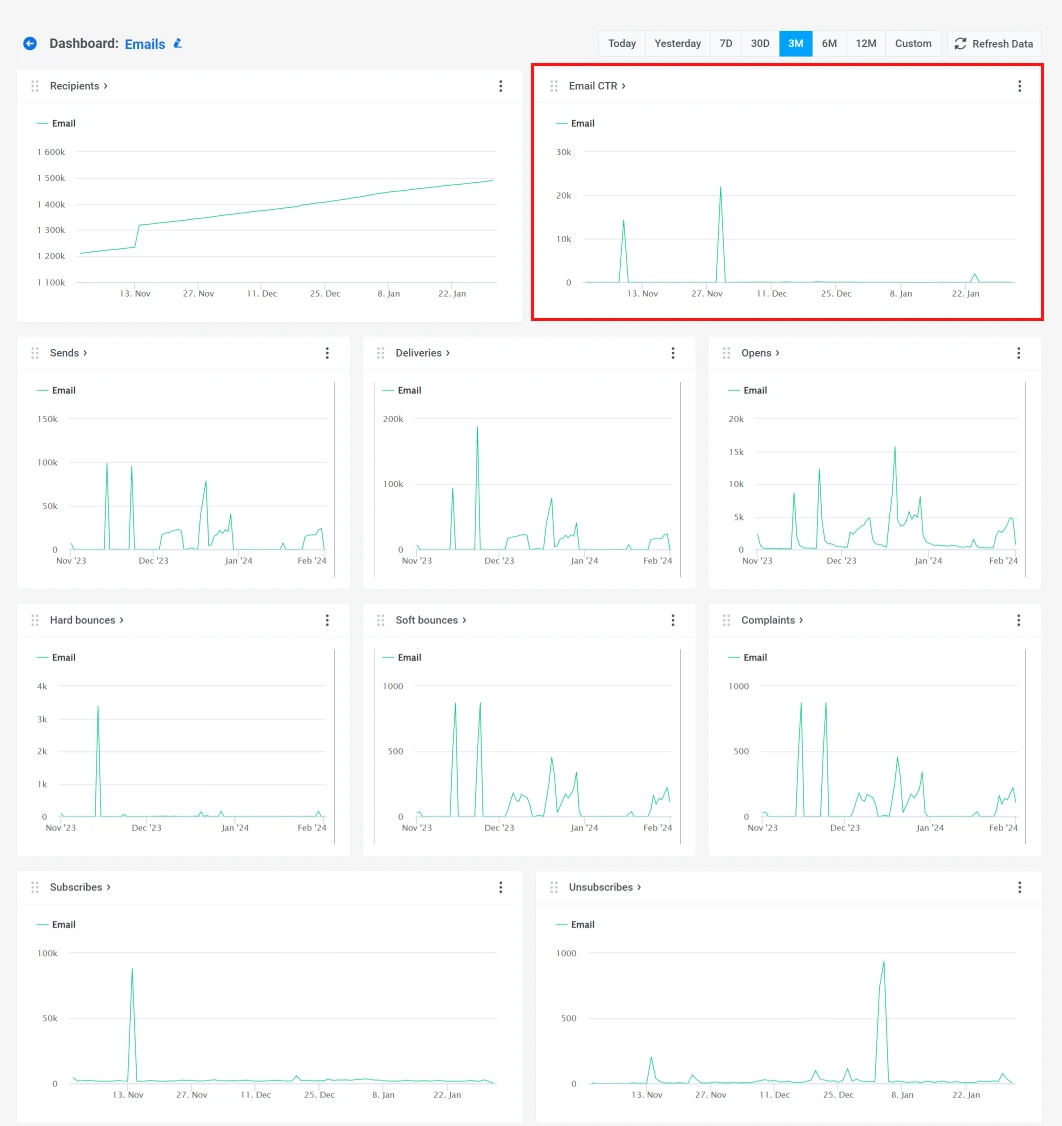
For example, in Pushwoosh, you can track email performance on two levels:
- Individual message performance inside a customer journey — visible right on the Journey canvas, so you can instantly see how every single email performs.
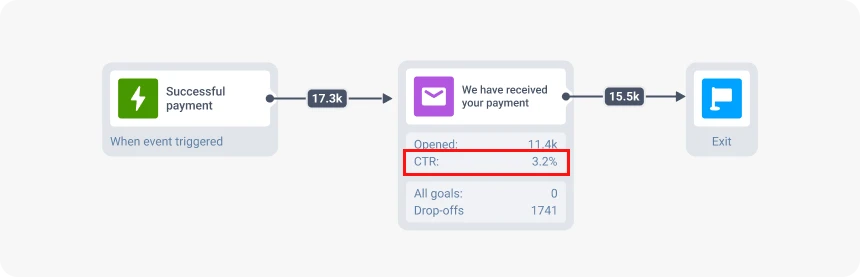
- Campaign-level performance in the dashboard, where you can compare click-through rates across messages, analyze trends, and spot opportunities to optimize.
What is a good email CTR?
According to MailerLight’s 2025 study, the average email click rate in 2025 was 2.09%, representing a slight increase from 2024’s average of 2%.
Anything above 2% is considered strong performance across most industries. High-performing marketing campaigns typically land between 2% and 5%, while purely promotional emails see slightly lower rates of 1% to 3%.
Here is a typical email CTR range to evaluate email performance:
- Below 1% → usually signals low relevance, poor targeting, or list quality issues
- 1–2% → acceptable baseline for broad, non-personalized campaigns
- 2–4% → good performance; common for well-targeted lifecycle or triggered emails
- 4%+ → strong performance; usually indicates high intent, personalization, or critical user moments
Average email CTR by industry
Email CTR varies widely by industry, often not aligning with open rates. And the gap is usually driven by user intent and action readiness, not email design or copy alone. Here’s what 2025 data reveals:
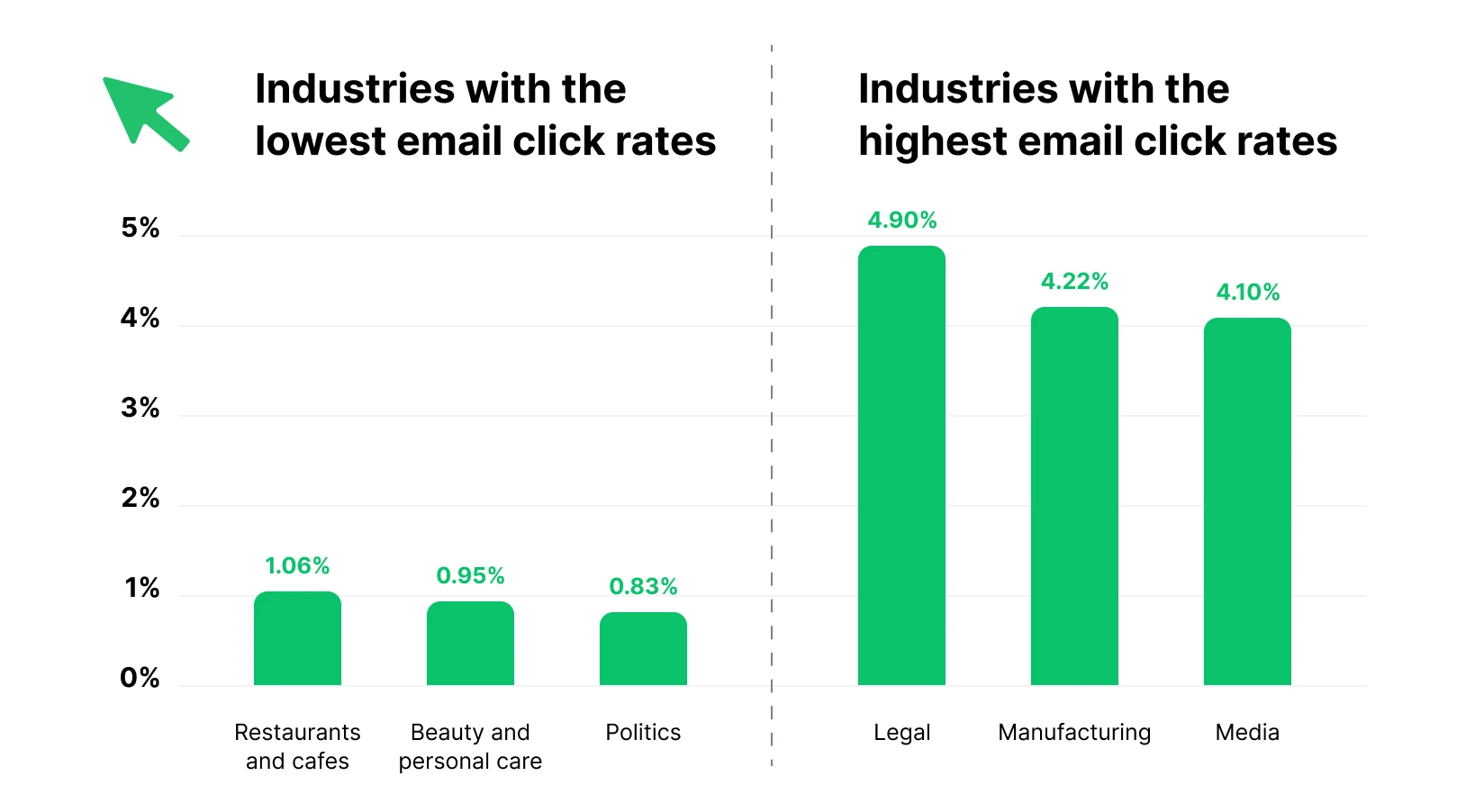
Industries with the lowest average CTR, such as restaurants, beauty, and politics, typically send frequent, promotional emails to broad audiences. When messages aren’t tightly tied to a specific user action or need, clicks naturally drop, even if open rates are reasonable.
Industries with the highest CTR, including legal, manufacturing, and media, usually communicate with high-intent audiences and send more purpose-driven emails: updates, resources, or time-sensitive information that clearly warrants a next step.
With behavior-based segmentation and triggered messaging, many brands can outperform their industry’s average CTR, regardless of vertical.
Average email CTR by email type
The type of email you send has a dramatic impact on click-through rate. Here’s how different email types compare:
| Email type | Average CTR | Notes |
|---|---|---|
| Welcome emails | 16–26% | Highest CTR due to peak user interest right after signup |
| Triggered/automated emails (overall) | ~5–10%+ | Timely, behavior-based messages often outperform newsletters 2–3× |
| Transactional emails (order, shipping, back-in-stock) | 5%+ | Highly relevant, expected, and action-oriented |
| Newsletters | ~3–4% | Lower than automated emails, but stable when the content is value-driven |
| Marketing emails (general) | 2–5% | Broad messaging; performance depends heavily on segmentation |
| Promotional emails | 1–3% | Lower CTR due to sales focus and higher send frequency |
| Cold emails | ~2–2.5% | Can reach 4–10% with strong targeting and personalization |
Key takeaway: Email CTR is highest when messages are triggered, expected, and tied to a specific user action. Automated, transactional, and lifecycle emails consistently outperform newsletters and promotional campaigns because they align with user intent, not just because they’re better designed.
What affects email CTR? (and why your CTR might be low)
Email click-through rate drops for very specific reasons, and most of them have little to do with email copy alone. Low email CTR is usually a signal that messages are reaching the wrong users at the wrong time or lack a clear next step.
In this section, we’ll break down the key factors that affect email CTR and explain why your emails may be getting opened but not clicked.
1. Deliverability and list quality issues
If your list includes inactive users, outdated email addresses, or bots, CTR will drop, even if open rates look acceptable. Poor list quality inflates delivery volume without increasing real engagement, pushing CTR down and bounce rates up.
That’s why it’s essential to focus on the list hygiene first: confirming signups (for example, with double opt-in), sunsetting long-term inactive users, and segmenting out contacts who no longer engage. A smaller, cleaner list almost always produces a higher CTR than a larger, less qualified one.
2. Too many CTAs
When an email presents multiple competing actions, users often don’t choose any of them.
Low CTR frequently comes from emails that try to:
- Promote several products/features at once
- Mix educational content with sales offers
- Include multiple equal-weight links and buttons
High-performing emails usually focus on a single primary CTA aligned with a single user goal. This reduces cognitive load and makes the next step obvious.
3. The email is hard to scan (especially on mobile)
Most users don’t read emails line by line — they scan them. When emails are dense, text-heavy, or poorly optimized for mobile, CTR suffers.
Typical issues include:
- Long paragraphs without visual breaks
- Small or hard-to-tap CTA buttons
- Key information is placed too far down in the email
Clear structure, strong visual hierarchy, and mobile-first design make it easier for users to understand the value of clicking within seconds.
4. Weak relevance (wrong message, wrong segment, wrong moment)
Relevance is the strongest driver of email CTR, and the most common reason it underperforms.
Clicks drop when:
- The message doesn’t match the user’s lifecycle stage
- Emails are sent to broad segments instead of behavior-based ones
- Timing doesn’t align with recent user actions
Top-performing email campaigns use segmentation and personalization based on behavior, not just demographics or static lists. When email reflects what a user just did (or didn’t), clicks feel natural rather than forced.
How to improve email CTR: 8 practical strategies
Once you understand why your email CTR is low, the next step is knowing how to fix it.
The strategies below focus on practical, proven ways to increase email CTR: from optimizing email copy and CTAs to aligning message relevance with user intent.
Improve email open rates to unlock higher CTR
Email CTR can’t grow if emails aren’t being opened in the first place. If a message isn’t opened, it can’t generate clicks, no matter how strong the content or CTA is. That’s why low open rates often cap CTR performance, especially in broad or under-segmented campaigns.
Improving open rates usually comes down to fundamentals:
- Clear and relevant subject lines
- Recognizable sender names and good sender reputation
- Well-timed sends
- Smarter audience segmentation
If your CTR is low and your open rates are underperforming, start by improving your opens first.
Use triggered emails for high-intent moments
As benchmarks show, triggered emails consistently achieve higher CTR than newsletters or promotional campaigns. The reason is simple: they’re sent in response to real user actions, not marketing schedules. When an email arrives at a moment of clear intent, clicking feels natural, not forced.
Common high-performing examples include:
- Onboarding and welcome emails
- Abandoned cart or browse abandonment reminders
- Post-purchase cross-sell or follow-ups
- Replenishment or renewal reminders
- Win-back and reactivation emails
These email types are widely cited for delivering higher CTR because they’re expected, timely, and directly tied to what the user just did (or didn’t, such as inactivity or no purchases). Instead of asking for attention, they continue an existing action, making clicks feel natural rather than promotional.
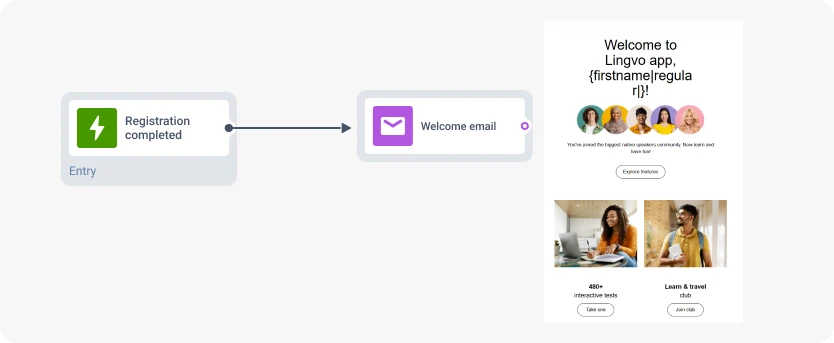
For example, in Pushwoosh, you can use Customer Journey Builder to trigger emails automatically after specific events.
Example #1.
Trigger: First login or registration
Email: Welcome email
→ Drives activation by guiding users to the next meaningful step.
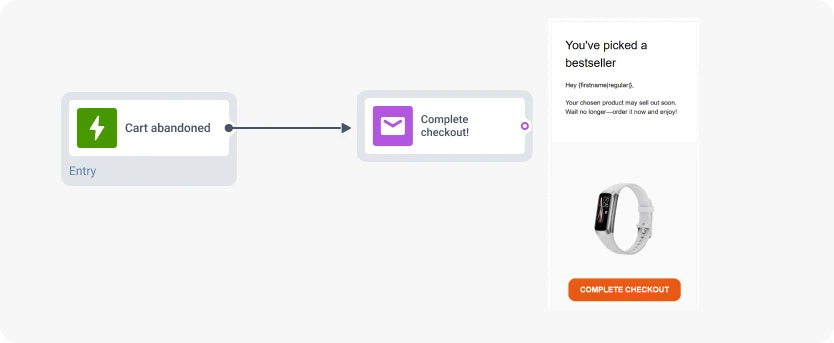
Example #2
Trigger: 1–2 hours after cart abandonment
Email: “Complete checkout!”
→ Reinforces intent while the product is still top of mind.
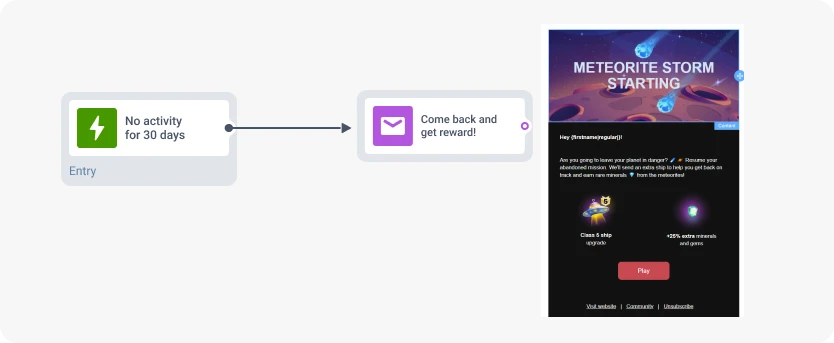
Example #3
Trigger: No activity for 30–60 days
Email: “Come back and get a reward”
→ Re-engages inactive users with a clear incentive to return.
Personalize with dynamic content for relevance
Personalization is one of the most reliable ways to increase email CTR because personalized emails feel relevant, as if they were created specifically for each user. When content reflects a user’s behavior, preferences, or context, clicking becomes a logical next step rather a moment of hesitation.
This is especially important for promotional emails, which usually have lower CTR than triggered messages. Personalization helps close that gap by making promotions feel contextual rather than generic, showing users content tied to their interests, behavior, or location. When messages feel clearly meant for them, clicks follow naturally.
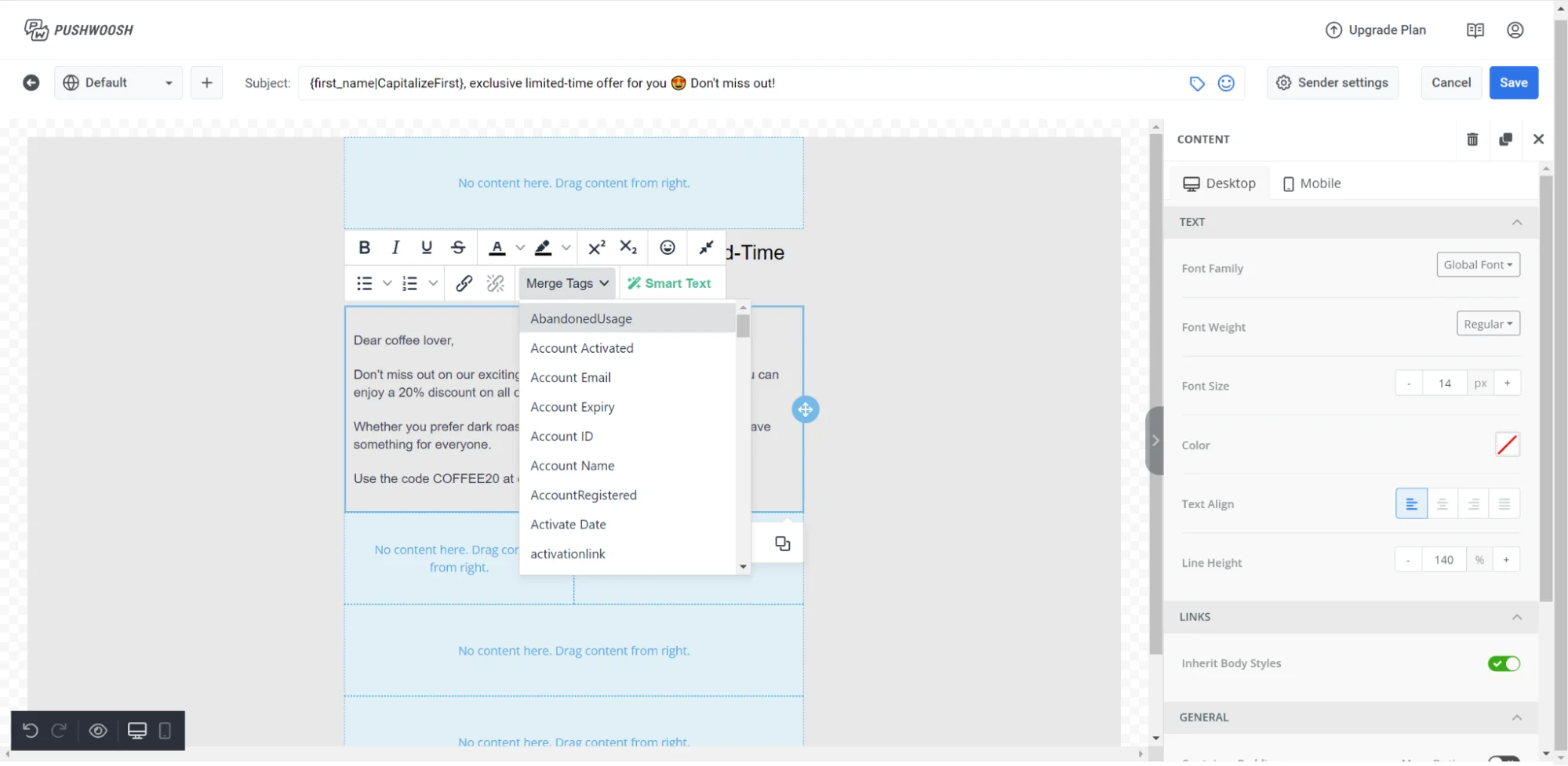
A powerful way to achieve this is with dynamic content, where a single email template adapts automatically for each recipient. Content can change based on recent activity, purchase history, account details, or lifecycle stage.
In Pushwoosh, you can personalize emails directly in the drag-and-drop editor using Merge tags for simple customization or Liquid templates to dynamically pull user data from your backend or APIs.
Use one primary CTA (and make it obvious)
One of the most common reasons email CTR underperforms is simple: users don’t know what to do next. When an email contains multiple CTAs competing for attention, users hesitate, and often don’t click at all.
High-CTR emails are designed around one primary action. That action should be visually dominant, clearly stated, and directly aligned with the user’s intent at that moment. Supporting links can be included, but they shouldn’t compete with the message’s primary goal.
Clarity matters more than creativity. CTAs that clearly describe the outcome (“Complete setup”, “View recommendations”, “Resume checkout”) consistently outperform vague or generic labels like “Learn more”. When urgency is relevant, for example, a limited-time offer or expiring trial, reinforcing it in the CTA can further increase clicks.
If your email is long or content-heavy, it’s acceptable to repeat the same primary CTA more than once, as long as every button leads to the same action. This helps users find the next step without introducing new decisions.
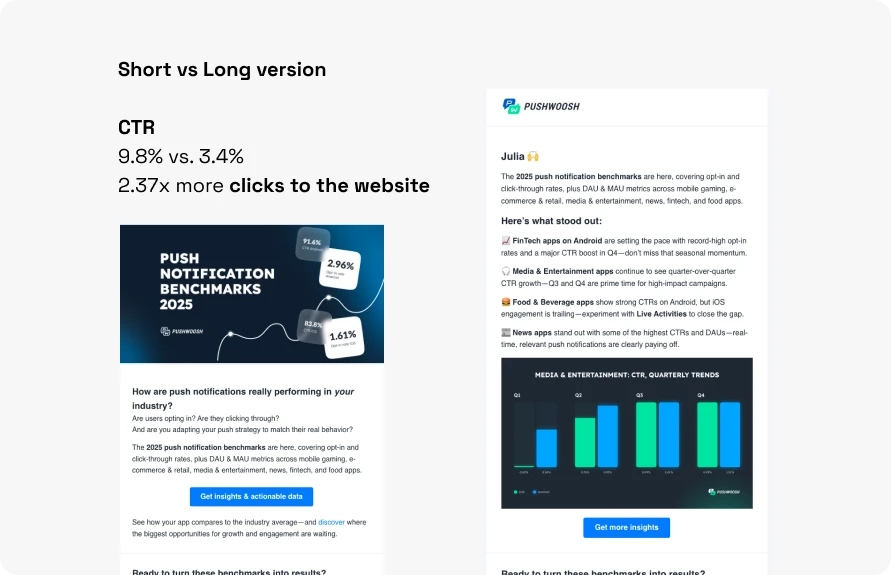
If you want higher CTRs while driving traffic to your website — whether it’s a news, documentation article, landing page, or a blog post — a concise, curiosity-driven email format works well:
- Start with a strong hook. Use a polemic statement, breaking news data, or an unusual problem/solution. Curiosity is a powerful motivator: by withholding full details, you encourage readers to click to learn more.
- Instead of overloading the email with information, send readers to your website where they can engage deeper. This not only deepens engagement but also helps marketers measure clicks and track conversions.
- Keep emails clean and scannable. Long emails can feel overwhelming. A short, intriguing message with a clear CTA is easier to digest and increases the likelihood of action.

Add images and videos to guide clicks
Visuals can increase email CTR when they support the action rather than distract from it. Well-placed images or video previews help users understand the value of clicking more quickly than text alone, especially when emails are scanned on mobile devices.
Images work best when they reinforce the message or point toward the CTA, such as product screenshots, feature highlights, or contextual visuals tied to the user’s last action.
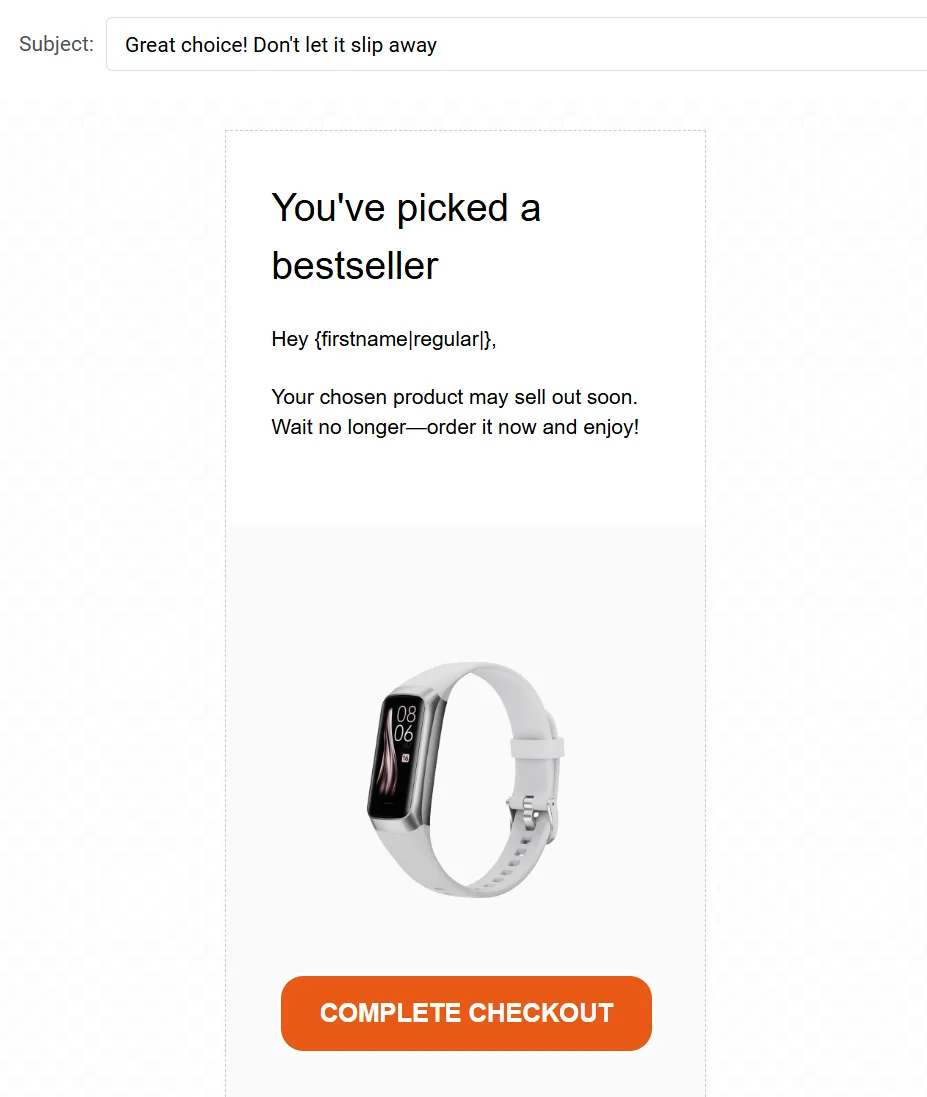
Overloading emails with large images or embedding videos without a clear next step can hurt CTR. The goal is to use visuals as a bridge to the click, not as the end experience itself.
When used intentionally, images and video previews make emails easier to process, more engaging, and more likely to drive the action you want users to take.
Optimize for mobile-first clicks
Most email clicks happen on mobile, which means CTR often drops not because users aren’t interested, but because clicking feels inconvenient. If tapping the CTA requires zooming, scrolling, or precision, many users simply won’t bother.
To improve mobile CTR, design emails for fast scanning and easy tapping:
- Use a single-column layout
- Keep text concise and broken into short sections
- Place the primary CTA high enough to be visible without excessive scrolling
- Make buttons large, thumb-friendly, and well spaced
Mobile optimization also extends beyond the email itself. Slow-loading or poorly optimized landing pages can negate interest and kill CTR even after a click.
A/B/n test what actually moves clicks
If you want to improve email CTR consistently, testing is essential—but only when you test the right things. A/B testing helps you replace assumptions with real user behavior and understand what actually drives clicks, not just opens.
For CTR optimization, the most impactful elements to test include:
- CTA copy and wording (value-driven vs action-driven)
- CTA placement (above the fold vs lower in the email)
- email layout (short vs detailed, text-heavy vs visual)
- personalization depth (generic vs dynamic content)
Here’s how A/B/n testing of 3 (or more) CTAs can look in Pushwoosh:
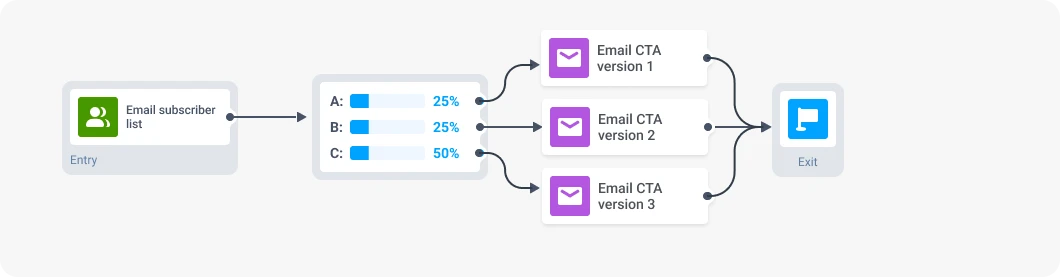
This approach makes it easier to compare performance across variants, so improvements in CTR can be directly attributed to what users actually respond to.
Use an omnichannel follow-up for non-clickers
Not every subscriber will click an email — and that’s expected.
Email CTR improves when non-clickers aren’t treated as a dead end, but as a signal to continue the conversation in another channel.
An effective way to lift overall engagement is to add an omnichannel follow-up for users who don’t click within a specific timeframe. Instead of resending the same email, you continue the conversation on another channel that’s better suited to the moment, such as push notifications, in-app messages, or SMS.
For example, in Pushwoosh, you can monitor email opens within a customer journey and automatically check whether a user has opened or clicked an email within a defined period. If they haven’t, the journey can seamlessly redirect them to the next channel:
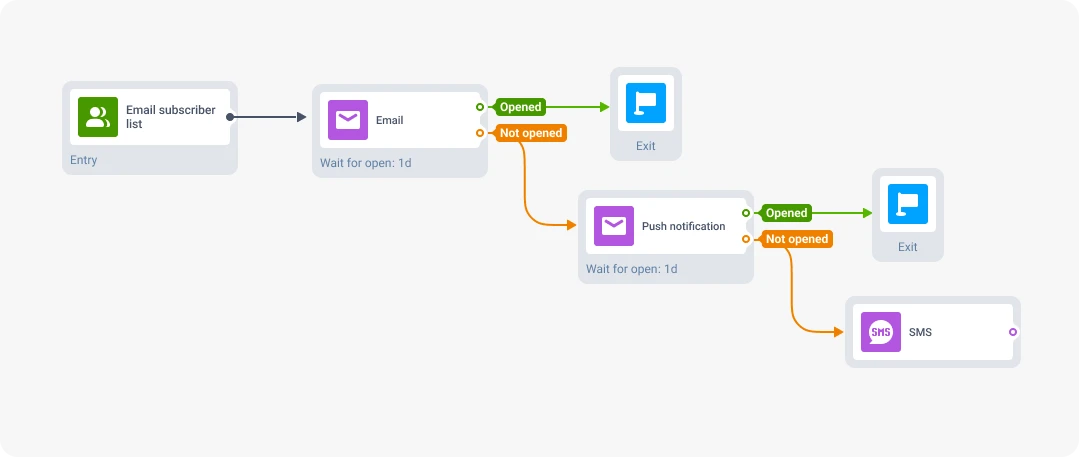
This approach improves CTR (and potentially revenue) not by forcing more clicks in email, but by meeting users where they’re most reachable.
Use AI tools to improve email CTR
Improving email CTR at scale is hard to do manually. As audiences grow and journeys become more complex, AI tools help remove guesswork and continuously optimize what actually drives clicks.
AI-powered email automation platforms can improve CTR by:
- Generating email content and refining CTA-focused copy
- Optimizing send time per user, so messages arrive when recipients are most likely to act
- Automatically creating behavior-based segments, increasing relevance without manual rules
- Crafting email campaigns and getting actionable recommendations to improve them
Pushwoosh’s ManyMoney AI marketing copilot supports these tasks across email and other channels. Instead of manually adjusting campaigns, AI helps analyze performance, suggest improvements, and optimize journeys in real time, so messages that don’t drive clicks can be improved or deprioritized automatically.
Increase email click-through rate with Pushwoosh
Improving email CTR isn’t about chasing clicks for their own sake. It’s about consistently delivering relevant, timely messages that help users take the next meaningful step: return to the product, complete an action, or convert.
Pushwoosh helps teams increase email CTR with behavior-based segmentation, automated journeys, dynamic personalization, A/B/n testing, AI-powered optimization, and seamless follow-ups across push, in-app, and SMS. With Pushwoosh, you can turn email clicks into real retention and revenue outcomes.