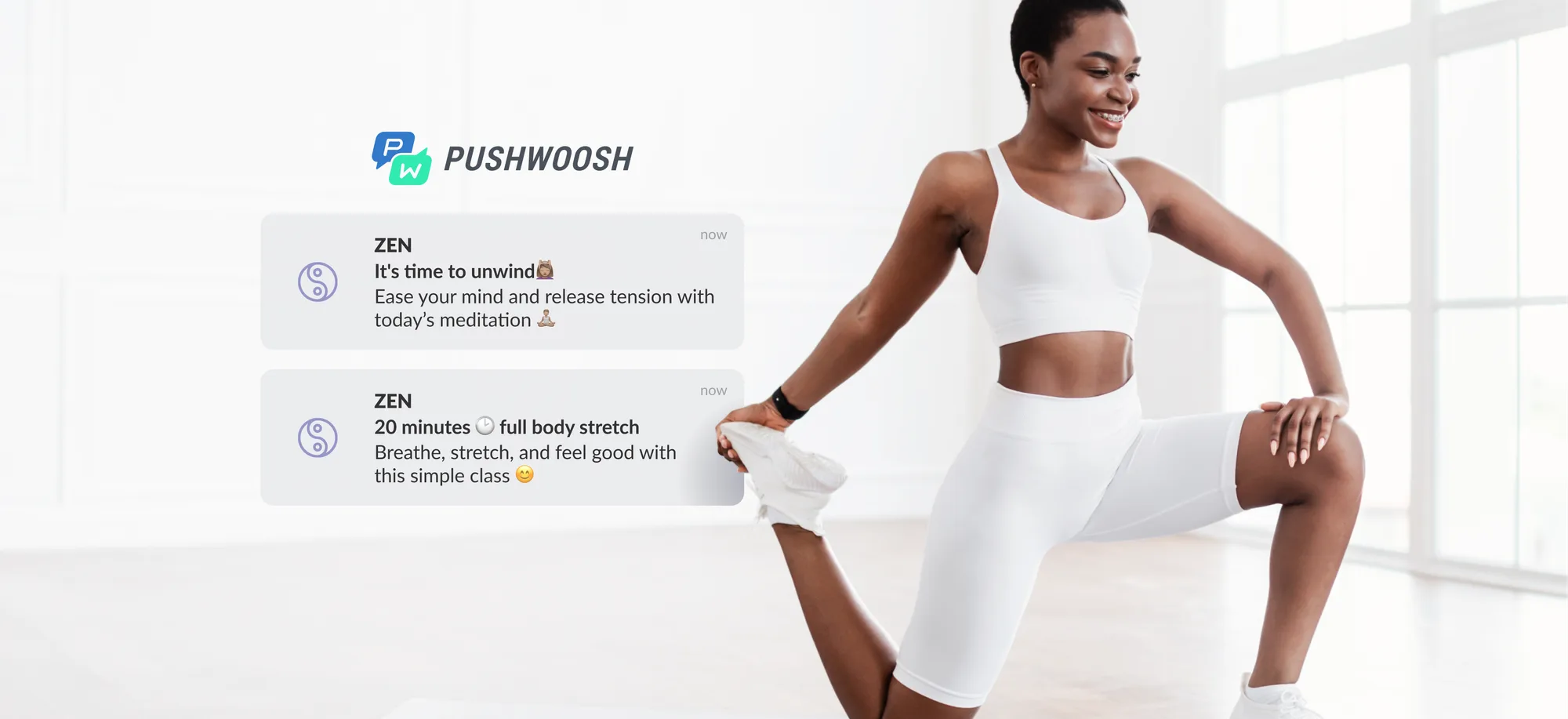
With automated communications, health & wellness app marketers can engage their
customers at every stage of the lifecycle. Aligned with each user’s unique
journey, relevant messages get automatically delivered in real time via app
users’ preferred channels. Newcomers turn into activated users, get engaged with
the app and then convert to paying customers — all thanks to triggered push
notifications, in-app messages, and emails.
Do you wish to devote less effort to customer engagement yet yield even higher
results? Explore these 10 communication scenarios we recommend to automate in
health & wellness apps.
- Automated User Onboarding
- Opt-In: Getting Subscribers
- Create a Habit with Scheduled Reminders
- Send Personalized Event-Triggered Messages
- Improve User Experience with Service Messages
- Re-Engaging Inactive Users to Minimize Churn
- Drive Feature Adoption and Discovery
- Upgrade Free Users to Premium
- Promote Loyalty Programs and Encourage Referrals
- Automated User Onboarding
You can’t overestimate the importance of the first communications you send to a
new customer. This is the case when, depending on the first impression, you can
either make it (=take the newcomer down the sales funnel) or break it (=lose the
hard-acquired customer on Day 1).
Metrics at stake:
activation rate,
app adoption rate, D1 retention, and even customer LTV (known to be increased by
proper onboarding by
up to 300%)
Channels
to use: better
go omnichannel
— use in-app messages + emails + push notifications
Live example: the Down Dog yoga app
(500k+ subscribers, 100k+ DAU)
Many
health & wellness apps try to provide users with highly personalized
experiences. To create them, at the course of the
onboarding,
apps need to collect and make sense of a broad range of customer information:
from their background to the preferred schedule.
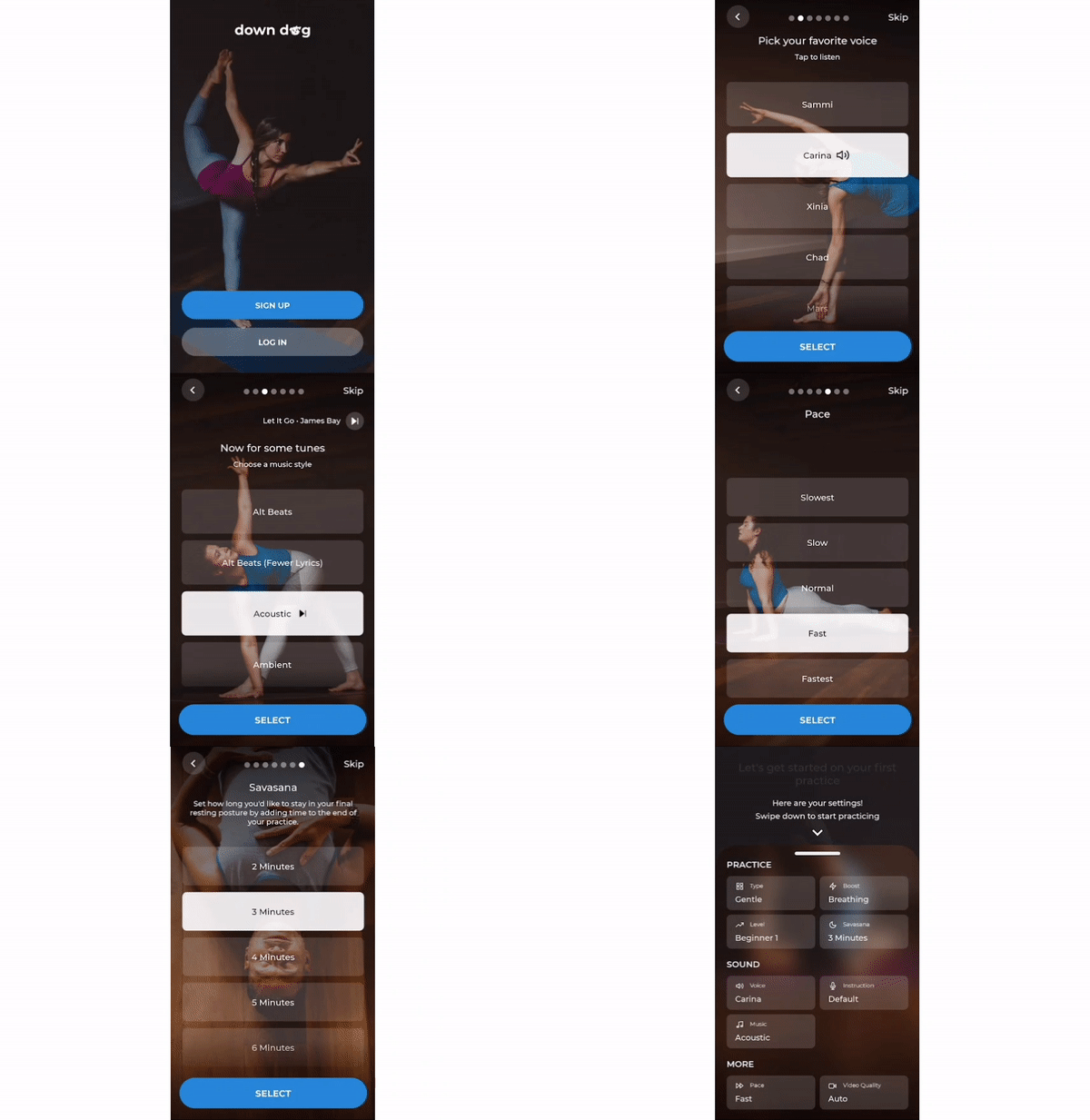
Here is how Down Dog approaches its introductory interview. On its welcome
screens, the app asks a user to remember their previous experience with yoga,
while allowing them to customize every aspect of the future sessions: from the
pace of the activity to the background music.
Having answered a list of questions, users get invested in using the app and
look forward to enjoying their highly personalized yoga experience.
How to create a similar onboarding flow for your app:
1️⃣ Start communicating at the Account Registrated event
2️⃣ Schedule a series of in-app messages one after another: ask any questions
that will help you personalize your new user’s experience and retain them in the
app. You may also want to showcase the most valuable features of your app and
let users know what awaits them after they’ve completed onboarding.
3️⃣ Wait until the Activation Action event is triggered. From here, you can split
the flow in two:
4️⃣ Tag the part of the users who’ve successfully activated. You will keep
communicating with them through your regular communications in other messaging
flows.
5️⃣ Reconnect with those who haven’t finished their activation process. Push
notifications and emails are the right channels to remind users to add any
information missing on their profiles and take the action you view as an
activation one (e.g. take their first training session in your app).

This is what your activation reminders may look like:
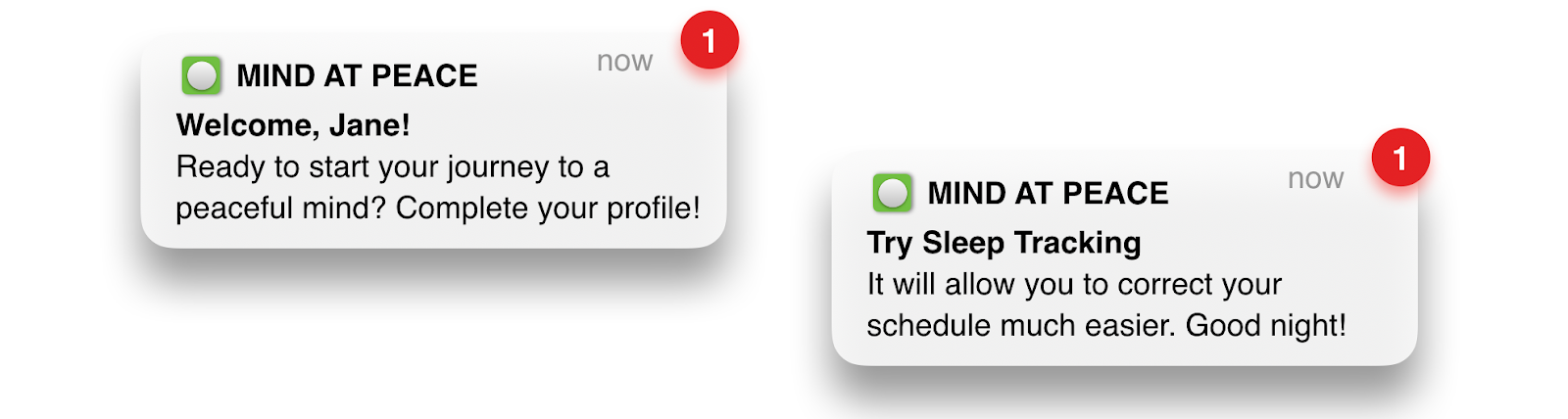
Note that to be able to send them, you need to make sure you’ve got users’ permission to send push notifications to them. In other words, users have to opt in:
- Opt-In: Getting Subscribers
The opt-in rate is one of the essential metrics for app marketers — your
marketing communications effectiveness
depends a lot on how many subscribers you have.
To encourage more users to opt in for receiving your pushes (especially on iOS),
show
in-app messages
to your new users, explaining the benefits of receiving your notifications.
Also, allow users to choose the topics they want to be updated on. This way,
they will see the value your messages bring specifically to them, and they’ll
know you won’t spam them with irrelevant content.
Metrics at stake:
opt-in rate +
DAU and MAU
(in the long term)
Channel to use:
in-app messaging
Live
examples: Calm (#1 app for sleep, meditation, and
relaxation with 1.5M+ 5-star reviews) and PunchLab
(a boxing training app made by boxers)
Both apps go further than asking bluntly if they can send push notifications.
Rather, they suggest sending reminders so that users remember to practice their
chosen activities at specified hours.
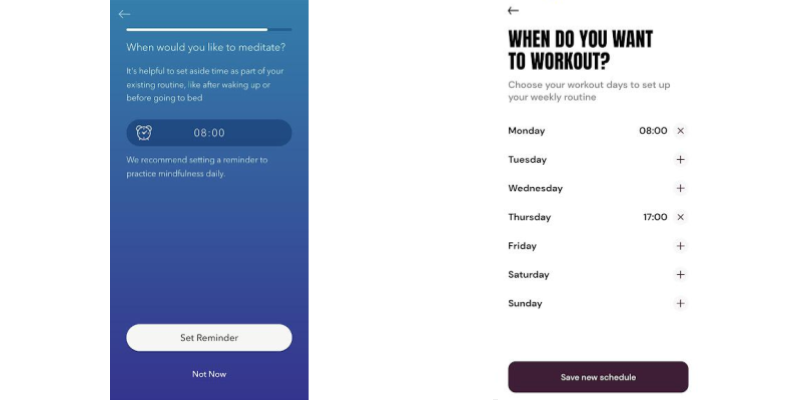
Calm and PunchLab suggesting to opt in for, accordingly, meditation practice and training session reminders
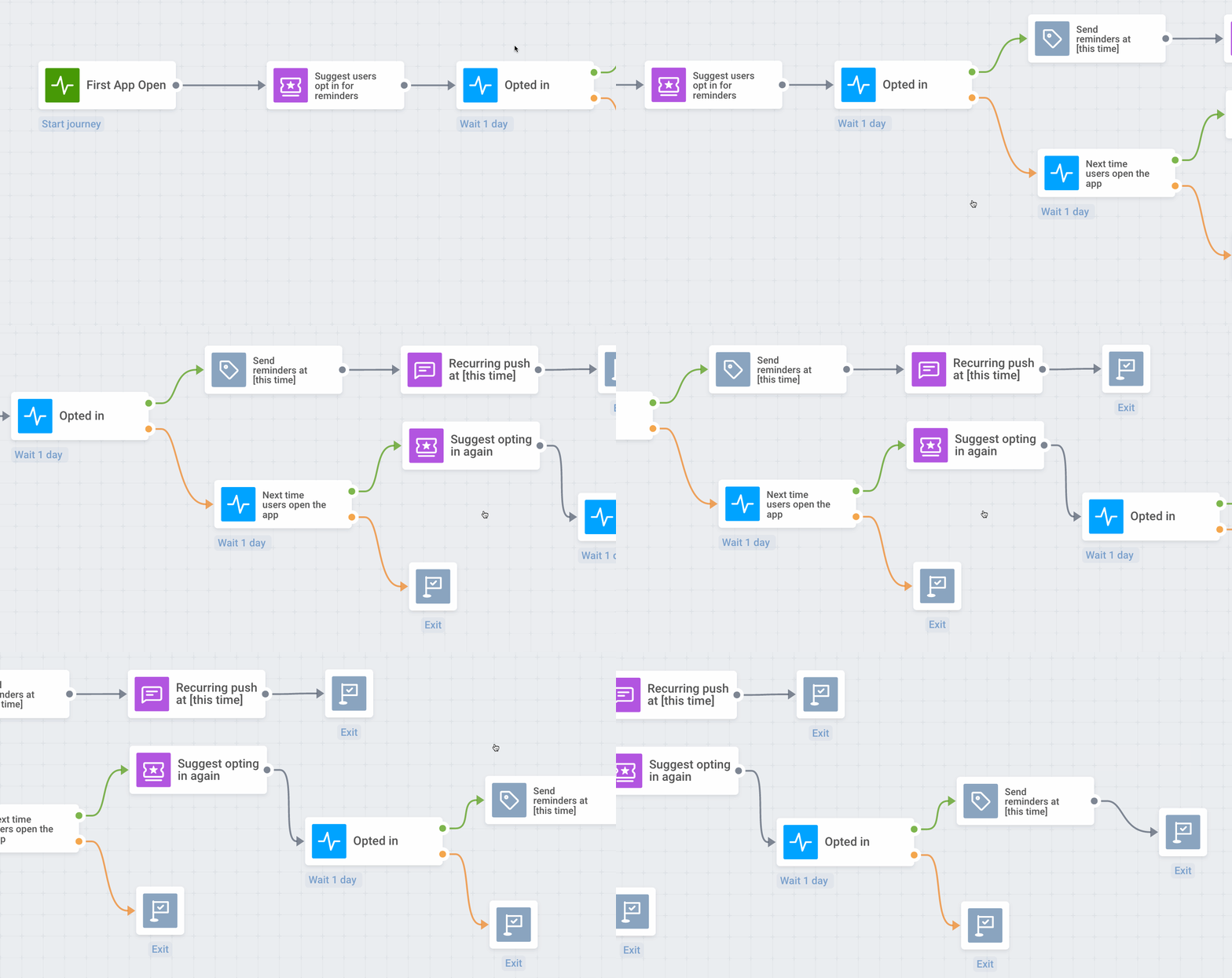
How to get users to opt in for your app push notifications:
1️⃣ Target the users who have opened your app for the first time.
2️⃣ Show them an in-app message suggesting they subscribe to push notification
reminders.
3️⃣ Tag users who have opted in for receiving pushes at a specified time.
4️⃣ Have another try with those who haven’t opted in: the next time they open
your app, show them the opt-in message once again.
5️⃣ Tag everyone who has opted in this time and finish the journey.
- Create a Habit of Using Your Health & Wellness App with Scheduled Reminders
If you want your customers to stay active and engaged, you need to work on
getting them back to your app regularly.
The best thing you can do is instill a (healthy) habit of using your health &
wellness app. Automated communications will help you do this job.
Metrics at stake: session interval (can be measured by the last app open),
DAU,
MAU,
stickiness, D7 and D30 retention; indirectly — conversion to paid subscription
Channels to use: push notifications, emails
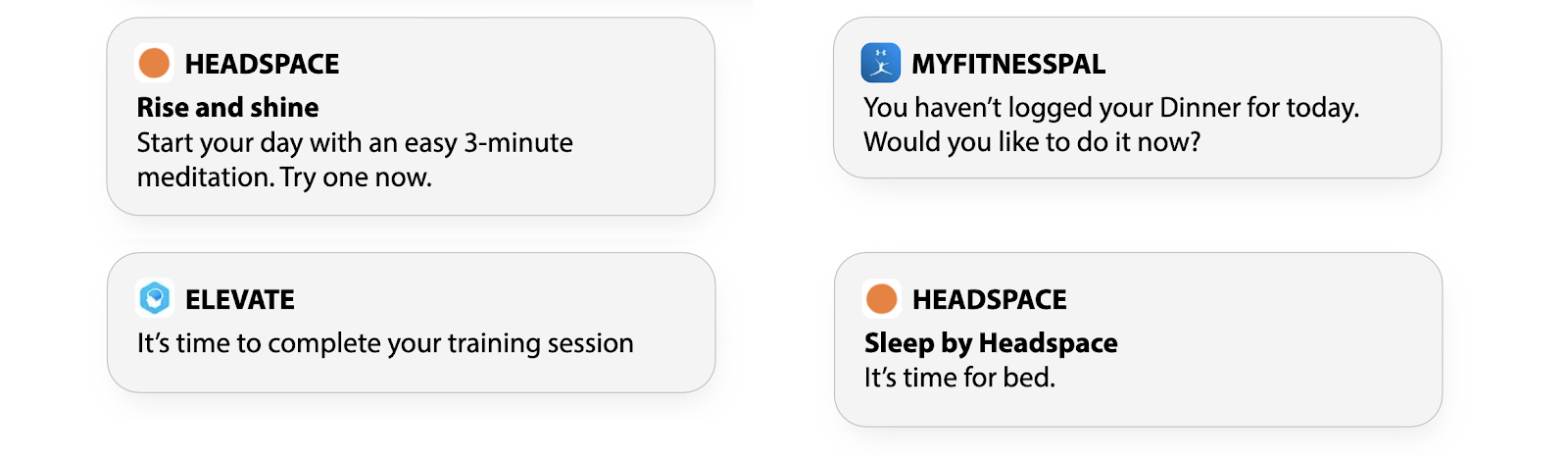
Live examples: Headspace (another
leader
in the mental wellness apps niche along with Calm), MyFitnessPal (the
top pick calorie counter
app), and Elevate (Apple’s
App of the Year
with 250k+ 5-star reviews)
How to instill a habit of using your health & wellness app:
1️⃣ Target a segment of users who have opted in for pushes (in general) or those
who’ve subscribed to receiving reminders at a particular time of the day.
2️⃣ Give them a chance to open your app without your reminder. If they haven’t
triggered the App Open event after your set time, send them a push
notification.
3️⃣ Set the journey to repeat daily with the Scheduled Launch feature.

Remember how PunchLab suggests users opt in for training reminders? This is what their resulting message looks like — simple and motivating:

From the marketer’s perspective, the push is repeating — the copy stays the same from one day to another, as well as from one user to another. What is personalized is the scheduled time chosen by each particular user.
In Pushwoosh, you can create a similar reminder with the use of Scheduled Launch in Pushwoosh Customer Journey Builder. Learn more ways to use the right timing to your advantage with Pushwoosh’s features for scheduled campaigns.
- Keep Your Users Engaged with Personalized Event-Triggered Messaging
The great thing about marketing a health & wellness app is that you know a lot
about your users: how they’ve been feeling lately, whether they’ve been strictly
following the diet, etc.
For a communication specialist, this only means one thing: they can create
extremely personalized messages and send them at the most relevant time!
Metrics at stake: push notification/in-app message/email CTRs (in the
shortest term), DAU, MAU, retention rates
Channels to use: push notifications, in-app messages, emails
Live example: VOS (100k+ active
users)
In the context of well-being tracking, the VOS app suggests users log how they
feel at the moment. Then the application may send a push notification referring
to the journaled feeling and suggesting a relevant affirmation so that a user
can cheer up, for example:

Also, VOS reacts to the unfinished sessions. Imagine: unlike many other apps that expect a user to at least open the application once a day, the VOS team will only be satisfied if a user completes all the tasks from the daily checklist. If they don’t, the app will send a reminder:

How to respond to any kind of in-app user activity with automated
messaging:
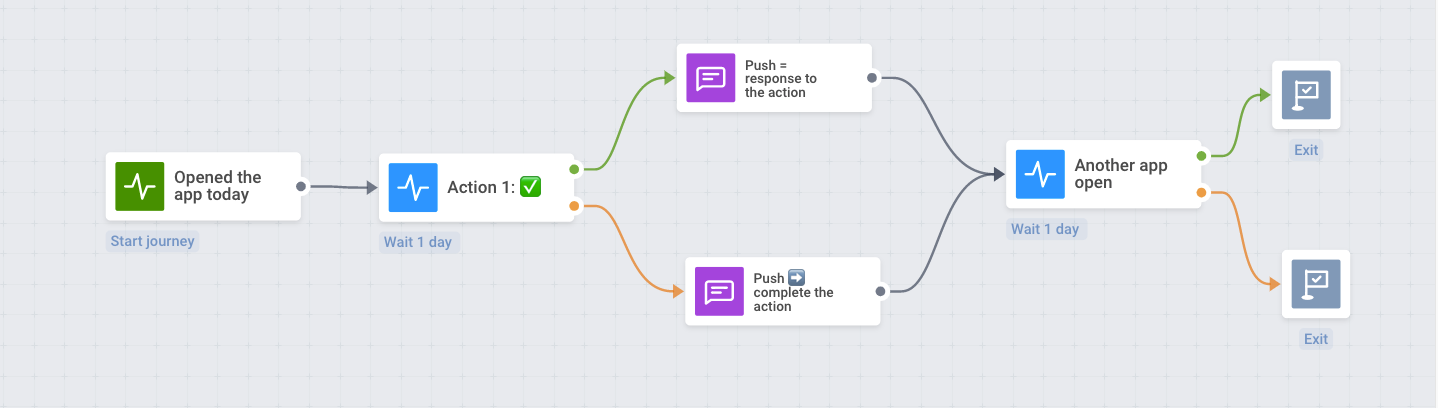
1️⃣ Target all the users who’ve opened your app today.
2️⃣ Wait for them to take the target action in the app — for VOS, it will be
making a journal entry.
3️⃣ Send a push notification with a relevant reaction to the taken action.
Encourage users to open your app and complete another one.
4️⃣ If a user hasn’t taken the first target action, get them back to the app with
a push referring to that.
5️⃣ Track how many users you’ve achieved to engage. You can differentiate your
communications further, Tag users depending on the actions they’ve taken (or
not) or just end the journey right there.
- Improve User Experience with Automated Service Messages
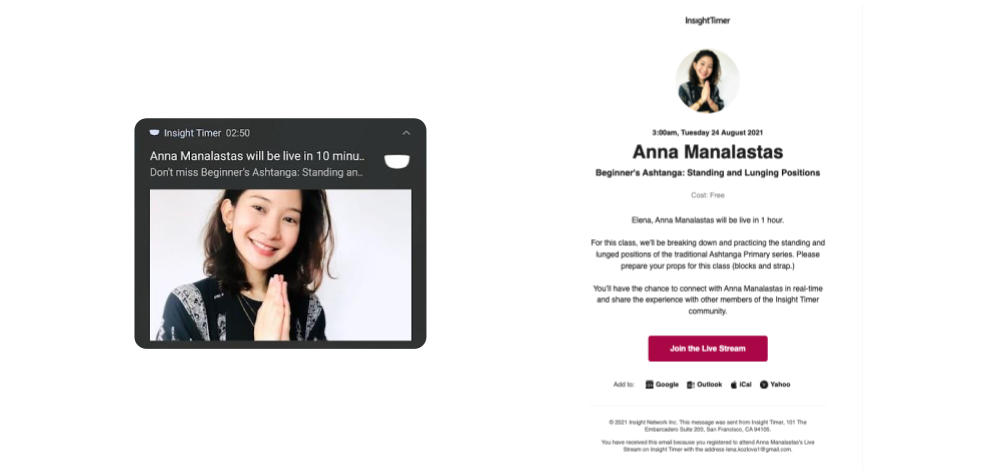
Another way to
keep users engaged
is by sending thempersonalized reminders on the activities they’ve signed up
to. This kind of communications will resemble service messages and will require
more
advanced personalization.
Metrics
at stake: attendance rate for a promoted live event, session interval, DAU,
MAU, D7 and D30 retention
Channels to use: push notifications, emails
Live examples: Insight Timer (4.9 out of 5 stars on the
App Store
and
Google Play;
16% D30 retention)
How to send automated event reminders to your health & wellness app users:
1️⃣ Target the users who’ve signed up for a particular activity — like a live
yoga session in the example above.
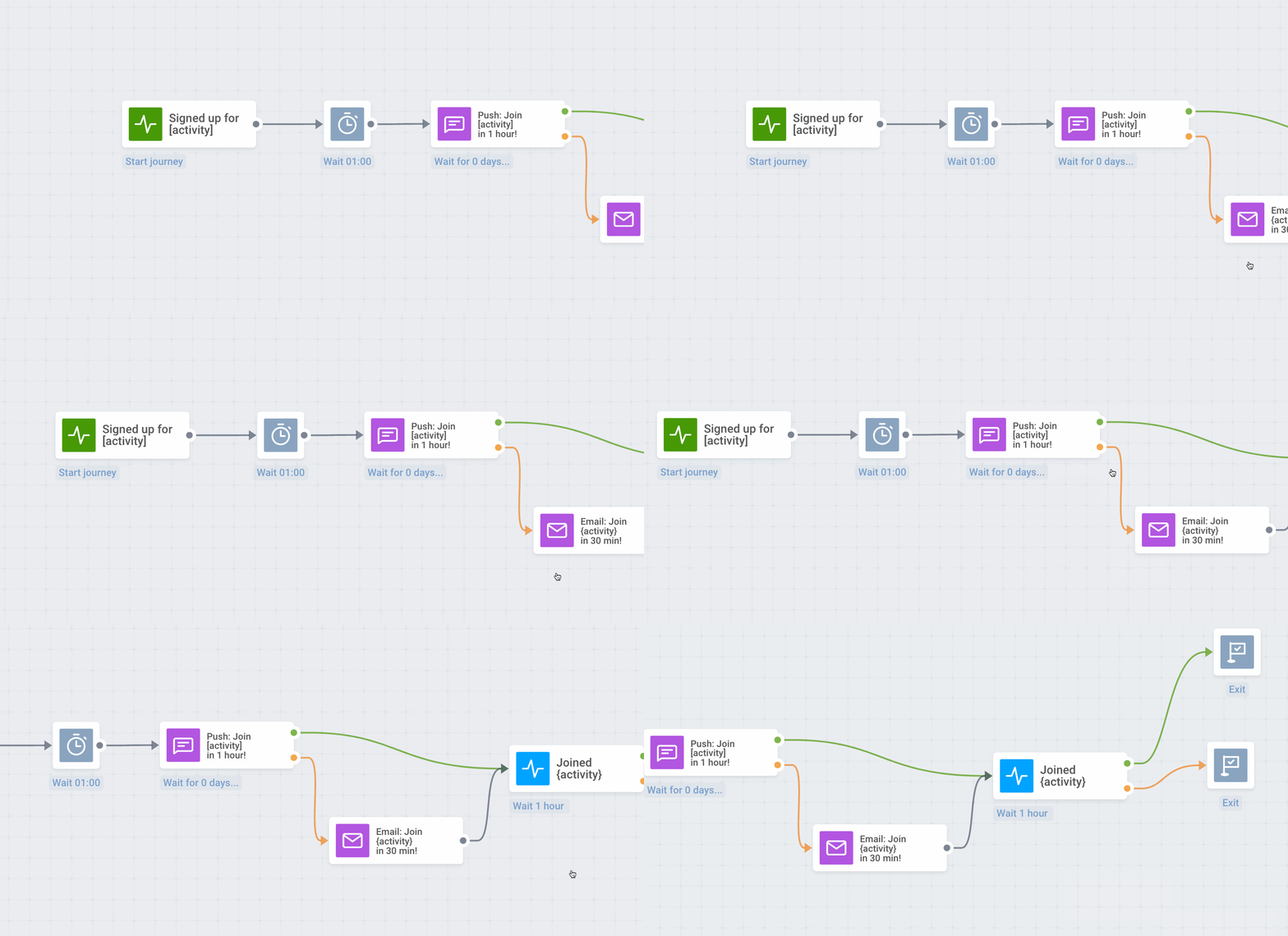
2️⃣ Schedule a push notification
to send one hour before the event starts.
3️⃣ Plan ahead two possible communication scenarios:
- for users who’ve opened your push: check if they actually attend the event;
- for users who haven’t opened the push: send them an extra reminder via email
30 minutes before the event starts. Check if they join the activity after
that.
Pushwoosh Customer Journey Builder will gather statistics for each step so you’ll get to assess the effectiveness of your communication channels and also measure the attendance rate for the tracked event.
- Re-Engage Inactive Users to Minimize Churn
All of your user acquisition efforts are pointless if you cannot retain
newcomers and keep them active. That’s where
push notifications and emails
come to the rescue. These communication channels are highly effective for
user retention
and preventing churn.
Metrics at stake: app open/session interval, DAU, MAU, time in the app,
number of app launches, screen opens, user LTV
Channels to use: push notifications, emails
Live examples: Elevate
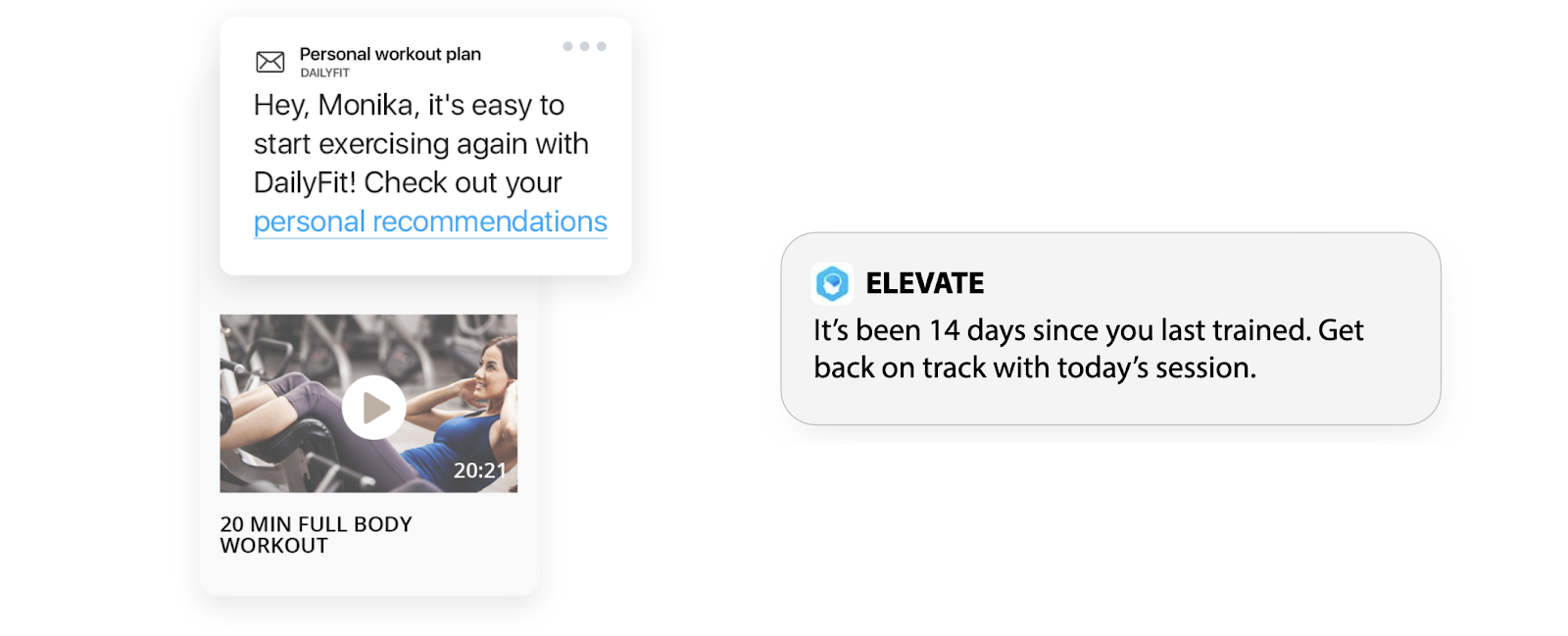
Healthy habits only do good when people stick to them. So sometimes, health &
wellness apps need to act like motivating coaches and remind users to get back
to their once-started routines.
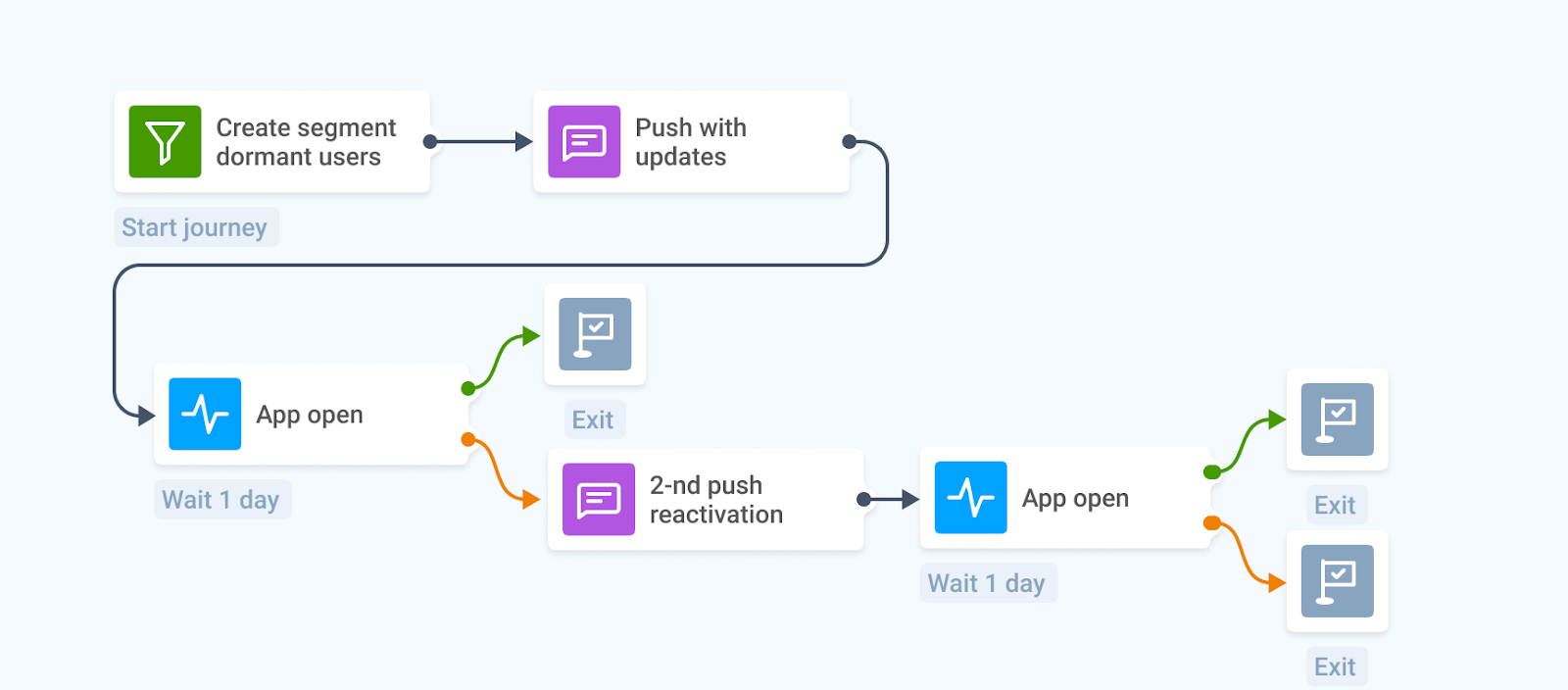
How to re-engage users in your health & wellness app:
1️⃣ Target those users who haven’t been active for a certain period of time. You
can choose the needed number of inactivity days when you set up the starting
Event.
2️⃣ Send a push notification that will get a user back on track.
3️⃣ Wait for the App Open event to be triggered.
4️⃣ If the event wasn’t fired, send another re-engagement message.
- Drive Feature Adoption and Discovery
By highlighting your latest improvements and explaining how the lesser-used
features can benefit your audience, you can increase user satisfaction with your
product — and your KPIs as well.
Metrics at stake: feature’s time-to-adopt and adoption rate; DAU and MAU
Channels to use: push notifications, emails, and in-app messaging
Live examples: Lifesum
(one of the leading health and fitness apps
in the Nordic region; in business since 2008)
The app at its core is an advanced calorie counter at its core, so its team
makes sure users are aware of the valuable features. If a customer hasn’t used a
part of its functionality,Lifesum will gladly present it in a push
notification.
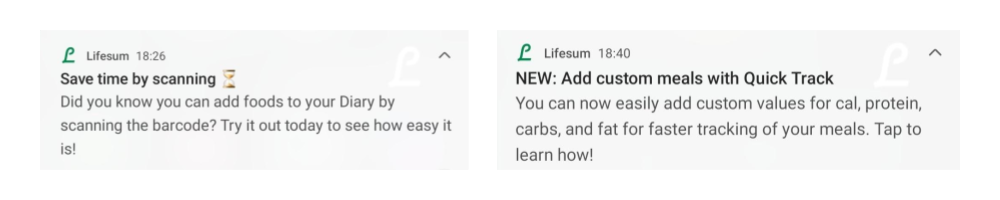
Lifesum promotes its features with push notifications
To drive deeper understanding of the app value, Lifesum sends emails — the format allows to explain the features and their benefits to the user in more detail.
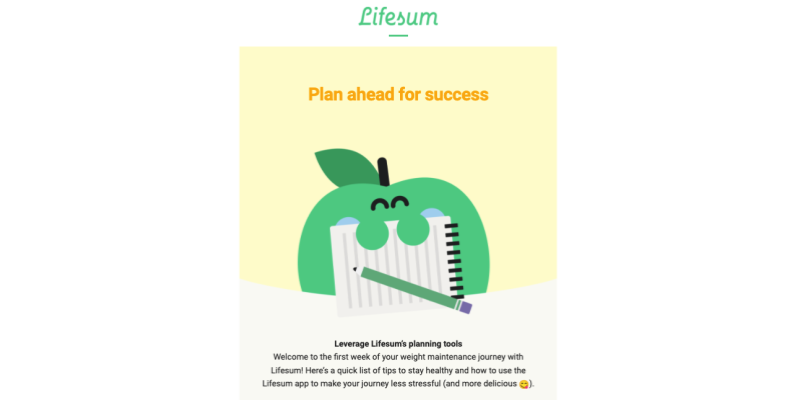
Lifesum also uses email for ample yet unobtrusive feature promo
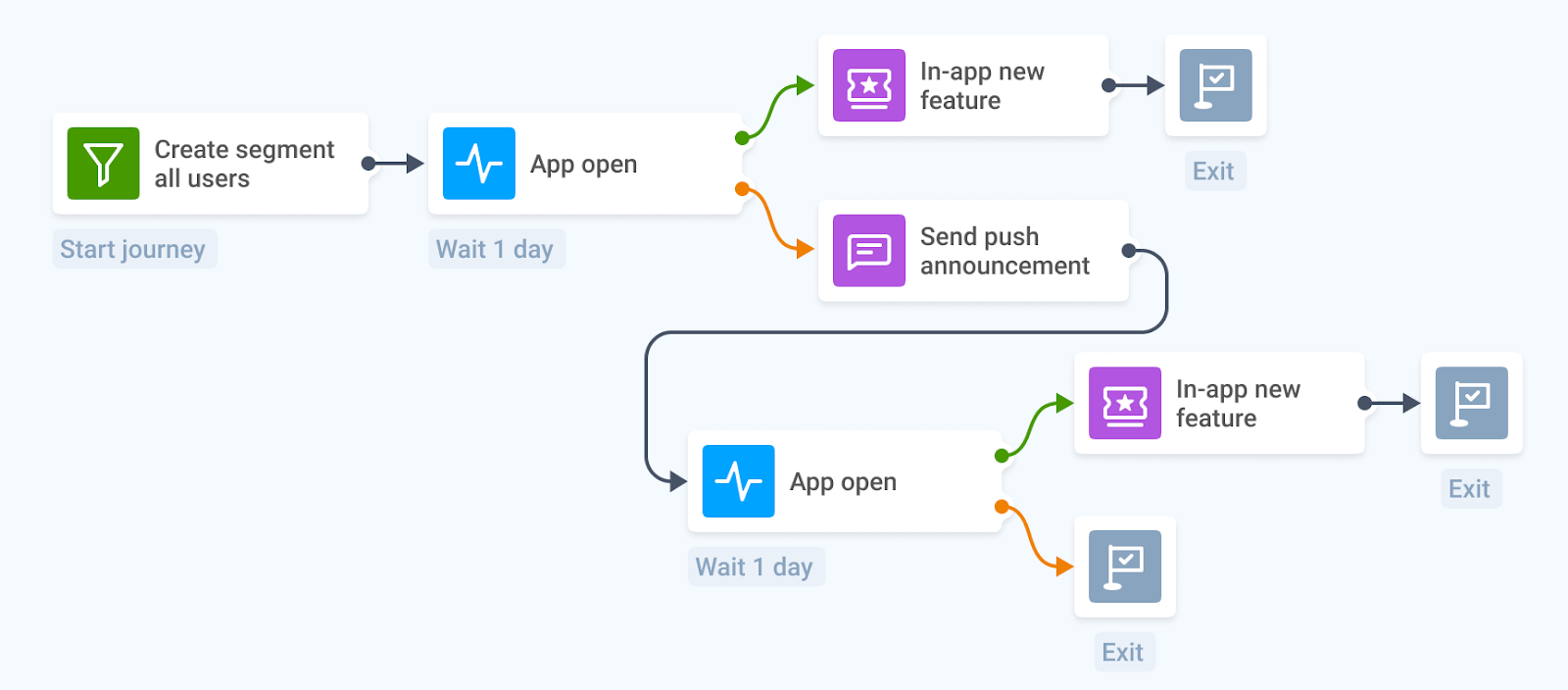
How to promote new products and feature adoption with automated
communications:
1️⃣ Select all users as your target segment.
2️⃣ Wait until the next time they open your app. Once they do, show them an
in-app message suggesting they try a new feature.
3️⃣ If a user hasn’t opened the app, reach out to them via push notification.
Then, you want to show them the same in-app with the information on the new
feature.
Just to remind you: afterwards, you’ll see the statistics on each step right in
the Pushwoosh interface.
- Upgrade Free Users to Premium
Driving revenue
is obviously the ultimate goal of all marketing communications. Health &
wellness apps can generate more profits from upgrading their users to more
expensive subscription plans.
With automated messaging, you can easily target upgrade offers to the who’ve
just finished their free trials or have long been using your free features only.
And with Pushwoosh, you will also get to
accurately track the effectiveness
of these communications.
Metrics at stake: conversion rates, number of paid users, total revenue,
MRPPU, LTV
Channels to use: in-app messages, emails; push notifications as an auxiliary
tool
Live examples: Insight Timer
($400k monthly revenue),Yazio
($2M monthly revenue),
Calm
($7M monthly revenue)
While
users are still in the app, full-screen in-app messages are the best to present
the benefits of a paid subscription and offer any current discounts for it:
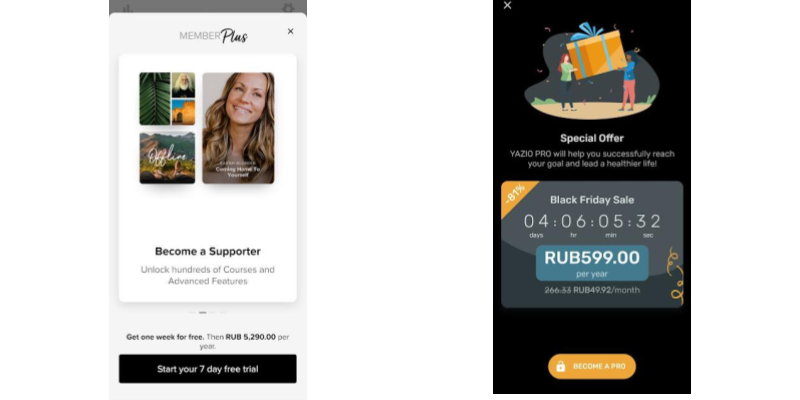
Insight Timer and Yazio use in-app messages to promote paid subscriptions
And if users have already left the app, you can promote your upgrade offer in an email:

Calm promotes its paid subscription via email
Alternatively, you can put your upgrade offer in the short form of push notification:
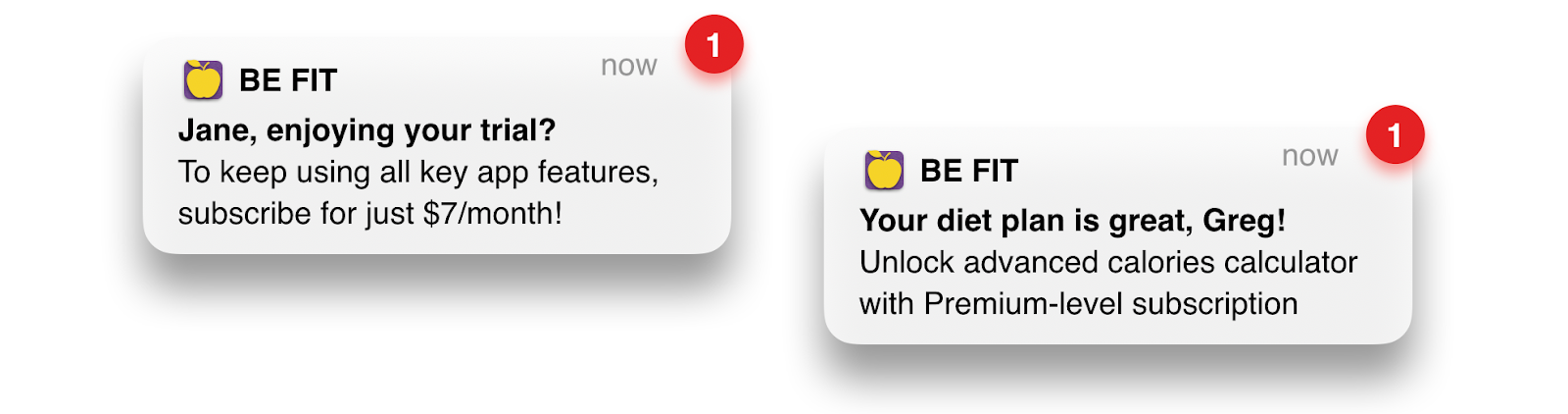
In most cases, you’ll want to link such push to an in-app message where you’ll explain the offer in more detail and direct the user to the purchase with a CTA button.
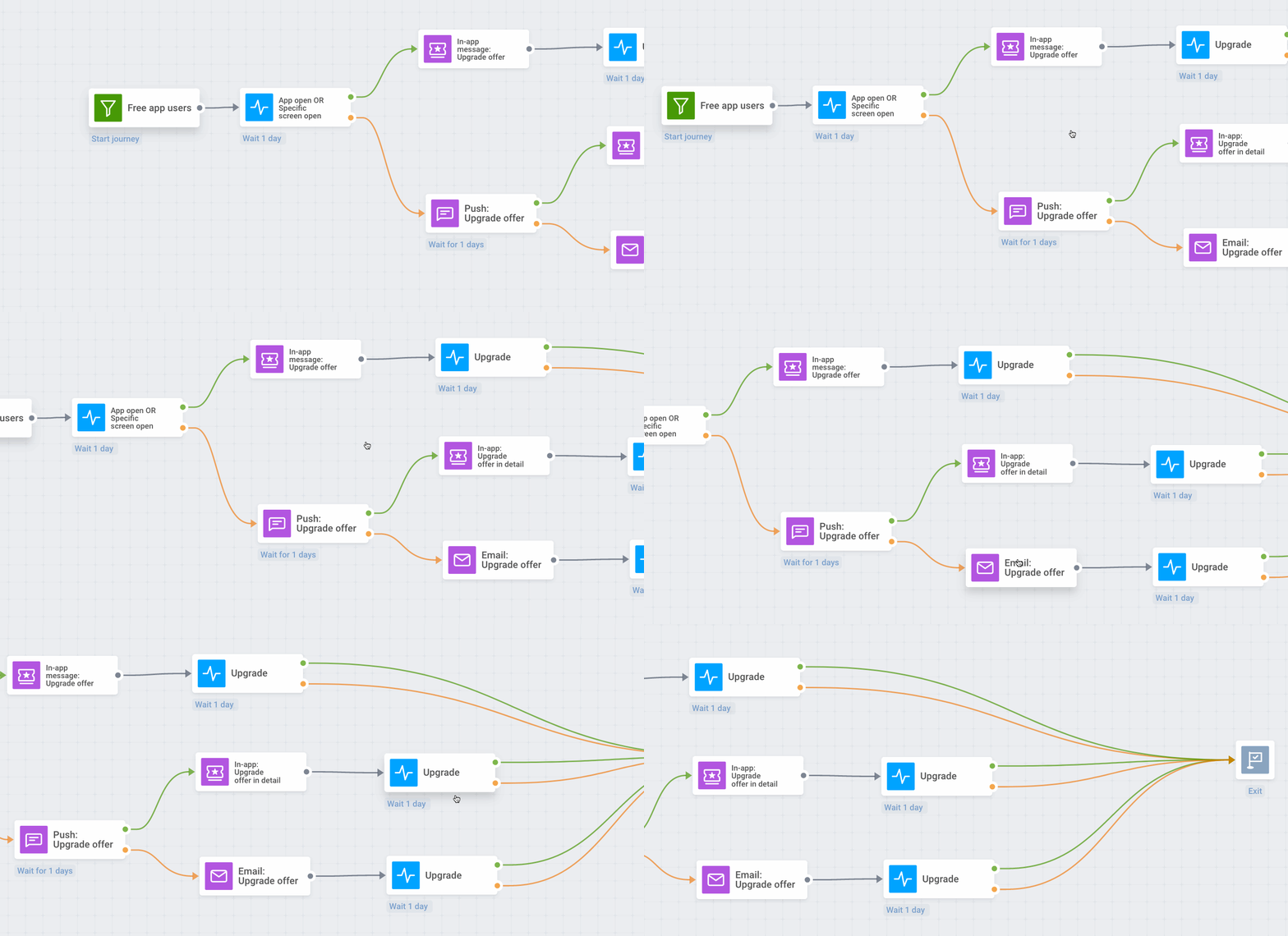
How to upgrade app users to a premium subscription with automated
communications:
1️⃣ Start by targeting all of your free users.
2️⃣ Wait until they open your app — or, even more specifically, view a particular
screen.
3️⃣ If they have done it, show them an in-app message with an upgrade offer.
4️⃣ If they haven’t opened your app or a certain screen, show them a push
notification enticing them to consider the upgrade offer.
5️⃣ If they’ve clicked on the push, display an in-app with more detail.
6️⃣ If they haven’t clicked on the push, send an upgrade offer via email.
7️⃣ Track how many upgrades you’ve gained with each communication scenario.
- Promote Loyalty Programs and Encourage Referrals
Loyalty and referral programs help to improve your brand recognition and broaden
your revenue stream. One option is to reward your current customers with
personal offers and promo codes. Another option is to expand your user base with
the help of personal recommendations your users can make to their close ones.
Metrics at stake: retention rates, customer LTV, total number of app users
Channels to use: emails, push notifications
Live examples: Calm
(100M+ downloads;
⅓ of subscriptions
are made on Day 1)
With that many people already using (or, at least, having tried) Calm, the
app had to be very specific when developing a referral program. The team
targeted the employees who received any wellness benefits from their companies
and suggested their HRs considered Calm. Here is the email that announced the
offer:
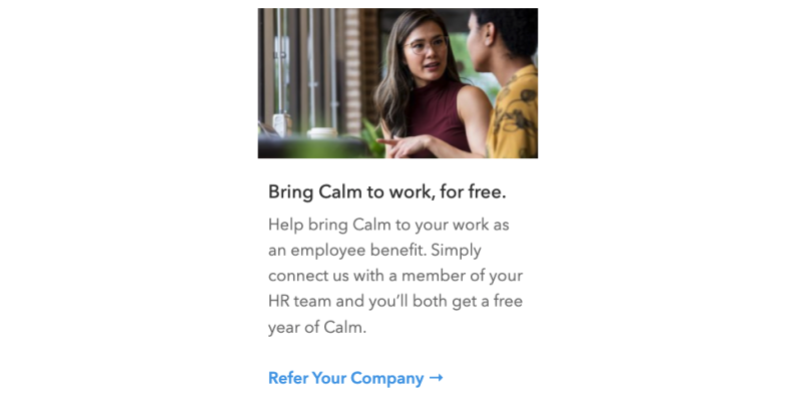
Calm presented its referral program in an email
While the Calm example looks unique and inspiring, you may need to come up with a more traditional loyalty promo. The easiest way to engage your health & wellness app users in a program is to offer them a promo code — the one they can use themselves at the next payment or the one they can share with friends:

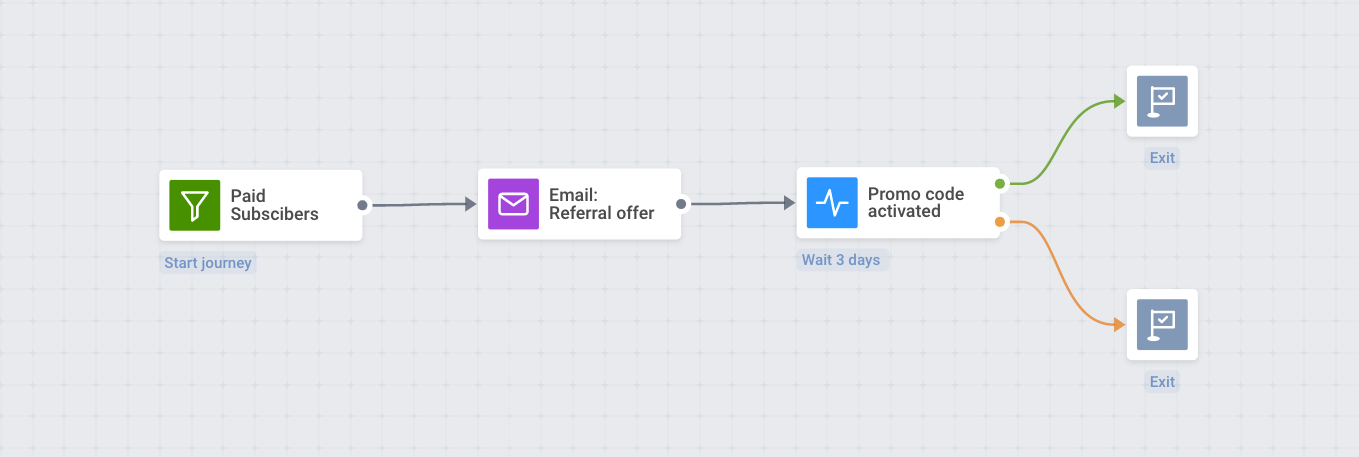
Here is how you can build a loyalty/referral program promo campaign — we’ll
build an example flow for that simpler version of a referral promo:
1️⃣ Choose all your paid subscribers as a target segment.
2️⃣ Without waiting for them to take any specific action in your app, send them
an email describing the referral conditions.
3️⃣ Keep an eye on how many times your promo code has been applied — meaning, how
many new users have landed in your app.
More Ways to Engage Your Health & Wellness App Audience with Automation Tools
Certainly, your marketing team may brainstorm many more specific scenarios that will engage your app audience; and, we bet, you’ll want to automate them. This is what Pushwoosh can help you with.
Discover Pushwoosh for Subscription-Based Apps
Contact Pushwoosh Team to discover the full capacity of our platform and see the opportunities it can open for your business.