Did you know that 80% of consumers are more likely to make a purchase from a brand that provides personalized experiences? Yet, nearly 60% of Americans consider most emails they receive useless. The gap between these two realities is exactly where personalized email marketing lives — and wins.
So what is personalized email marketing? At its core, personalized emails meaning revolves around delivering tailored, relevant messages to individual subscribers based on who they are, what they’ve done, and what they need right now. Far beyond adding a first name to a subject line, true personalization transforms email into a high-personalized email ROI channel that drives engagement, retention, and revenue.
In this guide, you’ll find everything about personalized email marketing: what it is, why it matters, the different types of email personalization, proven strategies and best practices, and real-world personalized email campaigns examples. You’ll also see how Pushwoosh — a leading customer engagement platform — powers personalized campaigns from data collection to omnichannel delivery.
What is personalized email marketing?
A personalized email is a targeted message sent to individual recipients, tailored based on specific data such as their preferences, past behaviors, and other personal details. This approach makes the email content more relevant for each recipient, making it more likely to engage them effectively.
Personalized emails meaning goes beyond knowing your subscriber’s name. A customized email encompasses understanding the subscriber’s journey, preferences, and intent — and reflecting that understanding in every aspect of the email, from subject line to CTA.
Keep in mind: Addressing your contact by their name is a nice touch but it doesn’t make your email personalized. The days when seeing the first name in the subject line was enough to make a user click are long gone. Instead, think more along the lines of Spotify’s Wrapped or this awesome personalized email example by Google:

Beyond basic personalization: What makes an email truly personal?
A truly personal email goes far deeper than a generic greeting. It reflects a genuine understanding of the subscriber’s context — where they are in their customer journey, what they’ve interacted with, what motivates them, and when they’re most likely to engage.
Here’s what separates surface-level from deep personalization:
- Surface level: First name in the subject line, generic birthday discount
- Behavioral level: Recommending products based on browsing history, re-engaging users who haven’t opened in 30 days
- Contextual level: Sending a weather-relevant offer based on a subscriber’s city, or adapting layout based on the device they’re using
- Predictive level: Using AI to anticipate what the subscriber needs before they even search for it
The most effective email personalization techniques combine these layers to create messages that feel genuinely relevant — not just technically addressed. This is where modern personalized email strategy and tools like Pushwoosh’s Customer Journey Builder and behavioral segmentation engine make the real difference.
What parts of the email should be personalized?
The general advice is “as many as possible”, since your ultimate goal should be for the user to feel like the email (likely automated) was written just for them. Consider these elements for personalization:
- “From” address: We know, you are probably a marketer with a shared marketing@yourfirm.com domain, but your recipient doesn’t need to know that. You can tweak your email campaigns to look like they’re coming from your CEO, or the recipient’s trusted account manager, or a friendly face they met at an event last week – you know, someone they actually want to hear from.
- Subject lines: Of course, you should tailor those based on the content of your email, but don’t forget to include the magic flare of a personal touch – the unique circumstances that made you send this very email to this very person. These could be the items they browsed, a game level they’re struggling with, or a meeting you had with them before reaching out.
- Email content: Similarly to subject lines, don’t just bombard your subscribers with generalized messages. Instead, stick to the point and offer them unique content based on the actions that lead to the email being sent.
- Images & copy: If you operate in several regions, approach your creatives very carefully as something that is appropriate in one country may be considered rude in another. Try experimenting with email header images or clever puns based on your contacts’ location, i.e. localize your email contents beyond just translating the copy.
- CTA buttons: With some luck (and a good CDP such as Pushwoosh), you’ll notice that some CTA copy performs better than others. Maybe the recipient responds better to “Save your seat” rather than “Register now” kind of messaging – store that knowledge and utilize it to optimize your call to action in the future.
And you will be rewarded in no time!
Why is personalized email marketing essential? (Benefits & importance)
The case for personalized email marketing is backed by compelling data. Personalized emails deliver 6x higher transaction rates compared to non-personalized ones. Marketers who use personalization have seen email marketing ROI increase by up to 122%. And segmented, targeted campaigns drive 760% more revenue than one-size-fits-all broadcasts.
The benefits of personalized email marketing span the entire customer lifecycle — from first contact to long-term loyalty.
Increased open rates and click-through rates
When an email feels relevant to the recipient, they’re more likely to open it — and act on it. Emails with personalized subject lines are 26% more likely to be opened than generic ones. Once opened, personalized content that speaks to the subscriber’s specific interests, behaviors, or lifecycle stage significantly boosts click-through rates.
This connects directly to Pushwoosh’s core Engage use case: by delivering relevant, timely content, you keep your audience opening your emails and interacting with your brand.
Boosted conversions and revenue
Personalization doesn’t just drive clicks — it drives purchases, sign-ups, and renewals. Personalized CTAs can perform up to 202% better than generic CTAs. When a subscriber sees a product recommendation based on their past purchase or an abandoned cart email with exactly the items they left behind, the path to conversion becomes much shorter.
For e-commerce, delivery, and fintech companies, this is where personalized email ROI becomes tangible and measurable. Pushwoosh’s behavioral segmentation and dynamic content capabilities help you send the right offer to the right person at the right time.
Enhanced customer loyalty and retention
Subscribers who feel understood and valued stay loyal to your brand. Personalized email campaigns — whether they’re loyalty reward reminders, personalized follow-up emails after a purchase, or re-engagement sequences tailored to lapsed users — consistently outperform generic retention efforts.
Customer retention is one of Pushwoosh’s core use cases: by combining email personalization with behavioral triggers and multi-channel messaging, you give users meaningful reasons to keep coming back.
Improved customer experience and brand perception
A well-personalized email is not an interruption — it’s a service. When your messages are relevant, timely, and genuinely helpful, subscribers view your brand positively. Poor personalization (or the absence of it) does the opposite: 72% of consumers say they only engage with marketing messages that are personalized to their interests.
By consistently delivering tailored experiences, you build a brand perception grounded in trust and relevance — which is increasingly a competitive differentiator in any industry.
Types of personalized email marketing
Personalization isn’t a single technique — it’s a spectrum of approaches, each leveraging different types of customer data to make emails more relevant. Understanding the types of email personalization available helps you build a more sophisticated and effective email strategy.
Demographic personalization
Demographic personalization uses basic profile information — age, gender, job title, income bracket, or life stage — to tailor email content. For example, a fitness app might send different content to college students versus working professionals, or adjust product recommendations based on stated preferences.
Pushwoosh Tags allow you to store demographic attributes for each user, making it straightforward to segment and target based on profile data.
Geographic personalization
Geographic email personalization tailors content based on the subscriber’s location. This ranges from promoting local events and store openings to highlighting weather-appropriate products (e.g., a rainwear promotion triggered when heavy rain is forecast in a subscriber’s city) or featuring the nearest delivery pickup point.
With Pushwoosh, location data is captured via Tags and used in segmentation conditions to trigger location-specific email campaigns automatically.
Behavioral personalization
Behavioral email marketing is one of the most powerful personalization types. It uses real-time and historical behavioral data — browsing history, app activity, purchase patterns, viewed products — to deliver hyper-relevant messages.
Classic examples include:
- Abandoned cart emails triggered when a user leaves items in their cart
- “You viewed this, you might also like…” product recommendation emails
- Re-engagement emails sent after a user hasn’t opened the app in 14 days
Pushwoosh Events allow you to track specific user actions (e.g., “added to cart”, “viewed product”, “completed level”) and trigger automated emails based on these behaviors via the Customer Journey Builder.
Transactional personalization
Transactional email personalization involves tailoring the post-transaction communication experience. Order confirmations, shipping updates, and post-purchase feedback requests are inherently personal — they reference a specific transaction between your brand and the subscriber.
Going beyond the basics, a personalized transactional email might include recommended accessories for the item purchased, a loyalty points balance update, or a personalized follow-up email requesting a review of the specific product bought.
Preference-based personalization
Preference-based email lets subscribers control what content they receive and how often. Offering content category choices at sign-up (e.g., “I’m interested in: Product Updates, Deals, Tutorials”) and honoring those choices consistently dramatically reduces unsubscribes while increasing engagement.
Pushwoosh supports preference-based segmentation through Tags, allowing users’ stated interests to drive their entire email experience.
Contextual personalization
Contextual personalization tailors email content based on the real-time context in which it is received — device type, time of day, or current weather. Dynamic content examples include showing a mobile-optimized layout to smartphone users, surfacing “good morning” content to subscribers opening before 9am, or promoting seasonal products during relevant weather events.
This type of email subject line personalization and content personalization is enabled through dynamic content blocks and send-time optimization features available in modern email marketing platforms like Pushwoosh.
Personalized email marketing strategies & best practices
Knowing the types of personalization is just the starting point. To drive consistent results, you need a strategic approach that ties data, content, automation, and optimization together. Here are the most important email personalization best practices and email personalization strategies to adopt.
Leveraging customer data for deeper insights
Effective personalization begins with quality data. The richer your understanding of each subscriber, the more relevant your emails can be. Focus on collecting:
- Demographic data: Name, location, job role, industry
- Behavioral data: App usage, purchase history, browsing activity, email engagement
- Transactional data: Order history, subscription tier, renewal dates
- Preference data: Stated interests, communication frequency preferences
Practice data hygiene regularly — remove inactive contacts, correct outdated information, and never collect data you don’t have a clear use for. Pushwoosh’s RFM (Recency, Frequency, Monetary) segmentation provides a powerful framework for identifying your highest-value segments and targeting them with the most relevant offers.
Effective audience segmentation
Micro-segmentation — dividing your audience into small, highly specific groups — is the foundation of truly personalized email marketing. Rather than sending one campaign to all 50,000 subscribers, you might create 10 micro-segments based on behavior, purchase history, and lifecycle stage.
Pushwoosh segmentation enables dynamic, multi-condition segments using Tags (user attributes) and Events (behavioral actions). Because these segments update in real time as user data changes, your campaigns always target the right people with the right personalized content for email.
Crafting dynamic content and subject lines
Dynamic email content allows different subscribers to see different content blocks, images, product recommendations, or offers — all within the same email campaign. This is one of the most scalable personalized email strategies available.
Key techniques include:
- Merge tags: Dynamically insert user-specific data (name, city, last product viewed)
- Conditional content blocks: Show different content based on segment membership
- AI-driven personalized subject lines: Use AI email marketing capabilities to generate and test subject lines that reference specific user behaviors at scale
Personalized subject lines — going beyond the first name to reference a specific behavior or interest — are among the highest-impact personalization touches you can implement. Use Pushwoosh’s Liquid Templates and drag-and-drop editor to build dynamic, personalized content for email efficiently.
Optimizing the customer journey with email automation
The most effective personalized email campaigns aren’t one-off sends — they’re automated sequences triggered by specific behaviors or lifecycle events. This is the essence of customer journey optimization.
Examples of trigger-based personalized campaigns:
- Personalized welcome email series: Adapts content based on the onboarding path a user chooses
- Abandoned cart emails: Triggered 1 hour, 24 hours, and 72 hours after cart abandonment
- Post-purchase follow-up emails: Including product recommendations, loyalty updates, or review requests
- Re-engagement drip campaigns: Activated when a user hasn’t engaged in 30, 60, or 90 days
Pushwoosh’s Customer Journey Builder lets you design, visualize, and automate these workflows across multiple channels, combining email with push notifications and in-app messages for a unified experience. This is a core marketing automation solution capability that transforms personalization from manual effort to scalable strategy. Understanding how to automate personalized emails starts here.
A/B testing for continuous improvement
No personalized email strategy is complete without systematic testing. A/B testing email personalization lets you validate which approaches actually improve performance — rather than assuming they do.
Test one variable at a time:
- Subject line variations (personalized token vs. generic, different personalization approaches)
- Content block variations (different product recommendations, different offer framing)
- CTA copy variations
- Send time variations
Pushwoosh A/B testing (A/B/n) lets you test multiple variants simultaneously and automatically routes traffic to the winning variant once statistical significance is reached — compounding improvements over time for significantly better personalized email ROI.
Ensuring data privacy and ethical personalization
Personalization requires data, and data requires responsibility. Ensure your email marketing campaigns comply with GDPR, CCPA, and other relevant privacy regulations:
- Only collect data you have a legitimate use for
- Be transparent with subscribers about how their data is used
- Honor unsubscribe and preference change requests immediately
- Avoid “creepy” personalization — referencing data in ways that feel invasive
Pushwoosh adheres to the latest privacy regulations and standards, with built-in data safety features to keep your customers’ data secure and your campaigns compliant.
Cross-channel personalization
Email doesn’t exist in a vacuum. The most effective personalized email marketing strategies integrate email with other communication channels — mobile push notifications, web push, in-app messages, and SMS — for a unified customer experience.
For example: a user abandons a cart → receives an in-app notification immediately → receives a personalized email 1 hour later → receives a push notification with a limited-time offer 24 hours later. Each touchpoint reinforces the others, creating a hyper-personalization effect across the full customer journey.
As a push notification service and multi-channel customer engagement platform, Pushwoosh makes this cross-channel orchestration native and seamless within a single Customer Journey Builder workflow.
Personalized email content examples
Email marketing personalization works wonders on many levels as it aims at understanding your customer. However, it proves to be more effective in some cases than others. Here are some proven personalized email campaigns examples to draw from:
• Transactional emails • Product recommendations • User onboarding • Loyalty and rewards programs • Abandoned cart recovery • Customer retention and engagement • Community relations and feedback
Below, we’ve gathered inspiring real-life personalized email content examples — and personalized email subject lines examples — to help you get started.
Transactional emails
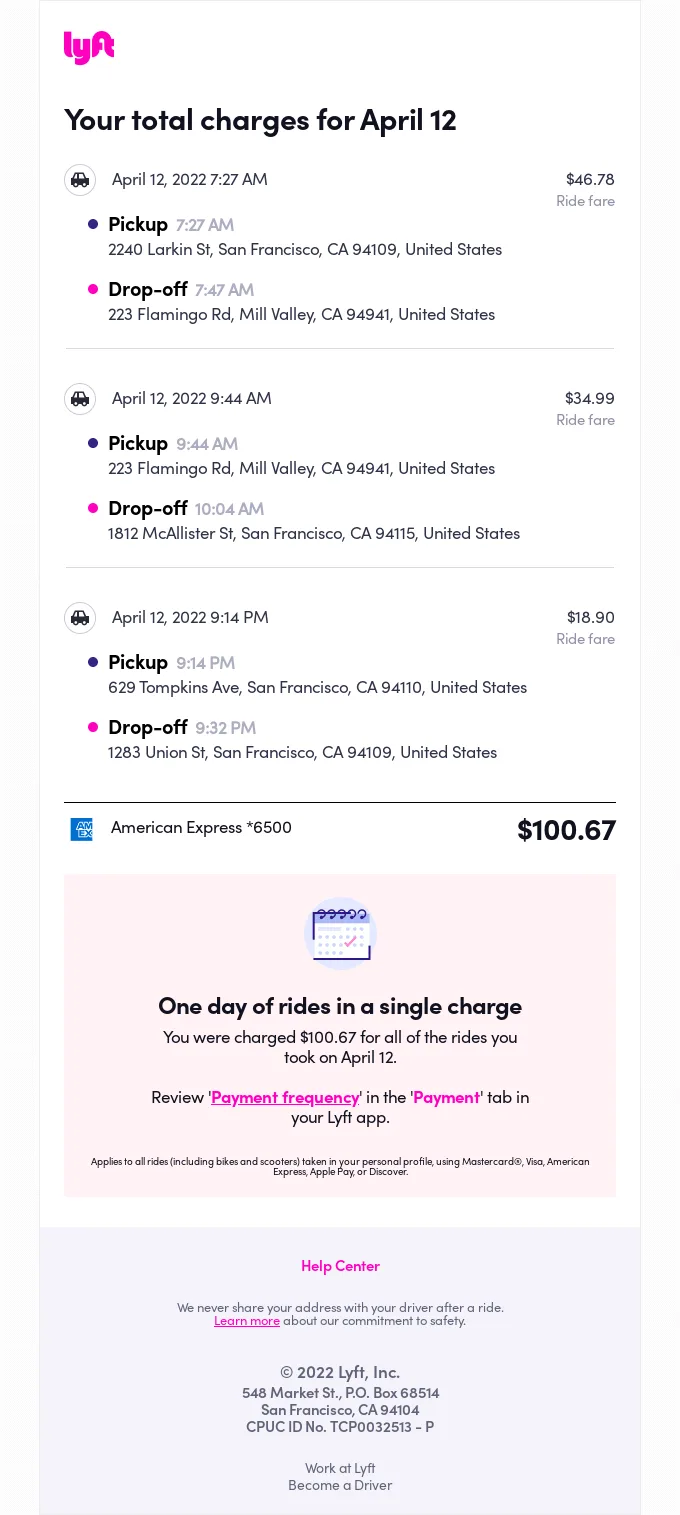
Transactional emails are sent to individuals after a specific action or transaction, such as completing a purchase, updating an account, resetting a password, etc. They are crucial for providing timely and relevant information related to users’ activities, but transactional emails are virtually impossible without personalization.
This transactional email example from Lyft relies on the user’s in-app activity (rides taken), accesses their sensitive information (credit card usage), and simplifies the user experience by presenting the final sum of all rides of the day.
Product recommendations
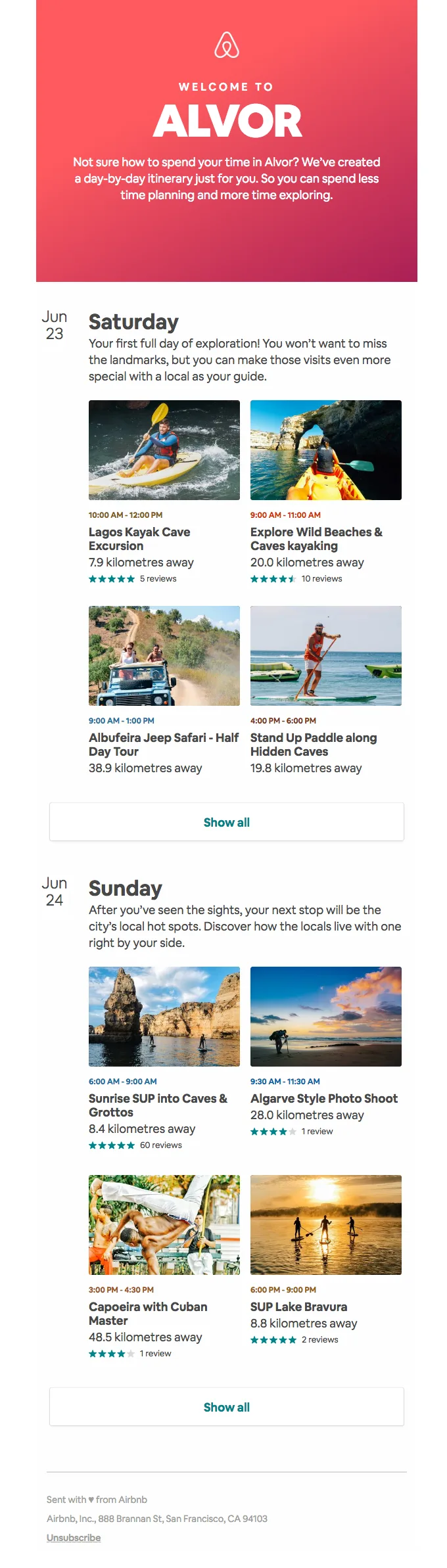
Emails with personalized product recommendations directly translate into revenue and conversions as they work wonders for upselling and cross-selling opportunities, notifying customers of new product updates regardless of the niche you operate in.
This email from Airbnb leverages dynamic email content to pull relevant recommendations for the specific time and location of the holiday recipient booked through the platform — a textbook example of dynamic content examples in action.
Abandoned cart recovery
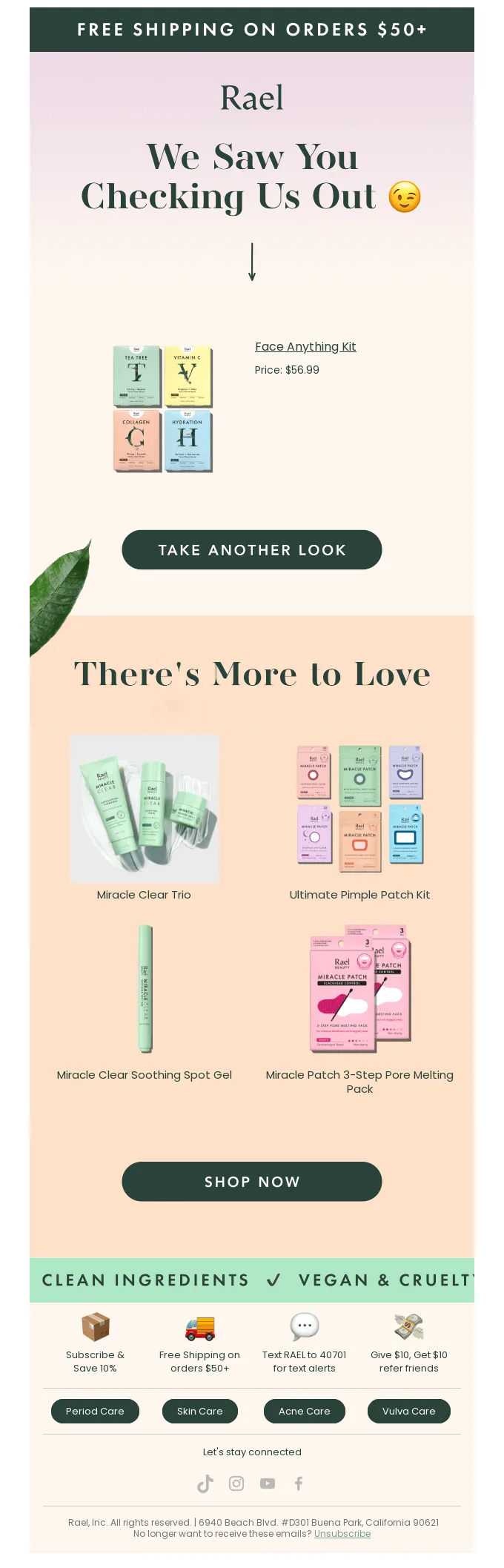
When it comes to cart abandonment, the key goal of the email is to remind customers of the items they left behind and provide an additional incentive to complete their purchase. Personalization makes it that much easier.
This abandoned cart recovery email by Rael not only specifies the product a user intended to purchase but also uses the opportunity to cross-sell relevant items, likely based on the buyer’s previous interaction with the site.
User onboarding
Email is an effective channel for introducing your audience to your product for the first time. Particularly in gaming, you don’t have the luxury to dive into multiple details through the in-app onboarding. Instead, an email allows for a more detailed overview of the game, the world, and the rules you are about to uncover.
The initial personalized welcome email by Sea of Thieves cuts straight to the chase and introduces new players to the specifics of the game. Personalization comes into play later on, as the user proceeds through the levels and interacts with the email selecting specific options.

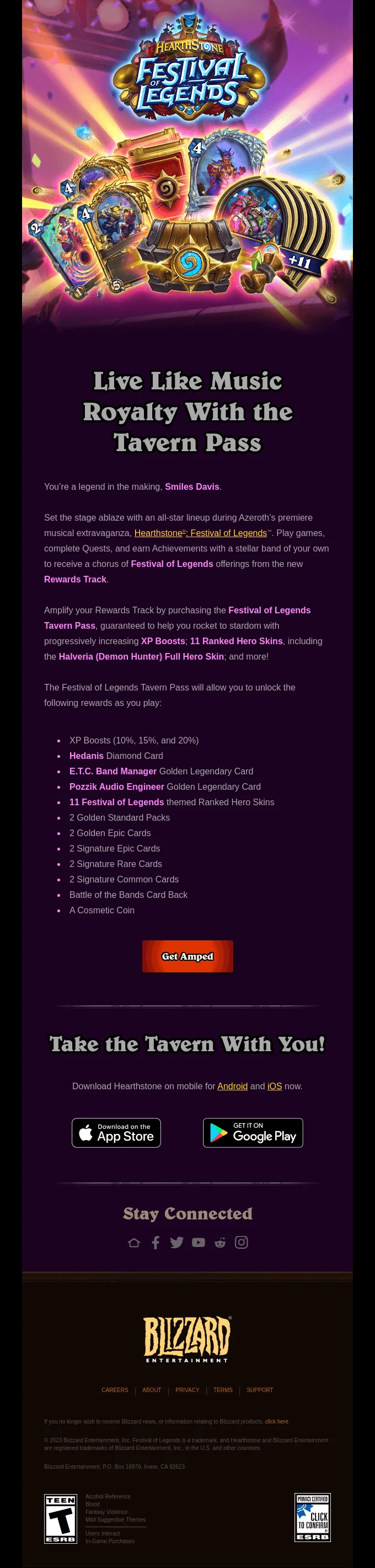
Email is also an excellent way to get users excited about your loyalty program, remind them about the reward system you’ve implemented, and generally create engagement in a non-monetary way.
This email example by Blizzard leverages personalization on multiple different levels, including achievements, perks, and dedicated in-game rewards to Hearthstone players to promote the new addition to the game with rewards.
Loyalty & rewards programs
Customer retention
Email personalization does wonders for customer retention. Thanks to the longer format, email allows you to share all the ins and outs of the user’s in-app activity to drive them back. Paired with push notifications, it makes it almost impossible to resist coming back to the app. This approach is particularly popular with education, HORECA, health & wellness industries.
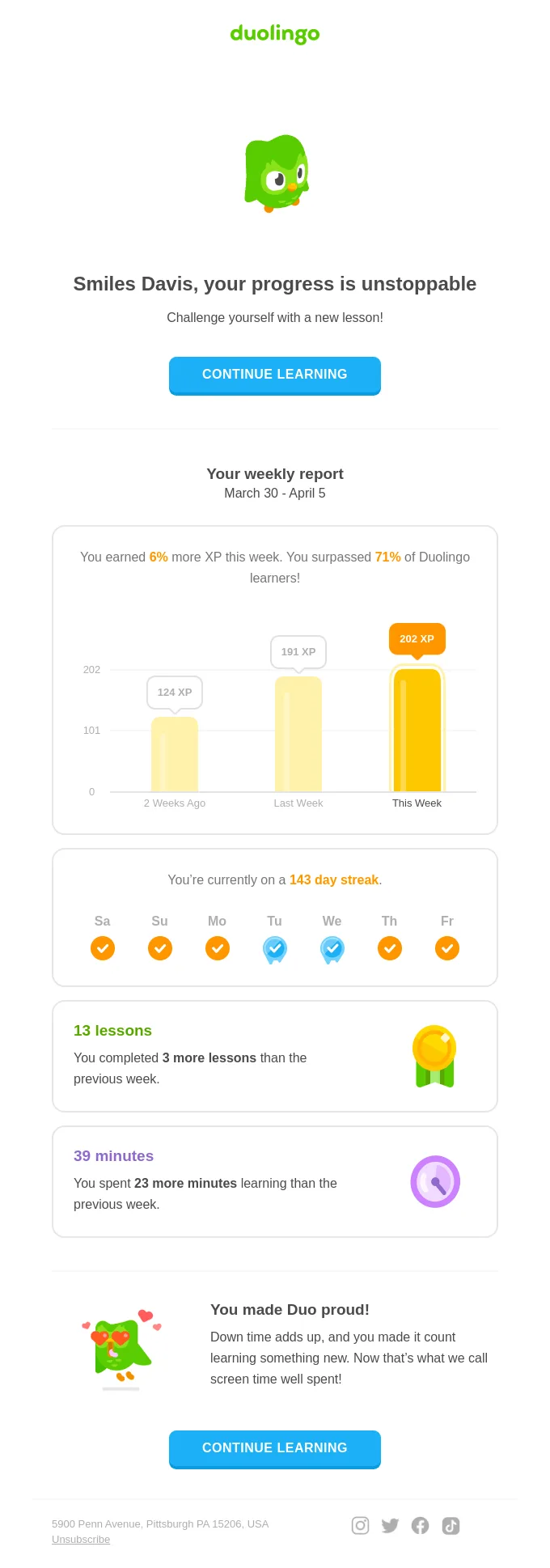
The personalized retention email by Duolingo provides weekly reports of the user’s in-app activity, encouraging them to come back and do better next week. It is also a great example of a personalized follow-up email that adds genuine value without hard-selling.
Community relations & feedback
Last but not least, email personalization is indispensable when asking for feedback or trying to build more meaningful relationships with your community.
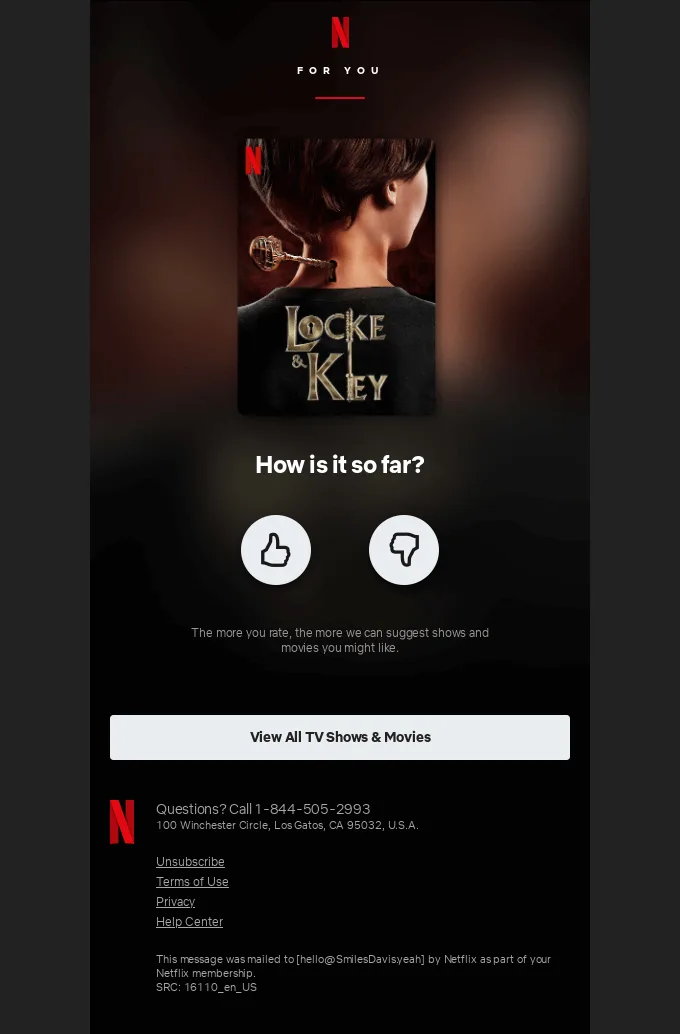
The email example from Netflix strikes home by asking you about the current series you’re watching to get quick and non-intrusive feedback regarding the show and remind you to come back and finish it while you’re at it.
Sounds exciting, doesn’t it? Now it’s about time we cover how to achieve all that and more.
How to personalize your emails in 7 simple steps
1. Collect user data 2. Segment your contact list early on 3. Create personalized emails based on data with dynamic content 4. Create A/B test versions 5. Personalize email settings 6. Analyze and optimize future campaigns 7. Pair your emails with other communication channels
1. Collect user data
The personalization of your email marketing campaign starts outside of the email editor. After all, successful personalization always comes down to the quality of personal data you’ve gathered. Understanding how to create personalized emails starts with knowing exactly what data to collect and why.
What kind of data should you be collecting?
Some kinds of personal data can be given to you voluntarily (through the signup form), while others need to be collected based on the user’s experience with your site or app.
Here are some examples of personal data points that can help you with your email personalization:
- Location (city or region);
- Birthday or anniversary with your brand;
- Recent browsing & purchase history;
- Email engagement history;
- Membership status;
- Device type used, etc.
Keep in mind that privacy laws, such as GDPR or CPA, clearly indicate that you should only collect personal data that is relevant to your business needs. The more isn’t always the better here. Consider what you need to know about the user to elevate their experience and ask for just that.
Gather quality data with Pushwoosh
What type of data you gather is entirely up to you. What we do is ensure data privacy and compliance.
Pushwoosh handles customer data with utmost care, adhering to the latest privacy regulations and standards. This way you can rest assured that your company’s and your customer’s personal data is safe.
To help you with the next step in setting up personalized campaigns, Pushwoosh can also match user’s email addresses with their push token, setting the stage for segmentation and omnichannel user-centric communications.
2. Segment your contact list early on
Once you’ve set up your signup forms and tracking, it’s time to make sure your contact lists are organized carefully – that’s how you achieve personalization for automated emails. Understanding how to send personalized emails at scale depends entirely on the quality of your segmentation.
The rule of thumb is that you can’t get too narrow here. The deeper you go, the higher level of personalization you achieve.
How to segment email contacts like a pro
- Keep your contact list clean – only engage with contacts that want to be engaged;
- Assign tags to users based on the personal data you’ve gathered – it’d be easier to segment the lists in the future;
- Offer multiple subscription options on the signup form – product newsletter may help you with upselling, while content updates will drive higher customer retention;
- Leverage personal data across multiple channels – do not limit yourself to just email, but make sure to distinguish between the channels you use in your lists’ segmentation.
Manage contact segmentation with Pushwoosh
Pushwoosh comes with a powerful Behavioral Segmentation engine allowing you to go as broad or as narrow with your contacts as the campaign requires. We also offer a dedicated Customer Journey Builder to help you visualize your segmentation in intricate workflows:
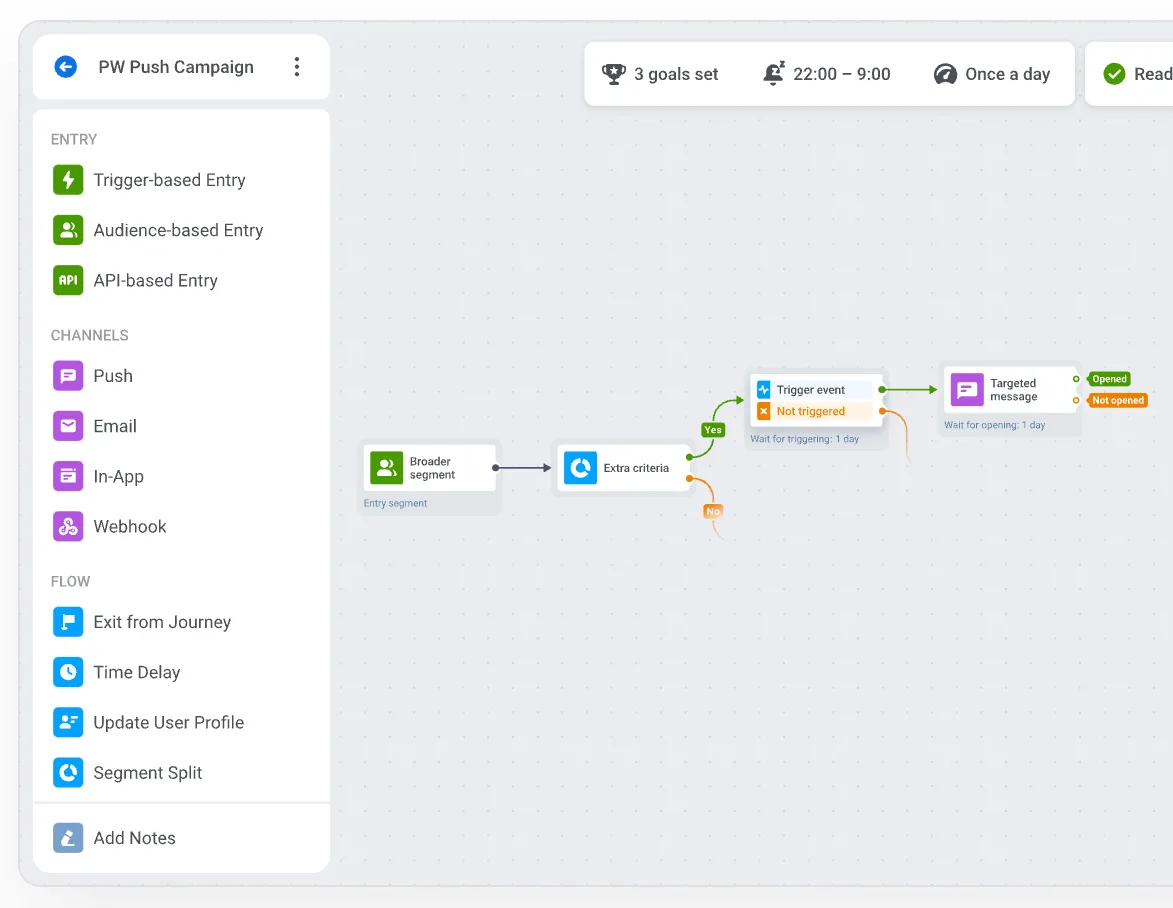
To start segmenting your email marketing contacts with Pushwoosh, you can upload, save, and update user attributes through Tags. Then, create a granular Segment based on the goals of your campaigns, using Tags (user attributes) and/or Events (specific actions that happened a certain number of times).
Once you have the conditions for your Segments specified, you are ready to move on to creating an actual email you’ll send to your target contacts.
3. Create personalized emails based on data with dynamic content
Sometimes, just tweaking the copy within a ready-made email template to reflect on the specific list’s needs will be enough for the email to be considered personalized. However, if you want to go really deep with your segmentation, you’d need to leverage dynamic email content.
When to use dynamic content in email marketing
Dynamic content tokens usually refer to personal details or users’ on-site and in-app behavior:
| Personal details | Behavioral insights |
|---|---|
| _ First name; _ Last name; _ Location; _ Account manager assigned to contact; * Brand anniversary, etc. | _ Product recommendations; _ In-game level progression; _ Recently browsed products; _ Membership status, etc. |
How to use dynamic content with Pushwoosh
Pushwoosh comes with a built-in drag-and-drop email editor, making the creation of personalized email campaigns easy.
Simply pick the Merge tags option from the toolbar and specify which characteristic you’d like to personalize from the drop-down list.
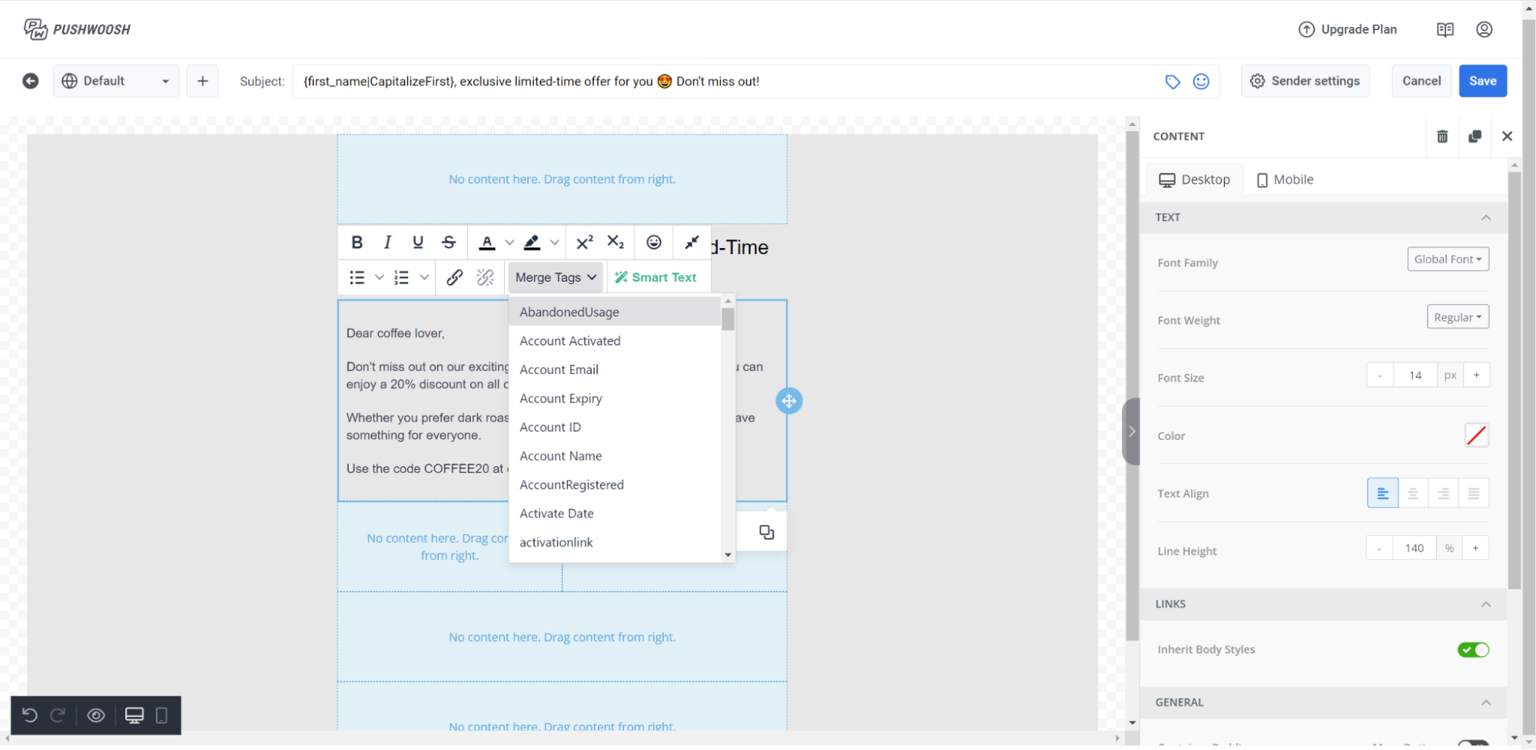
Alternatively, you can use Liquid Templates for even quicker and better personalization results.
4. Create A/B test versions
The golden mantra of email marketing is always be testing. That’s why, before hitting that send button, you should always set up at least a few different versions of the email you’re sending. Remember to test just one variable at a time for the experiment to go smoothly.
Email elements you can A/B test
Virtually anything is up for an A/B test, but here are some ideas for you to play with:
- Subject line;
- Preview text;
- From/to address;
- In-email images;
- CTA buttons;
- Delivery time;
- Sending time;
- Activation triggers.
Run A/B/n tests with Pushwoosh
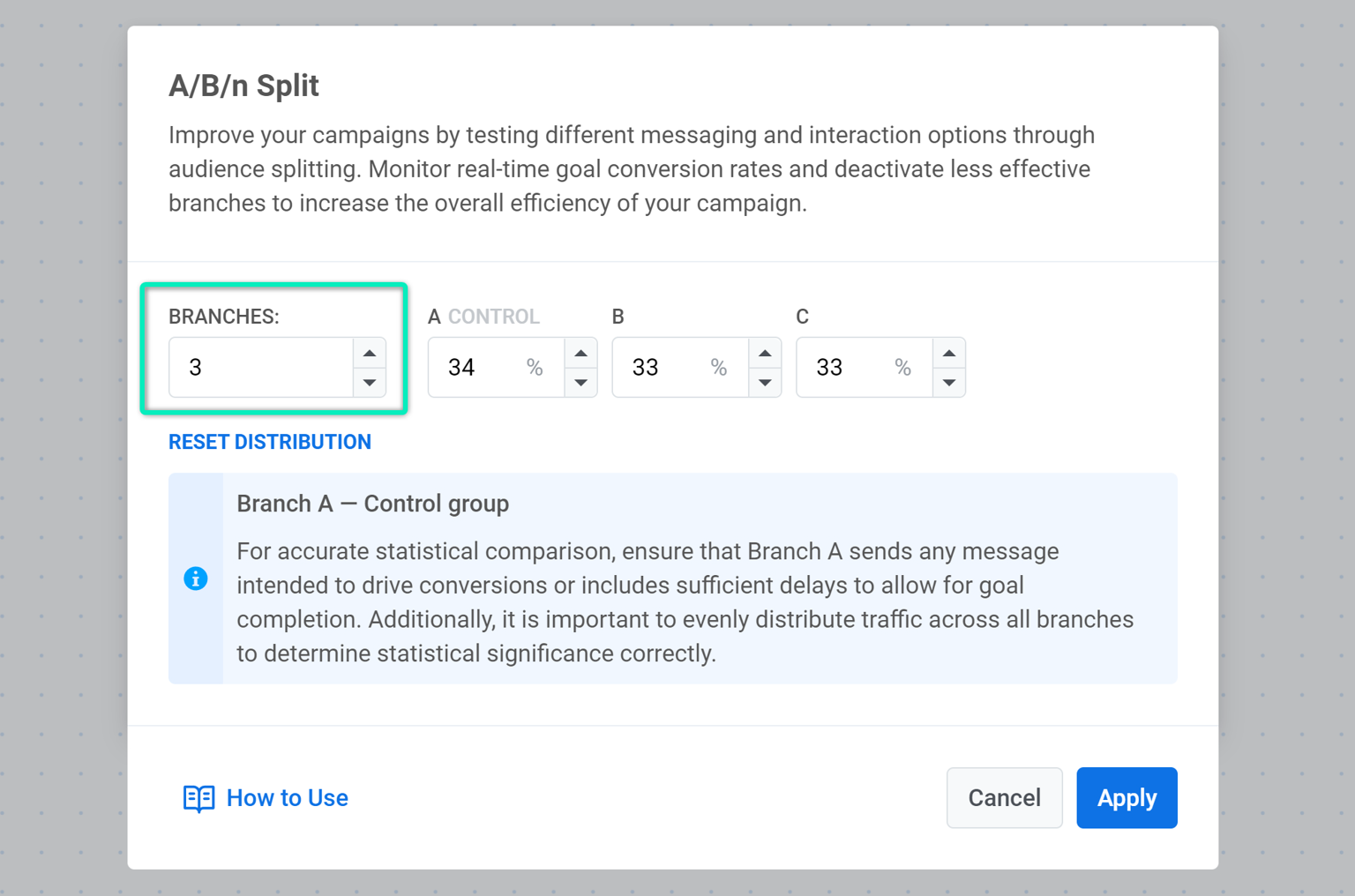
Pushwoosh allows you to test more than two different versions of your email at once to improve your campaign’s messaging even further. Simply choose how many branches of your email you want to set up for an A/B/n test, introduce the changes to the variants, and distribute the percentage among the groups.
You can set up specific Conversion Goals to help you analyze the effectiveness of your testing. As soon as you have a statistically significant winner, you want your workflow to adjust and send only the winning version for optimized results.
5. Personalize email settings
This one is simple. Just because you are based in the U.S. doesn’t mean your European contacts should receive their emails at 11 PM. To win the personalization game, simply match the time when they’re most likely to be active and available.
Most ESPs allow at least a few options for send time optimization:
- Sending the email right away: Perfect for transactional emails and urgent communications;
- Selecting a specific time across different time zones for it to be sent: Works well for event invites, product updates, etc.;
- Analyzing the recipients’ former engagement times and sending the email when they’re more likely to interact with it: Great for newsletters, new user onboarding, etc.
How to do it with Pushwoosh
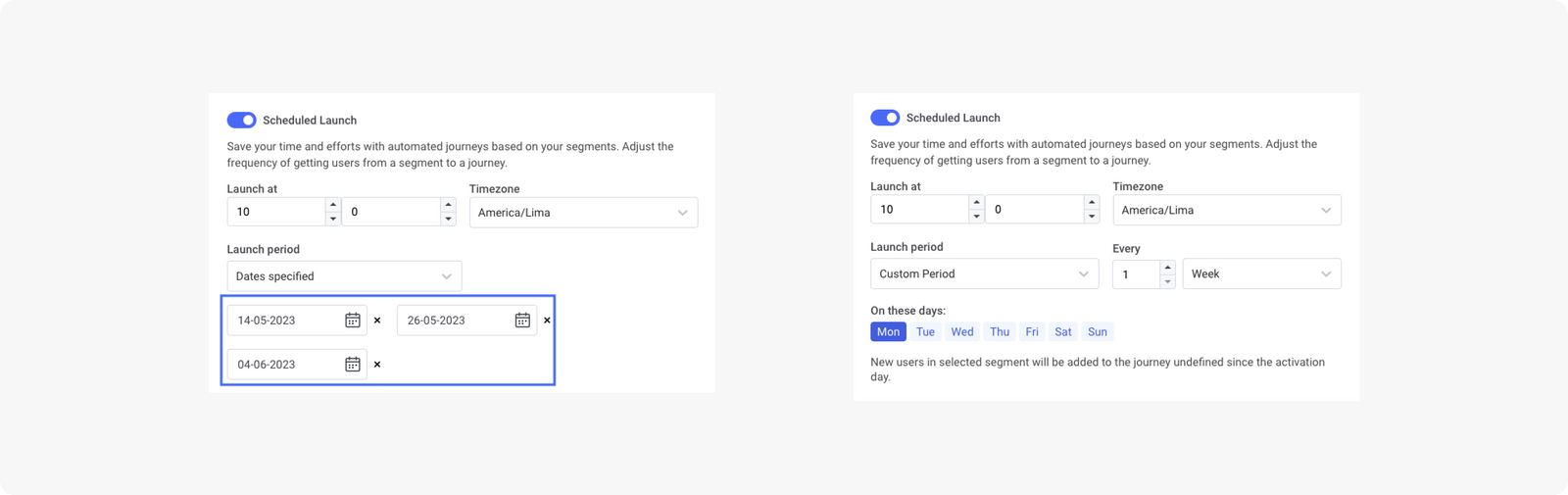
Pushwoosh comes with multiple options for optimizing your email’s send times:
- Scheduled Launch is the best functionality to start sending automated email messages for the first time.
- A dynamic Time Delay scheduling feature allows you to send an email before or after a specific action has been taken.
- Wait for Trigger option will automatically send your email once a specific condition for sending has been met.
6. Analyze and optimize future campaigns
Your email campaign has been sent but your work just begins – now it’s time to measure its performance and learn from your insights.
Metrics to focus on:
- Email deliverability: How many emails reached the intended audience (low results may indicate issues with your sender’s reputation and may require additional analysis);
- Unsubscribes: How many people found your messaging inappropriate (the average unsubscribe rate benchmark should be around 0.1%);
- Spam complaints: How many recipients were annoyed by your email to the extent that they marked it as spam;
- Click-through rate (CTR): How many people who opened your email also clicked on the links it featured.
☝️Notice how we didn’t include the Open rate. While a popular metric, due to Apple’s new privacy policy (MPP), ORs are often skewed.
Analyze your email’s performance with Pushwoosh
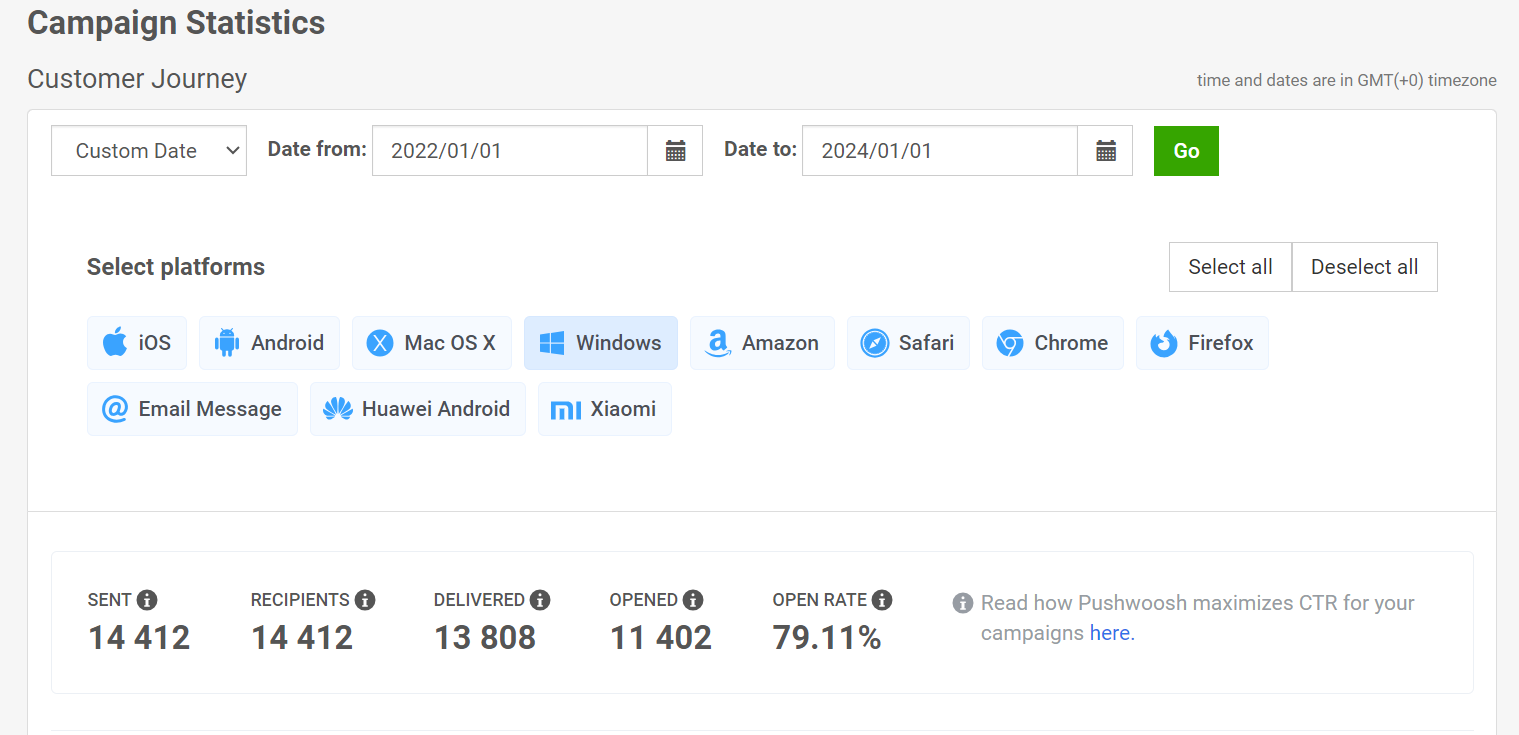
Pushwoosh provides comprehensive email statistics to help you analyze and optimize your campaign’s performance for a specific email or an entire project. You can also leverage customizable dashboards to focus on the metrics that matter to you most and identify trends.
7. Pair your emails with other communication channels
To maximize the impact of your email campaigns, try integrating them with other communication touchpoints. Multichannel synergy isn’t just about increasing coverage – it’s about crafting a cohesive user experience across platforms.
Channels that go best with email campaigns are:
- Social media: Leverage cross-promotion or retargeting campaigns to complement your email content;
- SMS: Make sure no crucial communication gets lost in the mail;
- Push notifications: Reach users on your own terms to share time-sensitive updates at a lower cost;
- In-app notifications: Facilitate user experience by guiding them through your product.
Build omnichannel campaigns with Pushwoosh
Personalized email marketing is no longer a “nice to have” — it’s the baseline expectation for any brand that wants to engage, retain, and earn from its audience. Whether you’re sending a personalized welcome email to a new user, a behavioral trigger campaign to re-engage lapsed customers, or a dynamic product recommendation to your highest-value buyers, personalization is what makes email marketing work at scale.
As a leading email marketing platform and multi-channel customer engagement platform, Pushwoosh gives you everything you need to execute sophisticated personalized email strategies at any scale:
- Pushwoosh segmentation — behavioral, demographic, RFM, and preference-based segments that update in real time
- Customer Journey Builder — visual, automated, trigger-based email workflows across the full customer lifecycle
- Dynamic content and Liquid Templates — true message-level personalization without engineering overhead
- Pushwoosh A/B testing — multi-variant testing with automatic winner selection
- Cross-channel orchestration — combine email with push notifications, in-app messages, and SMS in a single workflow
As a comprehensive marketing automation solution, Pushwoosh is purpose-built for mobile-first businesses that need to deliver the right message, on the right channel, at exactly the right moment.
Frequently asked questions about personalized email marketing
What is the main goal of personalized email marketing?
The main goal is to deliver highly relevant and timely content to individual subscribers, fostering stronger relationships, increasing engagement, and ultimately driving conversions and revenue. It moves beyond generic mass emails to provide value tailored to each customer’s needs and behaviors.
How does email personalization increase ROI?
Email personalization increases personalized email ROI by boosting key metrics such as open rates, click-through rates, and conversion rates. By delivering relevant content and offers, it reduces unsubscribe rates, enhances customer loyalty, and leads to more repeat purchases and higher customer lifetime value.
What data do I need for effective email personalization?
Effective email personalization relies on comprehensive customer data, including demographic information (e.g., age, location), behavioral data (e.g., website/app activity, purchase history, viewed products), transactional data (e.g., order confirmations, shipping), and preference data (e.g., content interests, communication frequency).
How can I use dynamic content in personalized emails?
Dynamic content allows different parts of an email (e.g., images, product recommendations, offers, entire content blocks) to change based on the recipient’s data. You can use it to display personalized product carousels, location-specific deals, relevant articles, or even different sender names based on customer segments.
Can I automate personalized email campaigns?
Yes, personalized email campaigns can and should be automated using a robust marketing automation solution or customer engagement platform. This involves setting up trigger-based emails (e.g., abandoned cart, welcome series, birthday messages) that are sent automatically when specific conditions or events occur, ensuring timely and relevant communication at scale. Pushwoosh’s Customer Journey Builder makes it straightforward to automate personalized emails across the full customer lifecycle.
How to create personalized emails?
Understanding how to create personalized emails starts with collecting rich customer data, segmenting your audience based on behaviors and attributes, using dynamic content and merge tags to personalize content blocks and subject lines, and automating delivery through trigger-based workflows. Tools like Pushwoosh provide a drag-and-drop email editor, behavioral segmentation, and a Customer Journey Builder to make this process accessible without deep technical skills.