Welcome emails set the tone for how your new users expect to interact with your brand. Greeting newcomers with the right messages is important for building their loyalty, increasing retention and lifetime value. In this article, we’ll share the best practices for creating effective welcome emails and even provide an ultimate welcome email template to get you started!
The success of your customer onboarding efforts is highly dependent on the first few touchpoints, and it all starts with a welcome email.
What is a welcome email?
A welcome email is the first touchpoint with your newly acquired user. Usually, it’s a friendly hello that encourages them to interact with your product, gently guides them to the first purchase, or just simply shows that you care.
What makes a good welcome email?
A good welcome email is informative, neat, and engaging. It briefly explains the basics, creates interest and tells you what to do next.
Ideally, your welcome email delivers on the promise of your newsletter (which you made in the signup form) and contains an incentive to stimulate further engagement. Assuming that you are building your subscriber list organically, which is way preferred over renting an email list, you want to follow best practices for welcome emails. You will find them in this blog post.
☝️ Even though there are best practices, it’s important to remember that different businesses have different audiences, so A/B/n testing is always highly recommended.
Welcome email template
Crafting a welcome email can sometimes feel overwhelming, but starting with a ready-made template makes the process much easier. With Pushwoosh’s drag-and-drop email builder, you can access professional and engaging email templates and get started quickly without worrying about structure and design.
Here’s an example of a welcome email template for a language-learning app:
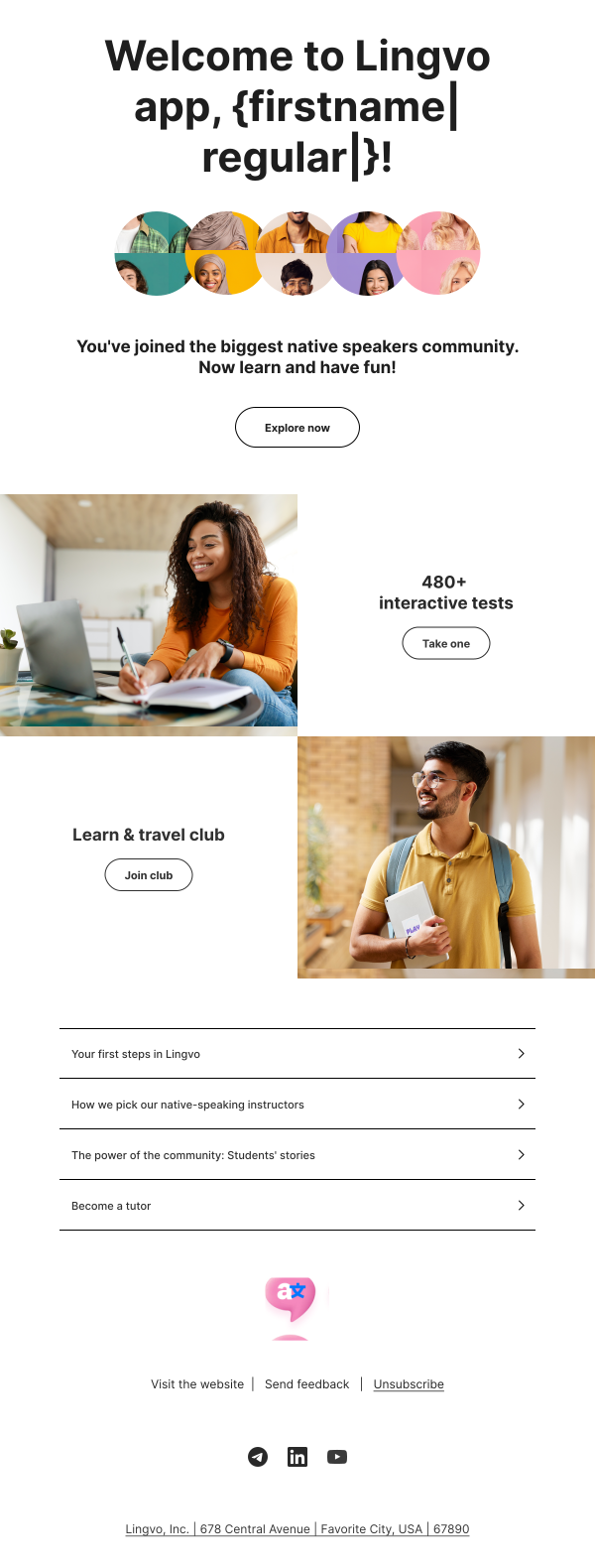
What makes this email template effective?
- Personalization based on a user’s name;
- Engaging visuals that create a sense of community;
- Multiple CTA buttons that offer users a choice of actions;
- Links to the overview content that helps users get to know the app better.
All of these elements work together to create a seamless introduction to the app, ensuring a high activation rate.
👉**To use the template:** Log in or
Sign up for Pushwoosh, go
to **Content** >
**Email Content** >
press ‘Create email content’ > press ‘Choose a template.’ Several email
templates will then appear, ready to use as is or
customize.
Examples of welcome emails that set the tone for success
Figma
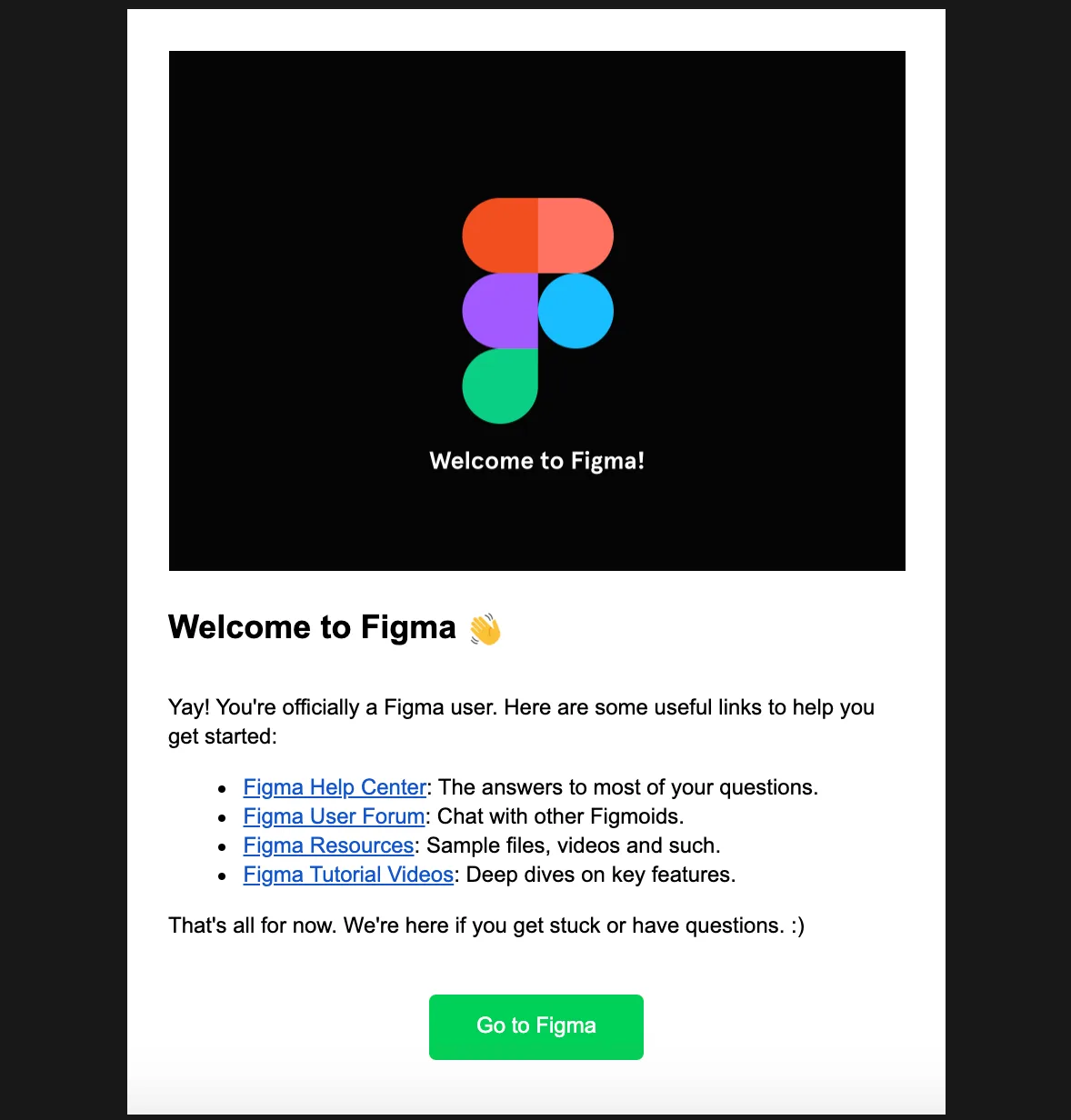
Figma is a popular browser-based UI/UX design tool. Its welcome email greets new users with a logo, expresses excitement about a new user and offers helpful tips on how to start using the application.
Best practices to follow:
❇️ Keep your copy short, clear and actionable.
❇️ Be precise about your CTA: in the example of this welcome email from Figma, the call-to-action button button takes users to the dashboard where they can start creating.
Grammarly
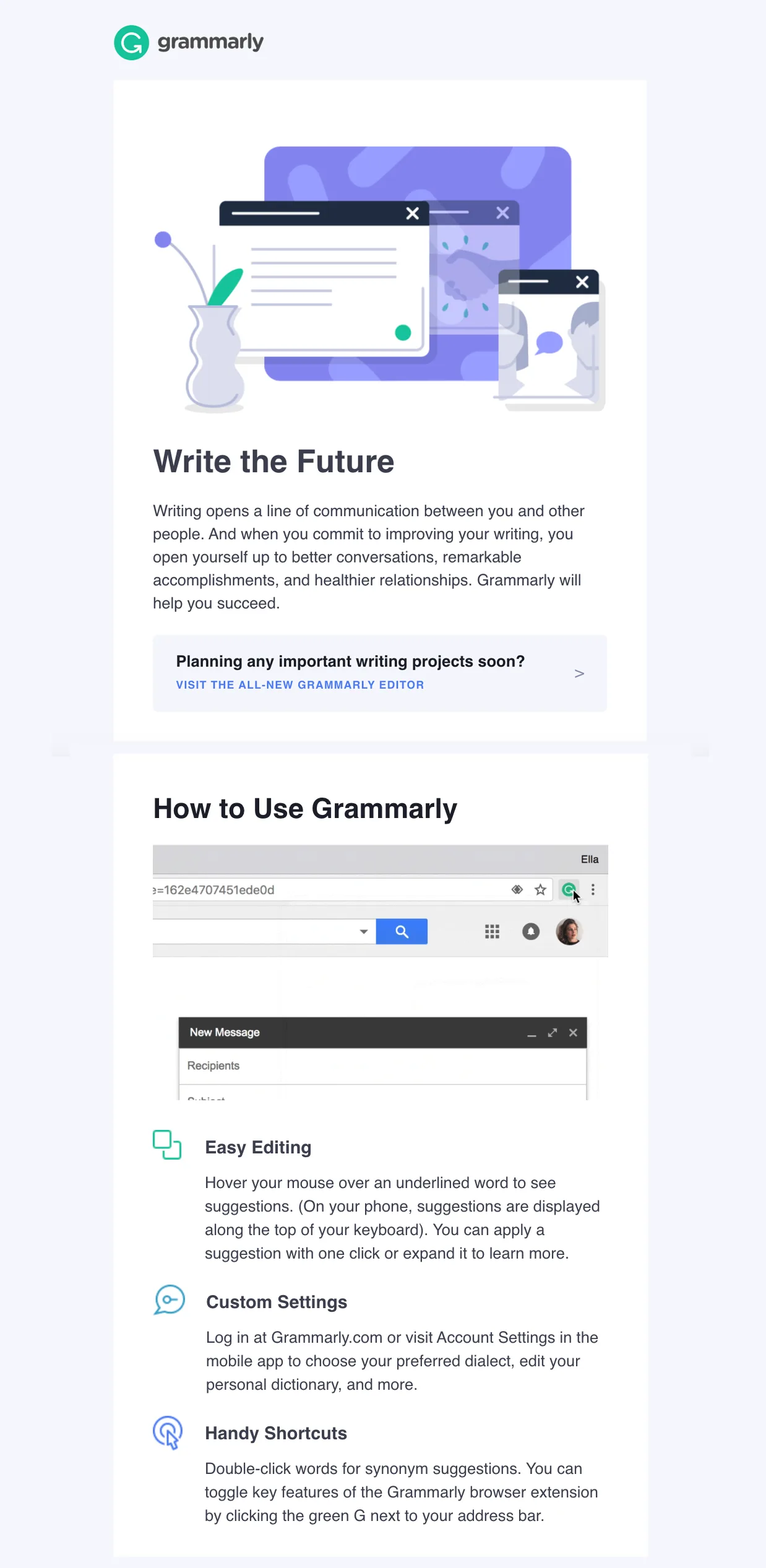
Grammarly is a digital writing tool that processes language with the help off artificial intelligence. Its welcome email is inspiring and informative. Once again, it also offers a short guide on how to use the service, explains its value. With the help of gifs and screenshots, the functionality is shown in a visual, easy-to-understand way.
Best practice to follow:
❇️ Mention a limited list of values your welcome email reader may get from your product. If you succeed in engaging a customer with this very first communication, you’ll have all the time in the world to talk about more features and use cases later on.
Asana
Asana is a popular project management solution that you even might be using in your team. Asana’s welcome email contains all the tips a user might need to start working with the tool. The CTA takes new users to the dashboard where tips appear as they study it.
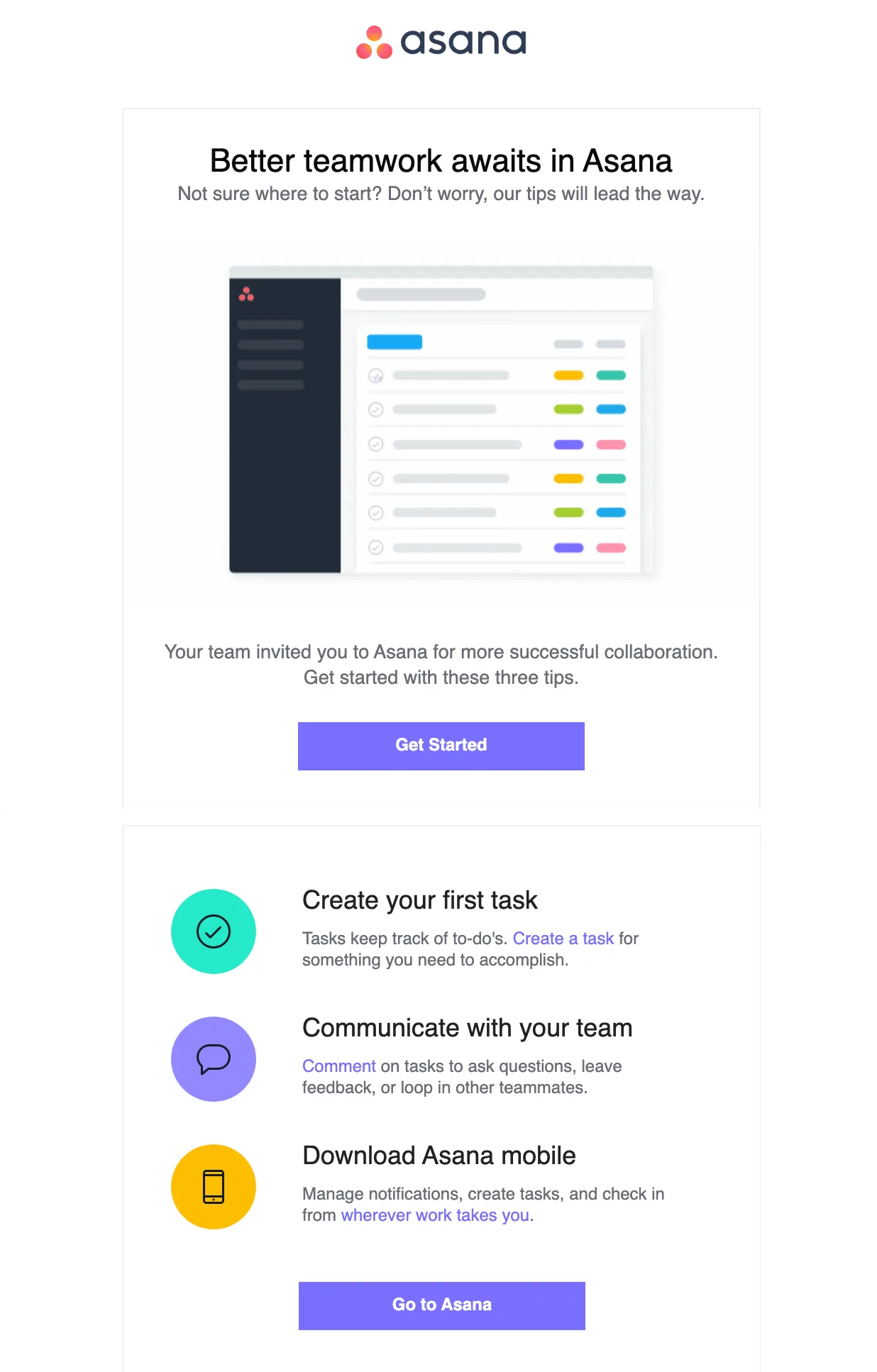
Best practice to follow:
❇️ Make your welcome email work in concert with other onboarding activities — for example, add links to the video tutorials to the body of your first email or, like Asana, have useful tips in your interface to keep familiarizing new users with your product in the right context.
Airbnb
Airbnb might need no introduction as it’s a well-known online marketplace for arranging or offering lodging, primarily homestays, or tourism experiences. Its welcome email is a colorful greeting that motivates new “community members” to start exploring the experiences Airbnb offers. The email contains all the buttons a new user might need to help them get the most out of the service.
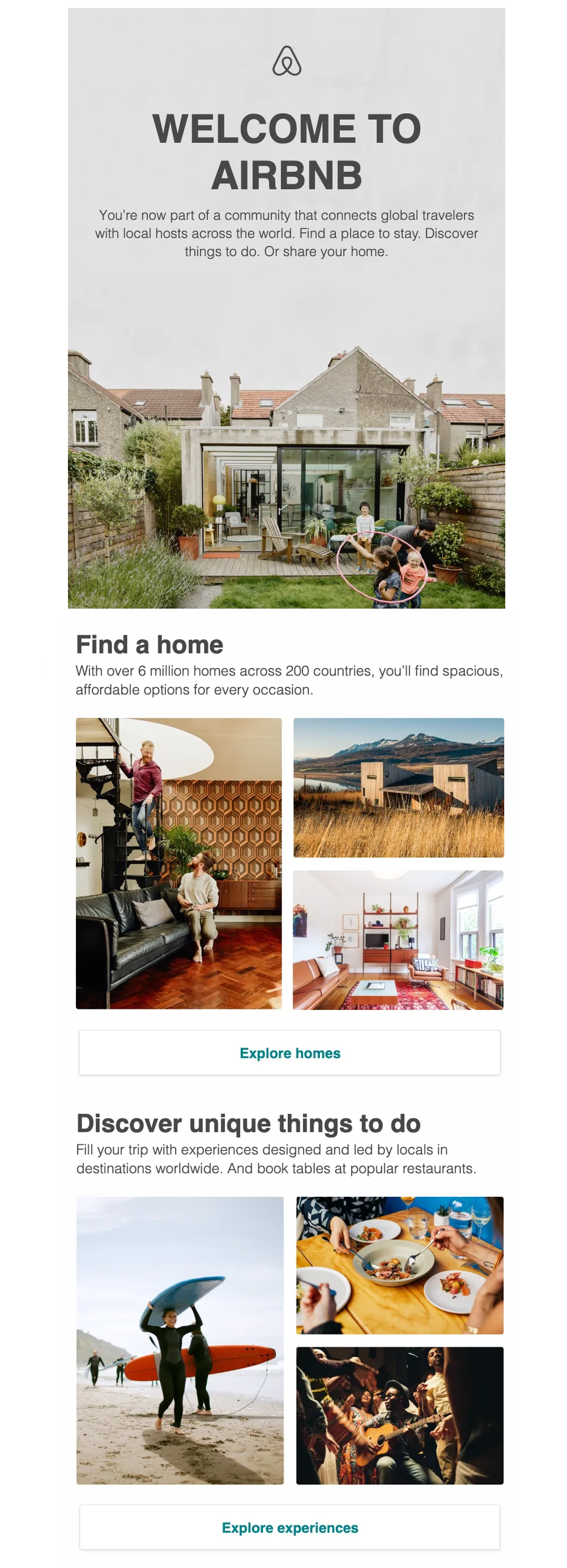
Best practice to follow:
❇️ Treat your welcome email as an opportunity for your brand to shine brightly. Feature compelling imagery that tells your brand story and speak with your audience in the tone of voice that both resonates with your customers and makes you stand out from other services.
Welcome email FAQ
Why are welcome emails important for customer engagement?
A welcome email is the first step in building a meaningful relationship with your new users. It sets expectations for how they will interact with your app and gives them a glimpse into the benefits they can gain. By offering a warm greeting and introducing key features, a welcome email increases the likelihood of long-term engagement and boosts customer retention rates.
What should you include in a welcome email?
An effective welcome email should include a greeting, a summary of the app’s unique value, and clear next steps to help users get started. You might also want to include a strong CTA, personalized content based on user interests, and links to tutorials or resources that simplify the onboarding process.
How do welcome emails affect user retention?
Welcome emails play a key role in user retention by creating a memorable first impression and highlighting features that encourage continuous use. By engaging users early on with useful tips and an introduction to the app’s core functionalities, you lay the groundwork for ongoing engagement, which ultimately leads to higher retention rates and a stronger user base.
How can you personalize a welcome email?
Personalizing a welcome email can be as simple as using the user’s name or as detailed as tailoring content based on their goals and preferences. Pushwoosh Customer Data Platform platform makes it easy to collect and leverage user data for this level of personalization.
So, how do you make a good welcome email?
To sum it up, there are no strict rules on creating a well-performing welcome email. However, there are certain traits that all effective welcome emails share. Neat, informative and engaging emails will make a great contribution to the success of your marketing communications.
Learn which tools will help you to create an effective welcome email — explore what Pushwoosh has to offer within its email marketing solution. Or discover our customer engagement platform in its full capacity on a personal product tour: