Pushwoosh integration with AppsFlyer ESP 2.0
Track email clicks in AppsFlyer and preserve Universal Links and App Links when Pushwoosh wraps links for email tracking.
- Email click attribution in AppsFlyer
- Deep linking preserved for wrapped email links
- Lightweight setup on the Pushwoosh side

What this integration does
If you send emails through Pushwoosh and use AppsFlyer for attribution, email clicks can become a blind spot: links open in the browser instead of the app, and AppsFlyer doesn’t see the click. ESP 2.0 fixes both — your users land in the app, and every click shows up in AppsFlyer with full attribution.
Users land in the app, not the browser
Deep links from email work correctly on iOS and Android — no extra redirects, no broken UX.
Email clicks visible in AppsFlyer
Every email click appears in AppsFlyer with attribution data, alongside your other channels.
One-time setup, nothing breaks
Your email campaigns, link wrapping, and click statistics continue to work as before. Setup takes one round with Pushwoosh support.
How it works
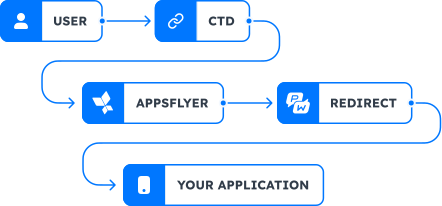
What happens from the moment a user clicks an email link to landing in the app.
- Pushwoosh wraps links — tracking URLs replace email links on the CTD. Link structure stays the same.
- Click goes to AppsFlyer — via CNAME, AppsFlyer handles attribution, SSL, and deep linking.
- Pushwoosh records the click — AppsFlyer sends a callback so click stats are preserved on both sides.
- User lands in the app — AppsFlyer routes to the app via deep link or to the final web destination.
How to set up
Create a new click tracking domain
A new CTD is required, even if you already have one. This keeps your existing email traffic unaffected. You'll need a Pushwoosh app with email configured, an AppsFlyer account with ESP 2.0 enabled, and access to your domain DNS settings.
Contact Pushwoosh
Share your new CTD and Pushwoosh application code. Pushwoosh activates the domain and provides a CNAME target.
Point CTD to Pushwoosh
Create a CNAME record pointing to the Pushwoosh target. Verify that wrapped links use the new CTD.
Complete integration in AppsFlyer
Provide your click tracking domain and ESP endpoint in AppsFlyer. AppsFlyer validates the configuration.
Update CNAME to AppsFlyer
After validation, repoint the CTD to AppsFlyer routing domain. DNS propagation can take up to 24 hours.
Frequently asked questions
How Pushwoosh and AppsFlyer work together
| Responsibility | Pushwoosh | AppsFlyer |
|---|---|---|
| CTD activation | ✅ | — |
| CNAME target | ✅ | — |
| Link wrapping | ✅ | — |
| Click statistics | ✅ | ✅ |
| Click routing | — | ✅ |
| SSL certificates | — | ✅ |
| Deep linking (AASA / App Links) | — | ✅ |
| ESP 2.0 validation | — | ✅ |


