Lifecycle campaigns महीनों से आपकी backlog में पड़ी हैं। हर sprint में कुछ और pre-requisite आ जाता है: cleaner user IDs, event taxonomy review, data warehouse connection। कुछ भी पूरी तरह से finish नहीं होता, और campaigns कभी launch ही नहीं होतीं।
यह assumption गलत है कि launch से पहले आपको perfect data foundation चाहिए। हर mobile SDK Day 1 से जो default signals track करता है (events जैसे DeviceRegistered और ApplicationOpen) — वो काफी हैं ऐसी lifecycle journeys बनाने के लिए जो retention को actually move करें।
यहां 3 lifecycle campaigns हैं जो आप इस हफ्ते सिर्फ इस data पर launch कर सकते हैं — खासकर भारतीय market के लिए relevant जहां Android का 95%+ market share है और budget-conscious scale-ups को Braze-level price points afford नहीं होते।
3 lifecycle journeys जो retention बेहतर करती हैं — एक नज़र में
User lifecycle में 3 main points हैं जहां retention टूटती है। नीचे दी गई हर journey एक-एक को address करती है।
| Journey | Lifecycle stage जो यह close करती है | Trigger (default data) | Primary channels | Track करने की metric |
|---|---|---|---|---|
| 1. Onboarding (Day 1–7) | Install से activation तक | DeviceRegistered event | Push + in-app + email | Day-7 activation rate |
| 2. Engagement nudge (Day 7–30) | Activation से habit तक | Segment: DeviceRegistered 7 days ago | Push → in-app या email | Day-30 retention |
| 3. Dormant reactivation | Habit से loss तक | Segment: 14+ days से कोई ApplicationOpen नहीं | Push → in-app → email | Reactivation rate |
DeviceRegistered eventDeviceRegistered 7 days agoApplicationOpen नहींये 3 journeys ही क्यों?
क्योंकि retention predictable points पर ही टूटती है, और अधिकांश apps इन्हीं 3 moments पर users खोते हैं।
पहला breaking point: install → activation. Mobile app install करने वाले लगभग आधे users Day 1 के बाद कभी वापस नहीं आते। उन्हें win करने का window short होता है, और user real-time में decide कर रहा होता है: यह मेरे attention के लायक है या नहीं? Journey 1 इसे address करती है।
दूसरा breaking point: activation → habit. जिस user ने onboarding complete किया लेकिन अगले कुछ हफ्तों में app 3-4 बार नहीं खोला, वो long-term में rarely टिकता है। बिना repetition के activation सिर्फ one-off trial है। Journey 2 बिल्कुल उसी window को target करती है — Day 7 से 30 — जहां intent को routine में बदलना होता है।
तीसरा breaking point: habit → loss. Engaged users भी drift करते हैं। Week-to-week देखें तो dramatic नहीं लगता, लेकिन एक quarter में cumulative basis पर यहीं सबसे ज्यादा retention silently evaporate होती है। Journey 3 users को catch करती है इससे पहले कि drift permanent हो जाए।
ये 3 foundation हैं। आगे चलकर शायद आप और add करेंगे (cart abandonment — Indian e-commerce के लिए critical, paywall recovery, milestone messages) लेकिन वो specific moments serve करती हैं। ये 3 basic journeys हर mobile app के हर user को serve करती हैं।
कैसे शुरू करें और “default SDK data” का actual मतलब क्या है
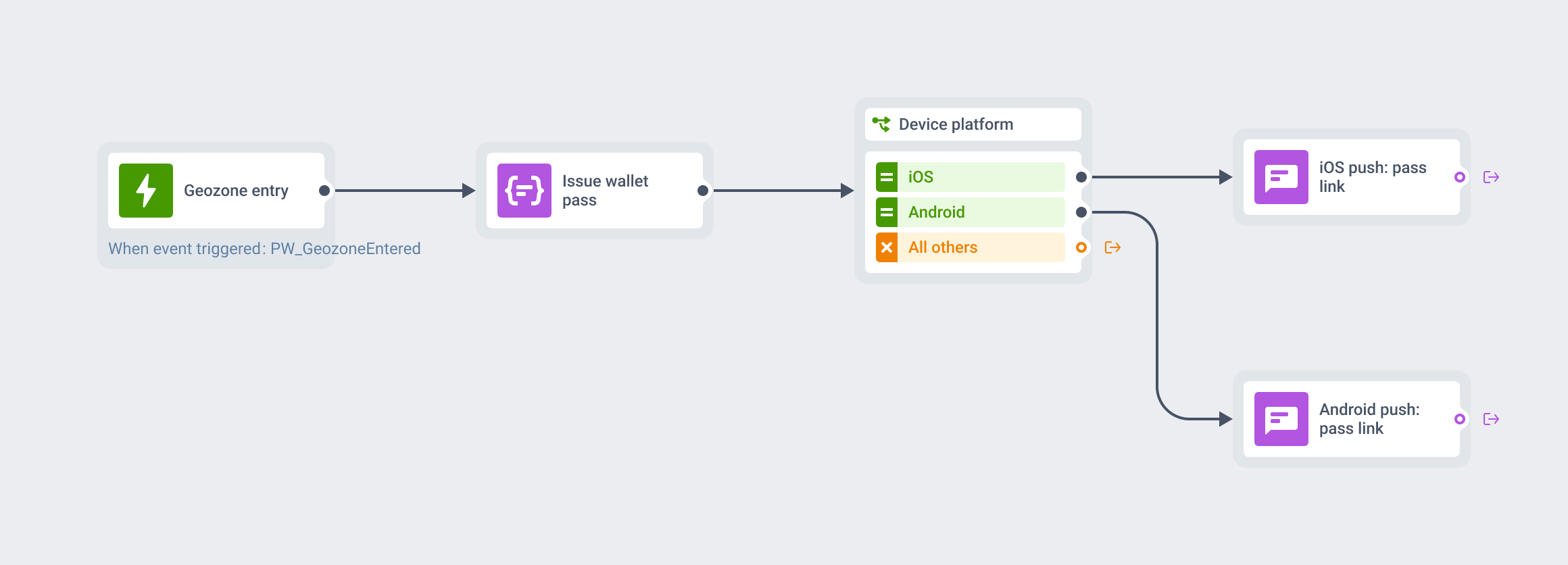
इन campaigns को run करने का easiest तरीका है अपने app को एक customer engagement platform से connect करना (जैसे Pushwoosh — free to start). भारतीय market के लिए important point: Android की 95%+ market share है, इसलिए FCM integration via Pushwoosh entry-level Android devices (Xiaomi, Realme, Samsung Galaxy M-series) पर stable delivery करती है — जो भारत में dominant device class है।
ऊपर वाली journeys के लिए जो default events चाहिए:
PW_DeviceRegistered— हर device पर एक बार fire करता है, first-time app launch और SDK initialization पर। यह आपका install signal है। Onboarding के लिए trigger-based entry के तौर पर use करें।PW_ApplicationOpen— हर बार जब user app launch करे fire करता है। Most recent fire के timestamp को session-activity signal की तरह use करें। “Last open more than 14 days ago” आपका dormancy segment है।
यही पूरा starting kit है। Default events की पूरी list Pushwoosh docs में मिलेगी।
Journey 1: New user onboarding (Day 1–7)
यह क्या close करती है: Install और activation के बीच का drop। Mobile retention में सबसे steep decay install के पहले 3 days में होती है — एक नया user जितनी देर पहली useful moment तक नहीं पहुंचता, वापस आने के odds उतने कम।
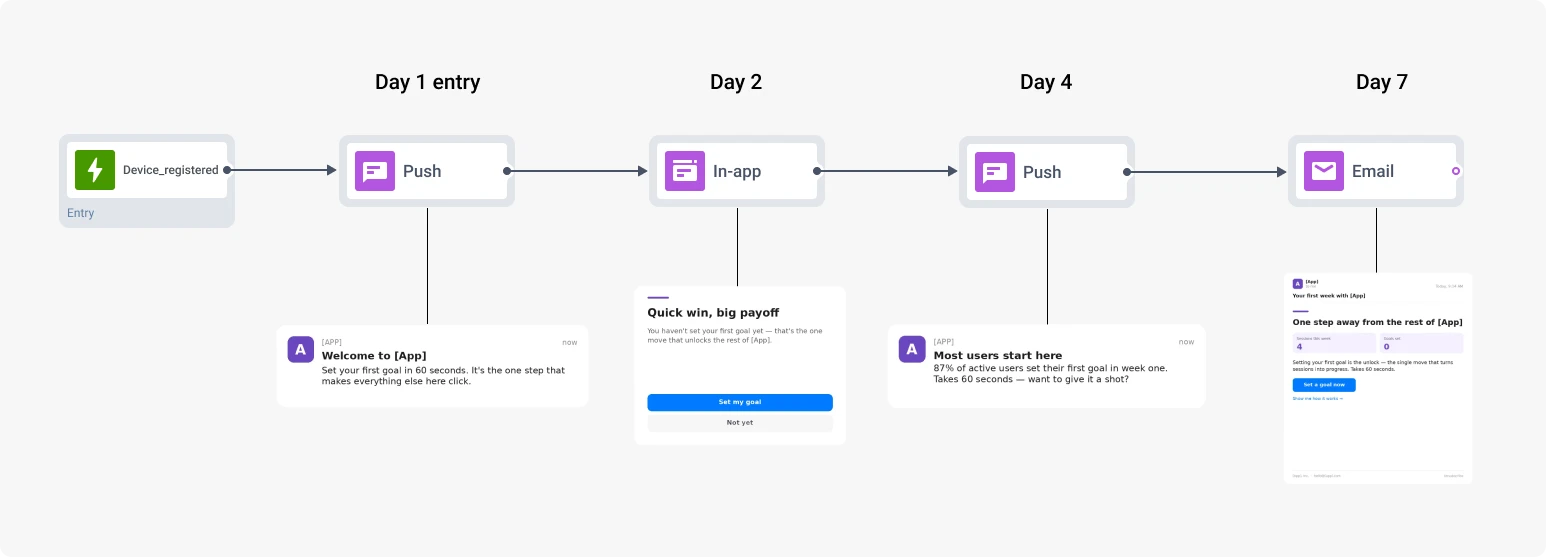
Entry trigger: PW_DeviceRegistered (trigger-based entry)। हर new install automatically journey में enter करता है।
Sequence:
- Day 1: Welcome push या in-app, single most useful first action पर point करते हुए: dashboard खोलें, goal set करें, first order place करें, profile complete करें।
- Day 2: अगले session opening पर in-app message — same key action को context में surface करें।
- Day 4: Push notification: “आपने अभी तक [X] try नहीं किया — यहां क्यों ज्यादातर users यहीं से start करते हैं।”
- Day 7: Email या in-app first-week recap — “ये है जो आपने किया, ये है next step।”
Metric: Day-30 retention (D7) और Day 7 पर activation rate (वो new users की share जिन्होंने key action complete की)।
Journey 2: Engagement nudge (Day 7–30)
यह क्या close करती है: Activation और habit के बीच का drop। जिस user ने onboarding complete किया लेकिन अपने first few weeks में regularly वापस नहीं आता, वो long-term में rarely टिकता है। “Tried it” को “uses it weekly” में convert करने का window लगभग Day 7 से 30 तक है।
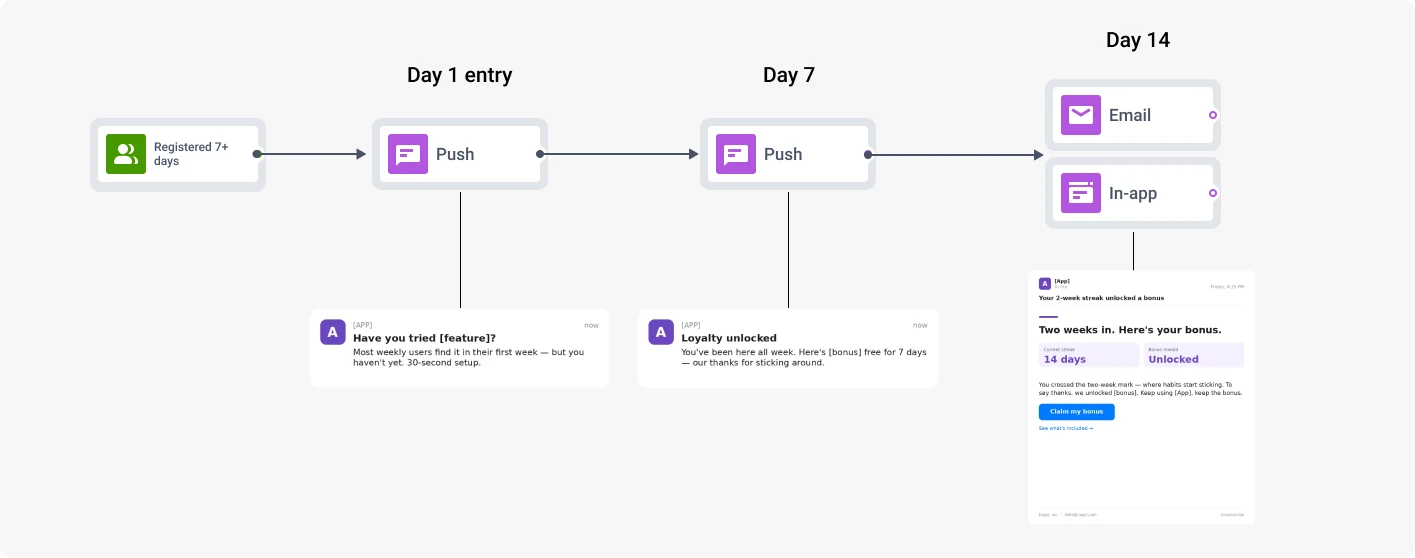
Entry trigger: Segment-based entry “PW_DeviceRegistered 7 days ago registered।” Always-on, तो users seven-day mark cross करते ही rolling basis पर enter करते हैं।
Sequence:
- Entry पर: Push notification जो कोई useful feature या नया content surface करे जिसे user ने अभी तक try नहीं किया।
- Day 7: Push notification — loyalty nudge या social proof message (“आप जैसे users यह भी करते हैं”)।
- Day 14: Email या in-app summary: “ये है जो आपने किया, ये है next।” Soft, recap-style।
- Exit: User किसी भी 7-day window में 3 sessions से नीचे गिरे → journey naturally end होती है। अगर वो drift करते रहें, Journey 3 उन्हें pick up करती है।
Metric: Day-30 retention (D30) और अगले 30 days में session frequency।
Journey 3: Dormant user reactivation (14+ days idle)
यह क्या close करती है: Habit और loss के बीच का drop। एक बार जब user quiet हो जाता है, हर additional day जब वो app open नहीं करता return को less likely बनाता है। Dormancy के पहले 2 weeks में reactivation की real odds होती हैं।
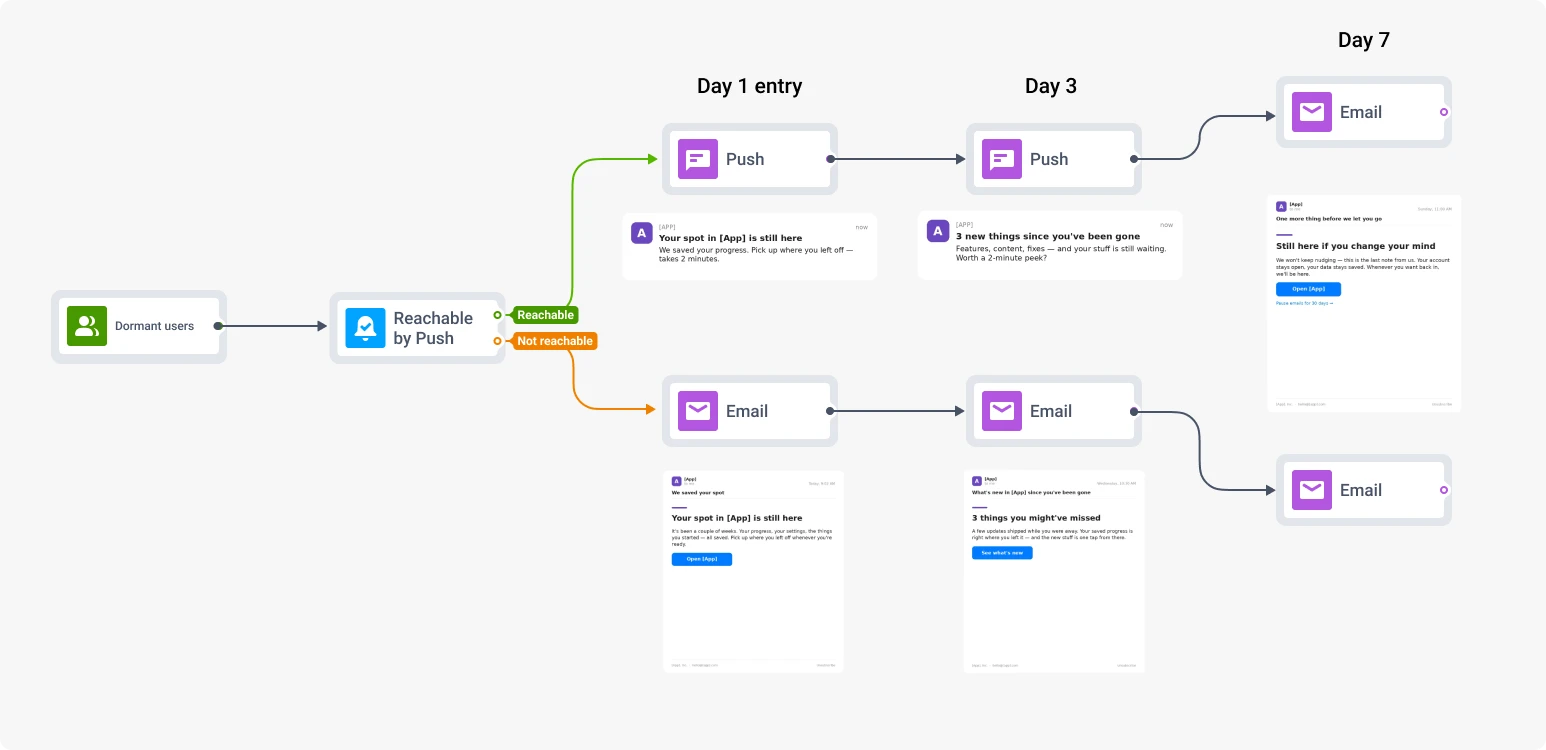
Entry trigger: Segment-based entry “वो users जिनके पास last 14 days में कोई PW_ApplicationOpen events नहीं हैं।”
Segment: Dormant users, Reachability check element से split:
- Push-reachable — primary group, push touch पहले मिलता है।
- Push-unreachable — push completely bypass, अगले return पर in-app या immediately email। भारतीय context में important — कई entry-level devices पर aggressive battery optimization push delivery को unreliable बना सकती है।
Sequence: सात days में तीन-touch campaign। हर touch soft reminder से more pointed value pitch तक escalate होता है:
- Entry पर. Reactivation push: वापस आने का personal-feeling reason — content जो उन्हें पसंद था, feature जो उन्होंने most use की, missed unread notification। Push-unreachable users के लिए, same content email के through send करें।
- Day 3. अगर कोई return नहीं: stronger pull — क्या नया है, क्या वो miss कर रहे हैं, या incentive। Reachable group के लिए push, बाकी के लिए email।
- Day 7. Final touch: email recap, opt-out-friendly।
- Exit condition: 7 days के अंदर session होती है → journey success mark करती है, user exit करता है।
Metric: Reactivation flow में enter करने के 7 days के अंदर session।
ManyMoney AI के एक prompt से scale करें
इस तरह से आप इस हफ्ते easily 3 journeys build कर सकते हैं। अगली बार, अगर आप नई locale, नया segment, testing के लिए नया variant set create करना चाहें, तो build repeat नहीं करना पड़ेगा। इसे ManyMoney AI, Pushwoosh के marketing co-pilot को hand off करें।
[Segment X] के लिए जो onboarding journey live है उसे लोऔर [नए segment / नई locale / नए offer] के लिए adapt करो।Structure same रखो, copy और channel logic regenerate करो,draft के तौर पर prepare करो।ManyMoney AI एक journey draft return करता है adapted copy, channel routing और timing के साथ, review के लिए ready। आपको बस approve करना और ship करना है। पहला build आपको platform सिखाता है; ManyMoney हर अगले cycle के लिए इसे scale करता है और campaign performance analyse करता है।