Lifecycle campaigns have been sitting in your backlog for months. Every sprint, one more thing has to ship before they can start — cleaner user IDs, an event taxonomy review, a data warehouse connection. None of it ever quite finishes, and the campaigns never launch.
The premise behind this that you need a perfect data foundation before launching is wrong. The default signals every mobile SDK tracks from day 1 (events like DeviceRegistered and ApplicationOpen) are enough to build lifecycle journeys that move retention.
Here are the 3 lifecycle campaigns you can launch this week on that data alone.
The 3 lifecycle journeys that improve retention — at a glance
The user lifecycle has 3 main points where retention breaks down. Each of the 3 journeys below corrects one of them.
| Journey | Lifecycle stage it closes | Trigger (default data) | Primary channels | Metric to track |
|---|---|---|---|---|
| 1. Onboarding (Day 1–7) | Install to activation | DeviceRegistered event | Push + in-app + email/in-app | Day-7 activation rate |
| 2. Engagement nudge (Day 7–30) | Activation to habit | Audience segment: DeviceRegistered 7 days ago | Push → in-app or email | Day-30 retention |
| 3. Dormant reactivation | Habit to loss | Audience segment: no ApplicationOpen for 14+ days | Push → in-app → email | Reactivation rate |
Why these 3 journeys?
Because retention breaks at predictable points, and most apps lose users at the same 3 moments.
The 1st is install to activation. About half the users who install a mobile app never come back after day one. The window to win them is short, and the user is making the decision in real time: is this worth my attention or not? That’s what Journey 1 addresses.
The 2nd is activation to habit. A user who completed onboarding but doesn’t open the app 3 or 4 times in the next few weeks rarely sticks long-term. Activation without repetition is just a one-off. Journey 2 targets exactly that window — Day 7 through 30 — where intent has to turn into routine.
The 3d is habit to loss. Even engaged users drift. The drop-off doesn’t look dramatic week to week, but compounded over a quarter it’s where most retention quietly evaporates. Journey 3 catches users before that drift becomes permanent.
These 3 are the foundation. You’ll likely add more later (cart abandonment, paywall recovery, milestone messages) but those serve specific moments. But these basic journeys serve every user in every mobile app.
How to start and what “default SDK data” actually means
The easiest way to run these campaigns is to connect your app to a customer engagement platform (like Pushwoosh, it’s free to start).
Here are the default events you need for the journeys above.
- PW_DeviceRegistered — fires once per device, on the first-time app launch and SDK initialization. This is your install signal. Use it as a trigger-based entry for onboarding.
- PW_ApplicationOpen — fires every time a user launches the app. Use the timestamp of the most recent fire as your session-activity signal. “Last open more than 14 days ago” is your dormancy segment.
That’s the whole starting kit. Find the full list of default events in the Pushwoosh docs.
Journey 1: New user onboarding (day 1–7)
What it closes: The drop between install and activation. The steepest decay in mobile retention happens in the first 3 days after install — the longer a new user goes without reaching their first useful moment, the lower the odds they’ll come back.
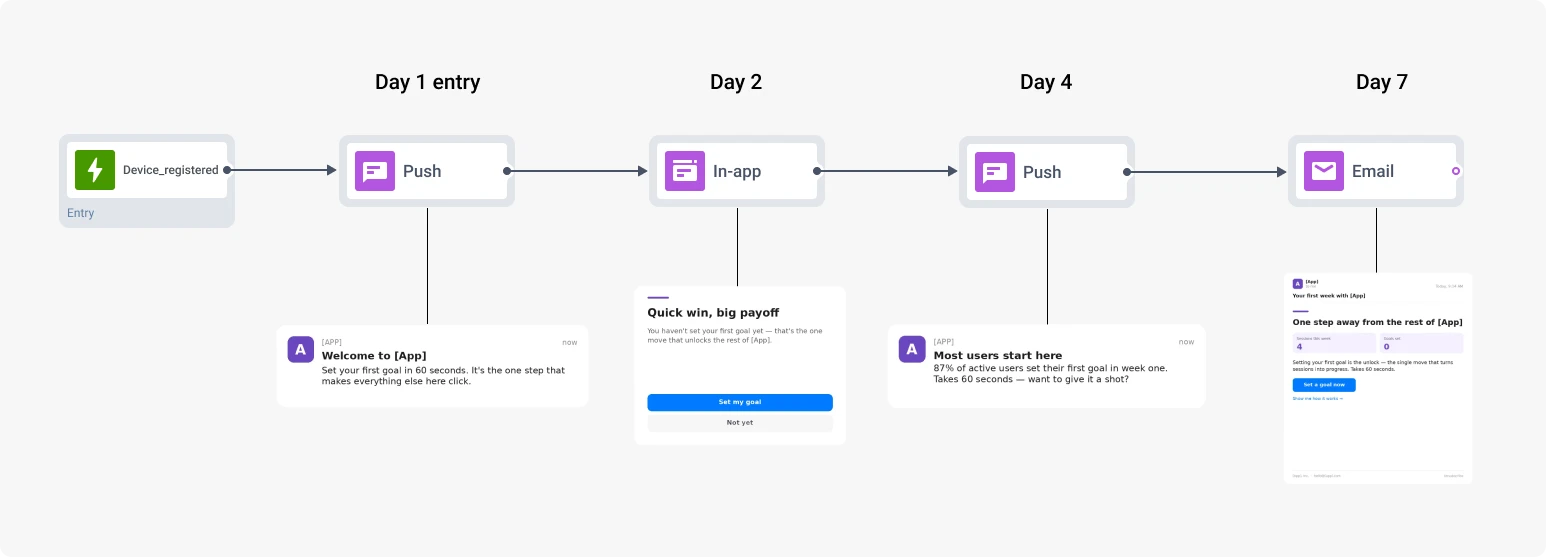
Entry trigger: PW_DeviceRegistered (Trigger-based Entry). Every new install enters the journey automatically.
Sequence:
- Day 1: Welcome push or in-app, pointing at the single most useful first action: open the dashboard, set a goal, place a first order, complete a profile.
- Day 2: In-app message at the next session opening — surface the same key action in context.
- Day 4: Push notification: “You haven’t tried [X] yet — here’s why most users start here.”
- Day 7: Email or in-app first-week recap — “here’s what you’ve done, here’s what to do next.”
Metric: Day-30 retention (D7) and Activation rate at day 7 (share of new users who completed the key action).
Journey 2: Engagement nudge (Day 7–30)
What it closes: The drop between activation and habit. A user who completed onboarding but doesn’t come back regularly in their first few weeks rarely sticks long-term. The window to convert “tried it” into “uses it weekly” is roughly Days 7 through 30.
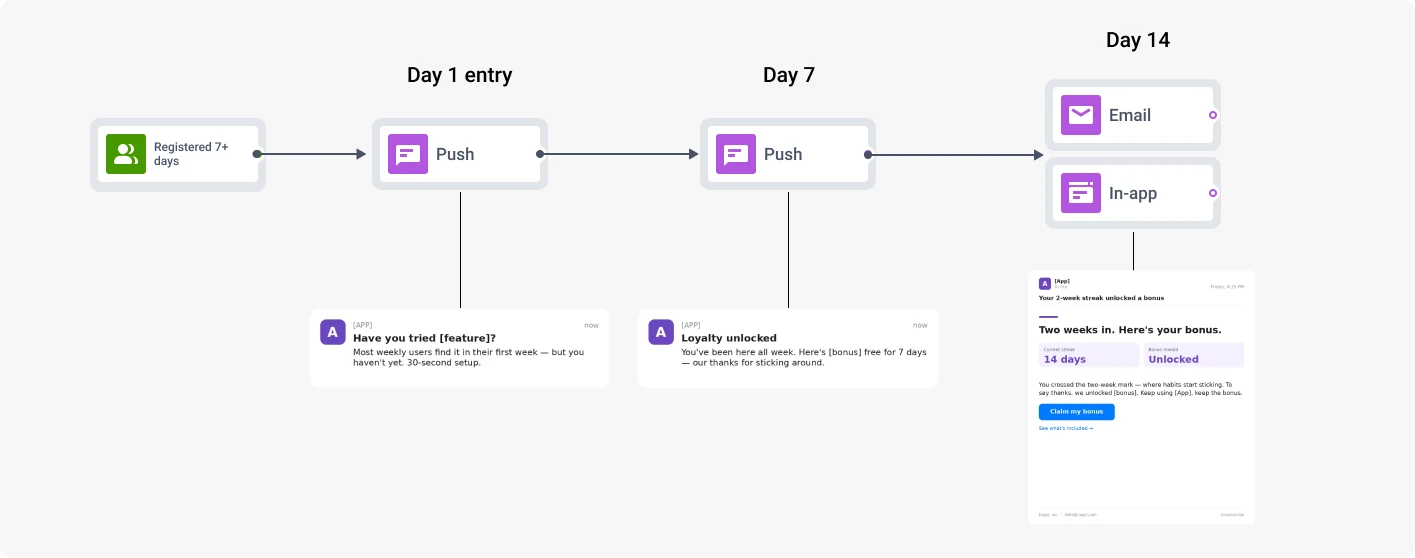
Entry trigger: Segment-based entry “PW_DeviceRegistered registered 7 days ago.” Always-on, so users enter on a rolling basis as they cross the seven-day mark.
Sequence:
- At entry: Push notification surfacing a useful feature or new content the user hasn’t tried yet.
- Day 7: Push notification — loyalty nudge or social proof message (“users like you also do X”).
- Day 14: Email or in-app summary: “here’s what you’ve done, here’s what’s next.” Soft, recap-style.
- Exit: User drops below 3 sessions in any 7-day window → journey ends naturally. If they keep drifting, Journey 3 picks them up.
Metric: Day-30 retention (D30) and session frequency over the next 30 days.
Journey 3: Dormant user reactivation (14+ days idle)
What it closes: The drop between habit and loss. Once a user goes quiet, every additional day they don’t open the app makes a return less likely. The first 2 weeks of dormancy are when reactivation still has real odds.
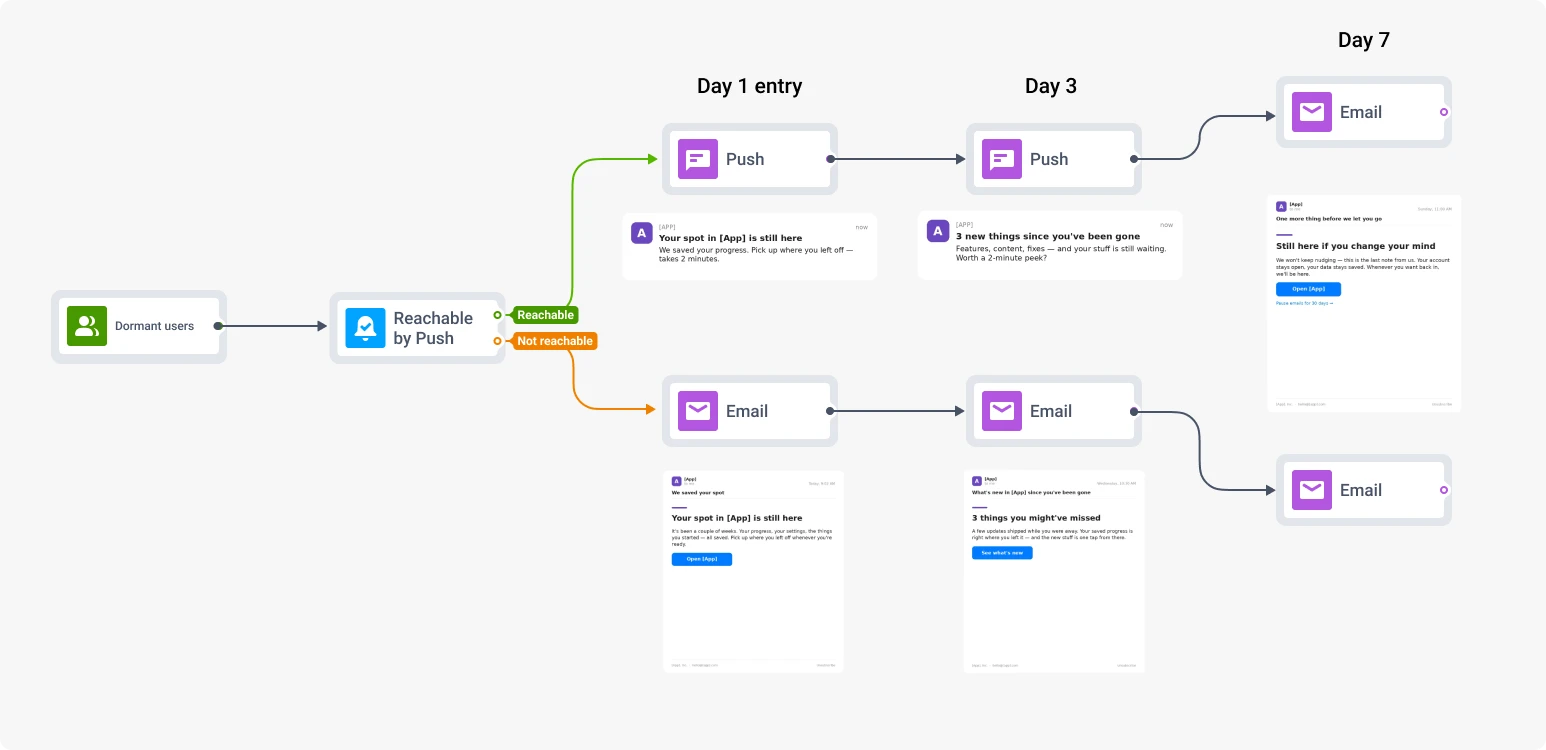
Entry trigger: Segment-based entry on “users with no PW_ApplicationOpen events in the last 14 days.”
Segment: Dormant users, split with Reachability check element:
- Push-reachable — primary group, gets the push touch first.
- Push-unreachable — bypasses push entirely, gets in-app on next return or email immediately.
Sequence: A three-touch campaign over seven days. Each touch escalates from a soft reminder to a more pointed value pitch:
- At entry. Reactivation push notification: a personal-feeling reason to come back: content they liked, a feature they used most, an unread notification they missed. For push-unreachable users, send the same content via email.
- Day 3. If no return: a stronger pull — what’s new, what they’re missing, or an incentive. Push for the reachable group, email for the rest.
- Day 7. Final touch: an email recap, opt-out-friendly.
- Exit condition: Session occurs within 7 days → journey marks success, user exits.
Metric: Session within 7 days of entering the reactivation flow.
Scale it in one prompt with ManyMoney AI
This is how you can easily build 3 journeys this week. Next time, if you decide to create a new locale, a new segment, a new variant set for testing, you don’t have to repeat the build. Hand it to ManyMoney AI, Pushwoosh’s marketing co-pilot.
Take the onboarding journey we have live for [segment X]and adapt it for [new segment / new locale / new offer].Keep the structure, regenerate copy and channel logic,prepare it as a draft.ManyMoney AI returns a journey draft with adapted copy, channel routing, and timing, ready for review. All you need is to approve and ship. The first build teaches you the platform; ManyMoney scales it for every cycle after and analyses campaign performance.