A single delivery order can trigger 5 to 7 push notifications between “confirmed” and “delivered.” Multiply that by a few orders a week, and the app starts looking like spam. The average smartphone user already gets 46 push notifications a day; 43% disable them when apps send just 2–5 per week.
Users want to know what’s happening at any moment, not to be interrupted five times along the way. The difference between engagement and opt-out is knowing which moments need a push notification and which just need to be visible.
Alerts vs. live state: the only distinction you need
Most teams treat push notifications as the default channel for everything real-time. Order confirmed, push. Driver assigned, push. Driver en route, push. Driver arriving, push. Delivered, push. Five interruptions for one event that the user initiated and is already expecting.
Every one of those updates matters, but not every one needs to be a push notification. There are 2 fundamentally different communication jobs in real-time scenarios:
Alerts say “Something happened! Look now.” They interrupt and demand attention. They belong in moments that genuinely require a decision or a behavior change: your flight gate just changed, your payment failed, your ride is here.
Live state says “Here’s what’s happening right now, check when you want.” It’s ambient and updates continuously. Live state covers what users want to track without needing to react to: driver location, prep time, delivery ETA, game score, and workout distance.
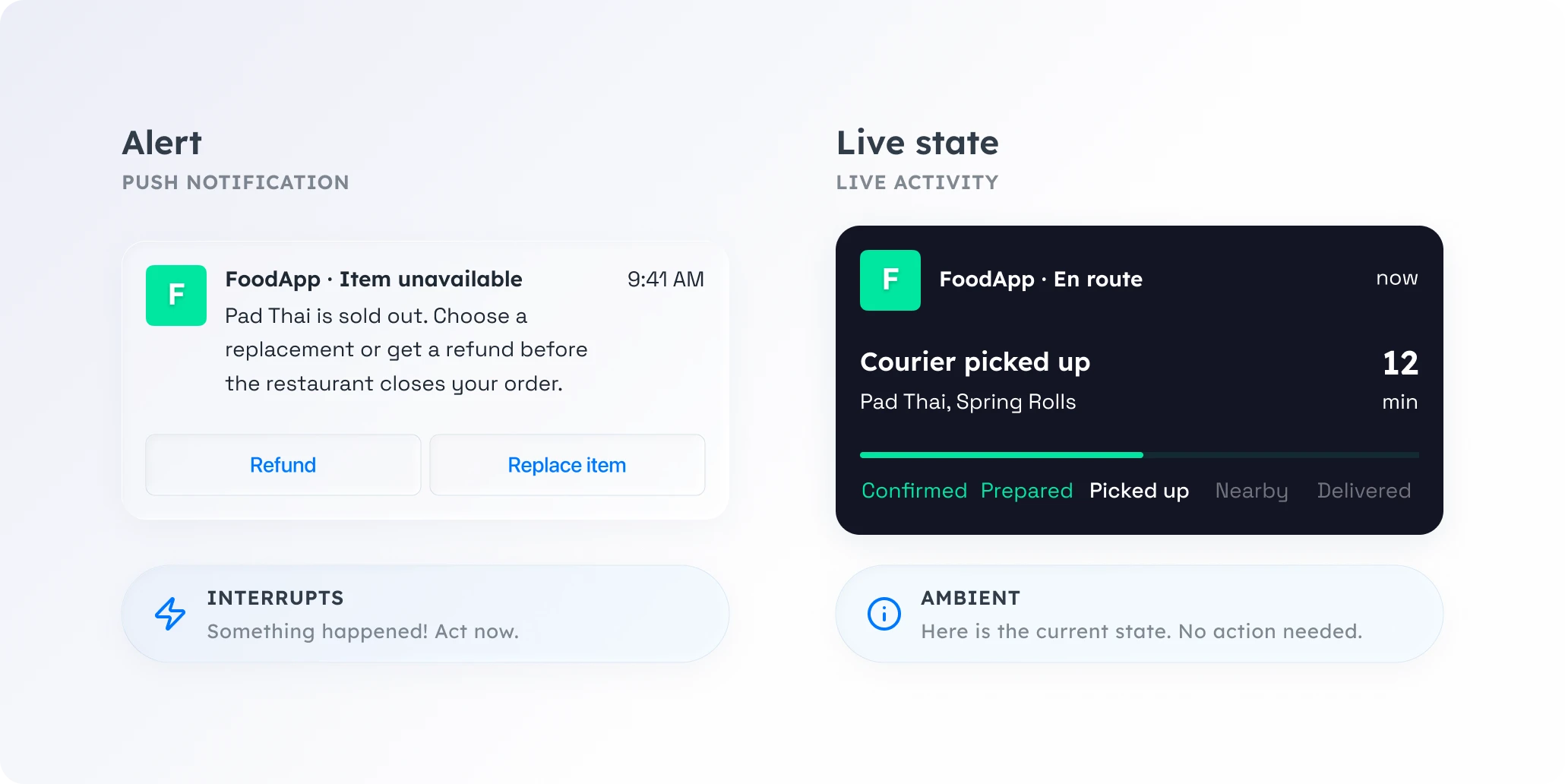
Push notifications were built for alerts. Live Activities were built for live state. Using push for state tracking means interrupting users to tell them something they didn’t ask to be interrupted about.
The 3-message rule
For any real-time scenario, you need at most 3 push notifications.
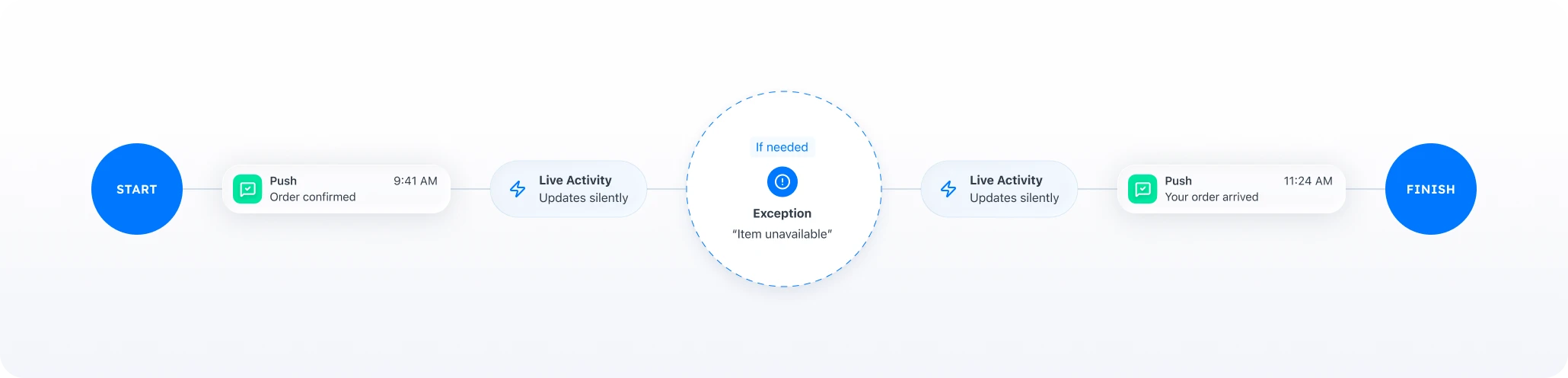
Start. Confirm the process has begun. “Your order is confirmed.” “Payment initiated.” “Your ride is on the way.” This sets expectations, gives the user confidence, and activates the Live Activity that will carry the rest.
Exception. Something went wrong or needs attention. “Item unavailable.” “Your driver can’t find the entrance.” “Payment declined, update your card.” “Flight delayed by 2 hours.” These are genuine interruptions because they require action.
Finish. The process is complete. “Your order has been delivered.” “Payment received.” “You’ve arrived.” This closes the loop and ends the Live Activity.
Everything between Start and Finish lives on the lock screen as a Live Activity: the prep time ticking down, the driver moving across the map, the score updating, the ETA recalculating. Updated automatically, with zero interruptions.
What this looks like in practice: a food delivery order
Take a standard delivery flow, before and after.
Before (push-only approach), 5 notifications in ~45 minutes:
- 🔔 “Your order is confirmed”
- 🔔 “Your order is being prepared”
- 🔔 “Your courier has picked up your order”
- 🔔 “Your courier is nearby”
- 🔔 “Your order has been delivered”
Five interruptions for one lunch order. Multiply that by two or three orders a week, and a single app is pushing 10–15 notifications. That’s the threshold where users start turning notifications off entirely.
After (3-push rule + Live Activity):
- 🔔 Push: “Your order is confirmed” → Live Activity starts
- 📱 Live Activity updates silently: preparing → picked up → courier location → ETA countdown
- 🔔 Push (only if needed): “Courier can’t access the building, please check your phone”
- 📱 Live Activity: ETA countdown continues
- 🔔 Push: “Your order has been delivered” → Live Activity ends
The user goes from 5 interruptions to 2, or three if there’s an issue. The lock screen stays clean, and the real-time visibility is actually better. Instead of five disconnected pings, the user sees a live, continuous tracker with driver location and ETA, refreshing every few seconds.
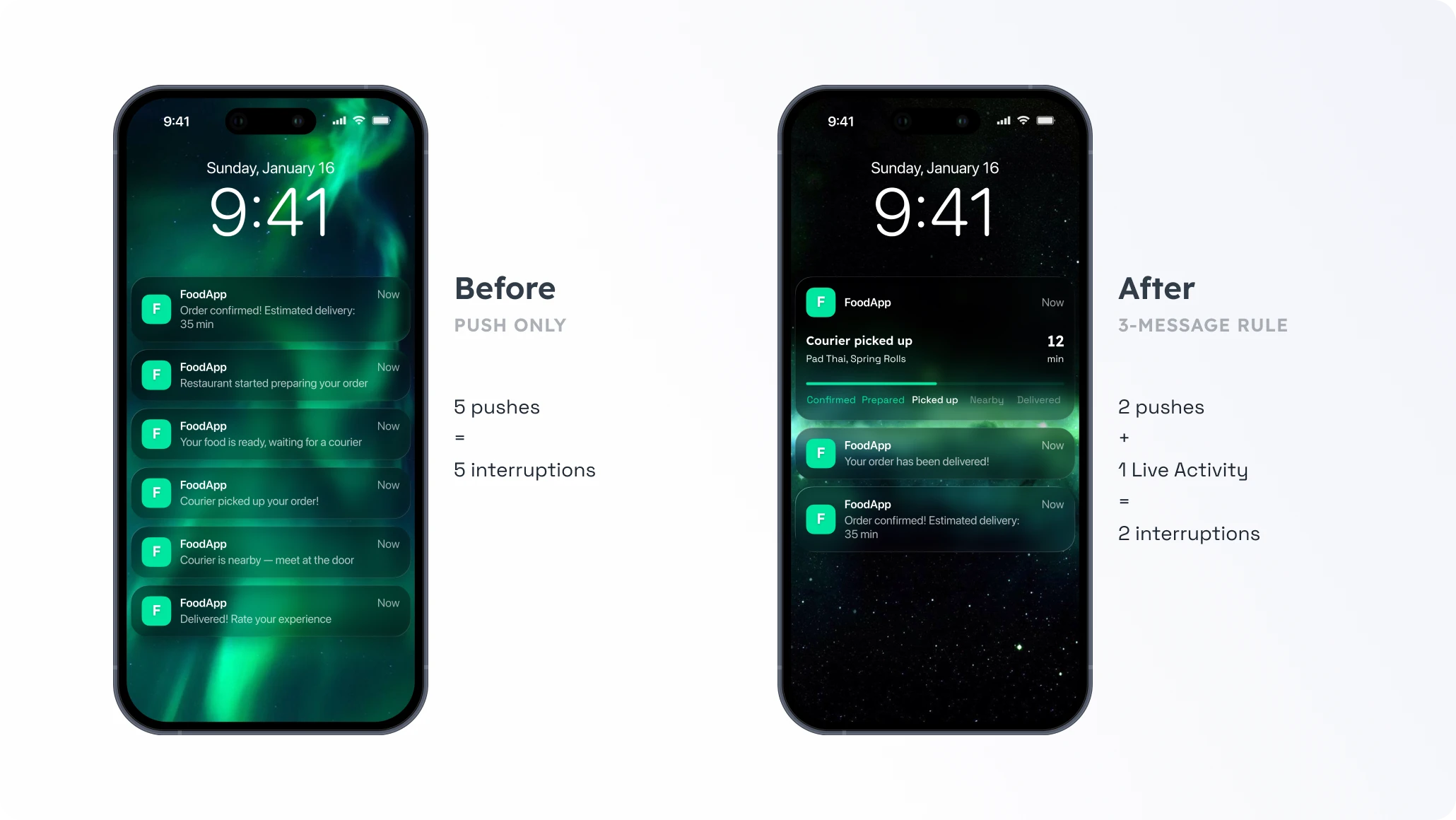
The outcome: fewer opt-outs, lower “where’s my order” support volume, and the app stays visible on the lock screen for 30–45 minutes straight instead of flashing five times and vanishing.
Adapt the rule for your app
The same rule works wherever users track something in real time.
| App | Push: Start | Live Activity | Push: Exception | Push: Finish |
|---|---|---|---|---|
| Ride-hailing (Mobility) | Driver assigned | Location, ETA, vehicle details | Driver cancelled / re-routed | Trip completed + fare |
| E-commerce | Order shipped | Packing → in transit → out for delivery → nearby | Delay or failed attempt | Delivered |
| Fintech | Transaction initiated | Processing status (cross-border, verification) | Payment failed / unusual activity | Transaction complete |
| Gaming | Tournament begins / energy full | Leaderboard position, boss timer, progress | Opponent found / streak at risk | Match result |
| News & media | Breaking story / live event | Live ticker: score, vote count, headline | Major development | Event concluded |
In every case, push notification marks the transitions that matter. Live Activity carries the state between them.
How to start without rebuilding your stack
The usual pushback: “We’d need a major refactor to add Live Activities.” In practice, a three-step approach fits inside a single sprint:
-
Audit your current push flow
Pick one real-time journey (order tracking, a ride, a match) and list every push notification it triggers. Flag each one: does it require the user to do something or know something new, or is it a status update they could check on their own? Typically, 2–3 of 5–7 pushes survive this filter.
-
Suppress and replace
Turn off the status-update pushes. Launch a Live Activity at the Start push, end it at the Finish push. Update it via API at every point where you used to send a push notification.
-
Measure
Track three things over 2–4 weeks. Opt-out rate should drop. Support ticket volume for "where's my order" questions goes down as Live Activities give users self-serve visibility. And session frequency often rises rather than falls: users with an active Live Activity tend to open the app more, because the lock screen becomes a re-entry point.