Understanding your audience is the foundation of every effective marketing strategy. Yet as customer data grows more complex and scattered across channels, sorting through it by hand becomes impossible. That’s where customer segmentation software comes in: purpose-built platforms that divide your audience into actionable groups and time each message to match.
This guide breaks down what customer segmentation is, the benefits of using dedicated tools, the types of segmentation and platforms available, and the key features to look for when choosing the best customer segmentation software for your business. You’ll also find a curated list of 8 top tools compared side by side.
What is customer segmentation?
Customer segmentation is the practice of dividing your customers into distinct groups based on shared characteristics: demographics, behavior, location, purchase history, or preferences. The goal is straightforward: understand who your customers are so you can communicate with each group in a way that resonates.
Instead of blasting the same message to your entire database, segmentation lets you tailor offers, content, and timing to each group’s specific needs. Engagement climbs, more users stick around, and the revenue follows.
But defining segments on paper is one thing. Executing segmentation at scale, across millions of users and multiple channels, requires the right technology. That’s why businesses turn to a dedicated customer segmentation platform to automate and operationalize what would otherwise be a manual, error-prone process.
What is customer segmentation software?
Customer segmentation software (also called customer segmentation tools) are platforms designed to collect, integrate, and analyze customer data, then automatically group customers into distinct, actionable segments.
In simple terms, the purpose of a segmentation tool is to turn raw data into targetable audiences you can act on immediately. Here’s what these platforms do:
- Collect data from multiple sources: app events, website visits, purchase history, CRM records, and third-party integrations.
- Analyze and categorize that data using rules, machine learning, or both, identifying patterns you’d miss manually.
- Create segments you can immediately activate in campaigns: push notifications, emails, in-app messages, SMS, and more.
Whether you call it customer segmentation software or customer segmentation tools, the core function is the same: making your audience data actionable.
Benefits of using customer segmentation tools
You already know why segmentation matters. What changes your numbers is using the right customer segmentation software to act on it. Here are the tangible benefits.
- Enhanced personalization and customer experience. Segmentation tools let you tailor messaging, offers, and content to each group’s preferences and behavior, so the communication a customer receives actually applies to them.
- Improved campaign effectiveness and ROI. When every campaign targets a defined segment, open rates, click-through rates, and conversions improve. Good marketing segmentation software eliminates the waste of one-size-fits-all blasts.
- Increased retention and loyalty. By identifying at-risk users early, through behavioral signals or RFM scores, you can trigger re-engagement before customers churn. Pushwoosh, for example, combines behavioral tracking with automated journey builders to act on these signals in real time.
- Optimized resource allocation and reduced costs. Stop spending budget on audiences unlikely to convert. Tools help you focus on high-value segments where your spend has real business impact.
- Deeper customer insights and analytics. Segmentation analytics reveal patterns across demographics, behavior, and purchase history that inform your marketing, and your product and business decisions too.
- Revenue growth and higher CLV. Targeted upsell, cross-sell, and retention campaigns drive revenue more efficiently, and companies using advanced segmentation consistently report higher customer lifetime value.
Types of customer segmentation tools and platforms (by functionality)
Not all segmentation tools work the same way. They can be grouped by their primary function.
Customer relationship management (CRM) systems
CRM for segmentation focuses on managing customer interactions and storing relationship data: contact details, communication history, deal stages, and support tickets. Tools like HubSpot and Salesforce let you segment by lifecycle stage, deal value, or engagement history. Best suited for sales-driven segmentation in B2B contexts.
Customer data platforms (CDPs)
A CDP unifies customer data from every source (app, web, email, CRM, support) into a single customer profile. Platforms like Segment and mParticle excel at creating a 360-degree view, making them ideal for advanced, cross-channel segmentation. They often integrate with execution tools for campaign delivery.
Marketing automation platforms
Segmentation marketing software combines segmentation with campaign execution. It lets you build segments and immediately activate them in automated workflows: emails, push sequences, SMS, and more. Pushwoosh’s Customer Journey Builder is a strong example, letting you segment and message from a single canvas.
Analytics and business intelligence tools
Analytics tools like Amplitude and Mixpanel focus on understanding user behavior through funnels, cohorts, and trend analysis. They help you identify segments but typically require integration with an engagement platform to act on them.
Mobile engagement and push notification platforms
This is where Pushwoosh fits. Mobile engagement platforms use real-time behavioral data for hyper-targeted push notifications (iOS, Android, web), in-app messages, email, and SMS. Pushwoosh combines behavioral segmentation (tags, events, RFM) with push notification services and a visual journey builder, making it a complete solution for teams that need to segment and communicate in one platform.
Key features to look for in customer segmentation tools
When evaluating platforms, here’s what an adequate tool has and a great one does better.
- Flexible data integration. The tool should connect to your existing stack: CDPs, analytics platforms, CRMs, data warehouses, and app SDKs. Pushwoosh integrates with Segment, mParticle, Amplitude, Mixpanel, and more.
- Behavioral tracking and event-based segmentation. Beyond static attributes, look for tools that track real-time events (purchases, screen views, feature usage) and let you build segments on those actions.
- RFM analysis. Built-in Recency, Frequency, Monetary scoring identifies your most valuable customers and those at risk of churn, without manual calculation.
- Segmentation logic (AND/OR operators). Combine multiple conditions to create precise segments. Pushwoosh’s proprietary Segmentation Language supports unlimited combinations.
- Customer journey automation. Segments are only useful if you can act on them. Look for a visual journey builder that triggers messages based on segment entry, exit, and behavioral events.
- Dynamic content personalization. Personalize message content per segment using tags, liquid templates, and conditional logic.
- A/B/n testing. Test multiple message variants per segment to optimize performance. Multivariate (A/B/n) testing accelerates learning beyond simple A/B.
- Cross-channel delivery. The best tools support push notifications, in-app messages, email, SMS, and WhatsApp from one platform.
- Reachability check. Verify which channels a user is reachable on before sending. Prevents wasted impressions and improves deliverability.
- Real-time analytics dashboards. Monitor segment performance, campaign results, and engagement trends. Pushwoosh offers fully customizable dashboards on every plan.
- AI-powered optimization. AI campaign creation and send-time optimization help you reach each segment when they’re most likely to engage.
- Data privacy and compliance. ISO 27001, GDPR, and OWASP compliance should be non-negotiable.
- Scalability and pricing transparency. The tool should grow with your business. Check whether advanced features are locked behind enterprise tiers, since pricing varies widely, from free tiers to $100K+/year.
The best customer segmentation tools and platforms
Here’s a list of tools covering different use cases, business sizes, and budgets, each compared on the features you’d actually weigh when choosing.
Pushwoosh: built to reach any customer segment at the right time
Best for: Mobile-first teams that need behavioral segmentation and omnichannel messaging in one platform, from startups to enterprises. A strong option among both B2B and B2C customer segmentation tools, thanks to its flexible segmentation engine and affordable pricing.
Pushwoosh is a customer engagement platform purpose-built for mobile and web. It combines a powerful customer segmentation platform with cross-channel messaging (push notifications, in-app, email, SMS) and a visual Customer Journey Builder, all from a single interface. It holds up whether you’re weighing options fresh for 2026 or looking for a leaner alternative to an enterprise incumbent.
Custom data integration options
Before segmenting your data, upload it to Pushwoosh in a CSV file or use one of our 3rd party integrations. Stream your data from CDPs and data streaming platforms including Twilio Segment, mParticle, Zapier, Solitics, and Make. You can also push information from product analytics tools such as Amplitude, Mixpanel, and Google Analytics, or marketing analytics platforms like Adjust and AppsFlyer. Contact the Pushwoosh team to learn more.
Tag-based and event-based segmentation
With Pushwoosh, you can create customer segments based on tags. To jumpstart segmentation, use default tags such as app version, browser, city, language, and OS version (the full list of pre-built tags is in the docs). You can also segment users based on events they performed in your app, so you can send contextual messages to users who showed interest in specific sections.
💡 Check out the audience segmentation tactics HungryNaki used to achieve a tenfold surge in DAU, a 2.6-fold growth in MAU, and a boost in monetary metrics.
RFM segmentation
RFM (recency, frequency, monetary) analysis and segmentation are available to Pushwoosh users. A built-in RFM tool shows how different customers interact with your app, so you can reach at-risk-of-churn customers to keep them or target high-value customers with a repeat-purchase offer.
Advanced segmentation flexibility
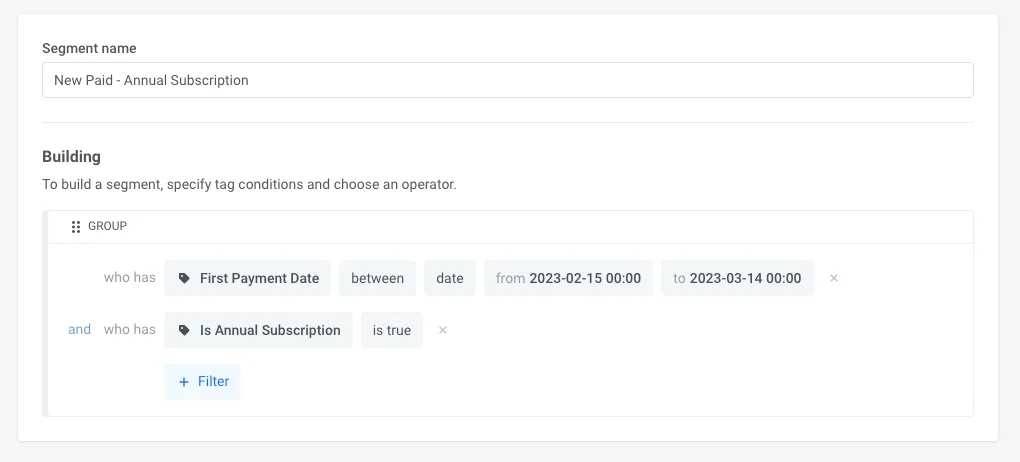
With its proprietary Segmentation Language under the hood, Pushwoosh lets you build any segment your requirements call for, including by combining several segments.
Say you own an e-commerce store and want to sell more sun-protection hats after signing a contract with a clothing brand. You can target users who showed interest in summer holiday items as one segment: bought a bathing suit in the last 14 days AND viewed sunglasses over $100 in the last 30 days. See the complete list of logical operators we support.
A/B/n testing capabilities
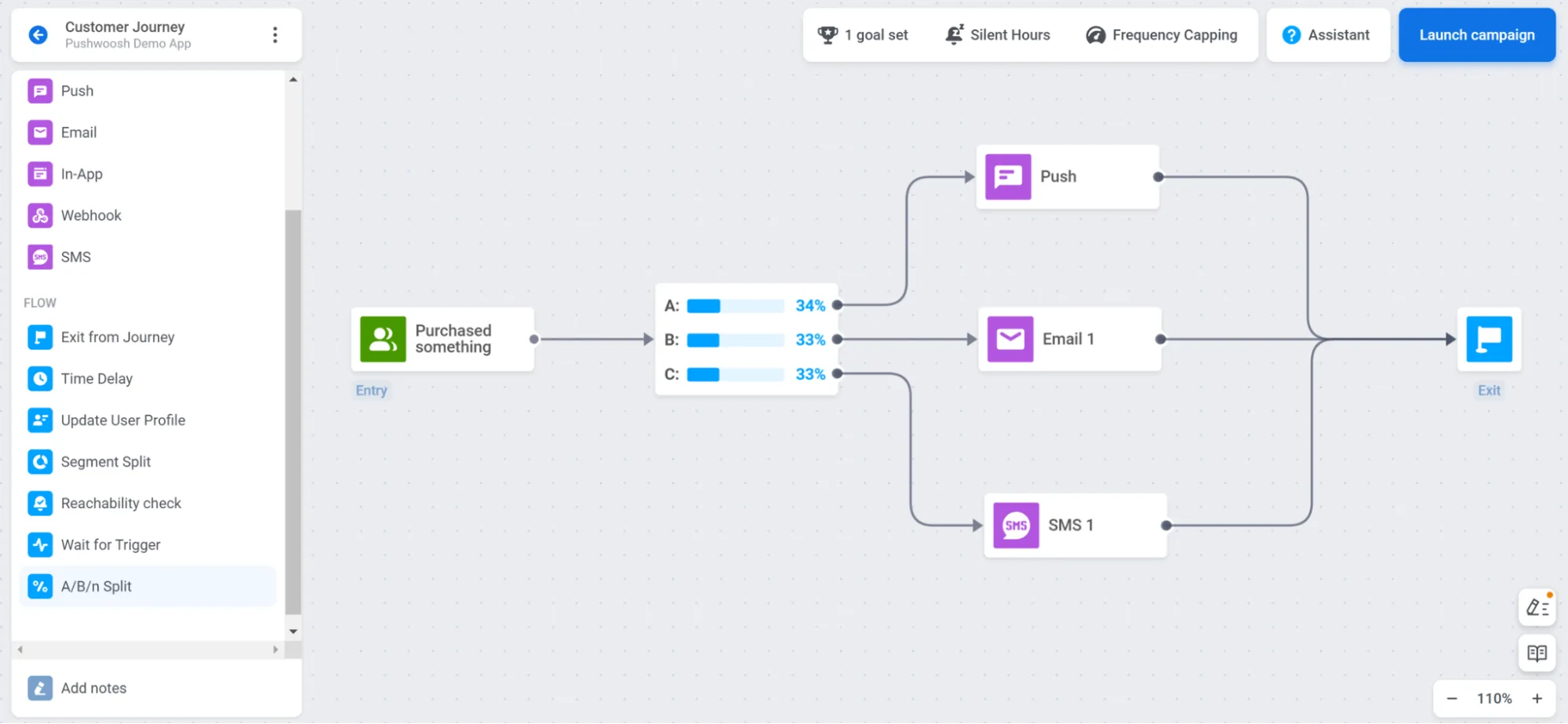
Compare two or more message variations to determine which gets the highest response and works best for your conversion goals. Testing multiple variables at once streamlines optimization. Watch our video on using A/B/n testing.
Personalization
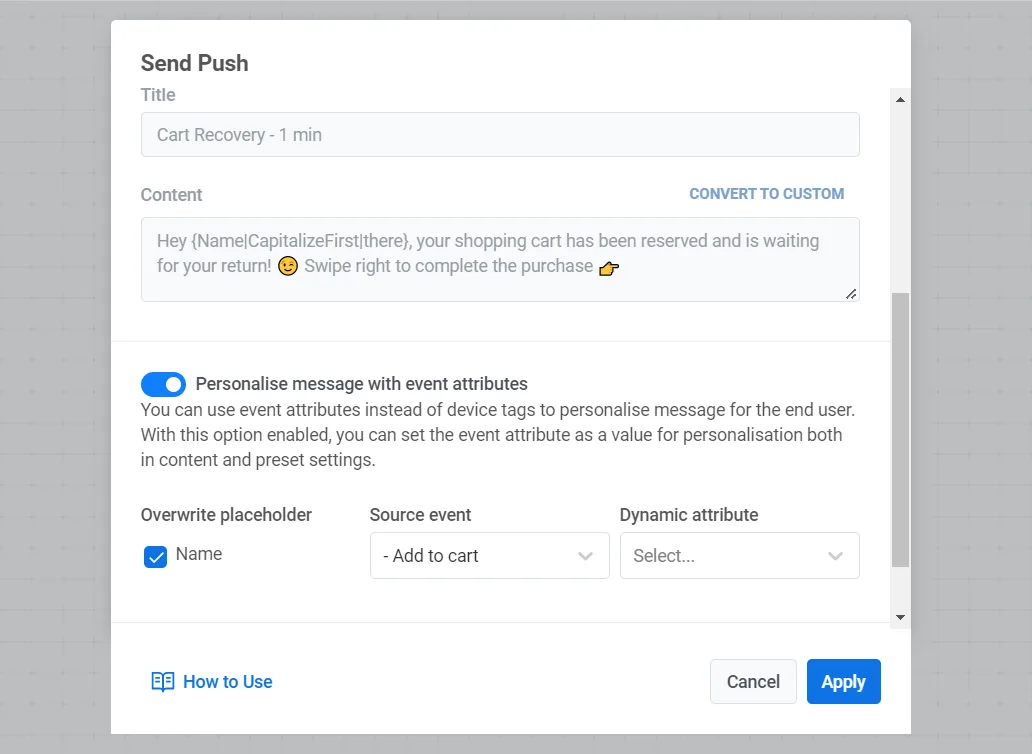
With Pushwoosh, you can use available customer data to create contextually personalized flows on two levels. At the campaign level, the Customer Journey Builder lets you create dynamic segments based on user characteristics and actions. At the content level, use custom and pre-built tags, events, and liquid templates to write personalized messages, mentioning a game player’s level or the exact product a customer viewed.
Reachability check
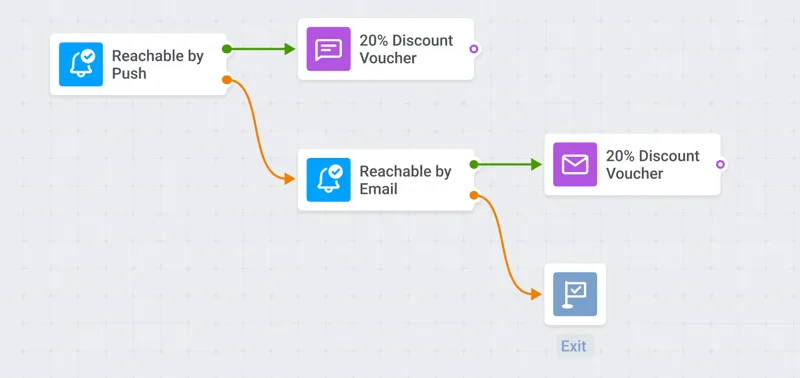
Implement user-centric strategies with the Pushwoosh reachability check. If users are unreachable via email, you can send an in-app message instead, delivering through the most effective channel for each segment.
Built-in data privacy and compliance
Pushwoosh emphasizes data security, keeping your customer data safe and compliant. Pushwoosh is ISO 27001 certified, GDPR compliant, and follows OWASP secure-development principles.
Data retention period
Active user device data is stored without limits. Event and message history are kept for 1 year, with extensions available, which surpasses many platforms and enables advanced behavioral segmentation over time.
Actionable reporting dashboards
Pushwoosh offers a flexible dashboard builder for creating customized dashboards that display your most important data: events, message metrics, audience insights, and more. See the statistics dashboards release.
Ease of use
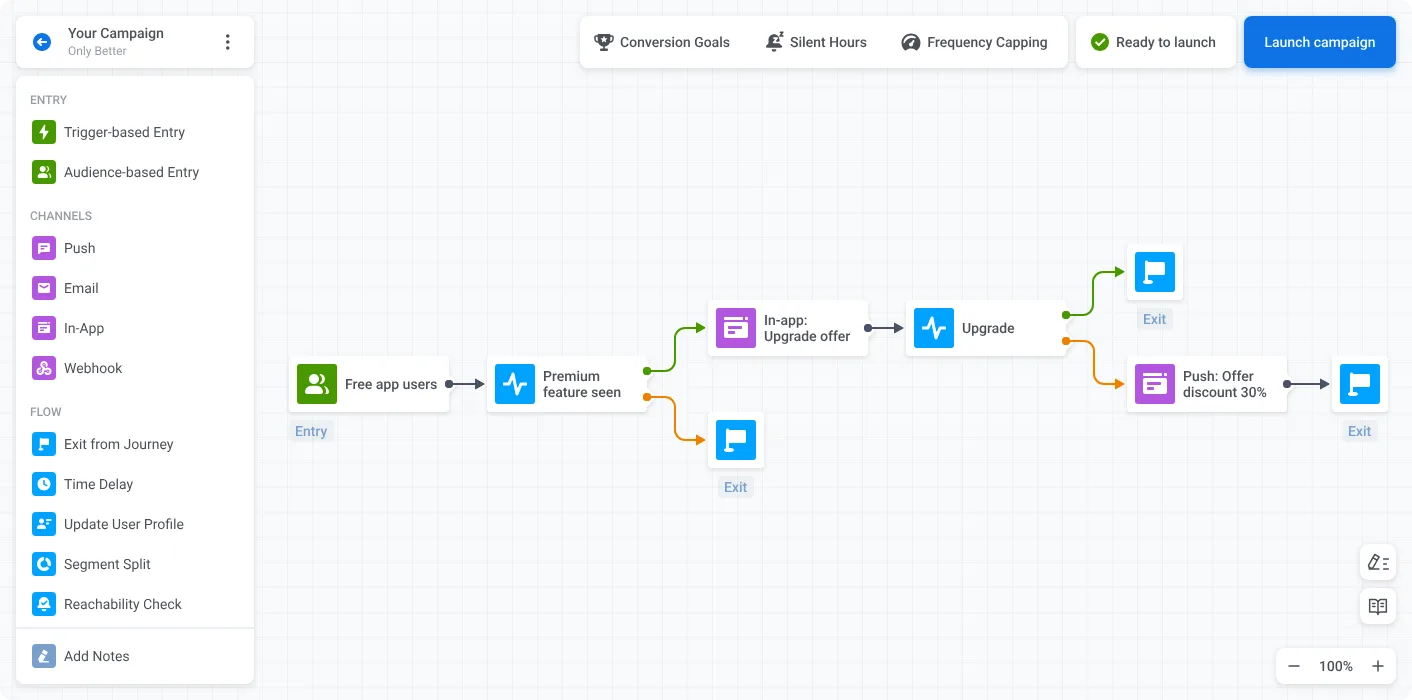
Registration is simple, and after signing up you can access all features without sitting through a sales demo. Pushwoosh is regarded for an easy-to-use interface that lets non-technical marketers build segments on the same canvas as messaging sequences, so you can set up a whole campaign on one screen. Customers have praised our support teams on G2 and Capterra, and our engineers are available 24/7.
Pricing
Pricing starts at $0, budget-friendly for startups and SMBs and a strong option for small businesses. Teams can start on the free tier and scale as they grow, with better price-value than other customer engagement tools on the market.
Customer.io
Customer.io is a messaging automation platform popular with growth, CRM, and lifecycle marketing teams, especially technical ones that want event-driven workflows. It’s capable, but its most useful segmentation and testing features sit on higher tiers, and its billing model has drawn criticism for charging on profiles that include dormant ones.
| Feature | Pushwoosh | Customer.io |
|---|---|---|
| Custom data integration options | ✔️ | ✔️ |
| Built-in data segmentation | ✔️ + RFM segmentation | ✔️ Behavior-based; no built-in RFM |
| Custom customer segmentation | ✔️ | ✔️ |
| A/B/n testing | ✔️ on all plans | ✔️ Advanced testing on Premium+ |
| Personalization | ✔️ | ✔️ |
| Reachability check | ✔️ | ❌ |
| Data privacy and compliance | ISO 27001, GDPR, OWASP | GDPR, HIPAA (Premium) |
| Pricing | Starts at $0 | Essentials from $100/mo; Premium from $1,000/mo |
🔎 See how Pushwoosh compares to Customer.io on other features.
Data integration and segmentation. Customer.io leans on behavioral, event-triggered data and real-time APIs, which suits teams comfortable wiring up events. It supports behavior-based segmentation and event-driven workflows well, but doesn’t advertise built-in RFM scoring the way Pushwoosh does, so recency-frequency-monetary work is more manual.
A/B/n testing. A/B testing is part of the platform, but advanced segmentation and testing are gated to the Premium plan, which starts around $1,000/month. Pushwoosh offers A/B/n testing on every tier.
Channels and personalization. Customer.io covers email, push, in-app, and SMS with strong automation logic and personalization, making it a solid multi-channel option for teams with engineering support.
Pricing. There’s no permanent free tier. Essentials starts at $100/month for up to 5,000 profiles, and Premium (which adds advanced segmentation, A/B testing, and HIPAA) starts at $1,000/month. Reviewers note that billing on profile count, including inactive ones, can raise costs as your list grows. Pushwoosh starts at $0 and keeps advanced features accessible on lower tiers.
Firebase
Firebase is Google’s app development platform, and its analytics and messaging pieces (Firebase Analytics, Audiences, Remote Config, and Cloud Messaging) are widely used for segmentation and A/B testing. It’s developer-first and effectively free for its core analytics, but it isn’t a marketing segmentation platform in the way the others here are, so marketers often pair it with an engagement tool.
| Feature | Pushwoosh | Firebase |
|---|---|---|
| Custom data integration options | ✔️ | ✔️ Google ecosystem, BigQuery export |
| Built-in data segmentation | ✔️ + RFM segmentation | ✔️ Audiences by events/properties; no RFM |
| Custom customer segmentation | ✔️ | ✔️ Console audiences |
| A/B/n testing | ✔️ | ✔️ Via Remote Config |
| Personalization | ✔️ | ✔️ Remote Config personalization |
| Reachability check | ✔️ | ❌ |
| Visual journey builder for marketers | ✔️ | ❌ Developer-oriented |
| Pricing | Starts at $0 | Free analytics; Blaze usage-based for some features |
🔎 See how Pushwoosh compares to Firebase on other features.
Data and segmentation. Firebase lets you define custom audiences in the console based on events, user properties, and predicted behavior (via Google AI Predictions like churn or purchase likelihood). Those audiences sync with Cloud Messaging and Google Ads. What it doesn’t offer is built-in RFM scoring or a marketer-facing segmentation language, so complex commercial segments take more setup.
A/B/n testing. Firebase runs experiments through Remote Config, which is powerful for testing in-app experiences and configuration values without an app update. It’s oriented toward product and growth experiments rather than message-variant testing across channels.
Channels. Firebase Cloud Messaging handles push, but there’s no native email, SMS, or unified cross-channel journey builder for marketing teams. That’s the main reason marketers use Firebase for analytics and pair it with a dedicated engagement platform for messaging.
Pricing. Firebase Analytics is free with generous limits, which is a real draw. Some pieces (like Remote Config at high volume, and BigQuery export) move to Blaze usage-based pricing. There’s no marketing-seat cost, but there’s also no reachability check or marketer journey builder, which Pushwoosh includes.
Braze
Braze is a comprehensive customer engagement platform serving large and enterprise customers. It has strong segmentation features, but it comes with a higher price tag and a learning curve.
| Feature | Pushwoosh | Braze |
|---|---|---|
| Custom data integration options | ✔️ | ✔️ |
| Built-in data segmentation | ✔️ + RFM segmentation | ✔️ No RFM |
| Custom customer segmentation | ✔️ | ✔️ |
| A/B/n testing | ✔️ | ✔️ |
| Reachability check | ✔️ | ✔️ |
| Data privacy and compliance | ISO 27001, GDPR, OWASP | SOC 2, GDPR, HIPAA, CCPA |
| Data retention period | 1 year for event data | 90 days |
| Ease of use | ✔️ | Takes time to master |
| Pricing | Starts at $49/month | $60k–100k/year |
🔎 Want to see how Pushwoosh compares to Braze?
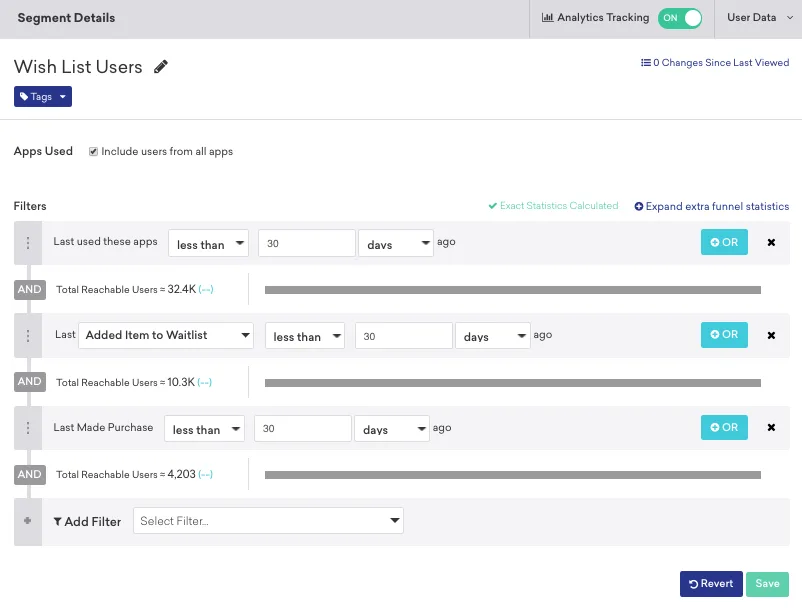
Braze offers Cloud Data Ingestion from warehouses like Redshift, Databricks, BigQuery, and Snowflake, and lets you target users across 131 predefined attributes. RFM segmentation isn’t available out of the box, whereas Pushwoosh includes it. Braze supports multivariate testing, liquid personalization, and reachability checks, all comparable to Pushwoosh but at a much higher cost. Its data retention runs 90 days against Pushwoosh’s 1 year, and G2 reviewers report a long learning curve for reporting and setup. Braze doesn’t publish pricing; reported costs run $60k–100k annually.
CleverTap
CleverTap is a customer engagement and retention platform for large and mid-sized companies. Segmentation features are good, though usability and documentation have drawn some complaints.
| Feature | Pushwoosh | CleverTap |
|---|---|---|
| Custom data integration options | ✔️ | ✔️ |
| Built-in data segmentation | ✔️ | ✔️ |
| A/B/n testing | ✔️ | A/B/C testing |
| Personalization | ✔️ | ✔️ Advanced/Cutting Edge plans only |
| Reachability check | ✔️ | ✔️ |
| Data privacy and compliance | ISO 27001, GDPR, OWASP | GDPR, CCPA, SOC 2 Type II, ISO 27001, HIPAA |
| Data retention period | 1 year for event data | 3+ years |
| Pricing | Starts at $49/month | Starts at $75/month |
🔎 See how Pushwoosh compares to CleverTap.
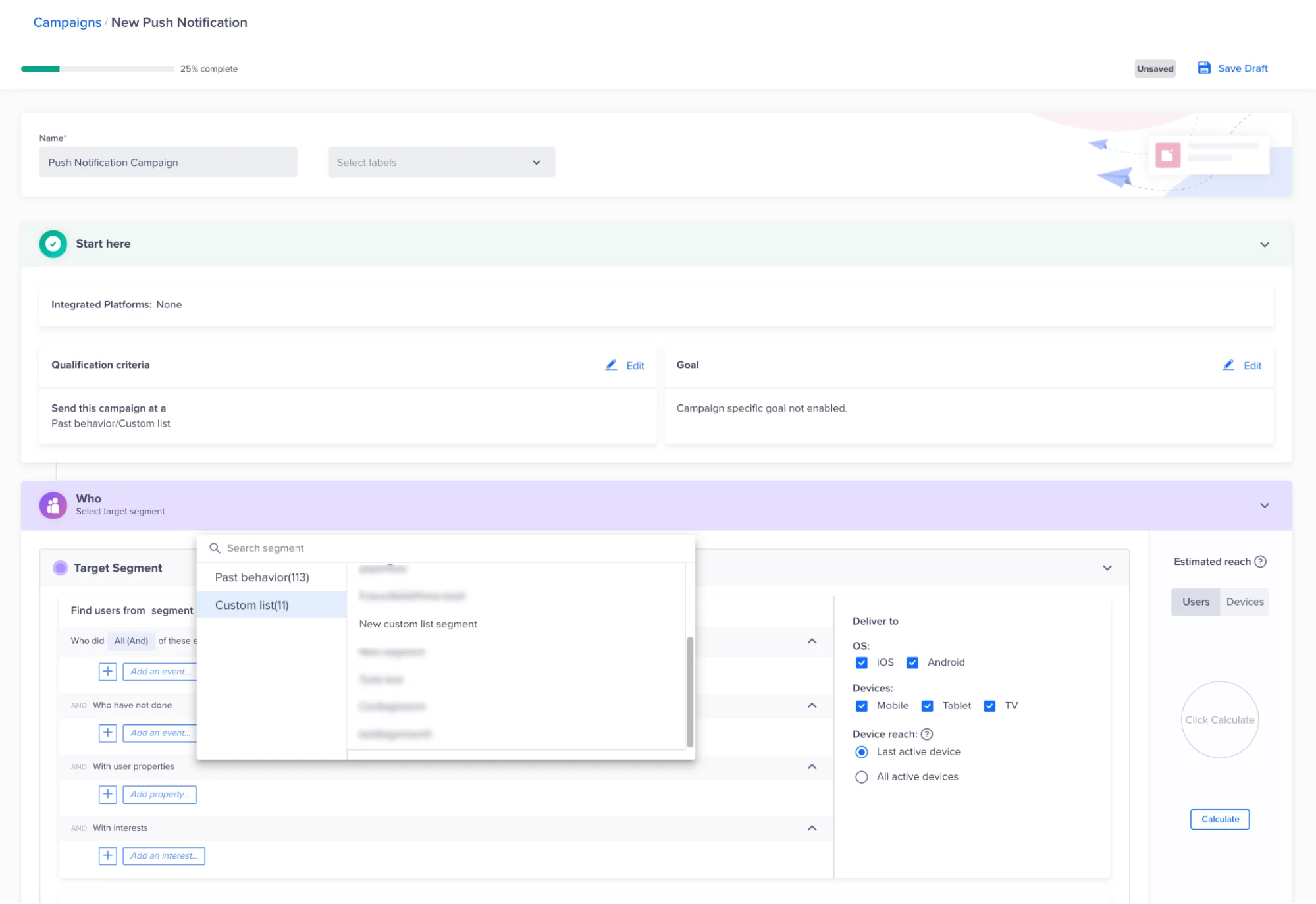
CleverTap injects user data from CMSs, apps, and CRMs, and integrates with Mixpanel, Amplitude, mParticle, and Segment. RFM segments are available out of the box, and you can build custom events and lists. It offers A/B/C testing (three variants) against Pushwoosh’s unlimited A/B/n. Personalization matches Pushwoosh’s feature set but is gated to higher tiers. CleverTap added a generative AI layer, Clever.AI, for engagement recommendations, though G2 reviewers have flagged inconsistencies in conversion-goal calculation. Pricing starts at $75/month, but the Essentials plan omits many personalization and segmentation features that Pushwoosh includes from $49.
MoEngage
MoEngage is a powerful engagement platform for large, corporate-sized companies. Below the Growth tier ($999/month), you lose access to integrations, advanced segmentation, and customizable dashboards.
| Feature | Pushwoosh | MoEngage |
|---|---|---|
| Custom data integration options | ✔️ | ✔️ Growth/Enterprise only ($999+/mo) |
| Built-in data segmentation | ✔️ | ✔️ RFM on Growth/Enterprise |
| Custom customer segmentation | ✔️ | ✔️ Growth/Enterprise only |
| A/B/n testing | ✔️ | ✔️ Growth/Enterprise only |
| Reachability check | ✔️ | ✔️ Growth/Enterprise only |
| Data retention period | 1 year for event data | Up to 180 days |
| Pricing | Starts at $49/month | Starts at $999/month |
🔎 See the complete comparison: Pushwoosh vs MoEngage.
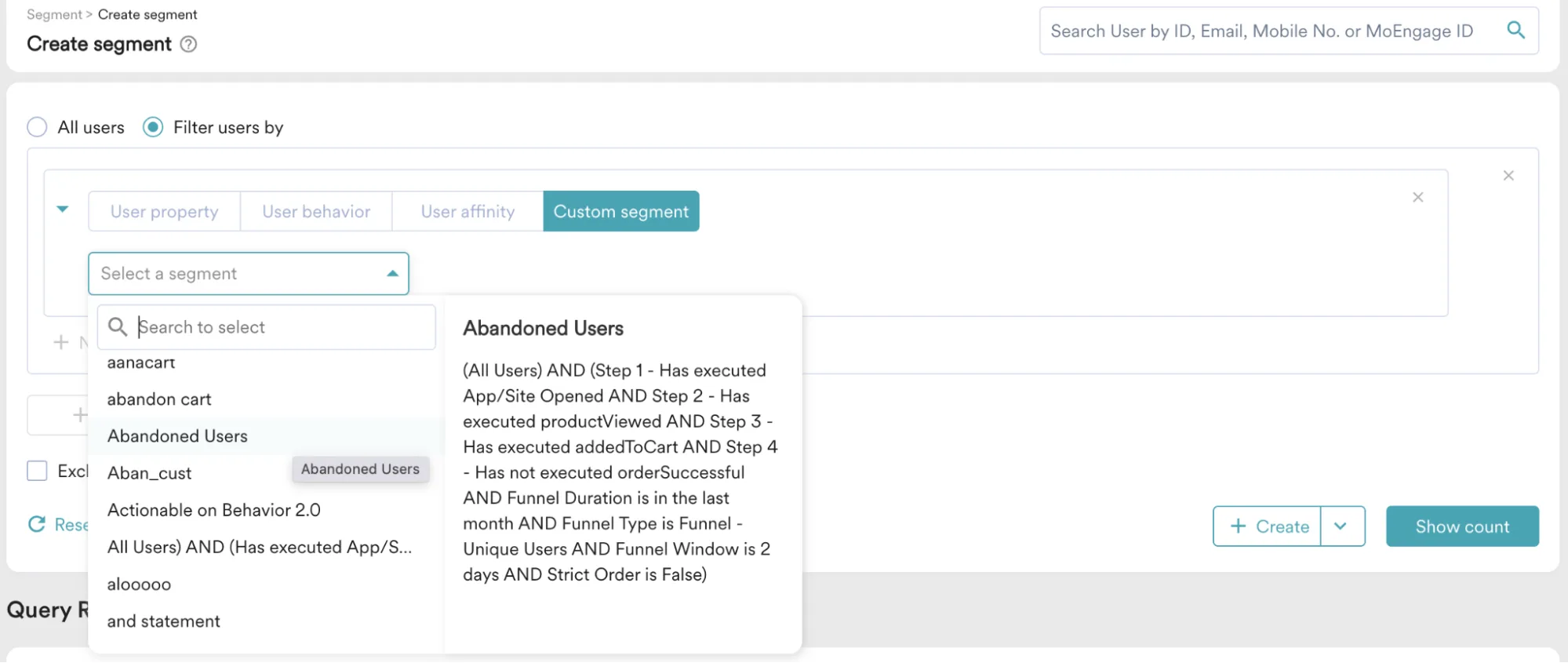
MoEngage lets you integrate warehouse data and analytics tools, and build RFM and affinity segments, but most of this (integrations, custom segments, A/B/n, reachability, custom dashboards) is locked to Growth and Enterprise plans starting at $999/month. On the Starter plan you can only export segments and personalize by attribute. Reviewers praise its usability, but the demo-first onboarding and higher entry price make it a harder fit for emerging teams. Pushwoosh offers RFM, custom segments, and reachability from $49.
OneSignal
OneSignal is a good fit for small and mid-sized companies exploring engagement tools. For segmentation specifically, it lacks RFM and past-behavior-based segmentation, and it has no reachability check.
| Feature | Pushwoosh | OneSignal |
|---|---|---|
| Custom data integration options | ✔️ | ✔️ |
| Built-in data segmentation | ✔️ | ✔️ No RFM; limited segment count |
| Custom customer segmentation | ✔️ | ✔️ Limited by number/type |
| A/B/n testing | ✔️ | ✔️ Professional/Enterprise only |
| Reachability check | ✔️ | ❌ |
| Data retention period | 1 year for event data | Lifetime |
| Pricing | Starts at $49/month | From $9/mo; key features at $999+ |
🔎 See how Pushwoosh compares to OneSignal.
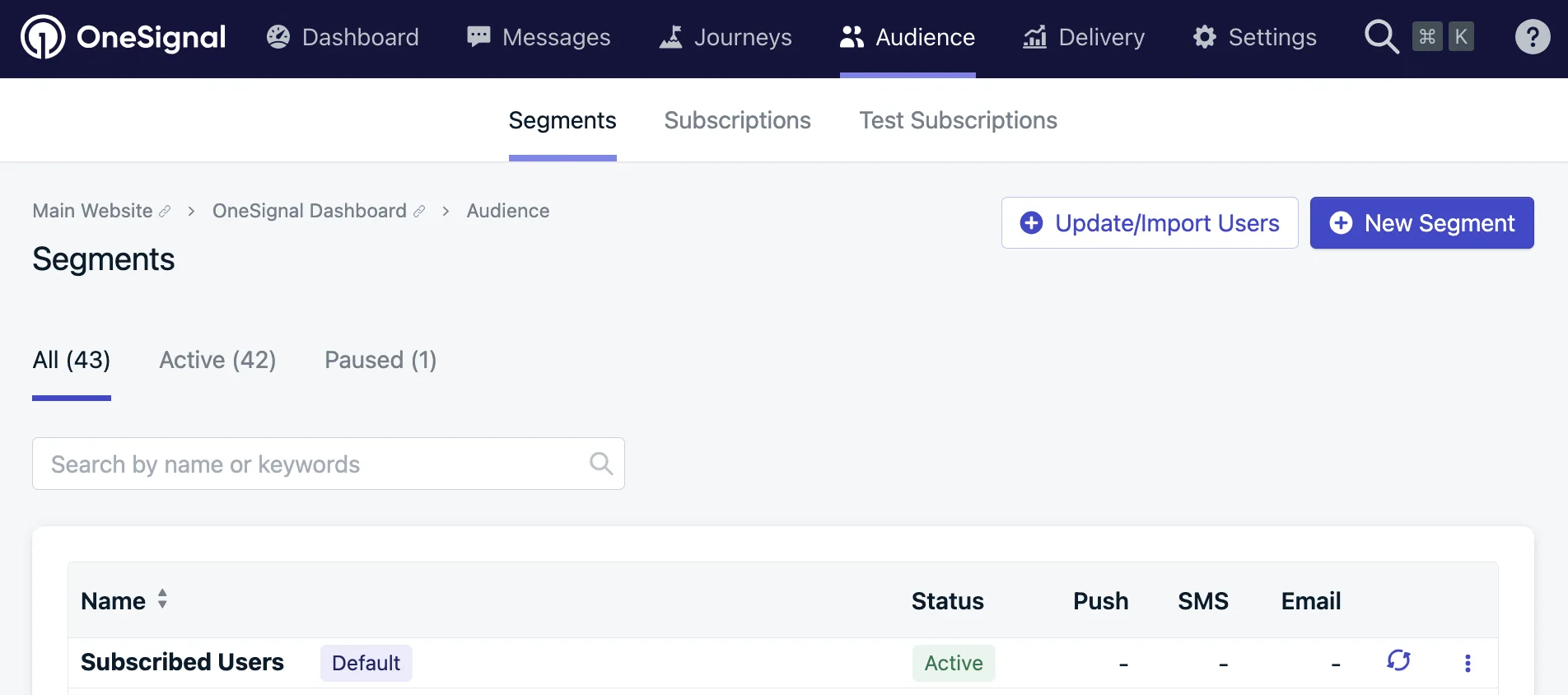
OneSignal integrates with Snowflake, RudderStack, Google Cloud, Segment, and analytics tools, but it doesn’t support RFM or past-behavior segmentation, so you may miss chances to re-activate at-risk users. Segment counts are capped by plan (ten on the $9 tier, twenty on the $999 tier), and you can’t combine filters with AND/OR logic the way Pushwoosh allows. Multivariate testing is limited to higher plans. On the plus side, data is retained for the lifetime of the app, registration is self-serve, and reviewers rate the platform easy to use with well-maintained docs.
Airship
Airship is a well-established martech provider used mainly by retail, telecom, and transportation enterprises. It has advanced segmentation features, but pricing runs into the thousands per month.
| Feature | Pushwoosh | Airship |
|---|---|---|
| Custom data integration options | ✔️ | ✔️ |
| Built-in data segmentation | ✔️ | ✔️ RFM available |
| Custom customer segmentation | ✔️ | ✔️ |
| A/B/n testing | ✔️ | ✔️ |
| Reachability check | ✔️ | ❌ |
| Data retention period | 1 year for event data | Real-time analytics 7 days; opt-in/out up to 4 years |
| Pricing | Starts at $49/month | Undisclosed (reported up to $35k+) |
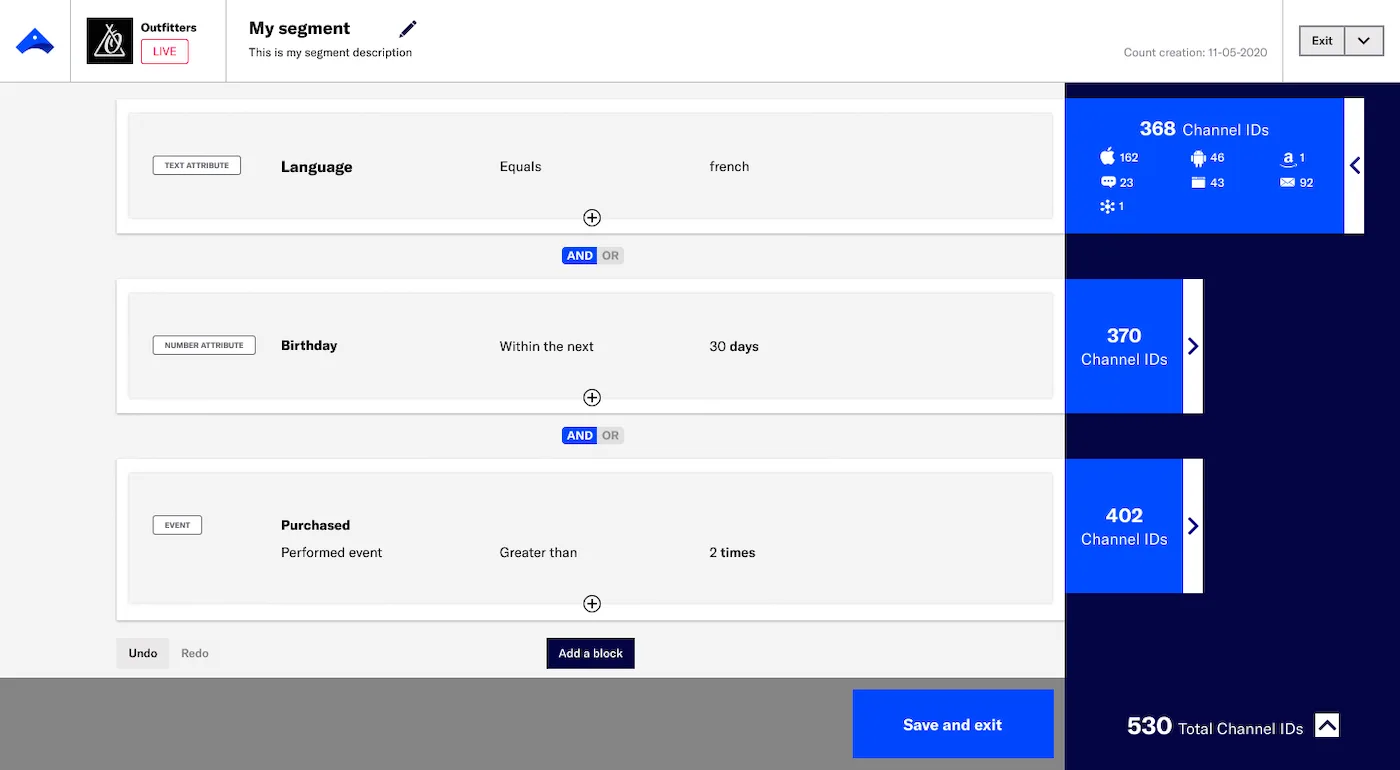
Airship integrates with Adobe, AWS, Amplitude, Segment, and other martech tools, and supports RFM and reusable, nestable segments with live audience estimates. It offers multivariate testing and personalization by attribute, behavior, and location. Its main gaps against Pushwoosh are the absence of a reachability check and a short 7-day window for real-time analytics, which limits prompt re-engagement. Reviewers like the analytics but note an outdated interface and slow support, and pricing (undisclosed, reportedly up to $35k plus onboarding) puts it out of reach for smaller teams.
Analytics platforms that integrate with customer segmentation tools
If you already build segments in product analytics platforms, you can push them to your engagement tool to activate campaigns. These integrations make Pushwoosh a flexible customer segmentation platform that connects to your existing analytics stack. Four examples:
- Amplitude — Identify at-risk groups (inactive 30+ days) in Amplitude, push segments to Pushwoosh, and trigger automated re-engagement. Connect Amplitude.
- Mixpanel — Identify behavioral milestones (users completing Level 10 in a game), pass segments to Pushwoosh, and send contextual in-app messages. Connect Mixpanel.
- Twilio Segment — Unify data in Segment, then use user attributes in Pushwoosh to personalize push, in-app, and email. Connect Segment.
- mParticle — Transfer mParticle audiences to Pushwoosh as segments that update automatically when the source updates. Connect mParticle.
How to effectively implement customer segmentation
Having the right tools is only half the equation. Here are the steps that turn your investment into results.
1. Define clear objectives for each segment. Start with the business outcome: increase retention by 15%, boost repeat-purchase rate, reduce churn among high-value users. Clear goals guide which segments to build and how to measure success.
2. Collect and unify customer data. Gather data from every relevant source (app events, website behavior, purchase history, CRM, support) and use integrations (like Pushwoosh’s connections with Segment, Amplitude, and mParticle) to unify it in one platform. Fragmented data leads to incomplete segments.
3. Choose relevant segmentation criteria. Select criteria that align with your objectives, combining demographic, behavioral, geographic, and psychographic data for richer segments. For mobile apps, behavioral criteria (events, session frequency, in-app purchases) typically deliver the highest impact.
4. Create and refine your segments. Use your tool’s builder to apply criteria and generate initial segments. Review segment sizes: too broad means generic messaging, too narrow means limited reach. Iterate until you find the balance.
5. Develop targeted strategies for each segment. Tailor messaging, offers, channels, and timing per group. Pushwoosh’s Customer Journey Builder lets you design multi-step, multi-channel flows per segment, with dynamic personalization and reachability checks built in.
6. Test, measure, and iterate. Launch A/B/n tests within each segment, monitor results through analytics dashboards, and refine definitions based on what the data tells you. Segmentation is an ongoing process, not a one-time setup.
Segment smarter and drive revenue with Pushwoosh
Effective customer segmentation goes beyond organizing data into groups. The real goal is reaching each customer with a message that fits them, at the moment it lands best, and turning that precision into engagement, retention, and revenue.
The right customer segmentation software makes this possible at scale. Pushwoosh combines advanced behavioral segmentation (tags, events, RFM), a visual Customer Journey Builder, cross-channel messaging (push, in-app, email, SMS), A/B/n testing, and AI-powered optimization, all in one customer engagement platform.
Whether you’re a startup exploring free customer segmentation tools or an enterprise looking for a cost-effective alternative to platforms charging $60K+/year, Pushwoosh delivers the features you need to engage, retain, and earn more from every customer.
Sign up for free and start segmenting today.