We know that data security and compliance with regulations are paramount to our customers — and they are important to us too. So we make it a priority to provide strong data security both for you and your end users. When Pushwoosh requests access to any data, it’s solely for the customer’s benefit: with the understanding of your app user behavior comes the ability to make communication with them as relevant as possible. Accessing data is key for leveraging use cases in customer segmentation and marketing personalization.
Сare about how Pushwoosh approaches your data? Get your questions answered in this blog post. Learn all your benefits and get reassured about data security and regulations compliance.
To begin with, let’s dive into how Pushwoosh gets access to your data and how you control this process.
How does Pushwoosh access customer data?
Pushwoosh gets access to the data that is either collected by Pushwoosh SDK (in case of device data) or gathered on the customer’s side and then shared with Pushwoosh (in case of user data). Either way, our customers have full control over how Pushwoosh gets access to their data.
For data collected by Pushwoosh, you can prohibit the collection manually during the Pushwoosh SDK integration.
To let Pushwoosh collect geolocation data, you have to additionally declare permissions usage in configuration files (we’ll explain these cases in more detail below).
Furthermore, if you have any concerns about how we handle the information you grant us access to, you can clear them up by checking our open-source SDK:
Why does Pushwoosh require customer data in the first place?
Pushwoosh provides a customer engagement platform so that our clients can communicate with their end users and create effective marketing campaigns to improve ROI, customer retention, customer experience, and of course, overall revenue. To boost these metrics, businesses opt for segmented (instead of broadcast) messaging. And since segmentation builds upon customer data (= information about users’ characteristics and behavior), Pushwoosh needs access to it.
So what types of data does Pushwoosh use? And what particular business cases does it empower marketers to solve based on data? Let’s dive into the finer details.
What data can Pushwoosh access to let you create effective messaging?
Device data
Device data refers to the data generated by a user’s device. This information is anonymized and doesn’t allow us to identify a particular user. Pushwoosh needs this data to set up the correct sending of push notifications, as well as to enable some of Pushwoosh’s features. We collect device data by default; however, an app developer can prohibit the collection of a particular data type manually during the SDK integration.
Geolocation information
Pushwoosh may have access to the user’s city and country based on the latest IP address a device was online from. This data is needed for sending relevant marketing offers to the app’s users. For example, an app marketer may want to launch a special campaign in a given country. In this case, they need to segment out the customers known to be from this specific location:
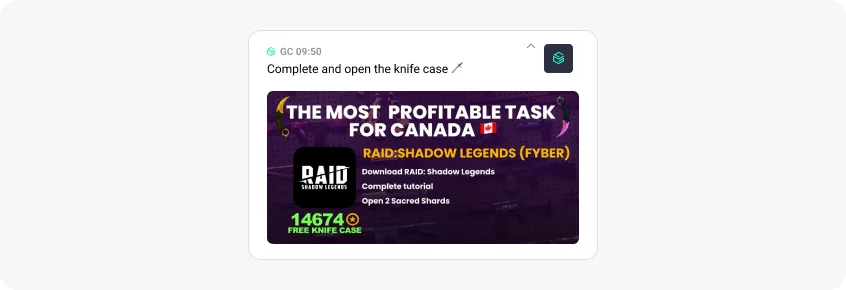
To enable sending this type of offers, Pushwoosh SDK needs access to app users’ geolocation data.
To get geolocation data, Pushwoosh uses the means of GeoIP, which means that the data is not collected on Pushwoosh’s side.
Precise/approximate location data
This type of data is needed to enable Pushwoosh’s Geozones feature that sets virtual boundaries around a specific location and sends push notifications as soon as a user enters the target zone. An app marketer may want to use this feature to deliver personalized messages to people near their retail store/cafe or send discount offers to those who have just visited competitors’ places.
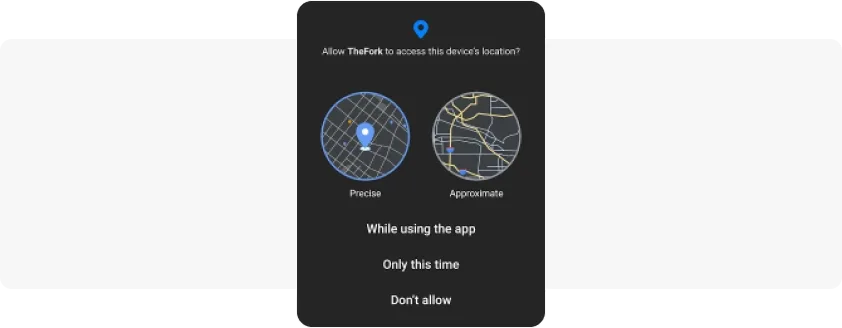
Pushwoosh can only track such data if both the app’s developer and the end user allow geolocation tracking. While giving their consent, the user can permit either precise or approximate location tracking.
Here is an example of an app asking for a user’s consent for their precise/approximate location tracking:
iOS IDFV (Identifier For Vendor)
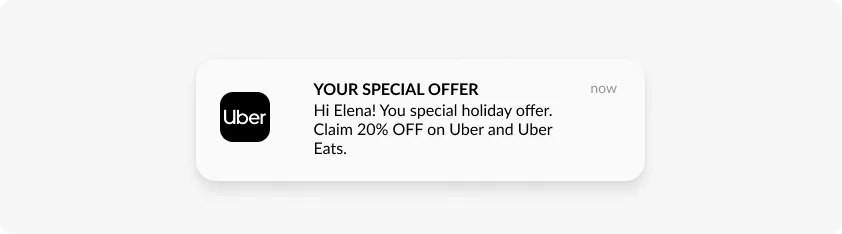
IDFV is an identifier that Apple uses for its devices. Pushwoosh collects IDFV to distinguish devices in its database. This allows recognizing applications installed on one device and creating app groups by the Pushwoosh Application Groups feature. With this feature, you can send one push notification to several applications with one click, and those users who have two or more apps installed will receive only one message. Here is an example of a push notification sent to a group of applications:
Pushwoosh also collects the following device data:
- Device model;
- Device language;
- OS version;
- Application version;
- Device time zone;
- iOS bundle identifier/Android Package Name;
- Browser.
The full lists of properties that Pushwoosh SDK can access upon a customer’s permission are available in our documentation: for iOS and Android.
User data
User data refers to any data that an end user provides to the app by filling out any app’s forms (most often during the onboarding stage). User data can include name, gender, age, email, product preferences, etc. Such zero-party data is collected on the developer’s side, and only if they’ve embedded such data collection in the app code. Only then this data may be shared with Pushwoosh.
All in all, it’s fully the decision of our customers whether to collect this information and share it with Pushwoosh or not.
With user data, Pushwoosh can provide higher personalization for your marketing communications. For example, you may want to call a user by their name when sending individual offers. Or you may want to add Deep Links to your push notifications to land customers on personalized in-app screens corresponding to their gender/age/interests or any other information that users previously shared with you.
Data on triggered events
This type of data refers to various actions a user performs in the app. To let Pushwoosh get access to this data, an app developer implements a postEvent method call in the Pushwoosh SDK. This method reports that an event has been triggered and, if necessary, passes its attributes (for example, for the “Made a purchase” event, the attributes can be the name and the price of the product).
Based on this type of data, Pushwoosh customers can create Dynamic Content for their push notifications. For example, you can mention the level a game player has achieved, the exact product a customer has added to the cart or an in-app achievement a user has unlocked. In our 8-year experience, we have seen that end users perceive messages with event-based dynamic content as more personal and helpful — users respond to such communications with higher CTRs and conversions. This is why we keep supporting and improving our behavior-based segmentation and triggered messaging features.
Pushwoosh may also require data on triggered events to enable Tags setting. With Tags, you can create granular behavior-based segments suitable to your business needs and target highly relevant marketing offers to different audience groups.
How does Pushwoosh handle sensitive user data?
Pushwoosh does not collect any sensitive personal information about the user (email address, phone number, name, credit card or financial information, etc.) unless this information is shared by the client (see the User data section above).
What data does Pushwoosh not collect?
Pushwoosh does not collect cookies, International Mobile Equipment Identity number (IMEI) or Media Access Control (MAC) addresses as we simply don’t need this type of data for the use cases that we solve.
How does Pushwoosh store customer data?
Pushwoosh stores data on our servers located in Germany. Data storage in this country complies with national data privacy regulations.
Pushwoosh stores data on triggered events for 30 days.
Device and user data are stored as long as a device is active. The device is considered active if it has a valid push token. The device is considered inactive when a user deletes an application from the device (=the push token becomes invalid). The data from inactive devices is stored for 90 days by default. If, during this time period, there is no application opening event, the data will be deleted.
Pushwoosh does not share or distribute data, nor does Pushwoosh market or advertise data to any third parties. Neither does Pushwoosh communicate with end users directly.
Our clients can prohibit the storage of their data after they complete the contract with Pushwoosh. We can delete the data immediately on the day the contract expires or agree on a certain period of time after which the data will be deleted.
Does Pushwoosh handle data in compliance with GDPR and other regulations?
ISO 27001 certified data centers
The infrastructure, operation, and customer support of our data centers are fully in line with the ISO 27001standard.
GDPR compliant
Pushwoosh guarantees its compliance with the European General Data Protection Regulation.
Adhering to OWASP (the Open Web Application Security Project)
We follow the recognized OWASP principles that make our software secure by design.
Moreover, the very infrastructure of our platform is designed in a way that guarantees the physical safety of your data. You can learn more details on this page.
So, am I safe to share access to my data with Pushwoosh?
Yes, we guarantee that we only access the data required to create perfectly relevant messaging campaigns for your app users. Moreover, you, as a Pushwoosh customer, are in full control of what data you grant us access to. Should you have any doubts or questions about your data safety and security, you can always turn to our Support team.
For new users: Are you wondering if Pushwoosh is the customer engagement platform you can rely on in your journey? Learn every detail about our solutions firsthand — get in touch with our team.
Related articles
View all