A long-standing marketing truth: your communications should be all about your customer, not your brand, to be effective. How do you achieve it in the app marketing context? Through personalizing your push notifications and emails precisely: mentioning the level a game player has achieved, the exact product a customer has added to the cart or that very in-app achievement a user has unlocked. Such granular personalization based on event attributes can now be achieved easily with Pushwoosh Dynamic Content. By the way, other customer engagement platforms don’t have this feature.
In our 8-year experience, we have seen that end customers perceive messages with event-based dynamic content as more personal and helpful — users respond to such communications with higher CTRs and conversions. Pushwoosh Team strived to make that effective messaging accessible to marketers, and now it’s all automated, time-efficient, and even more reliable.
Without further ado, let’s dive into more detail on how you can benefit the most from personalizing your communications with event-based Dynamic Content by Pushwoosh.
What Is Dynamic Content and Why Do You Need It in Your Communications?
Making a personalized push notification or email used to require getting some groundwork done first and taking time for manual actions that could be automated. And now they are: Pushwoosh enables perfectly automated personalized campaigns for you, unlike the competitors whose functionality is still not that advanced.
Let’s elaborate on this with an example:
A tough reality for every e-commerce business: some customers abandon their cart without making a purchase. Any marketer will want to return those customers; an experienced marketer will know how to do it with an extra-personalized communication.
This is how it might look.
Default message:
❌ You have left something in your cart — check it out
Personalized message:
✅ You have left iPhone 13 Pro Max in your cart — buy it now before prices go
up!
In this example, the default {something} is replaced automatically with the
specific item that a mobile customer added to their cart. How did we get this
information? By tracking the corresponding triggered event.
And you can specify any attribute from the events a user has triggered and use it for personalization**.**
How to Create Personalized Campaigns with Dynamic Content in Pushwoosh
After picking a push notification or email preset, you can turn on the Personalise message with event attributes option. Use attributes of the prior events — both Start Event or Wait for Event — by editing the placeholders in preset settings to customize the message to the end user.

You can use attributes of the prior events — both Start Event or Wait for Event
In the drop-down list, you can see all placeholders available in the message. To edit them, pick the desired one first, select the event you’d like to use attributes from, and then pick the attribute.
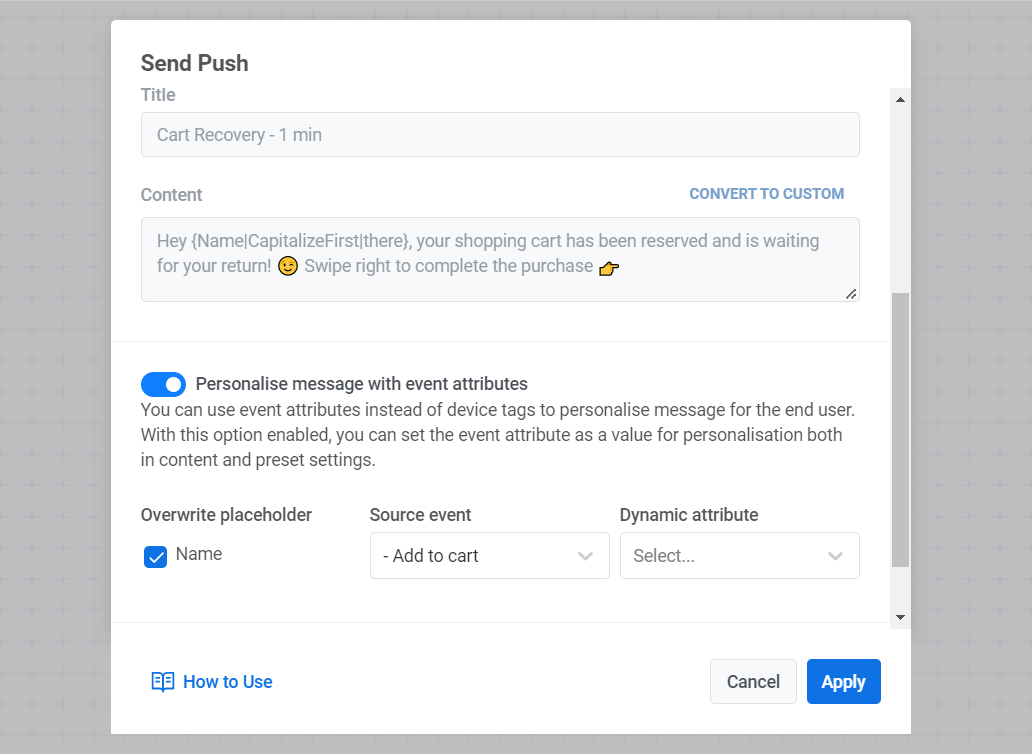
All the Tags from the content box of your message are available for editing and personalization. You don’t need to create and set them manually. The only thing you need to do is select the placeholders you’d like to rewrite and events to get attributes from — and tick the checkbox against it.
Emails: Rich Content Based On Multiple Event Attributes
In emails, event attributes can contain a link to the product photo, price, and name that will be substituted in the email after you sent it. That means, for example, that if the AddToCart event has more attributes than just a product name, you can use all of them to personalize the email. This can be a link to a product in the store, a price, a discount or a promo code — depending on what information the attribute contains.
Haven’t Personalized Campaigns with Dynamic Content Always Been Available?
As you may remember, Dynamic Content has long been there for use in Pushwoosh, but you had to create and set Tags manually to personalize your messages. Now you only need to select the attribute you’d like to enter in your message — the rest of the work is automated.
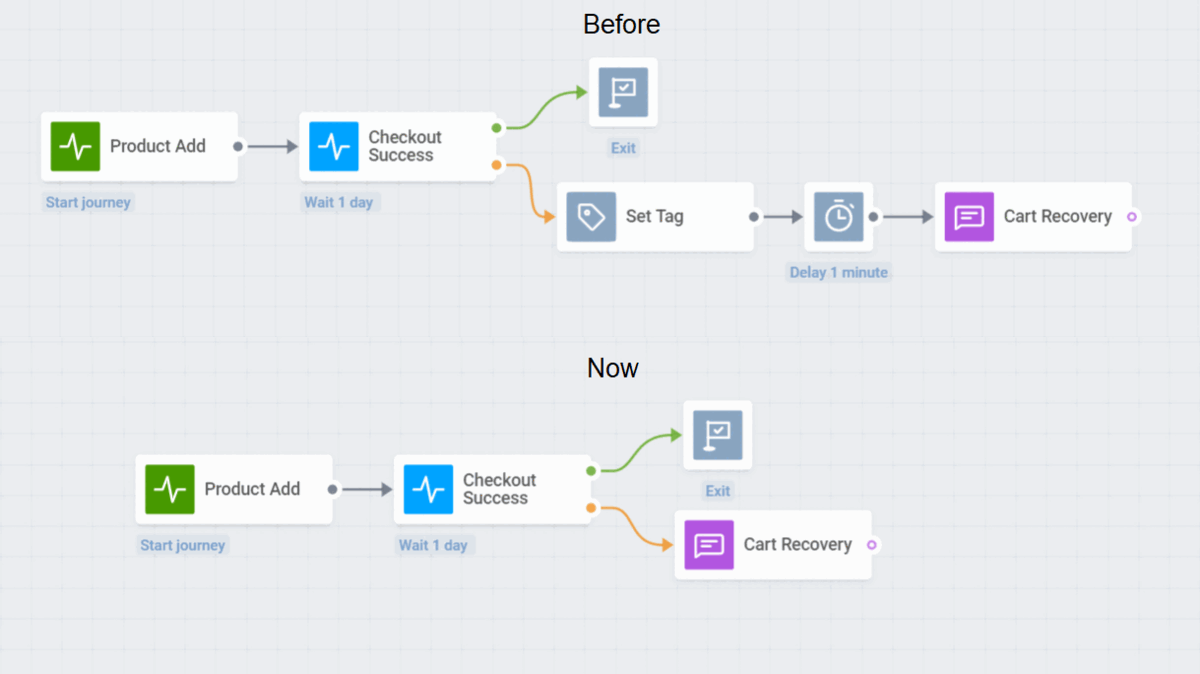
Making a personalized offer: before and now
☝️ Quick note: message customization only works with push notification and email presets and does not work with custom content. However, besides choosing from ready-made presets for push notifications and emails, you can create your own ones and add all the placeholders for customization you need.
Now, let’s move on to the next question that may arise, “How can I use this in my industry?” Pushwoosh has got you covered!
Personalize Communications in E-Commerce
With event-attribute-based personalization, you can improve your communications at every step of the user flow. Make the whole purchasing process seamless and effortless for your user to convert them into happy repeat customers — and grow your revenue as a result.
Abandoned Cart Recovery
A common situation: you have an Abandoned Cart journey and want to reach the customer with a return-to-cart message. You may like to specify the name of the product a user left in the cart to make the message look more personalized — and you can do so by adding event attributes to your push copy.

Now, each customer who abandons their cart will be receiving a personalized reminder. And you should be receiving more conversions!
Similarly, you can promote the products a customer added to their favorites and hasn’t purchased yet.
Order and Delivery Status Updates
Another casemight be sending a personalized email with the order or delivery details before proceeding to the next step to let your customer make sure everything is done right.
You only need to pick a proper email preset and customize it in a couple of clicks by choosing the attributes you’d like to specify: order number and status, product names, customer account ID, payment amount and currency.
The case will also be useful for mobility & delivery apps whose customers also like to track their orders.
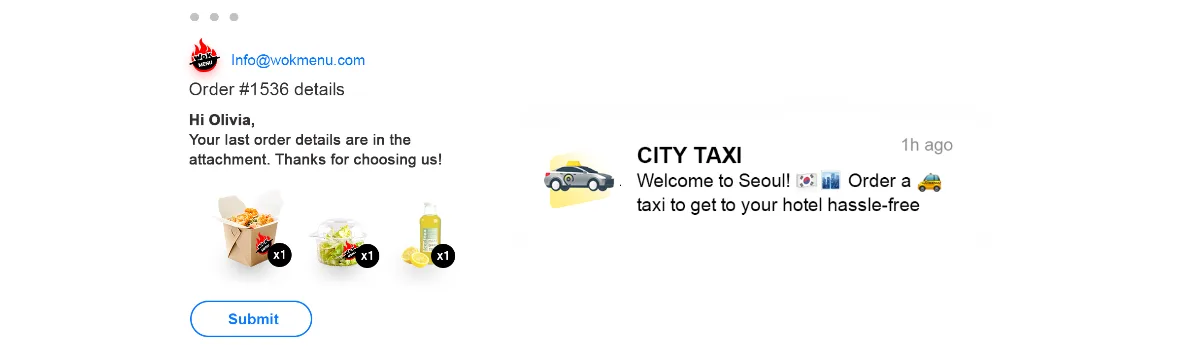
💡 Consider any changes in the purchasing process as event attributes to use in your communications. You no longer need to create and set Tags manually during the whole journey of your customers.
Returns Process Notifications
Even the returns process can become profitable for your business if you make it simple and clear with useful personalized communications.
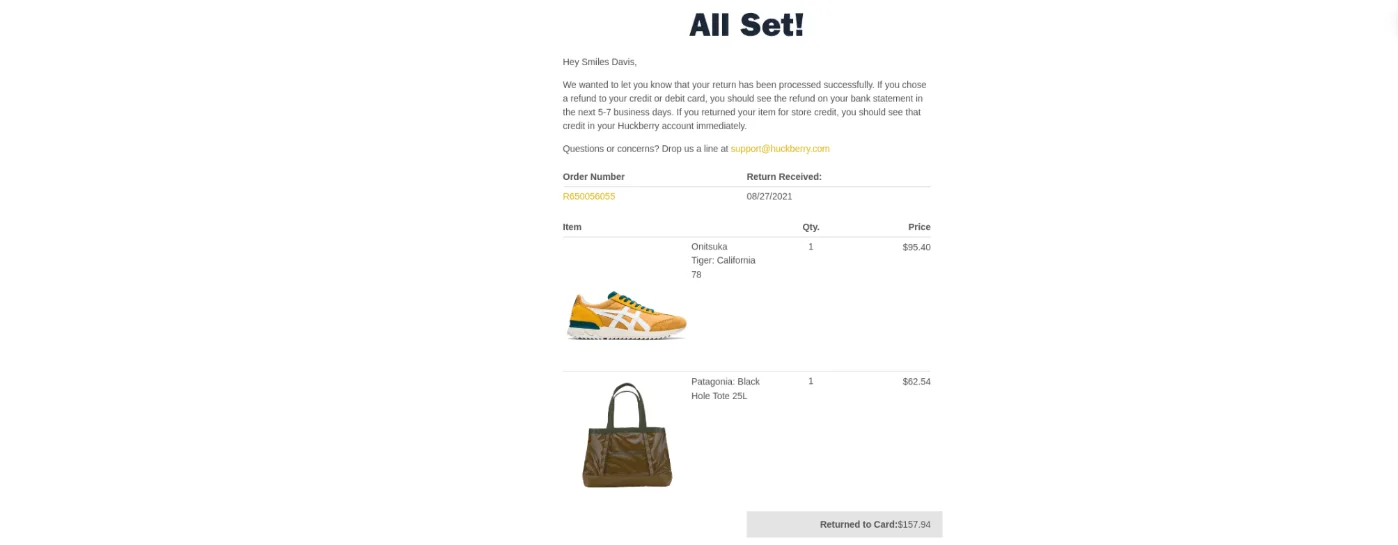
The right messaging along the way = higher chances that a customer will stay loyal to your brand, forgetting of that one time when something ordered didn’t suit them.
Communication Along Other In-App Activities
You may also require that extra grain of personalization when working on your customer support requests or engaging shoppers with in-app discount offers like Wheel of Fortune and Scratchcards.

If a customer spins the wheel and wins any bonuses, you can specify them in the next message. Name the activity and the number of bonuses the customer gets to stimulate the user’s further in-app activity, for example:
— Don’t miss your chance! Use the 13% discount you won yesterday spinning the Wheel!
Engage Players with Dynamic Content Based on Game Attributes
Use personalized content based on event attributes in your communications to specify various in-game actions, items, and events. It will help Increase players’ interest in the game and boost in-app activity.
Congratulations on Achieving a New Level in the Game
When a user achieves a new level in your mobile game app, send them a personalized congratulation message with the new achievement specified. You can reach two different goals at once — keep your players engaged and boost in-app purchases!
Incentives for Spending In-Game Currency
Another case: a user gets (or already has) a certain amount of in-game resources. If you mention the exact currency (coins or gems) and its amount in your push notification, this can spur the user’s interest and make them open the game to check what they can buy with the resources.

Alternatively, you can say straight away, You have enough gems to build a {BuildingName} or You’ve successfully unlocked a new perk — {PerkName}
Taking customization attributes from prior events guarantees that the user wants that item, building, or perk — so they won’t skip this message for sure.
Promotion for In-App Purchases and Paid Content
Free-to-play game monetization models rely on in-app purchases — and if your app also uses this model, you can make sure your in-app purchases skyrocket. Send personalized messages encouraging a user to take a specific purchase action in exchange for some bonuses, for example:
— Reduce your cooldown time for {ActivityName}
— Unlock {PerkName} and get a superior power!
— Buy a premium subscription and get {ItemName} as a gift!
Notifications about Other In-Game Activities and Events
If a player has reached a certain milestone or is about to miss an important in-game event — notify them right away using the event attribute added straight into your message.

Speak Personally to Every User of Your Learning or Health & Fitness App
Here are some cases showing howLearning and Health & Fitness apps can use event attributes in the most beneficial way:
Activity Reminders
As a user may have different types of training or lessons scheduled for the week, you can specify the upcoming session — for example, whether today is a weight lifting or cardio workout day.

Motivational Messages
Encourage users to get back to the app since they’ve been inactive for a while or motivate them to finish the study or workout sessions they’ve started by sending messages with your support: “It’s only 1 set left. Go for it!”
Upgrade and Upsell Offers
Boost your in-app purchases and paid subscriptions by highlighting the features a particular user has tried to access:

Personal Thank-You Messages
You can add referral and promotional codes in your personalized thank-you messages for a completed workout or study session — and grow your app faster.
Send Detailed Notifications in Service Apps
Service apps like VPN providers can send users a message specifying the private network server location they have connected to.

Interested in this topic? Learn more about message personalization and other useful features that are available within Pushwoosh Customer Journey Builder:
Explore Customer Journey Builder