You have 30 seconds.
That’s how long the average new user spends in your app on their first session before deciding whether to come back. Not the time it takes to walk through a 5-step onboarding. The reality is that there is no time to educate your user. You only have a small window for one signal, one action, one channel — timed to catch the user before they’re gone.
This guide covers how to read in-session signals, which channel matches each session window, and 3 journeys that work at real-session speed.
The activation window is shorter than your onboarding
Activation is the moment a new user takes the first meaningful action that signals they “got” the app. This is the highest-leverage moment in the entire mobile lifecycle. Get it right, and the install becomes a user. Miss it, and the install becomes a churn statistic.
Most teams know what their key first action is — first deposit, first level, first article, first order, first profile setup. The harder question is when it has to happen.
If you want to prevent churn at an early stage, you really need to act fast: within the first one to five minutes after the install.

That’s the activation window — the few minutes when the install is still warm and the user is still inside the app, deciding whether to stay. That’s where the journey has to fire.
The same pattern repeats later in the lifecycle: the paywall view, the cart with items in it, the home screen where the user can’t figure out what to do. Every one of these is a short window where intent is high and the next 30 seconds decide the outcome.
Activation is the most expensive one to miss, but the design principle is the same: read the in-session signal, send 1 message on the right channel, catch the user before the moment closes.
3 in-session signals you should track to catch users
Inside that short window, the user moves through 3 moments — still in the app, just left, gone for the day. The signal that fires, the channel that reaches them, and the message that works all change with each one.
Signal 1: User is still in the app, but attention is slipping
🙂 Behavior: the user opened the app. They started onboarding, or reached the paywall, or got to a verification flow — and stopped. Sitting on one screen for 40 seconds. Scrolling without progressing. App analytics show this as “in session,” which is technically true and operationally useless.
🛠️ The event: Pushwoosh’s UserIdle event fires when a user goes inactive on a screen past a configurable timeout — minimum 30 seconds. It’s a signal that attention is leaking while the user is still physically in the app.
💌 Your response: 1 in-app message at the hesitation point, with a single CTA. Not a tutorial, just a verb and a button. “Claim your welcome bonus.” “Verify in 60 seconds.” “Pick 3 topics to personalize your feed.”
Signal 2: User left, but recall is still warm
🙂 Behavior: The user closed the app without finishing the key step. You have a short window while the context is still in their head. After that, your app starts dissolving among the dozen other apps they touched today.
🛠️ The event: ApplicationExit fires after the user backgrounds the app and doesn’t return within a configurable timeout (10 to 30 seconds), so you don’t confuse a quick app switch with a true exit.
💌 Your response: 1 push notification 15 to 30 minutes later, with a single CTA and a deep link straight back to the screen they exited from.
Signal 3: The window is closing
🙂 Behavior: They didn’t come back the next day. The app is still installed, but it’s no longer top-of-mind. Every 24-hour increment past Day 1 lowers the odds of return non-linearly.
🛠️ The segment: users with no ApplicationOpen in the last 24 hours and no completion of the activation event.
💌 Your response: 1 email with context: what they started, what’s left to do, 1 link back.
Three moments. Three channels. Three messages.
From theory to practice: 3 journeys built around these signals
These signals only matter when they fire inside a real journey. Below, you’ll find real cases that put them to work.
Case 1: Activation dropout (the 5-minute window after install)
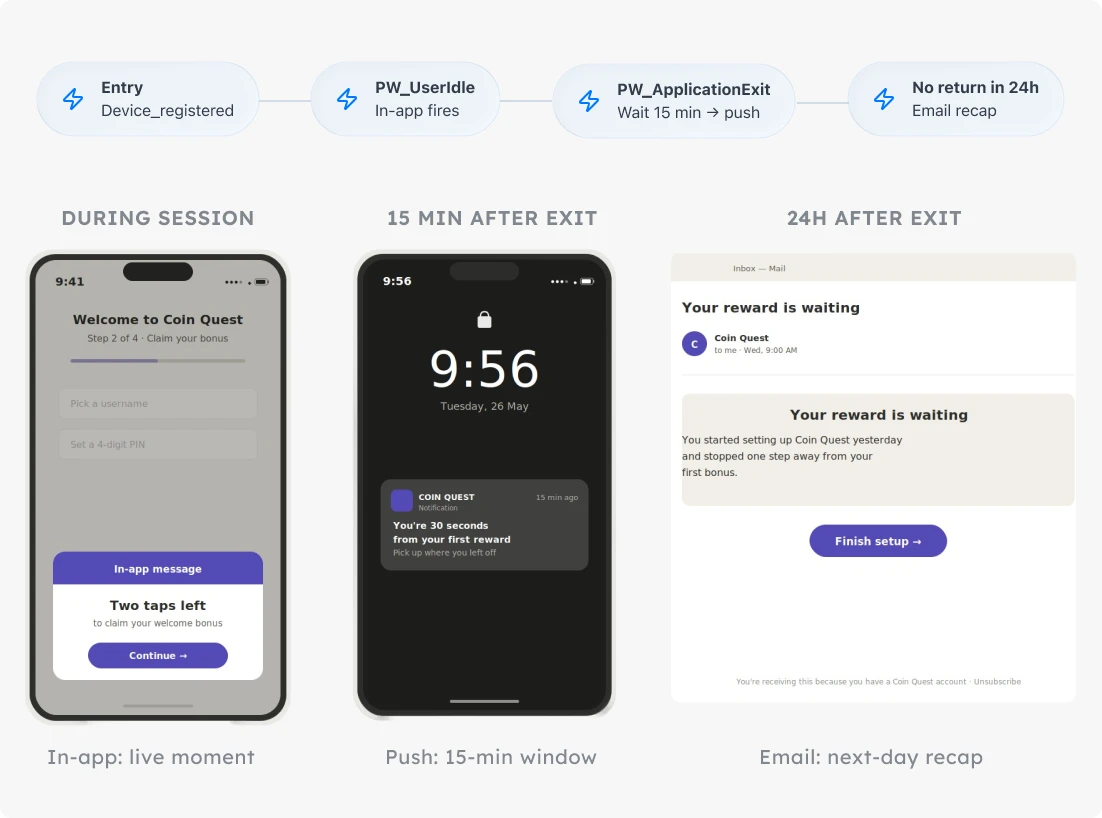
Industries where it fits: gaming, fintech, subscription apps.
The signal: the user installed and started the activation flow, but exited before completing the key first action — first level, first deposit, profile completion.
The journey:
-
Entry
Trigger-based entry on PW_DeviceRegistered. Every new install enters automatically.
-
Wait for trigger: key activation event
If the user completes the action during the session, they exit the journey. Done. No further messages.
-
PW_UserIdle on activation screen → In-app message
The user paused mid-onboarding. Surface one nudge in context: "Two taps left to claim your bonus." One CTA, no tutorial.
-
PW_ApplicationExit without completion → Wait 15 minutes → Push notification
The user left without finishing. Send one push pointing at the exact step they abandoned: "You're 30 seconds from your first reward. Pick up where you left off." Re-entry window, single CTA, deep link to the right screen.
-
No app open within 24 hours → Email
Recap-style: what they signed up for, what's waiting, one link back. Email is the long tail, not the urgent nudge.
What to watch: Activation conversion.
Case 2: Paywall hesitation (the high-intent moment)
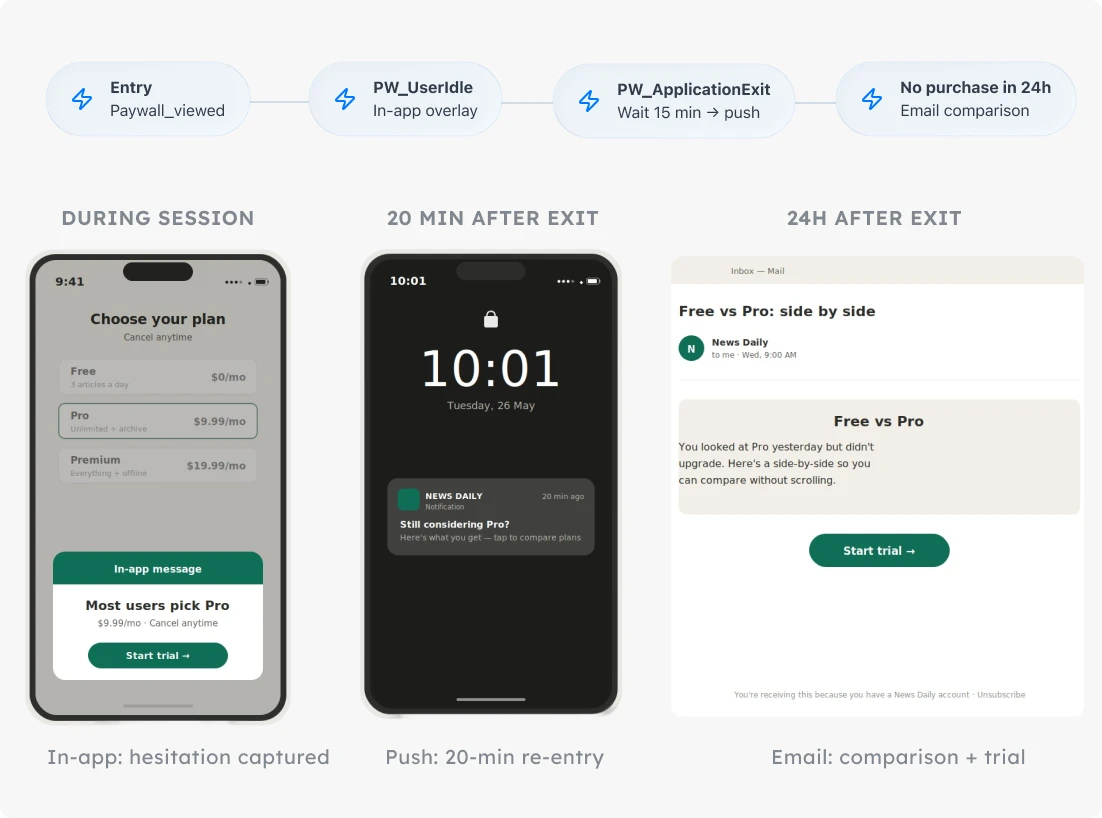
Industries where it fits: subscription, e-commerce, fintech.
Paywall views without purchase are the highest-intent signal in any subscription app. Most teams treat them as failures and re-target a week later. This journey treats them as the high-intent moment they are, and acts within the same hour.
The signal: the user viewed the paywall, didn’t purchase, idled on the screen. Same structure as activation — short window, high intent, decision happening in seconds — but later in the lifecycle, when the user is already familiar with the app.
The journey:
-
Entry
Trigger-based entry on paywall_viewed (custom event you fire when the paywall screen loads).
-
Wait for trigger: purchase_completed (your conversion event)
If the user buys, the journey exits.
-
PW_UserIdle on paywall screen → In-app message
The user is hesitating right now. Surface a sharp in-app at the paywall: social proof, a one-tap upgrade, or the most-popular plan highlighted. "Most users pick Pro for $9.99. Tap to start your trial." One message, in the moment of decision.
-
PW_ApplicationExit within 5 min of paywall_viewed → Wait 20 min → Push notification
Short re-entry push: "Still considering Pro? Here's what you get." Deep link straight back to the paywall.
-
No purchase within 24 hours → Email
A side-by-side plan comparison, customer quote, and a "resume where you left off" link.
What to watch: re-entry rate within 30 minutes of the post-exit push notification. If the push window isn’t pulling users back into the paywall, the timing or the copy isn’t matching the moment.
Case 3: Feature discovery friction (the “I don’t know what to do” moment)
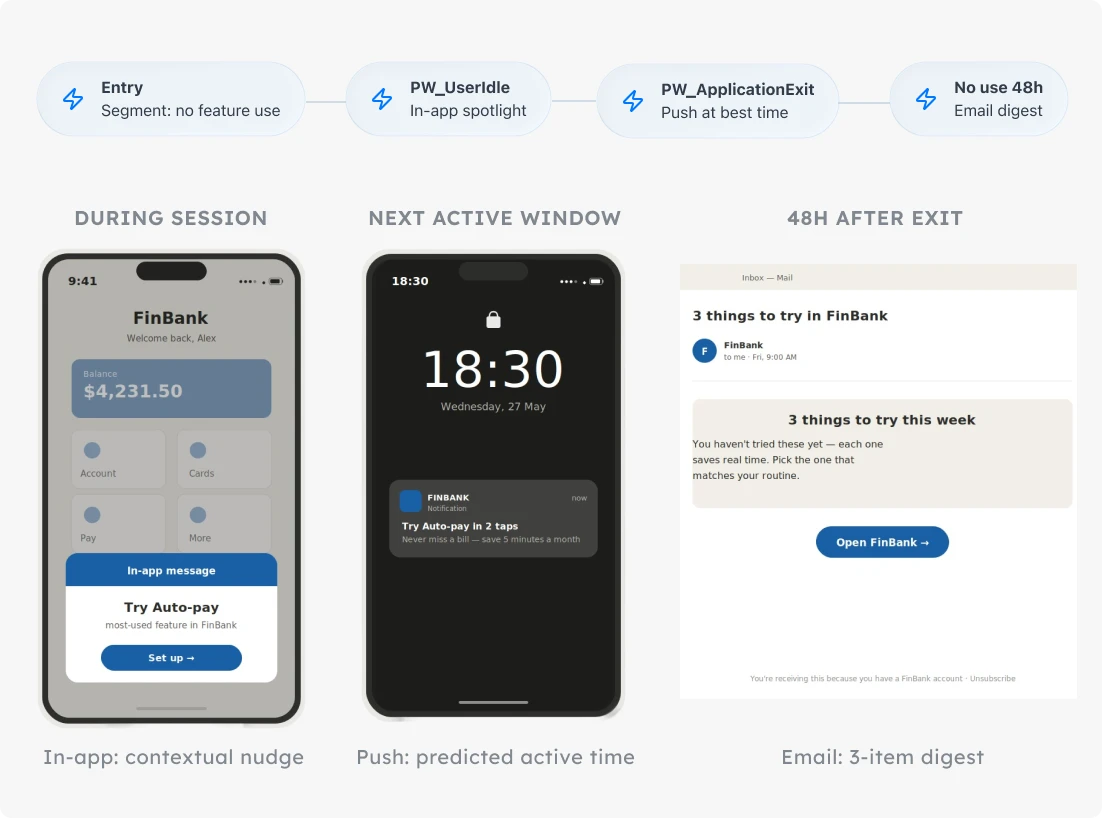
Industries where it fits: media, productivity, fintech.
The signal: the user opens the app, stays on the home screen, doesn’t tap into any key feature, and exits. Lower urgency than activation or paywall, but the same micro-moment logic applies: the user just told you they’re unsure, and the next few minutes shape whether they come back.
The journey:
-
Entry
Segment-based entry: users with PW_ApplicationOpen in the last 7 days but no interaction with a key feature event (key_feature_used).
-
PW_UserIdle on the home screen → In-app message
Contextual feature spotlight, one feature at a time. "You haven't tried [feature] yet — here's why it's the most-used in [app]." One tap to try.
-
PW_ApplicationExit without feature use → Push at next predicted high-engagement time
Use Pushwoosh's Best time to send to land the push in the user's active window rather than at a fixed delay. "Try [feature] in 2 taps."
-
No feature use within 48 hours → Email digest
Short list of 3 things the user could do with the app — visual, scannable, one click per item.
What to watch: 24-hour feature-use rate split by which channel triggered the return — in-app, push, or email. The split tells you which window is worth investing in per segment.
Catch users before they churn with Pushwoosh
Every short-session moment — the idle screen, the silent exit, the 24-hour no-return — is a window where you still have a chance to act. Pushwoosh ships the signals that mark them as default events, and Customer Journey Builder wires in-app, push, and email into one canvas so the whole 3-moment arc lives in a single automated journey.
Design 1 short-session retention journey, with 1 signal at each moment. Then watch the at-risk users you used to lose stick around — not just for Day 1, but for Day 7 and Day 30.