Most wallet pass tools stop at the moment the customer taps “Add to Wallet.” The card is issued, it sits in the phone, and then nothing. No welcome, no reminder before the points expire, no nudge when the customer goes quiet. The pass becomes a static object instead of the start of a relationship.
That silence is a missed opportunity. A pass holder has already raised their hand: they saved your card on purpose. The question is what happens next, and whether you can run that follow-up automatically instead of by hand. This article walks through how to build an automated journey around a wallet pass, using segmentation and conditional messaging, and where that goes beyond what a pure pass tool can do. We will use the Pushwoosh Customer Journey Builder as the worked example.
Why a pass holder is a different audience than a push subscriber
A push subscriber opted into notifications. A pass holder went a step further: they saved a specific card tied to a specific offer or membership. That intent is worth treating differently.
The two also live in different places. Push lands on the lock screen and in the notification center. A pass lives in Wallet, updates its own front face over the air, and can surface on the lock screen by location. A points balance changing on the card is a message in itself, one that does not cost a notification.
Treating pass holders as just another push segment wastes that signal. They have told you what they care about, so the follow-up can be specific: the reward they are working toward, the offer they saved, the tier they are one visit from reaching.
Building the journey: issue, update, re-engage
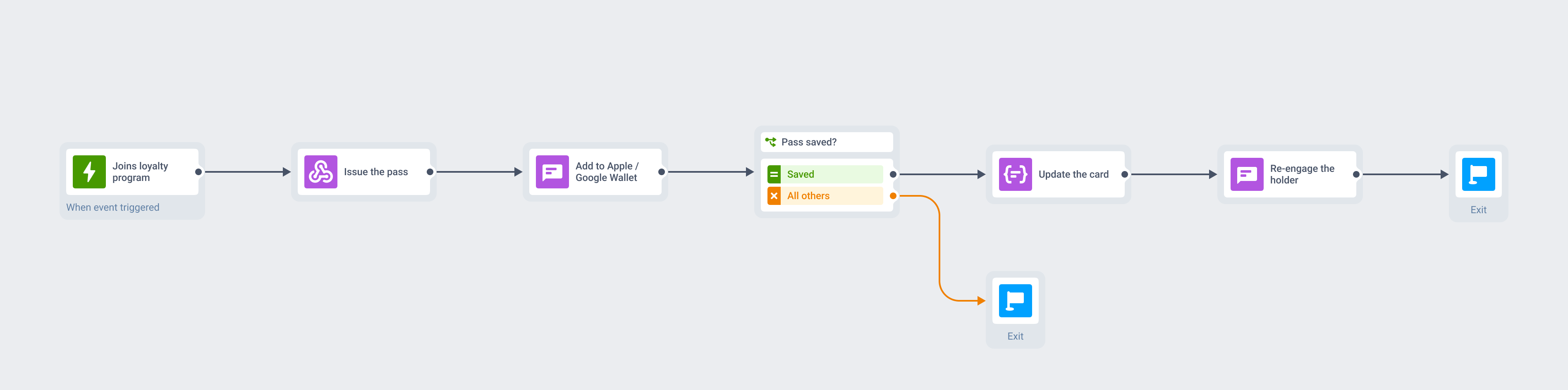
A wallet pass journey is a sequence you set up once and let run per customer. The pass is the anchor; the journey is everything that happens around it.
Trigger on pass save or non-save
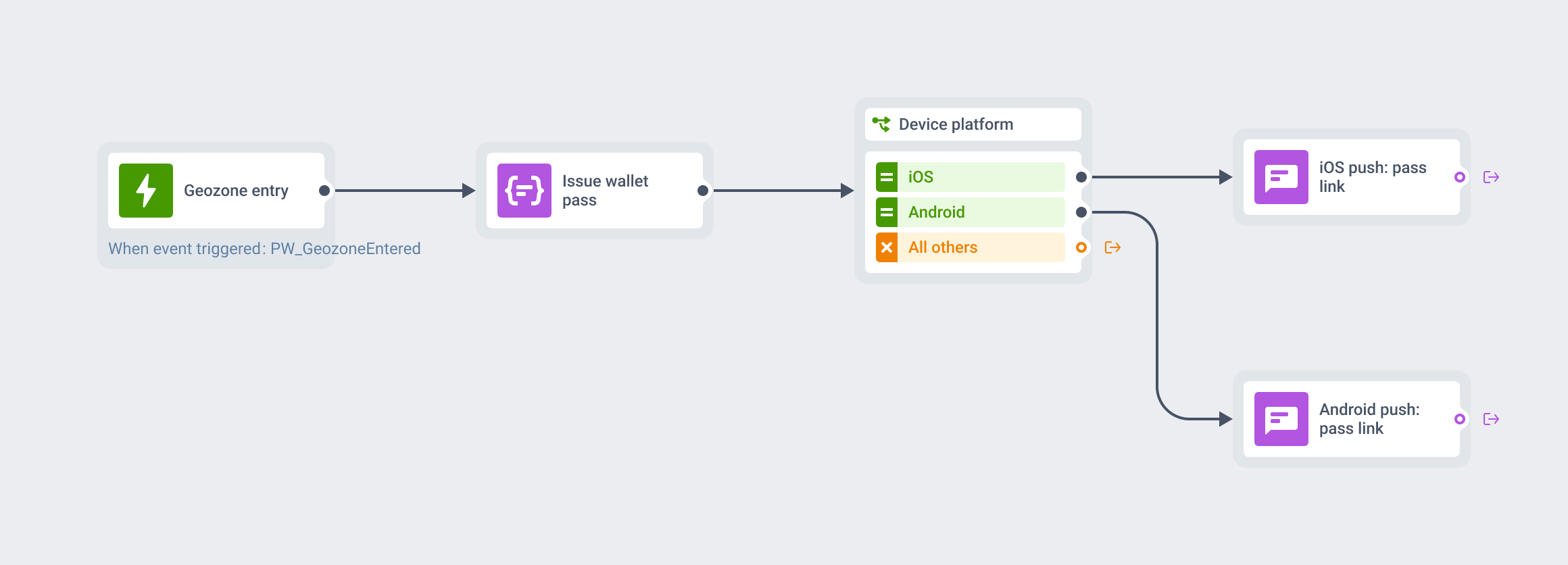
The journey starts when a customer enters the flow, and it branches on what they do. Someone who saves the pass moves down the engaged path and gets a welcome message confirming the reward and how to use it. Someone who was sent the pass but did not add it can get a single reminder on a different channel, then exit the flow so you are not chasing them.
That first split matters because it separates real pass holders from people who never engaged, and lets you message each group honestly.
Segment by card status: active, near-expiry, redeemed
A journey earns its keep through conditional branching. You can split pass holders by where they are: actively earning, sitting on unused points, close to an expiry date, or freshly redeemed. Each state calls for a different message.
An active earner gets progress nudges. A holder with points about to lapse gets a deadline reminder. Someone who just redeemed gets a thank-you and a path to the next reward. The card’s own data drives the branch, so the message always matches the moment.
Re-engage pass holders before points or offers expire
One message in the flow matters more than the rest: the one that fires before something expires. A pass holder with points they have not used, or an offer about to end, is the easiest person to bring back, because they already have something to lose.
Set a branch that watches for an approaching expiry date and sends a timely reminder, on push if they are reachable and another channel if not. Pair it with the pass’s own location relevance, so the card also surfaces on the lock screen when they are near your store. The reminder and the pass work together to re-engage pass holders at the exact moment a nudge pays off.
What this looks like against a pure pass tool
Tools built only to issue passes handle the first step well: you design a card, sign it, and distribute an install link. What they typically do not carry is the layer after issuance, the part that decides who hears what and when.
That layer is segmentation and orchestration: branch a flow by card status, fall back to email or SMS when push will not reach someone, coordinate the pass update with a message on another channel, and track which branch drove redemptions. That’s journey-builder territory, and a pure pass tool leaves you to do it by hand, one export and one manual send at a time.
The difference is whether messaging pass holders is a campaign you run or a system that runs itself. One journey covers issue, update, and re-engagement for every holder, and adapts per person as their card status changes.
One journey, every channel
Put a wallet pass inside a customer journey and the pass stops being an island. It becomes one touchpoint in a flow that also uses push, in-app, email, and SMS, with the channel chosen by who is reachable rather than by which tool you happened to open.
With the Pushwoosh Customer Journey Builder, the pass you built with Pushwoosh Wallet passes becomes a trigger and a touchpoint in an automated, cross-channel flow. You segment by card status, branch on behavior, fall back across channels with a reachability check, and measure the whole thing from one canvas.
Automate wallet pass re-engagement with Pushwoosh
Turn a saved card into an automated flow. Pushwoosh Customer Journey Builder segments pass holders by status and re-engages them across push, email, and SMS before their points expire.