आपके पास सिर्फ 30 seconds हैं।
भारत में एक average नया user आपके app में पहली session पर इतना ही समय बिताता है — फिर तय करता है कि वापस आना है या नहीं। यह 5-step onboarding पूरा करने का समय नहीं है। और भारतीय market में, जहाँ हर दूसरा user data-cost के प्रति सजग है और एक mid-range Android phone पर दर्जनों apps के बीच switch करता रहता है, यह window और भी छोटा है। हकीकत यह है कि user को “educate” करने का समय ही नहीं मिलता। आपको बस एक signal, एक action, एक channel के लिए एक छोटी सी खिड़की मिलती है — सही समय पर, ताकि user के जाने से पहले उसे पकड़ा जा सके।
यह गाइड बताती है कि in-session signals कैसे पढ़ें, कौन सा channel किस session-window से match करता है, और 3 ऐसी customer journeys जो real-session speed पर काम करती हैं — खासकर Android-first apps के लिए, जो भारत के 95%+ mobile market को represent करता है।
Activation window आपके onboarding से छोटा है
Activation वह moment है जब एक नया user पहला meaningful action लेता है — एक ऐसा signal कि उसने app को “समझ लिया”। पूरे mobile lifecycle में यह सबसे high-leverage moment है। इसे सही पकड़ लिया, तो install एक active user बन जाता है। चूक गए, तो install एक churn statistic बन जाता है।
ज़्यादातर teams को पता होता है कि उनका key first action क्या है — पहला deposit, पहला level, पहला article, पहला order, पहला profile setup। मुश्किल सवाल यह है कि यह कब होना चाहिए।
अगर आप early stage पर churn रोकना चाहते हैं, तो वाकई तेज़ी से act करना ज़रूरी है: install के बाद के पहले एक से पाँच मिनट के अंदर।

यही है activation window — वे कुछ मिनट जब install अभी भी “warm” है और user अभी भी app के अंदर है, यह तय करते हुए कि रुकना है या नहीं। customer journey को ठीक यहीं fire होना चाहिए।
यही pattern lifecycle में आगे भी repeat होता है: paywall view, items वाला cart, वह home screen जहाँ user को समझ ही नहीं आता कि करना क्या है। इनमें से हर एक एक छोटी window है जहाँ intent high है और अगले 30 seconds outcome तय कर देते हैं।
Activation सबसे महंगा moment है जिसे miss करना है, लेकिन design principle हर जगह एक ही है: in-session signal पढ़ो, सही channel पर 1 message भेजो, और moment बंद होने से पहले user को पकड़ लो।
3 in-session signals जिन्हें track करके users को पकड़ें
उस छोटी window के अंदर, user 3 moments से गुज़रता है — अभी भी app में, अभी-अभी बाहर गया, और दिन भर के लिए चला गया। जो signal fire होता है, जो channel उस तक पहुँचता है, और जो message काम करता है — हर एक के साथ ये तीनों बदल जाते हैं।
Signal 1: User अभी app में है, लेकिन attention फिसल रही है
🙂 Behavior: user ने app खोला। उसने onboarding शुरू किया, या paywall तक पहुँचा, या एक verification flow तक आया — और रुक गया। एक screen पर 40 seconds तक बैठा है। बिना progress किए scroll कर रहा है। App analytics इसे “in session” दिखाता है, जो technically सही है पर operationally बेकार।
🛠️ The event: Pushwoosh का UserIdle event तब fire होता है जब user किसी screen पर एक configurable timeout — कम से कम 30 seconds — के बाद inactive हो जाता है। यह एक signal है कि user अभी physically app में होते हुए भी उसकी attention leak हो रही है।
💌 Your response: hesitation point पर 1 in-app message, single CTA के साथ। कोई tutorial नहीं, बस एक verb और एक button। “अपना welcome bonus claim करें।” “60 seconds में verify करें।” “अपनी feed personalize करने के लिए 3 topics चुनें।“
Signal 2: User चला गया, पर recall अभी warm है
🙂 Behavior: user ने key step पूरा किए बिना app बंद कर दिया। जब तक context उसके दिमाग में है, तब तक आपके पास एक छोटी window है। उसके बाद आपका app उन दर्जनों दूसरे apps के बीच घुल जाता है जिन्हें उसने आज छुआ।
🛠️ The event: ApplicationExit तब fire होता है जब user app को background में भेजने के बाद एक configurable timeout (10 से 30 seconds) के अंदर वापस नहीं आता — ताकि आप एक quick app-switch को असली exit समझने की गलती न करें।
💌 Your response: 15 से 30 minutes बाद 1 push notification, single CTA और एक deep link के साथ जो सीधे उसी screen पर वापस ले जाए जहाँ से वह exit हुआ था।
Signal 3: Window बंद हो रही है
🙂 Behavior: वह अगले दिन वापस नहीं आया। App अभी भी installed है, लेकिन अब top-of-mind नहीं रहा। Day 1 के बाद हर 24-घंटे के increment के साथ return की odds non-linearly गिरती जाती हैं।
🛠️ The segment: वे users जिनका पिछले 24 hours में कोई ApplicationOpen नहीं है और जिन्होंने activation event पूरा नहीं किया।
💌 Your response: context के साथ 1 email: उन्होंने क्या शुरू किया था, क्या बाकी है, और वापस जाने के लिए 1 link।
तीन moments। तीन channels। तीन messages।
Theory से practice तक: इन signals पर बनी 3 customer journeys
ये signals तभी matter करते हैं जब वे किसी असली customer journey के अंदर fire हों। नीचे आपको असली cases मिलेंगे जो इन्हें काम पर लगाते हैं।
Case 1: Activation dropout (install के बाद 5-minute window)
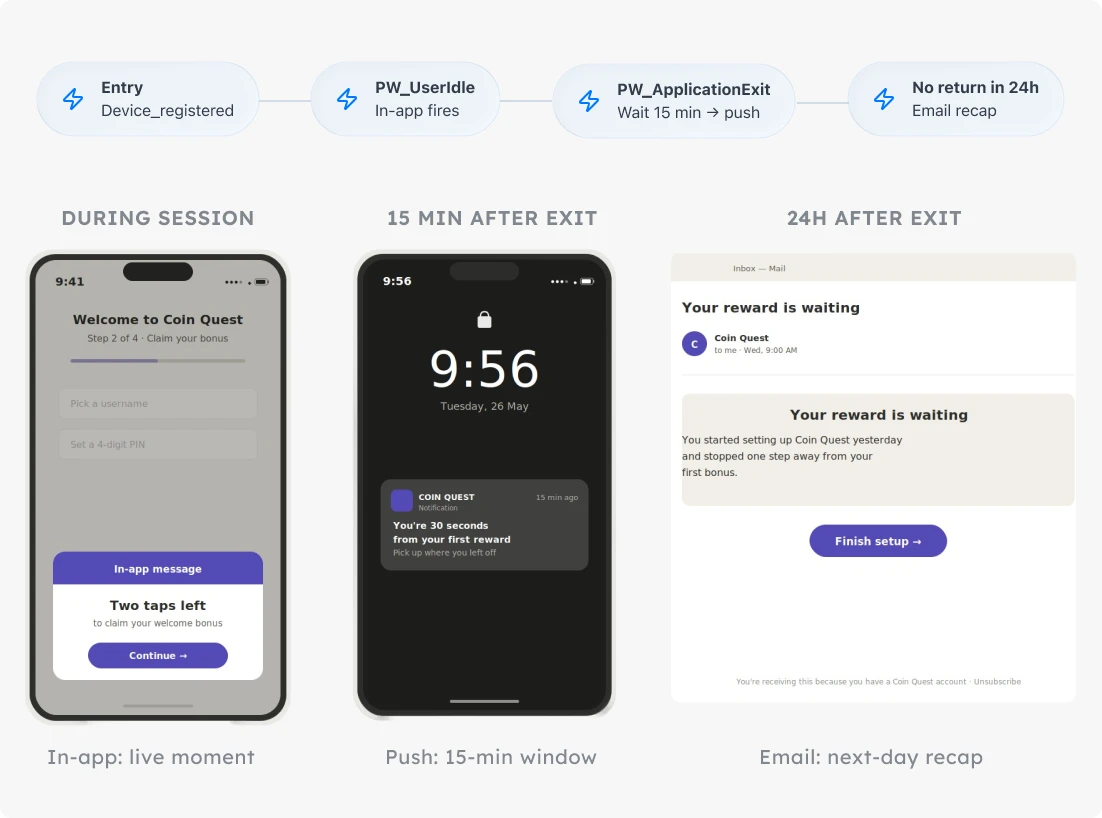
किन industries के लिए fit है: gaming, fintech, subscription apps। भारत में सोचें — एक UPI fintech app जहाँ user पहला transaction या KYC पूरा किए बिना अटक जाता है, या एक gaming app जहाँ पहला level अधूरा रह जाता है।
The signal: user ने install करके activation flow शुरू किया, पर key first action — पहला level, पहला deposit, profile completion — पूरा करने से पहले exit हो गया।
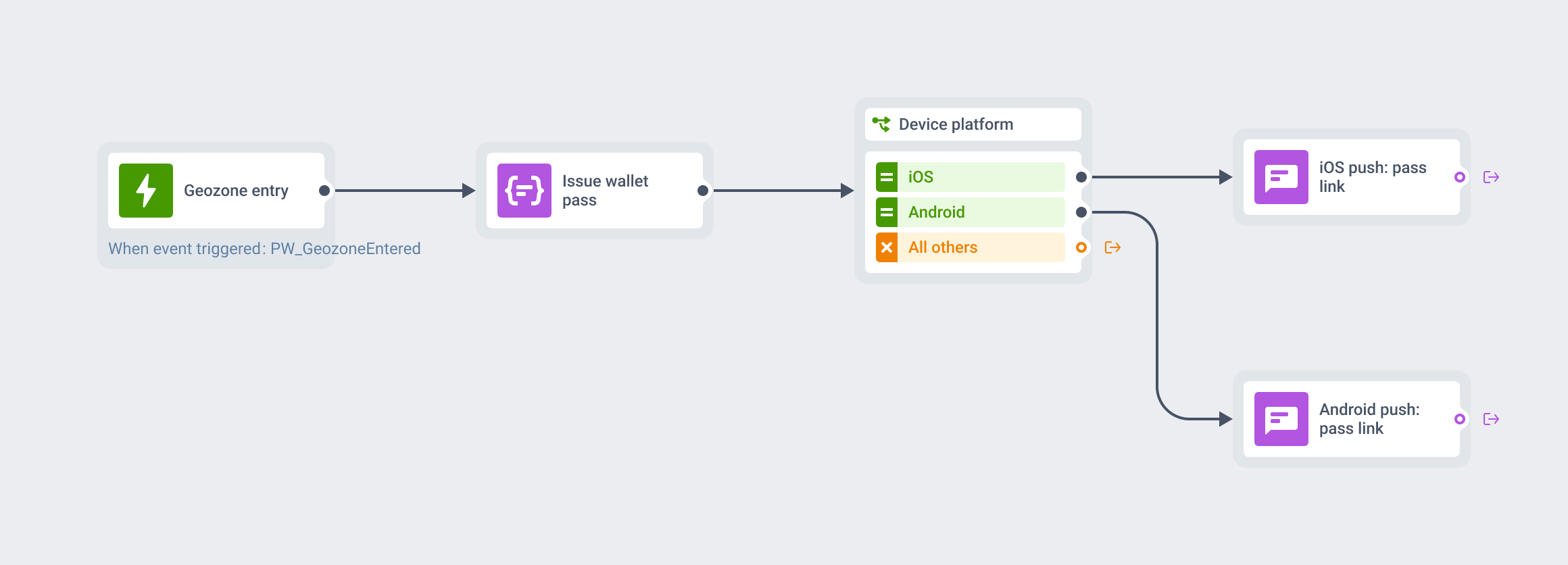
The journey:
-
Entry
PW_DeviceRegistered पर trigger-based entry। हर नया install automatically enter होता है।
-
Wait for trigger: key activation event
अगर user session के दौरान action पूरा कर लेता है, तो वह journey से बाहर निकल जाता है। Done। कोई further messages नहीं।
-
PW_UserIdle on activation screen → In-app message
User onboarding के बीच रुक गया। Context में एक nudge दिखाएं: "अपना bonus claim करने के लिए दो taps बाकी हैं।" एक CTA, कोई tutorial नहीं।
-
PW_ApplicationExit without completion → Wait 15 minutes → Push notification
User बिना खत्म किए चला गया। एक push भेजें जो ठीक उसी step की ओर इशारा करे जिसे उसने छोड़ा: "आप अपने पहले reward से सिर्फ 30 seconds दूर हैं। जहाँ छोड़ा था वहीं से जारी रखें।" Re-entry window, single CTA, सही screen पर deep link।
-
No app open within 24 hours → Email
Recap-style: किसके लिए sign up किया था, क्या इंतज़ार कर रहा है, वापस जाने के लिए एक link। Email यहाँ long tail है, urgent nudge नहीं।
क्या track करें: Activation conversion।
Case 2: Paywall hesitation (high-intent moment)
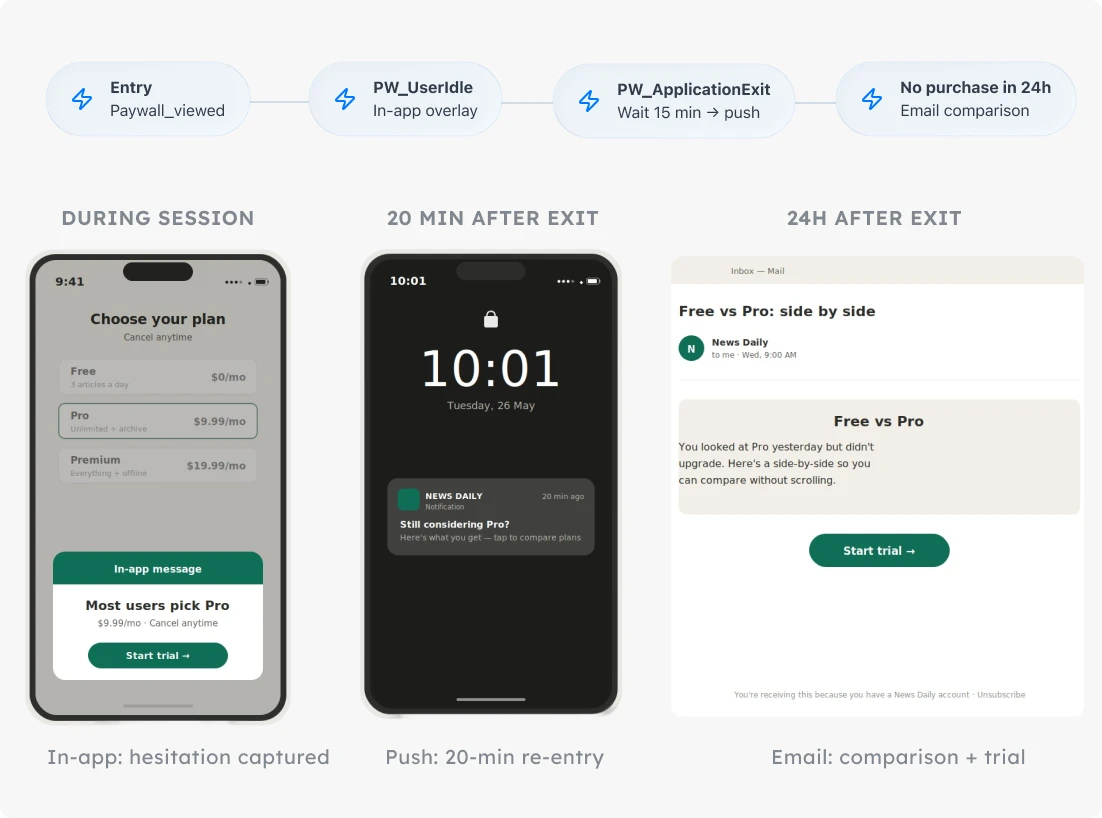
किन industries के लिए fit है: subscription, e-commerce, fintech। भारत के content/OTT और EdTech apps में यह खास relevant है, जहाँ free-to-paid conversion पूरी economics तय करता है।
बिना purchase के paywall views किसी भी subscription app का highest-intent signal हैं। ज़्यादातर teams इन्हें failure मानकर एक हफ्ते बाद re-target करती हैं। यह customer journey इन्हें वही high-intent moment मानती है जो ये असल में हैं, और उसी घंटे के अंदर act करती है।
The signal: user ने paywall देखा, purchase नहीं किया, screen पर idle रहा। Activation जैसा ही structure — छोटी window, high intent, seconds में होता decision — पर lifecycle में बाद में, जब user app से पहले से परिचित है।
The journey:
-
Entry
paywall_viewed पर trigger-based entry (एक custom event जो आप paywall screen load होने पर fire करते हैं)।
-
Wait for trigger: purchase_completed (आपका conversion event)
अगर user खरीद लेता है, तो journey exit हो जाती है।
-
PW_UserIdle on paywall screen → In-app message
User अभी इसी वक्त hesitate कर रहा है। Paywall पर एक sharp in-app दिखाएं: social proof, one-tap upgrade, या most-popular plan highlight किया हुआ। "ज़्यादातर users Pro चुनते हैं ₹799/महीने में। Trial शुरू करने के लिए tap करें।" एक message, decision के moment में।
-
PW_ApplicationExit within 5 min of paywall_viewed → Wait 20 min → Push notification
छोटा re-entry push: "अभी भी Pro पर सोच रहे हैं? देखिए आपको क्या मिलता है।" सीधे paywall पर deep link।
-
No purchase within 24 hours → Email
एक side-by-side plan comparison, customer quote, और एक "जहाँ छोड़ा था वहीं से जारी रखें" link।
क्या track करें: post-exit push notification के 30 minutes के अंदर re-entry rate। अगर push window users को वापस paywall पर नहीं खींच रही, तो या तो timing या copy moment से match नहीं कर रही।
Case 3: Feature discovery friction (“मुझे समझ नहीं आ रहा क्या करूँ” वाला moment)
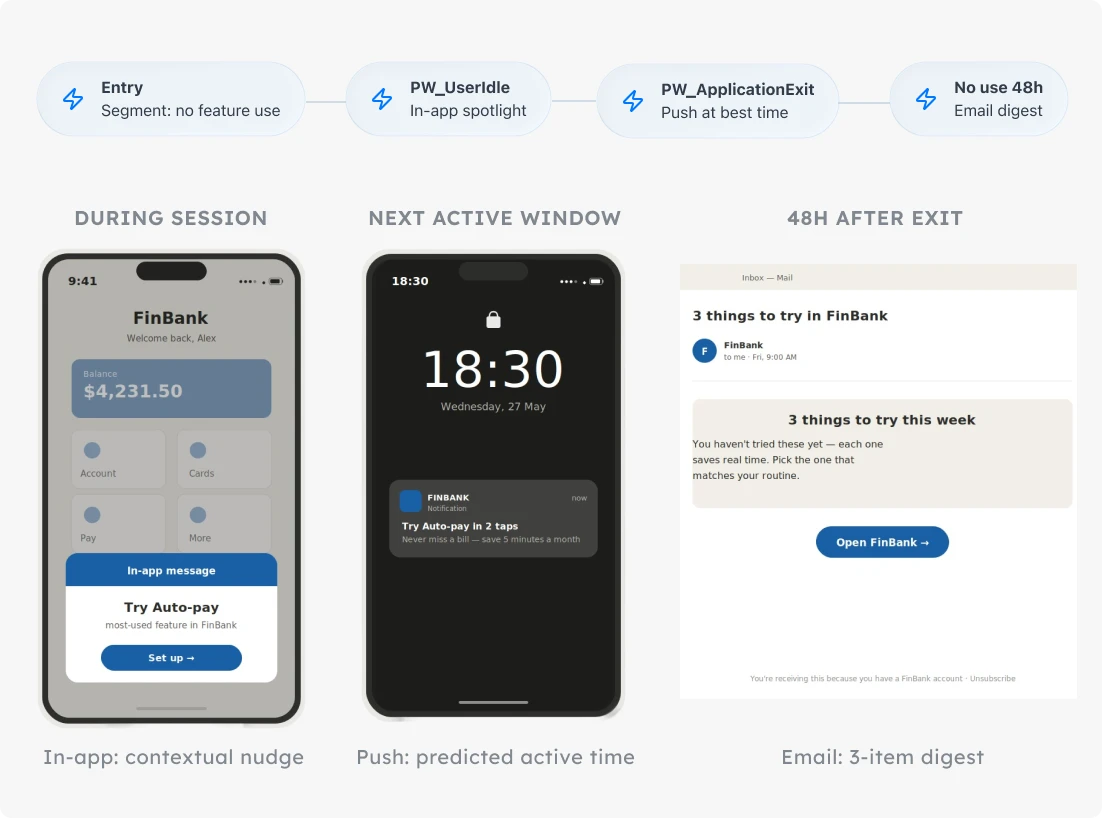
किन industries के लिए fit है: media, productivity, fintech। भारत के content और OTT apps में यह आम है — user app खोलता है, home screen पर वीडियो या articles के बीच खो जाता है, और किसी key feature तक पहुँचे बिना ही चला जाता है।
The signal: user app खोलता है, home screen पर रुकता है, किसी key feature में tap नहीं करता, और exit हो जाता है। Activation या paywall से urgency कम है, पर वही micro-moment logic लागू होता है: user ने अभी-अभी बता दिया कि वह unsure है, और अगले कुछ मिनट तय करते हैं कि वह वापस आता है या नहीं।
The journey:
-
Entry
Segment-based entry: वे users जिनका पिछले 7 दिनों में PW_ApplicationOpen है पर किसी key feature event (key_feature_used) के साथ कोई interaction नहीं।
-
PW_UserIdle on the home screen → In-app message
Contextual feature spotlight, एक बार में एक feature। "आपने अभी तक [feature] try नहीं किया — यहाँ बताते हैं कि यह [app] में सबसे ज़्यादा इस्तेमाल क्यों होता है।" try करने के लिए एक tap।
-
PW_ApplicationExit without feature use → Push at next predicted high-engagement time
fixed delay के बजाय push को user की active window में land कराने के लिए Pushwoosh का Best time to send इस्तेमाल करें। "[feature] को 2 taps में try करें।"
-
No feature use within 48 hours → Email digest
3 चीज़ों की एक छोटी list जो user app के साथ कर सकता है — visual, scannable, हर item पर एक click।
क्या track करें: 24-hour feature-use rate, इस आधार पर split करके कि return किस channel ने trigger किया — in-app, push, या email। यह split बताता है कि per segment किस window में invest करना worth है।
Pushwoosh के साथ churn से पहले users को पकड़ें
हर short-session moment — idle screen, silent exit, 24-hour no-return — एक window है जहाँ आपके पास अभी भी act करने का मौका है। Pushwoosh इन्हें mark करने वाले signals को default events के रूप में ship करता है, और Customer Journey Builder in-app, push और email को एक ही canvas में wire करता है — ताकि पूरा 3-moment arc एक single automated journey में रहे। भारतीय Android-first apps के लिए इसका मतलब है कि आप पूरी retention machinery बिना अलग-अलग tools जोड़े एक जगह चला सकते हैं।
एक short-session retention journey design करें, हर moment पर 1 signal के साथ। फिर देखें कि जिन at-risk users को आप पहले खो देते थे, वे रुक जाते हैं — सिर्फ Day 1 के लिए नहीं, बल्कि Day 7 और Day 30 तक।