Wallet pass update करने के लिए आप उसे अपने pass tool में या API से edit करते हैं। फिर platform हर उस device पर card refresh कर देता है जिस पर pass save है, कोई reinstall नहीं। Apple पर customer को lock-screen alert सिर्फ़ उन fields के लिए दिखता है जिनमें change message set है। Google पर उसका अपना alert सिर्फ़ loyalty, event ticket और flight passes पर आता है। भारत में Android का share 95%+ है, इसलिए ज़्यादातर customers के लिए Google Wallet वाले rules ही असली rules हैं।
यह updates का practical हिस्सा है। अंदर की mechanics के लिए पढ़ें wallet pass updates कैसे काम करते हैं। Examples Pushwoosh Wallet passes पर हैं, जहां हर pass एक User ID से जुड़ा है और builder, campaign या API से update हो सकता है।
आप क्या बदल सकते हैं
लगभग सब कुछ। Pushwoosh में Apple Wallet passes पर आप pass का name और description, field values और labels, change messages, colors, barcode message, expiration और status, locations और beacons edit कर सकते हैं। Images locked रहती हैं। Google passes पर आप logo और hero image, barcode, links और app link भी बदल सकते हैं।
1 चीज़ fixed रहती है: pass का style या type। Store card coupon नहीं बन सकता, और Google loyalty pass offer नहीं बन सकता। अगर format बदलना है, तो नया pass issue करें।
| Change | Example | Customer को क्या दिखता है |
|---|---|---|
| Field value | Points 120 से 180 | Card redraw होता है, और change message set हो तो alert भी |
| Date या time | Event अब 8 pm पर | Card redraw होता है, और change message set हो तो alert भी |
| Gate, seat, platform | Gate B12 से B20 | Card redraw होता है, और change message set हो तो alert भी |
| Colors (Google पर images भी) | Diwali sale के लिए seasonal design | Card redraw होता है, कोई alert नहीं |
| Locations | नया store खुला | Lock-screen relevance बदलती है, कोई alert नहीं |
| Expiration या void | Membership खत्म | Card gray हो जाता है या expired में चला जाता है |
1 pass या सारे passes एक साथ
Pushwoosh में हर pass 1 User ID का होता है। इससे update करने के 2 तरीके मिलते हैं।
एक-एक pass update करना रोज़ का case है: एक purchase 1 customer का balance बदलती है, तो उसी customer का card बदलता है। E-commerce app में हर order के बाद loyalty points ऐसे ही बदलते हैं। इसे आप लगभग हमेशा API या tag sync से automate करेंगे, हाथ से click करके नहीं।
Bulk case पूरा program है: हर holder के लिए नई terms या seasonal design, जैसे Big Billion Days या Diwali sale से पहले card का नया look। Pushwoosh में यह Wallet Pass Campaign से चलता है। Shared marked fields campaign से issue हुए हर pass पर update होते हैं, personal fields हर customer की अपनी values रखते हैं, और save करने से पहले campaign दिखाता है कि edit कितने passes पर असर डालेगा।
Google Wallet passes पर fields में user tags हो सकते हैं। Pushwoosh pass बनाते समय tag values भरता है और हर update पर उन्हें refresh करता है, इसलिए card वही दिखाता है जो profile अभी कहता है। Campaign में tag sync यह काम दोनों platforms पर बिना edit के करता है: जब field के पीछे का tag बदलता है, pass को अगली check पर नई value मिलती है, default रूप से हर 60 minutes में।
Change messages: किसे interrupt करना है
हर update पर किसी को disturb नहीं करना चाहिए। कौन से करें, यह आप तय करते हैं।
Apple पर आप किसी field में change message जोड़ते हैं, जैसे “Your gate is now %@”। जब वह field बदलता है, iOS lock screen पर वह message दिखाता है। जिन fields में message नहीं है, वे चुपचाप update होते हैं।
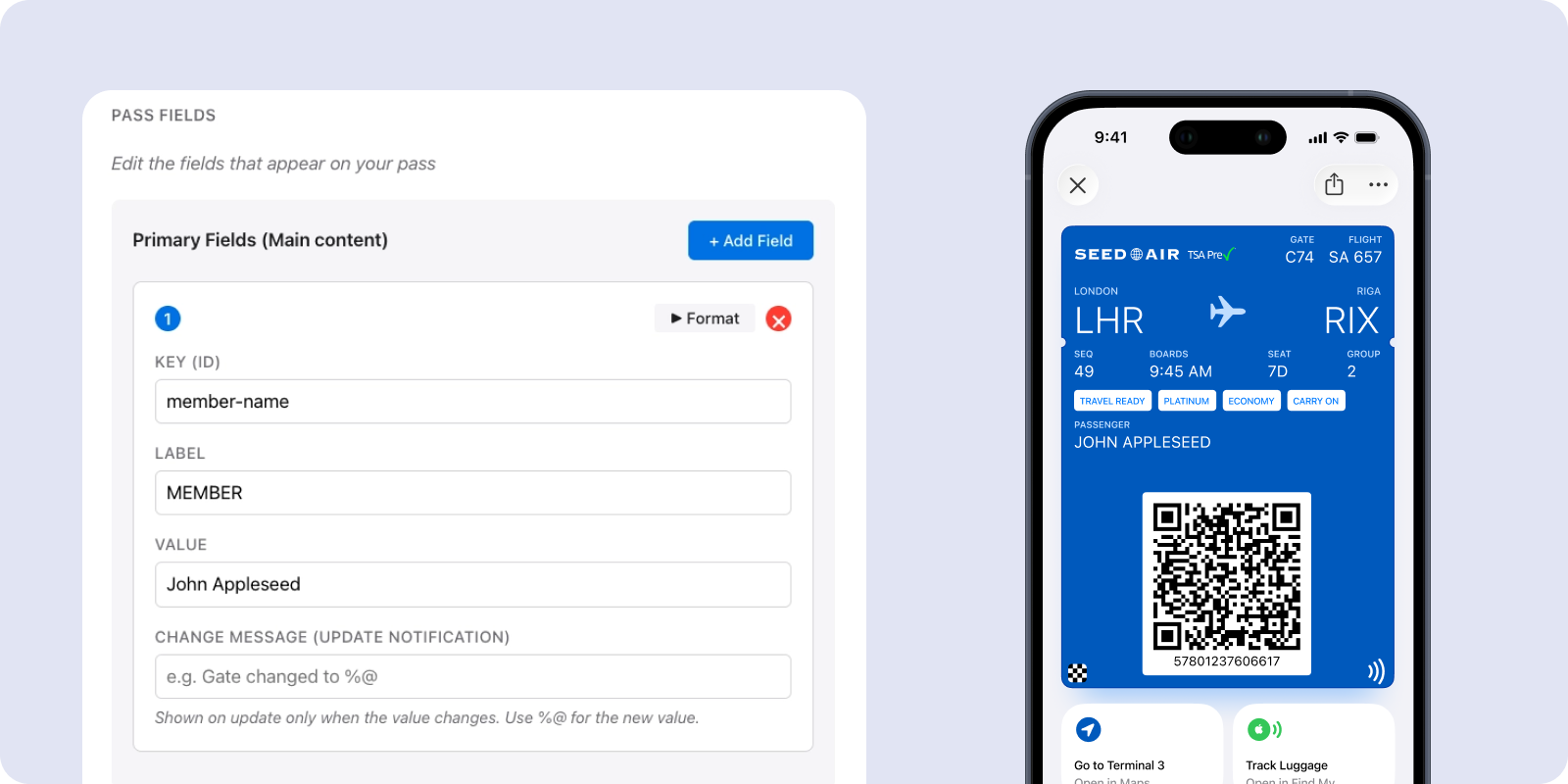
Google पर pass का type तय करता है कि Google बदले हुए fields के बारे में अपना alert भेजेगा या नहीं: सिर्फ़ loyalty, event ticket और flight passes को मिलता है, और text Google लिखता है। Event tickets और flights पर यह तभी fire होता है जब start time में 3 घंटे से कम बचे हों। किसी भी type के लिए आप API या campaign से update के साथ custom notification जोड़ सकते हैं। Google हर pass पर 24 घंटे में 3 से ज़्यादा notifications allow नहीं करता, उसके बाद pass चुपचाप update होता है। Android-first audience के लिए यह 3 का budget सोच-समझकर खर्च करें।
हमारा rule of thumb: alert उन changes पर दें जिन पर customer को कुछ करना है, जैसे नया gate, बदला हुआ time या expire होने वाले points। Redesign या नई store location पर कभी alert नहीं चाहिए।
Change messages marketing channel नहीं हैं
Field change से sale push करने का मन करता है। ऐसा न करें। Apple और Google सिर्फ़ pass से जुड़ी notifications allow करते हैं, जैसे balance, status या schedule, और यह rule तोड़ना card delete करवाने का सबसे तेज़ तरीका है।
Promotions के लिए उन्हीं customers तक app push, email या SMS से पहुंचें: हर pass एक User ID पर है, इसलिए उसका holder पहले से आपकी audience में है। Festive season के offers भी वहीं से भेजें। जब holders को pass के बारे में ही कुछ बताना हो, जैसे reward ready है, तो options pass holders को message करने वाले docs में हैं।
API से update करना
जब change आपके अपने systems से आता है, जैसे POS, booking engine या points ledger, तो builder की जगह API इस्तेमाल करें। FinTech या payments app में cashback balance, या EdTech app में course pass की validity, ऐसे ही backend से बदलती है। Flow दोनों platforms पर एक जैसा है: pass identify करें, नई values भेजें, platform को sync करने दें।
Methods और parameters Apple Wallet PassKit API और Google Wallet API references में हैं।
Expire, void और restore
Passes का एक life cycle होता है, और उसे साफ़ तरीके से खत्म करना उतना ही ज़रूरी है जितना शुरू करना। Wallet में पड़ा पुराना card, card न होने से भी बुरा है।
Apple पर expiration date set करें, और उसके बाद pass gray हो जाता है। आप pass को voided भी mark कर सकते हैं, जैसे coupon redeem होने के बाद। Google पर pass invalidate करने से वह customer के Expired passes में चला जाता है, और आप उसे बाद में फिर activate कर सकते हैं। Google pass delete करने से वह Google में invalidate होता है और Pushwoosh में उसका record हट जाता है।
जब update नहीं पहुंचता
ज़्यादातर cases 4 कारणों में आते हैं।
Apple certificate expire हो गया। Apple passes आपके Pass Type ID certificate से sign होते हैं, और इसके expire होते ही passes न sign हो सकते हैं न update। जिस दिन certificate upload करें, उसी दिन renewal date calendar में डाल दें।
Customer ने pass remove कर दिया। Updates सिर्फ़ उन devices तक पहुंचते हैं जहां pass अब भी save है।
Update पहुंचा, लेकिन alert नहीं आया। Apple पर check करें कि field में change message है। Google पर pass type, Notify about changed fields checkbox और daily limit check करें।
Customer ने pass कभी add ही नहीं किया। जो pass issue हुआ पर save नहीं हुआ, उसे कोई update नहीं मिलता। Install link फिर से भेजें।
Pushwoosh के साथ हर pass को current रखें
Pushwoosh native Apple और Google Wallet passes को builder, campaign या API से update करता है, और हर pass उसी User ID से जुड़ा रहता है जिस पर आपके push, email और SMS चलते हैं। 1 balance बदलें या पूरा program, और चुनें कि कौन से changes alert के लायक हैं।
Customers को informed रखना ज़्यादा messages भेजने से नहीं होता। बात यह है कि उनके wallet का card हमेशा सही हो।