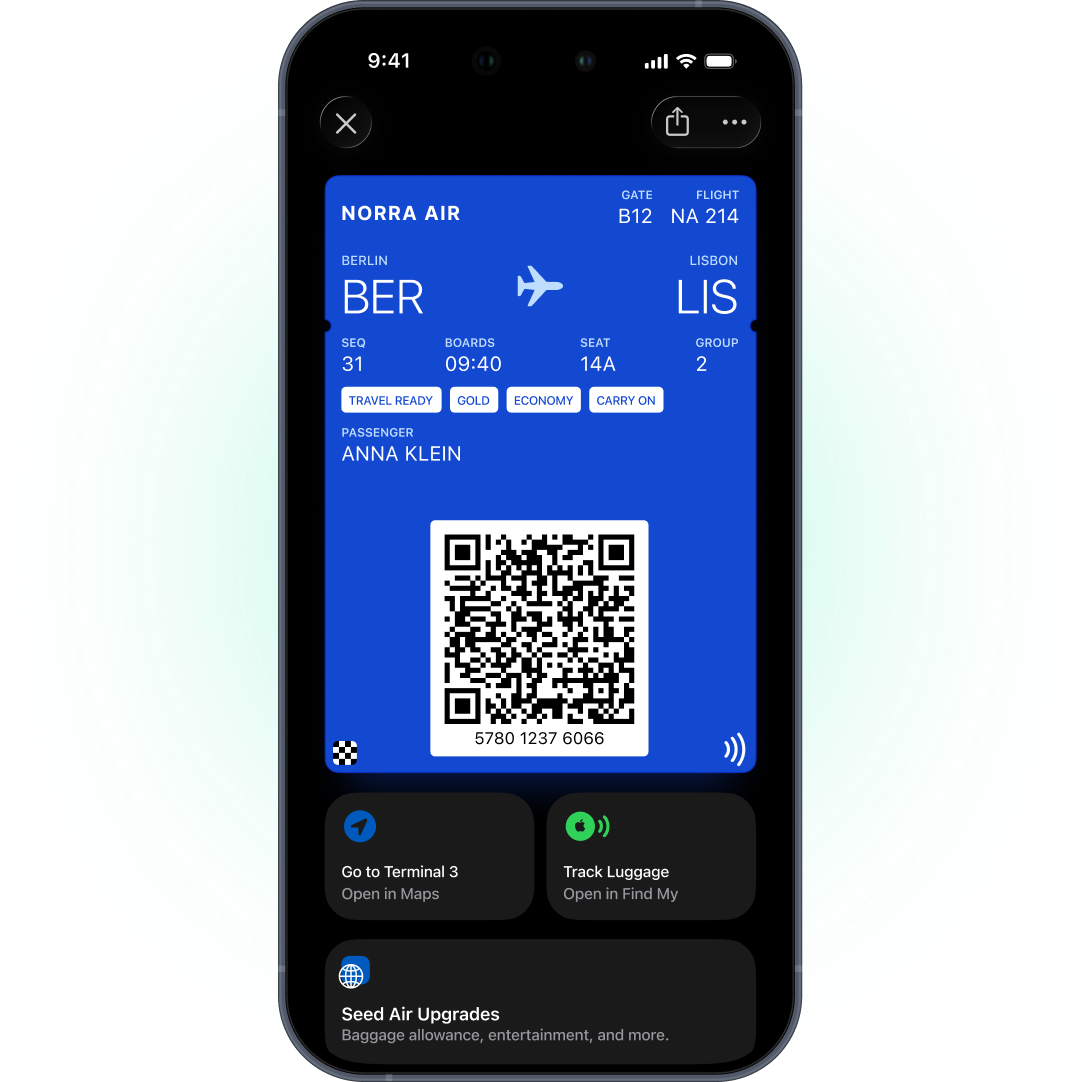
Apple Wallet या Google Wallet में digital boarding pass passengers को scan होने वाला pass देता है, जो gate, seat या boarding time बदलने पर खुद update हो जाता है। यह airline के app के बिना काम करता है, departure के आसपास lock screen पर आता है, और travel वाले पूरे दिन बना रहता है। Airlines के लिए यह boarding pass को operational changes का live channel बना देता है।
Pushwoosh में passes और messages 1 passenger profile share करते हैं, इसलिए आप अपनी day-of-travel journeys के अंदर airlines के लिए wallet passes चला सकते हैं।
Boarding pass live क्यों होना चाहिए
Day-of-travel changes पर ही airlines भरोसा खोती हैं, और regulators एक न्यूनतम स्तर तय करते हैं। EU में Regulation EC 261/2004 का Article 14 airlines से यह साबित करने को कहता है कि passengers को cancellation की जानकारी दी गई थी। US में DOT Tarmac Delay Rule के तहत carriers को अगले 7 दिनों की flights के लिए बदलाव के 30 मिनट के अंदर flight status update करना होता है।
Paper या PDF boarding pass उसी पल गलत हो जाता है जब gate बदलता है। Wallet pass खुद को फिर से draw करता है।
Market आगे बढ़ चुका है। Alaska Airlines ने wallet usage में 35% year-over-year growth report की, और 90% passengers airport पहुंचने से पहले check in करते हैं (competitor case, Airship, 2025)। Hawaiian Airlines ने अपने day-of-travel program के हिस्से के रूप में Google Wallet में boarding passes launch किए (competitor case, Airship)।
भारत में Android का share 95%+ है, इसलिए domestic routes पर ज़्यादातर passengers का pass Google Wallet में होगा। Google वाला Flight pass आपका मुख्य setup है, और Apple Boarding Pass iPhone users के लिए।
Boarding pass types और barcodes
| Apple Wallet | Google Wallet | |
|---|---|---|
| Pass type | Boarding Pass, transit type air | Flight |
| Barcode | PDF417, साथ ही QR, Aztec, Code128 | PDF417, साथ ही QR, Aztec, Code128, EAN-13 |
| Update alerts | Change message वाली fields | हां, departure से लगभग 3 घंटे के अंदर, हर pass पर दिन में max 3 |
| Lock-screen relevance | Relevant date और airport locations | आपकी जोड़ी गई airport locations |
Airline boarding passes के लिए अक्सर PDF417 ज़रूरी होता है, और दोनों platforms इसे support करते हैं।
Gate, seat और time updates
जब आपका departure control system gate, seat या boarding time बदलता है, वह API के ज़रिए नई values भेजता है और passenger के phone पर pass update हो जाता है।
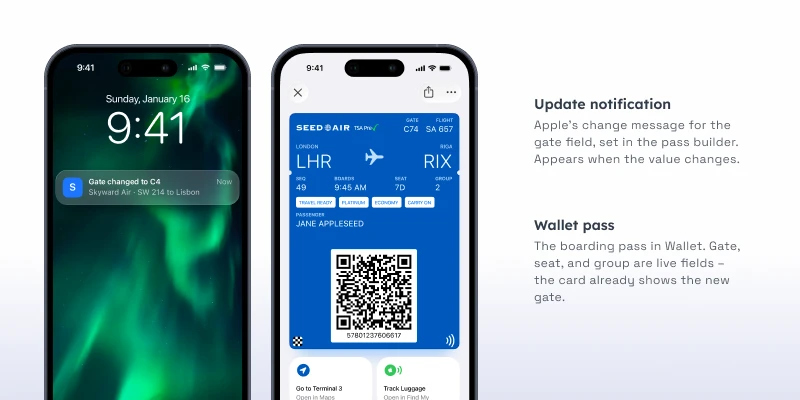
Change messages उन fields पर रखें जो terminal में मायने रखती हैं: gate, boarding time, seat। Apple पर value बदलते ही “Your gate is now %@” जैसा message lock screen पर आता है। Google पर Flight passes departure के आसपास updates पर notify करते हैं, Google की limits के अंदर।
Cosmetic fields को बिना change messages के छोड़ें। नए gate की तरफ़ भागते passenger को यह जानने की ज़रूरत नहीं कि आपने logo update किया।
Delay journeys: pass और message साथ में
Pass update नई जानकारी दिखाता है। उसे explain नहीं करता। Delays और cancellations के लिए update को उसी journey में एक message के साथ जोड़ें।
-
Delay announce हुआ
Pass departure time update करता है। एक time-sensitive push delay explain करता है।
-
Device तक पहुंच नहीं
बिना push वाले passengers के लिए SMS fallback।
-
Gate change
Pass change message के साथ update होता है। App users को push भी मिलता है।
-
Cancellation
Pass update या void होता है, और rebooking message push, email और SMS से जाता है, ताकि passengers को हर उस channel पर पता चले जो वे इस्तेमाल करते हैं।
Google update alerts को हर pass पर दिन में 3 तक सीमित रखता है। Operational रूप से भारी दिन पर बाकी काम push करता है।
Delay और gate-change push हिंदी या Hinglish में लिखें, जहां वह natural लगे, जैसे “आपकी flight का gate अब C4 है, boarding 10:15 पर”।
Boarding pass से आगे
यही setup trip के आसपास के दूसरे passes को भी support करता है।
Lounge passes उनमें से एक हैं। Alaska Airlines frequent flyers को geotrigger से नज़दीकी lounge में invite करती है और pass wallet में डाल देती है (competitor case, Airship)।
Frequent flyer cards दूसरा उदाहरण हैं: tier और miles वाला loyalty card, जो हर flight के बाद update होता है।
Airports भी अपने programs चलाते हैं। Heathrow Airport ने wallet-based loyalty program चलाया और रोज़ औसतन 1,245 extra sign-ups report किए (vendor case, PassKit, airline नहीं बल्कि airport)।
Alerts को trip तक सीमित रखें
Boarding pass alerts trip के लिए हैं: gate, time, seat, boarding। Apple और Google सिर्फ़ pass से जुड़ी notifications allow करते हैं। Ancillary offers, जैसे seat upgrades या paid lounge access, push, email या in-app से जाते हैं।
Setup
- Apple Pass Type ID certificate (Apple Developer account, $99 सालाना) और service account key के साथ Google Issuer ID।
- Apple पर Boarding Pass और Google पर Flight, PDF417 barcodes के साथ।
- Issuing और updates के लिए आपके departure control या reservation system से API connection।
- Gate, seat और boarding time पर change messages।
- Push और SMS fallback के साथ delay और cancellation journeys।
Apple और Google का one-time setup Wallet passes पर Pushwoosh docs में बताया गया है।
Pushwoosh के साथ passengers को informed रखें
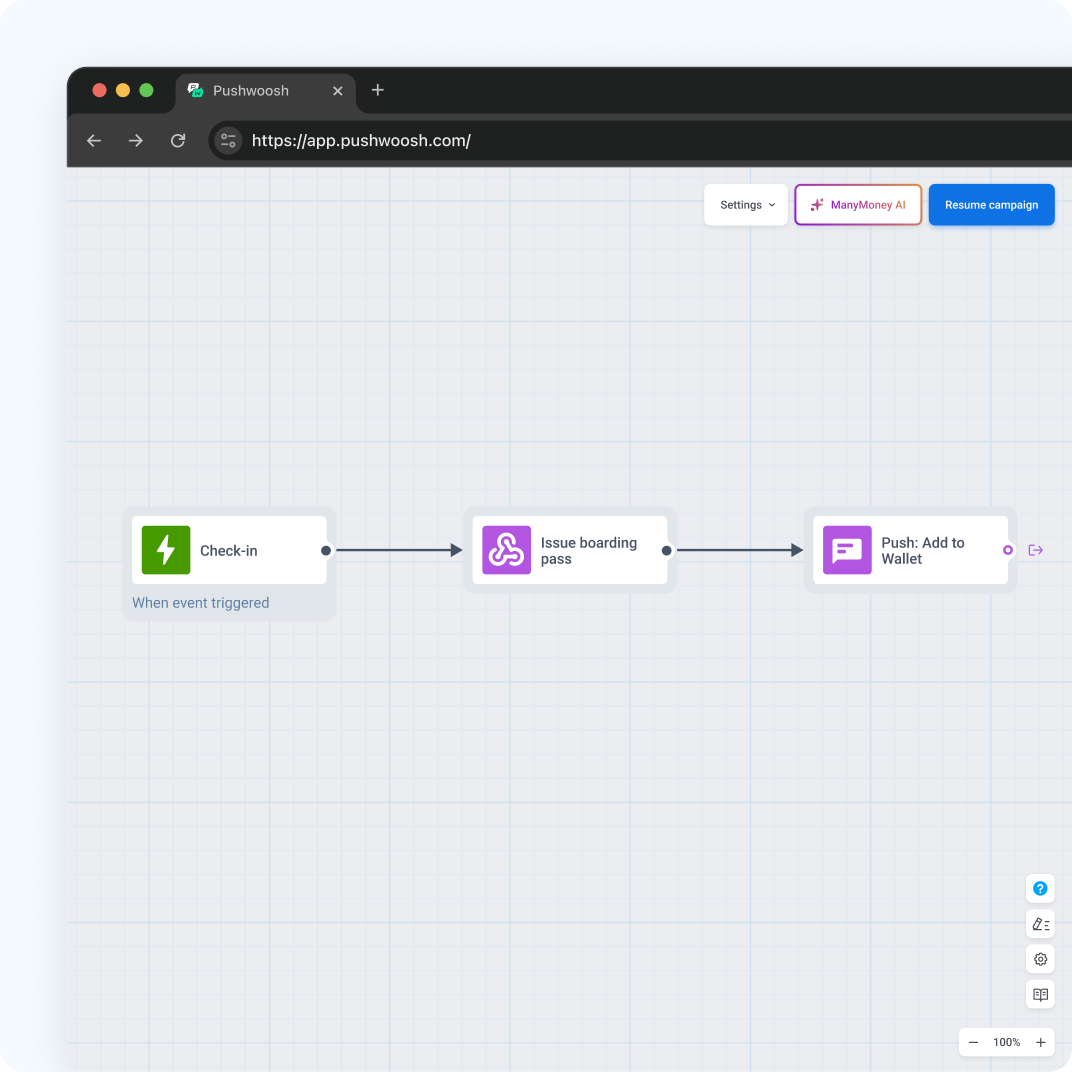
Pushwoosh User ID के हिसाब से native Apple और Google Wallet boarding passes issue करता है, API से gate, seat और time update करता है, और उसी platform से push, SMS और email के ज़रिए delay journeys चलाता है।
Travel वाले दिन passengers को ज़्यादा messages नहीं चाहिए। उन्हें ऐसा boarding pass चाहिए जो कभी out of date न हो।