आपका push dashboard पूरा हरा है: 99% deliverability, कोई error नहीं। लेकिन engagement हफ्तों से गिर रहा है, और आपकी तरफ से कोई explanation नहीं। Welcome to Apple message filtering 👋🏻🤡 यह वो layer है जो आपके “sent” और user के lock screen के बीच बैठती है, और आपकी team के पास इसके लिए कोई dashboard नहीं है।
इस guide में आप सीखेंगे कि अपनी existing messaging campaigns को audit कैसे करना है और कौन से hacks iOS पर visibility वापस लाते हैं — ताकि आपके iOS users actually वो देखें जो आप भेज रहे हैं।
🍏🛠️ Apple message filtering updates 2024–2026
October 2024 से September 2025 के बीच, Apple ने चार releases शिप किए जिन्होंने बदल दिया कि iOS पर notifications users तक कैसे पहुंचती हैं। हर update ने अलग channel को target किया, लेकिन underlying logic एक ही है।
- iOS 18.1 (October 2024): Apple Intelligence rolls out — notification-summary era की शुरुआत।
- iOS 18.2 (December 2024): Mail app incoming emails को automatically चार categories में sort करता है — Primary, Transactions, Updates, और Promotions। Mass sends Promotions में जाते हैं।
- iOS 18.4 (April 2025): Priority Notifications launch। Apple Intelligence incoming push notifications को predicted importance के basis पर rank करता है और important वाले lock screen के dedicated section में दिखाता है। Default off, सिर्फ iPhone 16, 15 Pro, और 15 Pro Max पर available।
- iOS 26 (September 2025): Messages app में दो new filters आए — Spam filter (default on) detected spam को separate folder में route करता है, और Screen Unknown Senders (default off) saved न किए हुए numbers से SMS को filter view के पीछे छुपाता है, बिना notification trigger किए। Transactions और Promotions categories अब SMS के लिए भी available हैं।
2024–2026 में Apple के सभी updates का pattern: senders जिनसे user actively interact करते हैं, उनके messages pass होते हैं। Mass sends जिनमें behavioral relationship नहीं, वो filter हो जाते हैं, summarize हो जाते हैं, या tab के पीछे छुप जाते हैं।
इसमें से कुछ भी delivery failure की तरह नहीं दिखता। APNs reports, email bounce rates, और SMS delivery receipts सभी message को delivered मार्क करते रहते हैं। User बस उस तरह नहीं देखता जैसे आप सोचते हैं।
Apple Intelligence priority कैसे decide करता है
Push notifications के लिए specifically, Apple ने full ranking algorithm publish नहीं किया है। Apple की public guidance और practical behavior के basis पर, तीन signals decision drive करते दिखते हैं:
- Content signals. Time-sensitivity cues (delivery updates, verification codes, appointment reminders), और क्या message किसी specific action को reference करता है जो user ने initiate की।
- Behavioral history. User कितनी frequently और recently app open करता है, इस app के past notifications से interact किया है या नहीं, और sender ऐसा कोई है जिसे वो regularly message या email करता है।
- Notification type. Transactional और response-to-user-action notifications को broadcast promotional content से higher-value treat किया जाता है।
Practice में इसका मतलब: 2 identical apps एक ही time पर वही promo भेज रहे हों, results बहुत अलग हो सकते हैं। जिस app पर user हफ्ते में दो बार transact करता है, उसे काफी trust मिलता है। जो app user ने 30 दिनों से open नहीं किया, उसे लगभग कुछ नहीं।
क्या pass होता है, क्या filter होता है
OS-level filtering के kick-in होने के बाद notifications को कैसे treat किया जाता है, इसका rough map:
| Priority मिलने की संभावना | Filter या deprioritize होने की संभावना |
|---|---|
| User action से tied order या delivery updates | Broad segment को promotional blasts |
| Appointment reminders, verification codes | Fixed-schedule sends ("हर बुधवार 11am") |
| User-initiated requests के replies | Generic re-engagement ("We miss you!") |
| Live Activity updates जो users ने subscribe किए | Behavioral trigger के बिना mass content |
| Senders जिनसे user ने recently engage किया | पूरे segment के लिए identical दिखने वाला content |
3-question audit और iOS पर बेहतर visibility के hacks
जिस campaign को आप diagnose करना चाहते हैं उसे चुनें। इन तीन audit questions से होकर गुज़रें और वो hack ढूंढें जो iOS पर message visibility fix करता है।
1. इस campaign का trigger क्या है: time या user action?
अगर fixed schedule है, तो यह question पहले से ही “no” है। Broadcast timing exactly वही चीज़ है जिसे OS-level filtering deprioritize करती है।
अगर trigger है, तो ensure करें कि वो behavioral trigger है, segment filter नहीं। Segment filter कहता है “users जिन्होंने कभी X किया।” Trigger कहता है “send this exactly तब, जब X हो।”
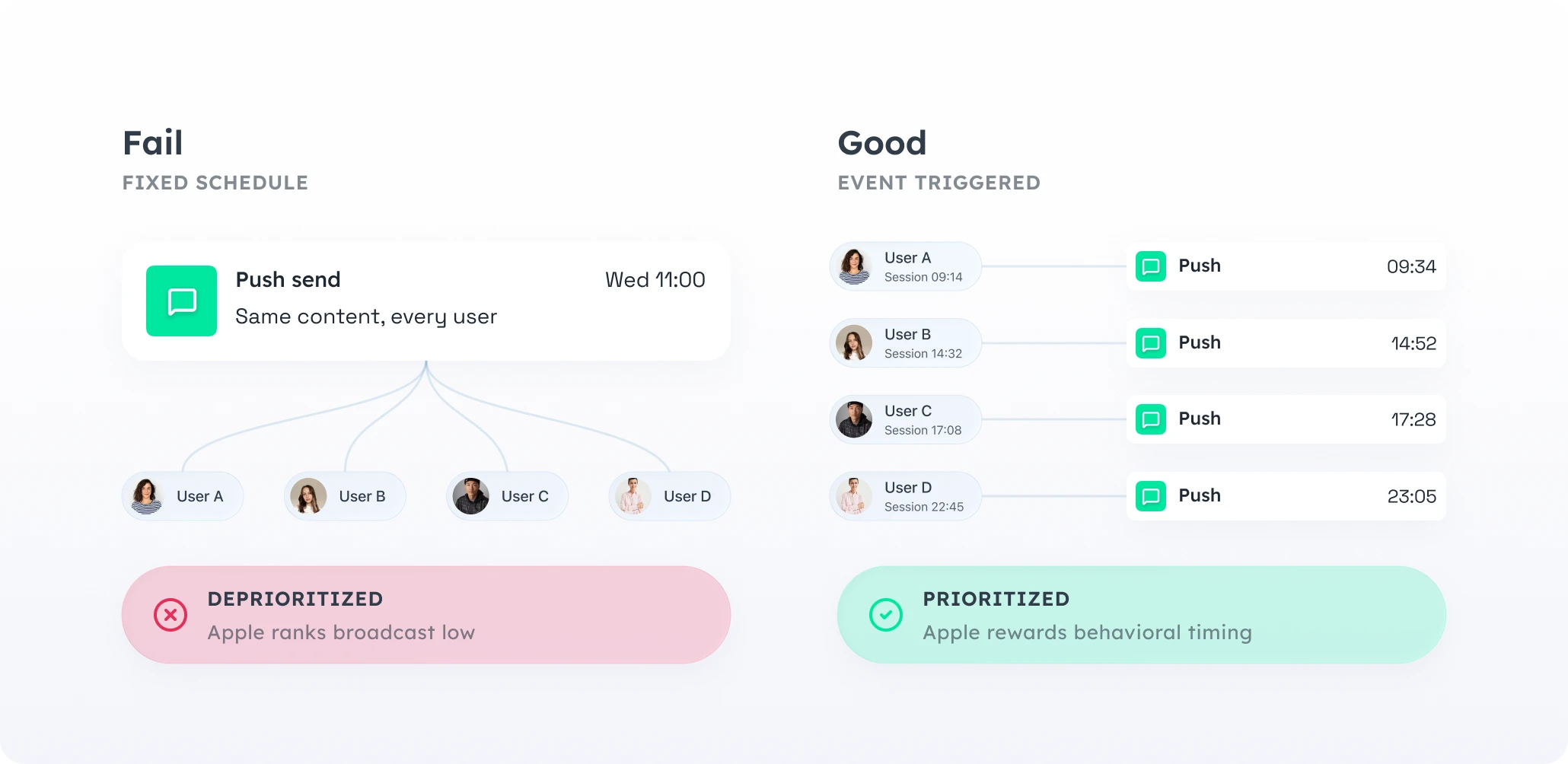
फर्क इसलिए matter करता है क्योंकि Apple की ranking user action और notification के बीच proximity को reward करती है। User के अपने behavior को follow करने वाला send relevant पढ़ा जाता है। Scheduled blast broadcast पढ़ा जाता है।
यहां दो hacks apply होते हैं।
🛠️ Hack #1: Time trigger को event trigger से replace करें
“Wednesday 11am promo” को बदलकर “behavioral event के N minutes बाद send” कर दें — events जैसे session_end, product_viewed_twice, added_to_cart_no_purchase। Content largely वही रहता है। Delivery moment बदलता है — और यही Apple की ranking reward करती है।
🛠️ Hack #2: जिन schedules को move नहीं कर सकते, उनके लिए Best Time to Send
Weekly digests, content drops, और streak reminders genuinely time-based होने चाहिए। इनके लिए, Best Time to Send fixed slot को हर user के past engagement pattern पर रखता है। Same campaign, per-user window।
2. क्या first name के अलावा personalization है?
Hi {first_name} personalization नहीं है — यह सिर्फ एक merge tag है। Real personalization का मतलब content खुद (offer, product, next step) इस user ने actually क्या किया उसके basis पर अलग हो।
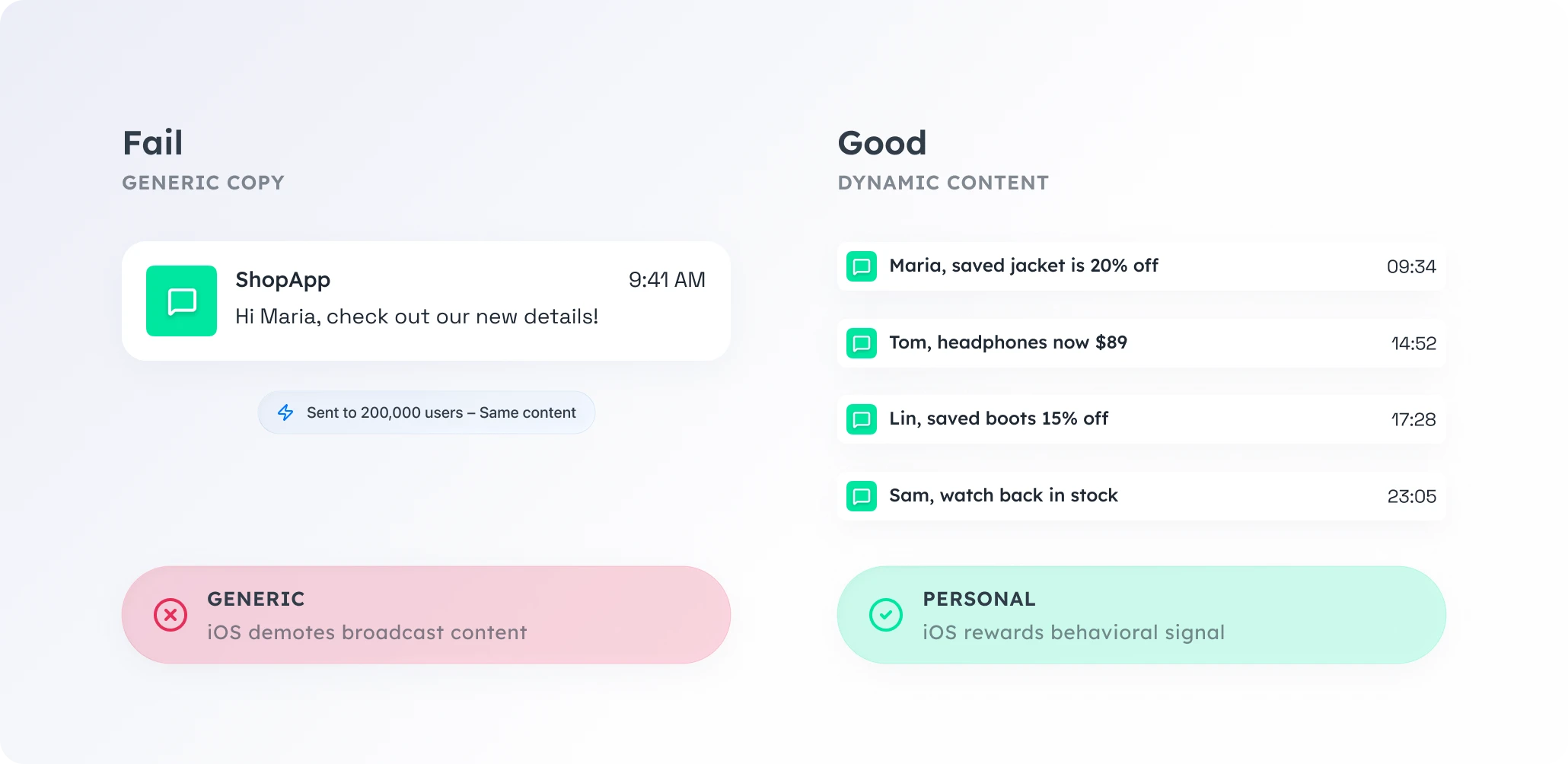
दूसरे version में behavioral signal है, पहले में नहीं। यह वो content type भी है जिसे Apple की email categorization Promotions में route करने के बजाय Primary में छोड़ने की तरफ झुकती है।
🛠️ Hack: Static copy को Dynamic Content से swap करें
Dynamic Content एक ही campaign से per-user content (offer, product, location, price, currency) render करता है।
- Static: “Our sale is live. Up to 50% off.”
- Dynamic: “
{product_last_viewed}is{discount}% off in{user_city}, through{deadline_local}.”
3. क्या specific next action है?
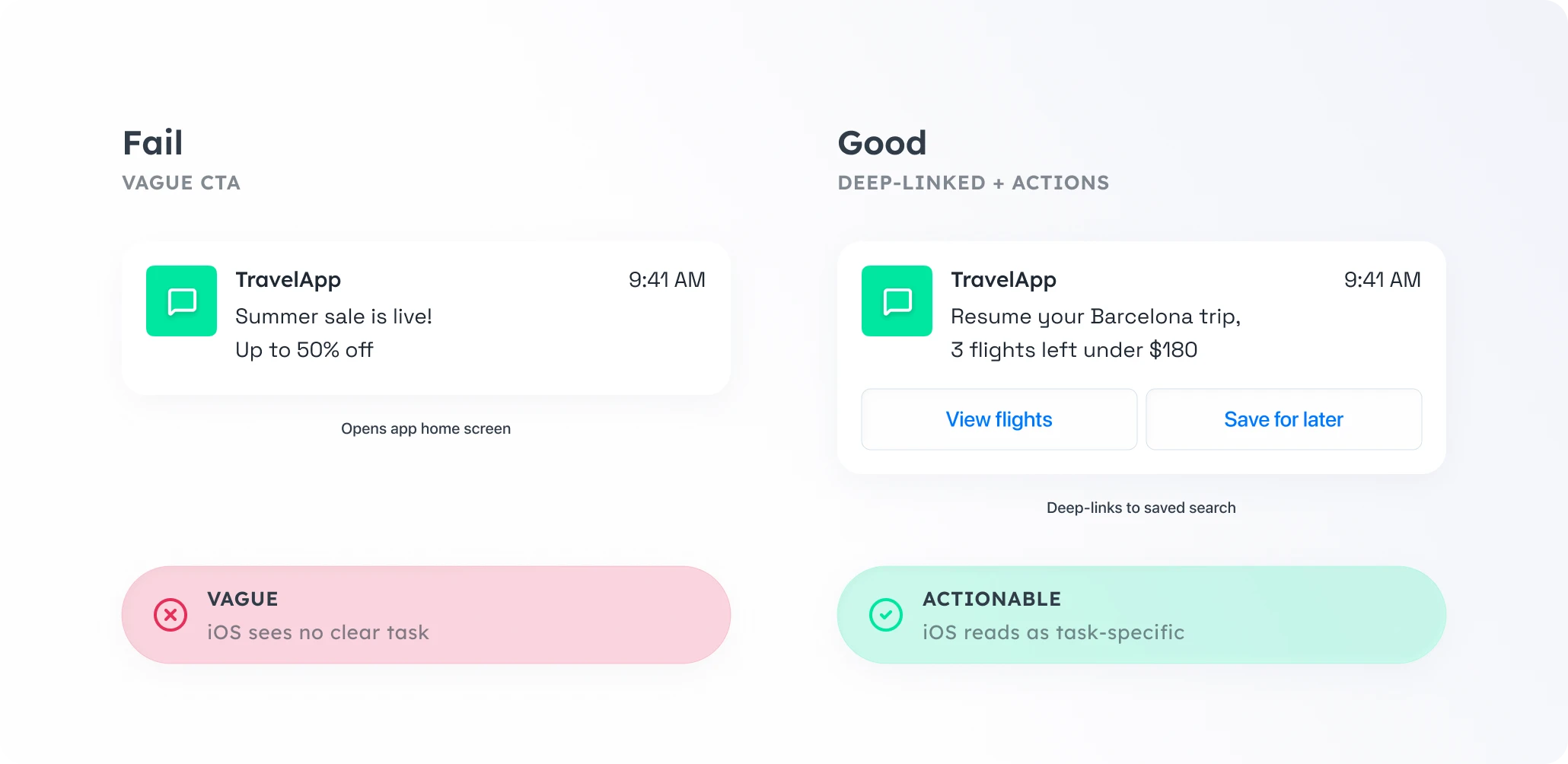
हर message एक चीज़ पर खत्म होना चाहिए जो user एक tap में कर सके। अगर CTA “explore” या “see more” है, या CTA है ही नहीं, तो message lifecycle work नहीं — public-address work कर रहा है।
🛠️ Hack: CTA को deep-link करें और action buttons add करें
दो changes notification और action के बीच gap close करते हैं।
CTA को deep-link करें। Home screen open करने के बजाय, push notification exact view खोलता है जो user को चाहिए: वो product, saved search, order tracking page, specific article। iOS deep-linked notifications को task-specific के रूप में पढ़ता है, जो Priority Notifications जो reward करती है उससे align करता है।
Action buttons add करें। iOS एक single push के अंदर चार actionable buttons तक support करता है: “Reorder,” “Track,” “Renew,” “Remind me later।” User app open किए बिना action complete करता है, जो engagement count होता है और sender का signal future ranking के लिए improve करता है।
Extra hack: Push को Live Activity से replace करें
कुछ notifications को push होने की ज़रूरत ही नहीं। अगर user एक ongoing state track करना चाहता है (delivery in progress, game round, ride, match score), तो Live Activity उस state को lock screen पर persistently दिखाती है — interrupt या filter किए बिना।
Pushwoosh के साथ iOS पर high-visibility campaigns बनाएं
iOS-level message filtering user behavior के around बनी campaigns को reward करती है, fixed schedules को नहीं। Pushwoosh आपको उस rebuild के लिए building blocks देता है — एक platform पर push, in-app, email और SMS, SOC 2 Type I, ISO 27001:2022 और GDPR compliance के साथ, Indian e-commerce, EdTech और FinTech apps के scale के लिए:
- Trigger-based entry —
session_end,purchase_initiated, या आपके mobile app के किसी भी custom event पर automatically push, email और SMS भेजें। - Best Time to Send — जिन campaigns को genuinely schedule चाहिए, उनके लिए Pushwoosh हर message individual user के peak engagement window पर deliver करता है।
- Dynamic Content + Liquid templates — एक single campaign से per-user offer, product, location, deadline render करें।
- Deep links और action buttons — हर push में चार one-tap actions तक, exact destination पर deep-linked।
- Live Activities — push भेजे बिना lock screen पर ongoing state दिखाएं।
- Journey statistics — event-triggered बनाम fixed-schedule sends को CTR और goal-completion rate से measure करें — पता चलेगा कौन सा rebuild काम कर गया।