SMS is probably your most expensive messaging channel. At $0.01–0.05 per message, a 100K-user base can run up $4,000–5,000/month in SMS fees only. If every flow in your app starts with text, you’re paying a premium for reach that a cheaper channel could handle.
It’s easy to see why teams default to SMS: near-universal deliverability, and no one wants a missed message. But “send SMS to everyone just in case” is not a strategy. It’s a budget leak.
The fix isn’t to stop using SMS. It’s to build a system where SMS fires only when it’s the best option, and push notifications and email handle the rest. Here’s how to set that up in Pushwoosh Customer Journey Builder.
How to choose the right channel and save costs
Think of your channels as a ladder: start at the cheapest step and climb only when needed.
Level 1 — Push notifications. Near-zero marginal cost. Instant delivery. Best for time-sensitive nudges where a short message is enough. The catch: users must have notifications enabled, and delivery depends on the OS and device state.
Level 2 — Email. Still very cost-effective (especially if you use Pushwoosh 😎). Handles detail-heavy messages: invoices, plan comparisons, step-by-step instructions. Slower, lower-urgency, but great for content users need to reference later.
Level 3 — SMS. High deliverability, high cost. This is your escalation channel: it kicks in when push notification and email either can’t reach the user or haven’t worked, and when the stakes are high enough to justify the spend.
The principle is simple: every user gets the message through the cheapest channel where they’re reachable. SMS enters the picture only when cheaper options are exhausted or when the moment is truly urgent.
This isn’t a theory. It’s a concrete routing pattern you can build right now.
Example: a payment reminder flow in Pushwoosh
Let’s put this into practice.
Here is an example: you run a fintech app and need to remind users about an upcoming payment. A missed payment means late fees, credit impact, and lost trust. The stakes are high, so SMS is justified at some point. But not as the first step.
Here’s how to build smart omnichannel routing in Customer Journey Builder:
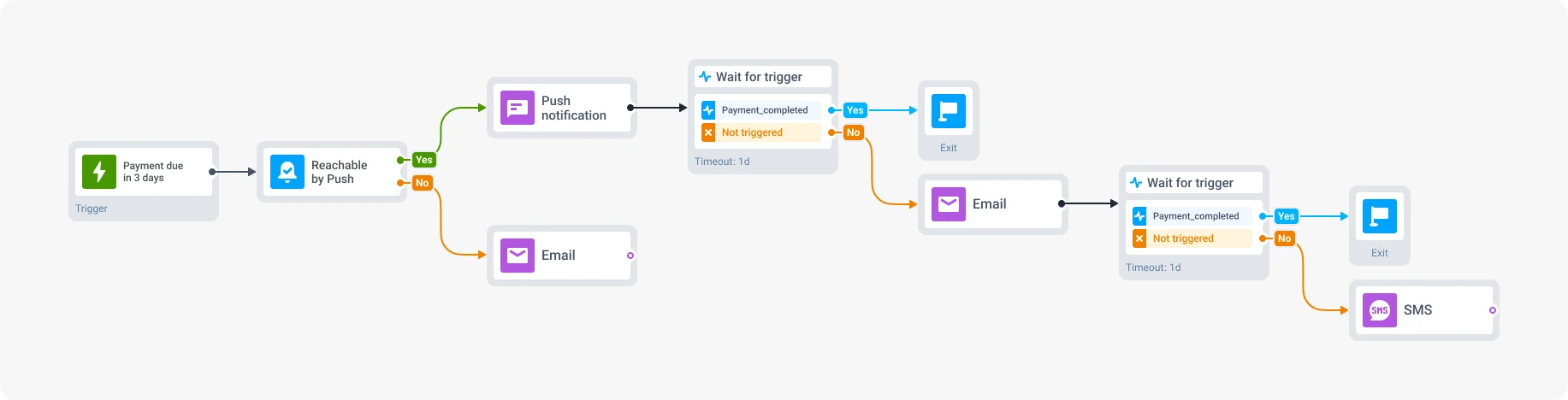
Trigger: payment_due_in_3_days
A custom event fires when a user’s payment date is 3 days away.
-
Reachability check → Push notification
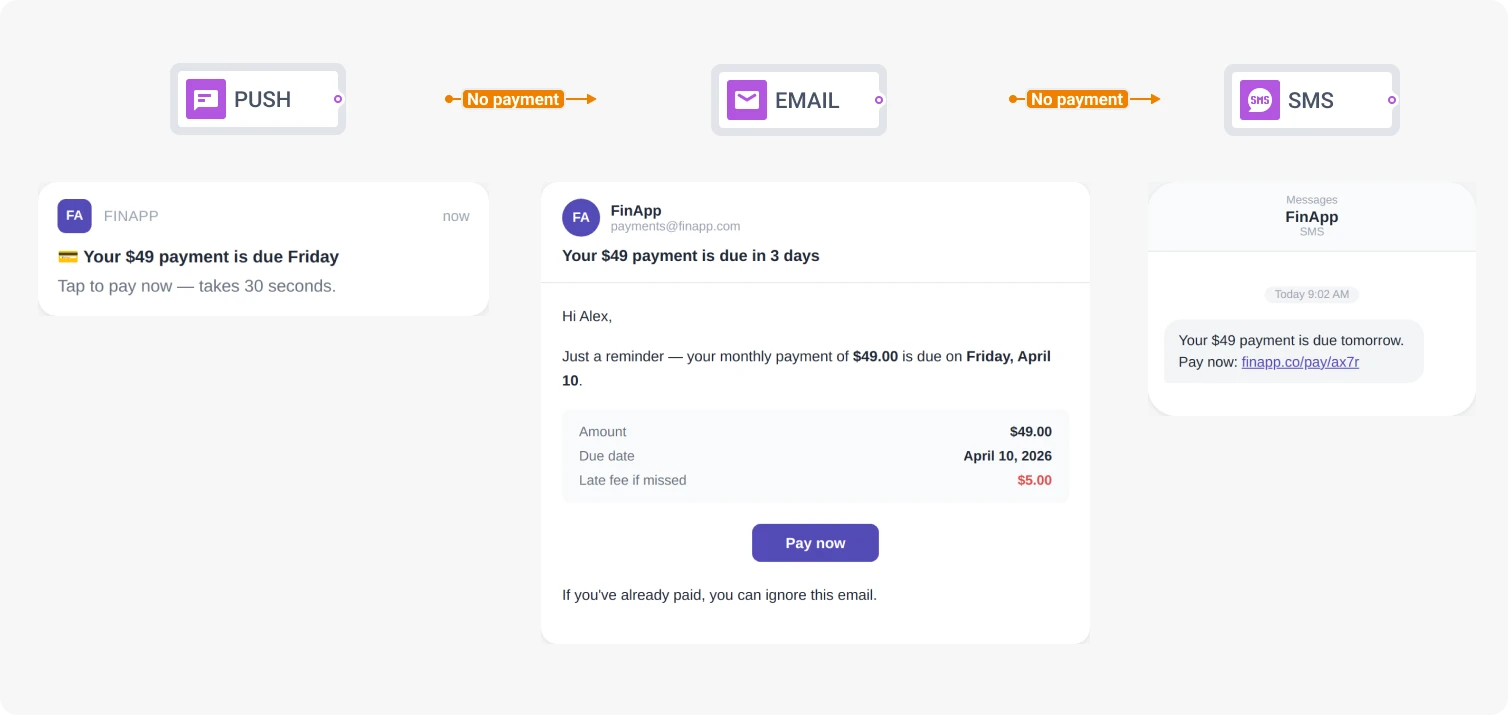
Check if the user is reachable via push notification. If yes — send a push: "Your $49 payment is due on Friday. Tap to pay now." Short, actionable, one tap to resolve.
-
Wait 24 hours → Goal check
Has the user completed the payment? If yes — they exit the journey. Done. No more messages. If not — continue.
-
Email with details
Send an email with the full breakdown — amount, due date, what happens if they miss it, and a direct pay link. Email gives you room for the details that push notifications can't carry.
-
Wait 24 hours → Goal check
Payment completed? Exit. Still outstanding? One step left.
-
SMS — the last resort
One day before the due date, SMS fires. But only for users who: (a) didn't respond to push or email, OR (b) weren't reachable on those channels at all. The message: "Payment of $49 is due tomorrow. Pay now: [deep link]"
The result: most users pay after Step 1 or Step 3. SMS goes out to a fraction of the audience — the users who genuinely need it. Your SMS bill drops, your reach stays the same, and no one gets three messages about the same payment.
Same logic, different app scenarios
The payment flow above is one pattern. The underlying logic — start cheap, escalate with purpose — adapts across use cases:
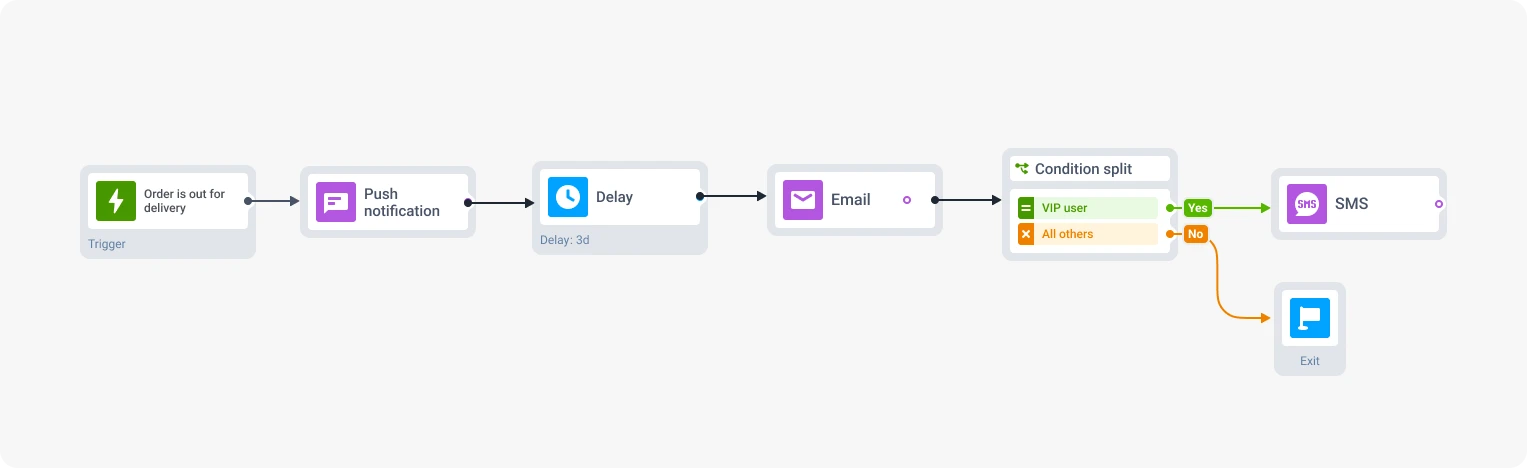
Subscription renewal (media, streaming apps). Push reminder 7 days before expiration. Email with plan comparison 3 days before. SMS on the expiration day — but only for high-CLV subscribers whose annual value justifies the cost of a text.
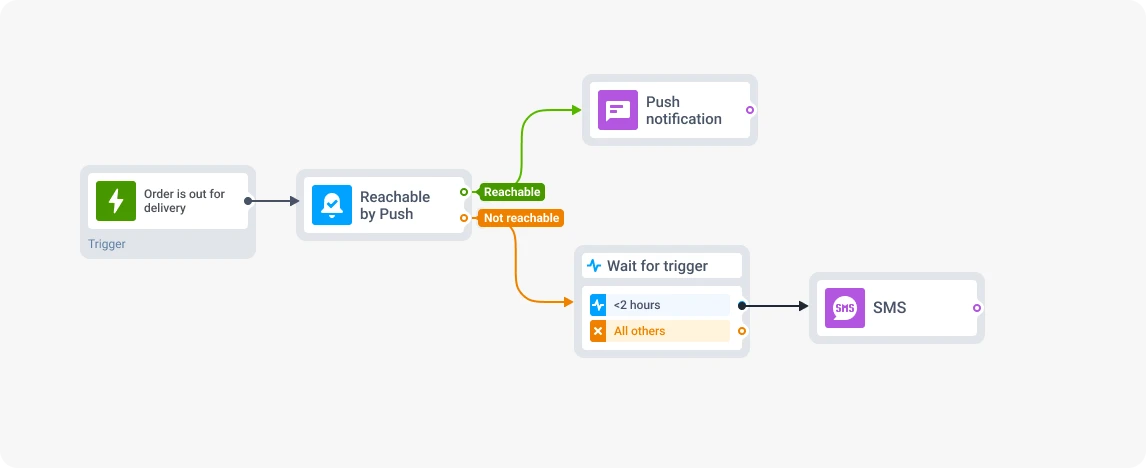
Delivery updates (e-commerce, delivery apps). Push notification is the default for “your order is out for delivery.” SMS kicks in only if a user is unreachable via push AND the delivery window is under 2 hours. Time-critical + unreachable = SMS territory.
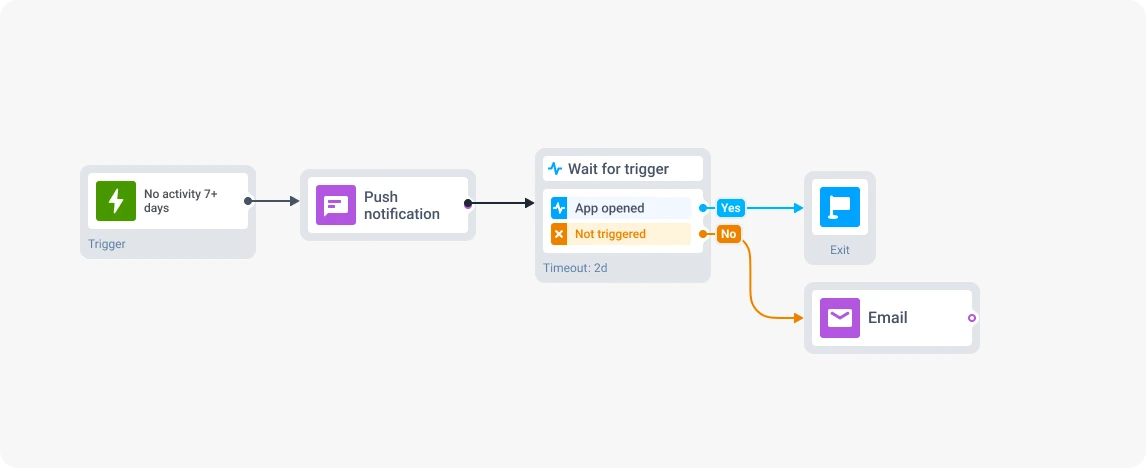
Lapsed user win-back (gaming). Push notification with a personalized offer. Email follow-up a few days later. And here’s the key: no SMS at all. For most gaming apps, the ROI of texting a lapsed player simply doesn’t justify the cost. Skipping SMS is also a valid routing decision — and often the smartest one.
The point isn’t to always include SMS at the end. It’s to build a system that decides — per user, per scenario — whether SMS earns its place.
Stay consistent across channels, without overwhelming
Channel routing solves the cost problem. But without coordination, you create a different one: users get overwhelmed with messages.
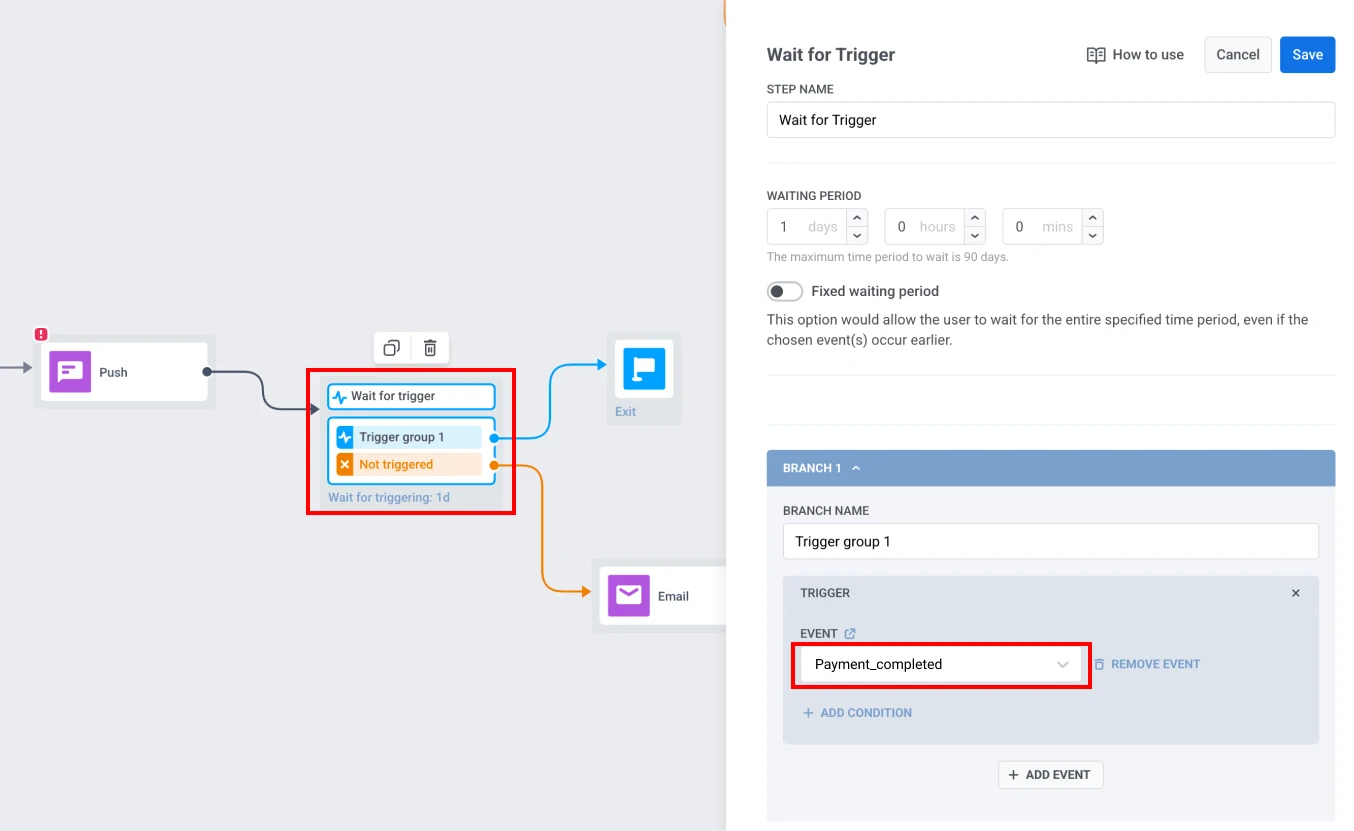
In a sequential flow, the Wait for trigger element handles this naturally — it listens for the target event (e.g., payment_completed) and exits the user the moment it fires. No trigger? The flow moves to the next channel. The user never receives push notification + email + SMS about the same payment. Each channel picks up only where the previous one left off.
When the message does go out on a different channel, adapt the content to the format. Push notification is short and actionable. Email carries the details. SMS is stripped to essentials + link.
Measure cost-per-conversion, not open rates
Open rates tell you whether a message was seen. They don’t tell you whether it was worth sending.
The metric that matters for channel routing is goal completion per branch: how many users completed the target action (payment, renewal, purchase) after each step in the journey. When you see that 70% of conversions happen after the push notification and 20% after email, you know exactly what your SMS branch is responsible for — and what it costs.
That’s where cost-per-conversion comes in. If your SMS branch converts 10% of the users who reach it, and each SMS costs $0.05, that’s $0.50 per conversion from SMS.
Push, with its near-zero cost and 70% share of conversions, delivers those at effectively $0.
This math makes the case for SMS-as-escalation self-evident — and it gives you hard numbers to bring to a budget review.
Journey analytics in Pushwoosh show this step by step, right on the canvas — so you can trace exactly where conversions happen and which branches cover their costs.
Build smart omnichannel routing. See the savings.
Every flow in this article uses the same building blocks — Reachability check, Wait for trigger, channel elements, and time delays — all available in Pushwoosh Customer Journey Builder. No custom code, no external channel orchestration.
Pick the flow that matches your highest-volume SMS use case. Rebuild it with push notification and email as the first tiers. Let SMS handle what only SMS can handle. Then check the numbers.