Push notifications हर बार deliver नहीं होते। यूज़र बिना किसी signal के silent हो जाते हैं। और आपकी audience का एक बड़ा हिस्सा Telegram पर active है — खासकर tier-2/tier-3 city users और crypto, fintech, gaming जैसी communities में जो भारत में Telegram-heavy हैं। April का update इन तीनों issues को एक साथ address करता है।
यह रहा क्या-क्या change हो रहा है 👇
नया channel available: Telegram 💬
अब आप Pushwoosh में Telegram bot configure करके यूज़र्स को सीधे Customer Journey Builder से 1:1 messages भेज सकते हैं — आपके push notifications, in-app messages, email, SMS और WhatsApp steps के साथ-साथ।

इससे क्या बदलेगा: बहुत सारे Indian mobile apps के लिए — खासकर fintech, gaming और community-driven apps — Telegram वो channel है जहां असली conversations होती हैं। पहले इन यूज़र्स तक पहुंचने के लिए main marketing stack के side में एक अलग tool चलाना पड़ता था। अब Telegram Customer Journey के अंदर है: same segmentation, same triggers, same reporting — Android-first audience के लिए push, WhatsApp और Telegram एक ही journey canvas पर एक साथ काम करते हैं।
जिन यूज़र्स को push नहीं मिला उन्हें मत खोएं 🔁
Customer Journey Builder में push notification step पहले से ही opens के basis पर flow को split कर सकता था। अब यह delivery के basis पर भी split करता है — यानी message device तक पहुंचा या नहीं।

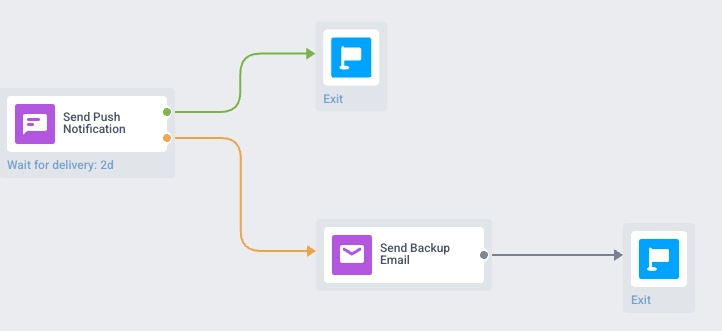
- 🟢 Delivered → main path पर continue।
- 🟠 Not delivered (token expired, device offline, opt-out, etc.) → इन यूज़र्स को दूसरे channel पर route करें: email, SMS, in-app, या Telegram।
यह क्यों matter करता है: Open rate बताता है कि किसने engage किया। Delivery बताती है कि message किसको पहुंचा भी या नहीं। भारत में Android पर 95%+ market share होने के बावजूद OEM-level battery saver settings (Xiaomi, Realme, Vivo, Oppo जैसे devices पर) push delivery को aggressively kill कर देते हैं। जिन यूज़र्स तक push नहीं पहुंचा वो अक्सर वही होते हैं जिन तक आपको सबसे urgent पहुंचना है — fintech में UPI transaction alert, e-commerce में Big Billion Days का flash sale reminder। Journey अब इन यूज़र्स को automatically fallback channel पर route कर देता है, और delivered vs. not-delivered count canvas पर सीधे visible रहता है।
App छोड़ने से पहले idle यूज़र्स को पकड़ें 😴
एक new default SDK event, PW_UserIdle, तब fire होता है जब यूज़र आपके mobile app में inactive हो जाता है। SDK इसे ship करता है, इसलिए आपको खुद event define करने की ज़रूरत नहीं।
Idle यूज़र्स पर action लेना मुश्किल होता है: वो अभी churn नहीं हुए, लेकिन आपके data में भी कोई signal नहीं है जो उन्हें flag करे। PW_UserIdle के साथ आप:
- Dormant यूज़र्स को re-engagement campaigns के लिए segment कर सकते हैं,
- Journeys को directly इस event पर trigger कर सकते हैं, या
- इस signal को ManyMoney AI में feed कर सकते हैं, ताकि वो जो campaigns बनाए उनमें inactivity को account में ले।
PW_UserIdle (और इसके attributes) के बारे में और जानें →
Cloud Pages सभी plans पर rollout हो रहा है 📄
Cloud Pages, Pushwoosh-hosted branded landing pages, अब हर account के लिए request पर available हैं।
इससे क्या बदलेगा: ज़्यादातर campaigns को एक destination page की ज़रूरत होती है: survey, registration form, long-form promo, in-app message का click-through page। पहले यह एक अलग page builder में रहता था। अब आप destination को सीधे Pushwoosh के अंदर build और host कर सकते हैं — audience data और segmentation पहले से connected, एक tool कम maintain करना पड़ता है आपकी stack में।
अपने account पर Cloud Pages enable करने के लिए, अपने Customer Success Manager से बात करें या Support से contact करें।
Updates खुद try करें
ऊपर दिया गया हर feature live है और आपके account में use करने के लिए ready है।
पूरी list के लिए हमारे release notes देखें।