Push notifications aren’t always delivered. Users go quiet without warning. And a chunk of your audience is on Telegram. April’s update addresses all three issues.
And here’s what changes 👇
New channel is available: Telegram 💬
You can now configure a Telegram bot in Pushwoosh and message users 1:1 from Customer Journey Builder, alongside your push notifications, in-app messages, email, SMS, and WhatsApp steps.

What it changes: For many mobile apps, Telegram is where actual conversations with users take place. Reaching them there used to mean running a separate tool on the side. With Telegram inside Customer Journey, you orchestrate it the same way as every other channel: same segmentation, same triggers, same reporting.
Don’t lose the users who didn’t get your push 🔁
The push notification step in Customer Journey Builder can already split the flow by opens. Now it also splits by delivery, whether the message reached the device.

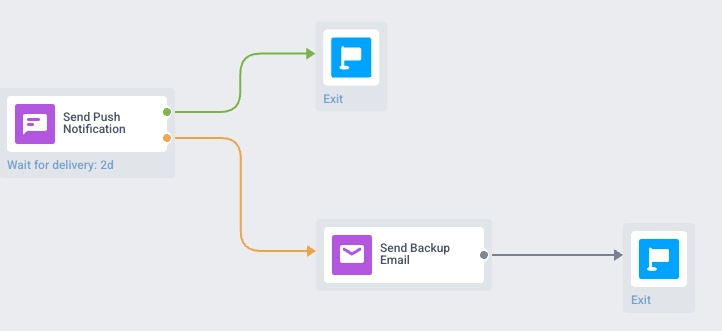
- 🟢 Delivered → continue down your main path.
- 🟠 Not delivered (token expired, device offline, opt-out, etc.) → reroute those users to another channel: email, SMS, in-app, or Telegram.
Why it matters: Opens tell you who engaged. Delivery tells you who even got the message in the first place. The users who didn’t are often the ones you most need to reach, and the journey now routes them to a fallback channel automatically, with delivered vs. not-delivered counts visible on the canvas.
Catch idle users before they churn 😴
A new default SDK event, PW_UserIdle, fires when a user goes inactive in your mobile app.
Inactive users are hard to act on: they haven’t churned yet, but nothing in your data flags them either. With PW_UserIdle, you can:
- segment dormant users for re-engagement campaigns,
- trigger journeys directly off the event,
- feed the signal into ManyMoney AI, so it factors inactivity into the campaigns it builds.
The event ships with the latest SDK; ask your dev to enable idle detection.
Read the docs for PW_UserIdle (and its setup notes) →
Cloud Pages are rolling out across plans 📄
Cloud Pages, branded landing pages hosted by Pushwoosh, are now available to every account on request.
What it changes: Most campaigns need a page to send users: a survey, a registration form, a long-form promo, a click-through page for an in-app message. That used to live in a separate page builder. Now you can build and host the destination inside Pushwoosh, with your audience data and segmentation already connected.
To enable Cloud Pages on your account, ping your Customer Success Manager or contact Support.
Try the updates yourself
Every feature above is live and ready to use in your account.
For the full list, check our release notes.