जो data आपके पास पहले से है, उस पर instantly route करें
Condition Split हर यूज़र को उसके profile पर पहले से मौजूद segment, tag, या event attribute के आधार पर 10 branches तक में से एक पर भेजता है — जिस पल वो step तक पहुंचता है। हर configuration एक catch-all branch रखता है, तो कोई भी छूटता नहीं।
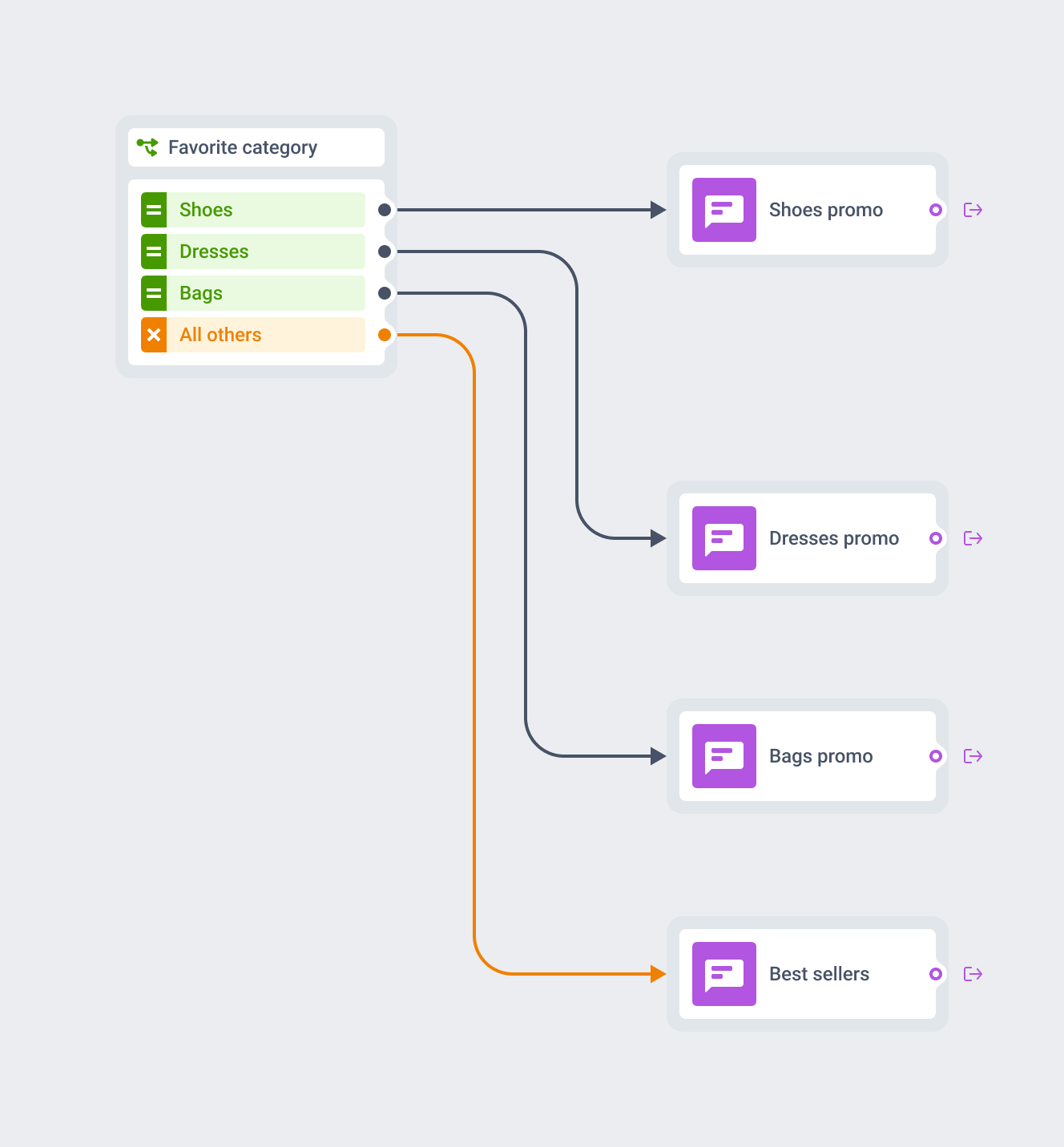
Condition Split आपको क्या देता है
3 condition types
Segment, Tag, या Event attribute। एक element में एक type, हर एक profile पर पहले से मौजूद data से पढ़ा हुआ।
10 branches तक
Tag और Event attribute के लिए ceiling, equals या contains जैसे value-matching operators से पहुंचती है। Not-equal, greater-or-equal जैसे comparisons कम पर cap होते हैं।
Guaranteed catch-all
All other users हर configuration में मौजूद है और हटाया नहीं जा सकता।
Instant evaluation
Element यूज़र के current data को उसके पहुंचते ही check करता है, कोई window sit करने के लिए नहीं होती।
Compound logic के लिए chain करें
एक element एक condition पढ़ता है। Segment और tag को साथ route करने के लिए 2 elements stack करें।
सिर्फ existing data पढ़ता है
Segment, tag, या event को account में इस element के काम करने से पहले exist करना ज़रूरी है।
3 condition types कैसे अलग हैं
हर Condition Split element exactly एक condition type को यूज़र के current profile के against check करता है, फिर उसे matching branch पर भेजता है। ये check एक ही बार चलता है, उसी पल जब यूज़र element तक पहुंचता है।
| Condition type | Branches | क्या check करता है |
|---|---|---|
| Segment | Exactly 2 | क्या यूज़र currently किसी चुने गए segment में है: Users in a segment, या All other users |
| Tag | 1 से 10, operator पर depend करता है | Profile पर किसी tag की current value, आपके define किए हर value के लिए एक branch |
| Event attribute | 1 से 10, operator पर depend करता है | Journey में पहले fire हुए किसी event के attribute की value |
Tag और Event attribute के लिए branch ceiling हर branch के पीछे वाले operator पर depend करती है। Equals, in, या contains जैसे value-matching operators पूरे 10 तक पहुंचते हैं। Not-equal, greater-or-equal, या exists जैसे comparison operators कम पर cap होते हैं, क्योंकि उन पर बनी एक branch खुद ही range का बड़ा हिस्सा cover कर लेती है।
एक journey एक element के अंदर condition types को mix नहीं कर सकती, और segment, tag, या event को account में पहले से exist करना ज़रूरी है। Element खुद इनमें से किसी को create नहीं करता। ये Customer Journey Builder के अंदर बैठता है, वही segments, tags, और events पढ़ते हुए जो canvas का बाकी हिस्सा पहले से इस्तेमाल करता है।
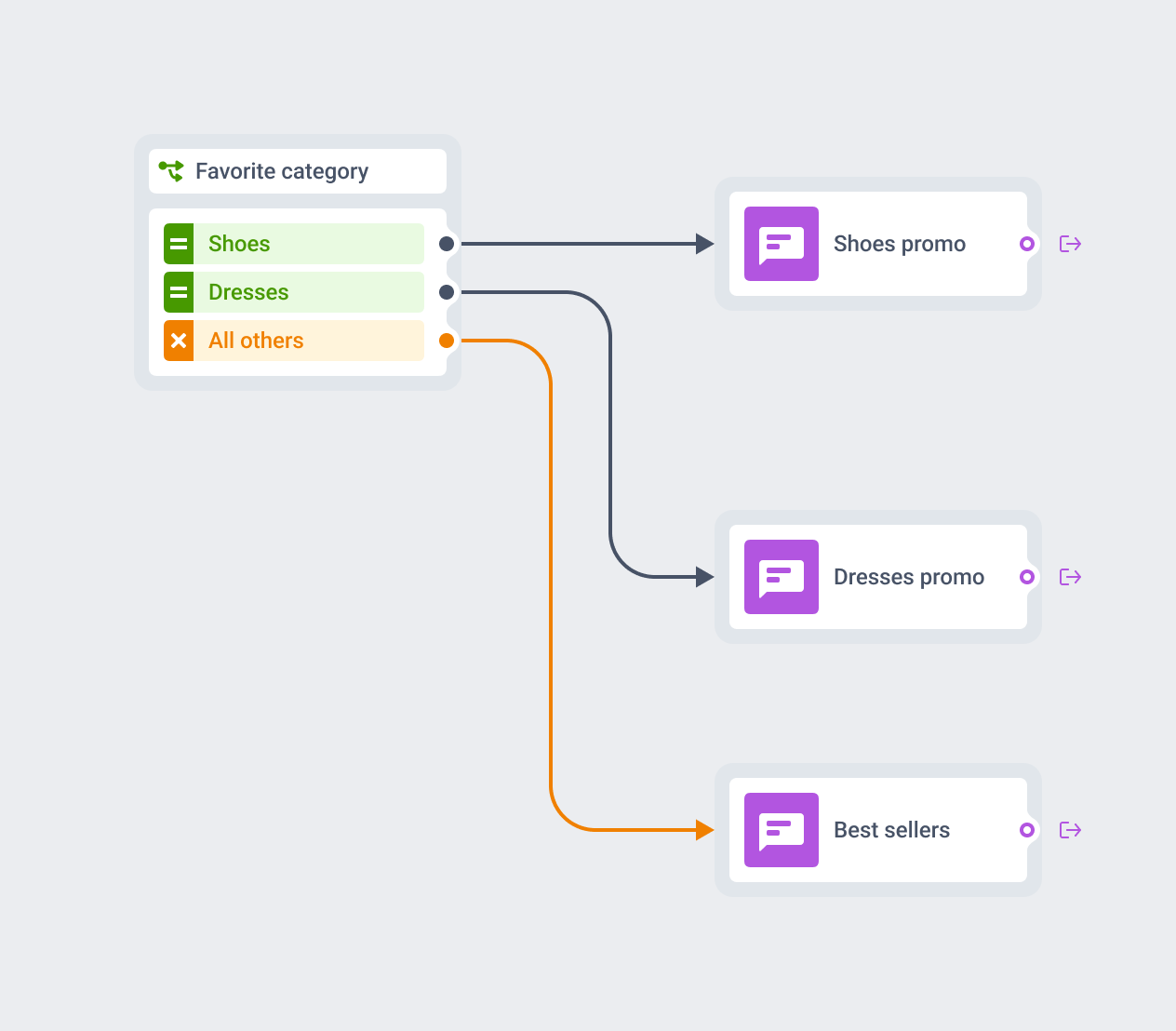
हर configuration में एक रास्ता बाहर रहता है
Segment, Tag, या Event attribute configure करें, और All other users हर version के element में default ship होता है। इसके लिए कोई toggle नहीं है, और इसे delete करने का कोई रास्ता नहीं।
जिस यूज़र की tag value आपकी बनाई किसी branch से match नहीं करती, वो फिर भी कहीं ना कहीं लैंड करता है — एक path पर जो आप control करते हैं, journey छोड़ने की बजाय।
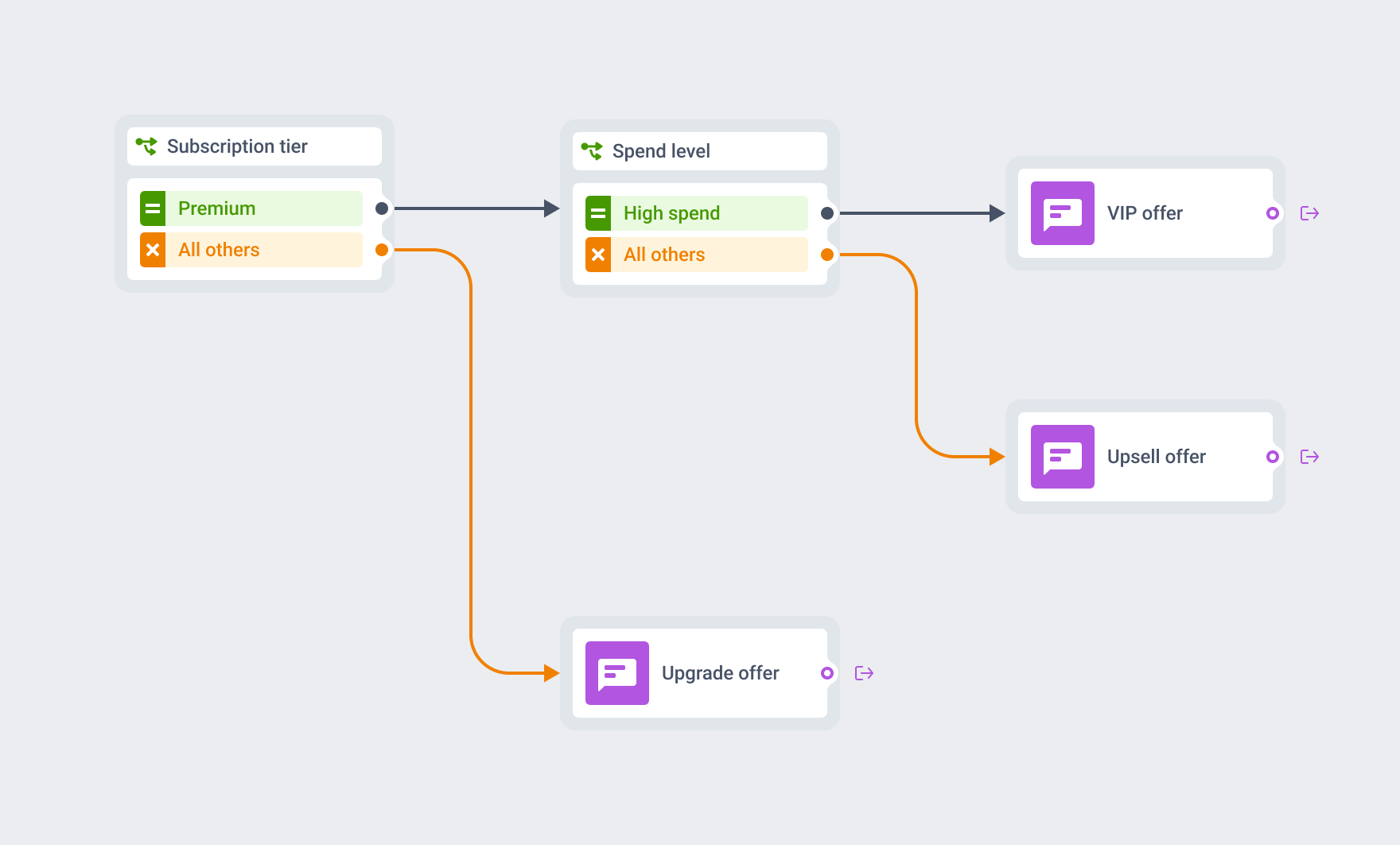
Condition के ऊपर condition के लिए elements stack करें
एक element एक condition type पढ़ता है। “Premium subscriber और high spend” के लिए, पहले एक Segment condition वाला Condition Split रखें Premium के लिए, फिर उस branch पर जो पहले ही Premium match कर चुकी है, spend level के लिए एक Tag condition वाला दूसरा Condition Split add करें — जैसे Flipkart Plus या किसी OTT ऐप का Premium tier।
हर element canvas पर पढ़ने में simple रहता है, और chain वो compound logic carry करती है जो एक भरी-पूरी rule अकेले उठाती।
यहाँ ये सबसे ज़्यादा काम आता है
Subscription-tier routing
Premium subscribers loyalty path पर, बाकी सब upgrade offer पर — entry के ठीक बाद।
Loyalty-tier routing
VIP या high-value segments को बाकी base से अलग offer पर।
Preference-based routing
एक favorite-category tag एक promo journey को 10 category-specific paths तक split कर देता है।
- Mobile games
- Creator / subscription ऐप्स
- Airlines / aviation
- E-commerce / retail
- Marketplaces
- Fintech / banking
- Media / news / streaming
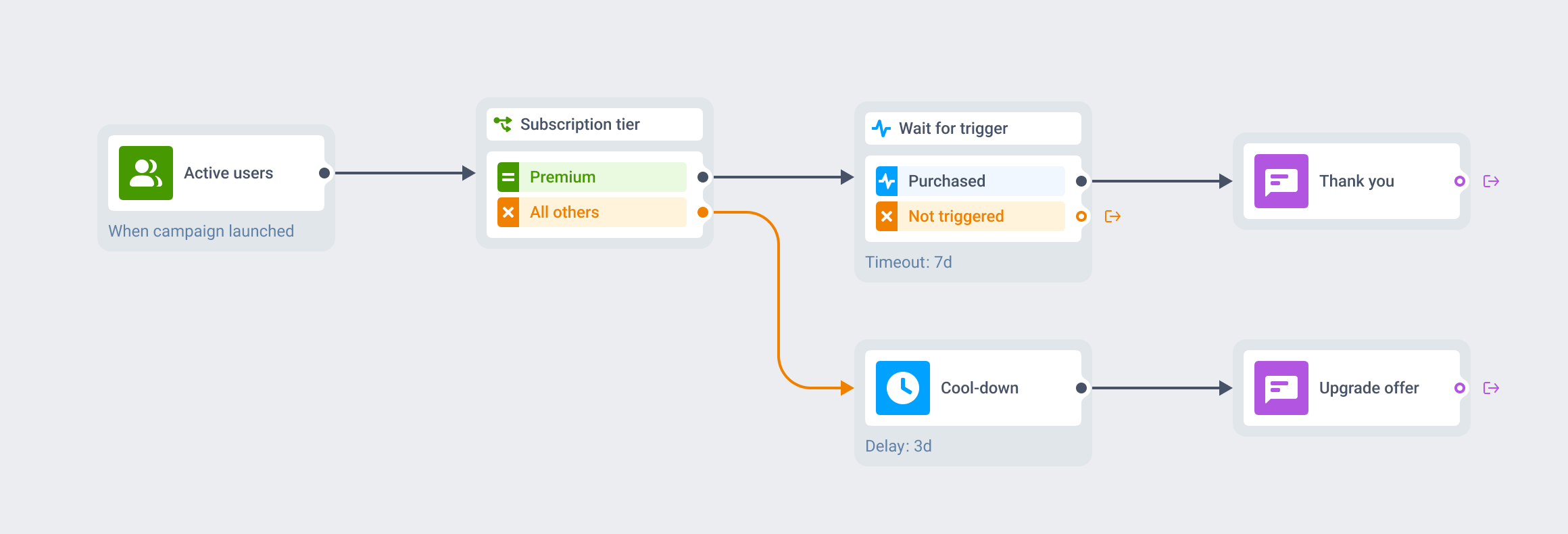
एक ही canvas पर, कई elements में से एक
Condition Split उस data पर route करता है जो profile पर पहले से है। उसी canvas पर 2 neighbors अलग काम करते हैं। Wait for Trigger pause करके एक नए event के fire होने का wait करता है। Time Delay बिना किसी branch के, सिर्फ एक time span के लिए pause करता है।
Condition Split को entry के ठीक बाद रखें ताकि कोई पहले से क्या है, उस पर route हो जाए — पहला message देखने से भी पहले।
Profile data ऐसे infrastructure पर रहता है जिसका नाम आप बता सकते हैं
Condition Split जो segments, tags, और event attributes पढ़ता है वो बाकी platform जैसे ही infrastructure से गुज़रते हैं: Pushwoosh अपने hardware पर US और Germany में चलता है, GDPR और BDSG के तहत। Pushwoosh SOC 2 Type 2 और ISO 27001:2022 certified है, HIPAA और GDPR compliant भी। पूरी detail data safety page पर है।






यह कैसे काम करता है
-
Canvas पर element रखें
Customer Journey Builder में कोई journey खोलें और किसी entry point के बाद, या 2 steps के बीच Condition Split drop करें।
-
एक condition type चुनें और branches बनाएं
Segment (fixed 2 branches पर), Tag, या Event attribute (1 से 10 branches, हर एक के पीछे वाले operator पर depend करते हुए) चुनें, फिर हर branch को उस value से map करें जो उसे match करनी है।
-
Compound logic के लिए दूसरा element chain करें
किसी already-matched branch पर एक और Condition Split add करें, 2 conditions को combine करने के लिए जो एक single element एक साथ नहीं रख सकता।
FAQ
संबंधित उत्पाद देखें
एक विजुअल टूल के साथ अपनी अभियानों को मैप करें और सुव्यवस्थित करें। Pushwoosh कस्टमर जर्नी बिल्डर का उपयोग करके संवाद करें, जुड़ाव बढ़ाएं, रिटेन करें, कन्वर्ट करें, सेगमेंट करें और प्रयोग करें।
90 दिन तक 3 branches में 4 events track करें, AND/OR logic और session-scoped matching के साथ — food delivery और ride-hailing journeys के लिए बना।
जर्नी को fixed span, clock time, date, weekly slot, या profile पर मौजूद date से रोकें — हर यूज़र अपने टाइम पर अगला step पाए। Android-first टीमों के लिए।
Journey traffic को 4 branches तक split करें, हर branch को अपने conversion goals पर score करें, result significant होते ही winner पर auto-route करें।
Pushwoosh सेगमेंटेशन टूल आपकी अनोखी पसंद और व्यवहार के आधार पर अपने उपयोगकर्ताओं तक सबसे प्रासंगिक ऑफर पहुंचाने में आपकी सहायता करते हैं।
Customer actions पर automatically campaigns launch करें। Real-time behavioral triggers से conversion, retention और engagement के perfect moments capture करें।