Condition split
Route each user down one of up to 10 branches based on a segment, a tag, or an event attribute already on their profile, the moment they reach this step. Every configuration keeps a catch-all branch, so nobody falls through.
What Condition split gives you
3 condition types
Segment, Tag, or Event attribute. One type per element, each read from data already on the profile.
Up to 10 branches
The ceiling for Tag and Event attribute, reached with value-matching operators like equals or contains. Not-equal, greater-or-equal, and similar comparisons cap lower.
A guaranteed catch-all
All other users is present in every configuration and can't be removed.
Instant evaluation
The element checks the user's current data the moment they arrive, with no window to sit in.
Chain for compound logic
One element reads one condition. Stack 2 elements to route on segment and tag together.
Reads existing data only
The segment, tag, or event has to exist in the account before this element can use it.
How the 3 condition types differ
Every Condition split element checks exactly one type of condition against the user’s current profile, then sends them down the matching branch. The check runs once, the moment the user reaches the element.
| Condition type | Branches | What it checks |
|---|---|---|
| Segment | Exactly 2 | Whether the user currently belongs to a segment you pick: Users in a segment, or All other users |
| Tag | 1 to 10, by operator | The current value of a tag on the profile, one branch per value you define |
| Event attribute | 1 to 10, by operator | The value of an attribute on an event that already fired earlier in the journey |
The branch ceiling for Tag and Event attribute depends on the operator behind each branch. Value-matching operators such as equals, in, or contains reach the full 10. Comparison operators such as not-equal, greater-or-equal, or exists cap lower, since a branch built on one of those already covers most of the range on its own.
A journey can’t mix condition types inside one element, and a segment, tag, or event has to already exist in the account. The element itself doesn’t create any of them. It sits inside Customer Journey Builder, reading the same segments, tags, and events the rest of the canvas already uses.
Every configuration keeps a way out
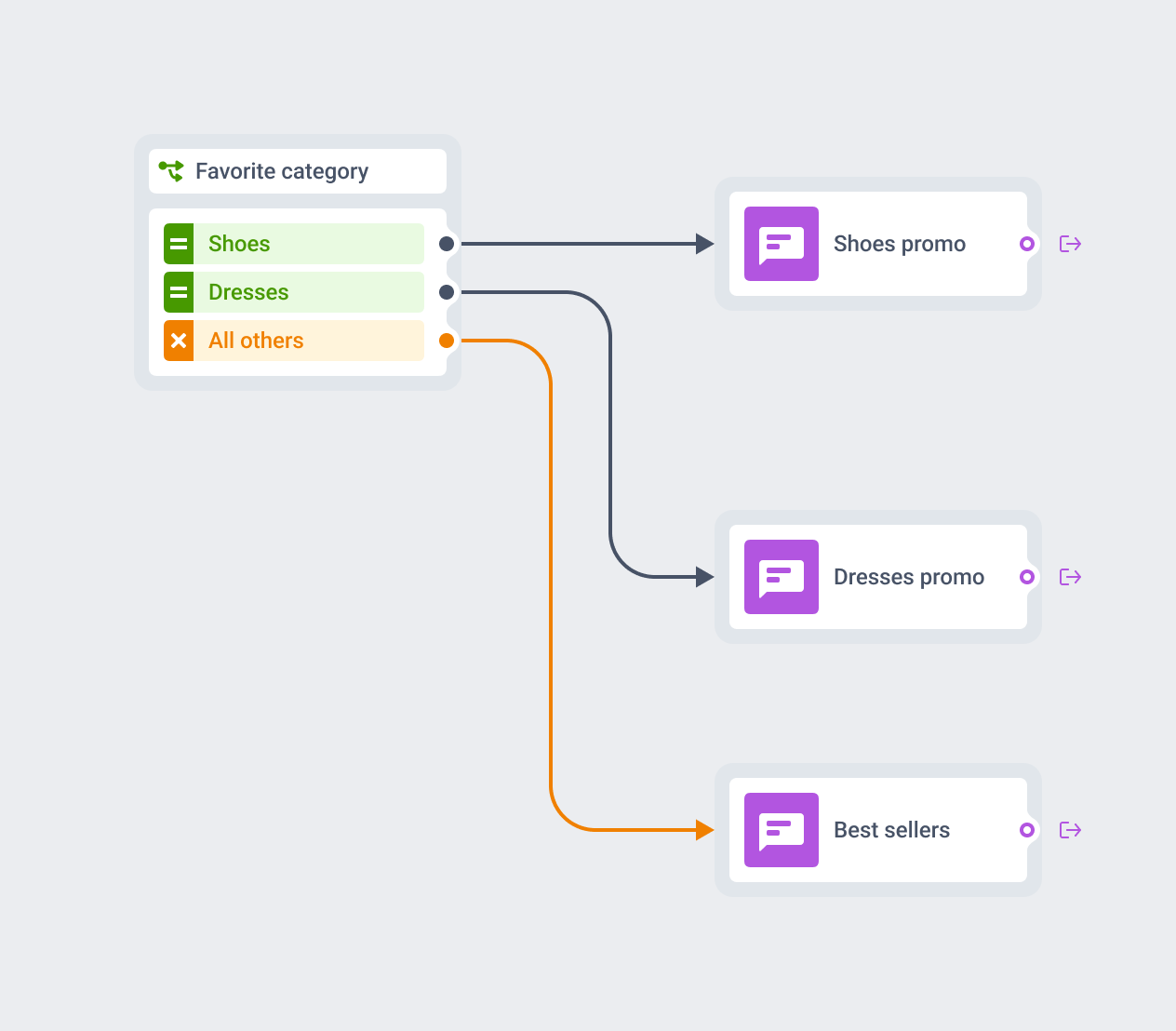
Configure Segment, Tag, or Event attribute, and All other users ships with every version of the element by default. There’s no toggle for it, and no way to delete it.
A user whose tag value matches none of the branches you built still lands somewhere, on a path you control instead of leaving the journey.
Stack elements for a condition on top of a condition
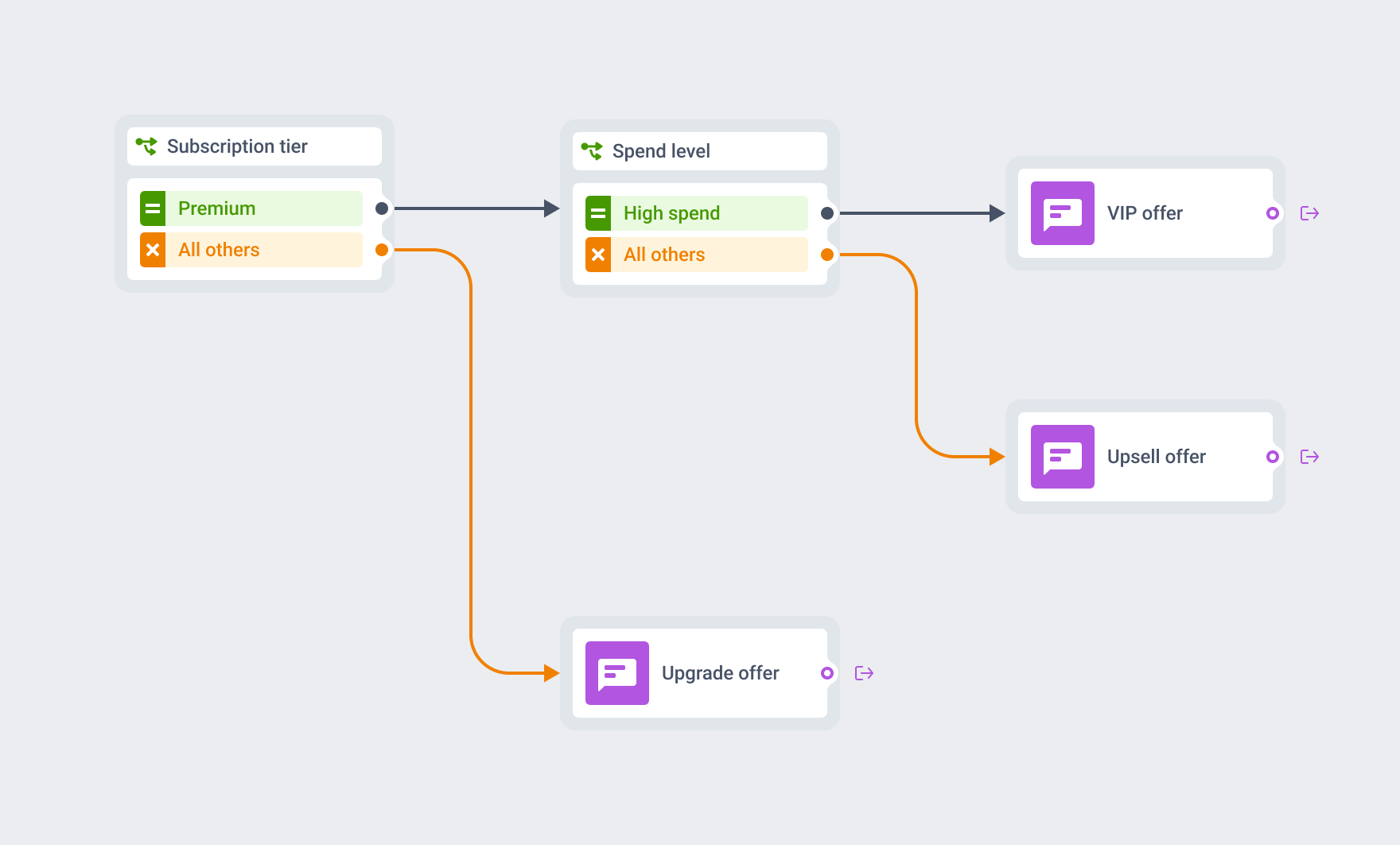
One element reads one condition type. For “Premium subscriber and high spend”, place a Condition split with a Segment condition for Premium first, then add a second Condition split with a Tag condition for spend level on the branch that already matched Premium.
Each element stays simple to read on the canvas, and the chain carries the compound logic that one crowded rule would otherwise hold.
Where this earns its place
Subscription-tier routing
Premium subscribers down a loyalty path, everyone else down an upgrade offer, right after entry.
Loyalty-tier routing
VIP or high-value segments down a different offer than the rest of the base.
Preference-based routing
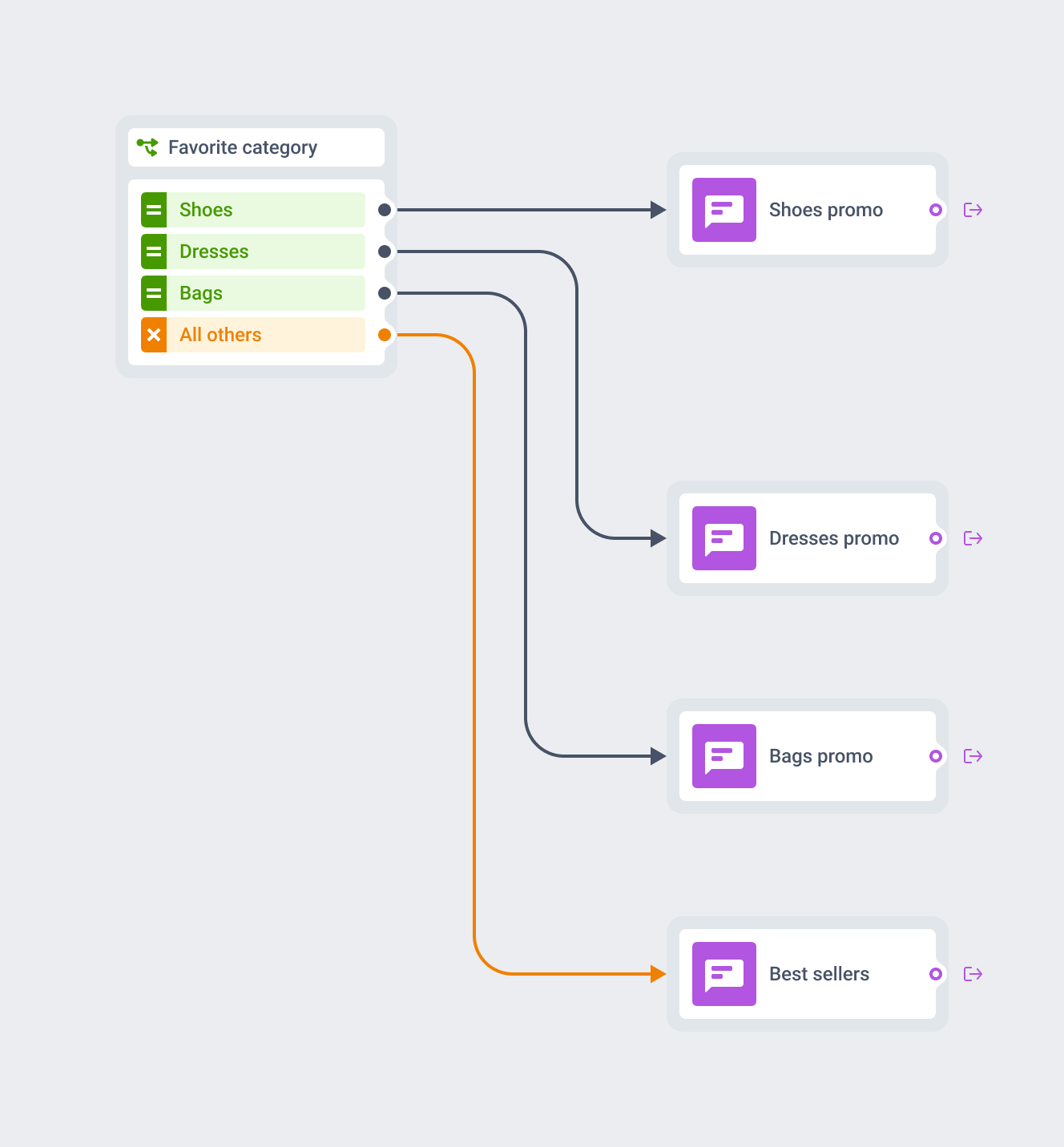
A favorite-category tag splits one promo journey into up to 10 category-specific paths.
- Mobile games
- Creator / subscription apps
- Airlines / aviation
- E-commerce / retail
- Marketplaces
- Fintech / banking
- Media / news / streaming
One element among several, on the same canvas
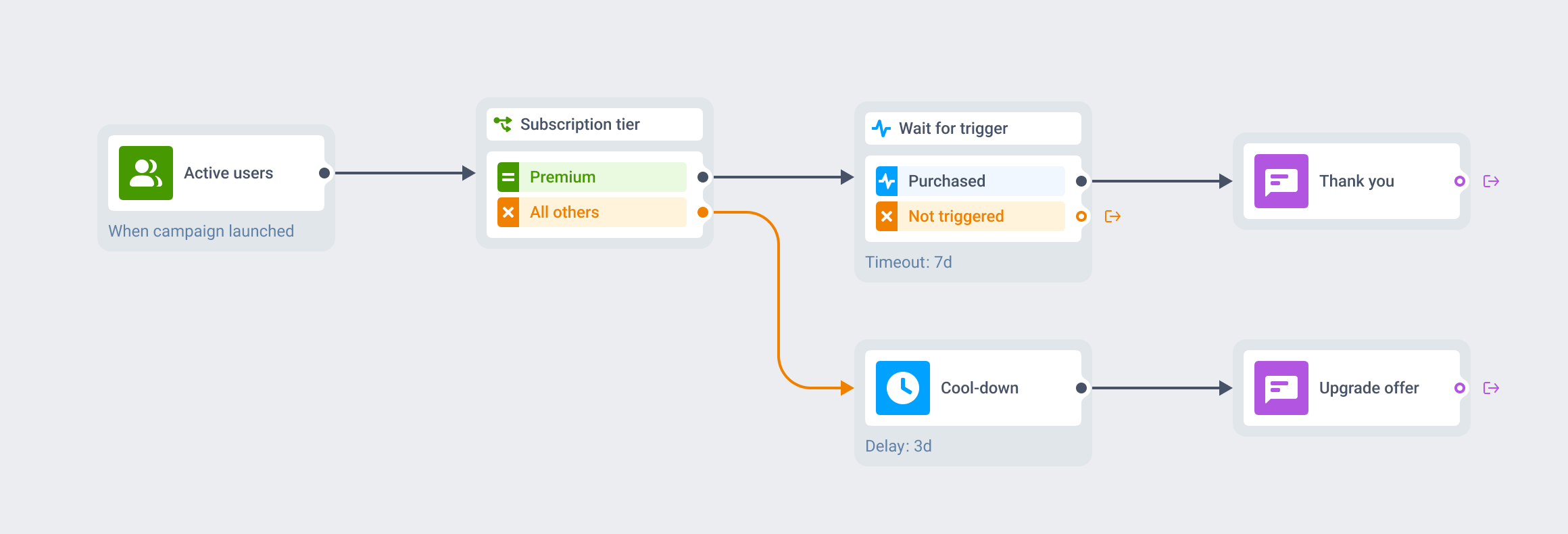
Condition split routes on data the profile already holds. Two neighbors handle different jobs. Wait for Trigger pauses and waits for a new event to fire. Time Delay pauses for a span of time, with no branch at all.
Place Condition split right after entry to route on who someone already is, before they see a single message.
Profile data stays on infrastructure you can name
The segments, tags, and event attributes a Condition split element reads run through the same infrastructure as the rest of the platform: Pushwoosh is SOC 2 Type 2 and ISO 27001:2022 certified, GDPR-compliant, and runs on its own hardware in the US and Germany, under BDSG. Full detail sits on the data safety page.






How it works
-
Place the element on the canvas
Open a journey in Customer Journey Builder and drop Condition split after an entry point or between 2 steps.
-
Pick a condition type and build the branches
Choose Segment (fixed at 2 branches), Tag, or Event attribute (1 to 10 branches, depending on the operator behind each one), then map each branch to the value it should match.
-
Chain a second element for compound logic
Add another Condition split on a branch that already matched, to combine 2 conditions the single element can't hold at once.
FAQ
Explore related products
Map out and streamline your campaigns with one visual tool. Communicate, engage, retain, convert, segment, and experiment using Pushwoosh Customer Journey Builder.
Hold a user for up to 90 days across 3 branches of up to 4 events each, with AND/OR logic, a guaranteed "Not triggered" path, and session-scoped matching for order- and ride-level journeys.
Pause a journey by a fixed span, a clock time, a one-time date, a weekly slot, or an offset counted from a date already stored on the user profile.
Split journey traffic across up to 4 branches, score each one against your conversion goals, and route new users to the winning branch automatically once the result is significant.
Pushwoosh segmentation tools help you reach your users with the most relevant offer based on their unique preferences and behavior.
Drive engagement with event-based triggers. Automatically launch campaigns when customers take actions, capturing perfect moments for conversion and retention.