Wait for Trigger
Hold a user for up to 90 days while up to 3 branches each watch for their own set of events. A guaranteed fourth branch catches everyone the first three miss.
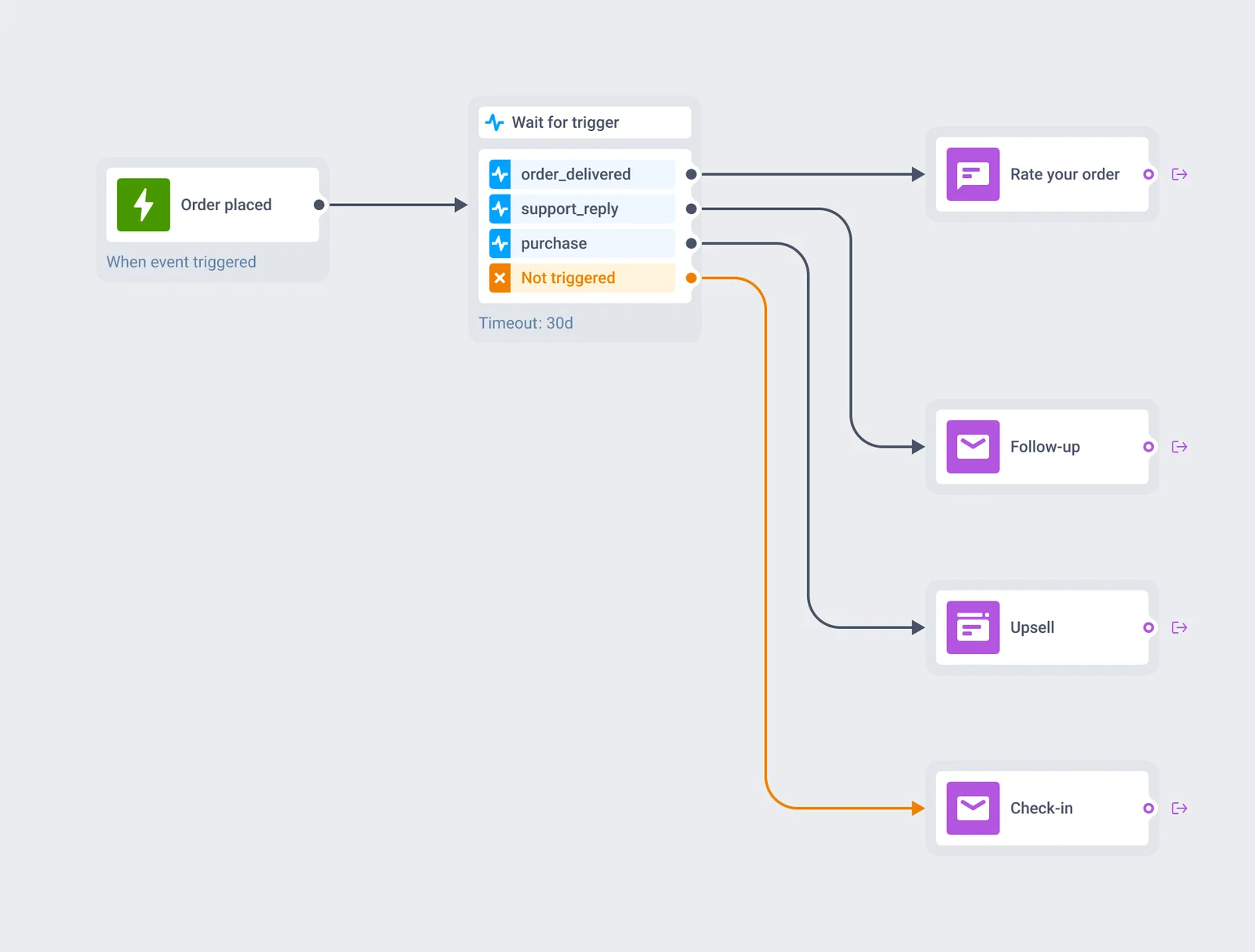
What Wait for Trigger gives you
Up to 3 branches
Each branch watches for its own set of events, evaluated independently of the other 2.
Up to 4 events per branch
Combine them with AND, where every event has to fire, or OR, where any one of them does.
A guaranteed fourth branch
Not triggered catches every user none of the 3 configured branches matched inside the window.
Up to 90 days
The window a user can sit inside a single Wait for Trigger element.
Fixed waiting period
Hold every user for the full window, including the ones whose event fired on day 1.
Session-scoped matching
Route an event into the journey session it belongs to, instead of every session open for that user.
How the branches decide
Each of the 3 branches on a Wait for Trigger element carries its own list of up to 4 events, tied together with AND or OR, plus an optional attribute condition on any of them. The element checks every incoming event against all 3 branches at once and moves the user down the first one that matches. Anyone who matches nothing inside the window lands on Not triggered, the fourth branch every element carries by default.
Turn on Fixed waiting period and a matched user still waits out the full window before moving on. That’s the setting for scoring whether something happened inside a fixed number of days, instead of reacting the moment it does.
| Setting | What it controls | Limit or default |
|---|---|---|
| Branches | Independent event-based conditions, evaluated in parallel | Up to 3 |
| Events per branch | Combined with AND or OR, with an optional attribute condition on each | Up to 4 |
| Not triggered | Catches every user the 3 configured branches didn't match | Always present |
| Wait window | How long a user can sit on the element before Not triggered fires | Up to 90 days |
| Fixed waiting period | Holds a matched user for the full window instead of moving them on the moment their branch matches | Optional toggle |
| Session-scoped matching | Ties an incoming event to the one journey session carrying a matching key, such as order_id or ride_id | Available when a journey runs several sessions per user at once |
The element sits inside Customer Journey Builder, reading the same event catalog as the rest of the canvas, so a branch here routes straight into any channel block already on the journey.
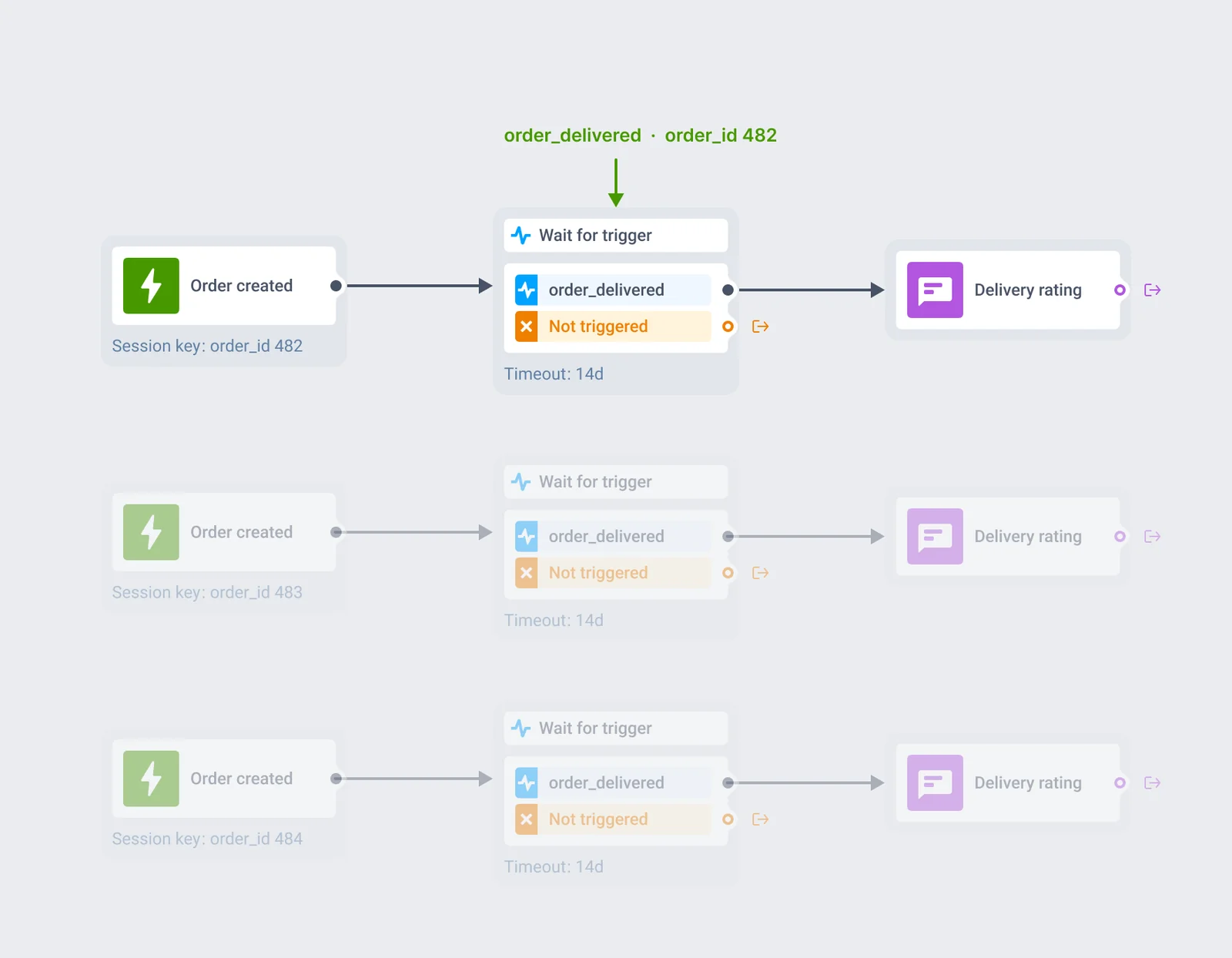
Match the event to the one order or ride it belongs to
Some journey entries run more than one session per user at once, one per order or per ride rather than one per person. A user with 3 open orders running through the same journey ends up with 3 active sessions, one per order_id. With session-scoped matching on, an order_delivered event carrying order_id 482 moves only the session for order 482. The other 2 keep waiting.
Without it, the same event applies to every open session that user has, and branches fire on orders they have nothing to do with. The same pattern covers ride_id on a ride-hailing journey, or any other key that identifies one session out of several running for the same user.
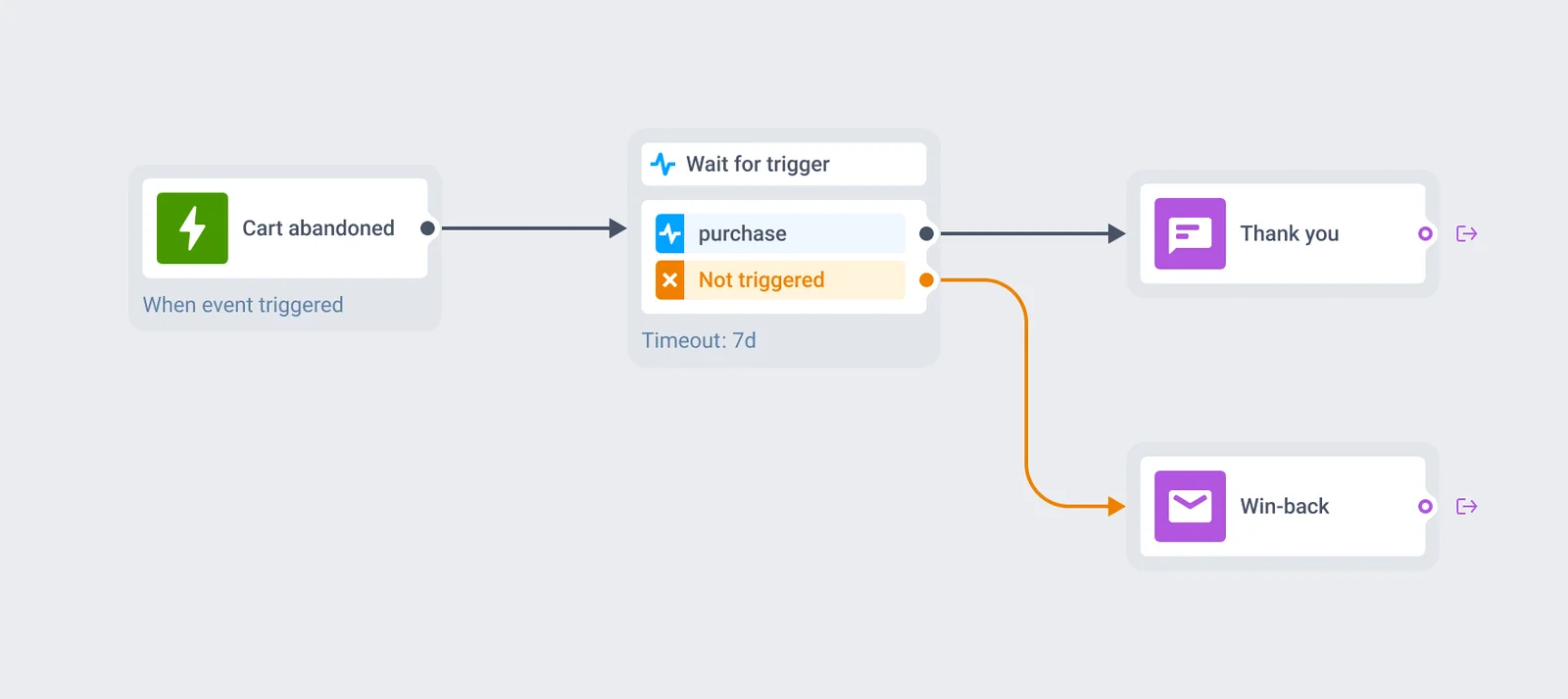
Give converted and unconverted users different next steps
Wait up to 90 days for a purchase after a cart reminder, a subscribe after a trial-ending notice, or a payment_success after a payment prompt. Users who match go down a branch built for people who already converted: a thank-you, an upsell, a receipt.
Everyone else keeps waiting inside the same window, then drops onto Not triggered and into whatever win-back sequence you’ve built for people who haven’t acted yet.
Where this earns its place
Conversion branches after a reminder
Purchased or not, subscribed or not, paid or not: route each outcome down its own path.
Order- and ride-level outcomes
Session-scoped matching routes each event on a food delivery or ride-hailing journey to the specific order or ride it belongs to.
Fixed-window measurement
Turn on Fixed waiting period to score a cohort on whether something happened inside N days, regardless of the exact moment it fires.
- Mobile games
- Creator / subscription apps
- Food delivery
- Ride-hailing / taxi
- E-commerce / retail
- Marketplaces
- Fintech / banking
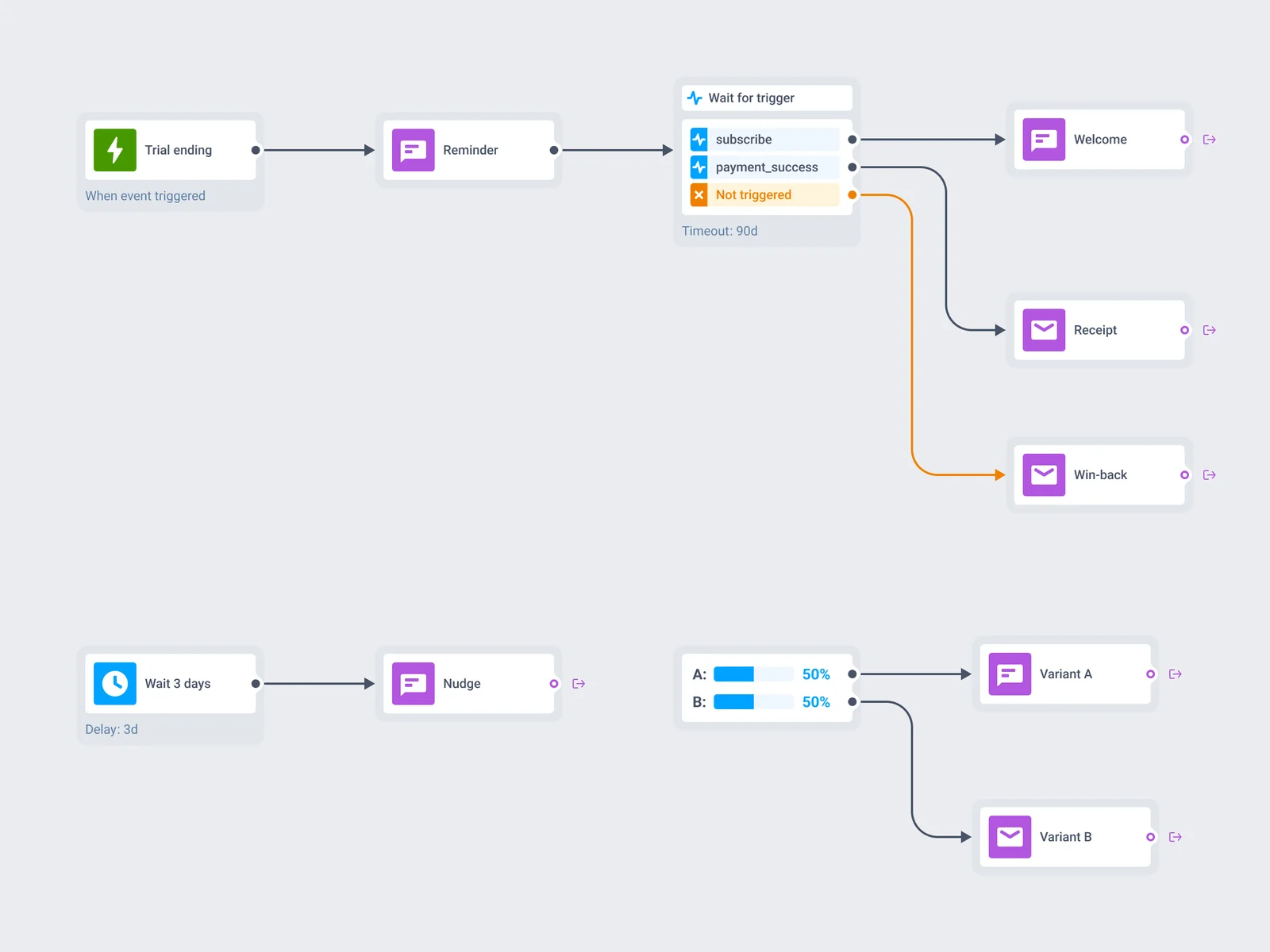
One element among several, on the same canvas
A journey usually starts at an event trigger, sends a message, then reaches Wait for Trigger to see what the user does about it. A Not triggered branch pairs naturally with a reachability check, giving a non-responder a different channel before the journey moves on.
Two neighbors handle different jobs on the same canvas. Time Delay pauses for a span of time, with no event and no branch. A/B/n split splits traffic by a percentage you set at random. Wait for Trigger is the one that waits on the user’s own behavior.
Event and session data stay on infrastructure you can name
Every event a Wait for Trigger element evaluates runs through the same infrastructure as the rest of the platform: Pushwoosh is SOC 2 Type 2 and ISO 27001:2022 certified, GDPR-compliant, and runs on its own hardware in the US and Germany, under BDSG. Full detail sits on the data safety page.







How it works
-
Place the element on the canvas
Open a journey in Customer Journey Builder and drop Wait for Trigger after an entry point or a channel step.
-
Build up to 3 branches
Add up to 4 events per branch with AND or OR, an optional attribute condition on each, and set the wait window up to 90 days. Turn on Fixed waiting period for a fixed-window measurement instead of an instant reaction.
-
Turn on session-scoped matching where it applies
On a journey that runs several sessions per user at once, match incoming events to the session carrying the same key, such as order_id or ride_id, so one event doesn't move every open session at once.
FAQ
Explore related products
Map out and streamline your campaigns with one visual tool. Communicate, engage, retain, convert, segment, and experiment using Pushwoosh Customer Journey Builder.
Drive engagement with event-based triggers. Automatically launch campaigns when customers take actions, capturing perfect moments for conversion and retention.
Pause a journey by a fixed span, a clock time, a one-time date, a weekly slot, or an offset counted from a date already stored on the user profile.
Split journey traffic across up to 4 branches, score each one against your conversion goals, and route new users to the winning branch automatically once the result is significant.
Transform abandoned carts into revenue with cart recovery automation. Send timely reminders, personalized offers, and incentives that drive conversions.
Unify customer experiences with multi-channel orchestration. Coordinate messaging across email, SMS, push, and more for seamless, personalized journeys.