Digital punch card एक stamp card है जो Apple Wallet या Google Wallet में रहता है। Barista उसे scan करता है, card पर stamp count update होता है, और card भरते ही reward दिख जाता है। कोई app नहीं चाहिए। “9 खरीदें, 10वीं free” वाली deal जिसे सब समझते हैं, वह बनी रहती है, और card खो जाने वाली परेशानी खत्म हो जाती है।
Pushwoosh में आप restaurants और कैफ़े के लिए wallet punch cards उसी profile पर चला सकते हैं जिस पर आपके push, email और SMS हैं।
Paper punch cards क्यों fail होते हैं
Paper cards खो जाते हैं, jeans के साथ धुल जाते हैं, घर पर रह जाते हैं। हर खोया card zero पर reset होता है, और reset ही वह पल है जब regular customer तय करता है कि program की परवाह करना बेकार है।
Paper anonymous भी है। आप नहीं देख सकते कि कौन free coffee से 2 stamps दूर है, और किसी को कुछ याद नहीं दिला सकते।
App-only programs data की problem हल करते हैं, लेकिन card को download के पीछे छिपा देते हैं। Costa Coffee के registered app users unregistered customers से साल में 173% ज़्यादा खर्च करते हैं (competitor case, UXCam), जिससे पता चलता है कि एक known customer की कीमत क्या है। लेकिन ज़्यादातर लोग 1 कैफ़े के लिए app install नहीं करेंगे, और Costa भी members को Costa Club card Apple Wallet में रखने देता है।
Android-first market में यह बात और भी अहम है: भारत में Android का share 95%+ है। एक और app install करवाने के बजाय card सीधे Google Wallet में भेजना entry barrier को लगभग zero कर देता है।
भारत PhonePe और Paytm जैसे UPI apps का market है, इसलिए billing counter पर customer के हाथ में phone पहले से होता है। Add to Wallet वाला QR UPI QR के पास रखें, ताकि payment और card save एक ही पल में हो जाएं।
Wallet punch card कैसे काम करता है
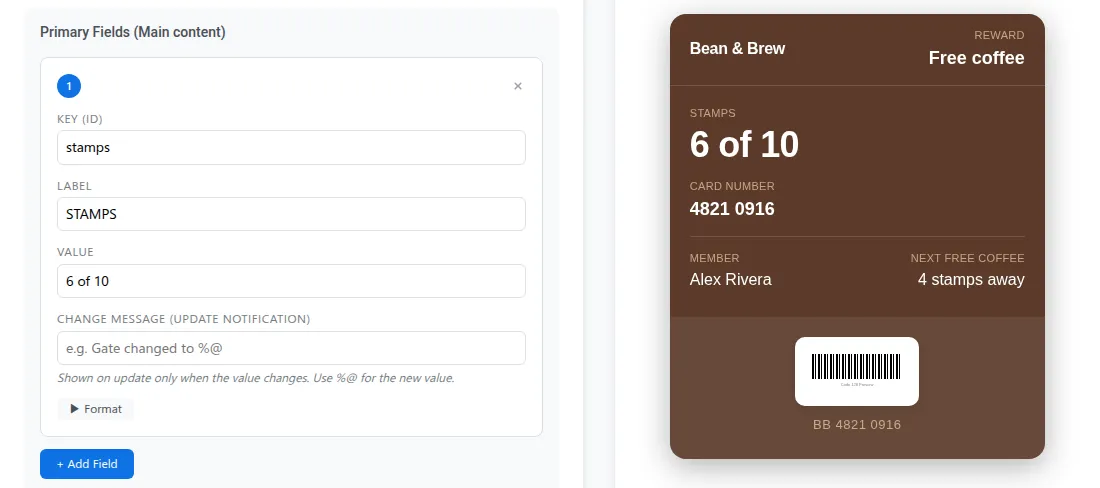
Apple पर punch card एक Store Card है। Google पर यह Loyalty pass है। Stamp count एक field में रहता है, आमतौर पर “6 of 10” के रूप में।
| Step | क्या होता है |
|---|---|
| Add | Customer counter पर QR, link या आपके app से Add to Wallet tap करता है |
| Scan | हर visit पर barista barcode scan करता है |
| Stamp | आपका POS या loyalty system stamp गिनता है और नया total भेजता है |
| Update | Customer के phone पर card refresh हो जाता है |
| Reward | Nवें stamp पर card reward दिखाता है और customer को alert कर सकता है |
शुरुआत में 1 बात plan कर लें: stamp count आपके loyalty या POS system से API के ज़रिए आता है। Pushwoosh card issue और update करता है। वह आपके लिए stamps नहीं गिनता। अगर आपका billing system पहले से visits track करता है, तो आधे से ज़्यादा काम हो चुका है।
4 steps में setup
-
Platforms को एक बार connect करें
Apple Pass Type ID certificate (Apple Developer account, $99 सालाना) और service account key के साथ Google Issuer ID।
-
Card design करें
Pass builder में Apple के लिए Store Card और Google के लिए Loyalty चुनें। अपना logo, colors, stamp field और ऐसा barcode जोड़ें जिसे आपका scanner पढ़ता हो।
-
अपना POS connect करें
Stamp updates और rewards अपने system से API के ज़रिए भेजें, customer के User ID के साथ।
-
QR वहां रखें जहां लोग इंतज़ार करते हैं
Counter पर, cup sleeve पर, receipt पर। अपने emails और app में भी Wallet buttons जोड़ें।
Platform setup के steps Wallet passes docs में हैं।
Counter पर scanning
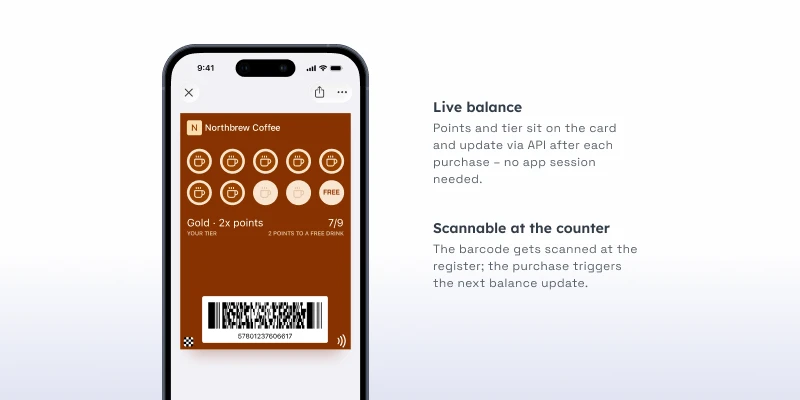
Loyalty program counter पर ही चलता या डूबता है, इसलिए इसे 1 scan तक सीमित रखें। Barista POS scanner से barcode scan करता है, POS stamp record करता है, और customer के phone पर card update हो जाता है।
Location relevance भी मदद करती है। अपनी shops को locations के रूप में जोड़ें, हर card पर 10 तक, और customer के पास आते ही card lock screen पर आ सकता है। “रुकिए, ढूंढ रहा हूं” वाला पल खत्म।
Reward का पल
Reward ही वह 1 alert है जो लोग सच में चाहते हैं। Apple पर reward को उसकी अपनी field में change message (”%@ is on us”) के साथ रखें, और उस field को तभी update करें जब count target पर पहुंचे: message lock screen पर दिखता है। बिना change message वाली stamp field चुपचाप update होती है। Google पर Loyalty passes भी updates पर notify कर सकते हैं, Google की limit तक, यानी हर pass पर दिन में 3।
Reward redeem होने के बाद उसी card पर count reset करें। Customer जब तक आता रहे, उसके पास 1 ही card रहता है।
भारत में ज़्यादातर customers Android पर हैं, इसलिए Google Loyalty pass आपका मुख्य setup होगा। Apple वाला Store Card version भी बनाएं, ताकि iPhone वाले regulars छूट न जाएं।
N दिनों के बाद win-back
जो regulars आना बंद कर देते हैं, उन्हें वापस लाना सबसे सस्ता है। वे आपको पहले से पसंद करते हैं। ऐसे card holders का segment बनाएं जिन्हें 21 दिनों से कोई stamp नहीं मिला, और उन्हें लौटने की वजह दें।
इसे push, email या SMS से भेजें, card से नहीं। Apple और Google सिर्फ़ pass से जुड़ी notifications allow करते हैं, इसलिए “हमें आपकी याद आई, इस हफ़्ते double stamps” आपके दूसरे channels का काम है। Card फिर भी अपना role निभाता है: अगला scan होते ही double stamp उस पर दिख जाता है।
Win-back को segmentation ही काम का बनाता है। Joe & The Juice ने अपनी audience को 7 preference groups में बांटा और एक साल में loyalty card revenue 56% बढ़ाया (competitor case, Braze)।
किसी भारतीय café chain के लिए यही तरीका ऐसा दिख सकता है: weekday office regulars, weekend visitors और festive season में आने वाले customers के अलग segments, और हर segment के लिए अलग win-back offer, जिसका push copy हिंदी या Hinglish में हो, जहां वह natural लगे।
Double stamps के लिए Indian calendar से natural moments लें: सितम्बर–अक्टूबर में नवरात्रि और दशहरा, फिर दिवाली, और दिसम्बर में क्रिसमस और न्यू ईयर। Festival week में win-back segment को push से offer भेजें, और card पर stamps पहले की तरह update होते रहें।
इसे चलाने के 3 तरीके
एक अकेली shop इसे simple रख सकती है: “9 खरीदें, 10वीं free”, counter पर QR, कोई app नहीं।
एक छोटी chain हर location पर 1 card इस्तेमाल करती है, नज़दीकी shops को locations के रूप में set करती है, और win-back SMS से चलाती है।
App वाली chain billing counter के लिए card wallet में रखती है, order ahead के लिए app, और offers push से भेजती है।
1 wallet vendor, loyaltypass, wallet notifications के open rates लगभग 90% बताता है, email के करीब 20% के मुकाबले (vendor estimate, independent research नहीं)। इसे direction मानें, benchmark नहीं, और अपने scans per visit खुद measure करें।
Pushwoosh के साथ repeat visits बढ़ाएं
Pushwoosh User ID के हिसाब से native Apple और Google Wallet digital loyalty cards issue करता है, punch cards भी, API से stamps update करता है और उसी journey से push, email या SMS के ज़रिए win-back चलाता है। Counter पर card और उसके बाद follow-up, 1 platform में।
Repeat visits के लिए बड़े reward की ज़रूरत नहीं। ज़रूरत इसकी है कि regulars के stamps कभी न खोएं।