A digital punch card is a stamp card that lives in Apple Wallet or Google Wallet. The barista scans it, the stamp count updates on the card, and the reward appears when the card is full. No app needed. It keeps the “buy 9, get the 10th free” deal everyone understands and drops the part where the card gets lost.
In Pushwoosh, you can run wallet punch cards for restaurants and coffee shops on the same profile as your push, email and SMS.
Why paper punch cards fail
Paper cards get lost, washed with jeans and left at home. Every lost card resets to zero, and a reset is exactly when a regular decides the program isn’t worth bothering with.
Paper is also anonymous. You can’t see who’s 2 stamps from a free coffee, and you can’t remind anyone of anything.
App-only programs fix the data but hide the card behind a download. Costa Coffee’s registered app users spend 173% more a year than unregistered customers (competitor case, UXCam), which shows what a known customer is worth. But most people won’t install an app for 1 coffee shop, and even Costa lets members keep the Costa Club card in Apple Wallet.
How a wallet punch card works
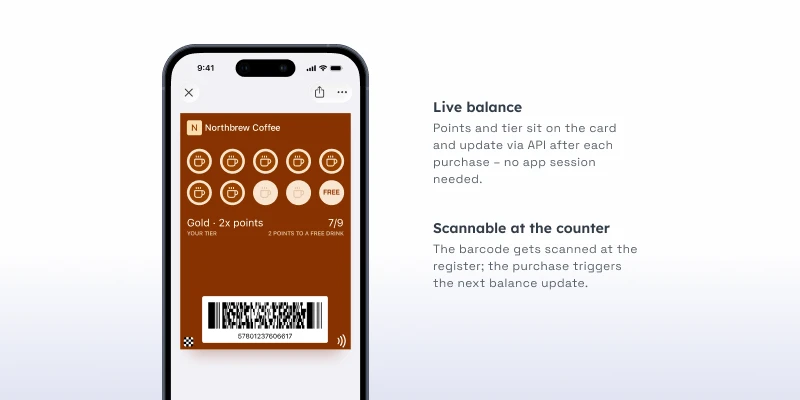
On Apple, the punch card is a Store Card. On Google, it’s a Loyalty pass. The stamp count sits in a field, usually as “6 of 10”.
| Step | What happens |
|---|---|
| Add | The customer taps Add to Wallet from a QR at the counter, a link or your app |
| Scan | The barista scans the barcode at each visit |
| Stamp | Your POS or loyalty system counts the stamp and sends the new total |
| Update | The card redraws on the customer's phone |
| Reward | At the Nth stamp, the card shows the reward and can alert the customer |
Plan for 1 thing up front: the stamp count comes from your loyalty or POS system through the API. Pushwoosh issues and updates the card. It doesn’t count stamps for you. If your till already tracks visits, you’re most of the way there.
Setup in 4 steps
-
Connect the platforms once
An Apple Pass Type ID certificate (Apple Developer account, $99 a year) and a Google Issuer ID with a service account key.
-
Design the card
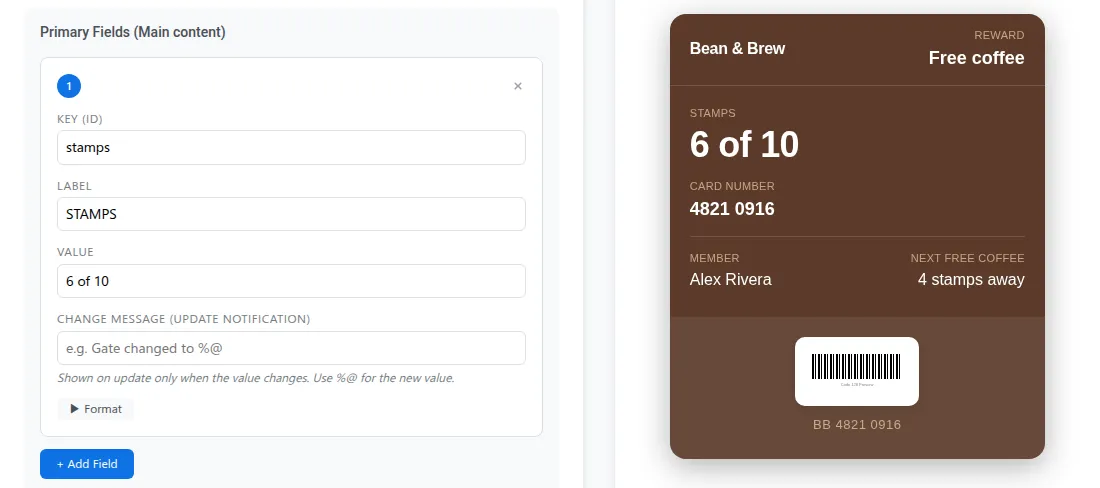
In the pass builder, pick Store Card for Apple and Loyalty for Google. Add your logo, colors, a stamp field and a barcode your scanner reads.
-
Connect your POS
Send stamp updates and rewards from your system through the API, keyed to the customer's User ID.
-
Put the QR where people wait
On the counter, the cup sleeve, the receipt. Add the Wallet buttons to your emails and app too.
Platform setup steps are in the Wallet passes docs.
Scanning at the counter
The counter is where a loyalty program lives or dies, so keep it to a single scan. The barista scans the barcode with the POS scanner, the POS records the stamp, and the card updates on the customer’s phone.
Location relevance helps too. Add your shops as locations, up to 10 per card, and the card can appear on the lock screen as the customer walks up. No more “hang on, let me find it”.
The reward moment
The reward is the one alert people actually want. On Apple, keep the reward in its own field with a change message (”%@ is on us”) and update that field only when the count hits the target: the message appears on the lock screen. A stamp field without a change message updates silently. On Google, Loyalty passes can also notify on updates, up to Google’s limit of 3 per pass per day.
Once the reward is redeemed, reset the count on the same card. The customer keeps 1 card for as long as they keep coming.
Win-back after N days
Regulars who stop coming are the cheapest customers to win back. They already like you. Build a segment of card holders with no stamp in 21 days and give them a reason to return.
Send it by push, email or SMS, not through the card. Apple and Google only allow notifications about the pass, so “we miss you, double stamps this week” belongs in your other channels. The card still plays its part: the double stamp shows up on it as soon as the next scan lands.
Segmentation is what makes win-back work. Joe & The Juice split its audience into 7 preference groups and grew loyalty card revenue by 56% in a year (competitor case, Braze).
3 ways to run it
A single shop can keep it simple: “buy 9, get the 10th free”, a QR on the counter, no app at all.
A small chain uses 1 card across every location, sets the nearest shops as locations, and runs win-back by SMS.
A chain with an app keeps the card in the wallet for the till and the app for ordering ahead, with offers going out by push.
1 wallet vendor, loyaltypass, puts open rates for wallet notifications at around 90%, against about 20% for email (vendor estimate, not independent research). Treat that as a direction, not a benchmark, and measure your own scans per visit.
Grow repeat visits with Pushwoosh
Pushwoosh issues native Apple and Google Wallet digital loyalty cards, punch cards included, by User ID, updates stamps through the API and runs win-back by push, email or SMS from the same journey. It’s the card at the counter and the follow-up after, in 1 platform.
Repeat visits don’t need a bigger reward. They need regulars to never lose their stamps.