A grocery loyalty program doesn’t need an app to work. A loyalty card in Apple Wallet or Google Wallet gives shoppers something to scan at the till, shows their points and personal offers, and updates after every shop. Shoppers don’t have to download a supermarket app to join: the wallet is already on their phone.
In Pushwoosh, the card sits on the same profile as your push, email and SMS, so you can run wallet loyalty cards for grocery and q-commerce from 1 platform.
Why grocers don’t need an app first
Grocery is a high-frequency, low-attention category. Shoppers want the discount at the till, not another icon on the home screen. An app-first program leaves a large share of your buyers outside it.
There’s a quieter problem too. Research on loyalty programs found that the change in shopper behavior after joining is small, and even that effect fades within 6 to 9 months (Journal of the Academy of Marketing Science, 2008). A static card doesn’t hold anyone’s attention. A card that keeps showing something new and personal at least has a chance.
How a wallet loyalty card works
On Apple, the card is a Store Card. On Google, it’s a Loyalty pass. Both carry a barcode for the till, a points balance and fields for personal offers.
| Step | What happens | Who does it |
|---|---|---|
| Join | Shopper taps Add to Wallet from a QR at the till, a receipt or an email | Shopper |
| Scan | Cashier scans the card barcode | Store |
| Count | Your loyalty system adds points and picks offers | Your system |
| Update | The card redraws with the new balance and offers | Pushwoosh, via API |
Notice the third row. Points and offers come from your loyalty or POS system through the API. Pushwoosh issues and updates the card, but the points logic stays with you.
The model works for grocers at scale. Wallet vendor PassKit reports more than 90,000 wallet loyalty cards issued for Tian Tian Market, an Asian supermarket chain in London (vendor case, PassKit).
Personal offers that stay current
The card is where a personal offer can live between shops. After each scan, your system can refresh the offer fields: money off the coffee brand this shopper always buys, a bonus on their usual weekly basket.
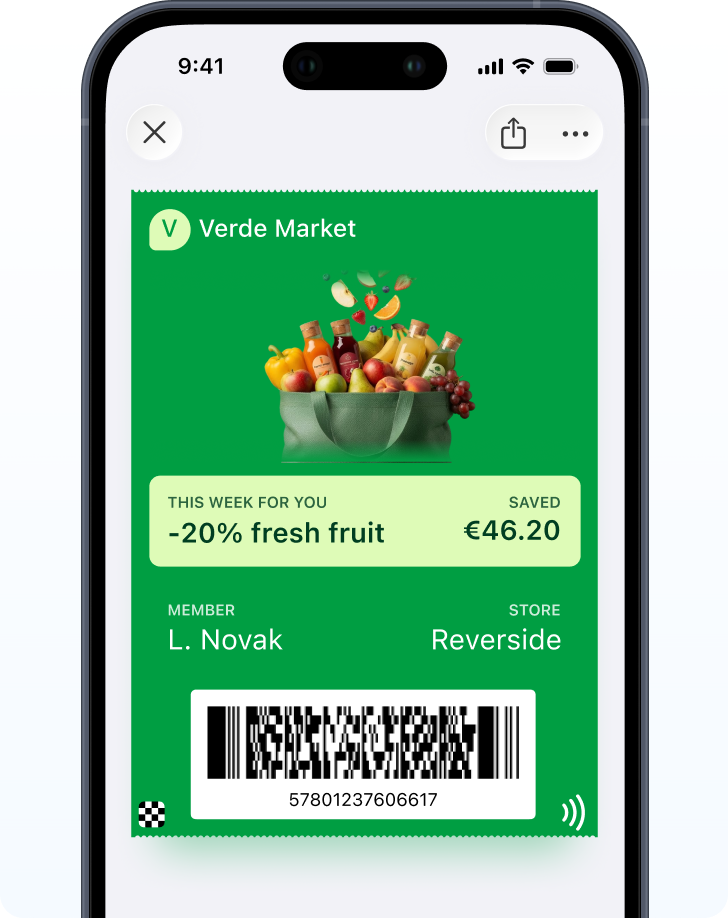
Coupons work the same way. Thai hypermarket chain Big C moved from PDF coupons to coupons in Google Wallet and reported a 38% higher average basket and more redemptions (market case, Google Wallet case studies).
Weekly offers: update quietly, announce elsewhere
Grocers run on weekly offer cycles, which raises a practical question: should the card alert shoppers every week?
No. Apple and Google only allow notifications related to the pass, and a weekly promo blast through the card breaks their guidelines. Refresh the offer fields quietly, then announce the new week by push, email or SMS. Save the card’s alerts for things that really are about the card: points about to expire, a reward unlocked.
On Google, Loyalty passes can notify on updates, up to 3 per pass per day. On Apple, only fields with a change message trigger an alert.
At the till: what to check
Start with the barcode. Apple supports QR, PDF417, Aztec and Code128. Google adds EAN-13. Match the format to what your tills read, and test it with a real phone at a real till before launch.
Then the mapping. The barcode value has to identify the member in your loyalty system, or the scan does nothing useful.
Then the people. A cashier saying “Scan this to add your card to Wallet” does more than any poster by the door.
Store locations on the card
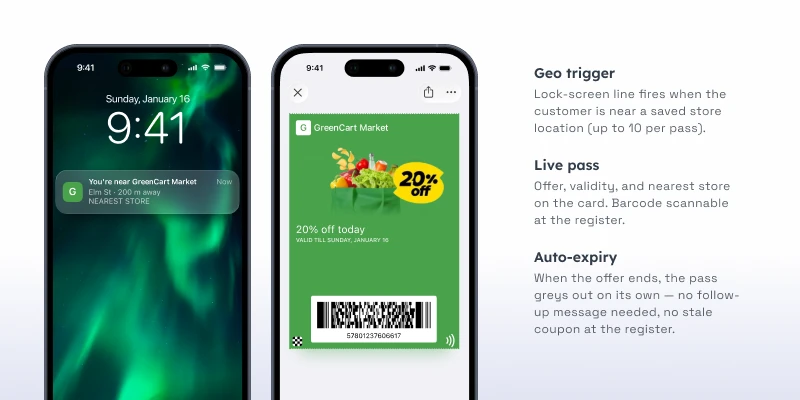
Add your nearest stores as locations, up to 10 per card, so the card can appear on the lock screen as the shopper arrives. Wallet decides when to show it. For bigger networks, set each shopper’s nearest stores through the API.
Identify more shoppers at the till with Pushwoosh
Pushwoosh issues native Apple and Google Wallet loyalty cards by User ID, updates points and offers through the API, and runs push, email and SMS from the same journeys. Every scan turns a shopper into someone you know, with or without your app.
Knowing more of your shoppers isn’t about a bigger discount. It’s about making the card the easiest thing to show at the till.