Deep links and custom data
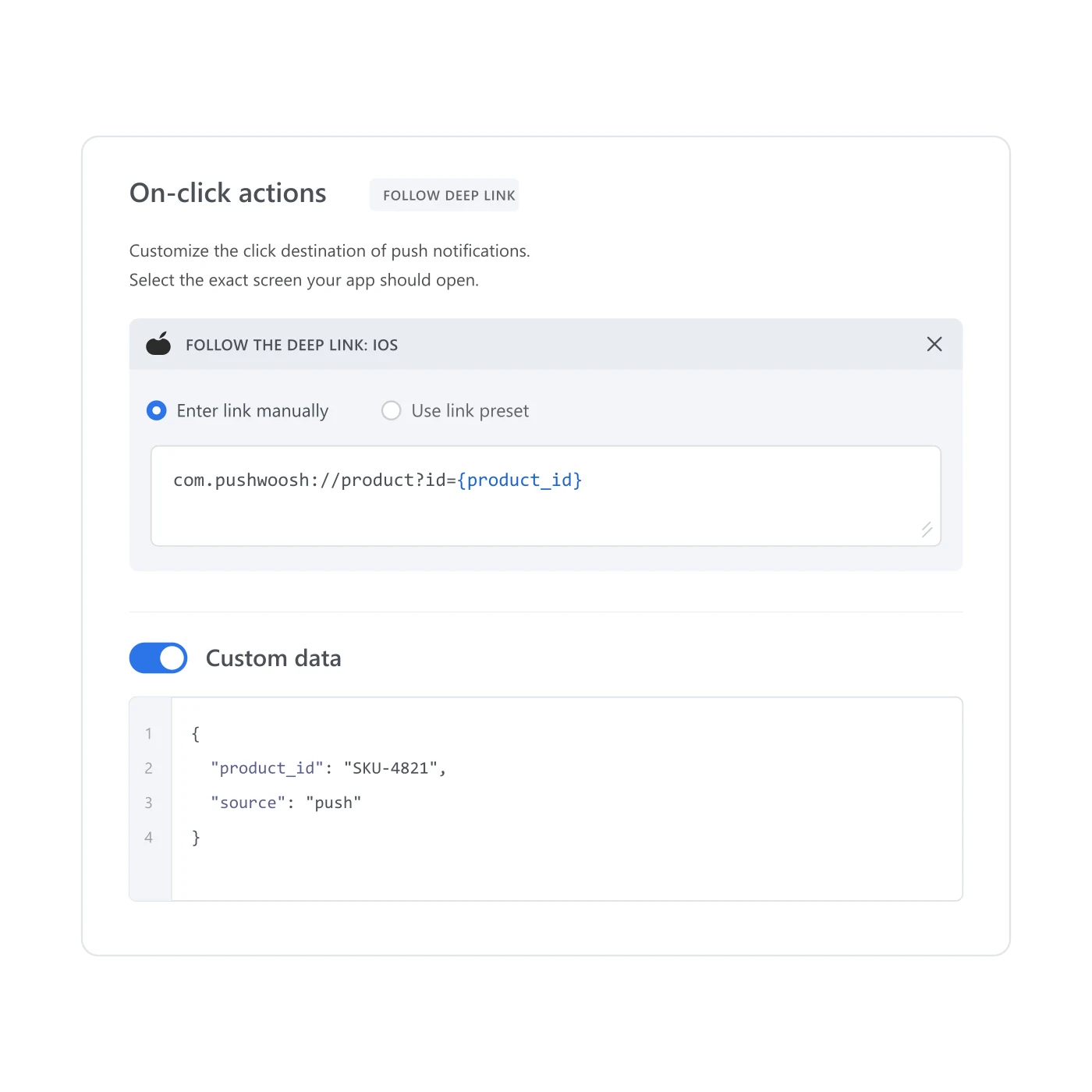
Add a URI to a message preset that opens the exact screen in your app, with the JSON payload it needs to act on. Set it once, in the preset, and every push, journey step and API send built from that preset opens the same place.
One tap, the wrong screen
A push lands, someone taps it, and the app opens on whatever screen loads by default. The match they were invited to, the cart they left, the listing that triggered the message in the first place. None of that survives the tap. Rebuilding that path by hand, in every message, is the kind of work that gets skipped under deadline, so it usually is. Deep links and custom data carry the destination and the payload inside the message itself, so the tap lands where the message promised.
What it does
A message preset can carry two things beyond its text: a deep link URI and a block of custom data. The URI accepts {placeholder} tokens, filled in per recipient from segment or event attributes, so one template can point at a different product page, match lobby or order for each person it reaches. Custom data travels as JSON in the message payload, under the key u, for your app to read and act on after the tap.
| Setting | What it carries | Where it's set |
|---|---|---|
| Deep link URI | Custom URI scheme with {placeholder} tokens filled per recipient | Message preset |
| Custom data | JSON payload delivered under the key u | Message preset |
| Also available via | The journey's Data to App element, with no push attached | Customer Journey Builder |
Both belong to the preset itself. Every campaign, journey step and API call built from that preset opens the same place with the same data, without re-entering either one.
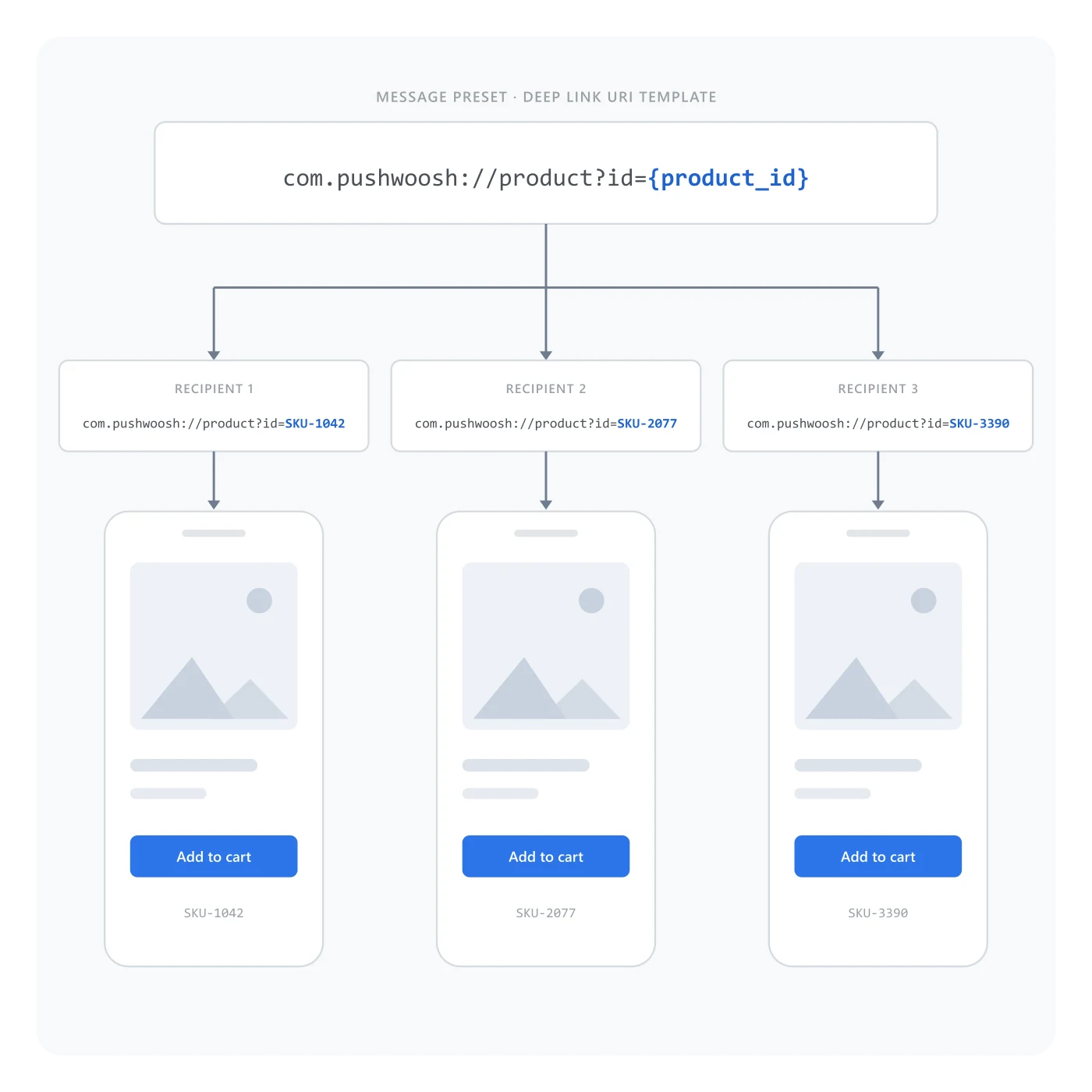
One template, a different screen for each recipient
The URI template stays fixed on the preset; only the placeholder value changes per person. That’s what lets a single cart-abandonment preset open a different product page for every recipient, instead of every abandoned-cart message needing its own hand-built link.
Why Customer Journey Builder needs this
A journey can decide who gets a message and when, but not what happens after the tap, unless the message itself carries that instruction. Without a deep link, a step that fires on an abandoned cart still opens the app’s home screen, and the person has to re-find the cart on their own, if they bother. Deep links and custom data are what let Customer Journey Builder finish the job a trigger started, instead of stopping at the notification.
How it works
Parsing the URI and the JSON payload once the app opens is work for your mobile team; the preset only carries them there.
-
Open the message preset
Open the preset that the push, email or journey step will reuse, and turn on Deep link.
-
Set the URI template
Enter the URI with {placeholder} tokens for the fields that change per recipient, then add the Custom data JSON if the app needs a payload alongside it.
-
Reuse the preset
Attach the same preset to a campaign, a journey step or an API-triggered send. The link and the payload travel with it.
One preset, wherever it gets reused
The deep link and custom data live on a message preset, alongside its personalization tags and its text. Build a cart-abandonment preset once, with a URI back to the item and the item ID as custom data, and reuse it across a one-off campaign, a Customer Journey Builder step and an API-triggered send. The destination and the payload go with it every time. The same preset can also drop that URI and payload through a journey’s Data to App element, with no push attached at all.
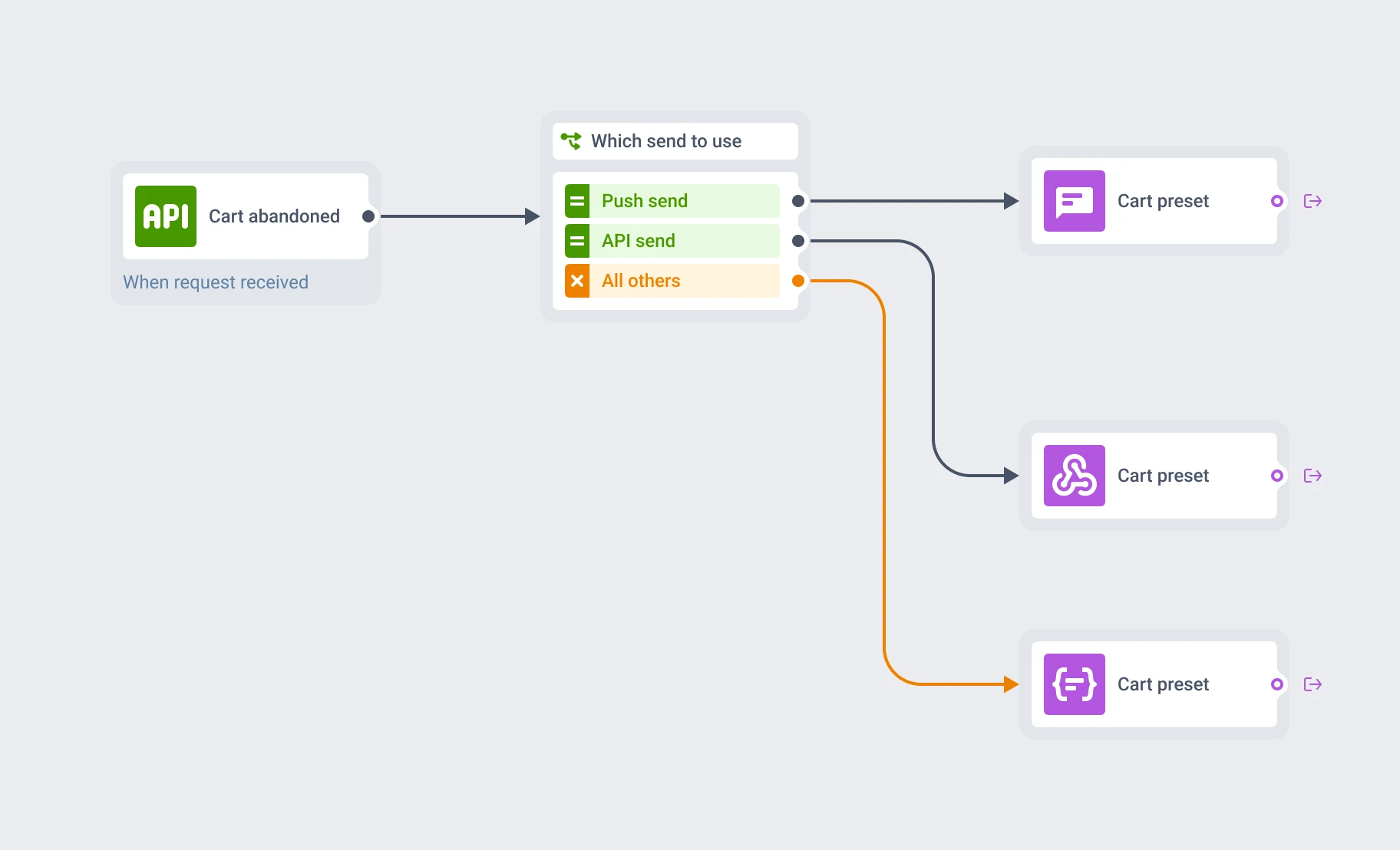
The same preset, three different sends
A push step, an API call and a Data to App element can all pull from the same preset. Change the URI or the custom data once, and every send built on that preset picks up the change.
- Message presets: the reusable template deep links and custom data live on
- Customer Journey Builder: the flows that trigger the preset and act on the data behind the tap
- Personalization: the same {placeholder} mechanism, applied to message text instead of a URI
What to keep in mind
Give every tap somewhere real to land
Set the URI and the payload once, on the preset. Every send built from it opens the right screen from then on.
Explore related products
Build a push, email or in-app message once, with every language version, and reuse it across campaigns, journeys and API sends on all 7 Pushwoosh channels.
Map out and streamline your campaigns with one visual tool. Communicate, engage, retain, convert, segment, and experiment using Pushwoosh Customer Journey Builder.
Deliver personalized messaging across push, in-app, email, SMS, and WhatsApp. Tailor journeys, timing, and content to boost engagement with ease.
Drive engagement with event-based triggers. Automatically launch campaigns when customers take actions, capturing perfect moments for conversion and retention.
Mobile push notifications by Pushwoosh — every-device reach, rich content, precise targeting, cross-channel Journeys and 99% uptime. Turn notifications into loyal, paying users.
Drive player return with smart re-engagement campaigns. Send strategic messages, limited-time events, and rewards that bring gamers back.