Dynamic content
Drop a tag placeholder like [first_name] into push, email, SMS, or in-app content through the Personalization picker, and Pushwoosh fills in each recipient's own value when the message sends. One message, written once, personal to whoever reads it.
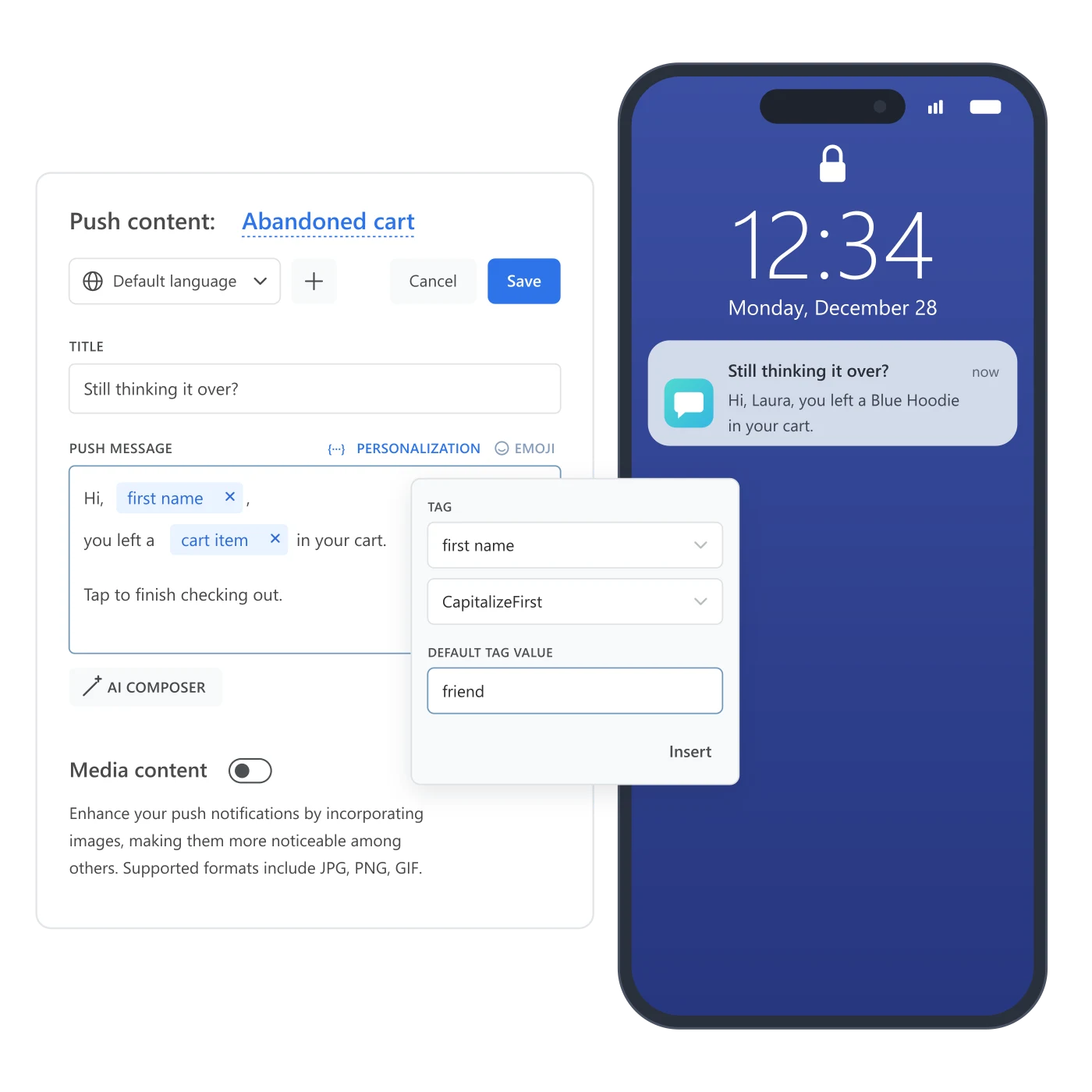
Write it once, and it still reads like you know them
“Hi, valued customer” tells the reader nothing was written for them, and it reads that way. “Hi, Laura, you left a Blue Hoodie in your cart” converts better, but nobody has time to hand-write that version for every loyalty tier and every cart. Most teams settle for the generic line by default, not because it performs better, just because the alternative looked like a campaign per segment. Dynamic content removes that trade: write the message once, drop in a placeholder, and each recipient reads their own name and their own cart, with a real fallback for anyone the tag doesn’t cover.
What Dynamic content gives you
Placeholder syntax
Insert a tag as [tag_name] through the Personalization picker, not typed by hand. No limit on placeholders per message.
Default Tag Value
A documented fallback shown whenever the recipient has no value for that tag.
Case modifiers
CapitalizeFirst, CapitalizeAllFirst, UPPERCASE, lowercase, or regular, one per placeholder. Price, Integer, and Date tags use their own set instead.
Wide field coverage
Title, body, subtitle, icon, banner, and even Chrome button URLs, across push, email, SMS, and in-app.
Direct User ID
Insert the recipient's own Pushwoosh User ID, resolved per recipient at send time.
Event-attribute personalization
A Journey send node can pull from the event that triggered or matched the step, not only a static tag.
What a hand-built segment list can’t do as cheaply: the placeholder resolves against each recipient’s own profile the moment the message sends, so one message serves everyone without a separate build per segment.
| Access | Tag types you can use | Where |
|---|---|---|
| Personalization picker | String, Integer, Price, Date | Control Panel content editor: push, email, SMS, in-app |
| API or Liquid Templates | List, or any type once the message needs conditional logic | Direct API calls, or Liquid Templates |
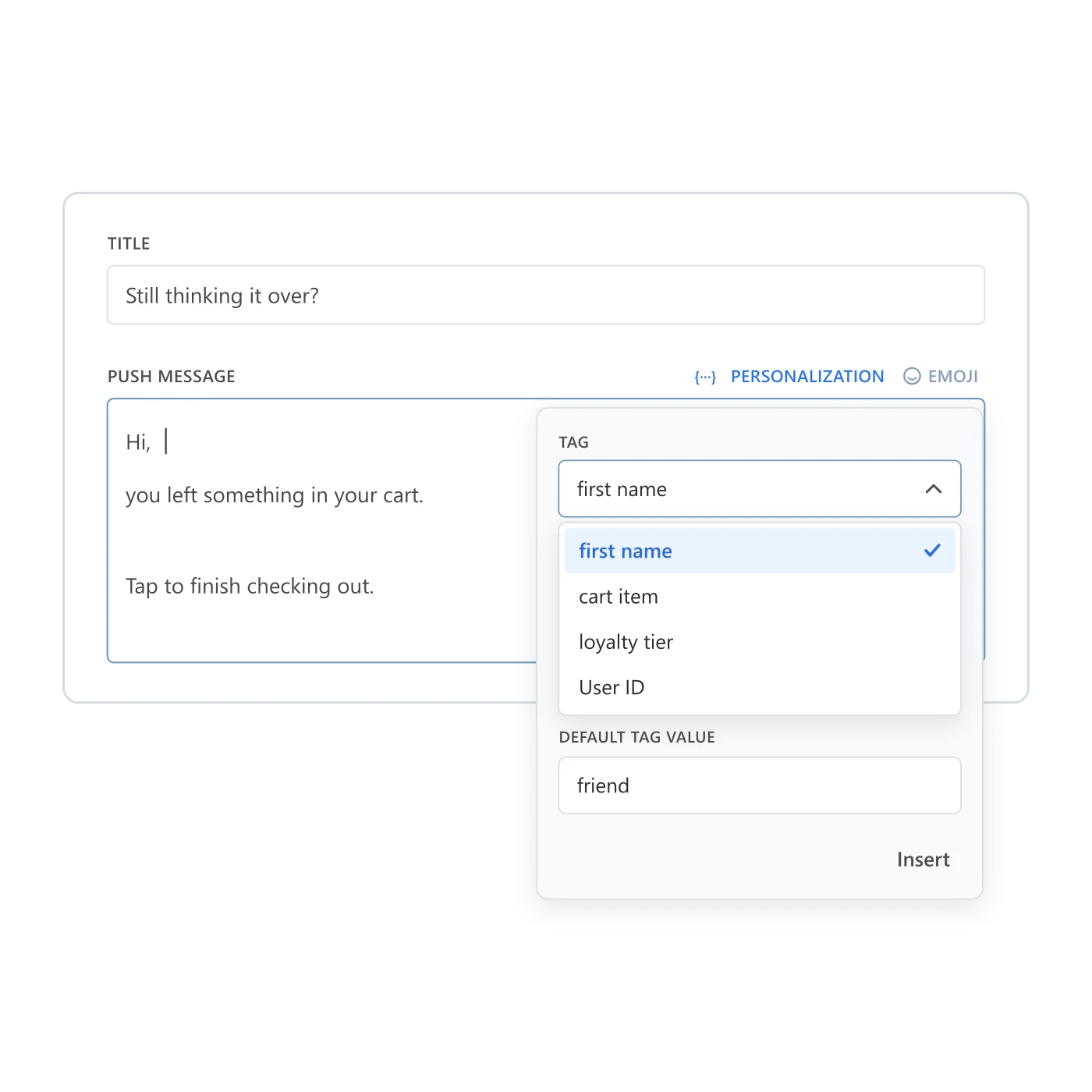
Pick the tag, not the syntax
The picker writes the token for you: choose a tag from the list and it lands in the field as [tag_name], formatted and ready. Set a Default Tag Value alongside it, and a recipient with no value for that tag still gets a complete sentence instead of a blank space or a broken token.
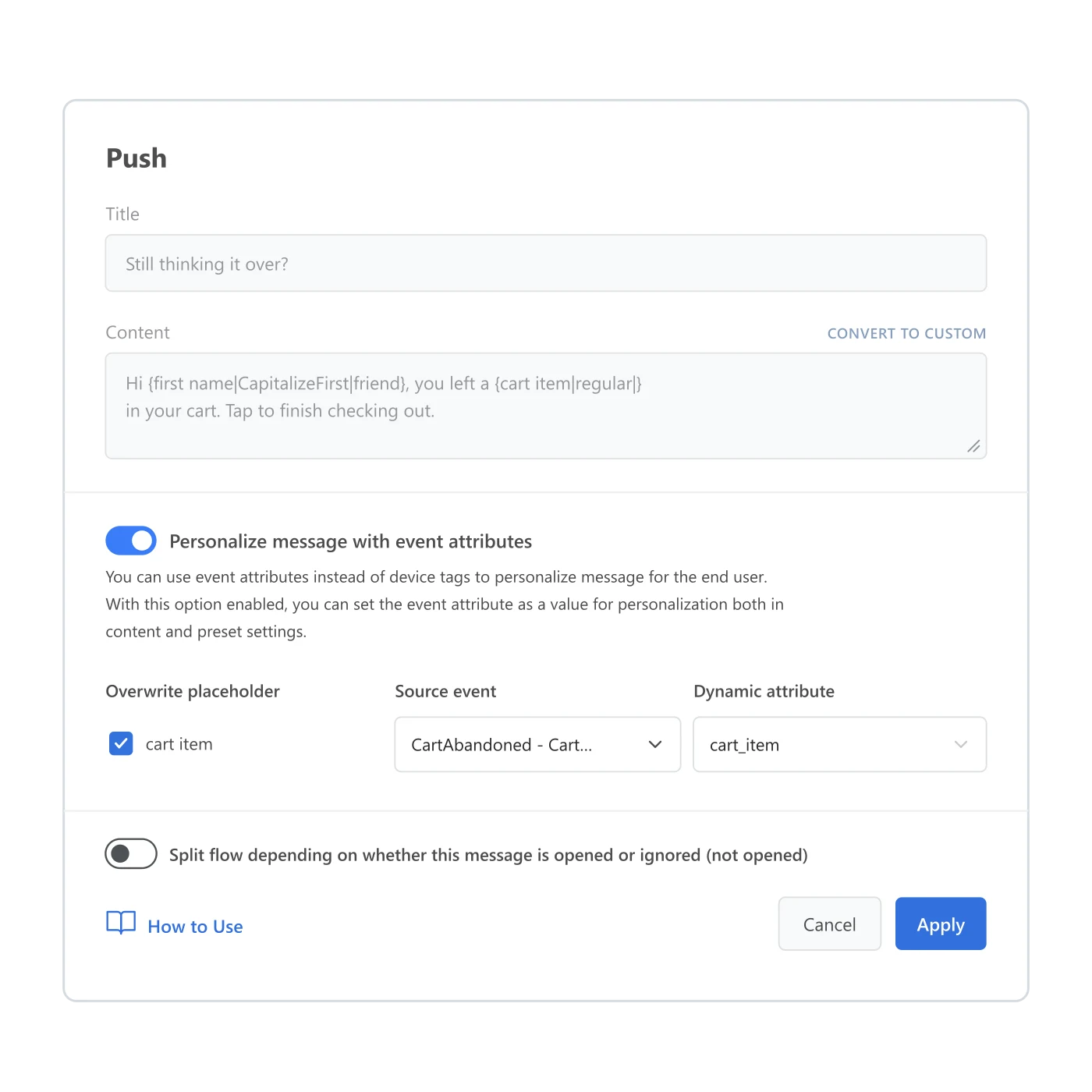
Personalize straight from the event, not just the profile
Turn on “Personalize message with event attributes” on a send node and the message reads its placeholders from the event that started or matched that step, rather than a tag saved earlier. A cart_item carried by the trigger reaches the reminder that follows without anyone updating a profile tag first.
Why it matters for Customer Journey Builder
A journey that sends the same line to a VIP and a first-time visitor is built for the flow more than for the person moving through it. Dynamic content is what lets one step in Customer Journey Builder read differently to everyone who reaches it: a name, a cart item, a balance tier, without splitting the canvas into a branch per segment. The same mechanism reads live off the event a step is built on, so a Wait for Trigger branch can hand its own order ID straight to the message that follows it. It keeps a journey feeling considered even while it runs on its own.
One placeholder among the pieces that feed it
Dynamic content lives inside Message presets, the same template a push, email, SMS, or in-app step reuses across a journey. The values it inserts come from tags on the profile, or from the event that triggered or matched the step: a cart-abandoned trigger can hand its own cart_item straight to the reminder that follows it. When a message needs to branch on a condition instead of filling in a value, or pull a live price at send time, that’s Liquid templates picking up where a static placeholder stops.
![Journey canvas: a Cart abandoned trigger feeds a Wait for Trigger element; users with no Checkout success within 2 hours get a Cart reminder push, then a Cart follow-up email after a 1-day delay, with notes showing the message presets fill [cart_item] from the event and [first_name] from Tags](/images/dynamic-content/feature-flow-with-siblings.webp)
One flow, several messages, one recipient reading their own version of each
A cart-abandoned trigger opens the journey, a Wait for Trigger branch checks for a purchase, and the reminder that follows carries the exact item the recipient left behind. The follow-up email reads the same tag data. Different channel, same person, same placeholder doing the work twice.
Where this earns its place
Cart and order detail
E-commerce, food delivery, and grocery, where the item or order status is the whole point of the message.
Player-level LiveOps
Level, player name, and in-game currency, addressed to the specific player who earned them.
Trip and booking detail
Travel, hotels, and theme parks, where a destination or check-in date makes a reminder worth opening.
- E-commerce / retail
- Mobile games
- Marketplaces
- Fintech / banking
- Travel / OTA
- Media / streaming
- Food delivery
The tag data behind it stays on infrastructure you can name
Every placeholder Dynamic content resolves reads a tag value that lives on the same infrastructure as the rest of the platform: Pushwoosh is SOC 2 Type 2 and ISO 27001:2022 certified, GDPR-compliant, and runs on its own hardware in the US and Germany, under BDSG. Full detail sits on the data safety page.





How it works
-
Insert the placeholder
Open the content editor for push, email, SMS, or in-app and use the Personalization picker to drop in [tag_name], with a Default Tag Value for anyone missing that tag.
-
Turn on event-attribute personalization in a journey
On a send node in Customer Journey Builder, switch on 'Personalize message with event attributes' to read from the triggering or matched event instead of a static tag.
-
Move up to Liquid Templates for logic
Need a List-type tag, or a branch inside one message? That's the API or Liquid Templates, not the Control Panel picker.
FAQ
One message, personal to whoever reads it
Write it once, drop in a placeholder, and stop rewriting the same line for every segment.
Explore related products
Build a push, email or in-app message once, with every language version, and reuse it across campaigns, journeys and API sends on all 7 Pushwoosh channels.
Map out and streamline your campaigns with one visual tool. Communicate, engage, retain, convert, segment, and experiment using Pushwoosh Customer Journey Builder.
Drive engagement with event-based triggers. Automatically launch campaigns when customers take actions, capturing perfect moments for conversion and retention.
Deliver personalized messaging across push, in-app, email, SMS, and WhatsApp. Tailor journeys, timing, and content to boost engagement with ease.
Pushwoosh segmentation tools help you reach your users with the most relevant offer based on their unique preferences and behavior.
Attach text, numbers, dates, currency, and app version to a device or a user, then use it to build segments, branch journeys, and personalize messages.