July अभी शुरू ही हुआ है, और team ने पहले से एक पूरा stack ship कर दिया है: एक बिल्कुल नया channel, आपके email sends के लिए एक safety net, और SMS जिसे आप शुरू से आखिर तक खुद run कर सकते हैं।
यह रहा क्या-क्या बदला 👇
नया channel: Viber 💬
अब आप Pushwoosh में Viber configure कर सकते हैं, one-time Viber campaigns भेज सकते हैं, और Customer Journey Builder के अंदर एक Viber step add कर सकते हैं — push notifications, in-app, email, SMS, WhatsApp, और Telegram के साथ-साथ।
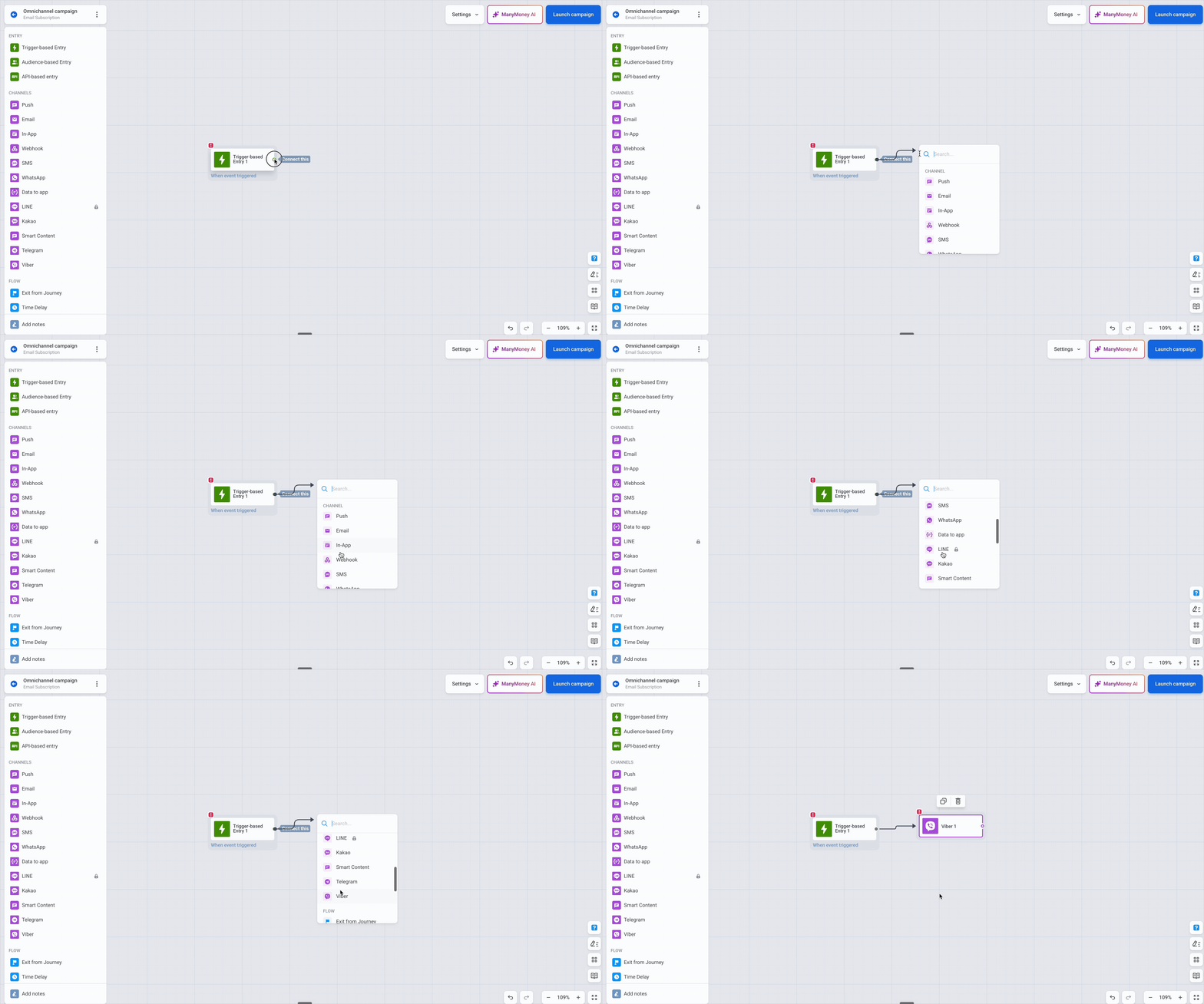
महत्वपूर्ण क्यों है: बहुत सारे apps के लिए — खासकर Eastern Europe, Middle East, और Asia के कुछ हिस्सों में — Viber वो जगह है जहां users का एक बड़ा हिस्सा वाकई messages पढ़ता है। पहले उन तक पहुंचने के लिए एक अलग tool साथ में चलाना पड़ता था। अब Viber बाकी हर channel जैसे ही orchestrate होता है: वही segmentation, वही triggers, वही reporting, एक ही canvas पर। भारत में domestic audience के लिए Viber core channel नहीं है, लेकिन cross-border user base वाले apps — जैसे remittance, ट्रैवल, या diaspora-facing products — के लिए यह एक और channel है जिसे अलग से manage नहीं करना पड़ता।
Send करने से पहले email की गड़बड़ियां पकड़िए 📩
Email send form में अब एक Audit your email step है जो कुछ भी भेजे जाने से पहले दो checks run करता है: एक Content check और एक Compliance check।
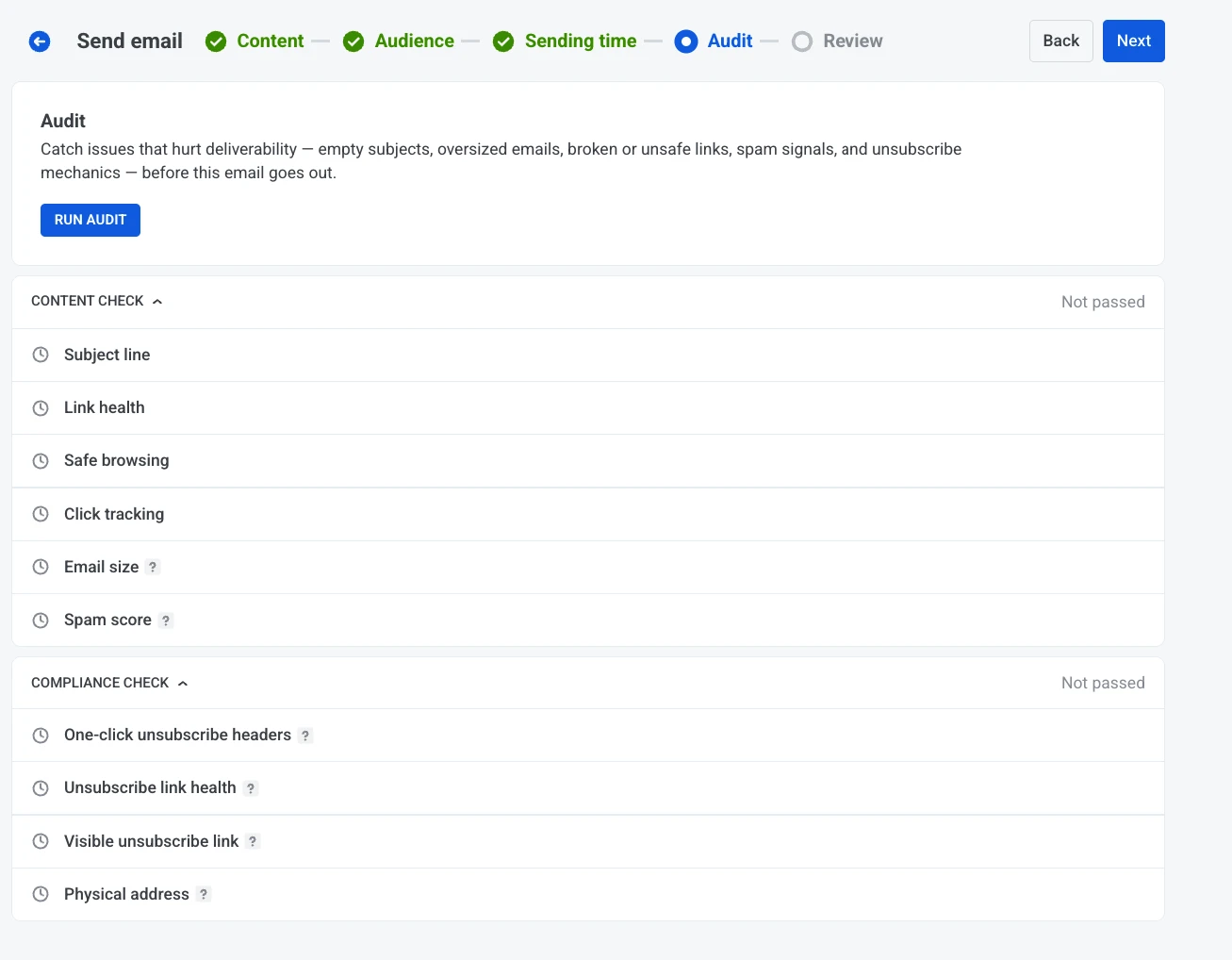
यह क्यों मायने रखता है: एक टूटा हुआ CTA link, एक missing unsubscribe, या एक compliance gap — ये वो चीज़ें हैं जो आपको Send दबाने के ठीक एक सेकंड बाद ध्यान आती हैं, जब तक वो पहले ही कुछ लाख inboxes में पहुंच चुका होता है। Audit इन problems को तब सामने लाता है जब आप उन्हें अभी भी fix कर सकते हैं — post-send report में नहीं, जब तक बहुत देर हो चुकी होती है।
मान लीजिए आप अपनी पूरी list को एक promo भेज रहे हैं। Audit run कीजिए, और Pushwoosh dead link और missing unsubscribe footer को पहले ही flag कर देता है। दोनों को fix कीजिए और clean send कीजिए। भारत में FinTech और e-commerce apps के लिए, जहां email volumes तेज़ी से scale करते हैं, ऐसे pre-send checks एक extra layer of confidence देते हैं — Pushwoosh की SOC 2 Type 2 और GDPR-compliant infrastructure के ऊपर।
Inbox placement की बड़ी picture के लिए, हमारी email deliverability guide देखिए।
SMS अब पूरी तरह self-serve है 📲
3 changes, जो साथ मिलकर matlab करते हैं कि अब आप बिना किसी setup ticket या journey के SMS run कर सकते हैं:
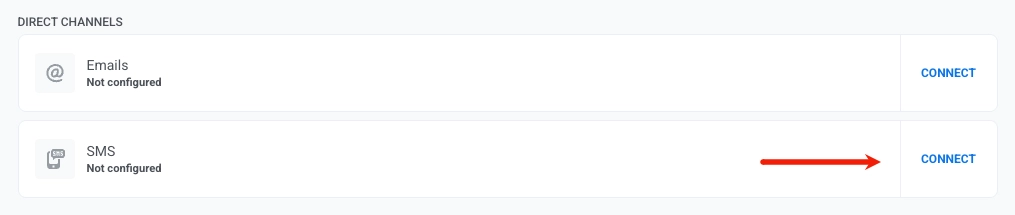
अपना provider खुद connect कीजिए। Control Panel में एक supported SMS provider चुनिए और उसे मिनटों में खुद connect कीजिए — manual setup का इंतज़ार करने के बजाय।
बिना journey के one-time SMS भेजिए। सीधे send form से एक single SMS campaign fire कीजिए। Schedule करने के बाद मन बदल गया? भेजे जाने से पहले उसे edit या cancel कर दीजिए।
एक tighter builder। SMS preset editor links को inline shorten करता है ताकि messages lean रहें, और type करते ही character count, encoding, और message parts दिखाता है — ताकि send करने से पहले आपको पता हो कि actually cost किस चीज़ से बढ़ रही है।
भारत में SMS का महत्व सिर्फ़ marketing तक सीमित नहीं है — OTP verification और transactional alerts के लिए यह आज भी सबसे भरोसेमंद channel है, चाहे push और in-app adoption कितना भी बढ़ जाए। Self-serve setup का मतलब है कि आपकी team बिना engineering dependency के transactional SMS flows को तेज़ी से iterate कर सकती है, और character count व encoding जैसी details पर नज़र रखने से बड़े user base पर cost control में मदद मिलती है।
In-app editor: entry animations और autosave 🎬
Rich media editor में 2 quality-of-life updates।
Entry animation। चुनिए कि एक in-app message screen पर कैसे enter करे — None, Fade, या Default — ताकि appearance message से match करे। Learn more →
Autosave। Editor आपके काम करते समय browser में एक draft रखता है। किसी template को फिर से खोलिए और यह unsaved changes को restore करने का offer देता है, जो 7 दिनों तक kept रहते हैं। अब एक closed tab की वजह से आधा-बना creative खोने की टेंशन नहीं। Learn more →
अपनी भाषा में काम कीजिए 🌍
Pushwoosh Control Panel अब 14 languages में available है। Account settings से interface language switch कीजिए, ताकि team का हर सदस्य उसी भाषा में काम कर सके जिसमें वो सोचता है — खासकर तब useful जब campaigns चलाने वाले लोग एक ही office या एक ही देश में न हों।
Sharper reporting और तेज़ investigation 📊
3 updates जो यह देखना आसान बनाते हैं कि आपकी messaging क्या कर रही है:
- 📊 Frequency capping statistics — बिल्कुल exactly देखिए कि sending limits delivery को कैसे affect करते हैं। Suppressions और affected users अब push, email, और Customer Journey reports में दिखते हैं, साथ ही project dashboard पर एक dedicated block भी। Learn more →
- 🗂️ Refreshed message history — Message और campaign performance review करने के लिए एक cleaner, ज़्यादा functional layout, जिसमें detailed stats एक click दूर हैं। Learn more →
- 🔎 User Explorer में received messages को type से filter कीजिए — जब आप किसी single user को investigate कर रहे हों, उनकी received-message list को message type से filter कीजिए ताकि relevant activity तक तेज़ी से पहुंच सकें। Learn more →
Developers के लिए: Messaging API v2 ⚙️
API से send करने वाली teams के लिए कुछ additions:
- Notify के ज़रिए Viber — Notify endpoint के through Viber messages भेजिए। payload reference देखिए।
sms_preset— अपने API payload में सीधे एक saved SMS preset reference कीजिए।- Update — किसी scheduled message को उसके
message_codeसे replace कीजिए, इससे पहले कि वो send हो — बिना उसे cancel करके फिर से बनाए। Update देखिए → use_latest_user_device— सारे devices के बजाय सिर्फ़ user के सबसे recently active device पर deliver कीजिए। Notify देखिए →
Updates खुद try कीजिए
July के और updates रास्ते में हैं। तब तक, Pushwoosh release notes में recently ship हुआ सब कुछ browse कर सकते हैं, या sign in करके इन्हें work में लगा सकते हैं।
संबंधित लेख
सभी देखें