Put the unread count on your app icon
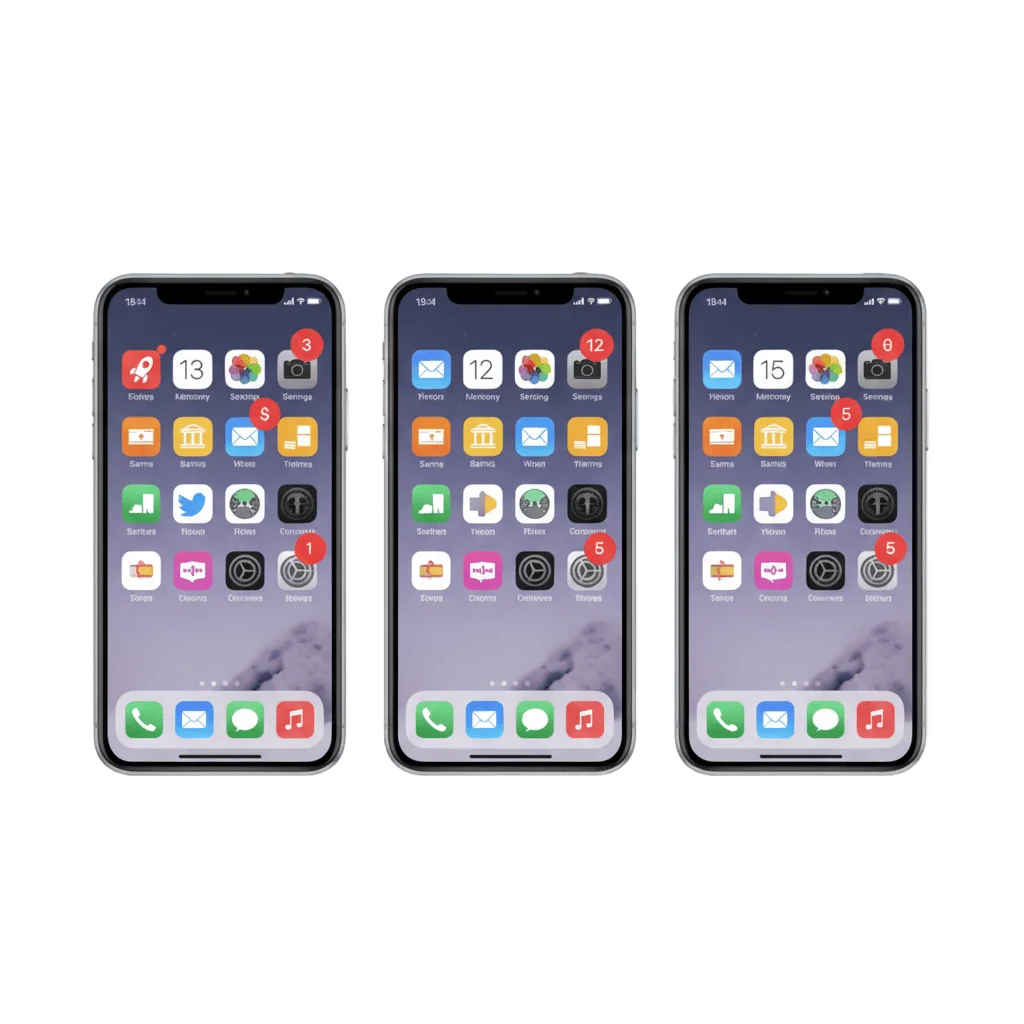
A badge is the smallest thing you can say to a user, and it costs them nothing to read. Set it, bump it or clear it from the same campaign and Journey as everything else you send.
Trusted by 80,000+ companies to scale their engagement
The format, in full
A badge is a single integer, and that is the whole appeal. It costs no banner and no sound, it spends none of the permission you fought to get, and it keeps working on the user who swiped your push away three hours ago. There are three things you can do to that integer from the composer or the API, plus one caveat about where it actually renders.
An exact count
ios_badges: 5 puts a 5 on the icon, whatever was there before. The value you send is the value the user sees, which is what you want when your server already knows the real total.
+1 and -1
Relative changes bump or drop the count without you tracking it. The SDK posts the on-device value back through the internal /setBadge endpoint, so Pushwoosh's counter stays level with the real icon.
0 clears it
Send 0 and the badge leaves the icon. Clearing on open is the difference between a count users trust and a red dot they learn to ignore.
iOS uniform, Android launcher-dependent
On iOS the badge is a standard aps.badge value and every device draws it identically. On Android there is no native badge API, so the render depends on the launcher, and Pushwoosh says so rather than implying coverage it cannot deliver.
What you control
| What you send | What happens to the count | Where it lives |
|---|---|---|
An integer, 5 | Sets the badge to exactly that value | ios_badges / android_badges, or the Badges field |
+1, +3 | Increments the current count | Same field. Also +n in the Android presets |
-1 | Decrements the current count | Same field, for a read or a dismissal on the server side |
0 | Removes the badge from the icon | Same field, or the app on launch |
| An SDK call | Sets or clears the badge from an in-app event | setApplicationIconBadgeNumber on iOS, PushwooshBadge on Android |
| Nothing | The SDK applies whatever badge arrived with the push | No app code for the basic iOS case |
| An extension | Changes the count before the notification is displayed | PWNotificationExtensionManager with App Groups |
5ios_badges / android_badges, or the Badges field+1, +3+n in the Android presets-10setApplicationIconBadgeNumber on iOS, PushwooshBadge on AndroidPWNotificationExtensionManager with App GroupsWhere you set it
A Badges field in the composer
The Send-Push form and the push presets take a number, +n, -n or 0. Changing what a campaign does to the count takes no release and no developer.
One key in the API
ios_badges and android_badges in /createMessage. On iOS the value is rendered into the aps.badge field of the payload Apple already carries.
Applied and synced by the SDK
The SDK applies the arriving value with no app code, and keeps the server's notion of the badge current through /setBadge so +1 counts from the right number.
The job it does, inside a journey
One count, several sources
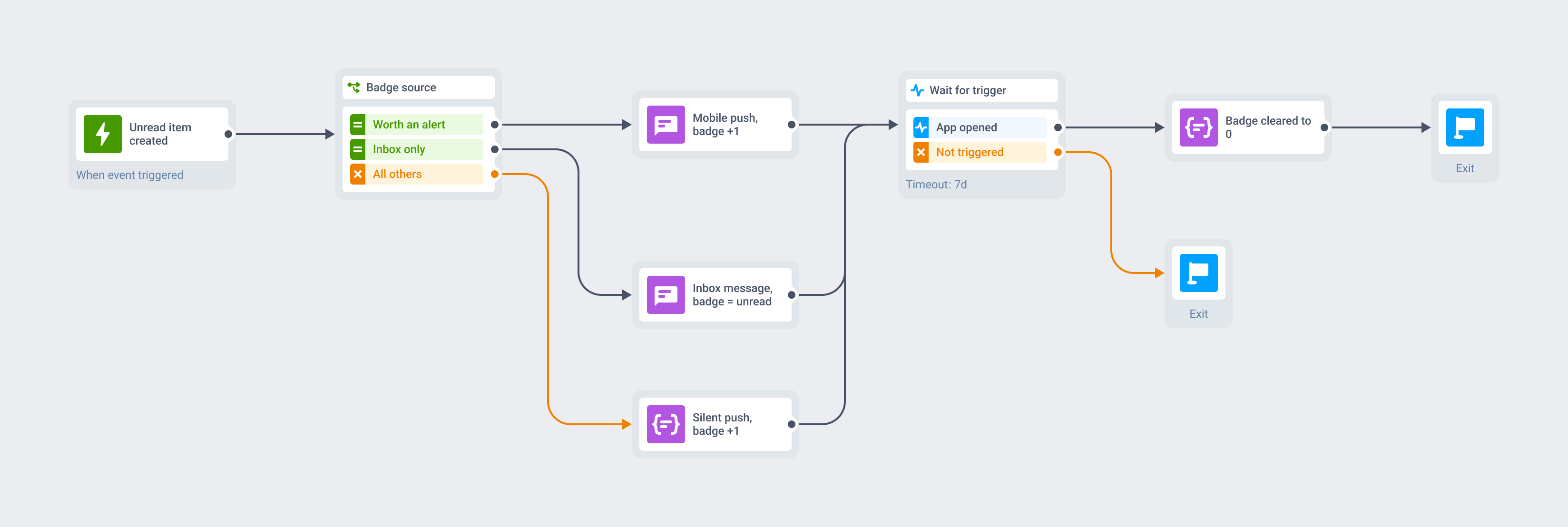
The badge is an attribute of a message you are already sending, so it needs no integration of its own. The same Customer Journey and the same customer profile that decide who gets the push also decide what the count becomes.
So the only open question is what feeds the number. A Message Inbox unread total can be the count outright, a silent push can move it with no alert at all, and a visible mobile push carries it along for the ride. A step at the journey goal takes it back to 0.
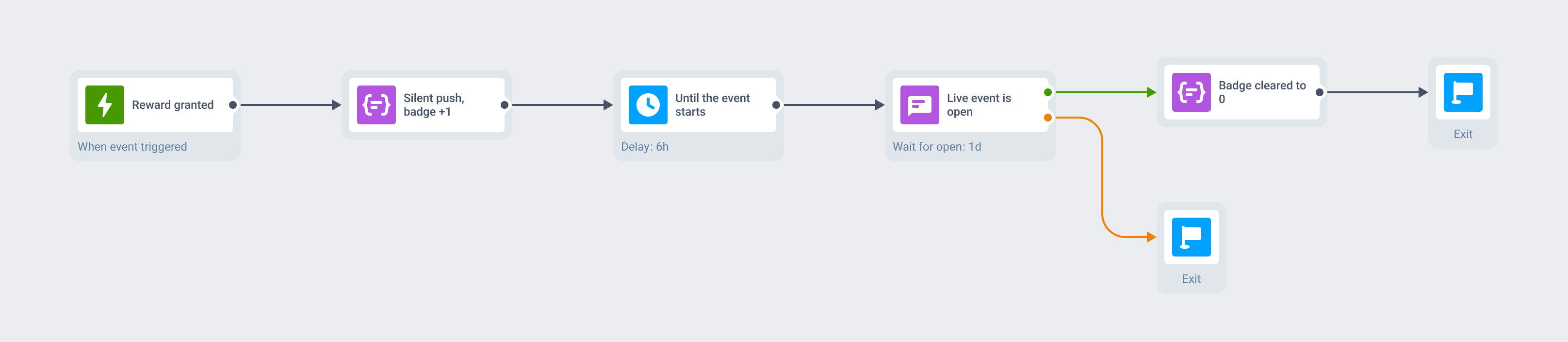
Three rewards stack up while the player is away
Each reward granted fires an event, and each event sends a silent push that adds +1. Nothing rings, nothing lights up the lock screen, and by the evening the icon quietly reads 3.
When the live event opens, the same Journey sends one visible push worth interrupting for. Whichever of the two brings the player back, the SDK clears the badge to 0 on launch, so tomorrow’s count starts from something true.
What to use it for
The badge pays off in proportion to count-density: whether your app has a real, building number of unread or pending things worth putting on an icon. Apps built around a counter get a genuine re-engagement nudge for free, and apps with nothing to count get a red dot that trains users to ignore red dots.
| Moment | What the number means | Why the badge fits |
|---|---|---|
| Mobile games · rewards, refilled lives, event entries | 3 things to collect | The count is part of the retention loop already, and collecting is the whole motivation |
| Creator & subscription apps · drops, DMs, comments | 12 unread | A social feed keeps this number internally, so the icon only has to show it |
| Media & news · unread stories, new episodes | 5 unread stories | The textbook case, and the one that reliably brings a reader back into a session |
| E-commerce & marketplaces · cart items, unread offers | 2 items in your cart | A quiet reminder that costs the shopper none of their attention to receive |
| Fintech · statements, alerts, pending actions | 1 action needed | There is a real unread-document count, and the icon carries it without putting detail on a lock screen |
| Trading & betting · triggered alerts, settled bets | 4 alerts fired | Alerts pile up into a number that actually means something to the user |
| Healthcare & telemed · results, secure messages | Your results are in | The count travels on the home screen while the content stays behind authentication |
| EdTech · unread lessons, streaks, assignments | 2 lessons waiting | A streak or a lesson queue is exactly the kind of number people close out |
When the badge is the wrong tool
The badge reports a quantity. Everything about what is waiting, and how urgently, belongs to another surface.
- The user needs to know what arrived: that is a mobile push, a rich media push or an in-app message.
- The moment cannot wait. A badge is passive by design, so urgency belongs to an interruption level.
- The state is ongoing rather than counted: an order en route, a running score. That is a Live Activity.
- The app has no natural building count. Insurance, hotels, utilities and single-session tools get one bill or one booking, and a badge there is noise.
- Your audience is Android-heavy and the badge would be a primary mechanic. Treat it as best-effort there and design the flow to work without it.
Platform & technical coverage
iOS has one badge, and every iPhone draws it the same way. Android has no universal badge API, so what appears on the home screen is up to the launcher the user happens to be running. The last column names whatever actually draws the number, because for this feature that is where the honest answer lives.
| Capability | iOS | Android | Web | Delivered by |
|---|---|---|---|---|
| Exact badge value | Yes, standard aps.badge | Best-effort, launcher-dependent | – | The push payload, applied by the SDK |
Relative +1 and -1 | Yes, Pushwoosh SDK 6.4.0+ | +n in the presets, launcher-dependent | – | The push, with /setBadge keeping the counter in sync |
Clear to 0 | Yes | Launcher-dependent | – | The push payload, or the app on launch |
| No-code Badges field | Yes, in the composer and presets | Yes, a badge value in the presets | – | Pushwoosh Control Panel |
| Set or clear from app code | setApplicationIconBadgeNumber | PushwooshBadge | – | Your app, through the Pushwoosh SDK |
| Change the count before display | Yes, in a Notification Service Extension | – | – | PWNotificationExtensionManager with App Groups |
| Update the badge with no alert | Yes | Best-effort | – | A silent push, same audience and Journey |
| Launcher and device coverage | Every iPhone, identically | Sony, Samsung, LG, HTC, ASUS, ADW, APEX, NOVA, Huawei, ZUK, OPPO | – | com.pushwoosh:pushwoosh-badge with launcher permissions |
| Pixel and unsupported launchers | n/a | – | – | No native Android badge API exists, so nothing renders |
| Read the current count from the OS | – | – | – | iOS exposes no read API, so the count lives in your app or on the server |
| An app-icon badge at all | Yes | Launcher-dependent | – | Browsers have no equivalent surface for a web push |
aps.badge+1 and -1+n in the presets, launcher-dependent/setBadge keeping the counter in sync0setApplicationIconBadgeNumberPushwooshBadgePWNotificationExtensionManager with App Groupscom.pushwoosh:pushwoosh-badge with launcher permissionsSecurity & hosting
Pushwoosh runs on its own hardware in the US and Germany, under GDPR and BDSG.






How it works
Setting a badge is no-code and free on every plan. The engineering time sits in two narrow places, and neither of them is the iOS basic case.
-
Compose the count (no-code)
Type a number,
+n,-nor0in the Badges field of the Send-Push form or a preset, or sendios_badgesandandroid_badgesthrough the Messages API. On iOS the basic case needs nothing from your app: the SDK applies the value on arrival. -
Wire the two places that need it (developer)
Android needs the
com.pushwoosh:pushwoosh-badgelibrary plus the launcher-specific permissions in the manifest. Clearing on push-open and app-launch is one SDK call, and a Notification Service Extension with App Groups is only for counts that have to change before display. -
Orchestrate it (no-code)
Drive the number from your Message Inbox unread total, move it with a silent push that shows no alert, and clear it at the goal of the same Customer Journey that runs your push, in-app and email.
Limits worth knowing
Explore related products
Mobile push notifications by Pushwoosh — every-device reach, rich content, precise targeting, cross-channel Journeys and 99% uptime. Turn notifications into loyal, paying users.
Message Inbox adds an in-app notification center to your app and website. Silent delivery reaches every user, including the ones who declined push, and saved messages stay available on their own time.
Map out and streamline your campaigns with one visual tool. Communicate, engage, retain, convert, segment, and experiment using Pushwoosh Customer Journey Builder.
In-app messaging by Pushwoosh — onboard, upsell, announce and collect feedback right when app users are paying attention. No-code editor, native SDK layouts, per-element analytics. Free to start.
Set the iOS interruption level on the push you already send, so a fraud alert, a courier at the door or a gate change breaks through Focus and the Scheduled Summary. Toggle Time-Sensitive or Critical no-code in the Pushwoosh Control Panel, from the same campaign and Journey.
Mobile push notification platform for gaming apps. Send personalized alerts, special offers, and event reminders to keep players coming back.