Show progress as it happens
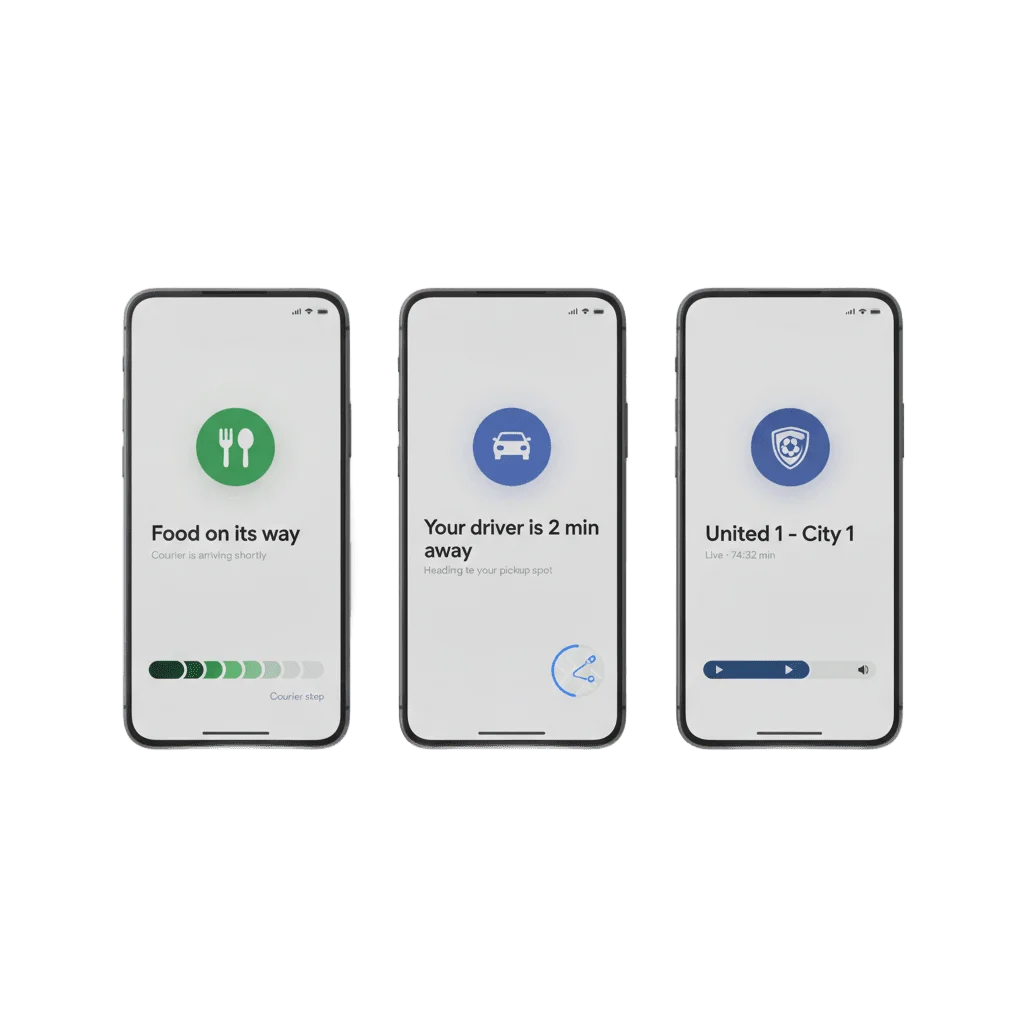
One Android 16 notification that rewrites itself as an order, a ride or a match moves along. Pushwoosh starts, refreshes and ends it from the server, with the app closed.
Trusted by 80,000+ companies to scale their engagement
The format in full
A plain push says one thing once, and a five-step order turns into five notifications. A Live Update posts one card for the whole activity and then keeps rewriting it, so the lock screen always shows the current step instead of a stack of old ones.
One ongoing card
The activity gets a single notification on the lock screen and in the shade, and every later update rewrites that card rather than adding another.
Progress that moves
Pushwoosh renders Android's native Notification.ProgressStyle, so the bar, its value and its colour-coded segments are the real OS primitive.
A chip in the status bar
While the activity runs, Android keeps a compact indicator in the status bar, visible from inside any other app.
Time anchors
An update can carry a time anchor, so the card counts down to the ETA on its own between server refreshes.
Action buttons on the live card
The SDK module wires the buttons alongside the progress, so a tap can open the map or call the courier from the card itself.
Your own rendering
LiveUpdateProgressStyleProvider hands the drawing to your app, so colours, icons and segment labels follow your design.
Where a Live Update sits between a push and a screen
| When the message is | Send | Where it lives |
|---|---|---|
| One change of state, said once | A plain push | The banner, then the shade |
| One change worth a picture | A rich media push | The expanded notification |
| A choice the user can make in a tap | An interactive push | Buttons on the notification |
| An activity in progress, minutes to hours | A Live Update | One ongoing card that rewrites itself, plus a status bar chip |
| A record the user comes back to later | Message Inbox | A list inside the app |
| Detail, a form or a layout | An in-app message | A full screen in the app |
The job it does inside a journey
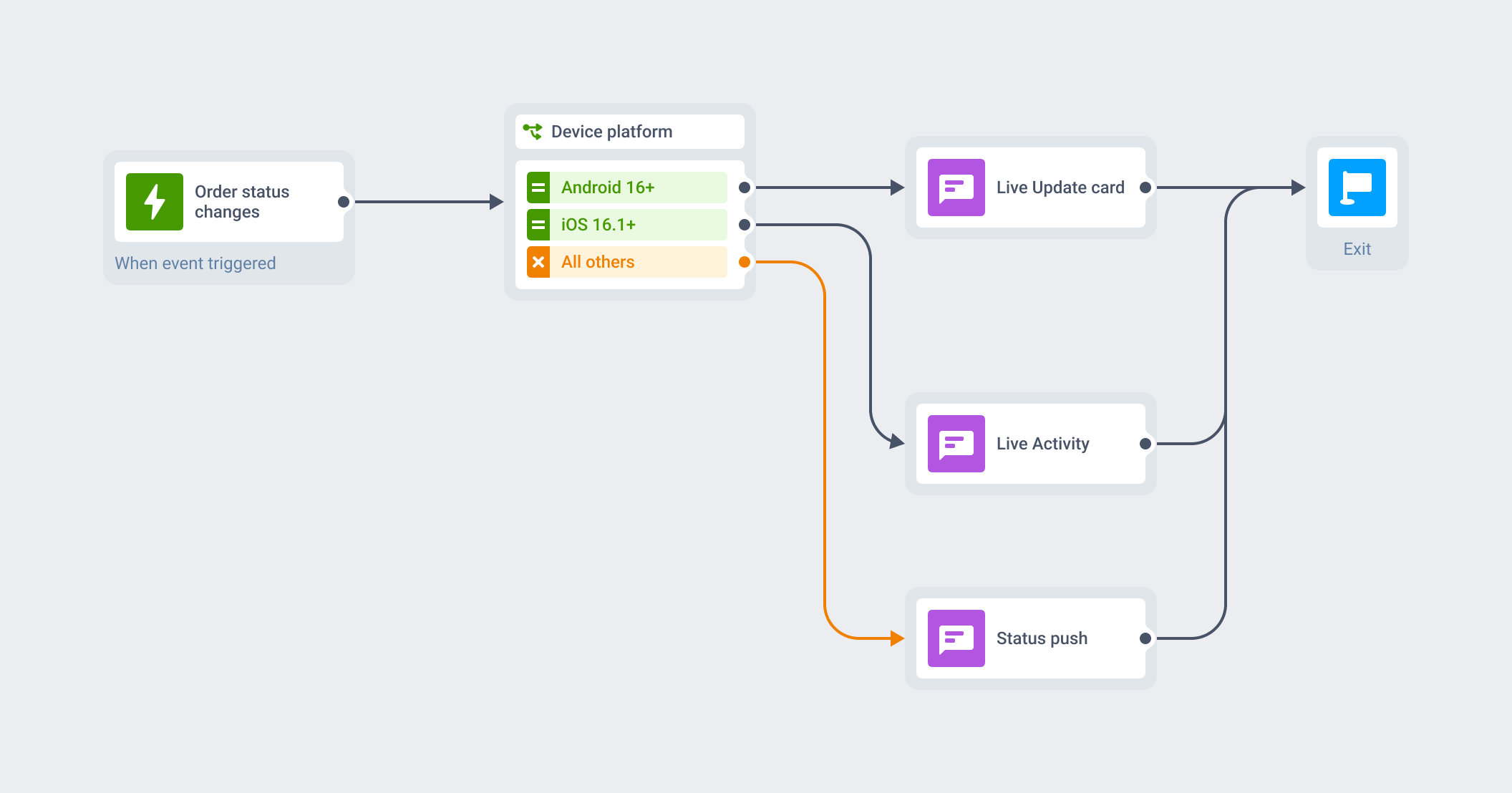
One Journey for both platforms
A Live Update is an attribute of a message you are already sending. The audience, the trigger, the segment and the customer profile stay where they are, and the format decides what that message looks like while the activity is still running.
Android 16 devices get the live card, iPhones get the Live Activity, and older Android phones get a standard push, all from the same Customer Journey that runs your push, in-app and email.
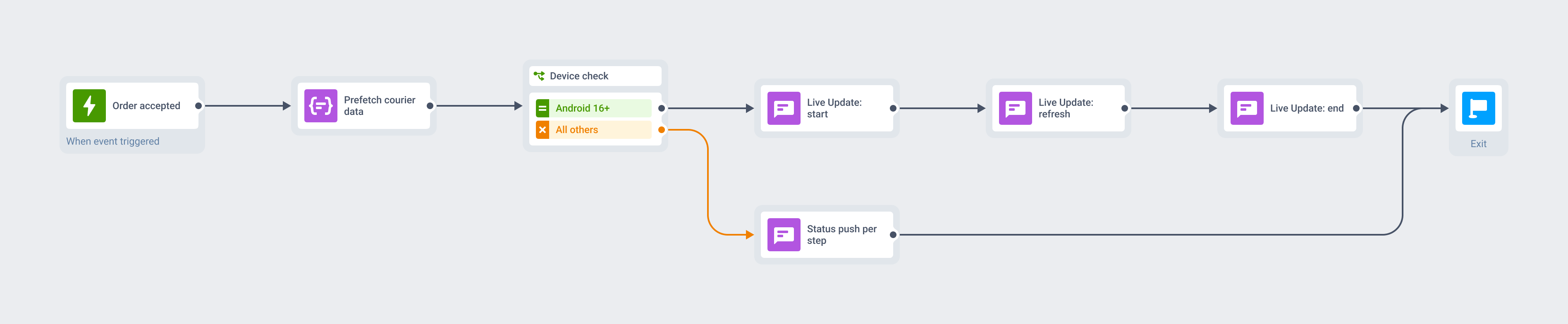
An order worked end to end
The restaurant accepts the order and the Journey opens the card at its first step.
A silent push warms the courier data in the background, invisible to the user, so the next refresh lands with a real name and a real ETA. Cooking, courier assigned and two minutes away then rewrite that same card, and the delivered event closes it.
On a phone below Android 16 the same Journey sends a plain push at every step, and both branches leave the receipt in Message Inbox.
What to use it for
A Live Update earns its place when something is genuinely in progress and the user is already waiting on it. For an announcement, an offer or anything the user did not start, a plain push is the right format, and Google’s policy for this surface says the same.
| Moment | What the card carries | What the user does |
|---|---|---|
| Food delivery · an order in progress | Accepted, cooking, courier assigned, minutes away | Watches the courier close in from a locked screen |
| Ride-hailing · a trip underway | Driver en route, ETA, trip progress | Glances at the lock screen instead of going back to the map |
| E-commerce · after the purchase | Shipped, out for delivery, stops away, delivered | Follows the parcel from the shade and knows when to be in |
| Marketplaces · several orders at once | One card per shipment, each with its own seller | Keeps track of parcels landing on different days |
| Airlines · the day of the flight | Gate, boarding, delay, baggage belt | Checks the gate from the lock screen in a loud terminal |
| Live sports · a match in play | Score, clock, period | Follows the cricket or the football with the phone locked |
| Sports betting · an in-play bet | Bet status, live odds, cash-out window | Acts on the cash-out before the window closes |
| Banking · a transfer in flight | Transfer progress, card delivery status | Sees the money land while the phone stays in a pocket |
| Field services · a technician on the way | En route, ETA, arrived | Stops guessing which hour to stay home for |
| Energy · an outage in your street | Fault confirmed, crew on site, restore ETA | Gets an answer without calling the support line |
Platform & technical coverage
Live, self-refreshing cards are new, and the version floors are the first thing to check against your own install base. The last column says where the push is the format itself, and where it only drives something your app already ships.
| Capability | Android | iOS | Web | Delivered by |
|---|---|---|---|---|
| An ongoing card that refreshes in place | Android 16 (API 36) | iOS 16.1+, as a Live Activity | – | The push, rendered by the SDK against the OS live-notification API |
| Native segmented progress bar | Android 16, Notification.ProgressStyle | Your ActivityKit widget | – | pushwoosh-liveupdates 6.9.0+, wrapping the OS primitive |
| Always-visible compact indicator | Status bar chip | Dynamic Island, iPhone 14 Pro and later | – | The OS, from the live notification |
| Server-driven start, update and end | Yes | Yes | – | OPERATION_START · OPERATION_UPDATE · OPERATION_END in the Messages API |
| Dismissing the card from the app | endLiveUpdate(id), endAllLiveUpdates() | Yes | – | The PushwooshLiveUpdates facade in your app |
| Brand styling of the live card | LiveUpdateProgressStyleProvider | Your widget code | – | Your app code, called by the SDK |
| Android 15 and below | –, SDK calls are no-ops | n/a | – | A standard push or Message Inbox on the same Journey |
Notification.ProgressStylepushwoosh-liveupdates 6.9.0+, wrapping the OS primitiveOPERATION_START · OPERATION_UPDATE · OPERATION_END in the Messages APIendLiveUpdate(id), endAllLiveUpdates()PushwooshLiveUpdates facade in your appLiveUpdateProgressStyleProviderSecurity & hosting
Pushwoosh runs on its own hardware in the US and Germany, under GDPR and BDSG.







How it works
The Android build is a one-time engineering step. After that the three operations run from the Control Panel and the API like any other message in the Journey.
-
Add the module once (developer)
Drop
pushwoosh-liveupdates6.9.0+ into the Android app. It catches Live Update pushes ahead of standard notification handling and takes care of the channel, the permission, the large icon and the action buttons.LiveUpdateProgressStyleProvideris where you brand the card. -
Drive the whole lifecycle from the server (API)
OPERATION_STARTposts the card,OPERATION_UPDATErewrites it in place,OPERATION_ENDdismisses it, all through the Messages API with one activity ID tying them together. The app can also close a card it holds withPushwooshLiveUpdates.endLiveUpdate(), with no server round trip. -
Orchestrate it (no-code)
Fire the three operations from the same Customer Journey as the rest of your messaging, against the same segment and the same customer profile. The iOS half of the same story runs from that Journey too.
Limits worth knowing
Explore related products
Mobile push notifications by Pushwoosh — every-device reach, rich content, precise targeting, cross-channel Journeys and 99% uptime. Turn notifications into loyal, paying users.
Message Inbox adds an in-app notification center to your app and website. Silent delivery reaches every user, including the ones who declined push, and saved messages stay available on their own time.
Map out and streamline your campaigns with one visual tool. Communicate, engage, retain, convert, segment, and experiment using Pushwoosh Customer Journey Builder.
Add labelled action buttons to the push you already send, so users accept, claim, approve or track in one tap. Build the iOS button sets no-code in the Pushwoosh Control Panel and send them from the same campaign and Journey.
Show live ride status on the lock screen, alert riders when the driver arrives and onboard riders and drivers with one mobility marketing platform.
Offload your app and web messaging to Pushwoosh API. We manage push, email, SMS, and data streams — you build successful products without limits.