Break through Focus when the message can't wait
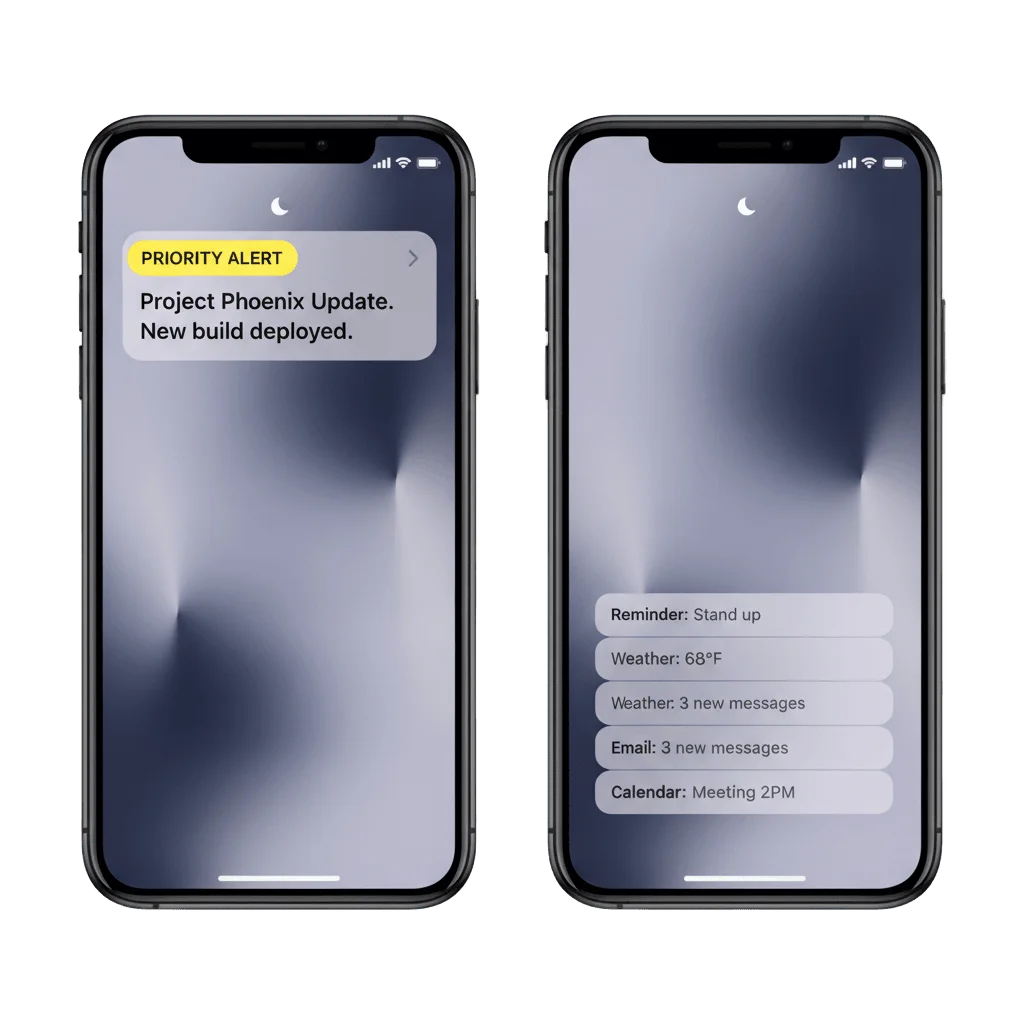
The iOS interruption level decides whether your push lands now or waits in a Scheduled Summary until the evening. Set Time-Sensitive or Critical with a toggle in the Pushwoosh Control Panel.
Trusted by 80,000+ companies to scale their engagement
The format, in full
Since iOS 15 the user decides how much silence they get. A Focus mode holds notifications back, and the Scheduled Summary hands them over in a batch that evening. That suits an offer. It ruins a fraud alert, and the interruption level on your push is the field that separates the two.
passive (iOS 15+)
Lands in the notification list without a sound and without waking the screen. The level for a recommendation or an offer that can wait until the user looks.
active (the default)
Wakes the screen and plays a sound, and still waits behind a Focus mode and the Summary. Every push you send today is already this level.
time-sensitive
Breaks through Focus and the Scheduled Summary, posted at once and marked with the yellow Time Sensitive banner, then kept surfaced for a window.
critical
Everything Time-Sensitive does, plus an override of Do Not Disturb and the silent switch, so a muted phone still rings. Apple grants the entitlement to health, safety and security apps.
What each level gets past
| Level | Sound & screen wake | Focus & Summary | DND & silent switch | What it needs |
|---|---|---|---|---|
passive | – | – | – | Nothing |
active | Yes | – | – | Nothing, this is what a push does by default |
time-sensitive | Yes, with the yellow banner | Yes | – | The Time Sensitive Notifications capability declared in your app |
critical | Yes, rings on mute | Yes | Yes | The Critical Alerts entitlement, granted to your app by Apple |
passiveactivetime-sensitivecriticalWhere you set it
Two toggles in the composer
The one-time push composer has a Time-sensitive option and a separate Critical Push option in its iOS settings. Changing the urgency of a campaign takes no release.
One field in the API
ios_interruption_level in /createMessage accepts passive, active, time-sensitive and critical, and pairs with apns-push-type: alert.
Permission read-back in the SDK
The iOS SDK reports whether a device still grants Time-Sensitive, so you can stop spending the level on users who have turned it off.
The job it does, inside a journey
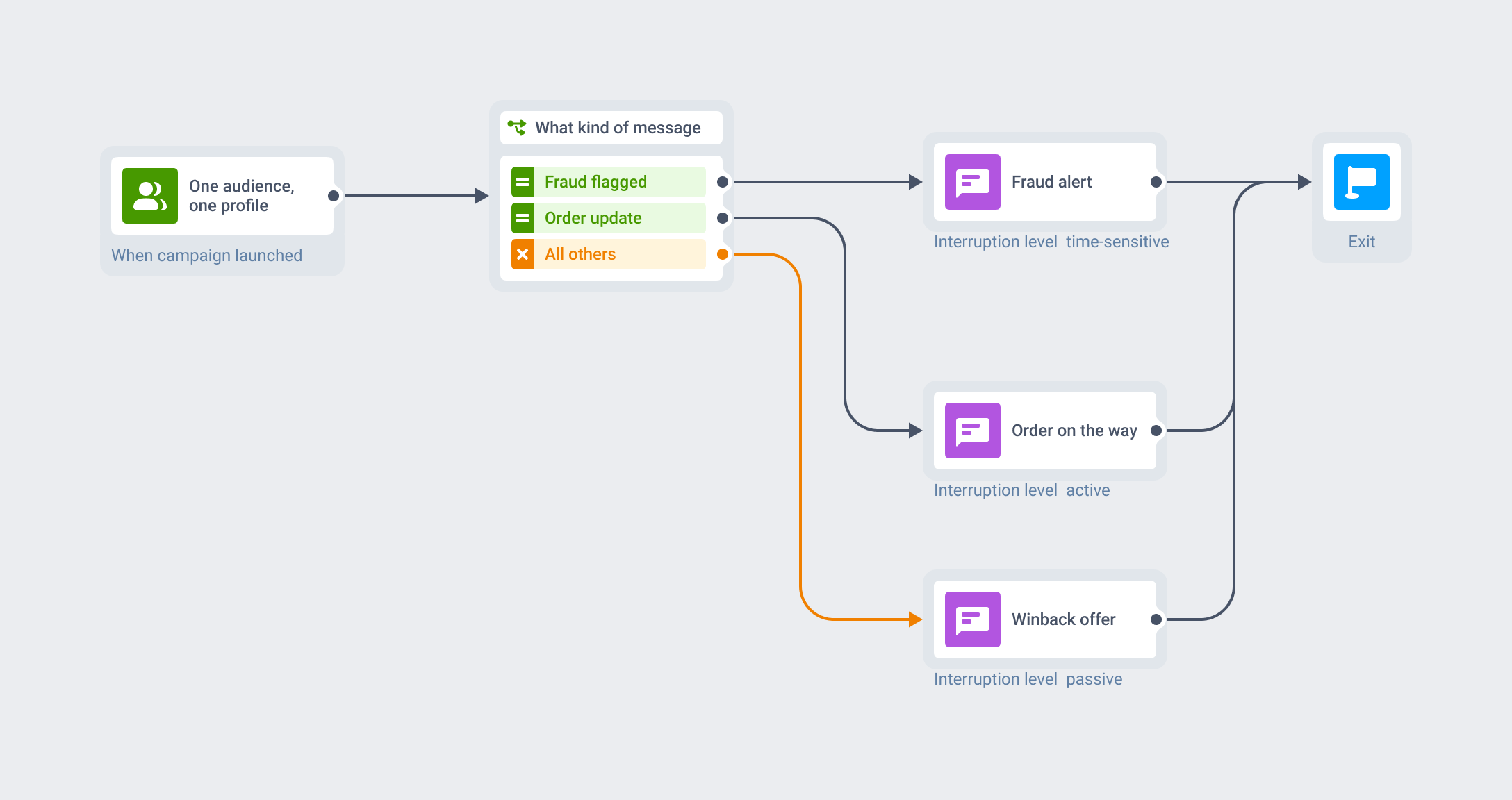
One Journey, graduated urgency
The level is an attribute of a message you are already sending. The audience, the trigger, the segment and the customer profile stay where they are, and what changes is how hard that one message pushes for attention.
So the fraud branch of a flow goes time-sensitive while the winback branch stays passive, inside the same Customer Journey that already runs your push, in-app, email and SMS.
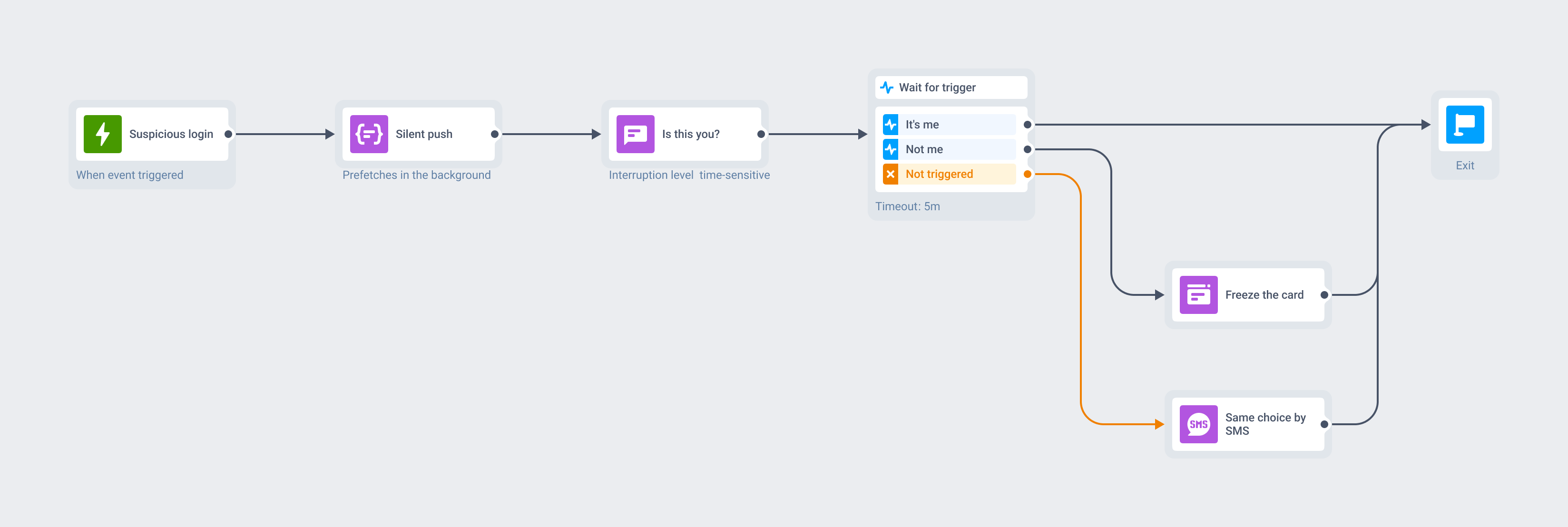
A suspicious login, caught at 2am
A risk engine flags a login and fires an event. A silent push warms the device detail in the background, invisible to the user, and the time-sensitive push arrives through a Sleep Focus with two buttons: It’s me, and Not me in destructive red.
Not me freezes the card and opens the recovery screen. If neither button is tapped within five minutes, the same Journey falls back to SMS carrying the same choice, and Message Inbox keeps the alert waiting in the app.
What to use it for
The level earns its place where a message loses its value if it is read three hours later. In most apps that is a handful of flows, and everything else belongs at active or passive.
| Moment | What the push says | Why it earns the breakthrough |
|---|---|---|
| Fintech · fraud and suspicious login | Approve this payment · Card frozen | The money moves while the summary waits |
| Trading & crypto · margin and liquidation | Margin call · Liquidation in 10 minutes | A price alert read after the position closes is a receipt |
| Ride-hailing · the driver arrives | Your driver is outside | The driver waits two minutes. The summary arrives in three hours |
| Food delivery · the courier is at the door | Your courier is at the door | A doorstep window measured in a minute or two |
| Airlines & rail · day-of disruption | Gate changed to B12 · Flight cancelled | The passenger is standing in the wrong terminal right now |
| Healthcare & pharmacy · medication and results | Time for your dose · Your result is ready | Apple's own example, and one of the two cases it sanctions for Critical |
| Energy & utilities · outage and safety | Outage in your area · Leak detected | People are already worried, and a safety alarm can qualify for Critical |
| Lending, parking, EV charging · a deadline with a cost | Payment overdue · Meter expiring | A fee the user can still avoid, for about as long as the push takes to arrive |
When to keep it at active or passive
Apple is explicit that the level exists for genuine urgency and must not be used for marketing. When a Time-Sensitive push sits there untapped, iOS offers the user a one-tap switch on the lock screen that turns the level off for your app, permanently and with no way to ask for it back. So these stay where they are.
- Promotions, discounts and seasonal campaigns.
- Content drops, new episodes and editorial digests.
- Re-engagement, winback and cart-abandonment reminders.
- Game LiveOps nudges: energy refills, event starts, streak reminders.
Platform & technical coverage
Interruption levels are an iOS 15 construct. Android runs urgency through notification channel importance, which the Pushwoosh SDK creates from the push payload rather than your app registering it in code, and the web has nothing comparable. The last column says where the level is the push itself, and where it depends on something Apple has to grant you first.
| Capability | iOS | Android | Web | Delivered by |
|---|---|---|---|---|
passive and active levels | iOS 15+ | – | – | The push itself, no app code |
time-sensitive level | iOS 15+ | – | – | The push, once your app declares the Time Sensitive Notifications capability |
critical level | iOS 15+, entitlement required | – | – | The push, once Apple grants your app the Critical Alerts entitlement |
| No-code toggle while composing | Yes, in the iOS settings of the campaign | – | – | Pushwoosh Control Panel, one-time push and presets |
| Level set from the API | ios_interruption_level in /createMessage | – | – | The Messages API |
| A different level per Journey branch | Yes | – | – | The Journey step, carrying the level as a message attribute |
| Read back whether a device still grants Time-Sensitive | Yes | – | – | The Pushwoosh iOS SDK |
| The comparable urgency control | The four interruption levels | Channel importance and push priority | – | The notification channel, created from the push payload |
passive and active levelstime-sensitive levelcritical levelios_interruption_level in /createMessageSecurity & hosting
Pushwoosh runs on its own hardware in the US and Germany, under GDPR and BDSG.





How it works
Setting the level is no-code. Earning the right to use it is a one-time engineering step for Time-Sensitive and an Apple review for Critical, and that step is the same at every vendor because it is Apple’s model.
-
Clear the entitlement once (developer)
passiveandactiveneed nothing. Time-Sensitive needs the Time Sensitive Notifications capability declared in Xcode, with no SDK version floor. Critical needs the Apple-granted Critical Alerts entitlement, requested through the Developer Portal and reserved for health, safety and security, plus a.criticalAlertauthorization request in your app. -
Set the level on the message (no-code or API)
Turn on Time-sensitive or Critical Push in the iOS settings of the composer, or send
ios_interruption_levelthrough the Messages API. Everything else about the push behaves exactly as it did. -
Orchestrate it (no-code)
Same audience, same Customer Journey. Raise the level on the branch that has earned it and leave the rest at
activeorpassive.
Limits worth knowing
Explore related products
Mobile push notifications by Pushwoosh — every-device reach, rich content, precise targeting, cross-channel Journeys and 99% uptime. Turn notifications into loyal, paying users.
Make an iPhone ring with a real incoming call, even when your app is fully closed. The Pushwoosh iOS SDK registers the PushKit VoIP token and reports every call to CallKit for you.
Live Updates put an order, a ride or a delivery on the Android 16 lock screen as one card that refreshes itself. Pushwoosh starts, updates and ends it from the server, from the same campaign and Journey as any other push.
Add labelled action buttons to the push you already send, so users accept, claim, approve or track in one tap. Build the iOS button sets no-code in the Pushwoosh Control Panel and send them from the same campaign and Journey.
Map out and streamline your campaigns with one visual tool. Communicate, engage, retain, convert, segment, and experiment using Pushwoosh Customer Journey Builder.
Message Inbox adds an in-app notification center to your app and website. Silent delivery reaches every user, including the ones who declined push, and saved messages stay available on their own time.