Let Android users mute a single channel instead of your whole app
Pushwoosh routes every Android push into a channel your users control, from order updates to promotions to breaking news. Set importance and sound per category, and a muted promo never means a blocked app.
Trusted by 80,000+ companies to scale their engagement
The format, in full
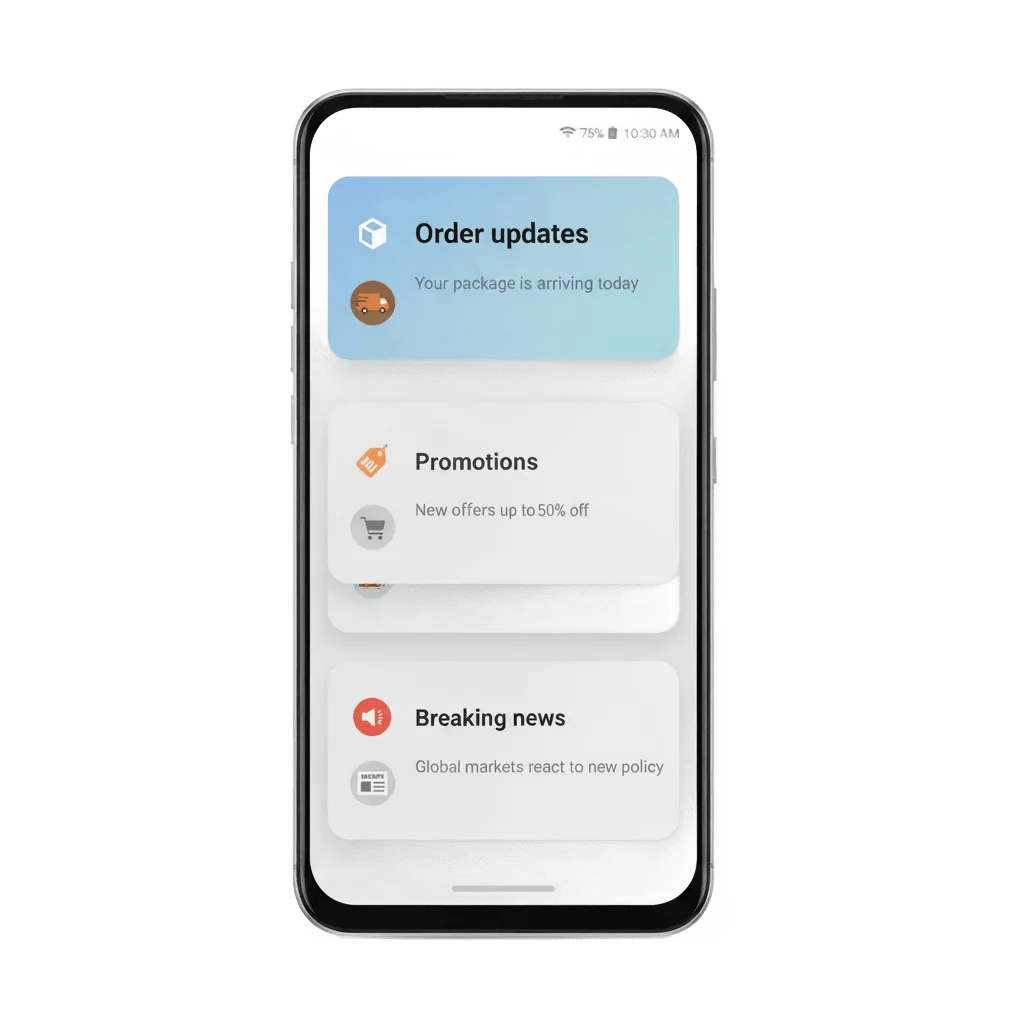
Every Android notification belongs to a channel, a user-controlled category such as “Promotions”, “Order updates” or “Breaking news”. The channel is what lets someone mute one type of message without blocking the app that sends it.
Named channel, created server-side
Add pw_channel to Android root params in the Control Panel, or to android_root_params in /createMessage. The first push naming a new channel creates it on the device, with no app release needed.
Default channel, out of the box
The SDK creates a default channel on every Android 8+ device automatically, even when pw_channel is left empty, so a notification always has somewhere valid to land.
Importance level
The Importance level field (-2 to 2) sets how the channel behaves on arrival, from silent to a full heads-up banner. It is read once, at the moment the channel is created.
Custom sound per channel
Pair pw_channel with android_sound, a file placed in res/raw, and every push into that channel plays its own sound instead of the system default.
What you control
| What you send | What it does | Where it lives |
|---|---|---|
| A channel name | Creates the channel on first send, or reuses the one already on the device | pw_channel in Android root params, or the API payload |
An Importance level, -2 to 2 | Sets heads-up behavior, fixed the moment the channel is created | The Importance level field on the push, or the same value via the API |
android_sound + pw_channel | Gives that one channel its own alert sound | A file in res/raw, referenced by name without an extension |
No pw_channel sent | The SDK creates and uses a default channel automatically | No setup, out of the box on Android 8+ |
pw_channel in Android root params, or the API payload-2 to 2android_sound + pw_channelres/raw, referenced by name without an extensionpw_channel sentWhere you set it
One field in the composer
Type a channel name into Android root params in the Send-Push form or a preset. A new category needs no release and no developer.
One key in the API
android_root_params.pw_channel in /createMessage, alongside android_sound for a channel-specific alert sound.
The same logic on every Android transport
The identical pw_channel payload works over FCM, and over Huawei HMS and Amazon ADM through Alt-store push.
The job it does, inside a journey
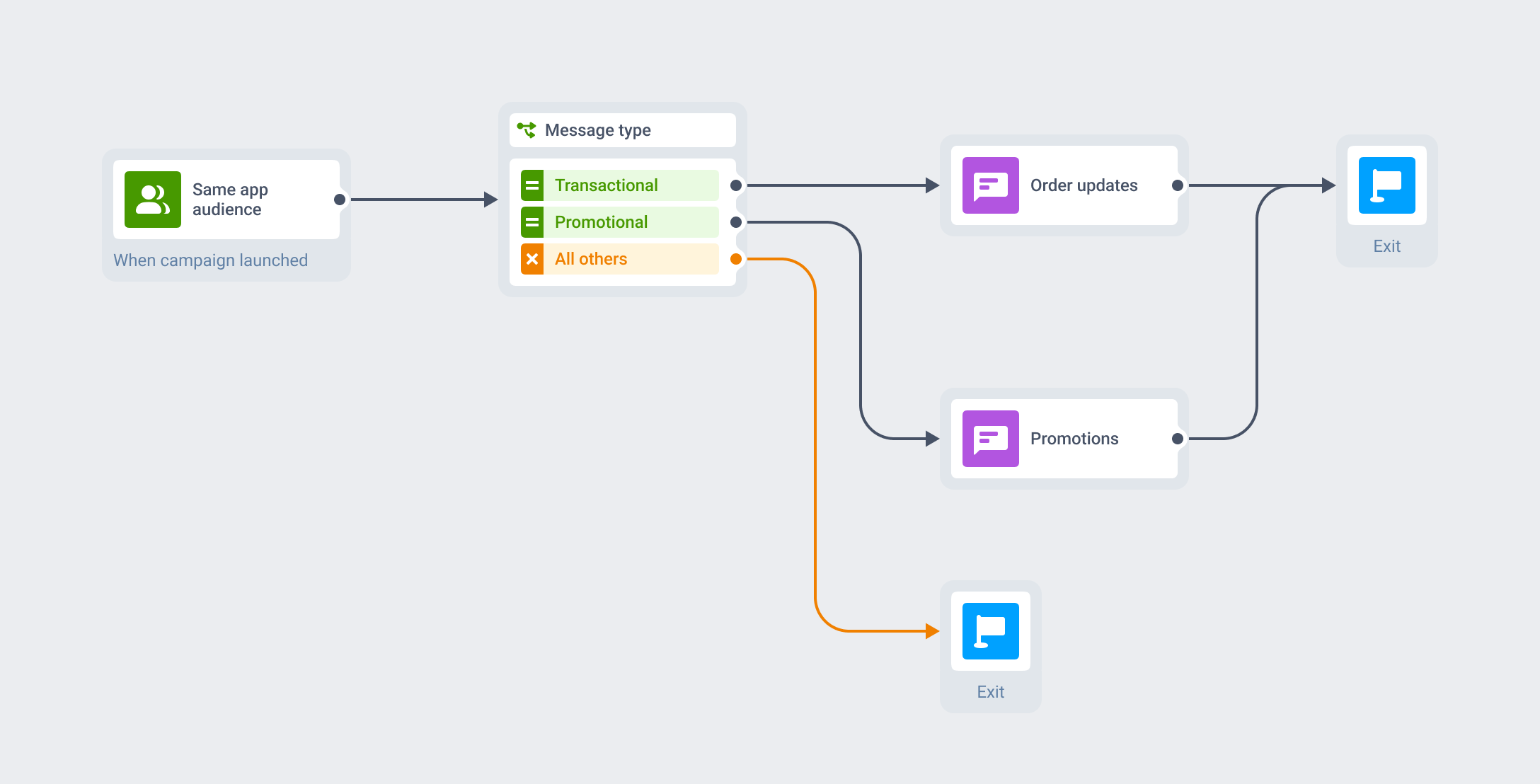
The same Journey runs two channels
The channel is an attribute of the push you are already sending, so it needs no separate integration to wire up. A transactional branch names one channel, a promotional branch names another, and both run from the same audience and the same Customer Journey as the rest of your mobile push.
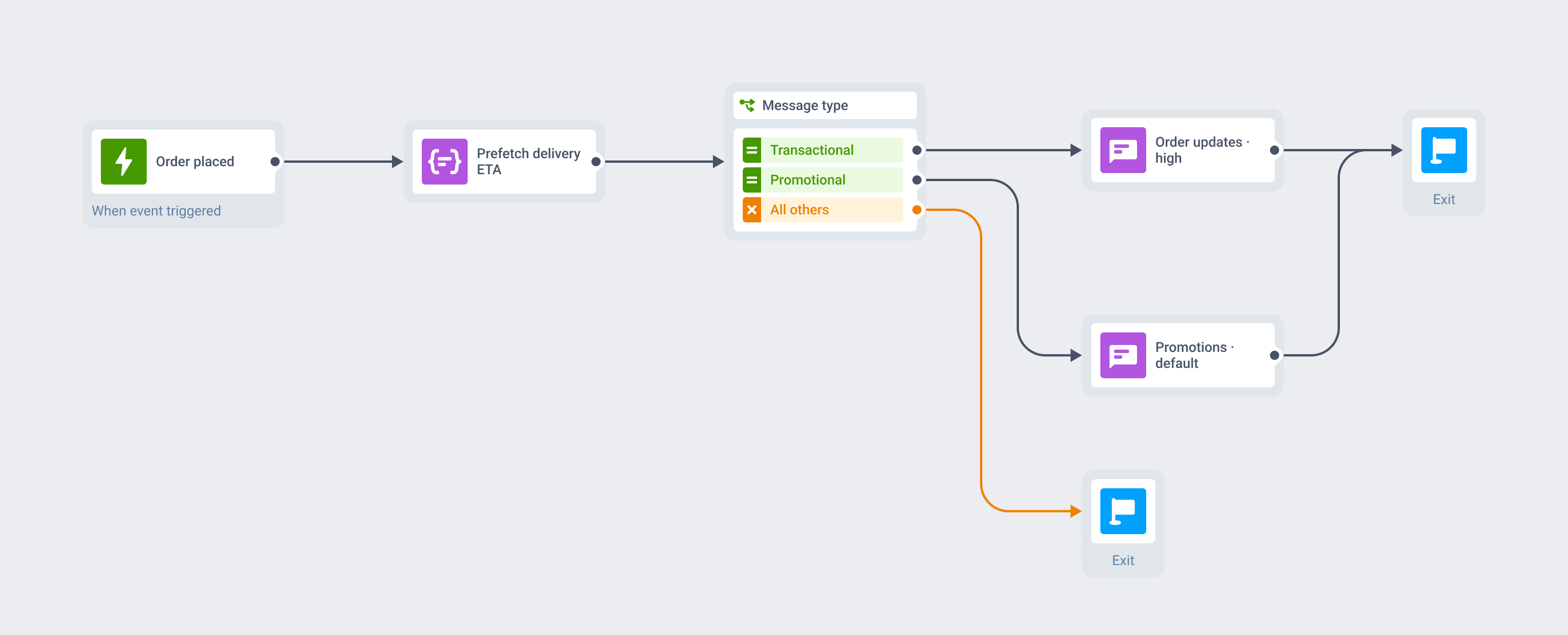
The order alert rings while the sale stays quiet
An order-placed event fires the Journey. A silent push quietly prefetches the delivery estimate in the background, and the transactional branch names the “Order updates” channel with a high Importance level, so it posts as a heads-up alert.
The same Journey runs a separate branch into a “Promotions” channel at default importance. A user who mutes Promotions keeps getting order alerts on the same phone: the two run as separate channels inside one app.
What to use it for
Channels pay off in proportion to how many genuinely different types of notification an app sends. One uniform stream gets almost nothing from them; a mix of loud promotions and quiet transactional alerts gets the most.
| Industry | Channels worth separating | Why it fits |
|---|---|---|
| Mobile games | Events & promotions vs guild & social vs rewards vs live-ops alerts | High stream diversity on an Android-heavy install base |
| Creator & subscription apps | New content vs social interactions vs billing vs promotions | Subscribers get what they signed up for, and nothing else |
| E-commerce & retail | Promotions vs order & delivery updates vs price-drop alerts | The classic promo-versus-transactional split |
| Marketplaces | Buyer/seller messages vs order updates vs promotions vs listing alerts | Multi-sided messaging is naturally multi-stream |
| Fintech & banking | Fraud & transaction alerts vs statements vs reminders vs promotions | Must-deliver alerts sit next to fully optional promotions |
| Media, news & streaming | Breaking news vs topic feeds vs new episodes vs promotions | The textbook Android channel use case |
When it isn’t worth the setup
- Reaching someone new: the channel only sorts a message the push already sent.
- Anything on iOS: channels do nothing there, and Time-Sensitive or Critical levels handle the same job.
- Making a heads-up alert retroactive: importance is fixed the moment a channel is created, and a new behavior needs a new channel name.
- A long list of near-duplicate channels: it reads as clutter and trains users to mute the whole group.
- An app with one real stream of notifications: there is nothing to separate, so a channel adds a setting nobody needs.
Platform & technical coverage
Notification channels are an Android-only OS primitive, introduced in Android 8.0 Oreo. iOS has no channel to register; the comparable job runs through Time-Sensitive and Critical interruption levels instead, and the web has no equivalent either. The last column says where Pushwoosh’s mechanic ends and the operating system’s rules begin.
| Capability | iOS | Android | Web | Delivered by |
|---|---|---|---|---|
| Notification channels | – | Android 8.0 Oreo (API 26) and later | – | Native OS primitive, Pushwoosh SDK 5.4.0+ |
| Default channel | – | Yes, created automatically | – | The Pushwoosh SDK, on every Android 8+ device |
Named channel via pw_channel | – | Yes, created on first send, no app release | – | Android root params field, or /createMessage |
| Custom sound per channel | – | Yes | – | pw_channel + android_sound, a file in res/raw |
| Same mechanic on Huawei & Amazon devices | – | Yes, via HMS and ADM | – | Alt-store push |
| Cross-platform SDK wrappers | – | Cordova/Capacitor, React Native, Unity, Flutter | – | Routed through the native Android bridge |
| Runtime permission required first | – | Android 13+, POST_NOTIFICATIONS | – | The OS, before any channel can show |
| The comparable urgency control | Time-Sensitive / Critical levels | Channel importance, set here | – | A separate feature per platform |
pw_channel/createMessagepw_channel + android_sound, a file in res/rawPOST_NOTIFICATIONSSecurity & hosting
Pushwoosh runs on its own hardware in the US and Germany, under GDPR and BDSG.





How it works
-
Compose (no-code)
Type a channel name into Android root params in the Send-Push form, or send
android_root_params.pw_channelthrough the Messages API. -
Set it up once
The first push naming a new channel creates it on the device with the importance, sound and vibration from that message. Plan a taxonomy of 3 to 5 channels up front, since changing the behavior later needs a new channel name.
-
Orchestrate (no-code)
Route each channel from the matching branch of the same Customer Journey, using the same audience and profile as the rest of your messaging.
Limits worth knowing
Explore related products
Mobile push notifications by Pushwoosh — every-device reach, rich content, precise targeting, cross-channel Journeys and 99% uptime. Turn notifications into loyal, paying users.
Reach every Android device, Google Play or not. Pushwoosh delivers your push to Huawei, HarmonyOS, and Amazon Fire devices across FCM, HMS, and ADM — managed from one place, with fallback to email, SMS, and WhatsApp.
Add labelled action buttons to the push you already send, so users accept, claim, approve or track in one tap. Build the iOS button sets no-code in the Pushwoosh Control Panel and send them from the same campaign and Journey.
Set the iOS interruption level on the push you already send, so a fraud alert, a courier at the door or a gate change breaks through Focus and the Scheduled Summary. Toggle Time-Sensitive or Critical no-code in the Pushwoosh Control Panel, from the same campaign and Journey.
Map out and streamline your campaigns with one visual tool. Communicate, engage, retain, convert, segment, and experiment using Pushwoosh Customer Journey Builder.
Put the unread count on your app icon and keep it honest. Set an exact number, bump it with +1, or clear it to 0 from the Pushwoosh Control Panel Badges field or the ios_badges API key, on the same campaign and Journey you already run.