Best time to send
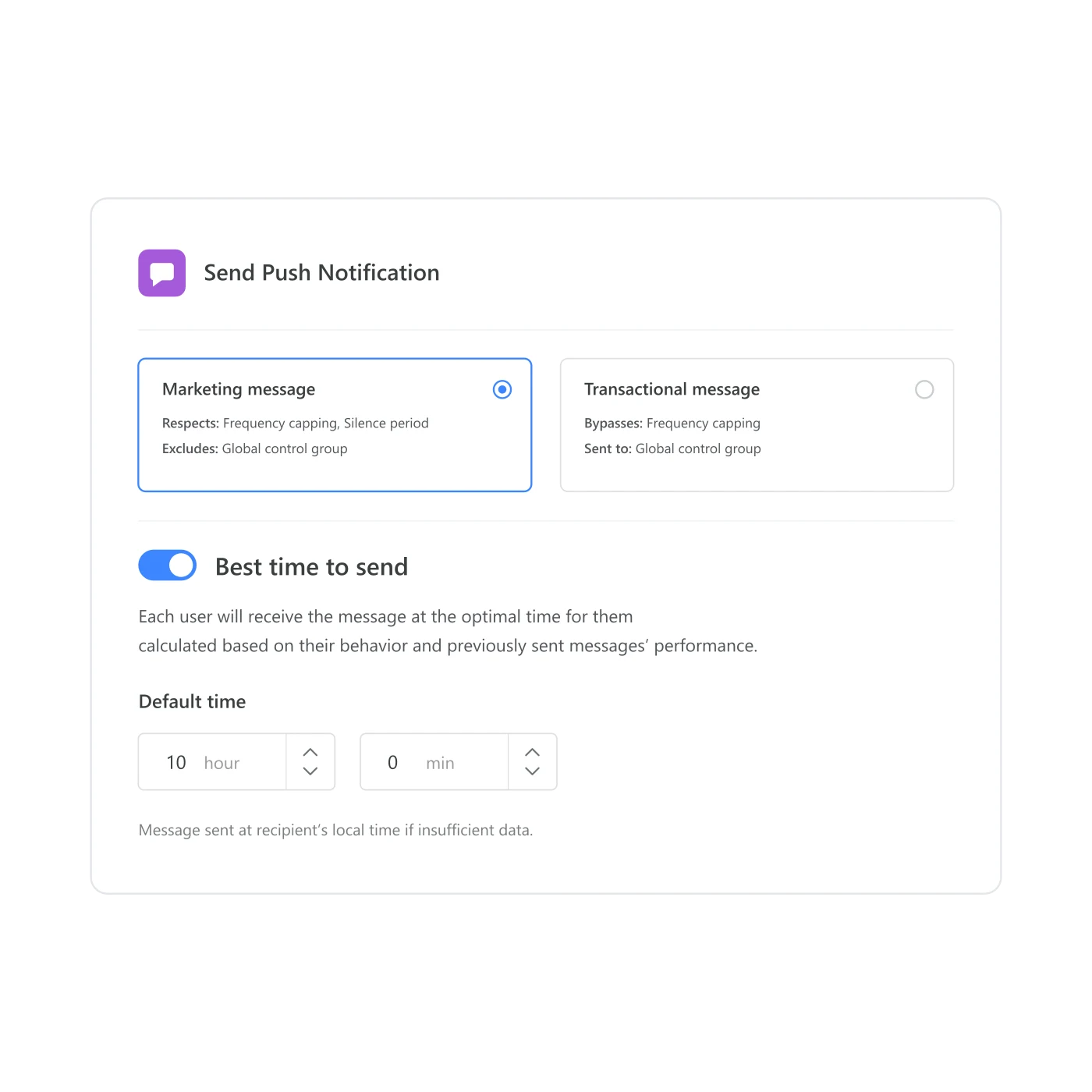
Best time to send calculates a personal delivery window for each push or email step, based on that person's own history of opens, and falls back to a time you set when there isn't enough history yet.
The same minute, a hundred different mornings
A journey fires a push the moment its trigger condition is met, at one server minute, for everyone who qualifies. Some of those people are mid-commute and glance at the phone right away. Some are asleep. Some put the phone down after breakfast and won’t pick it up again until lunch. None of that shows up in the send report: the count goes up the same whether the message landed in someone’s hand or their notification shade at 6am. Best time to send is what turns “the trigger fired” into “it arrived when this specific person was actually likely to look.”
What it calculates, and what it falls back to
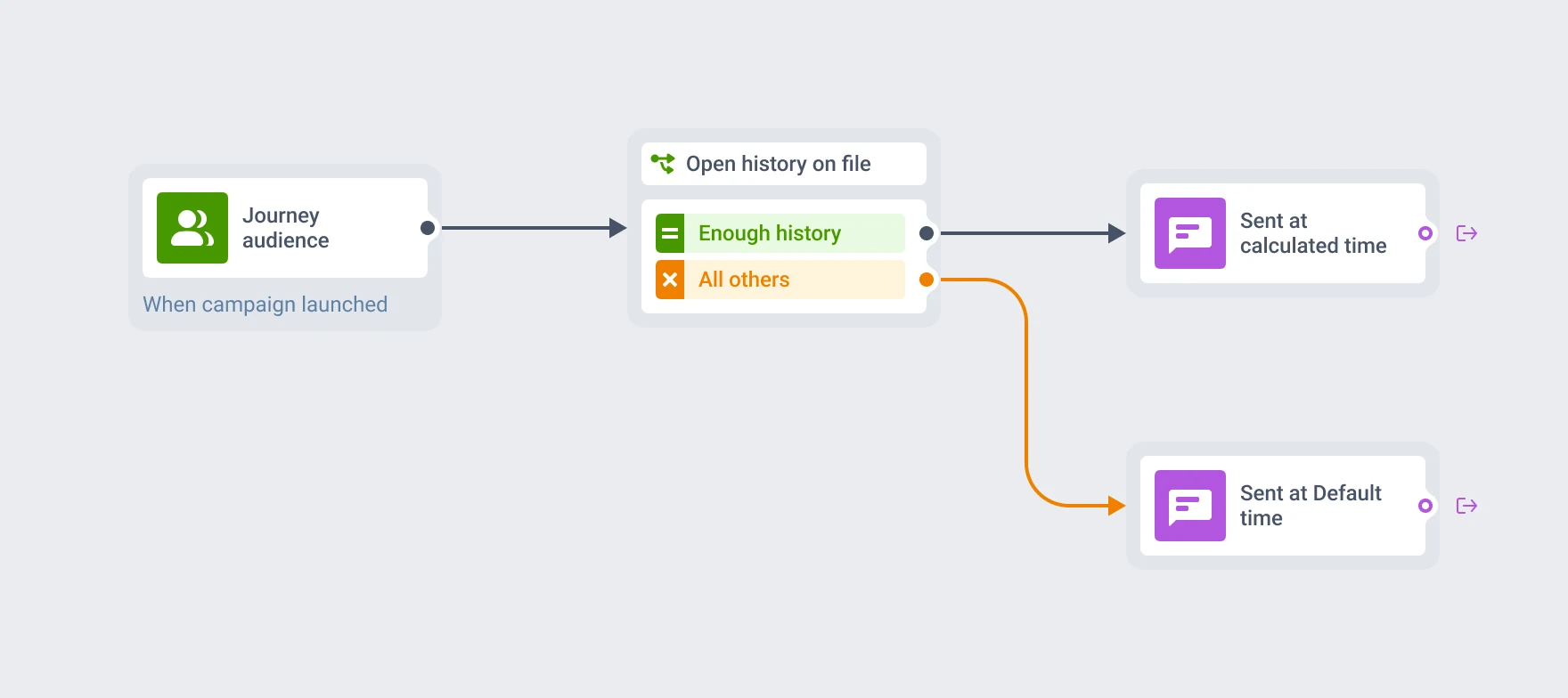
At each push or email step with Best time to send turned on, Pushwoosh looks at the last 30 days of that person’s own history: PW_ApplicationOpen and PW_NotificationOpen for push, PW_EmailOpen for email. It finds the hour they open most often and delivers within the next 24 hours of entering the step. The more of that history exists, the more the calculated hour can be trusted. Someone with barely any opens on file gets the Default time you set instead, delivered in their own local time.
| Setting | What it does | Default |
|---|---|---|
| Channels | Push and email steps inside Customer Journey Builder | — |
| History lookback | Last 30 days of that person's opens, recalculated every time they enter the step | 30 days |
| Delivery horizon | The calculated hour always falls within the next 24 hours of entry | 24 hours |
| Data source | PW_ApplicationOpen + PW_NotificationOpen (push), PW_EmailOpen (email) | — |
| Fallback | Default time you set, delivered in the recipient's own local time, used when history is too thin | Marketer-set Default time |
It’s a personal calculation from that recipient’s own opens, recalculated at every entry, rather than one best hour applied to the whole segment.
Recalculated on every journey entry
Pushwoosh works this out fresh each time someone reaches the step, from the last 30 days of history available at that exact moment. That’s what keeps the estimate current: a subscriber who only recently started opening pushes regularly gets a better-informed hour than they would have last week, without anyone touching the setting.
Why Customer Journey Builder needs this
A journey that runs unattended sends whenever its logic fires, whether or not anyone’s actually looking at their phone right then. Customer Journey Builder can sequence a launch, a renewal reminder, or a daily reminder without anyone watching the clock, but only if something inside it accounts for the fact that “now” means something different for every recipient. Best time to send is what lets a journey stay automated and still land inside the window each person is actually likely to check.
How it works
-
Turn on the standard events first
Enable PW_ApplicationOpen and PW_NotificationOpen for push, or PW_EmailOpen for email, a few days before you send, so there's real history to calculate against.
-
Turn on Best time to send on the step
Open the push or email step's settings, flip the toggle, and set a Default time for the fallback — it's delivered in each recipient's own local time automatically.
-
Check how often the fallback fires
A high share of sends going out at Default time usually means the audience doesn't have much open history yet.
One control among several that decide when a message lands
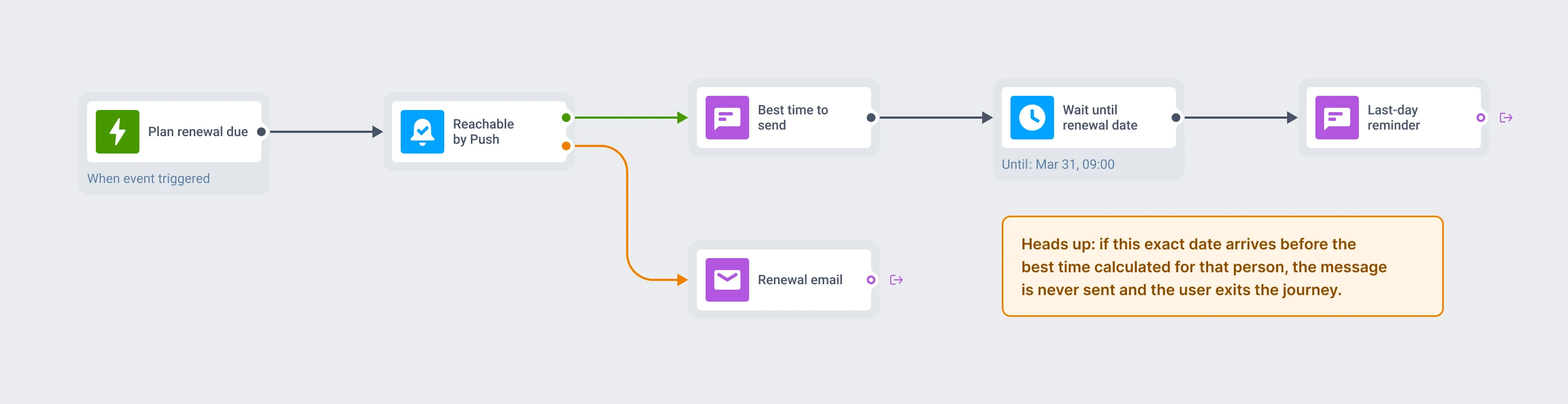
Best time to send decides the hour, inside a 24-hour window, that a push or email goes out. Reachability check decides which channel it goes out on, routing around one that’s closed. A Time Delay set to a specific date and time still runs on its own clock: if that exact moment falls before the send time Best time to send calculated for that person, the send never goes out and the person exits the journey, with nothing in the reports to flag why. Combine the two, and check which one is meant to win before you rely on a specific order.
A Time Delay set to an exact date can still cut in front
If a Time Delay later in the same journey is set to a specific date and time, and that moment arrives before the delivery window Best time to send calculated, the send never fires and the person exits the journey. Worth checking for before combining the two.
- Customer Journey Builder: build the flows this times
- Reachability check: pick the channel this reaches them on
- Time Delay: hold a user for a reason other than their open history
What to keep in mind
Send at the moment each person is actually looking
Turn it on once per step. If push or email opens are already flowing into these events, there’s nothing else to set up.
Explore related products
Map out and streamline your campaigns with one visual tool. Communicate, engage, retain, convert, segment, and experiment using Pushwoosh Customer Journey Builder.
Check whether push, email, SMS, WhatsApp, or LINE can reach someone before a message goes out, and chain checks into a fallback cascade so a closed channel doesn't end the journey.
Pause a journey by a fixed span, a clock time, a one-time date, a weekly slot, or an offset counted from a date already stored on the user profile.
Block a journey from sending on any channel during a daily quiet window, timed to each subscriber's own device timezone. Set per-channel windows, day-of-week overrides, and what happens to a blocked message.
Drive engagement with event-based triggers. Automatically launch campaigns when customers take actions, capturing perfect moments for conversion and retention.
Mobile push notifications by Pushwoosh — every-device reach, rich content, precise targeting, cross-channel Journeys and 99% uptime. Turn notifications into loyal, paying users.