Most teams want to see which campaigns actually make money. What usually stops them is attribution. Purchase data sits in different systems, each in its own format, so tying it back to the message that drove it turns into a real project. That’s why teams fall back on opens and clicks: those numbers are already in the dashboard.
The fix is getting revenue into your messaging platform in a shape it can actually use. Here’s how to do it in Pushwoosh.
Why revenue data never reaches your messaging platform 💰
The reason comes down to format: revenue never arrives in 1 shape.
For example, your SDK fires an in-app purchase event when someone buys gems. Your backend sends a custom OrderPlaced. Stripe and Shopify push their own webhook events for subscriptions and store orders. Every one has different field names, a different structure, a different idea of what “amount” means.
To report on revenue across all of that, someone has to write custom logic for each source and keep it in sync. Most teams don’t because it’s rarely a priority until the quarter-end review. And by then the data isn’t there. So revenue tracking gets postponed, and the team keeps reporting opens because these standard metrics are already wired up.
And it’s fixable fast: the whole thing comes down to getting revenue into 1 consistent format.
1 event for all your revenue

Pushwoosh solves the format problem with a single built-in event: PW_Conversion. Whatever the original source is, revenue lands in 1 normalized record with a fixed set of fields:
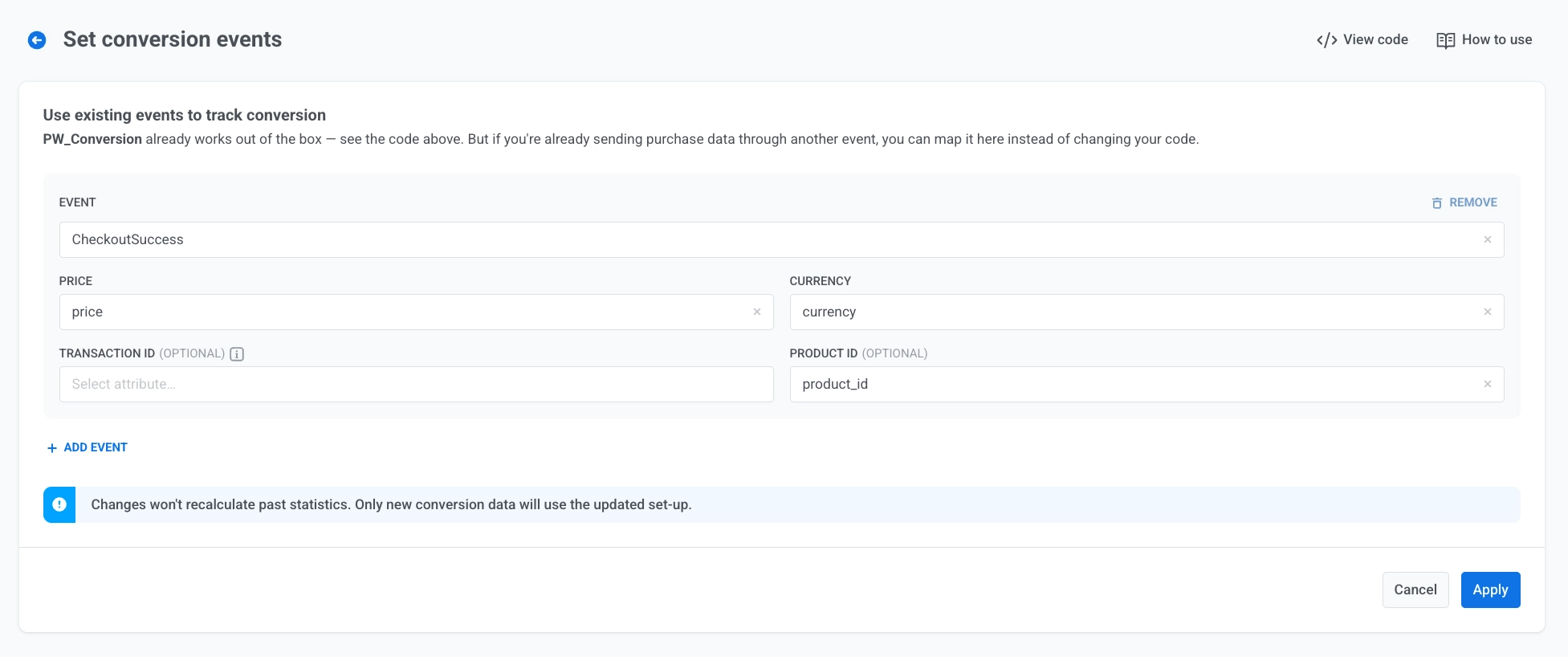
- value — the transaction amount
- currency — e.g. USD or EUR
- transaction_id and product_id — optional identifiers
That’s it. A subscription renewal, an in-app purchase, a Shopify order — all of them become the same kind of event. Once revenue lands as PW_Conversion, everything downstream reads the same data: RFM segmentation, Customer Journeys, dashboards, and ManyMoney AI.
2 ways to start tracking
You set conversion events up per application, and there are 2 paths. Pick the 1 that matches how your purchase data already flows.
- Map an existing event — no code needed. If purchase data already flows into Pushwoosh through another event, point Pushwoosh at it. Pick the source event and map its fields: which attribute holds the price, which holds the currency. Pushwoosh then generates a PW_Conversion record every time that event fires, without changing a line of your app. You can map several sources at once — a custom purchase_completed event alongside a Stripe or Shopify webhook.
- Send PW_Conversion from your code. If you’d rather send revenue explicitly, add a postEvent call wherever a purchase completes in your app or backend. This path needs a hand from your dev team, but it’s a small, one-time integration.
Which events you can turn into revenue (and which you can’t)
The mapping path works with any event that carries a monetary amount:
- Custom events — your own purchase_completed, subscription_renewed, order_placed.
- Default events — where they represent a paid action.
- Inbound-webhook events — Stripe, Shopify, and other payment sources you’ve connected.
What you can’t map is an event with no amount to read. App_open, screen_view, or push_opened only track what a user did. With no amount to pull in, there’s nothing to convert.
What you can measure once revenue is in

This is the payoff. With revenue normalized, 3 things that used to mean custom work become built-in:
- Segment by spend. RFM segmentation reads PW_Conversion directly, so your biggest spenders land in the Champions segment automatically, ready to target with a loyalty offer.
- Prove which journeys drive purchases. Set PW_Conversion as a Conversion Goal in any Customer Journey. After it runs, the goal stats show how many users actually bought, not just how many opened. That “did the flow pay off?” question finally has an answer on the canvas.
- Report revenue in dashboards alongside the other mobile app metrics that matter, without building custom logic for every purchase event.
Find your app in here
The same setup adapts to how your app actually makes money. Find the row that looks like yours:
| App type | Events you'd map or send | What you finally see |
|---|---|---|
| E-commerce | Map order_placed + a Shopify or Stripe webhook | Which cart-recovery flows drive real orders; RFM by spend to find repeat buyers |
| Gaming | Send iap_completed, battle_pass_bought from code | Whether a post-level offer converts, not just gets opened; spend-based segments for high-value players |
| Subscription (media, streaming) | Map subscription_renewed, plan_upgraded (Stripe, App Store) | Whether win-back journeys drive real re-subscriptions; RFM by renewal recency |
| Fintech | Map premium_subscribed, first_trade, or a payment webhook | Which onboarding nudges lead to funded accounts; segments by transaction volume |
| Food delivery | Map order_placed from your backend | Which re-engagement pushes drive reorders; RFM by how recently they last ordered |
| Travel / booking | Map booking_confirmed + ancillaries like seat_upgraded | Which price-drop flows convert to bookings; segments by trip value |
order_placed + a Shopify or Stripe webhookiap_completed, battle_pass_bought from codesubscription_renewed, plan_upgraded (Stripe, App Store)premium_subscribed, first_trade, or a payment webhookorder_placed from your backendbooking_confirmed + ancillaries like seat_upgradedTrack revenue where marketers already work
Conversion events are 1 piece of a bigger direction for Pushwoosh: making revenue visible where marketers already work, instead of in a report they have to go fetch.
You already decide what to send, to whom, and how often. Right now those calls run on opens and clicks, because that’s all we hand back to you. Send PW_Conversion and the same decisions get made on money: which campaigns to keep, which to kill, which segments earn more sends — and which ones are costing you unsubscribes for nothing.

There’s a compounding payoff once revenue is flowing:
Put revenue tracking to work in Pushwoosh
Start with whichever path is less work: map an event you already send, or hand your dev team the postEvent sample. Set PW_Conversion as a Conversion goal on your next journey, and watch revenue show up next to the opens and clicks.