Open rates don’t get budgets approved. Revenue does. Yet most lifecycle teams can’t say how much of it came from their campaigns, because opens live in the messaging platform and purchases live in the backend, the app store, or Stripe.
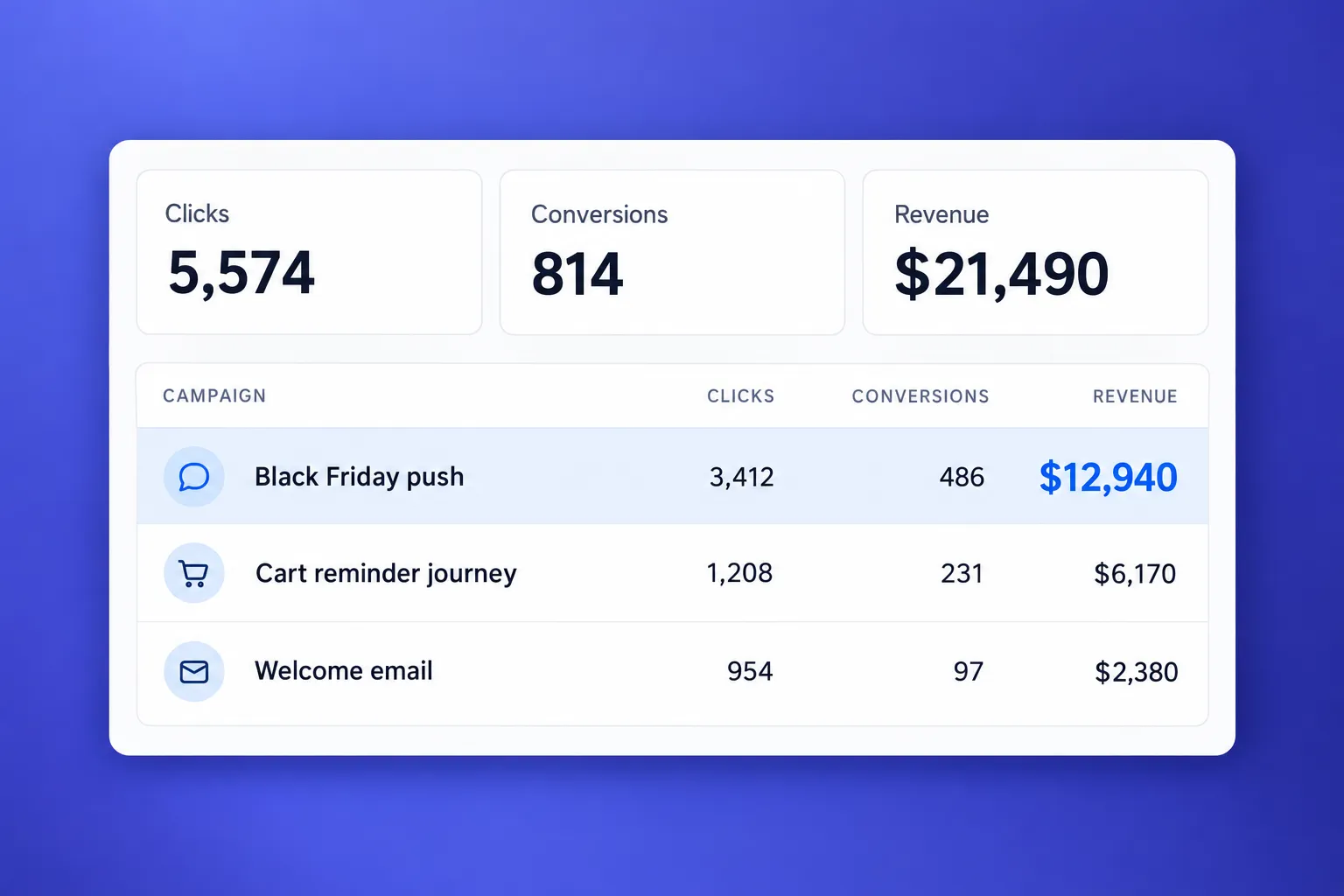
The Conversions tab in Pushwoosh now shows that revenue next to your campaigns, so you don’t have to look for it anywhere else. Open Project overview to see what every campaign and journey earned and which ones pay off.
Here’s how to turn that into marketing ROI and prove which part of that revenue your messages caused.
Why opens and clicks don’t prove marketing ROI (and what does)
Marketing ROI (return on investment) shows how much money a campaign returned for every dollar it cost. Finance can put that number next to everything else they fund. To get it, you need revenue per campaign first. Most messaging tools never showed that.
Opens and clicks measure attention. They help you tune a subject line or a push title, and they stop at the moment of interest. Open rates are also less reliable than they used to be, since Apple’s Mail Privacy Protection inflates them (more on that in our email marketing metrics guide). Without revenue next to them, opens and clicks turn into vanity metrics.
Picture proof as a ladder. Each rung is a question finance asks sooner or later:
| What leadership asks | What you measure | Where to see it in Pushwoosh | What it proves |
|---|---|---|---|
| Did people see it? | Sends, opens, clicks | Message and journey statistics | Attention |
| How much money came after it? | Attributed revenue per campaign | Conversions tab in Project overview | Revenue you can tie to a specific campaign |
| Would they have bought anyway? | Incremental revenue (uplift) | Control group report | Revenue your messaging caused |
Most teams stop on the first rung, because it’s the only one their dashboard fills in by default.
Together, attributed revenue and Incremental revenue are a proof of how much your messaging earns, and what you bring to leadership to prove marketing ROI.
Understand campaign attribution before you read the revenue
Before you read revenue per campaign, it helps to know how a purchase gets tied to a message. That’s what attribution decides.
In Pushwoosh, each purchase goes to the last campaign the user interacted with, inside an attribution window you choose: 1, 3, 7, or 30 days. Match it to how fast your customers decide: a day for food delivery, a few days for e-commerce, a month for travel.
You also choose what counts as an interaction. Click counts only messages the user opened or clicked, so it’s the strict number. Sent counts every message the user received, so it also credits people who were going to buy anyway. The gap between the two comes up again below.
Set up revenue tracking in Pushwoosh: step by step
As an example, take a fashion e-commerce app. The same steps work for subscription apps, games, travel, or fintech, and the table after the steps shows the details.
Case: This month the team ran a win-back journey (push + email) for shoppers who haven’t ordered in 60 days, and a spring sale email blast to the whole list. Before the monthly review, they want to know which one made money.
Note: the numbers below are illustrative.
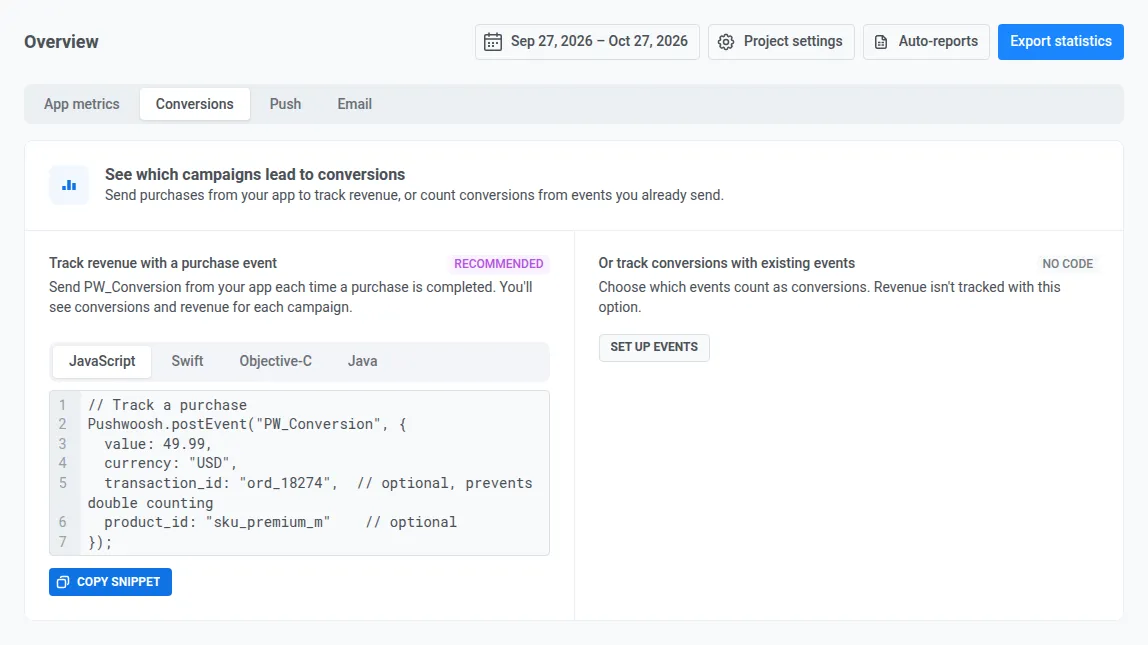
Step 1. Tell Pushwoosh what a purchase looks like
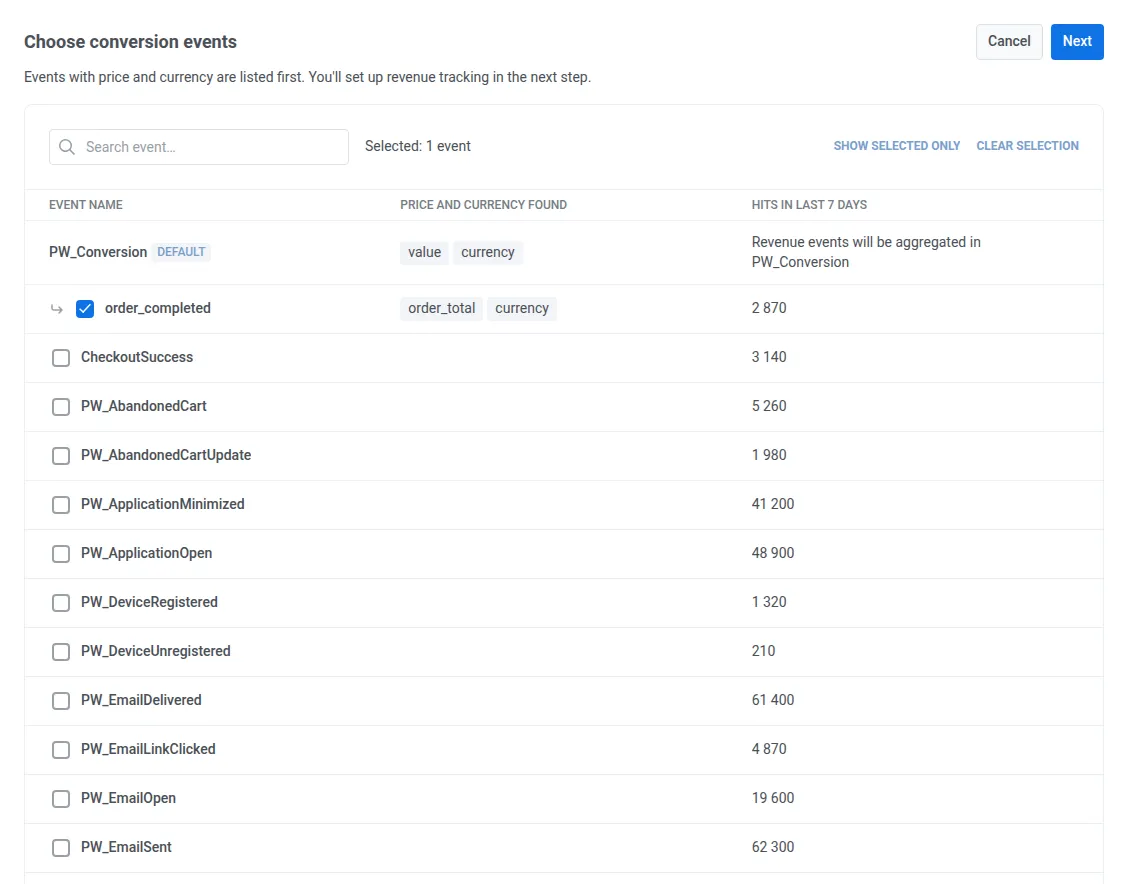
On the Conversions tab, click Set up events and pick the event your app already sends when someone pays. Pushwoosh puts events that carry a price and a currency at the top, so the store’s order_completed is first in line. You can also count actions without money, like sign-ups.
Step 2. Choose how strict the credit is
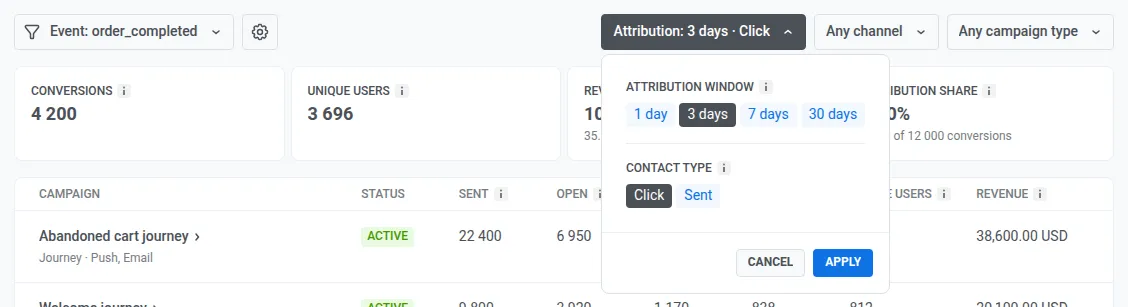
Set the window and Click or Sent in the Attribution filter. The store starts with Click, 3 days, the number it can defend. Switching takes a second, so you can always check the generous view too.
Step 3. See which campaigns pay off
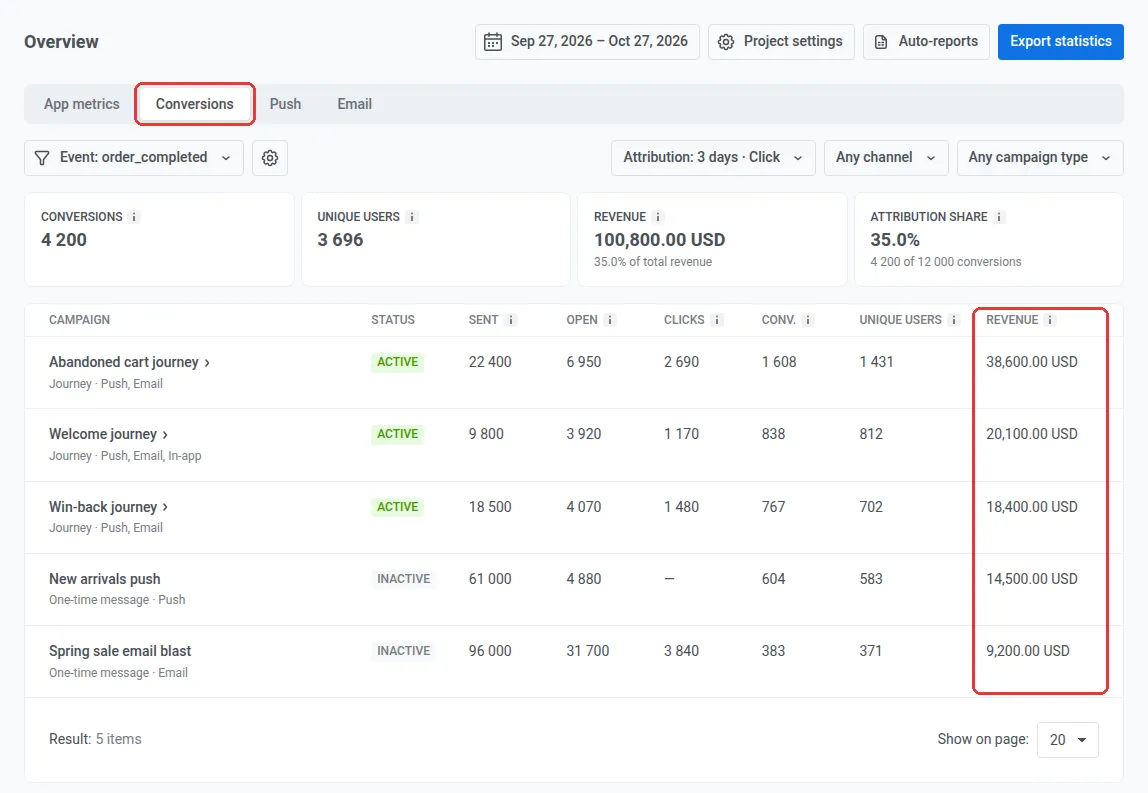
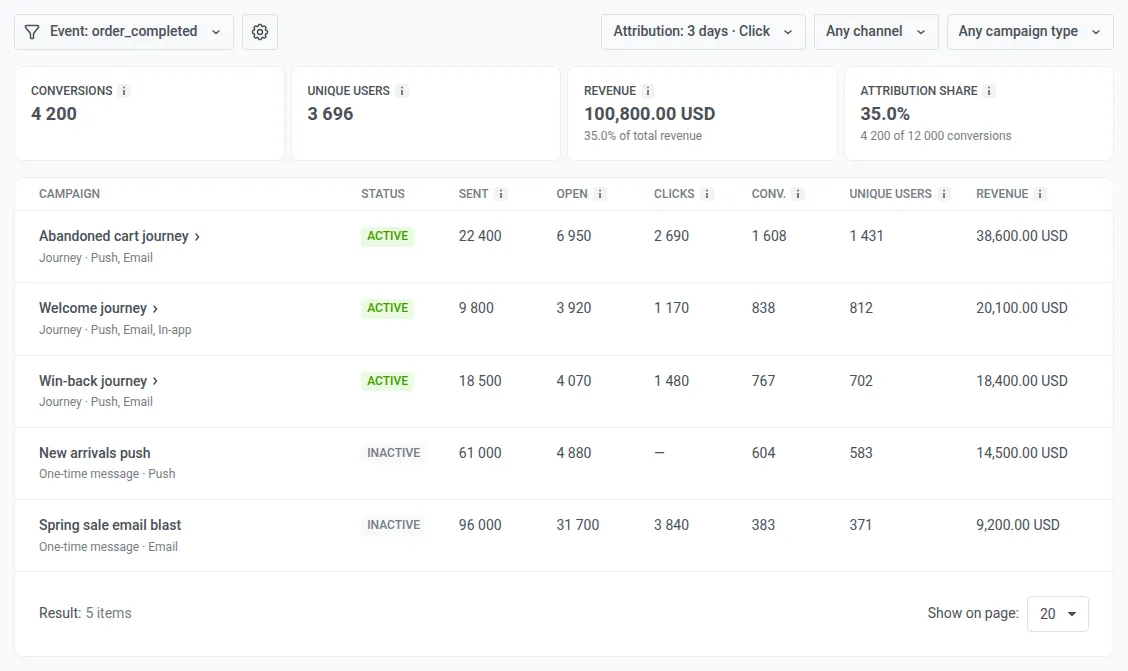
The tiles sum up the month. The store had 12,000 orders, and 4,200 of them came after a campaign: 35%, worth $100,800.

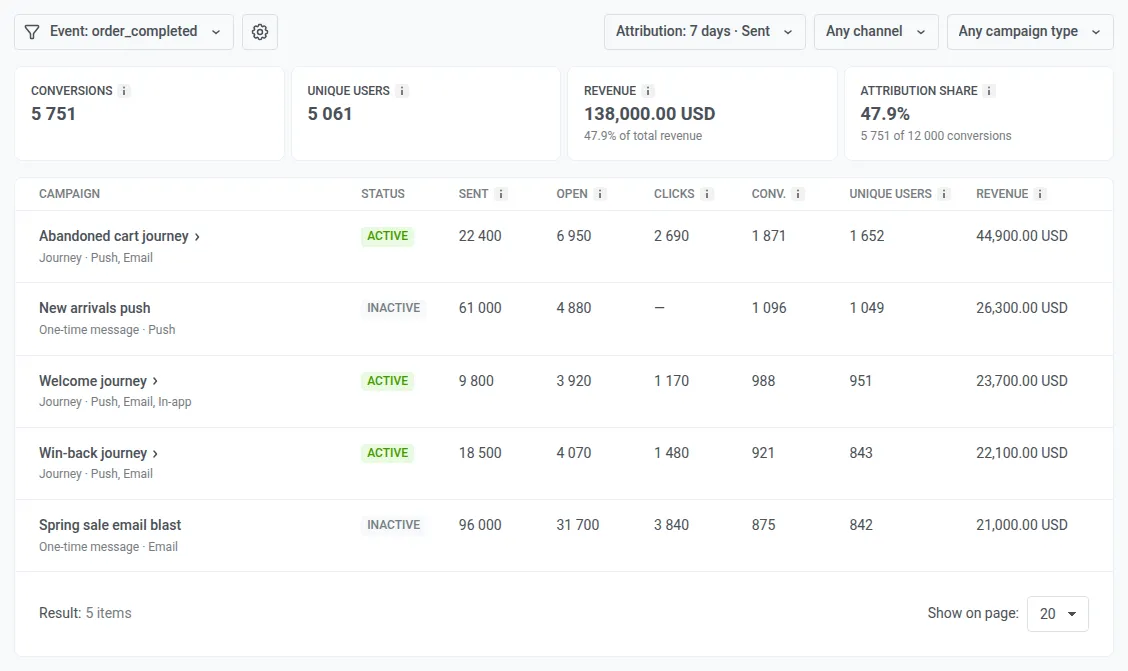
Below the tiles, every campaign and journey gets a row with its sends, opens, conversions, and revenue. Here are the store’s 2 campaigns, under the strict lens and under Sent, 7 days:
| Campaign | Revenue (Click, 3 days) | Revenue (Sent, 7 days) |
|---|---|---|
| Win-back journey (push + email) | $18,400 | $22,100 |
| Spring sale email blast | $9,200 | $21,000 |
Under the strict lens, the win-back earns twice as much. Under the generous one, the two look almost even. The blast went to everyone, so it picked up credit for shoppers who were going to buy that week anyway. The win-back reached people who had stopped ordering.
Step 4. Look inside a journey
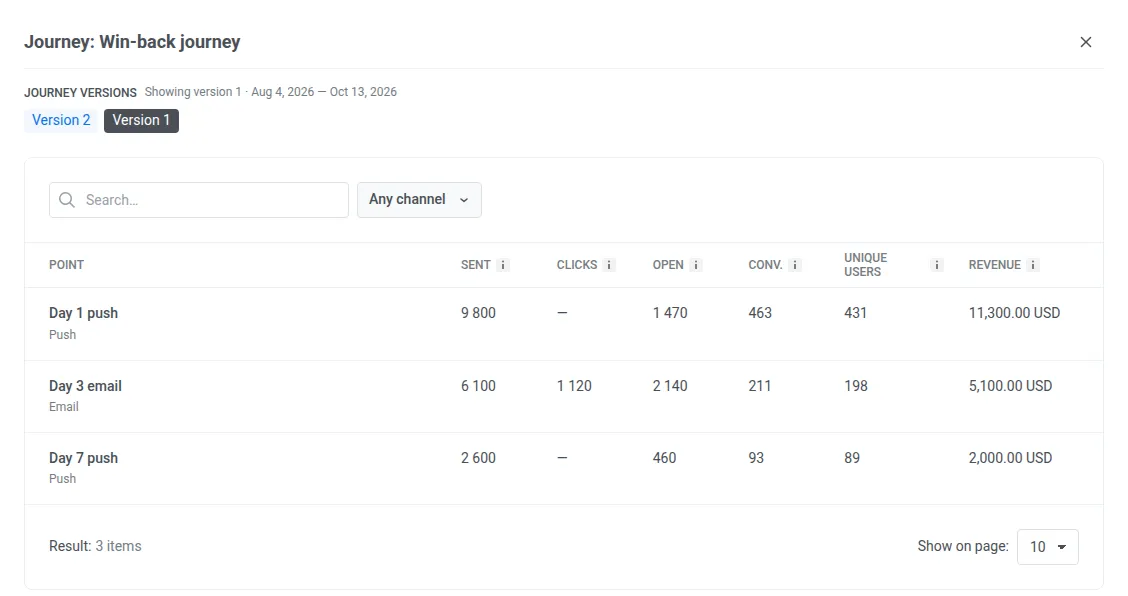
Click a journey to see which step brought the money. In the store’s win-back, the day-1 push earned $11,300 and the day-7 push only $2,000. The team rewrites that push and launches a new version of the journey. Each version keeps its own numbers, so 2 weeks later they can see whether the change paid off.
Same logic, other apps
| App type | Event that means money | Lens to start with | Campaigns to compare |
|---|---|---|---|
| Food delivery | Order placed | Click, 1 day | Lunch-hour push vs weekend promo email |
| Subscription | Subscription started, renewed | Click, 7 days | Trial-ending push vs discount email |
| Mobile game | In-app purchase | Click, 1 day | Level-up offer vs weekend sale |
| Travel | Booking confirmed | Click, 30 days | Price-drop alert vs destination email |
| Fintech | First deposit | Click, 7 days | Onboarding journey vs referral campaign |
Attribution vs incrementality: when you need a control group
Attribution and incrementality answer different questions. Mix them up, and you end up defending numbers you can’t prove.
Attribution tells you which campaign came last before a purchase. Incrementality tells you how many of those purchases happened because of the campaign. A user who orders every Friday will also order after your Friday push. Attribution gives the push full credit. Incrementality gives it close to zero.
| Attribution | Incrementality | |
|---|---|---|
| Question it answers | Which campaign came last before the purchase? | Would the purchase have happened without it? |
| How it's measured | Click or Sent and a window, per campaign | A control group kept out of marketing messages |
| Where in Pushwoosh | Conversions tab | Control group report |
| Best for | Ranking campaigns, journeys, and versions | Proving the program is worth its budget |
| Blind spot | Credits people who'd buy anyway | Needs enough users and a few weeks of data |
Use both. Attribution ranks your campaigns week to week. Incrementality checks the ones that carry the budget.
How to measure incremental revenue
Incremental revenue is the extra money your messages brought in, compared with a control group that got no marketing messages. Count the extra orders the messaged group placed, then multiply by your average order value.
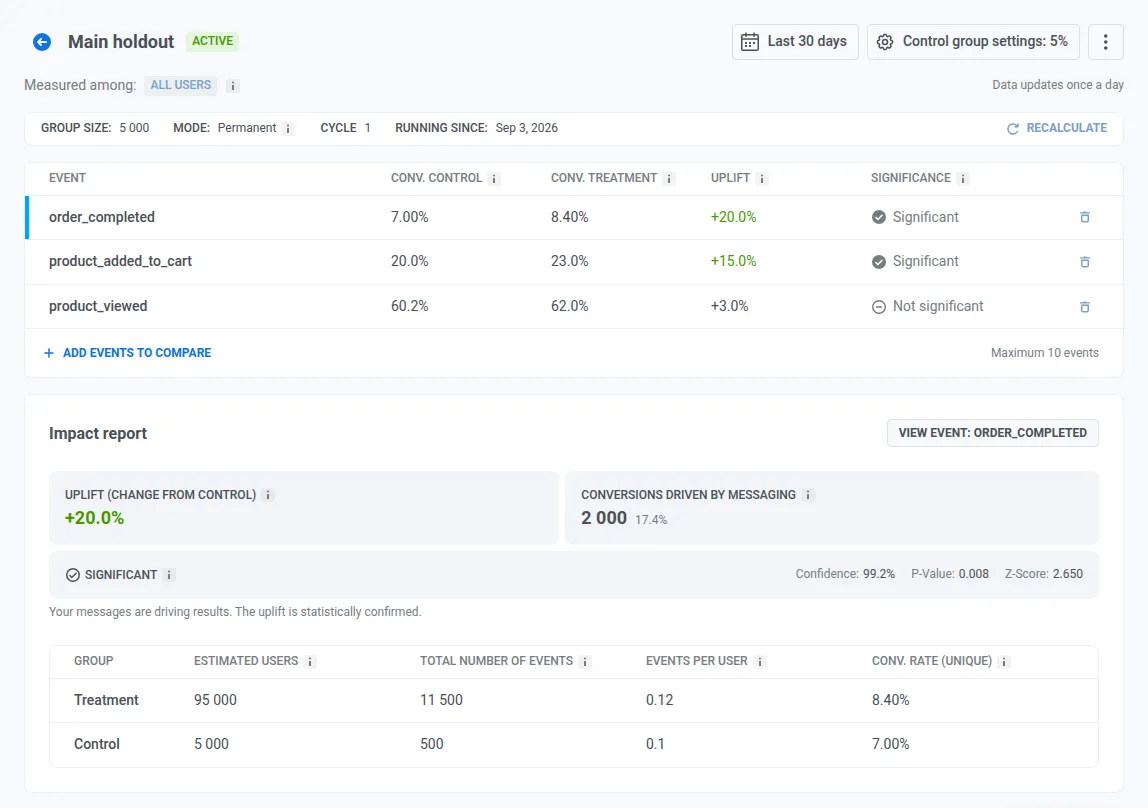
Back to the store. It keeps 5,000 of its 100,000 shoppers in a control group. Over the month, 8.4% of messaged shoppers placed an order, against 7.0% in the control group: a 20% lift. The report counts the extra orders that messaging drove, 2,000 of them. At the store’s $24 average order, that’s $48,000 of incremental revenue.
The Conversions tab shows $100,800 attributed for the same month, so a little under half of it is incremental. That gap is the number to bring to a budget review.
Read the numbers: scale, fix, or cut
Once revenue sits next to every campaign, each row tells you what to do with it.
| What you see | What it means | Your move |
|---|---|---|
| Revenue holds under Click | A real revenue driver | Scale it to more segments, then confirm with a holdout |
| Revenue jumps under Sent, stays low under Click | Mostly users who'd buy anyway | Run a control group before scaling |
| Little revenue under any lens | The campaign doesn't pay off | Rework the offer or segment once. If it still doesn't earn, cut it |
Before the numbers go to leadership: revenue is counted before refunds, and each currency is shown on its own. The tab updates once a day, so report on a closed period.
Connect every campaign to revenue with Pushwoosh
Pick the purchase event you already send, open the Conversions tab, and see which campaigns pay off. Then check your top earner against a control group before you show the number to anyone.
🤖 ManyMoney AI, Pushwoosh’s autonomous marketing copilot, reads the same revenue data. Ask it which campaigns earned the most this month, and it answers from live numbers.