Did you know most of the emails you send and receive on any given day are probably triggered emails?
If you’re not using them in your email marketing yet, now’s a good time to start. Triggered emails outperform batch, nurture, and routine newsletter sends by roughly 3x, with a 70.5% higher open rate and 152% higher CTR.
This guide covers everything you need to set up triggered email campaigns that actually convert, including real triggered email examples to steal from and ready-to-use templates you can spin up in Pushwoosh in a couple of minutes.
What is a triggered email? Triggered emails definition
A triggered email is an automated personalized message sent after a specific action or event, like making a purchase, abandoning a cart, or signing up for a newsletter. The point is to deliver something relevant or prompt the next step. Put simply, triggered email marketing is the practice of using email triggers, specific user actions, behaviors, or system events, to send the right message at the right moment automatically.
Triggered email campaigns improve communication and build stronger relationships with your audience.
What’s the difference between a triggered and automated email?
You’ll hear that all triggered emails are automated but not all automated emails are triggered. True enough, but it’s an oversimplification.
The real difference: triggered emails react to what a user does, while automated emails go out on a schedule as part of a wider plan. Both matter for engaging customers and driving conversions; they just get there differently.
Say you have a big sale in two months and you’re building a campaign around it. That’s automated. An email that fires every time someone hits a certain goal on your site? That’s triggered.
You get the idea.
How do triggered emails work?
So what is triggered email marketing in practice? Here’s the process, step by step:
- A user performs an action (or fails to). This is the email trigger: signing up, abandoning a cart, making a purchase, or going quiet for a set period. These are often called user behavior triggers.
- The event is captured by your platform. Your email or customer engagement platform detects the event in real time and matches it against the rules in your triggered email flow.
- Segmentation and personalization kick in. Before sending, the system checks the user’s profile, their behavior history, attributes, and segment, to apply triggered email personalization: dynamic content, product recommendations, or tailored offers.
- The email is sent automatically. It goes out with no manual step, landing in the inbox when relevance is highest. That timing is what makes event triggered emails so much sharper than batch sends.
- Performance is tracked and optimized. Open rates, click-throughs, conversions, and revenue per email get measured so you can keep improving your triggered email strategy.
Why do triggered emails beat traditional campaigns? They respond to what users actually do, not to what a marketing calendar says. That behavior-driven logic is what makes behavioral triggered emails the backbone of any serious lifecycle program.
Why are trigger emails so important?
Triggered campaigns are cheap and effective, but the benefits run deeper than that:
- Increased engagement: timely and relevant messages get higher open and click-through rates.
- Improved conversion rates: targeting specific behaviors nudges users to complete the action you want, which supports activation and drives revenue across the lifecycle.
- Cost-effectiveness: automation cuts manual work, saving time and resources.
- Enhanced customer satisfaction: timely updates build trust and improve the experience, which over time lifts retention and CLV.
There’s one more thing these lists miss. Triggered campaigns hit a rare balance: they’re customer-centric and business-driven at once. They cost the company little in time and effort, and recipients actually want them. People often anticipate or directly ask for the information a triggered message carries.
With that in mind, let’s get into some triggered email examples.
Essential types of triggered emails
Plenty of email types can be triggered, but they generally split into two groups:
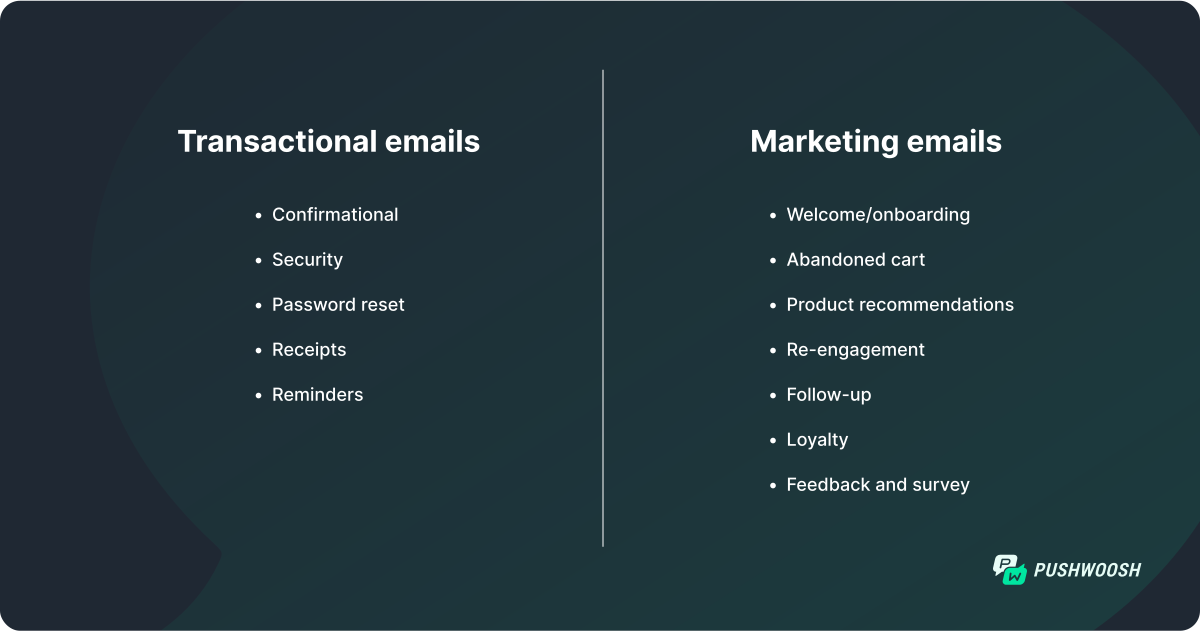
Transactional emails
A transactional email is an automated message sent after a specific transaction or interaction, such as a purchase or an account update. It carries essential information tied to that transaction and keeps communication between you and the customer clean.
People expect these emails and often request them outright. No surprise, then, that transactional emails usually see higher open rates (40 to 50% is considered strong) and click rates (10 to 20% on average) than other campaigns.
Let’s look at the different kinds of transactional emails.
Confirmation email example
Confirmation emails do what the name says: confirm a transaction, an order, a booking, a delivery window, a shipment. Their job is to reassure the customer that everything is on track.
Take a confirmation email from TurboTax. It tells the recipient their refund went through and lays out a timeline for what comes next, which reinforces the sense of security. TurboTax also uses the space to share a bit about itself and slip in a promotion, so a purely functional message quietly does double duty.
Confirmation emails are especially popular in e-commerce, travel and hospitality, finance, online learning, and event management.
Confirmation email template
If you’re not sure where to start, a pre-designed template helps. Pushwoosh’s drag-and-drop email builder has ready-made templates for common cases. They’re clean and ready to go; you just swap in your content.
Here’s a template for an order confirmation in an e-commerce app. It shows the order number, total, and payment method so the customer can check everything against their purchase, with the order number in the subject line for easy tracking later.
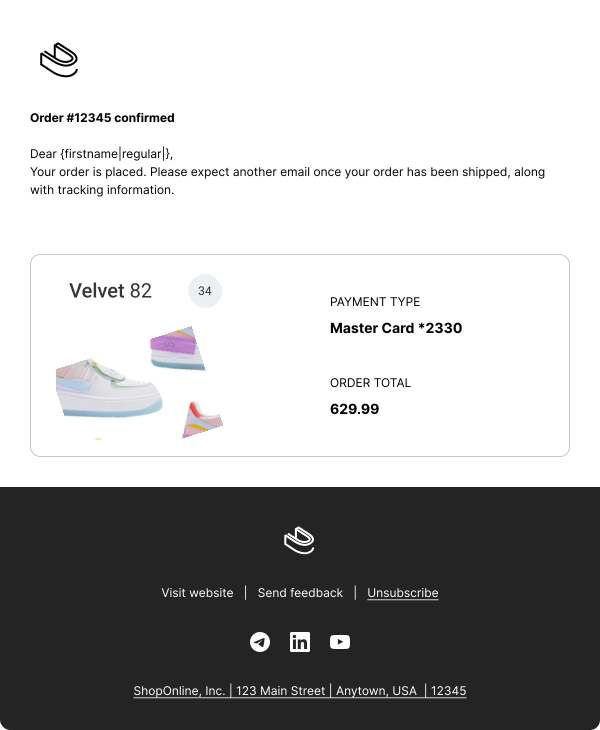
👉 To use the template: Log in or Sign up for Pushwoosh, go to Content > Email Content > press ‘Create email content’ > press ‘Choose a template.’ Several templates appear, ready to use as is or customize.
Security alert triggered email example
Security alert emails flag potential problems: unauthorized access, a password change, suspicious activity. The goal is to inform and protect the user and keep their account and personal data safe.
Here’s a security email from DoorDash, telling a user that a new device tried to log into their account:
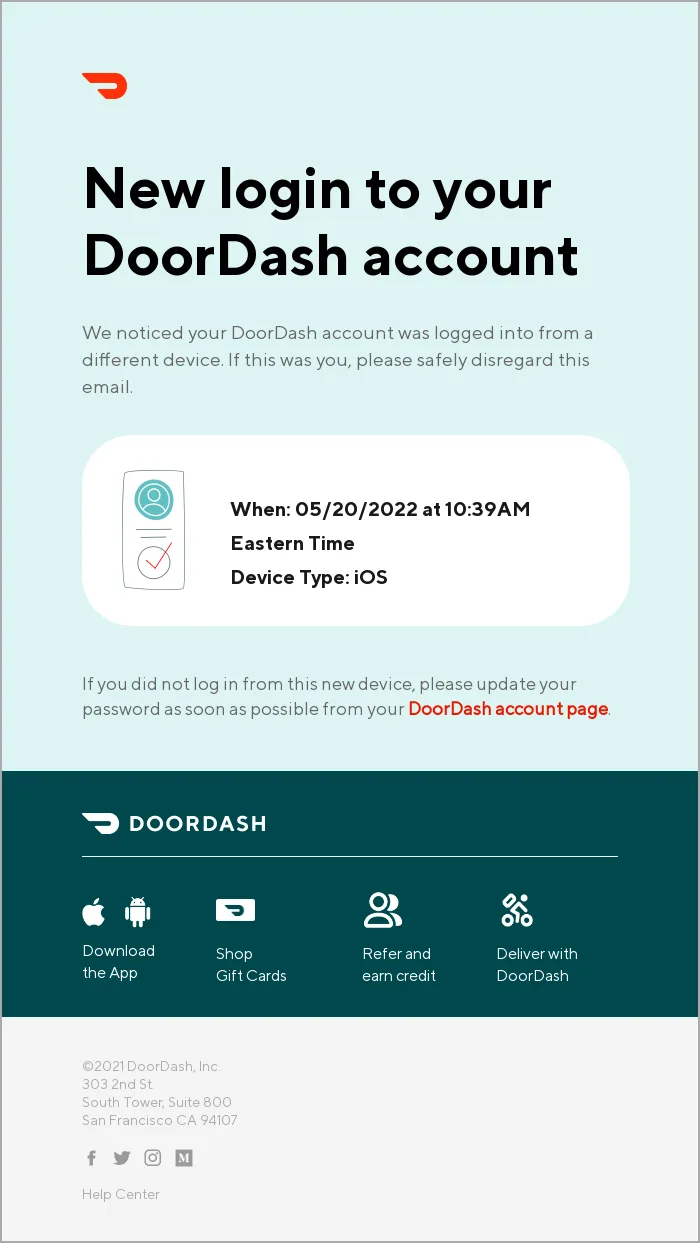
Industries that get the most out of security alert emails: finance and banking, software and technology, healthcare, and online services.
Password reset request example
This one’s self-explanatory. Password reset emails go to users who asked to change or update their password. They usually carry just a secure link or code to set a new one, keeping the account protected and accessible only to its owner.
Here’s a to-the-point password reset email from Vimeo:
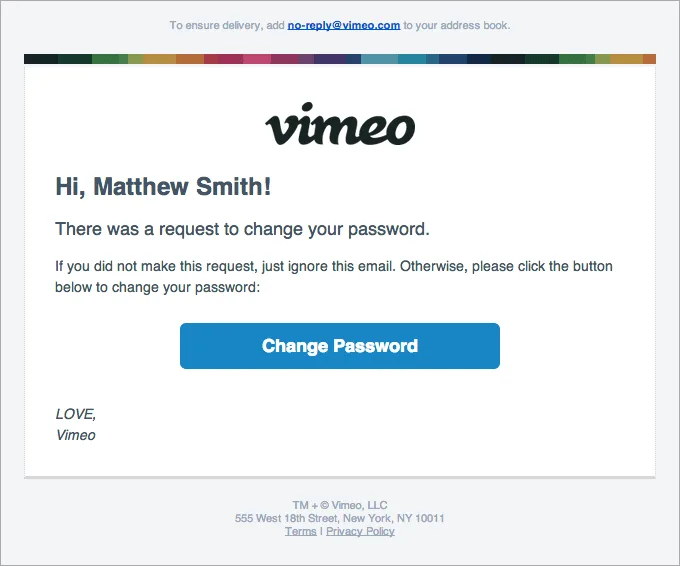
Simple as they look, password reset emails handle sensitive information and need solid encryption and data security to work properly.
Receipt/invoice emails example
Receipt and invoice emails go out after a purchase. They give a detailed record of the transaction, the amount paid, items bought, any taxes, and serve as proof of purchase and often the basis for a refund.
Uber nails receipt emails, both on content and on deliverability, which lands every time:
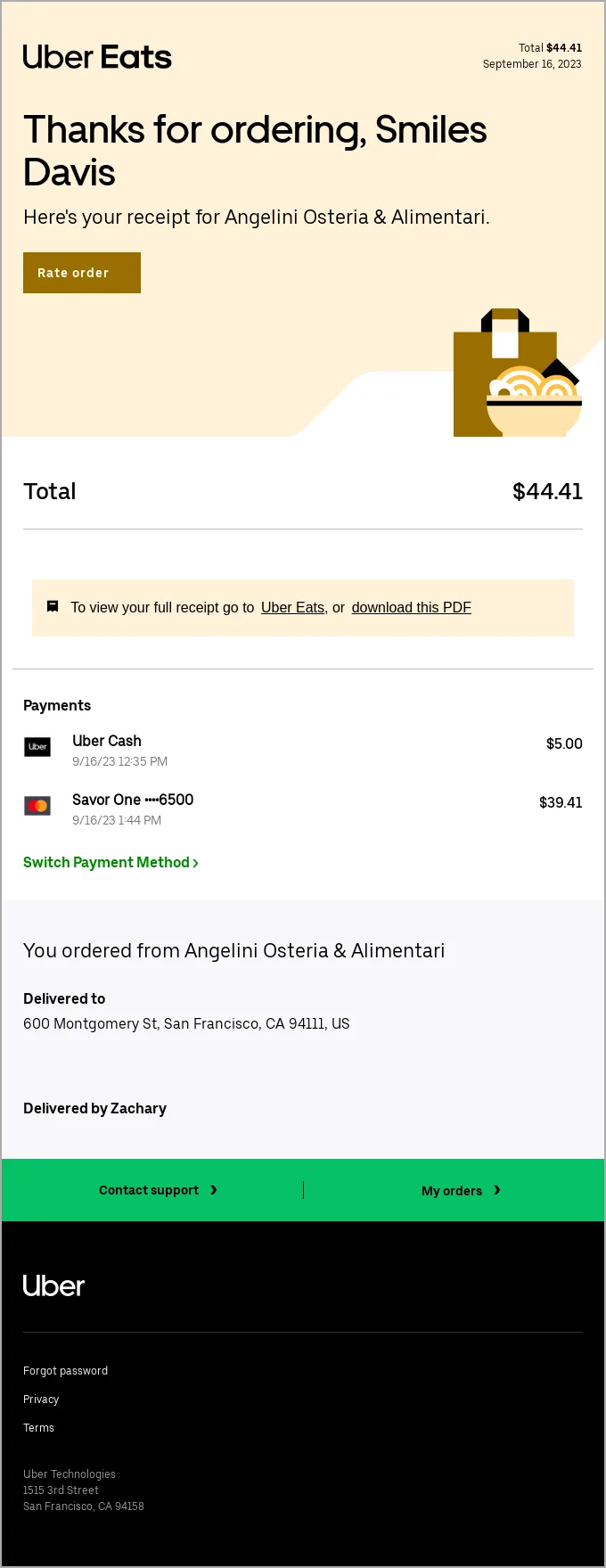
If you sell anything online, you need to send receipts and invoices. The industries that lean on them most are e-commerce, retail, travel, and subscription services.
Appointment reminder emails
Reminder emails make sure a customer remembers an upcoming appointment or meeting. They cut both ways: the recipient gets a chance to adjust their schedule, and you reduce no-shows and manage your time better.
➡️ Key success metrics: show-up rate and appointment-to-sale conversion rate
Here’s a classic appointment reminder from Booksy, sent 24 hours before the visit:
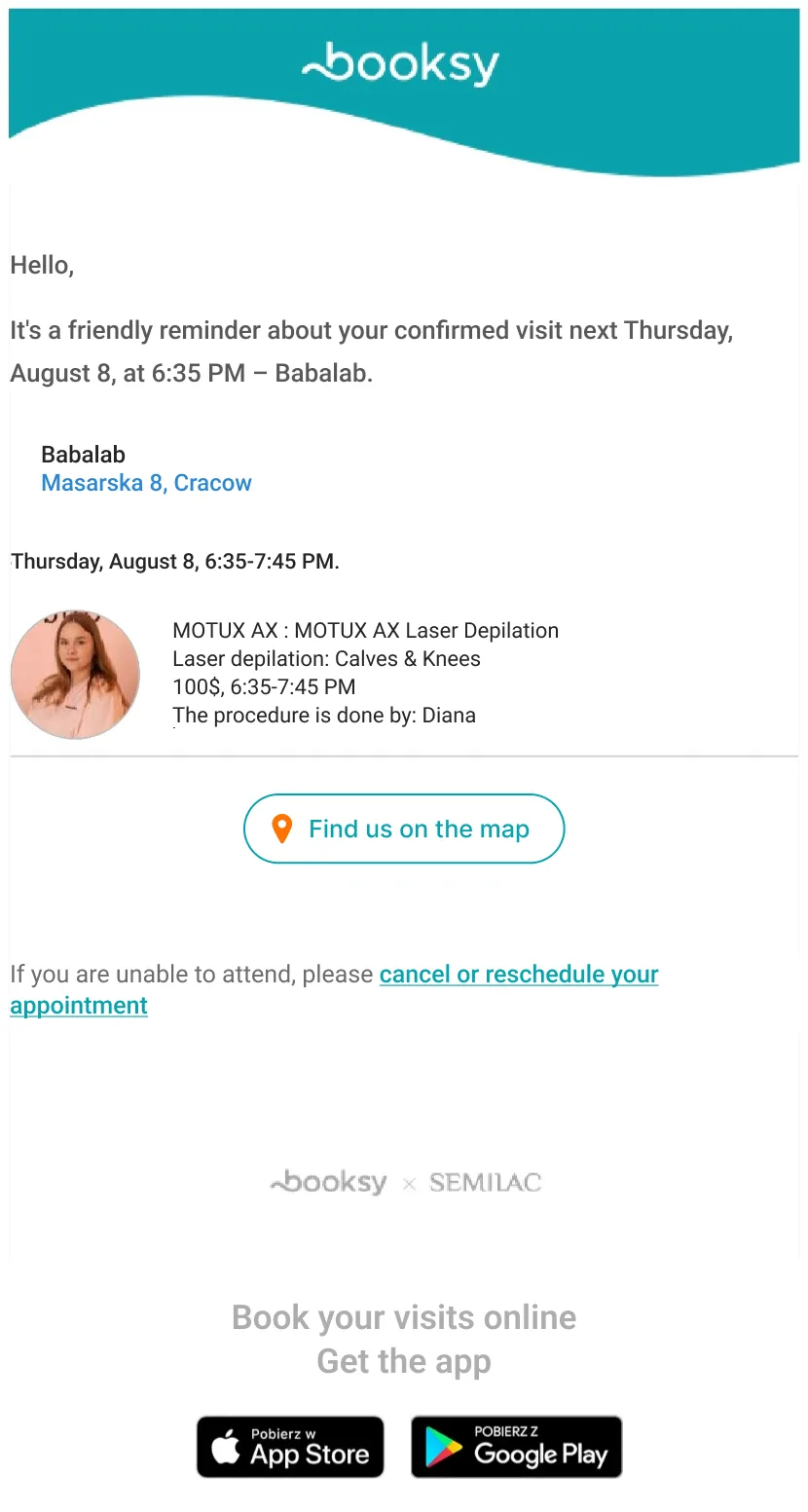
Healthcare, beauty and wellness, professional services, education, and event management use appointment reminder emails the most.
Pushwoosh has the tools to send them, including a ready-to-use template with personalized elements and the right structure:
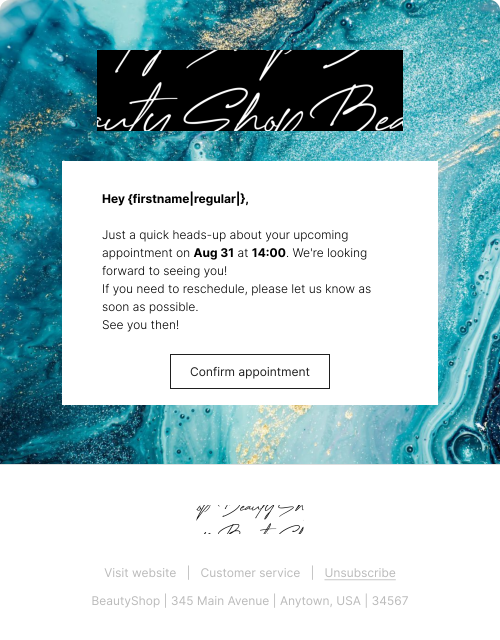
👉 To use the template: Log in or Sign up for Pushwoosh, go to Content > Email Content > press ‘Create email content’ > press ‘Choose a template.’ Several templates appear, ready to use as is or customize.
The reminder lands at each customer’s own best time, thanks to Pushwoosh’s dynamic scheduling.
Marketing emails
A marketing triggered email is an automated message sent in response to user behavior or set criteria, aimed at engaging, nurturing, or converting a potential customer. These promote products, services, or content by putting a relevant offer in front of the right person at the right time.
Marketing emails build relationships and drive conversions with content matched to the recipient’s interests and actions.
Unlike transactional emails, marketing messages are rarely anticipated, so their performance tends to run lower.
Welcome emails example
Welcome emails greet new subscribers after signup and introduce them to the brand. It’s your shot at a strong first impression: hand over the essentials and give people a reason to explore.
Here’s a good welcome email from Sea of Thieves that introduces the player to the game’s world and hands over resources to help them find their footing:

You can run a welcome email as part of your newsletter journey or build a fuller onboarding campaign that opens with a short, value-driven note on what to expect.
➡️ Key success metric: early-stage engagement and retention rates
Welcome email template
Here’s an effective welcome email template in Pushwoosh’s drag-and-drop builder. It engages users visually and pushes them toward their first actions in the app. Personalization by name, clean illustrations, multiple CTA buttons, and links to helpful resources all pull their weight.
The payoff of this structure: higher activation.
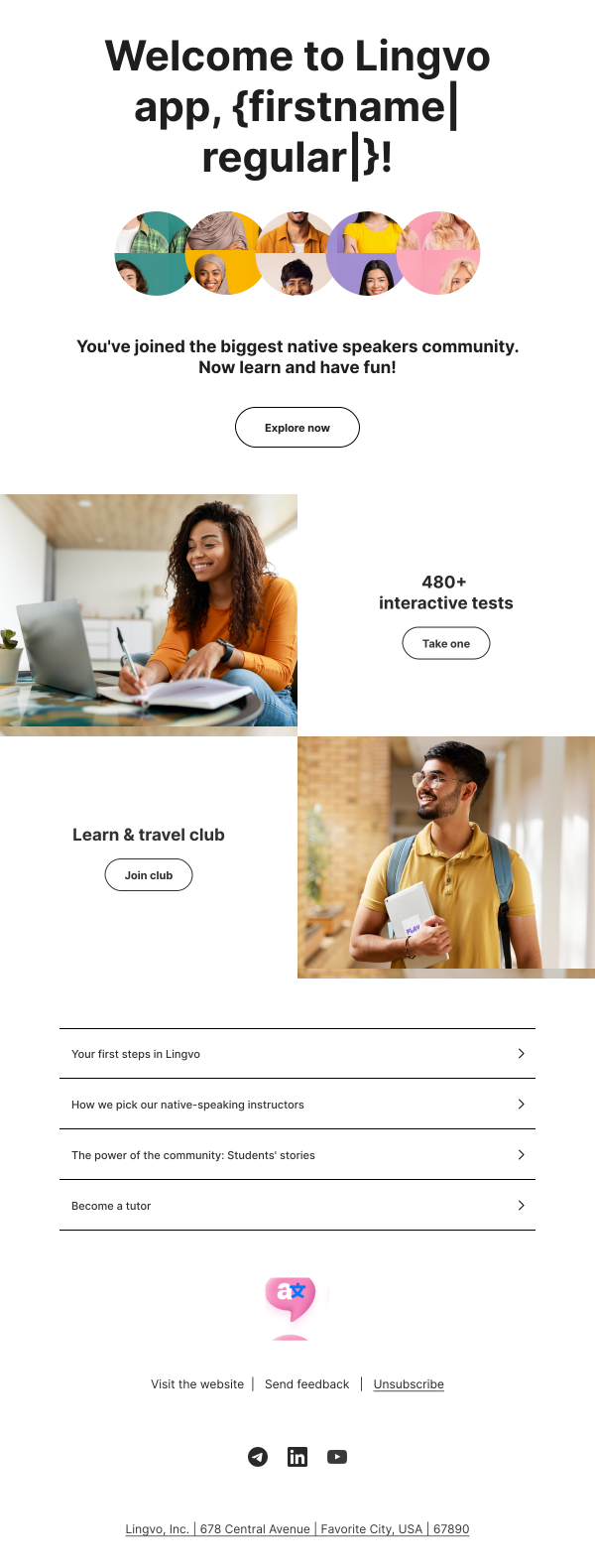
👉 To use the template: Log in or Sign up for Pushwoosh, go to Content > Email Content > press ‘Create email content’ > press ‘Choose a template.’ Several email templates appear, ready to use as is or customize. The one above is called ‘Welcome to app.’
Abandoned cart trigger email example
You know these: abandoned cart emails remind users about items they left behind without checking out. They perform unusually well, a 44.1% open rate, and recover a real share of lost sales (29.9%).
➡️ Key success metric: revenue generated
HUX, for one, goes straight for the sale, using its cart email to remind the buyer how quick and painless checkout can be:
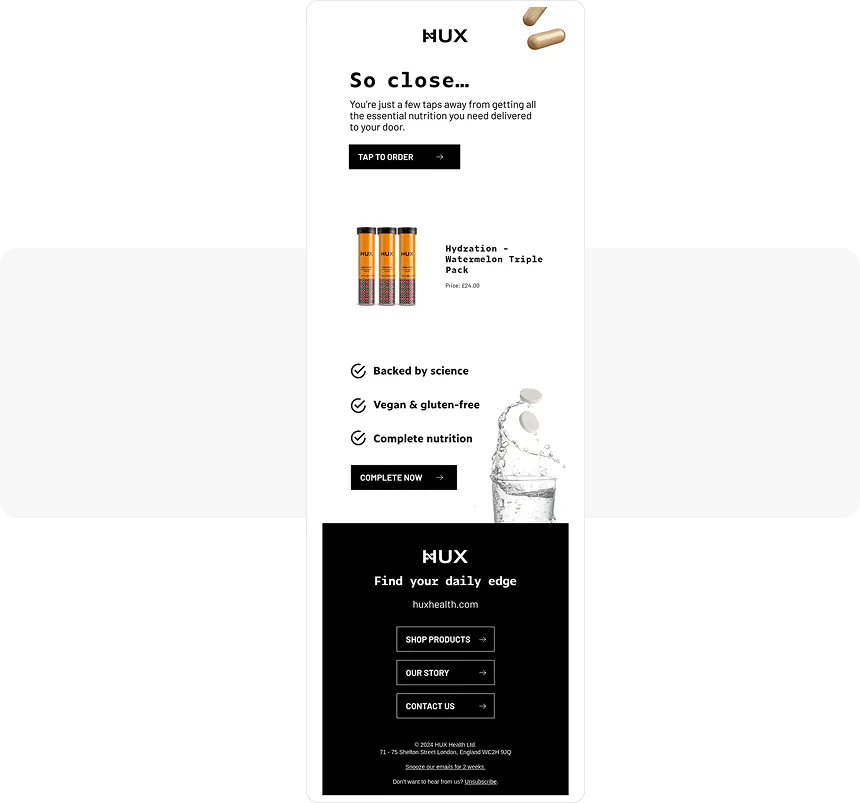
Naturally, abandoned cart emails see the most use in e-commerce, retail, travel, and hospitality.
Abandoned cart email template
Here’s an abandoned cart email template for Pushwoosh users, with an attention-grabbing CTA and built-in personalization. Use it as is or restyle it in the builder to match your brand:
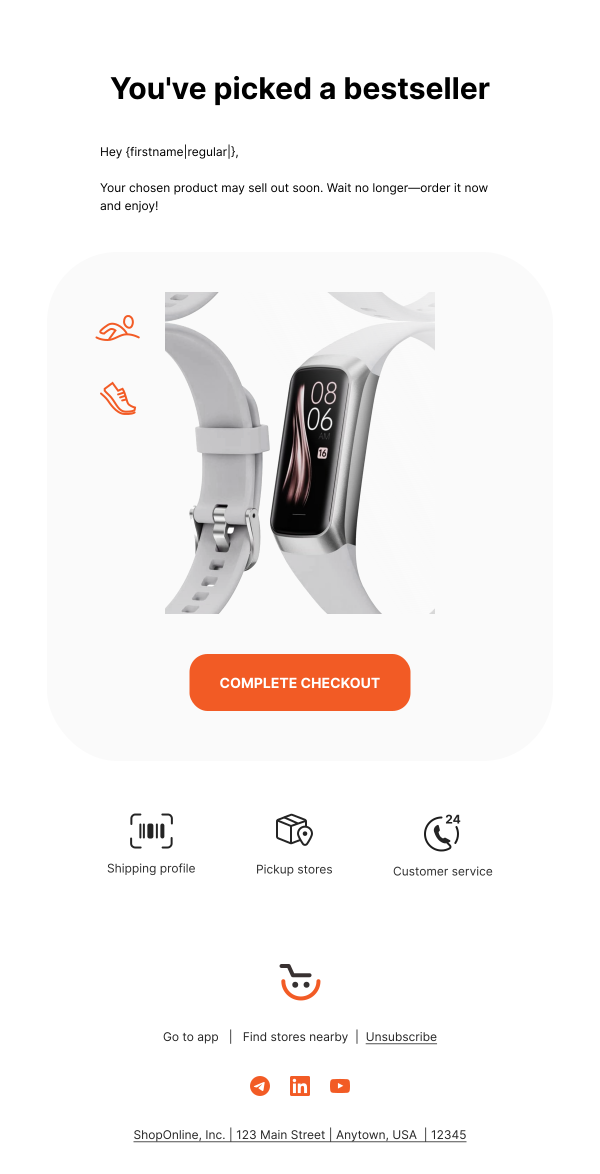
👉 To use the template: Log in or Sign up for Pushwoosh, go to Content > Email Content > press ‘Create email content’ > press ‘Choose a template.’ Several templates appear, ready to use as is or customize. The one above is called ‘Abandoned cart.’
Product recommendations email example
Product recommendation emails suggest items based on a user’s browsing or purchase history. The aim is a better shopping experience through suggestions that fit what the person actually cares about.
➡️ Key success metrics: add-to-cart rate, conversion rate, and average order value (AOV)
The NGO DonorsChoose runs a strong version of this: it personalizes recommendations using user demographics and an “other visitors also browsed” signal, so the suggestions feel picked for the reader rather than pulled at random.
Product recommendation emails have been shown to lift CTR by as much as 300%, which makes them hard to leave out of a marketing plan.
Re-engagement trigger email example
Re-engagement emails reach users who’ve gone quiet and haven’t interacted with the brand in a while. The goal is to reignite interest and pull them back.
For best results, trigger one after a set stretch of inactivity.
➡️ Key success metrics: reactivation rate, features used or products viewed
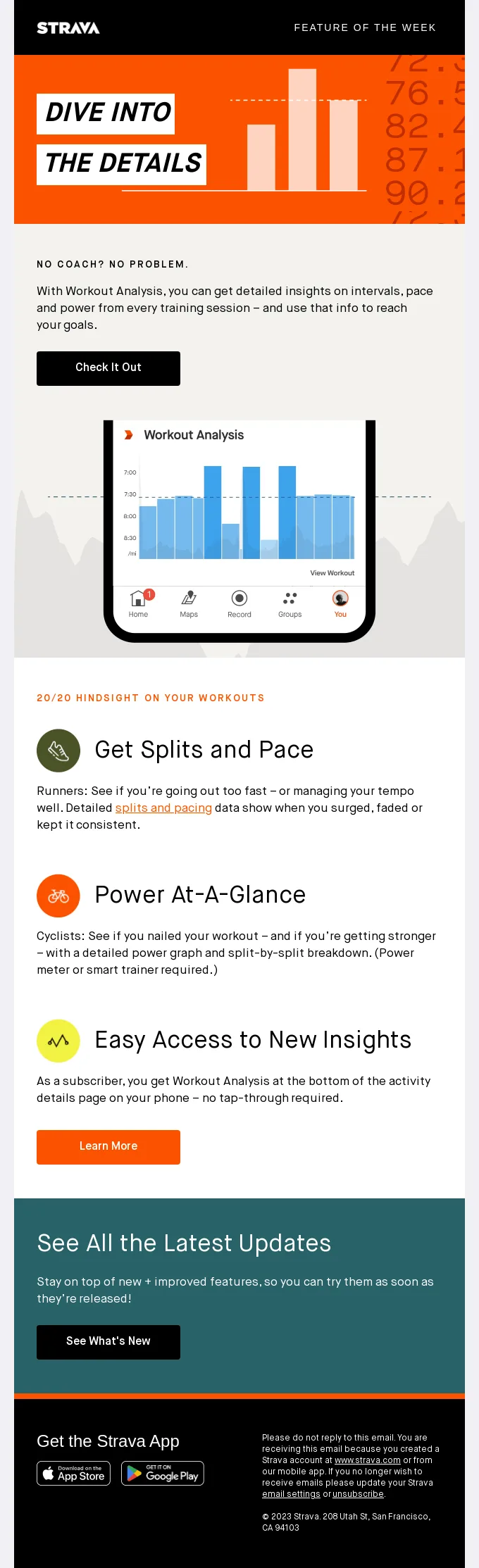
Here Strava uses a re-engagement email to bring users back to the app and promote a feature they may have missed. It works because it speaks to a real need, not having a personal trainer:
Re-engagement email template
Need a starting point? A ready-made template helps. Here’s one from Pushwoosh’s library. It coaxes users back into the game by promising extra rewards:
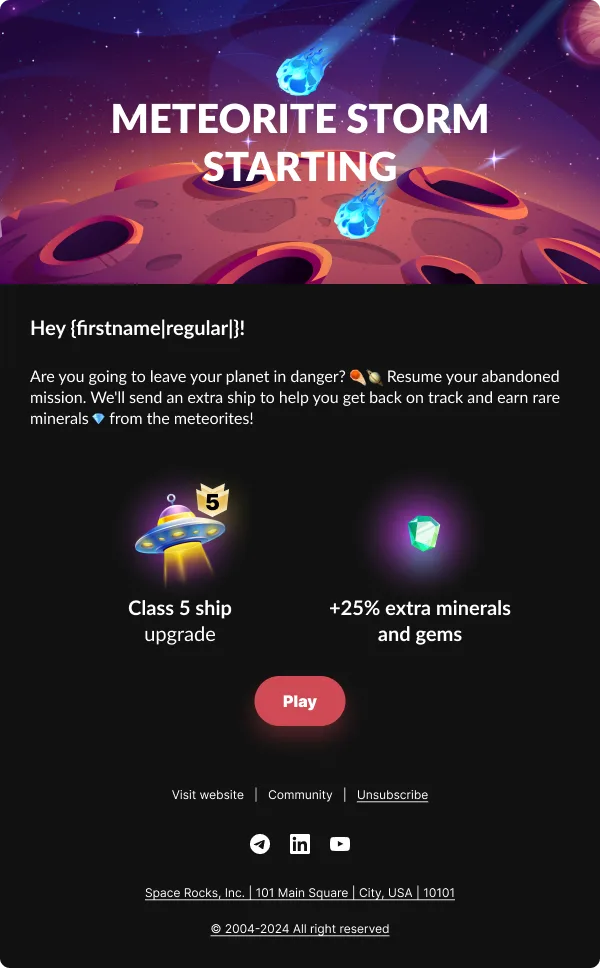
👉 To use the template: Log in or Sign up for Pushwoosh, go to Content > Email Content > press ‘Create email content’ > press ‘Choose a template.’ Several templates appear, ready to use as is or customize. The one above is called ‘Re-engagement.’
Follow-up emails example
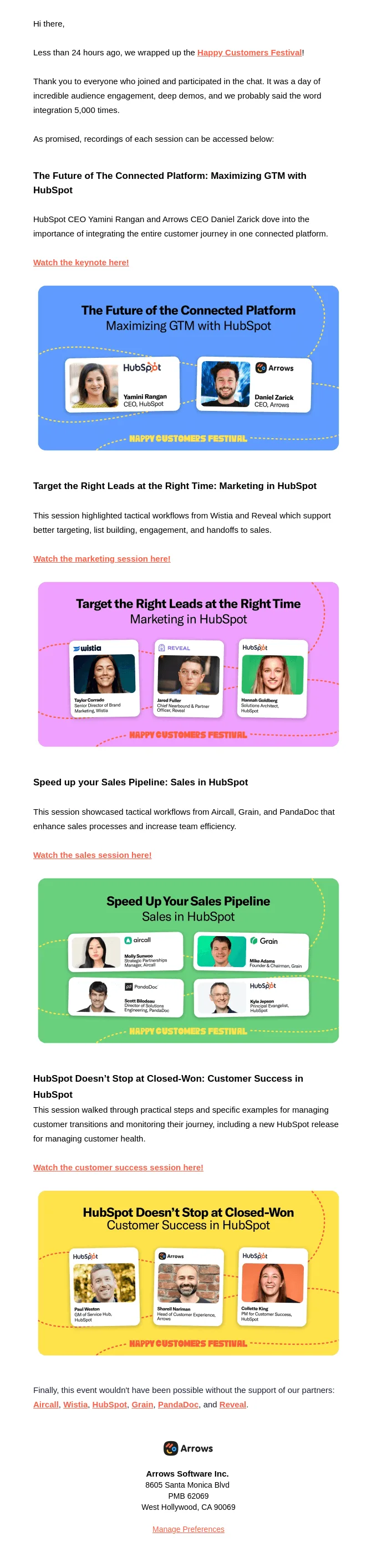
Follow-up emails respond to a specific action or event, like attending a webinar or signing up for a training session. They pass along relevant information based on that interaction and help you engage new contacts.
➡️ Key success metrics: user activation and engagement rates
Here’s a typical post-webinar follow-up from Arrows, reconnecting with the lead by featuring the event recording:
These are especially popular with online education and personal growth brands.
Loyalty program email example
That’s right, loyalty emails can be triggered too.
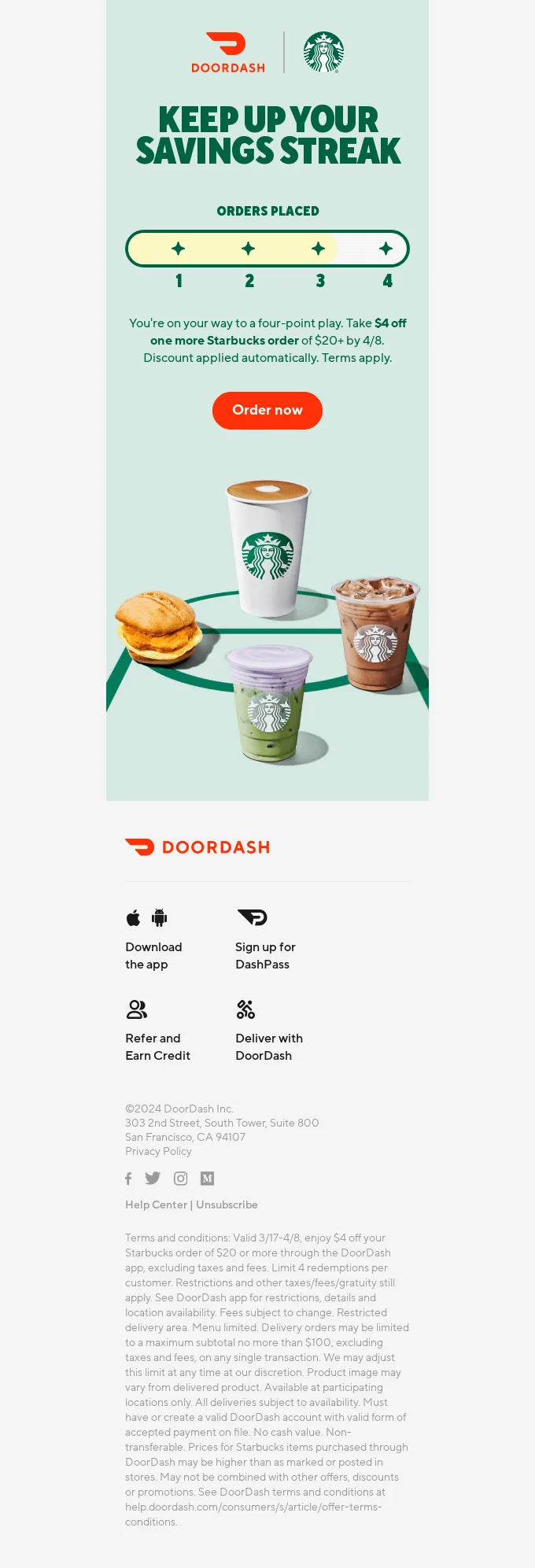
Loyalty program emails drive retention by keeping members engaged, updating them on rewards status, exclusive offers, and program perks.
➡️ Key success metrics: customer retention, redemption rate, and repeat purchase rate
For instance, you can trigger a loyalty email whenever a user moves up (or down) a tier, with tips on how to hold their status, the way DoorDash (again!) does here:
Feedback and survey email example
This type is one of the most underused. Feedback and survey emails ask customers about their experience with your product or service, which builds loyalty and hands you real insight.
➡️ Key success metrics: customer satisfaction and CLV
The trick with survey emails is timing them to key moments in the journey: post-purchase, after onboarding, following a support interaction, or just before a subscription renews.
A survey right after a purchase, for example, captures immediate satisfaction and lets you catch concerns while the experience is fresh. One after a support ticket confirms the issue was actually resolved.
Keep survey emails short and clear. Use a subject line that states the purpose, make the value of the feedback obvious, and if you can, a small incentive lifts participation.
Best practices for effective triggered email campaigns
There are plenty of ways to put triggered emails to work. The harder question is how to get the most out of each triggered email campaign you run.
Here are 7 tactics that reliably hit your deliverability and email CTR goals.
1. Set a clear goal for each trigger email campaign
Sending emails for the sake of it is what kills performance. People already feel buried under too many messages, and most aren’t relevant to them.
So only send triggered emails when they’re expected. Set a clear goal per campaign and track it closely.
Say you expected your re-engagement email to pull people back and lift engagement, but a week in it’s driving more unsubscribes than clicks. Don’t hesitate to pause and rework a campaign that isn’t delivering.
2. Use customer data thoughtfully
Triggered emails only work when they’re personalized to the customer’s needs. That also means they carry data-privacy pitfalls.
So which personal data deserves extra care with triggered emails?
- Location: useful for region-specific offers, but get explicit consent first to avoid legal trouble.
- Browsing and purchase history: common for recommendations, but it raises concerns if users don’t know they’re being tracked.
- Demographic information: handy for targeting, but sensitive without clear permission.
The fix is transparency in your data collection. Stick to GDPR and CCPA, and you keep customer trust while staying clear of legal issues.
Unified customer data transforms the strategy behind triggered email campaigns for any business. Combining real-time behavioral events and user attributes into a single profile enables marketers to react to user actions in the moment, not just send communications to static lists.
The most predictive signals our customers use include recent engagement (opens, clicks), session recency, and traits like purchase propensity and predicted lifetime value.
When this data flows from Twilio Segment into Pushwoosh, you can trigger emails based on actions like recent purchases, cart abandonment, or even optimal engagement windows, all tailored to user-level details.

3. Personalize your emails with segmentation
Once you’ve got data collection down, put it to work at the segmentation stage.
Triggered emails are automated, but you can and should layer on personalization, going beyond the trigger where it fits. You might enhance a transactional confirmation email with a unique discount code for products the user browsed earlier. That kind of triggered email personalization turns a functional message into a revenue-generating touchpoint.
Factor in user attributes, demographic and behavioral, when you set up the campaign.
4. Schedule your campaigns carefully
Knowing when to send matters as much as who you send to. Even though triggered emails fire automatically, you keep some control over timing.
- Transactional emails usually need to go out immediately. Skip the 2 to 3 minute delay many ESPs suggest. If someone wants to reset their password, they don’t have those minutes to spare, and waiting just frustrates them.
- Marketing emails leave more room. Your trigger might fire at an awkward hour. If a new subscriber signs up at 2 AM, they’ll forget your message by morning, so send the welcome email once they’re awake and more likely to engage.
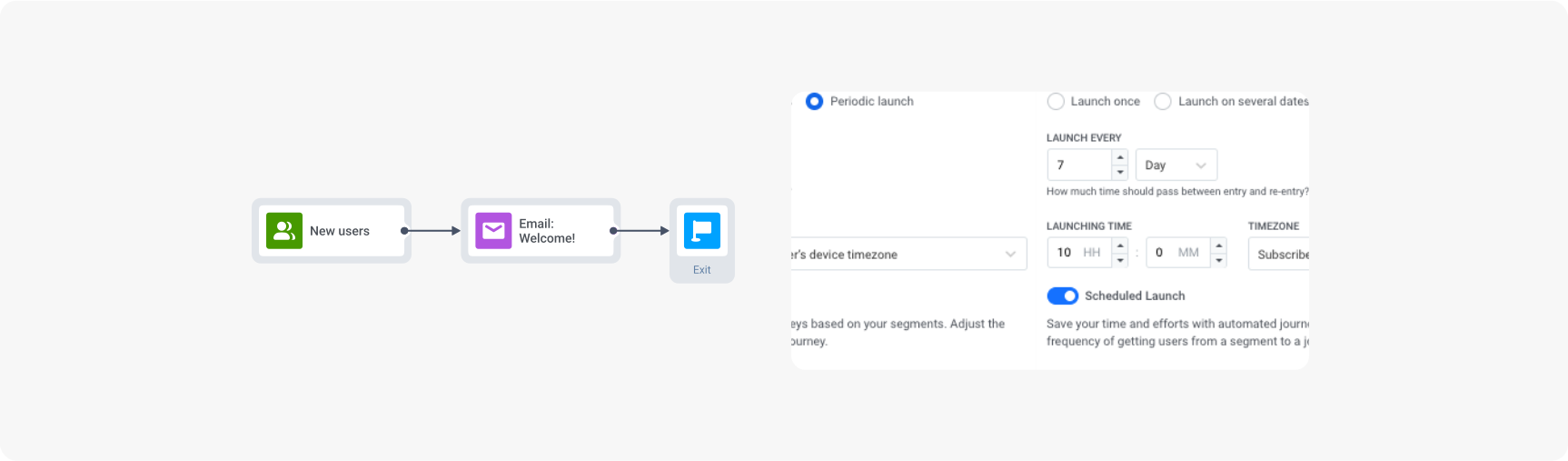
Use Pushwoosh features like Scheduled Launch and Best time to send, and experiment with recipient time zones to sharpen send times.
Here’s a scheduled recurring campaign in Pushwoosh. It sends emails to new users every week at 10 AM in each person’s own time zone:
5. Always optimize for mobile
Depending on your niche, more of your audience may read your emails on mobile than on desktop. So the email you designed on your laptop has to look just as good on a phone.
Use the preview to check the small screen, and always test-send before you go live. It saves headaches and makes subscribers a little happier to see your name in the inbox, which tends to feed retention.
6. Provide a clear call to action
Remember that campaign goal? Make sure the main CTA in your triggered email points at it.
- Abandoned cart email? “Complete the purchase” beats “Buy now.”
- Asking for feedback? “Leave a review” works better than “Tell us why.”
- Flagging an unexpected login? A simple “Yes, it’s me” does the job.
And if the copy won’t come, there’s always a handy AI tool to help.
7. Always aim to meet customer expectations first
Last one: triggered emails work because they serve the customer, not the business. Build your campaigns around that and the results follow.
Build a high-performing triggered email strategy with Pushwoosh
Better triggered email performance doesn’t come from sending more. It comes from sending the right message, to the right user, at the exact moment it matters, and measuring the real business impact.
Pushwoosh gives you what you need to build, automate, and optimize triggered email campaigns: behavior-based segmentation, a visual Customer Journey Builder, dynamic content personalization, A/B testing, real-time analytics, and cross-channel orchestration across email, push, in-app, SMS, and WhatsApp.