If you’re still using AI only to write copy for your campaigns, it’s time to level up your AI automation game. 🤖🚀
We looked at hundreds of real requests Pushwoosh customers sent to ManyMoney, our AI marketing agent. Spoiler: copywriting barely made the list. They hand it the operator’s job: building and debugging journeys, measuring impact, pulling reports.
Here are 10 of those real AI marketing use cases to borrow for your next campaign. Each comes with the task, the exact prompt for the AI marketing agent, and the result. Copy any prompt and run it in your account.
What can an AI marketing agent do?
Most AI tools in marketing give you suggestions and leave the rest to you. An AI marketing agent works with your actual data: it reads your journeys, segments, tags, events, and message stats, then builds the segment, edits the journey draft, or pulls the report itself.
But even with most AI agents, you first have to get that data in: connect sources, upload exports, explain how your campaigns are set up. ManyMoney skips this step. It’s built into Pushwoosh, so your data and context are already there from the first prompt.
To try it, open the AI Assistant button in the Control Panel (👉🏻click to log in).

Describe the task in plain language, and the AI assistant can:
- Build and edit journeys — from a first draft to fixes in a running flow.
- Create segments from a plain-language description, and find out why one comes back empty.
- Set up message presets for push, email, SMS, and LINE.
- Pull statistics and delivery reports for campaigns and journeys.
- Diagnose issues before and after launch — journey settings, tags, device registration, delivery logs.
- Answer product questions based on documentation.
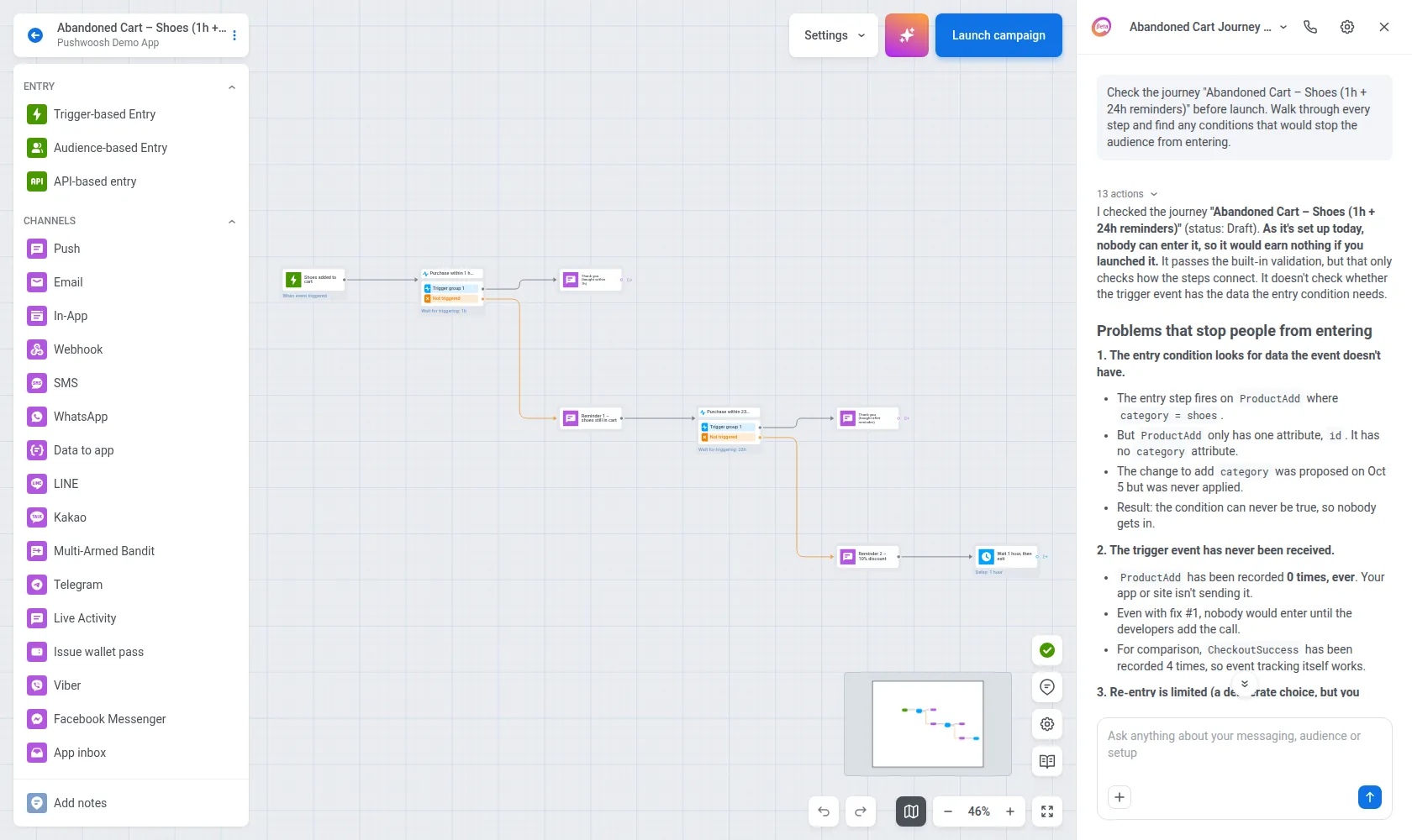

AI marketing use cases for your inspo: What tasks teams hand off to ManyMoney
We went through real ManyMoney conversations from Pushwoosh customers: over 100 conversations. The pattern was clear:
- 26% were about journeys: building, auditing, and fixing them
- 16% were performance analysis: holdouts, reports, metric checks
- Only 5% asked for copy
That ratio says a lot. Teams already have plenty of messages. What they hand off to AI is managing campaigns and making sure those messages reach the right people and do their job.
So if AI still only writes your push headlines, you’re leaving the most useful part on the table.
Here are the 10 tasks that came up most, with prompts you can copy and run today 👇🏻
Build and fix journeys
Journeys are where AI campaign management pays off first. A multi-step flow has dozens of settings: entry rules, delays, splits, goals. 1 wrong value can silently cut off your audience, and you won’t notice until the stats come back empty.
ManyMoney reads, checks, and fixes the journeys you already run, before that happens.
1. Audit a journey before launch
Customer case: A mobility service built a multi-step lifecycle journey and wanted a final check before going live.
Check the journey "[journey name]" before launch.Walk through every step, show me the branch map, and find any conditions that would stop the audience from entering.What ManyMoney does: It walked the journey step by step, drew the branch map, and found the expired date in the entry condition. The main audience, the biggest segment in the flow, would never have entered. ManyMoney suggested the fix and re-checked the journey after the edit.
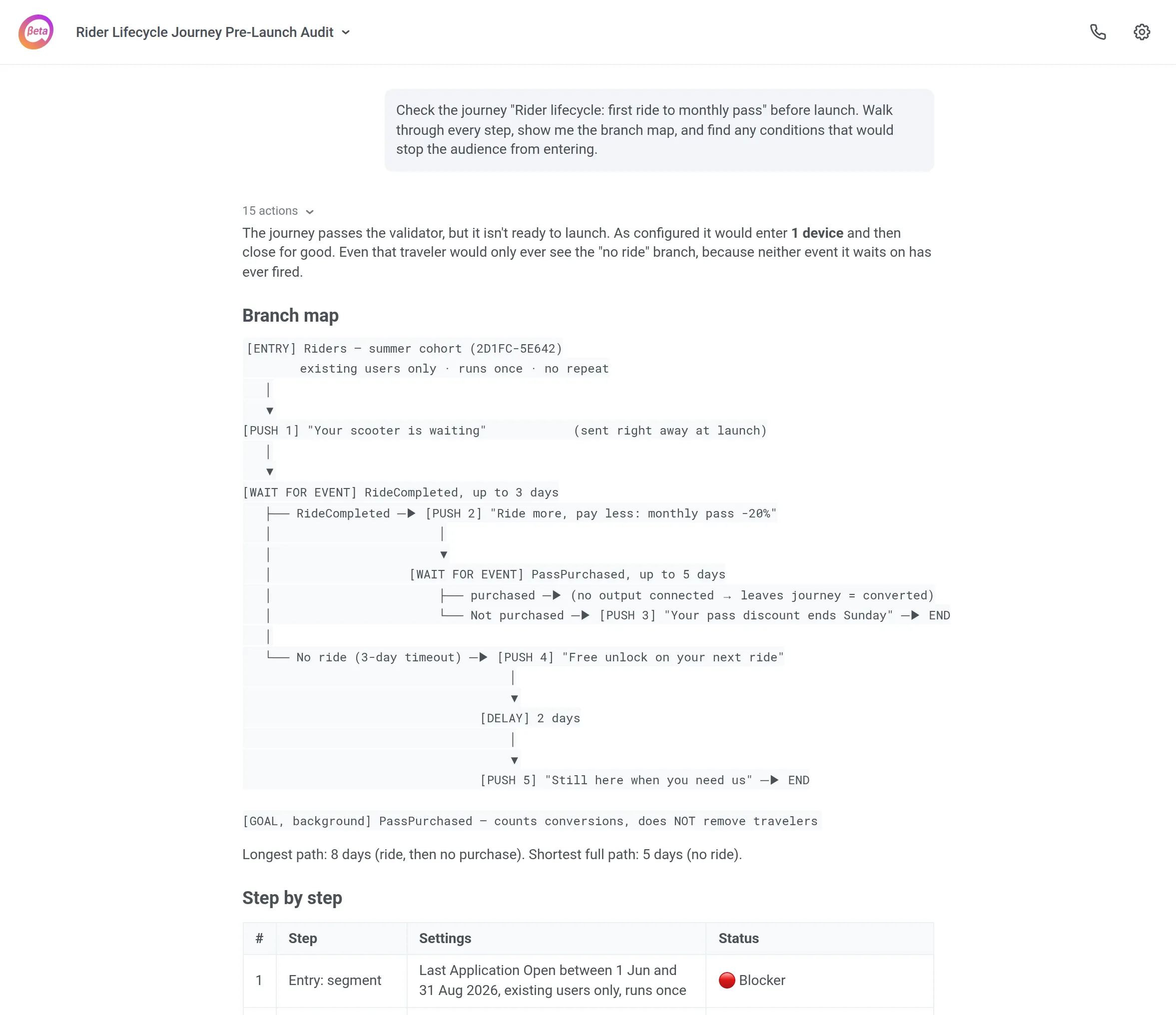
What you get: a broken launch caught before the send, not a week later from an empty stats page.
2. Draft a journey from the tags you actually have
Customer case: A subscription app needed a reminder flow for users whose plan is about to expire.
Draft a journey that reminds users their subscription ends soon.Use only tags that exist in this project.Leave it in Draft and describe what each block does.What ManyMoney does: It checks which tags and events the project really collects, builds the flow from those, and saves it as a draft with a short note on every block.
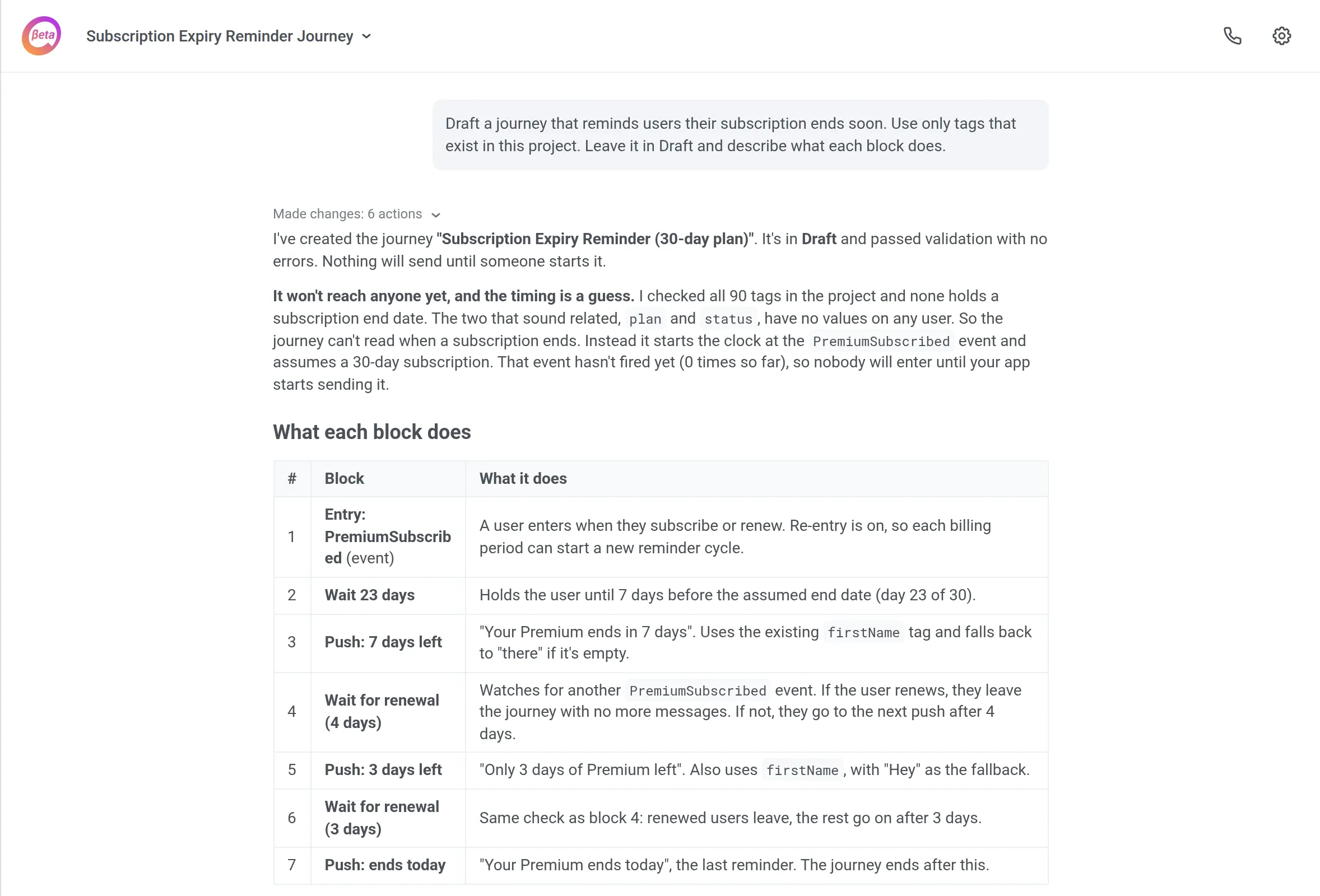
What you get: a journey you can review in Customer Journey Builder before anything goes live, with no invented tags that break on day one.
3. Add conversion goals and a control group
Customer case: A journey has been running for weeks, and nobody can say whether it works.
Add conversion goals and a 10% control group to the journey "[journey name]".Show me the plan first.Make changes only after I confirm.What ManyMoney does: It specifies which events should count as conversions, where the control group sits, waits for your OK, and then applies the changes.
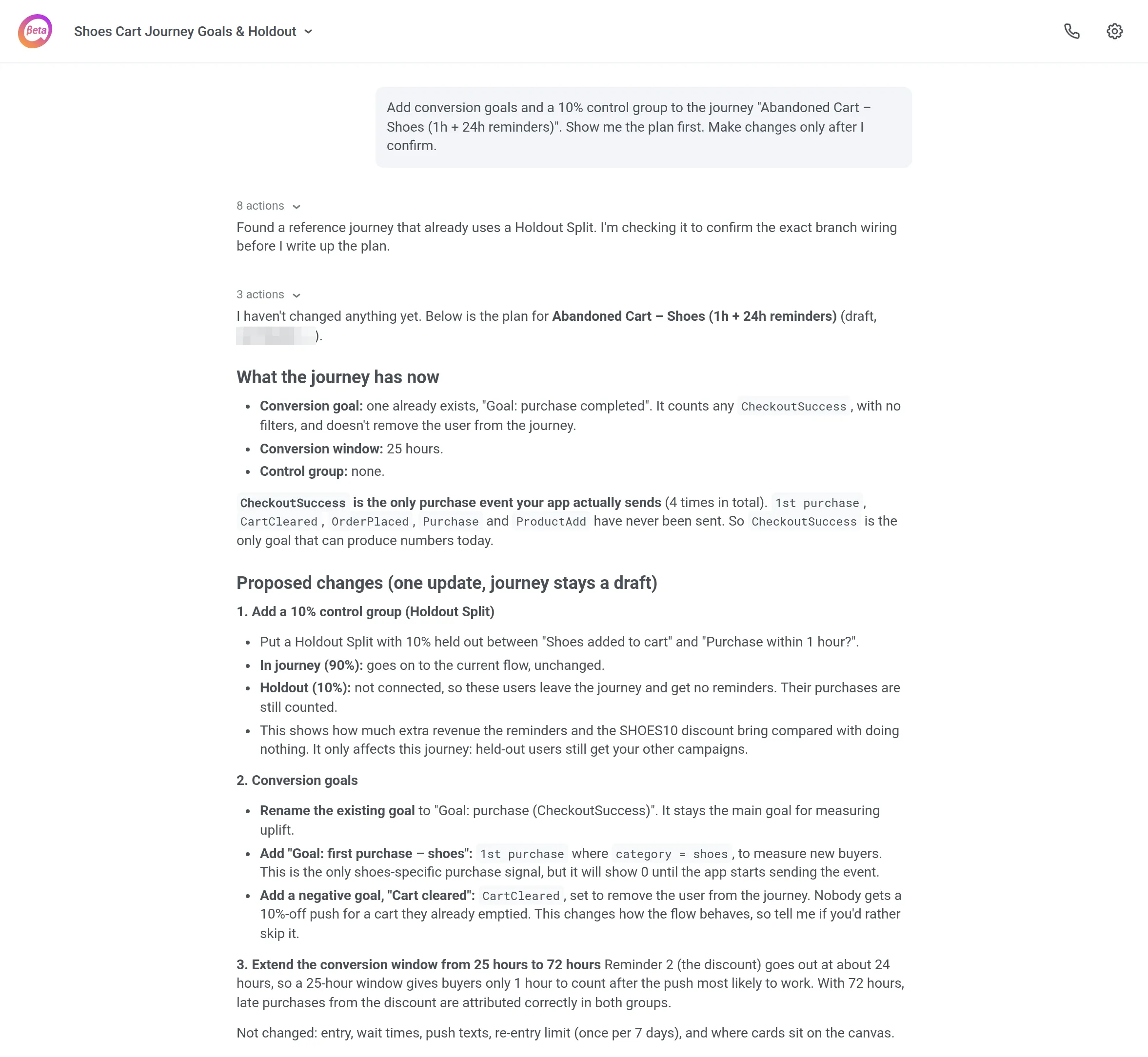
What you get: a journey that reports results against a baseline. Set conversion goals once, and every future report has something to compare to.
4. Trace why a user went through the whole journey
Customer case: An edtech app ran an “update your app” journey. Users who still had the old version should have dropped out, but they kept going to the very end.
Trace user [ID] through the journey "[journey name]" step by step and explain why they reached the end.What ManyMoney does: It traced real users through each step and found the cause: the app version tag arrived after the journey had already checked it. ManyMoney added a Time Delay before the check and a second check after it. Once the fix went live, it measured the result: roughly 1 user in 5 now drops out as intended.
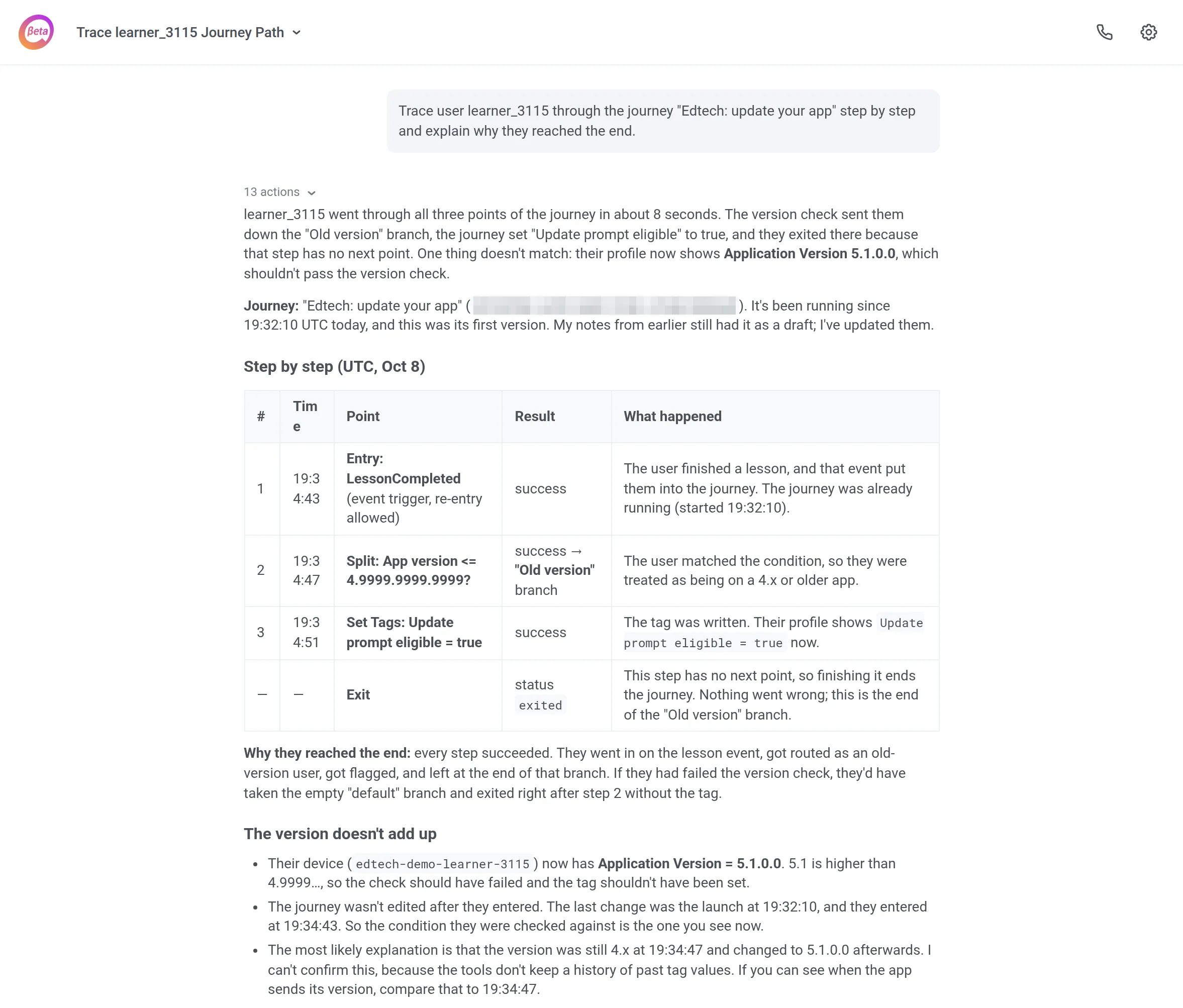
What you get: a logic bug found on real data and closed in 1 conversation.
📖 More on debugging flows: Journey analytics: how to find and fix drop-offs
Measure what’s working
Most dashboards give you numbers. Then someone still has to figure out what they mean.
That’s why analytics is the second most common thing Pushwoosh customers hand off to ManyMoney. Analysts get the best results with AI marketing analytics: a precise question in, a meeting-ready answer out.
5. Run incrementality testing against a control group
Customer case: A CRM team wanted to know whether its lifecycle journey actually drove more target actions or just took credit for users who’d have converted anyway.
Analyze the journey "[journey name]" end to end and compare recipients with the control group on [target action].Tell me whether there's a lift.What ManyMoney does: It compared the people who got the journey with the holdout on the target action. The answer was uncomfortable: no meaningful lift.
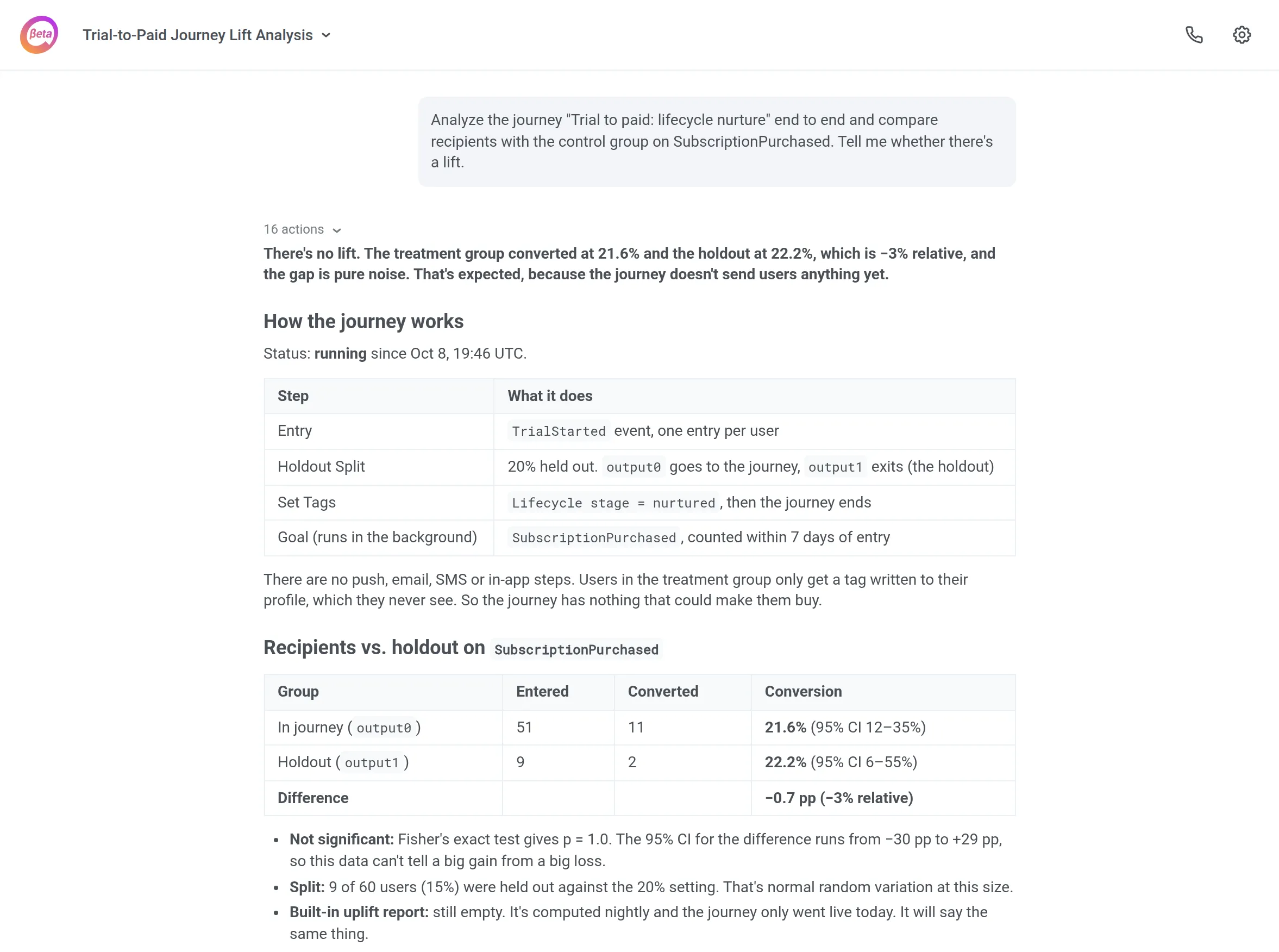
What you get: a decision to stop or rebuild the journey, based on measured incrementality instead of open rates. An unwelcome answer is still cheaper than another quarter of sending a flow that doesn’t move anything.
📖 Why holdouts matter: Measure messaging impact with a control group
6. Turn a weekly report into 1 reusable prompt
Customer case: An analyst was building the same weekly report by hand: metrics for every one-time send and every journey. Classic AI marketing reporting territory.
Build a table of metrics for all one-time sends and journeys for [period].Export it to CSV.What ManyMoney does: It built the report, then corrected the “sent” metric after the analyst checked it against her own numbers. At the end, it gave her 2 ready-made prompts to rerun the report for any period.
What you get: AI marketing reporting turns a weekly chore into a single command.
Know your audience with AI segmentation
AI segmentation works best when you can describe an audience the way you’d explain it to a colleague, without rebuilding the filter logic by hand.
Pushwoosh customers use ManyMoney for 2 jobs here: building segments from plain language and collecting the data those segments depend on.
7. Build a segment from plain language, and fix one that shows 0
Customer case: Complex segments are slow to build by hand. They’re even slower to debug when the count comes back as 0.
Create a segment: registered in the last 3 months, subscribed to email, opened emails, never purchased.Then show me the saved conditions.Why does the segment "[segment name]" show 0?Find the condition that filters everyone out.What ManyMoney does: For the first, it translates the description into segment conditions and shows you what it saved. For the second, it goes through the conditions one by one until it finds the one excluding everybody.
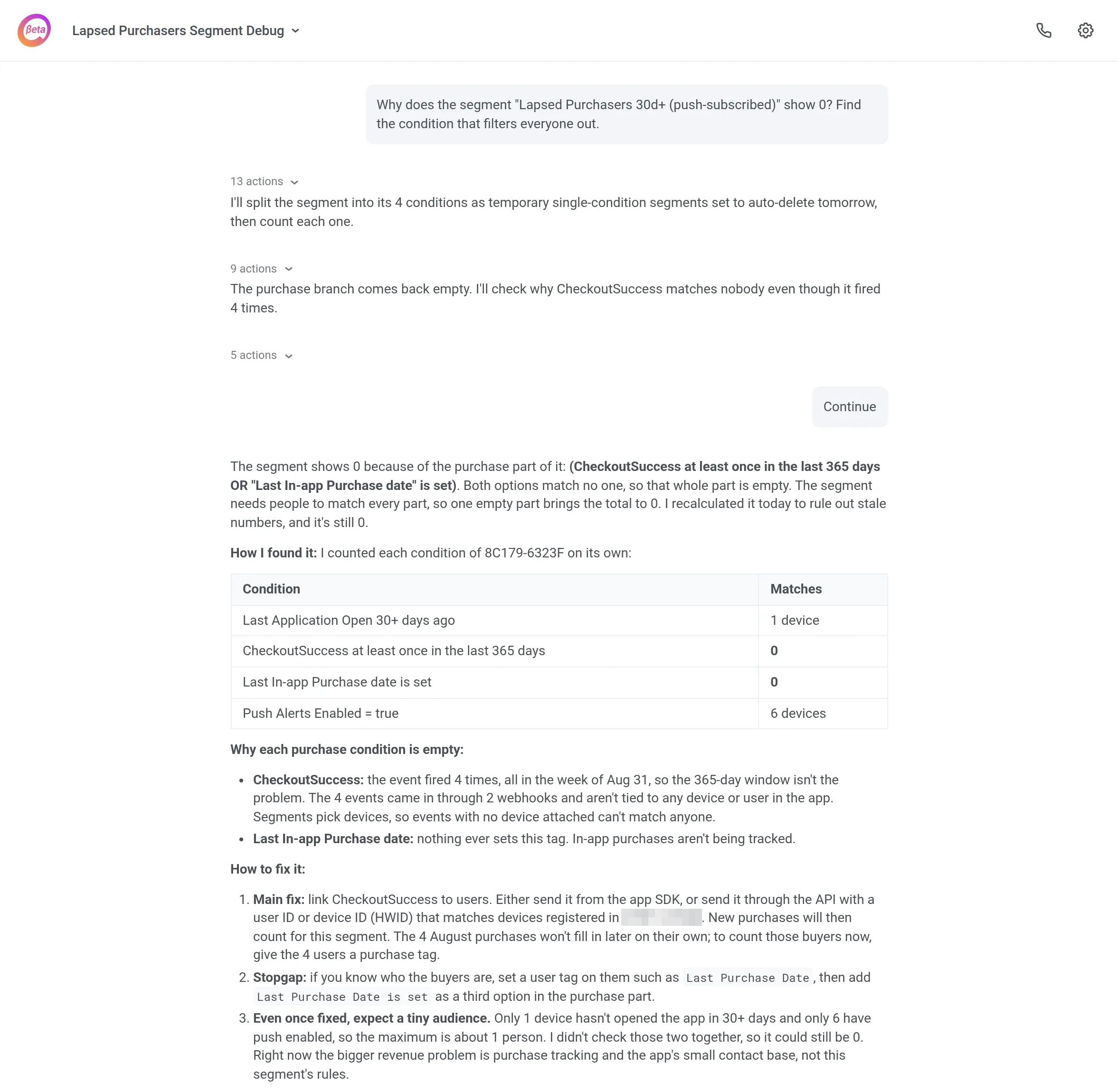
What you get: you go from an idea to a verified audience in 1 conversation, without guessing which AND/OR rule broke the count.
8. Let users segment themselves with an in-app survey
Customer case: A retail app wanted to know where customers prefer to hear from it: SMS, a messenger, or email.
Create an in-app message asking which communication channel users prefer, with multiple choice.Write each answer to a tag.What ManyMoney does. It built the in-app message with the question, created the tags and events, and connected them so each answer fires an event that writes a tag.
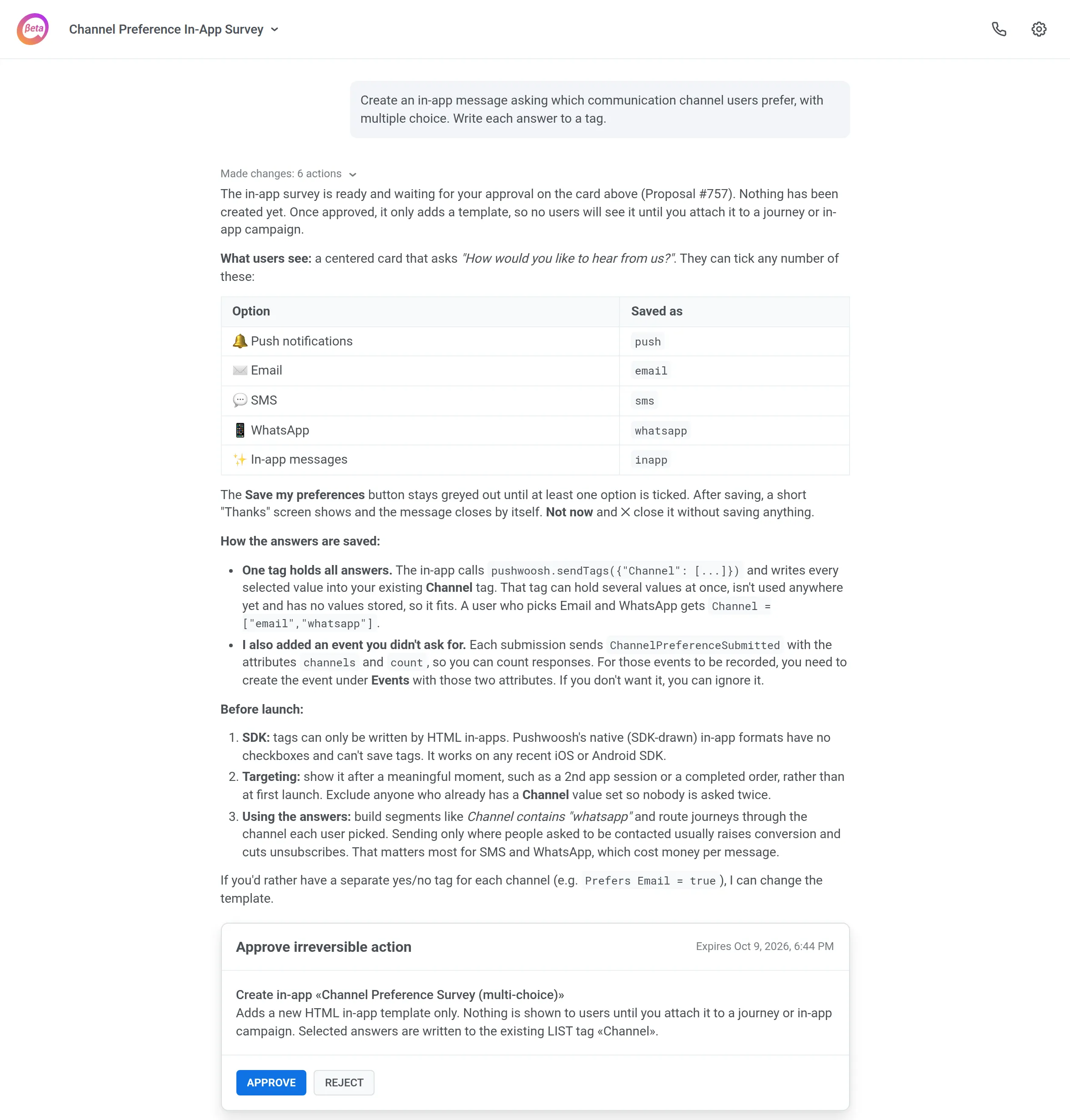
What you get: channel preference becomes a segment you can target right away. Users segment themselves, and you stop guessing which channel to use.
Personalize and localize
Personalization gets harder with every new condition and every new language: each one multiplies the copy you have to write and keep up to date.
Pushwoosh customers hand ManyMoney both parts of that job: matching the right message to each user, and keeping the text in sync across every language version.
9. Send messages based on user data, in every language
Customer case: A nutrition app wanted to nudge users whose overall health score was dropping. The message had to name the actual reason: calories, steps, or protein.
Users whose score drops below [threshold] should get a message based on the reason: [reason A], [reason B], or [reason C].Find the right event and write a variant for each reason.What ManyMoney does. It found the event that carries the score and its reason, wrote a message variant per reason, and refined the tone in the app’s language until it sounded right.
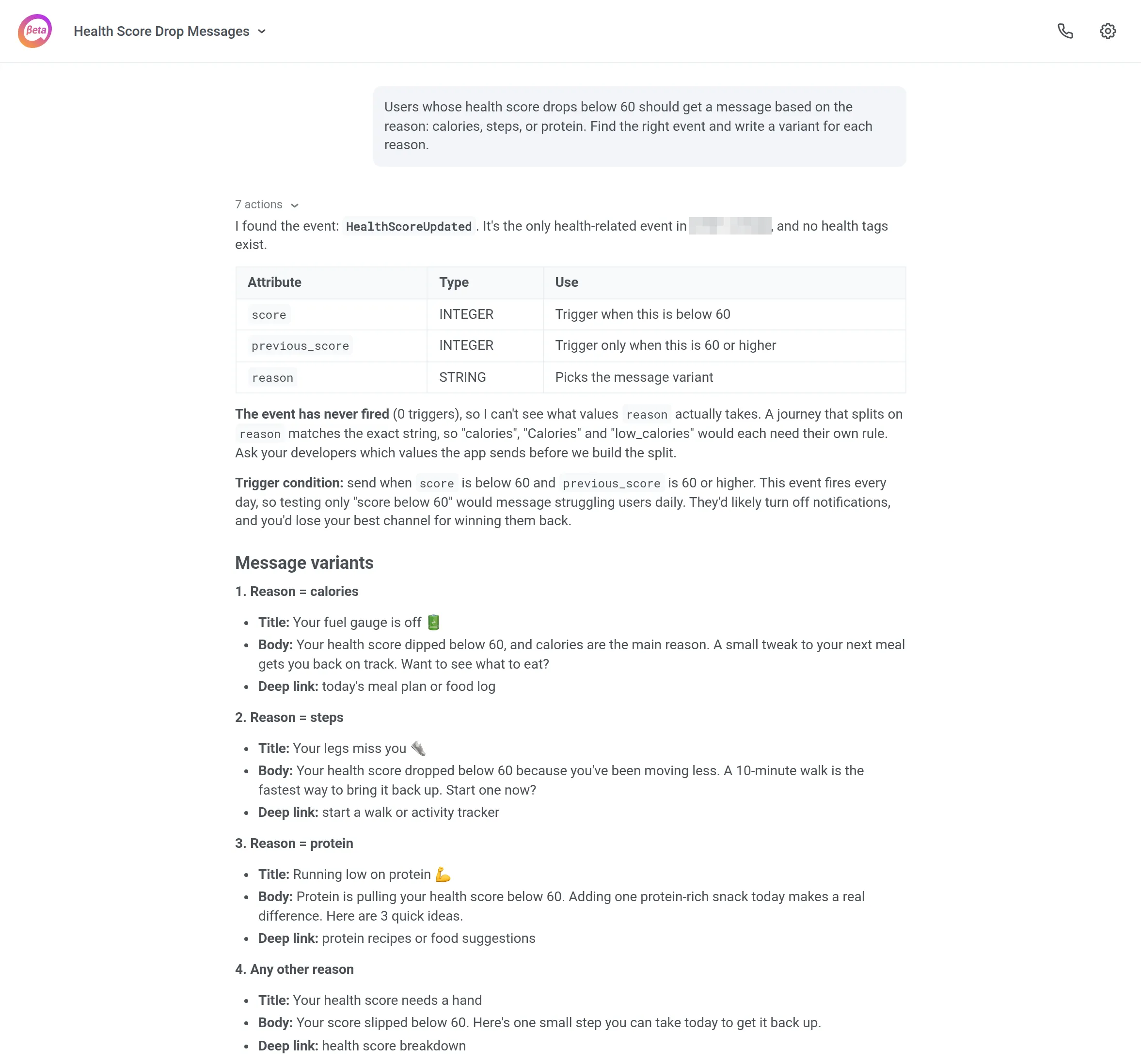
For changes to existing content, 1 prompt covers every locale:
Replace the text in the template "[template name]" with this one.Don't touch the styles.Do the same in every language version.What you get: from idea to ready copy in 1 conversation. Note that multi-language presets cover push, email, SMS, and LINE. WhatsApp messages need separate presets per language.
📖 More on language targeting: Localized messaging
Keep your setup healthy
Some of the most time-consuming questions in a marketing team sound simple: “Why didn’t this push arrive?” The answer usually sits in logs and device data that marketers rarely open.
For these questions, Pushwoosh has a dedicated mode, Troubleshoot with ManyMoney AI. It checks the setup for you and comes back with a diagnosis in under a minute.
10. Find out why a test push didn’t arrive
Customer case: A team sends a test push. Nothing shows up on the phone. Is it the token, the environment, or the setup? Before you file a ticket, ask:
Check why the test push didn't reach my device: look at the device registration and the send log.What ManyMoney does. In troubleshooting mode, it checks device registration, tracking logs, tags, and app settings. A full diagnosis typically takes 10–30 seconds. If the fix changes something in your account, ManyMoney asks before doing it. If the cause sits outside what it can see, it drafts a support ticket with everything it found.
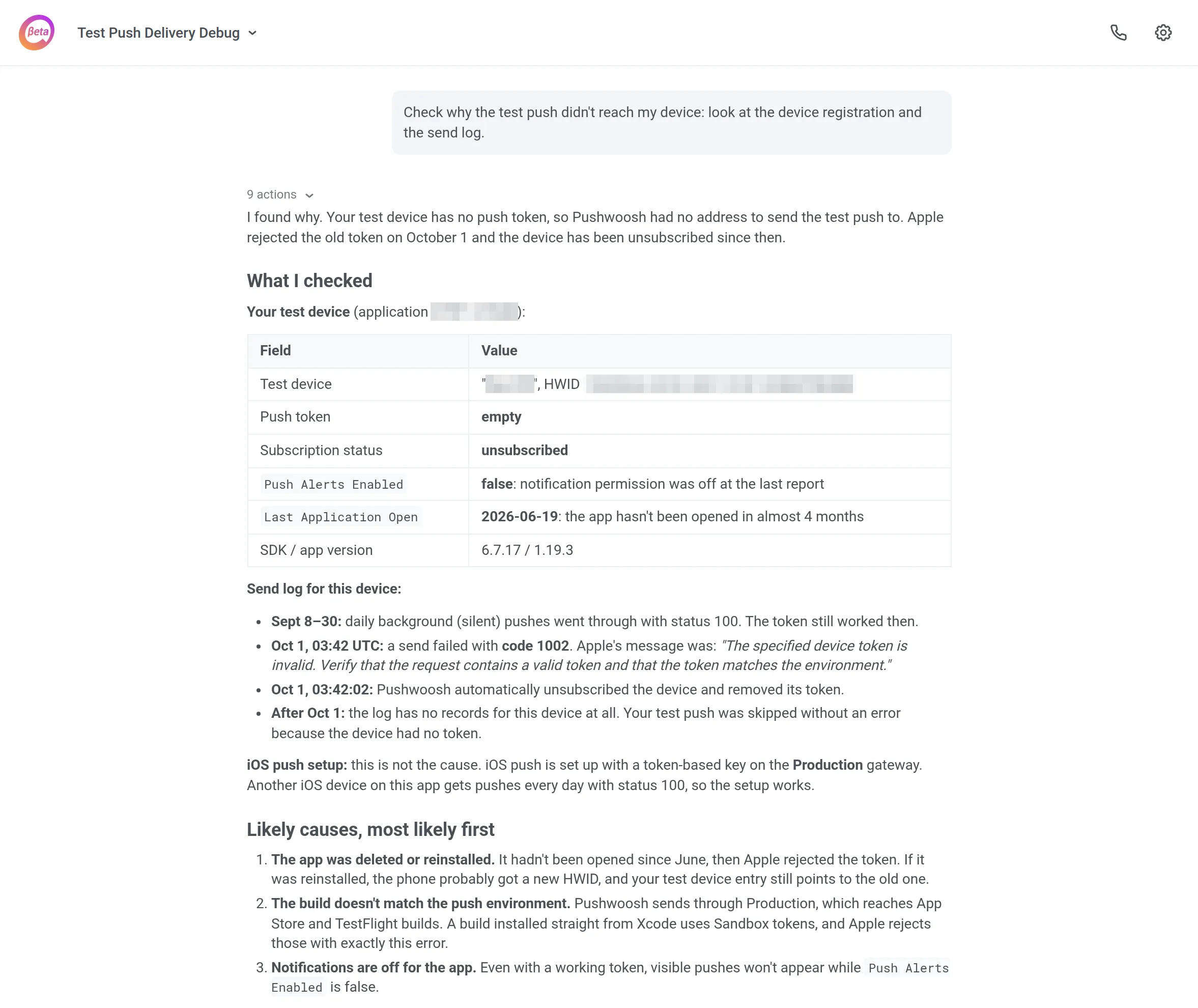
What you get: you get a specific cause and a fix plan, not a generic checklist. And you get it before the issue turns into a support thread.
How teams write prompts that work
The strongest prompts in our sample share 3 habits. None of them require prompt-engineering skills.
- Name the exact object. “Check the journey [name]” beats “check my journeys.” The agent knows where to look, and you know what it touched.
- Limit it to real data. “Use only tags that exist in this project” keeps the agent from building on events you don’t collect. The draft works on day one.
- Add a checkpoint. “Show me the plan first,” “leave it in Draft,” “don’t create anything yet.” You review before anything changes. This one habit does more for trust than any setting.
Get started with ManyMoney
Already on Pushwoosh? Open AI Assistant in your Control Panel and enable Full Automation so the agent can make changes in your account. Then pick 1 task from this list.
New to Pushwoosh? Sign up and run these prompts on your own project.