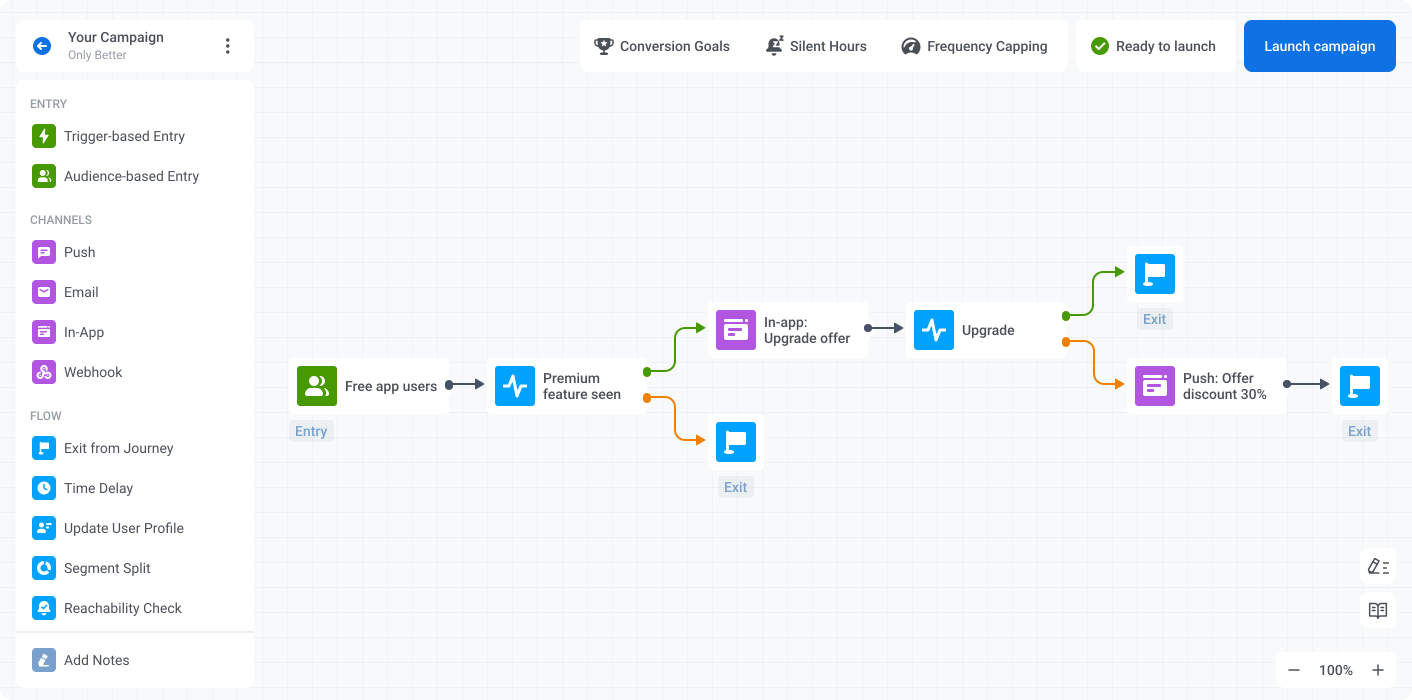
Have you been orchestrating messaging campaigns with Pushwoosh Customer Journey Builder or are you yet to try it? Either way, check out how the tool looks and functions now. Spoiler: approaching customers and your business goals will be as smooth as ever.
What is Pushwoosh Customer Journey Builder?
For those new to the tool, Pushwoosh Customer Journey Builder is a campaign planning and automation tool that allows marketers to design and launch engaging omnichannel communications that assist customers at every stage of their lifecycle.
Watch the video to get the first glimpse of Pushwoosh’s core tool:
New and renowned features for campaign planning and execution
It’s not your job to make sense of a marketing automation tool interface — it’s ours. So Pushwoosh Team has made sure that:
- Every element of Pushwoosh Customer Journey Builder goes under a clear name, is easily discoverable on the canvas and does its job as expected. We’ll break down each element’s functions and use cases below.
- Beginners can receive prompt help from Assistant — your personal automated campaign checker that takes you through a basic journey-launch checklist, validating your campaign or suggesting any steps that might be missing. See it in action below.
- Seasoned users collaborating in campaign creation with their teams can exchange comments in the interface. If you need guidance from the Pushwoosh Customer Success team, you may agree to exchange notes with your manager too!
Choose between audience-based and behavior-based targeting
There is a time and a place for broadcast messaging, but if you’re aiming at the highest efficiency of your communication, you have to opt for targeting selected audience segments formed by user behavior or attributes. Pushwoosh Customer Journey Builder allows you to do either with its:

Targeting a segment based on user data may be no less effective. For example, residents of a particular city may respond positively to the local news a media app delivers. At the same time, subscribers of a streaming service may enjoy the “You may also like” content recommended in a push notification.
EXTRA:

Apply even more granular segmentation — use Segment Split to divide your initially targeted audience into narrower segments. By doing so, you can test how different groups react to the same message or, even better, send customized communications to each group.
Leverage the most effective messaging channels for your use case
Modern customers are very selective about the communications they receive from brands. An occasional mis-hit — and they unsubscribe from your messages for good. So you may have to craft a thoughtful communication strategy to avoid losing your engaged audience. Pushwoosh Customer Journey Builder can help you with that.
Coordinate the must-have channels:
Engage your customers with on-point mobile and web push notifications. Choose from the Presets you prepared in advance or customize your content right in the Pushwoosh Customer Journey Builder interface.

Send emails to your subscriber list: use your Presets and optionally personalize them for recipients based on the events they have triggered or not.
Explore the must-try personalization options available in Pushwoosh
Continue your out-of-the-app communication with in-app messages. For example, expand on the details of the offer you pushed or develop an independent activity that will engage your active users.
EXTRA:
Use Webhooks to enable SMS and WhatsApp message sending — deliver transactional alerts and marketing communications via the most user-friendly channels.
You can send SMS right from the interface of Pushwoosh Customer Journey Builder too! Please contact our Sales team to get access to the feature.
Switch between the channels to convey your message effectively

One day a customer is still subscribed to your push notifications; the next day they may opt out. The same may happen to your email subscribers. To avoid sending messages into the void, do a Reachability check: see if it’s even technically possible to contact your target users via the chosen channel — push notifications or email. If they are not reachable by one means of communication, leverage an alternative channel to convey your message.

Track if a user has opened or ignored your push notification or email. Plan two options for further communication: for example, those who have opened your push may receive an in-app message with more detail and those who haven’t clicked on the notification may be sent an email with the same offer.

To increase your odds of getting more conversions, ensure your message has reached every user. Send your push notifications simultaneously to all the devices connected by UserID. With this feature, you can deliver mobile pushes to the phone and the tablet belonging to the same user. In addition, you can convey the message in a web push and, thus, reach the user while they are working with their desktop devices.
Avoid sending too many messages to the same user

When several campaigns run simultaneously, a single user may receive too many messages within a short period. Maybe they have triggered a few events, or they make part of various audience segments — whatever the reason was, the customer might be annoyed to hear from you again and again. To avoid overwhelming users with your communications, set Frequency Capping. Prevent opt-outs and increase your messaging efficiency with a couple of clicks!
Enjoy the benefits of omnichannel messaging
In Pushwoosh Customer Journey Builder, you plan, execute, and receive statistics on omnichannel campaigns all in one place. See the entire picture and coordinate your messages to ensure their highest efficiency.
Personalize your communications
Modern customers expect brand experiences to be tailored to them, and communications are no exception. Therefore, personalization is a prerequisite for your message to break through the noise and nudge your audience to action. Here is how Pushwoosh Customer Journey Builder allows you to achieve this step by step:
Keep user attributes and behavior data up-to-date
Take note of how a customer behaved at a certain point of their journey or what new information you have obtained from them — Update User Profile to make sure you base your segmentation and message copies on the up-to-date user data.
Send your messages at the most relevant time

Specify the moment when your message should appear on users’ screens — use Time Delay to:
- Set a period of time a user will wait before moving to the next stage of your campaign
- Schedule your next message sending for an exact time in the future
- Time your communication to whatever is noted on a particular user’s profile — for example, the date and hour of their next (or past) appointment or the moment when they have triggered a specific event in your app

Messages arriving in the middle of the night can irritate users and make them unsubscribe or even uninstall the app. To avoid losing your audience, pause your communications sending with Silent Hours.
⏰ Learn more about all features for effective campaign scheduling in Pushwoosh Customer Journey Builder
Adapt your campaigns to real-time user behavior
If only you could envisage all the possible offshoots in your core communication scenario and plan a few variations of your campaign! Wait, this is exactly what you can do with Pushwoosh Customer Journey Builder:

Chasing after the best time to send your messages? Act in response to user behavior rather than a particular hour struck on the clock. Continue communication with an individual user after they’ve taken a meaningful action: completed onboarding, started a free trial or made an in-app purchase.
Experiment safely

Do not guess, do A/B/N testing. Unlike many other marketing automation tools, Pushwoosh Customer Journey Builder doesn’t limit your experiments to only two options. Feel free to compare as many versions as you need. Test messages and full-scale campaign flows against each other on your terms.
Track your conversions in real time

What target action does your campaign encourage taking? Set this objective as a Conversion Goal and have the campaign statistics at your fingertips.
Launch automated campaigns within minutes
Users have always praised the ease and speed of work with Pushwoosh Customer Journey Builder. Without false modesty, our drag-and-drop campaign builder has had a more user-friendly interface, compared to competitors, since its very launch. And now, users may have an even better experience with the new features at their disposal:
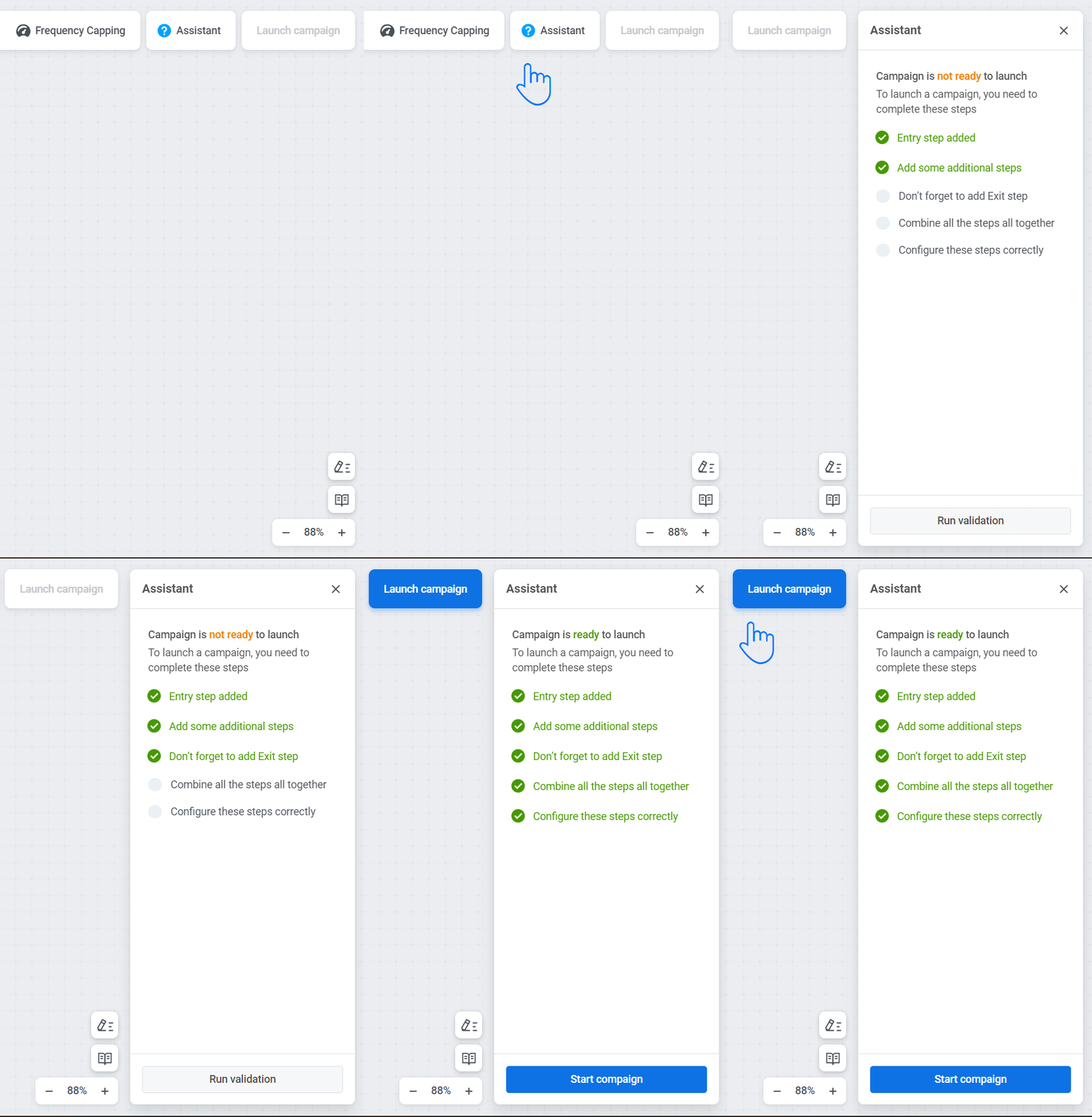
If you are an absolute beginner in the tool, you may appreciate help from our new Assistant. Step by step, it will guide you through the essential elements of any campaign creation and draw your attention to the points you have left incomplete. The tool won’t leave you alone until all the elements of your flow are set up correctly, and you’re ready to launch the campaign.

Among other things, Assistant will remind you to add the Exit from Journey element. Pushwoosh users would often forget to put it at the end of the flow, which prevented campaigns from launching and irritated many of you quite a lot. Now there will be one less thing to be annoyed about in your day as Pushwoosh Customer Journey Builder will remind you of that closing element, so small yet so important.

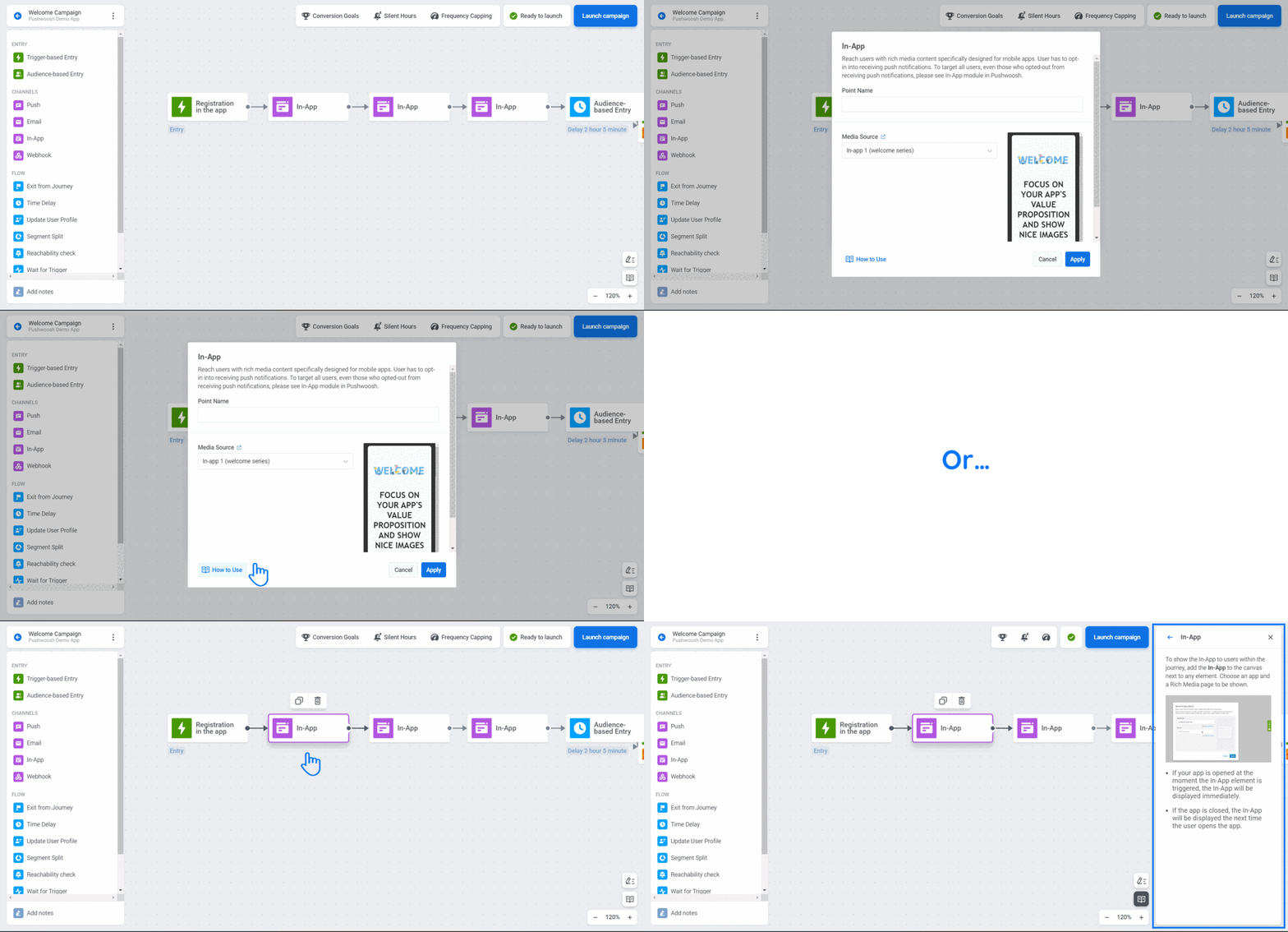
For your uninterrupted experience, Pushwoosh Customer Journey Builder has an embedded tutorial that appears on the sidelines of the canvas at a click.
EXTRA:

Analyze & optimize your campaign performance
With Pushwoosh Customer Journey Builder, you can track the results of your campaigns and fine-tune your messages to improve their efficiency and reach your goals faster.
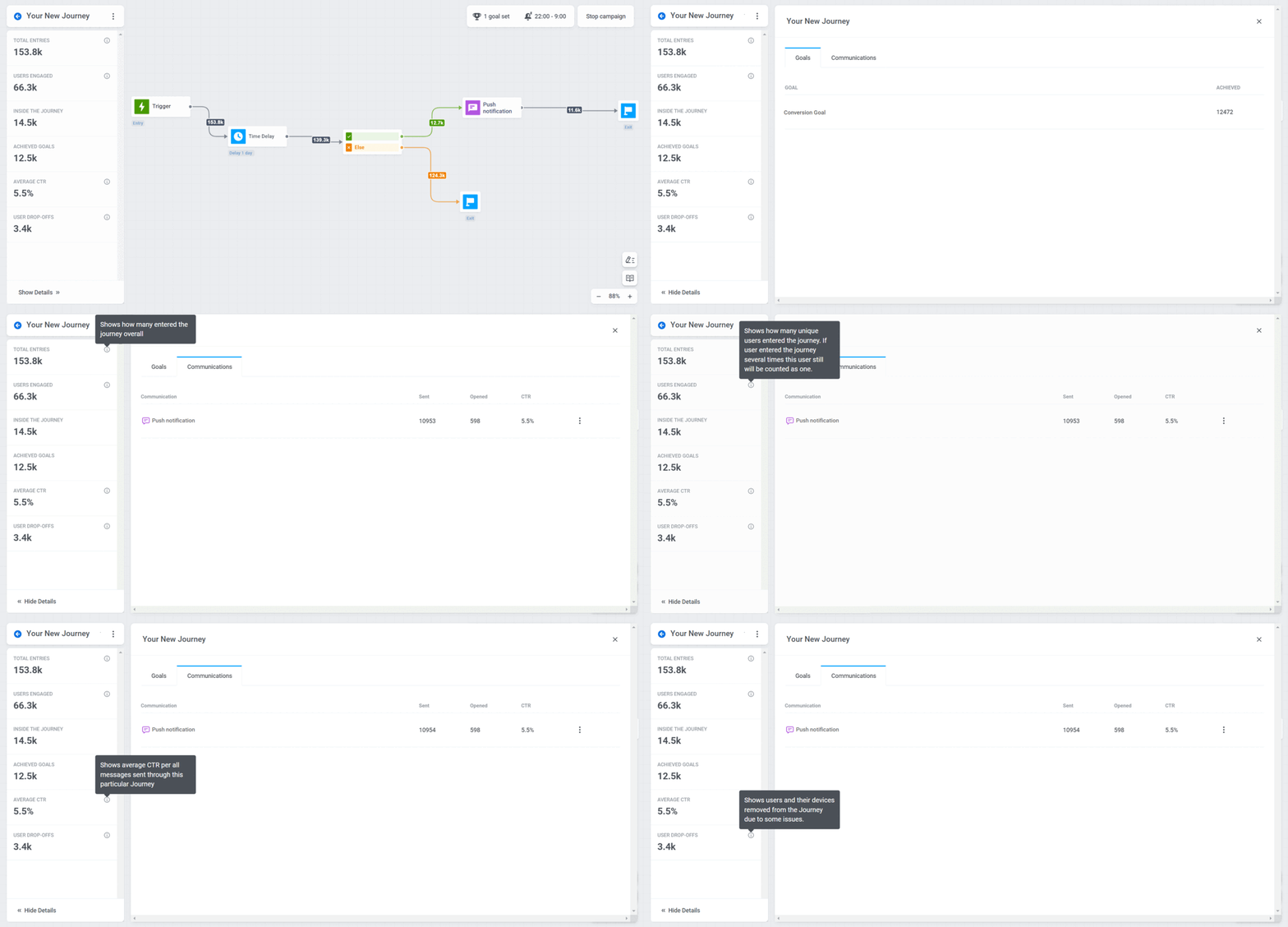
Get full access to campaign statistics: monitor your goal conversions, the number of users engaged in the campaign, and the CTRs of your messages to estimate their efficiency and understand what works best for you.
Shape your next campaign in Pushwoosh Customer Journey Builder
As your understanding of the audience deepens, your messaging campaigns become more elaborate. You can use every insight you gain for more granular segmentation and targeting, better-personalized copies, and higher conversions into your business goals. Pushwoosh Customer Journey Builder can accommodate your needs and take your communication to the next level. Try out the improved tool and see your efficiency grow with ease.
Or let us demonstrate how Pushwoosh Customer Journey Builder can help your business grow.