Summer’22 seems to have completely moved on, and you may get that itchy feeling: did you miss anything important in these past three months? Pushwoosh Team is happy to get you up-to-date — at least, on everything that concerns our product updates. With the recently released features, you can make a leap towards unprecedentedly personalized messages and a deep dive into RFM-data-based customer segments. Sounds intriguing? Then keep reading and adopt new technologies:
Personalization
Segmentation
Campaigns
Statistics
- Personalize your offers like never before: Create Dynamic Content with Liquid Templates
A cart abandonment reminder where you mention the exact productyour customer has left unpurchased. An email featuring a variable discount that incentivizes hesitating clients and encourages buyers to make a next purchase. We bet you’ve been yearning to reach this level of personalization, not just “Hello Jack”. And now you can get there with the huge Liquid Templates update in Pushwoosh.
Earlier, you were able to deliver spot-on offers in response to your customer behavior. Now the very copy of your push notifications and emails will sound more relevant and enticing — just compare:

And you can expand on the reminder you sent in a push notification and email your customer:

Learn more use cases and dive into tech detail behind sophisticated personalization now available in Pushwoosh:
Discover advanced personalization
Feel free to reach out to your CSM and learn more.
- Single out your best (and worst) paying customers with RFM Segmentation
You surely want to communicate differently with your most loyal customer and those who are about to churn. Now you can easily distinguish between them as Pushwoosh manages data-based segments for you, operating Recency, Frequency, and Average Monetary Values. In other words, you can use RFM Segmentation by Pushwoosh!
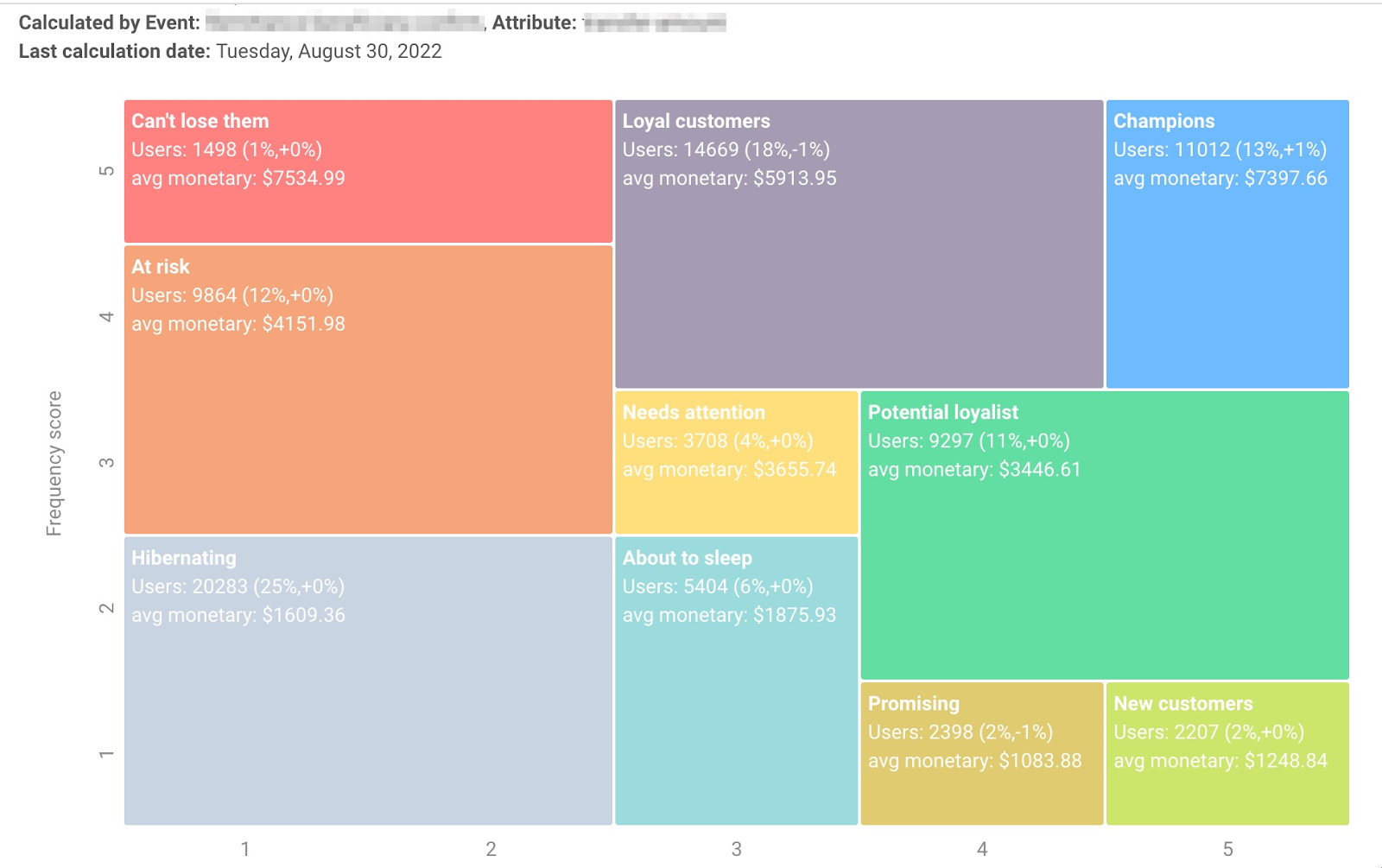
With RFM Segmentation, you can send on-point communications to boost your e-commerce sales and game app revenue.
Learn how to create RFM Segments
- Segment your audience by triggered Events
The first step towards streamlined behavioral segmentation: create, manage, and target Segments based on specific events your customers have triggered.
Earlier, you would have to set up dedicated journeys to Tag users when they trigger a specific Event. Now you can go straight to choosing Events as segmentation parameters when working via API, and soon it will become possible in the interface — stay tuned!
See how you can segment your audience
- Target exclusively desktop or mobile users
Another segmentation option for omnichannel marketing is made possible with Pushwoosh. Segment your audience by the type of browser they use: add the new BrowserType default string tag, gather information, and differentiate your communication on desktop vs. mobile to:
- Send dedicated offers running in your website or app version
- Get the most out of tech and design features available for web and mobile
- Avoid even the slightest doubt on the perfection of your targeting, design, and relevance of your communications

- A single UI for Pushwoosh Customer Journey Builder and Control Panel with app.pushwoosh.com
There have always been two ways to use the Pushwoosh platform: first, send single-channel communications via Control Panel (CP) or second, work on the omnichannel canvas of Customer Journey Builder. If you wished to switch between the two, a new tab would open, and you would have to re-login. It wasn’t as efficient as it could have been. And we’ve improved it.
Now Pushwoosh users can switch between the tools and their tasks much more easily as Customer Journey Builder has become accessible from the CP interface.

- Automate personal reminders sending, feedback gathering, and whatever else is possible with Dynamic Time Delay
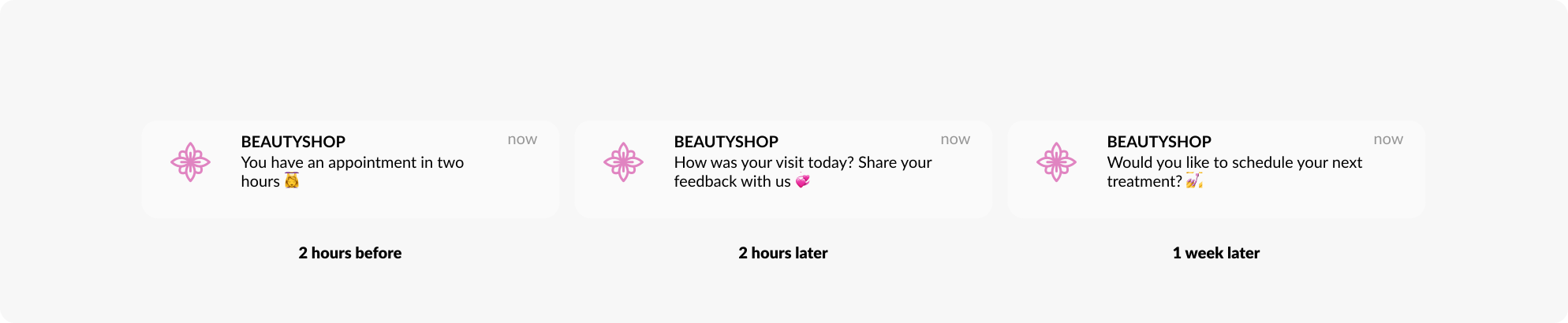
Customers appreciate timely and unobtrusive communications, and marketers definitely appreciate it when such messages are automated. Pushwoosh now perfectly satisfies the needs.
With Dynamic Time Delay based on user event or data, you can:
⏰ Remind your clients of a scheduled appointment, class or concert;
🎉 Send birthday congratulations or celebrate a user’s in-app achievement;
💌 Gather feedback after a visit;
📅 Suggest your customer chooses the time for their next appointment.
Looks like providing better customer experiences and nudging your audience to repeat conversions is now a breeze!
Learn how to set up Dynamic Time Delay
- Get more detailed statistics on your campaigns
Good news for those who have adopted campaign planning in Pushwoosh Customer Journey Builder: now you can get more insights on each communication you sent right in the interface.
- Reveal the numbers and gain insights on your journey travelers.
- Find out which messages got the highest CTRs and try to understand why.

Do you like the new UI? Don’t hesitate to let us know — your feedback helps us make Pushwoosh even better.
- Download your campaign statistics via API
No one can analyze your campaigns better than you — so export all the statistics you need from Pushwoosh Customer Journey Builder to your favorite tools via API. Take a deep dive into analytics in the optimal format and gain valuable insights without compromising time and operating convenience.
Learn how to export Journey stats via API
- Get detailed information on every message you send and analyze it further — access Tracking Log via API
Keep track of the push notifications and emails you sent and the exact users and devices who were delivered and actually opened them. Have the information on the device platform and the Push Alerts Enabled tag value at hand. As a Pushwoosh Enterprise customer, you can now upload this sort of detail of the Tracking Log via API and conduct further analysis on your side.
By doing so, for example, you will be able to segment out users who opened (or didn’t open) a certain message and plan your further communication with them based on this fact.
Find out what detail you can collect
➕ Similar statistics are accessible from the Pushwoosh interface, too — as a Custom Plan user, you will find them in the Recipient List tab. From there, you can move to User Explorer and dive into profound analysis without leaving the Pushwoosh platform.

Have you been using Pushwoosh as a free user with limited functionality? Get in touch with our team, and let’s change your customer engagement routine for the better!