Trigger-based entry
Start a journey the moment a user does something that matters: adds to cart, fails a payment, places an order. No waiting for the next scheduled segment pull.
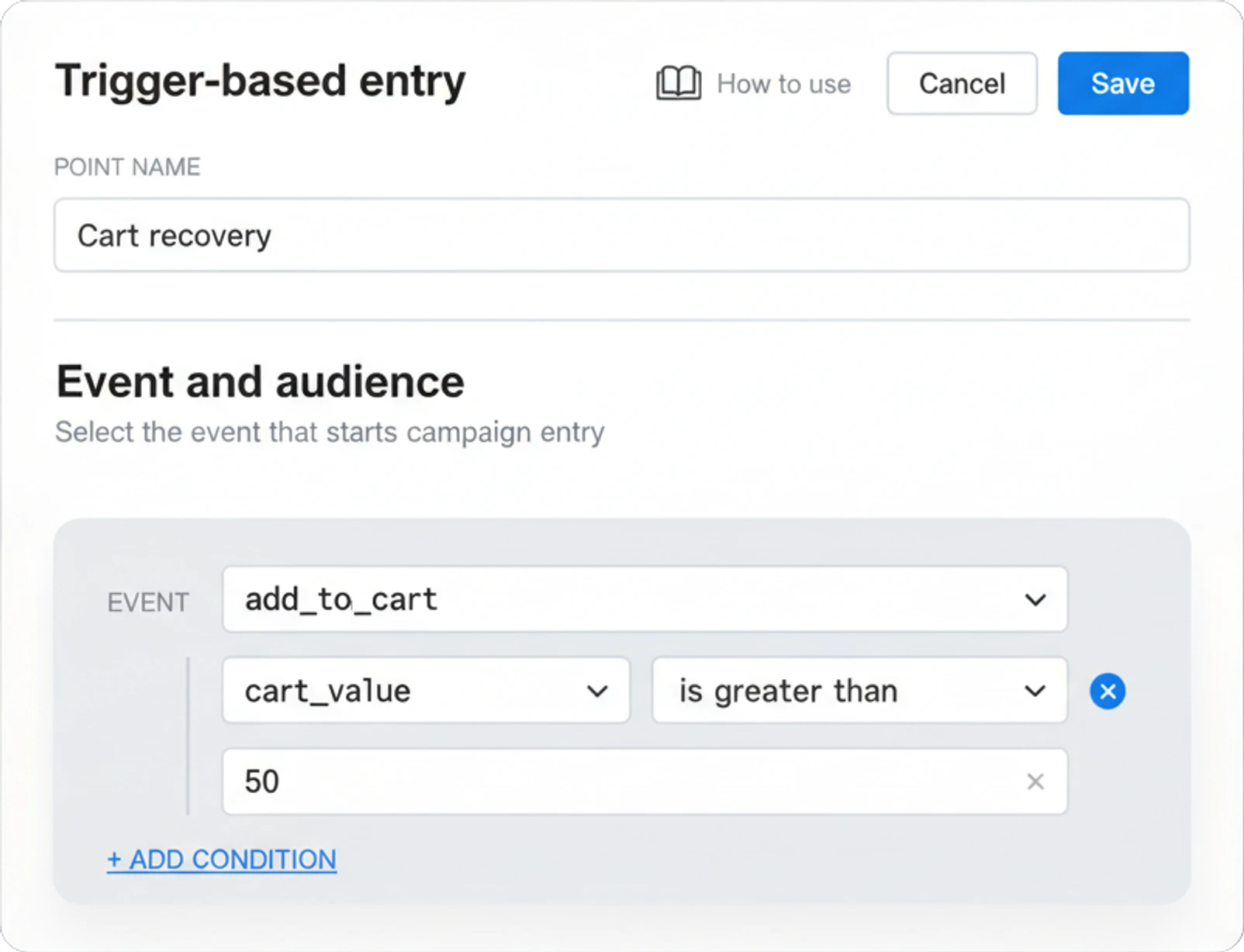
Start the moment it happens
You want your journey to start the moment something happens, not whenever the next segment refresh gets around to it. That’s easy to promise and hard to hold once more than one automation is running at a time: a cart-abandonment sequence sitting among a dozen others, each reasonable on its own. “We noticed you left something behind,” sent an hour later by a nightly batch, is a different message than one that’s already running before the person puts the phone down. Trigger-based entry is what closes that gap.
What Trigger-based entry does
Pick an event, and anyone who fires it enters the journey right then, instead of waiting on the next scan of a saved segment.
Reacts in real time
Enters the moment the event fires, not on the next scheduled scan.
Filters on the payload
Optional conditions on the event's own attributes qualify entry beyond its name.
Runs several sessions at once
Concurrency keyed to order_id or product_id lets one user hold multiple parallel runs.
Controls re-entry
Block a repeat trigger, or let it restart the session, per element.
| Setting | Options |
|---|---|
| Event source | SDK postEvent, REST API, default PW_* events, custom events, geozone entry |
| Entry condition | Optional: filter on the event's own attributes (attribute, operator, value) |
| Who enters | The user who fired the event, or a user named inside the event's payload |
| Re-entry | Do not allow (default), or allow it and restart the session |
| Concurrency | One active session per user, or several, keyed to a session attribute like order_id or product_id |
Audience-based entry re-checks a segment on a schedule. This reacts inside the same moment the event fires, and running several sessions per user means 3 open orders can each drive their own status journey instead of colliding into one. Routing a later event back to the right one of those sessions is what Wait for Trigger’s session-scoped matching handles further down the canvas. The full element, conditions and re-entry control included, ships on the free plan.
Why it matters for the journey builder
A journey builder is only as good as its entry points. Audience-based entry covers the scheduled cadence: newsletters, win-back sweeps. What a builder needs on top of that is a way to react in the moment a payment fails or a cart gets left behind, and that’s what trigger-based entry gives Customer Journey Builder. It reads from the same event catalog the rest of the canvas already uses for segmentation and branching, so the signal that opens the door is the same one driving the flow after it.
What it hands off to next
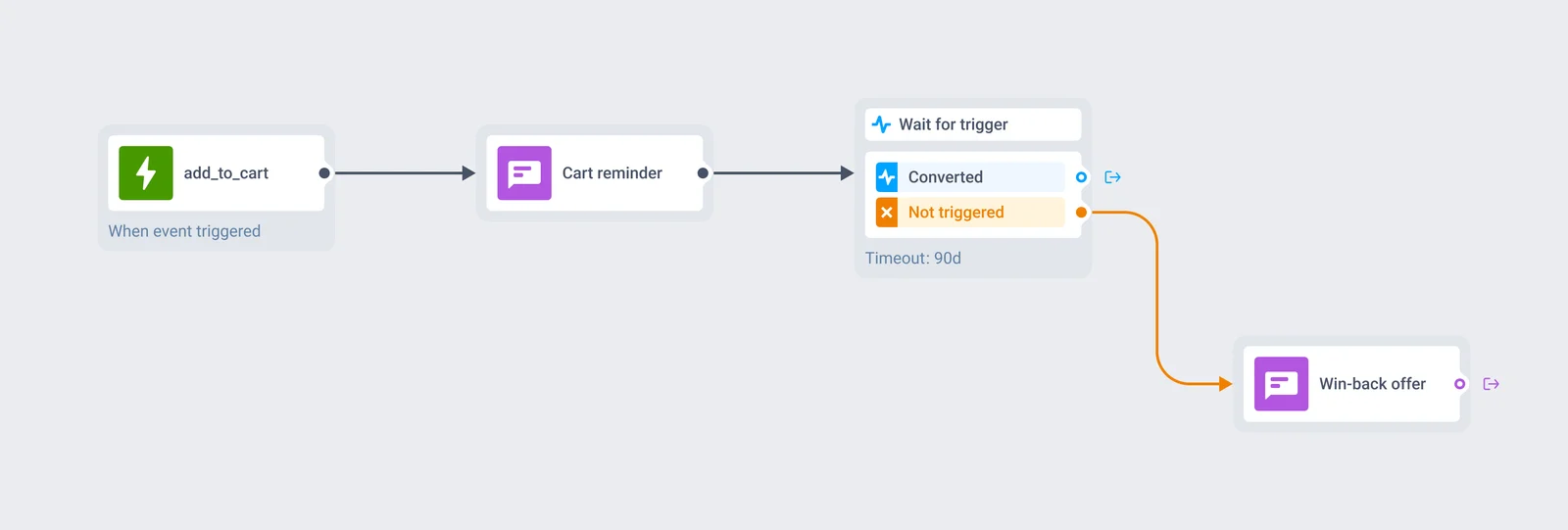
An add_to_cart event fires and this starts a cart-recovery journey. A Wait for Trigger element then gives the buyer up to 90 days to complete the purchase before branching into win-back. Neither element sends anything on its own. Both hand off to a channel block, and the entry element decided who was in the flow to begin with.
The event that starts a session can also carry the key a later branch needs to tell one order apart from another, all on the same Customer Journey Builder canvas.
Events and journeys stay on infrastructure you can name
Every event a trigger-based entry element reads runs through the same infrastructure as the rest of the platform: Pushwoosh is SOC 2 Type 2 and ISO 27001:2022 certified, GDPR-compliant, and runs on its own hardware in the US and Germany, under BDSG. Full detail sits on the data safety page.







How it works
-
Add the entry element
On the canvas, add a Trigger-based entry element and pick the event: a default PW_* event, or a custom one sent through SDK postEvent or a server call.
-
Qualify and target the entry
Add a condition on the event's attributes to qualify entry, add_to_cart where cart_value is over 50, for example, and choose whether the person who fired the event enters, or the user named inside its payload.
-
Set re-entry and concurrency
Decide whether someone already inside the journey can trigger it again, and whether one user can hold several sessions at once, keyed to an attribute like order_id.
Turn one event into a live journey.
Explore related products
Map out and streamline your campaigns with one visual tool. Communicate, engage, retain, convert, segment, and experiment using Pushwoosh Customer Journey Builder.
Drive engagement with event-based triggers. Automatically launch campaigns when customers take actions, capturing perfect moments for conversion and retention.
Hold a user for up to 90 days across 3 branches of up to 4 events each, with AND/OR logic, a guaranteed "Not triggered" path, and session-scoped matching for order- and ride-level journeys.
Pause a journey by a fixed span, a clock time, a one-time date, a weekly slot, or an offset counted from a date already stored on the user profile.
Transform abandoned carts into revenue with cart recovery automation. Send timely reminders, personalized offers, and incentives that drive conversions.
Start a journey on a clock instead of a behavioral event — immediately, on a specific date, on hand-picked dates, or on a repeating cadence, with the audience segment refreshed before every recurring run.