Retaining active users is crucial for your app’s growth, but it’s the quality of their engagement that really matters. Do your engagement numbers translate into conversions and revenue? That’s quite a challenge, so let’s unpack a tested and proven workflow for achieving just that.
How to identify high-value users
You have a segment of users who regularly visit your app.
Your DAU (Daily Active Users), MAU (Monthly Active Users), and user retention metrics are looking good.
But do these numbers really show you the full picture?
It’s a crucial question because having users open your app is one thing; having them take valuable actions is another.
Here’s where a strategic shift can make all the difference.
Focus on leveraging what you already have: a user base that’s engaged enough to open your app.
With the right approach, such as smart segmentation and targeted messaging, you can encourage active app users to take the next steps.
Let’s see how to build a strategy for transforming passive app visits into revenue-driving actions with Pushwoosh.
4 steps to boost app revenue via high-value user retention
Step 1: Create a segment of high-value users
Start by pinpointing users who are engaging in a way that shows potential for revenue.
Define them with clear criteria, such as:
- Opening the app more than ‘X’ times within ‘Y’ days.
- Clicking on at least ‘N’ features in a given timeframe.
- Viewing ‘Z’ or more products during their visits.
RFM segmentation is a great framework for this task. It allows you to categorize users based on their behavior and value-to-date.
The best thing is: each aspect of the RFM analysis is perfectly customizable, for example:
⏳ Recency takes into account how recently a user has taken your desired action in the app.
🔄 Frequency: How often they’ve taken this action within a specific period.
💰Monetary value: How much value these interactions have earned for your app. Although most relevant for e-commerce and delivery orders, this can be adapted to any app-specific actions that contribute to revenue.
With this approach, you can identify high-value segments of active users and design personalized campaigns to boost your conversion rates.
Did you know you can use Pushwoosh to automate this step?
Our RFM Segmentation tool can categorize your app users based on their engagement level and buying behavior.
At a glance on the chart, you can locate customers who are likely to become repeat buyers or engage with special offers:
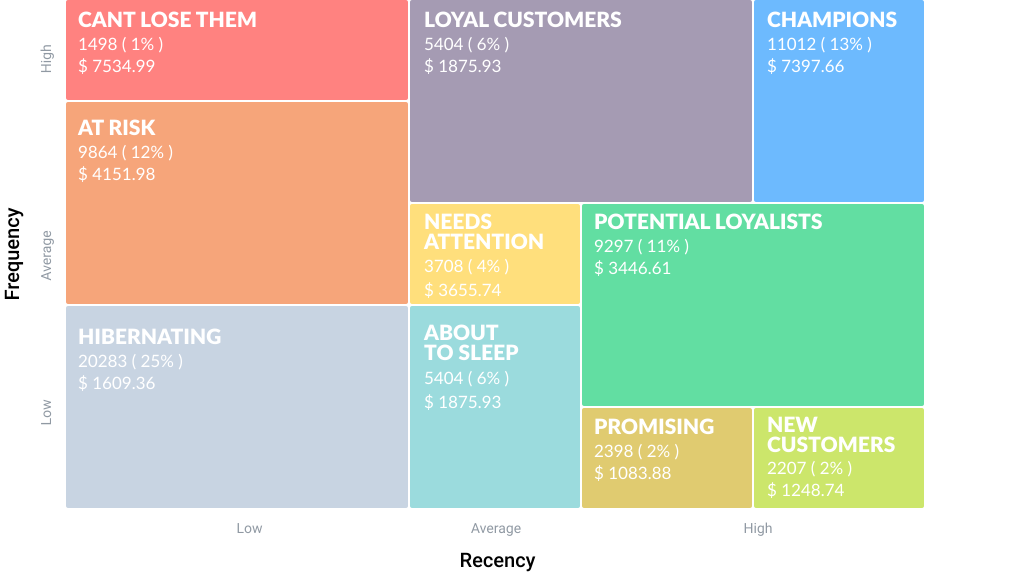
There are three key RFM segments that include high-value users:
- Potential loyalists: Users showing an average level of activity and engagement.
- Loyal customers: Frequent, high-value spending users.
- Champions: Customers with the highest willingness to pay.
These segments, once calculated, will be added to your list of Segments in Pushwoosh. Optionally, the tool will show the monetary value of each group. You can use the segments later in your targeted campaigns.
Step 2: Design targeted campaigns to engage high-value users
Once you have identified your high-value app users, it’s time to engage them with personalized campaigns.
For example, you can develop targeted strategies depending on the user segment:
🤩Potential loyalists: Convert these users by showcasing new features or offering a plan upgrade.
🚀Loyal users and Champions: Engage them with personalized offers and loyalty programs.
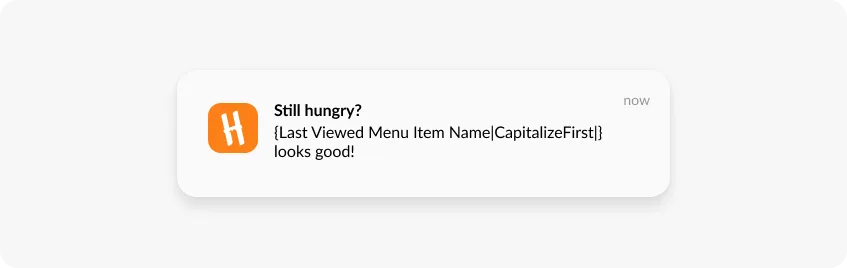
Use the Pushwoosh Dynamic Content feature to personalize push notifications based on specific events and user preferences.
For instance, HungryNaki sends personalized notifications displaying the last menu item a user viewed. The tactic brings impressive results!
Next, set up your high-value user retention campaign with Pushwoosh Customer Journey Builder.
It lets you design the entire campaign flow within the same canvas—adding audiences, segments, messaging, and analytics—all at once.
Start simple with a single-channel sequence
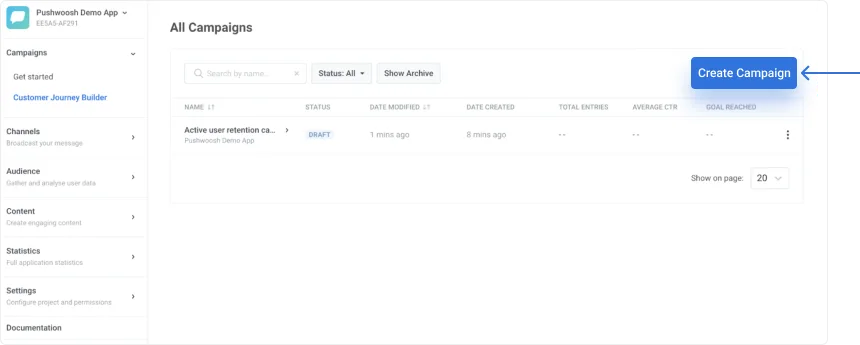
- Open your project in Pushwoosh, navigate to ‘Campaigns’, and click ‘Create Campaign’
- Select a trigger-based event: for example, you can target users that have just completed a purchase in your app.
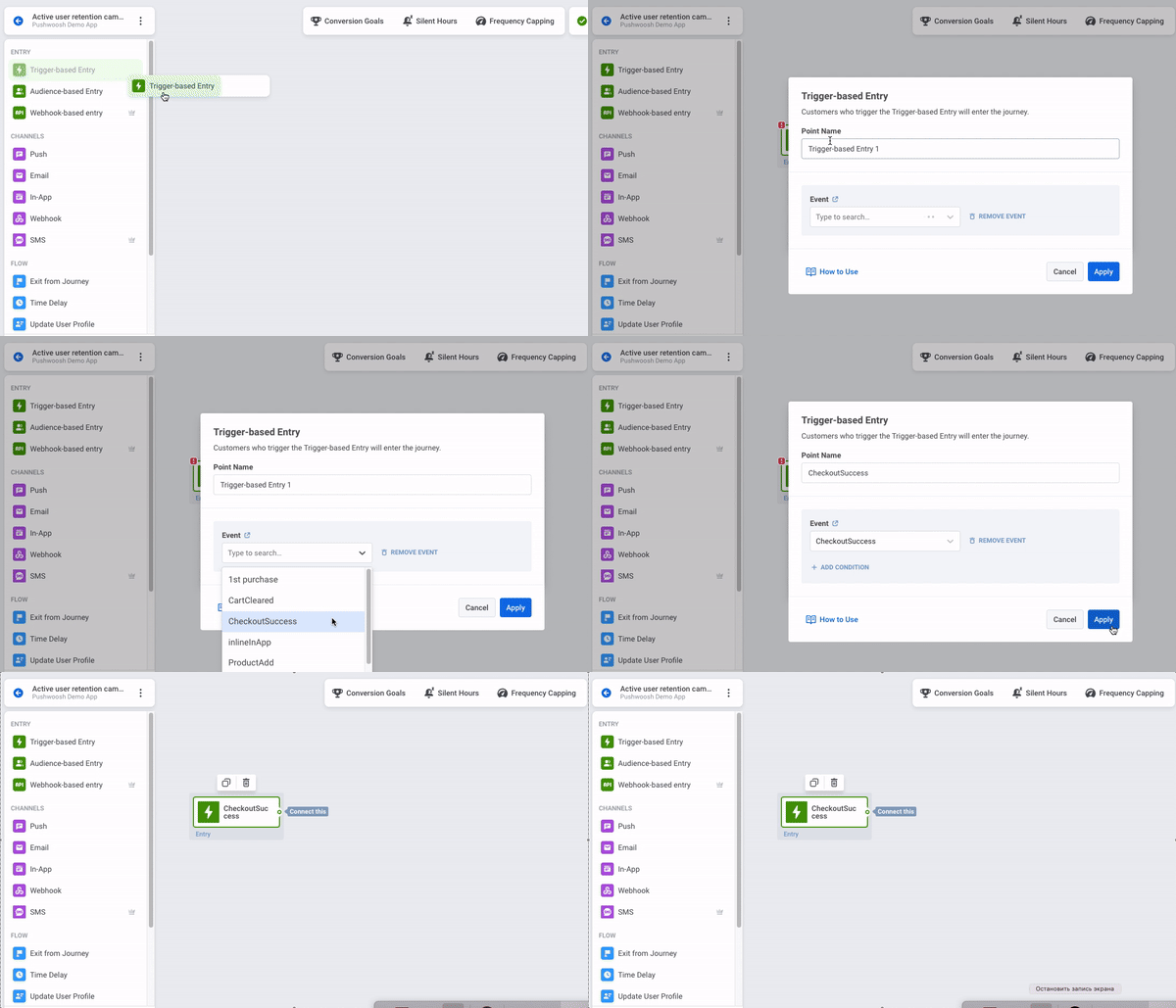
- Design an in-app message or a strategic sequence of in-app messages.
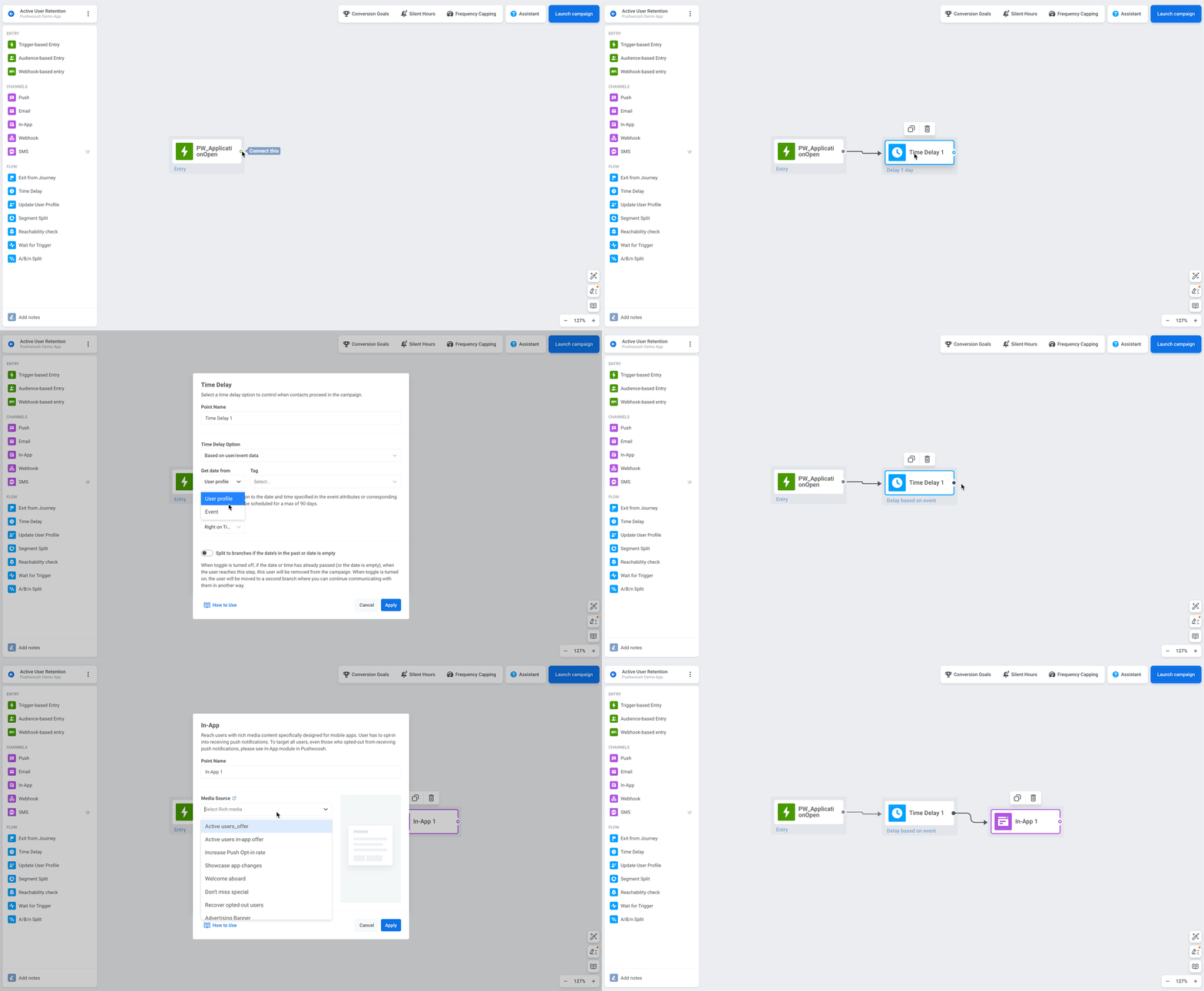
For example, you might display an in-app message with a special offer the next time users open the app.
First, add a ‘Time Delay’ element. In the settings, choose the ‘Time Delay Option’: ‘Based on user/event data’. Use data from the event you selected in the previous step.
Next, add a relevant in-app message.
Advanced workflow: Design a multichannel sequence
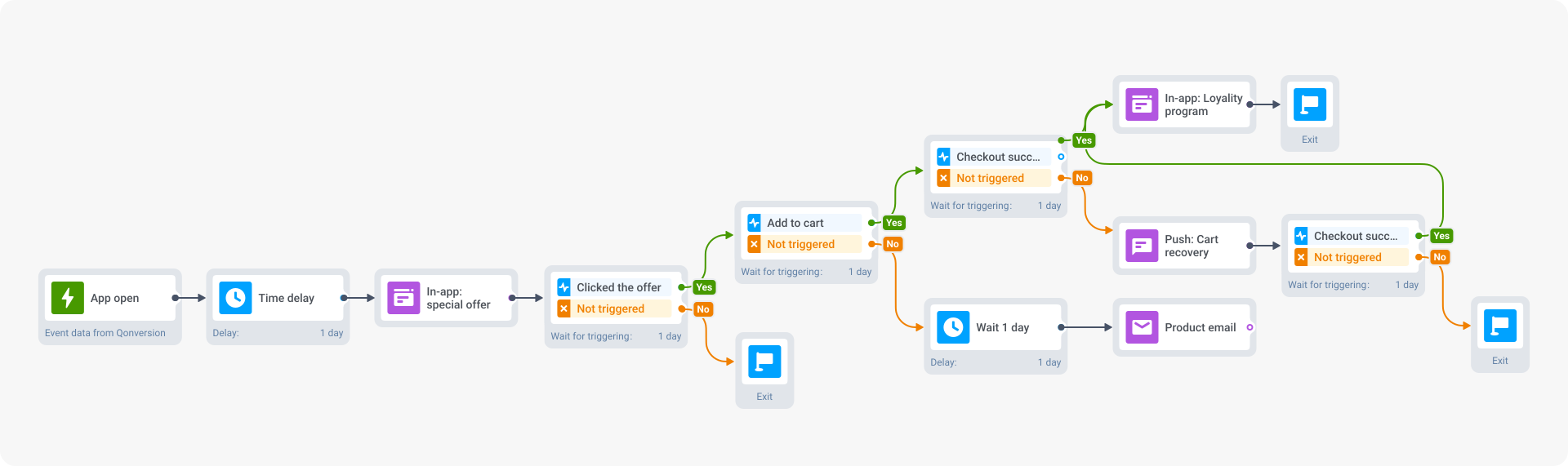
Using the Customer Journey Builder, you can involve various channels and send additional messages based on user actions. For example:
- A user engages with the in-app offer by viewing a product but doesn’t add anything to their cart:
➡️ Follow up with an email highlighting product benefits and featuring testimonials.
- A user adds an offer to their cart but doesn’t complete the purchase:
➡️ Trigger a personalized push notification reminding them of their cart items.
- A user successfully completed the purchase:
➡️ Schedule another in-app messageto invite them to the loyalty program and start collecting bonus points.
Step 3: Analyze your campaign performance
Every message you send is an opportunity to learn.
By treating each campaign as an experiment, you can find out what truly resonates with your audience.
Ask yourself: Does sending Message ‘A’ to users at Point ‘B’ increase conversions?
With the Pushwoosh Customer Journey Builder tool, you can easily track conversion rates at different journey stages:

To dig deeper, use the Pushwoosh Conversion Funnel Analytics tool and get a bird’s-eye view of your campaign. Here’s how:
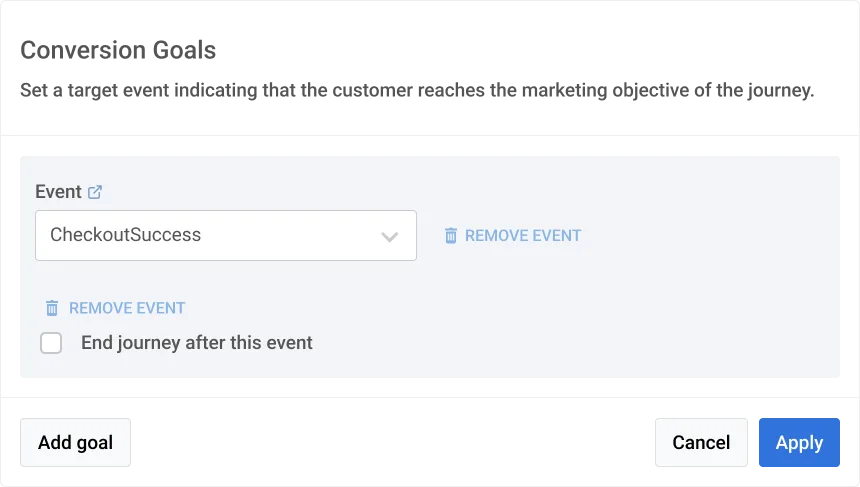
- Set clear conversion goals
Before launching a campaign, define what actions you consider to be conversions. This could range from making a purchase to upgrading an app subscription.
To set a conversion goal, head to ‘Conversion Goals’ at the top of your campaign canvas.
- Analyze conversion dynamics
Examine data from your Customer Journey Statistics to identify patterns and anomalies.
For example, if you notice a drop in conversion after users add items to the cart, try to understand why.
It could be that unexpected costs at checkout, like shipping fees, are causing them to hesitate.
- Examine individual message performance
Head to ‘Content’ → ‘Rich Media’ in your campaign dashboard to track your rich media performance.
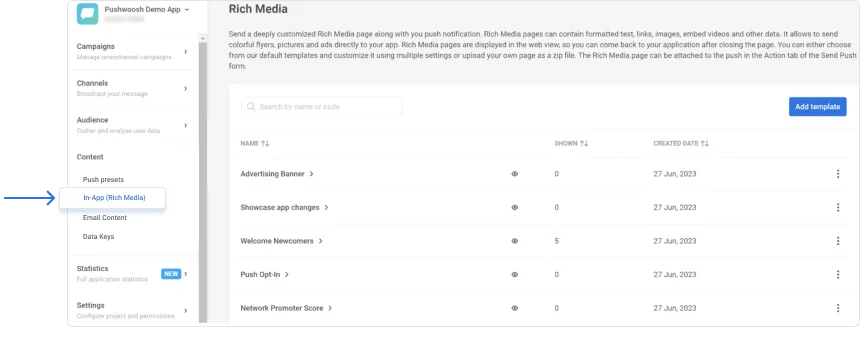
Here, you can see how various rich media assets contribute to the success of your campaign.
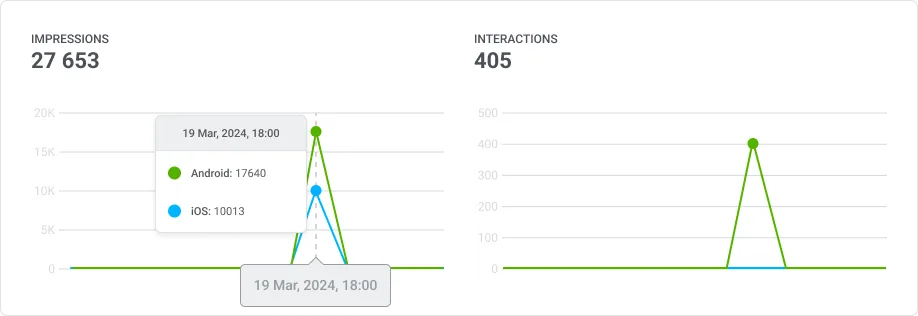
For example, you can find out how users engage with your banners.
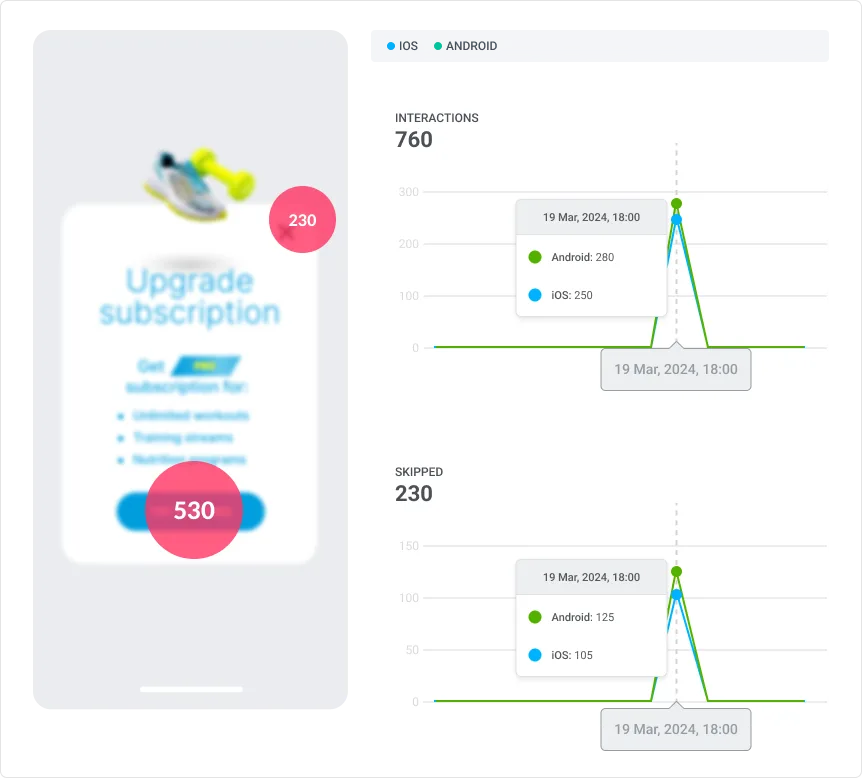
Do they close them immediately? Which banner elements attract users the most?
The heatmap view will be especially useful for this task.
It lets you assess the distribution of all clicks on the in-app message—and optimize your creatives.
Step 4: Keep optimizing and improve on the go
Make sure to regularly track the performance of your campaigns and adjust accordingly.
When in doubt, use A/B/n testing.
It allows you to refine your approach based on real user insights and achieve better results.
For example, you can come up with several banner copy versions and see which one generates the most clicks.
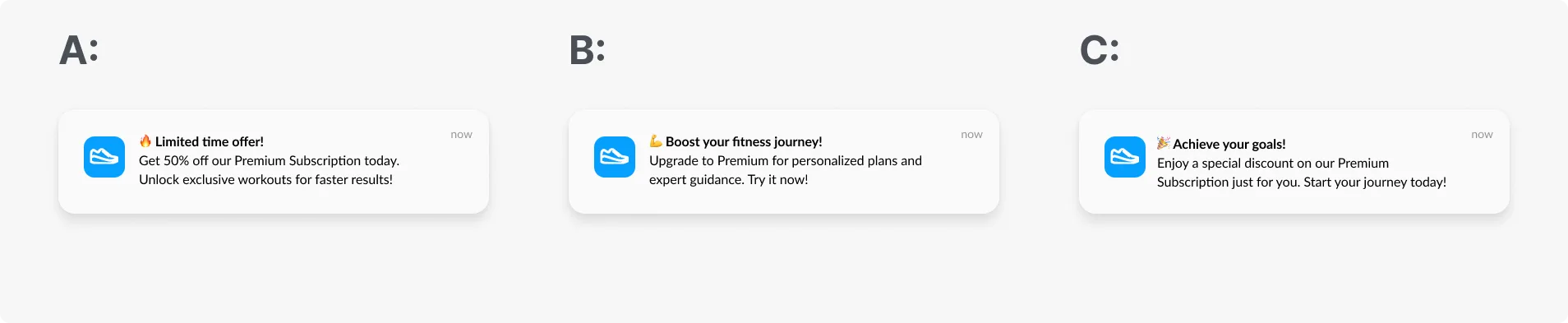
Using Pushwoosh Customer Journey Builder, you can test:
- Message content (notification copy and rich media)
- Timing and frequency for sending messages
- Personalized push notifications vs. generic messages
- Various user segments
- Deep links (to take users directly to a specific app page)
The A/B/n test feature works across all channels, from push notifications to emails, in-apps, and SMS:
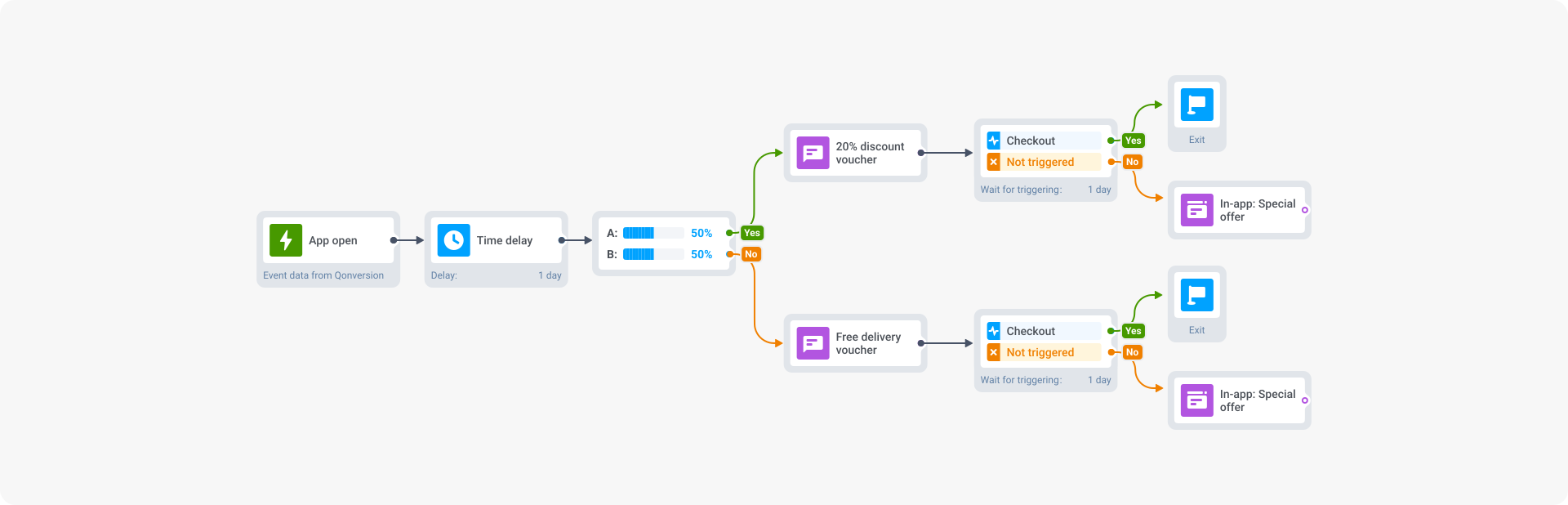
Remember, improving your app’s revenue through user engagement is an ongoing process.
So, never stop testing and refining. This way, you’ll keep your users engaged and your app growing.
FAQs: High-value user retention
What is a high-value app user?
A high-value user is someone who performs valuable actions within your app such as **completing upgrades and purchases, using paid features, leaving reviews.**They have high lifetime value (LTV) contributing to your app revenue growth.
Active users vs. high-value users
Active users are those who regularly open the app but may not necessarily engage in valuable actions as high-value users do.
How to identify users with high revenue potential
Look for signs of deep engagement—frequent logins, high interaction with key features, or a pattern of in-app purchases.
Tools like RFM segmentation by Pushwoosh can speed this process up and pinpoint those users who are not just active but truly invested.
These customers are more likely to respond to premium offers or exclusive content.
Keep an eye on their activity, and tailor your strategies to turn their potential into profit.
How to convert active users into high-value users?
To convert an active user into a high-value customer, focus on understanding their behavior and preferences.
Use data to tailor personalized experiences, offers, and content that resonate with their interests.
Implement A/B testing to refine your approach, ensuring you’re delivering value that aligns with their preferences.
Turn your high-value users into revenue boosters
Boosting your app’s revenue through high-value user retention is all about understanding your customers and constantly adapting.
Your goal is not just to capture attention, but to foster genuine connections that drive value and growth.
With Pushwoosh, you’ve got what you need to turn smart strategies into real wins—helping your app grow every step of the way.