What does in-app purchase mean — and why should you care? If you run or market a mobile app, in-app purchases (IAPs) are likely one of the most powerful revenue levers available to you. The global IAP market is projected to reach $340.76 billion by 2027, and understanding what is an in app purchase is the first step toward capturing your share.
This guide breaks down the in-app purchase (IAP) definition, covers the main types of in-app purchases, explains how they work, and outlines their core benefits. Along the way, you’ll see how real brands — from Candy Crush to Coursera — use IAPs to drive mobile app monetization, and how Pushwoosh helps you turn these strategies into revenue.
In-app purchase definition: what exactly is IAP?
An in-app purchase (IAP) is any transaction a user makes inside a mobile application after downloading it. This is different from paying to download the app itself: an IAP happens within a free or paid app, allowing users to buy digital content, features, or services without leaving the app experience.
Here is what an in-app purchase looks like in practice:
- Unlocking premium levels in a puzzle game like Candy Crush Saga.
- Buying virtual currency (gems, coins, crystals) to use within apps like Duolingo or Forest.
- Subscribing to premium features, such as ad-free listening on a music streaming app.
In simple terms, if you’ve ever tapped “Buy” on a special item, upgrade, or subscription inside an app, you’ve made an in-app purchase. The meaning of in-app purchase boils down to this: a transaction for digital goods or services that takes place entirely within an application.
Understanding the in-app purchase meaning is essential for app developers and marketers because IAPs are the dominant monetization method for free-to-download apps — which make up the vast majority of apps on both the Apple App Store and Google Play Store.
Types of in-app purchases
Not all in-app purchases are the same. The types of in-app purchases you offer shape your monetization model, user experience, and revenue potential. There are three main categories:
Consumable in-app purchases
Consumable in-app purchases are items that can be used once and then need to be repurchased. They are the most common type in mobile games and productivity apps.
- Virtual currency: Gems in Duolingo, gold bars in Candy Crush Saga.
- Energy or lives refills: Extra lives in a puzzle game, fuel in a racing game.
- Temporary boosts: XP boosters, speed-ups, or power-ups that expire after a single use.
Consumables drive repeat purchases, making them a reliable source of recurring revenue.
Non-consumable in-app purchases
Non-consumable in-app purchases are items that users buy once and keep permanently. They do not expire or deplete.
- Premium features: Removing ads from an app, unlocking a pro camera mode.
- Permanent content: A new character skin, an extra level pack, or a theme for a productivity app.
- Digital goods: Stickers, filters, or design templates that remain in the user’s account indefinitely.
Non-consumables are ideal for apps that want to offer a clear upgrade path from free to premium.
Subscriptions
In-app subscriptions grant access to content or features for a recurring period — weekly, monthly, or annually.
- Auto-renewable subscriptions: Automatically charge the user at the end of each billing cycle (e.g., Spotify Premium, Coursera Plus, Headspace).
- Non-renewing subscriptions: Expire after the purchased period and must be manually renewed (e.g., a seasonal sports pass, a limited-time access to a course catalog).
Subscriptions are the fastest-growing segment of in-app revenue, offering predictable, recurring income for app developers.
How do in-app purchases work?
The in-app purchase mechanics follow a straightforward flow:
- User initiates the purchase. The user taps a “Buy” or “Subscribe” button inside the app.
- The app store processes the payment. The transaction is handled by the platform’s payment gateway — either the Apple App Store or the Google Play Store. The user authenticates the purchase (via Face ID, fingerprint, or password), and the app store securely processes the payment.
- Content is unlocked. Once the payment is confirmed, the app delivers the purchased item, feature, or subscription access to the user instantly.
App developers integrate IAP functionality using platform-specific SDKs (StoreKit for iOS, Google Play Billing Library for Android). These SDKs handle product listings, payment processing, receipt validation, and content delivery — so the developer focuses on the experience, not the payment infrastructure.
The app store takes a commission (typically 15–30%) on each transaction. The remainder goes to the developer.
Benefits of in-app purchases for app developers and users
Why use in-app purchases? The advantages of IAP extend to both sides of the transaction.
For app developers
- Diverse monetization: IAPs let you combine consumables, non-consumables, and subscriptions to match your audience and business model.
- Revenue from free apps: The freemium model — free download with optional in-app purchases — is the most profitable distribution strategy in mobile. It lowers the barrier to entry and maximizes your install base.
- Predictable recurring income: Subscriptions provide a steady revenue stream that helps with forecasting and growth planning.
- Higher CLV: When users invest in virtual goods or premium features, they become more engaged, stay longer, and spend more over time.
For users
- Try before you buy: The freemium model lets users explore the core app experience at no cost before deciding to pay.
- Enhanced experience: IAPs offer personalization, premium content, and convenience — users only pay for what they actually value.
- Flexible spending: Users control how much they spend and when, from a one-time $0.99 unlock to a monthly subscription.
Apps that cracked the IAP code
What types of apps rely on in-app purchases more than others? Gaming, productivity, education, lifestyle, and shopping apps are among the top categories. Their offerings include virtual currency, premium features, and exclusive content. Let’s explore how apps in these categories integrate in-app purchases into their monetization strategies, all while engaging users and boosting chances of converting them into buyers.
| Item type | Apps that sell this type of item | App category |
|---|---|---|
| Virtual currency | Duolingo | Education |
| Candy Crush Saga | Puzzle game | |
| Forest | Productivity | |
| Jewels of Rome: Match 3 | Adventure game | |
| Premium Content /Features | Tinder | Lifestyle |
| Etsy | Shopping | |
| Insight Timer | Health & Fitness | |
| Coursera | Education |
Duolingo: cross-channel engagement champion
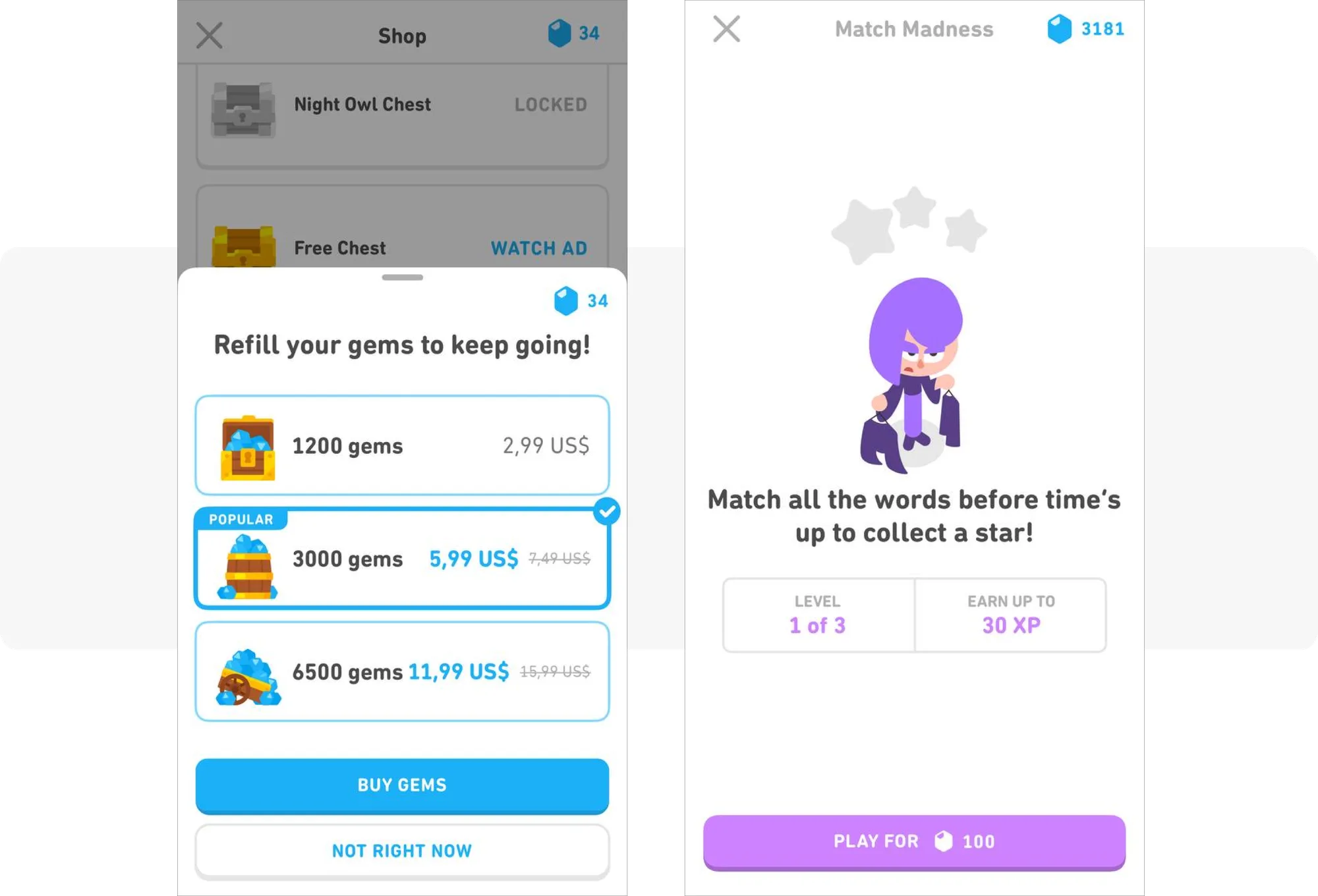
About 18% of Duolingo’s revenue comes from in-app purchases of gems. These gems can be used to purchase hearts for refilling lives or boosters to gain extra experience points for completing lessons. Users can also spend gems to unlock challenges, such as ‘Match Madness’, which are organized into tiers that require progressively more gems to advance:
Duolingo’s approach
Duolingo doubles down on engaging with users on different channels to motivate them to return to the app. Daily engagement builds loyalty and ultimately leads to additional purchases.
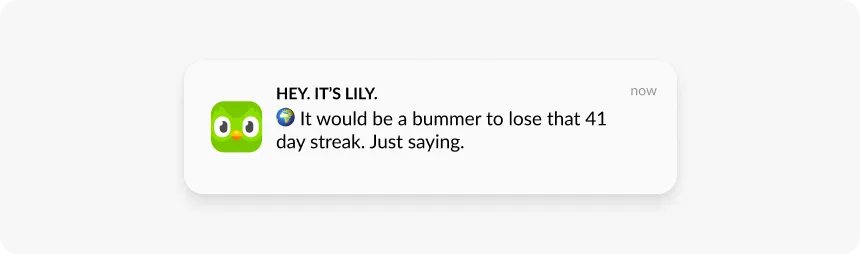
- Push notifications
Duolingo sends personalized push notifications that trigger different emotions. A push notification might show a humorous appeal to the user’s frustration, for example, when they are about to lose their 41-day streak. Another notification might trigger a sense of competition, for example, when a user loses their position on the leaderboard:
- In-app messages
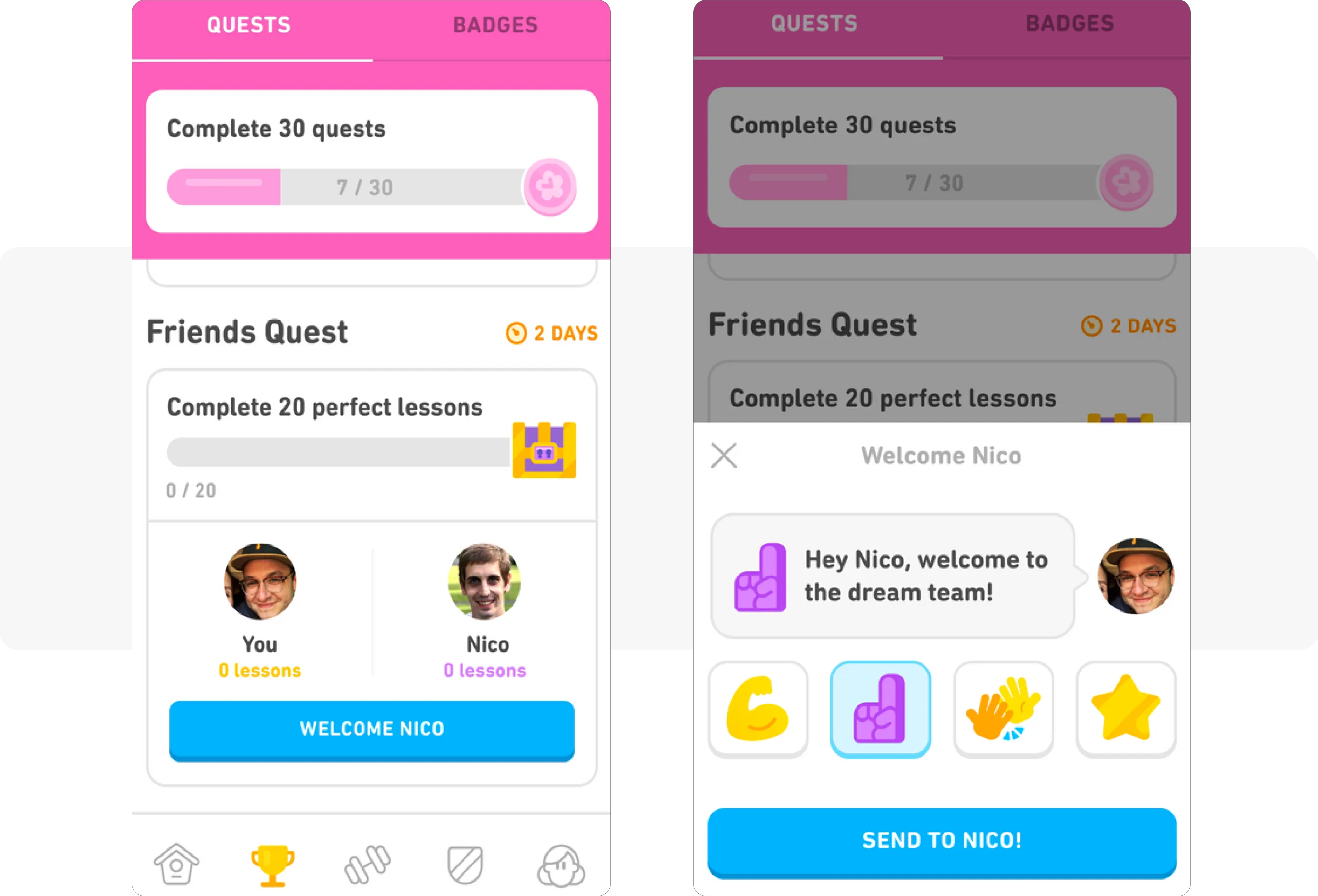
In-app messages promoting ‘Friends Quests’ foster a strong sense of community and healthy competition, keeping users engaged and motivated:
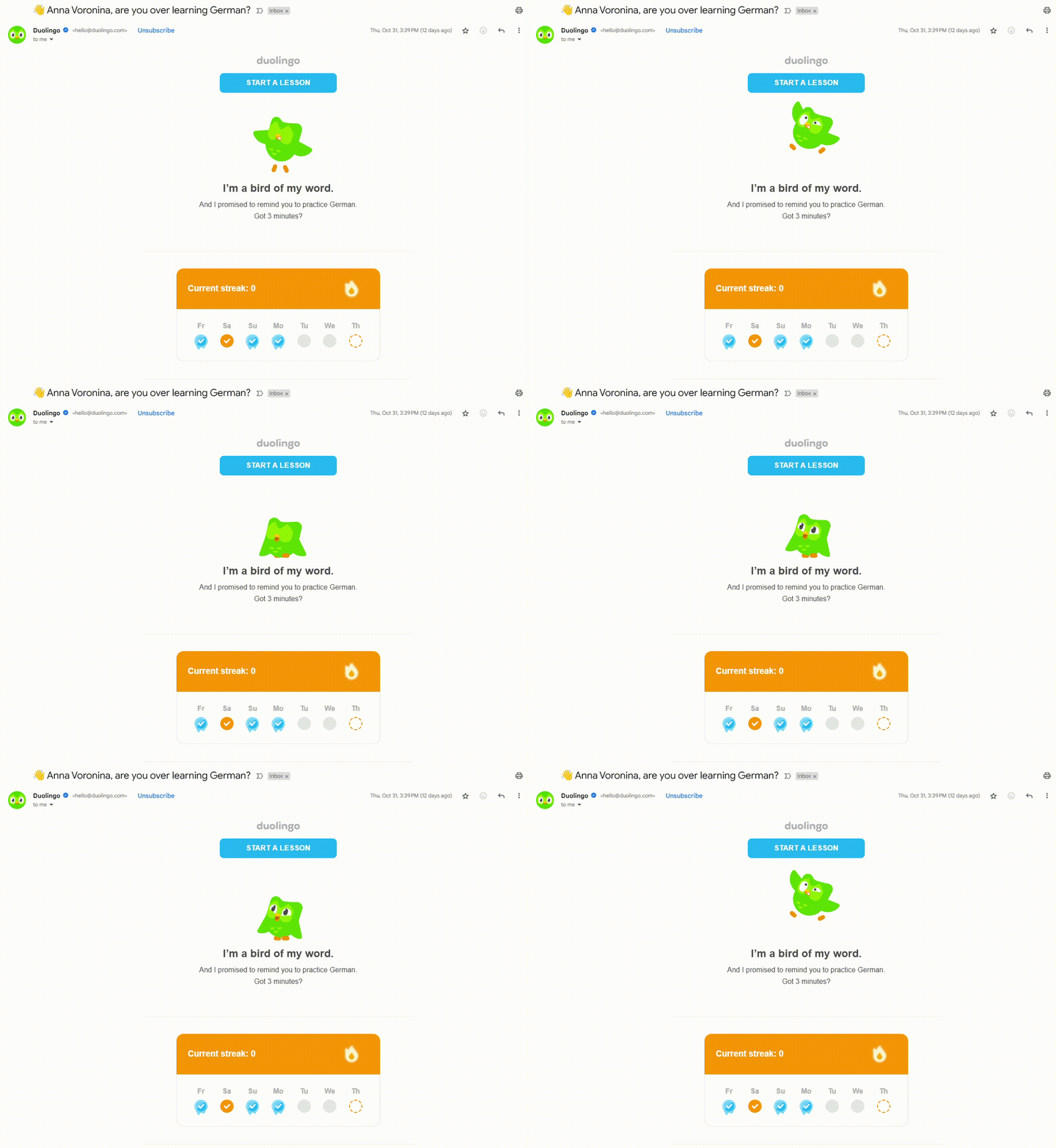
- Emails
Duolingo regularly sends emails that motivate users to stay committed to their language-learning journey:
A 40% YoY revenue growth in 2024 is a clear sign that an omnichannel approach combined with witty copy is effective, right?
How to automate user engagement across channels with Pushwoosh
To streamline your omnichannel engagement efforts, you’ll need to automate your campaigns. Automated messaging flows, whether scheduled or triggered by user behavior, ensure timely and relevant communication with your audience. Pushwoosh Customer Journey Builder does exactly that. With it, you can engage users across multiple channels—push notifications, in-app messages, emails, SMS, or WhatsApp—through a single, unified workflow.
On the campaign mapping canvas, you can define how the messaging flow adapts based on user interactions with messages. For example, if the user opens a push, you can continue the communication by sending an in-app message. If they don’t, you can send an email instead:
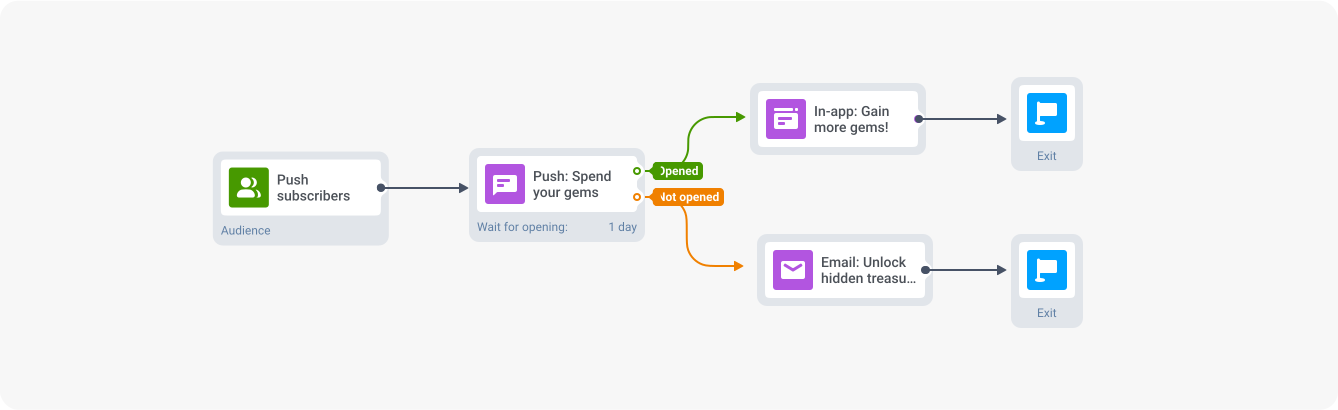
Automated cross-channel messaging flow in Pushwoosh Customer Journey Builder
Candy Crush Saga: game in-app monetization classic
In 2012, Riccardo Zacconi and his team decided to release Candy Crush on a freemium basis. This strategy was new at the time but it proved to be highly successful throughout the years.
Fast forward to 2023, the game generated over $1.2 billion from in-app purchases. Players from six continents log in daily to unwind and enjoy a quick dopamine hit.
But what makes Candy Crush so enduringly successful? The app has two core engagement tactics behind its success:
1. Keeping users engaged from the very beginning
The key is the app’s ability to engage its audience from the first tap. When players download the game, they immediately jump into the gameplay, which reduces registration friction.
2. Prompting game in-app purchases at key moments
Furthermore, the first prompt for game in-app purchases appears after players reach level 20, which takes approximately 30 minutes.
By this point, players are typically deeply engaged and may be more tempted to buy boosters. This is a great example of a mobile game IAP strategy.
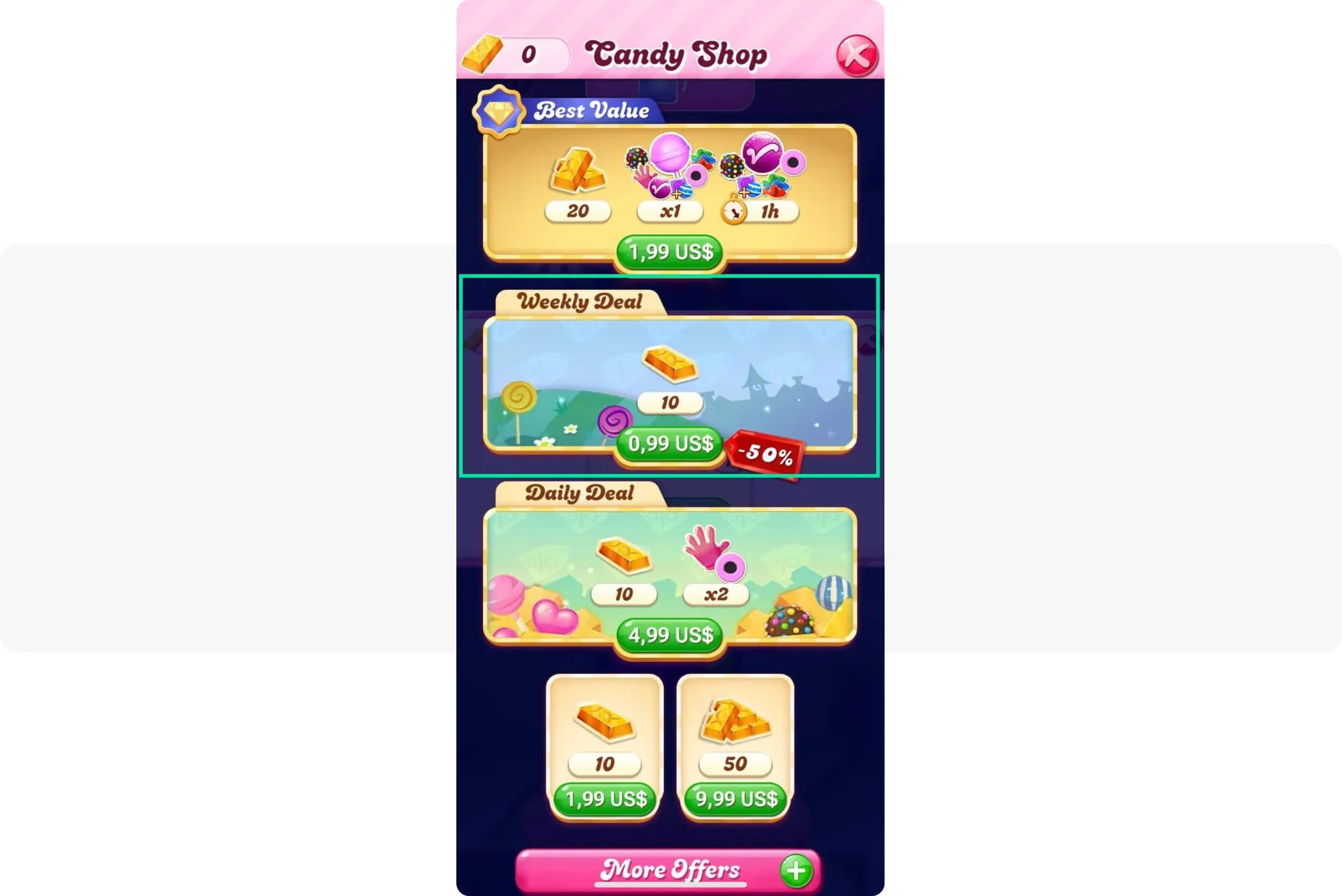
The team strategically places the weekly deal prominently on the screen, adding a 50% discount tag to attract users’ attention:
Gardenscapes: dual gameplay, multiple targeted offers and events
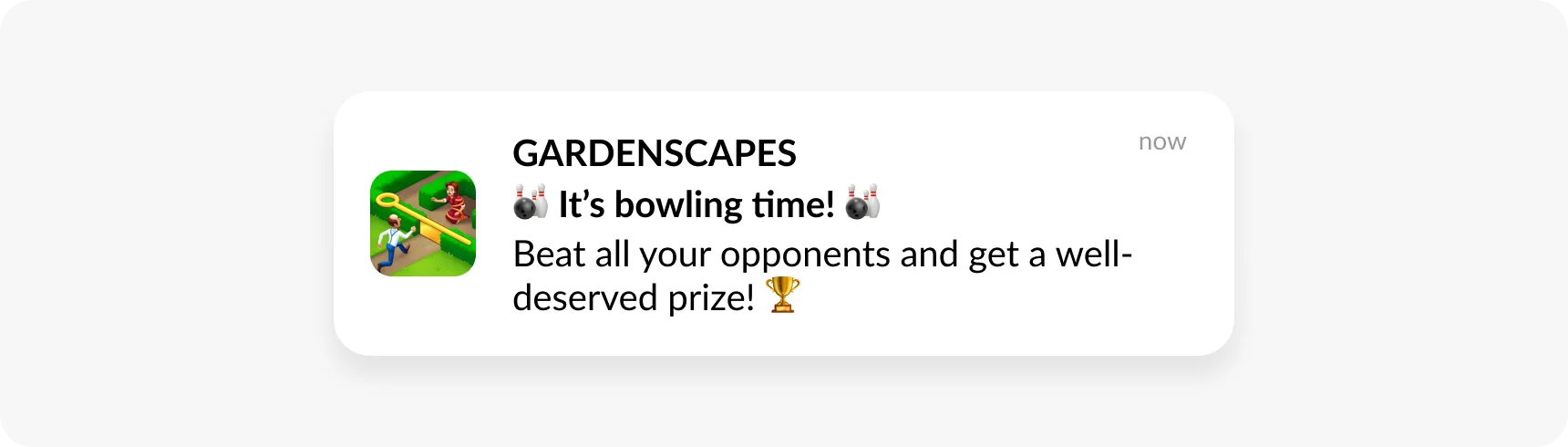
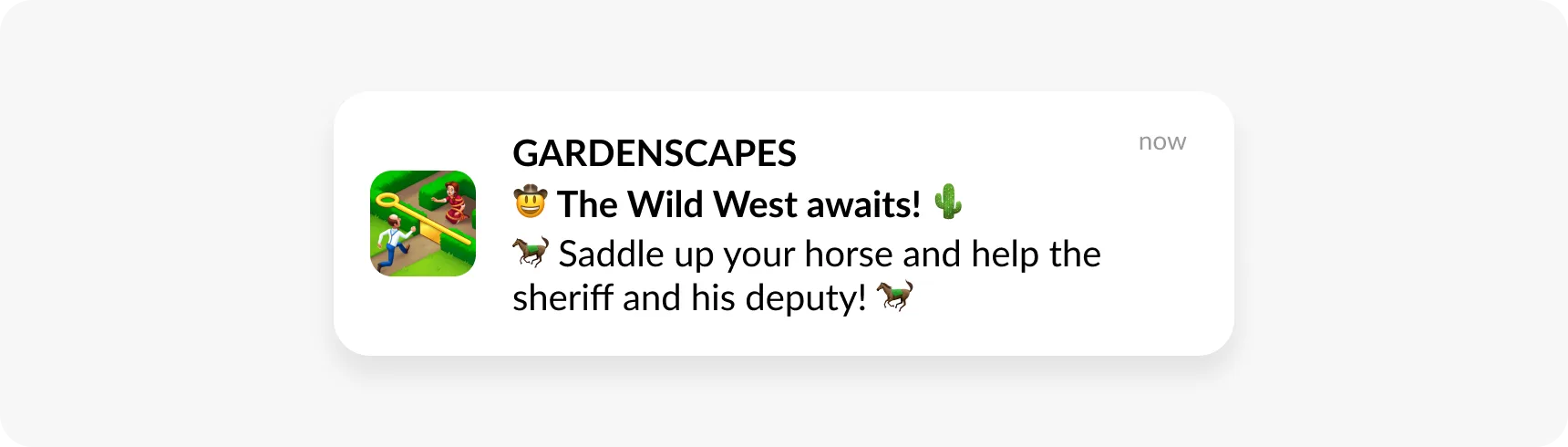
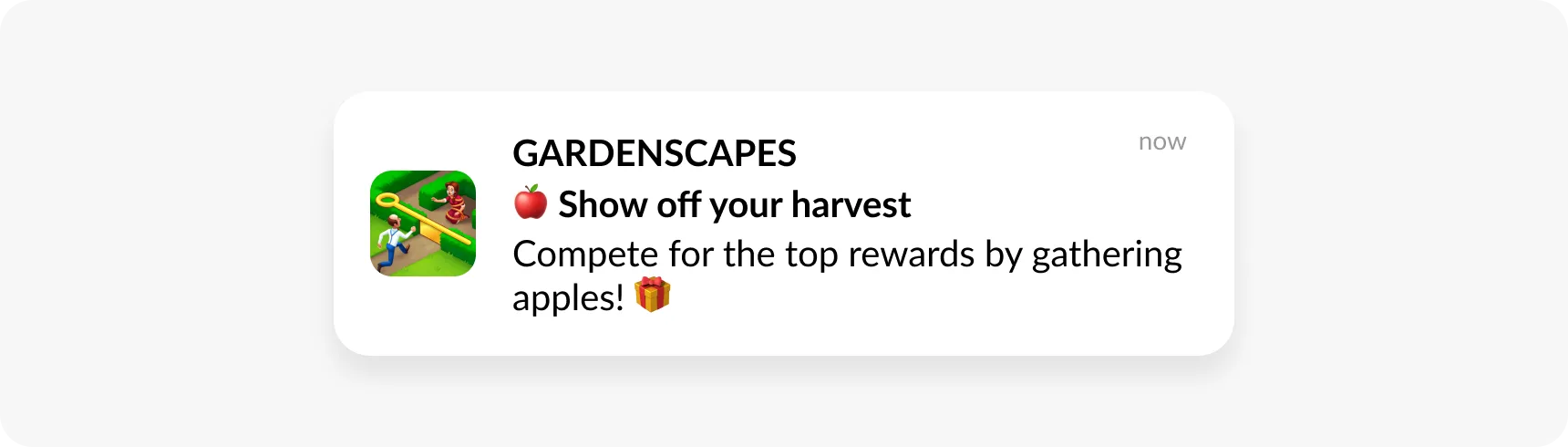
Gardenscapes combines match-3 puzzles with a home-renovation storyline, providing players with dual goals that boost session length and spending opportunities. Timed events and themed boosters are targeted to specific segments — such as competitive players or decorators — maximizing conversion.

Forest: transforming in-app purchases into real trees
Forest is an app that helps users stay focused on important tasks without getting distracted by their phones. While studying or spending quality time with friends, the app displays a tree that grows in real time. If the user closes the app (loses focus on their task), the tree dies.
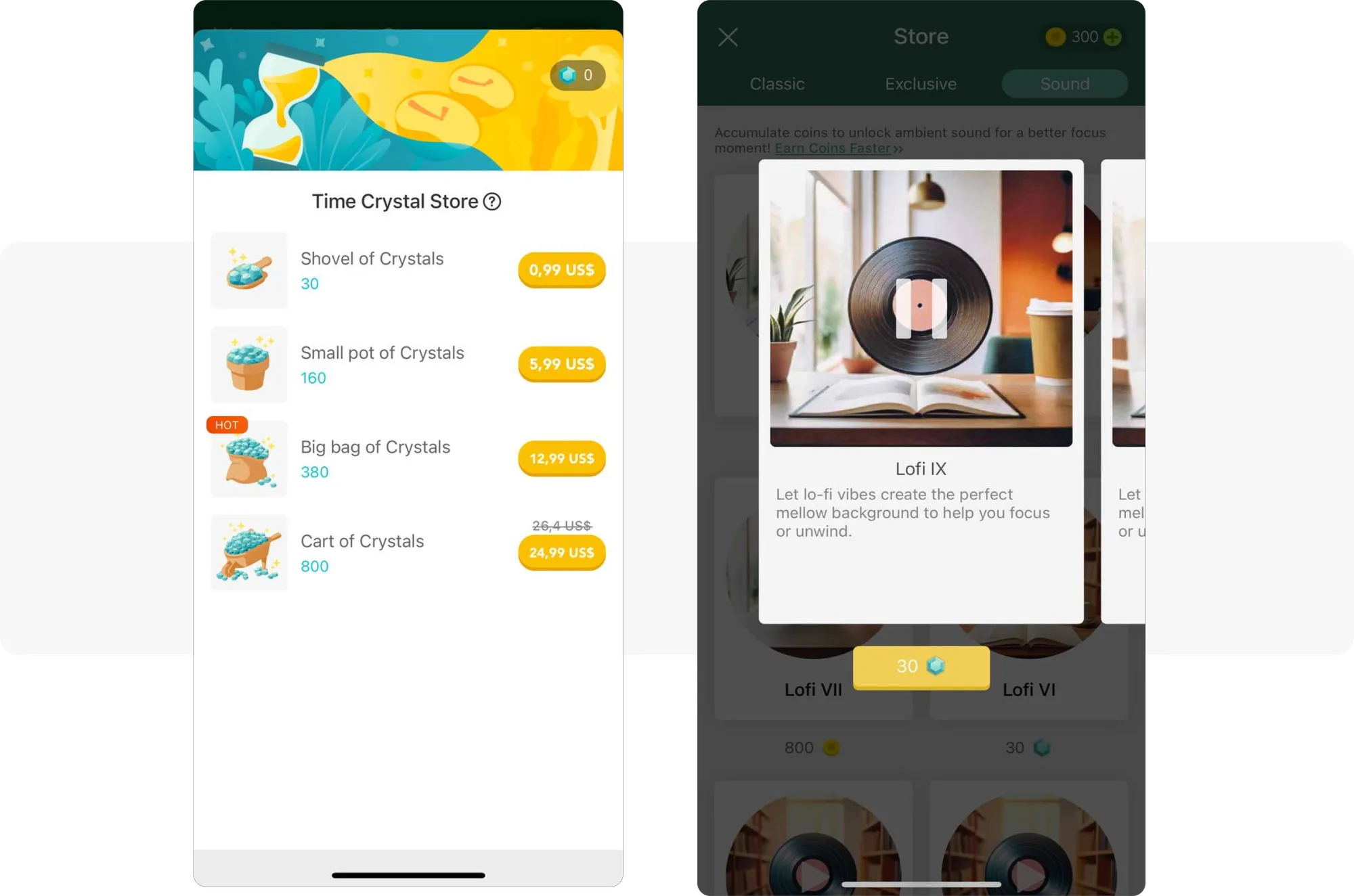
Users can purchase virtual items such as ‘crystals’ or ‘bonus packs’, which allow them to unlock premium features, gain coin boosters, and enhance their focus sessions with background sounds:
Connecting eco-values with user engagement
For each focus session, users get coins, which they can use to buy real trees. Thanks to the dedication of eco-conscious users, the app, in collaboration with Trees for the Future, planted over 1.5 million real trees.
Showing focus status through Live Activities
One of the most valuable aspects of Forest’s user engagement strategy is its ability to provide real-time feedback on the progress of the focus session.
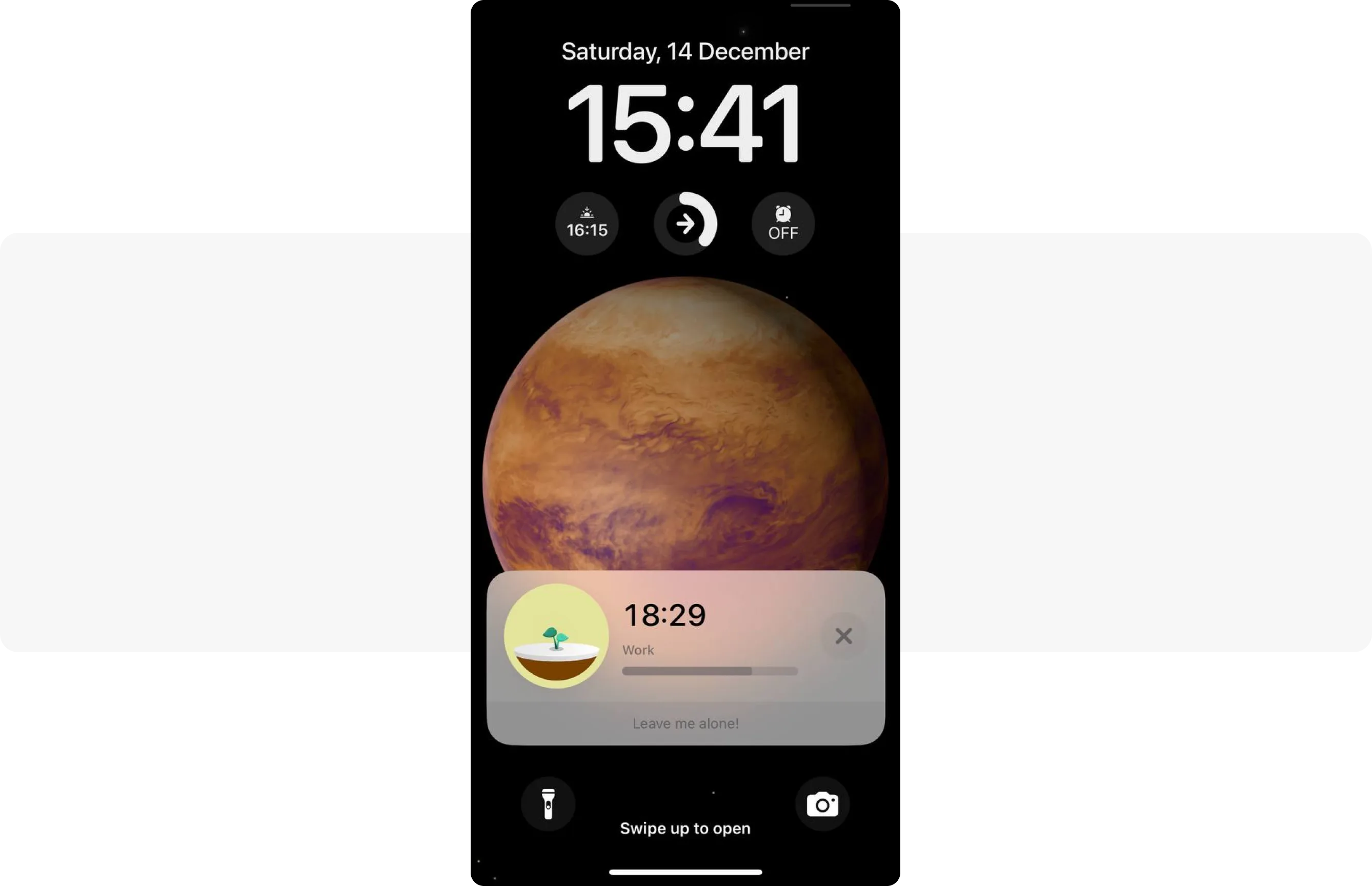
The app’s team leverages Live Activities for iOS users, enabling them to track their session progress without needing to unlock their phones. This notification type encourages continued app use, transforming into in-app purchases as users become more attached to the app:
How to use Live Activities to drive more revenue
Live Activities keep users updated on in-app processes, enhancing their overall experience. When combined with promotional push notifications that encourage in-app purchases, they create contextual opportunities to boost revenue. For instance, Forest could send a push notification offering to buy crystals when the user is close to finishing their focus activity. You can enable Live Activities using the Pushwoosh iOS SDK.
Jewels of Rome: push notifications that promote limited-time offers
In November 2024, Jewels of Rome achieved over 5,000 downloads and generated $200,000 in revenue. A substantial share of this revenue comes from in-app purchases which include:
- Boosts;
- Energy refills;
- Premium currencies.
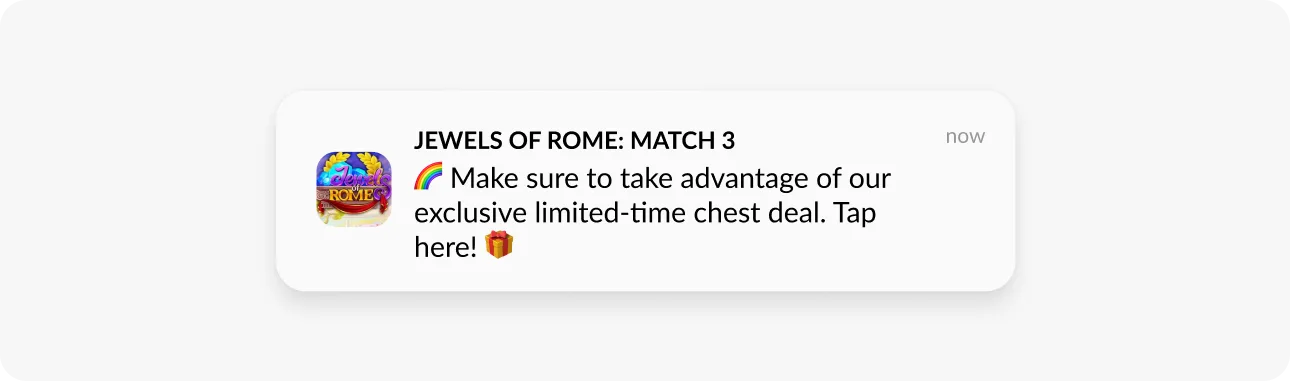
To promote their virtual items, Jewels of Rome employs push notifications. Look at the example in the screenshot: these messages are designed to instill a sense of urgency and encourage users to seize the available offers:
These strategies exemplify how successful games turn gameplay moments into revenue streams.
How to announce limited-time offers with Pushwoosh
Send push notifications at scale to announce new items available for purchase. Use the ‘Wait for Trigger’ element in the Customer Journey to instantly track whether a user has made an in-app purchase. If they haven’t, you can automatically send them a push notification with a limited-time offer:
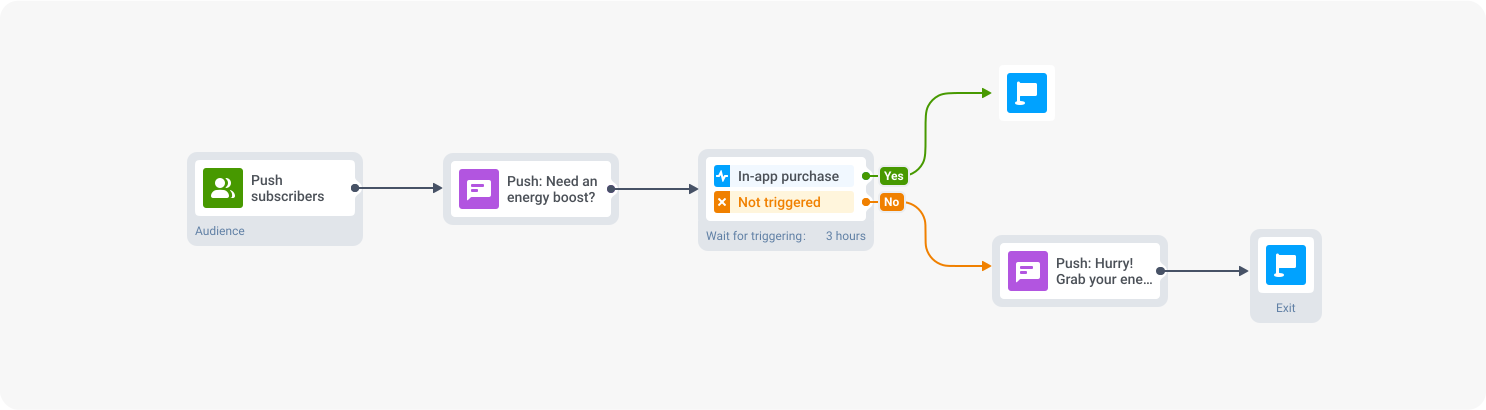
Limited-time offer campaign in Pushwoosh Customer Journey Builder
Tinder: promoting in-app purchases for better matches
Tinder offers popular in-app purchases to help users stand out:
- Super Likes: increase the chances of matching by three times, leading to longer conversations;
- Boosts: feature users as a top profile in their area for 30 minutes, increasing visibility and chances of connecting.
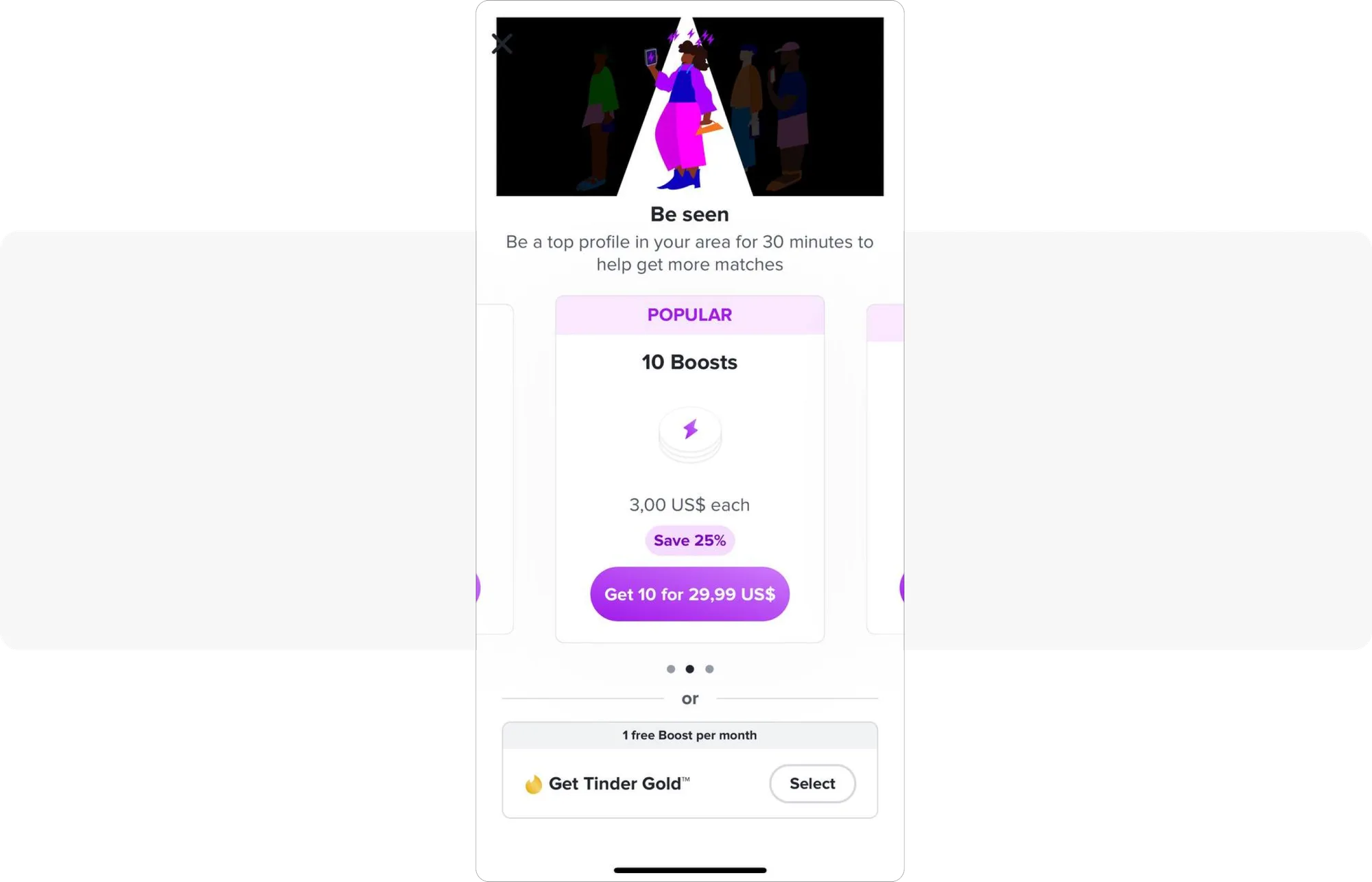
These in-app purchases help users attain their primary goal for using Tinder: finding a perfect match.
Promoting premium features with modal in-apps
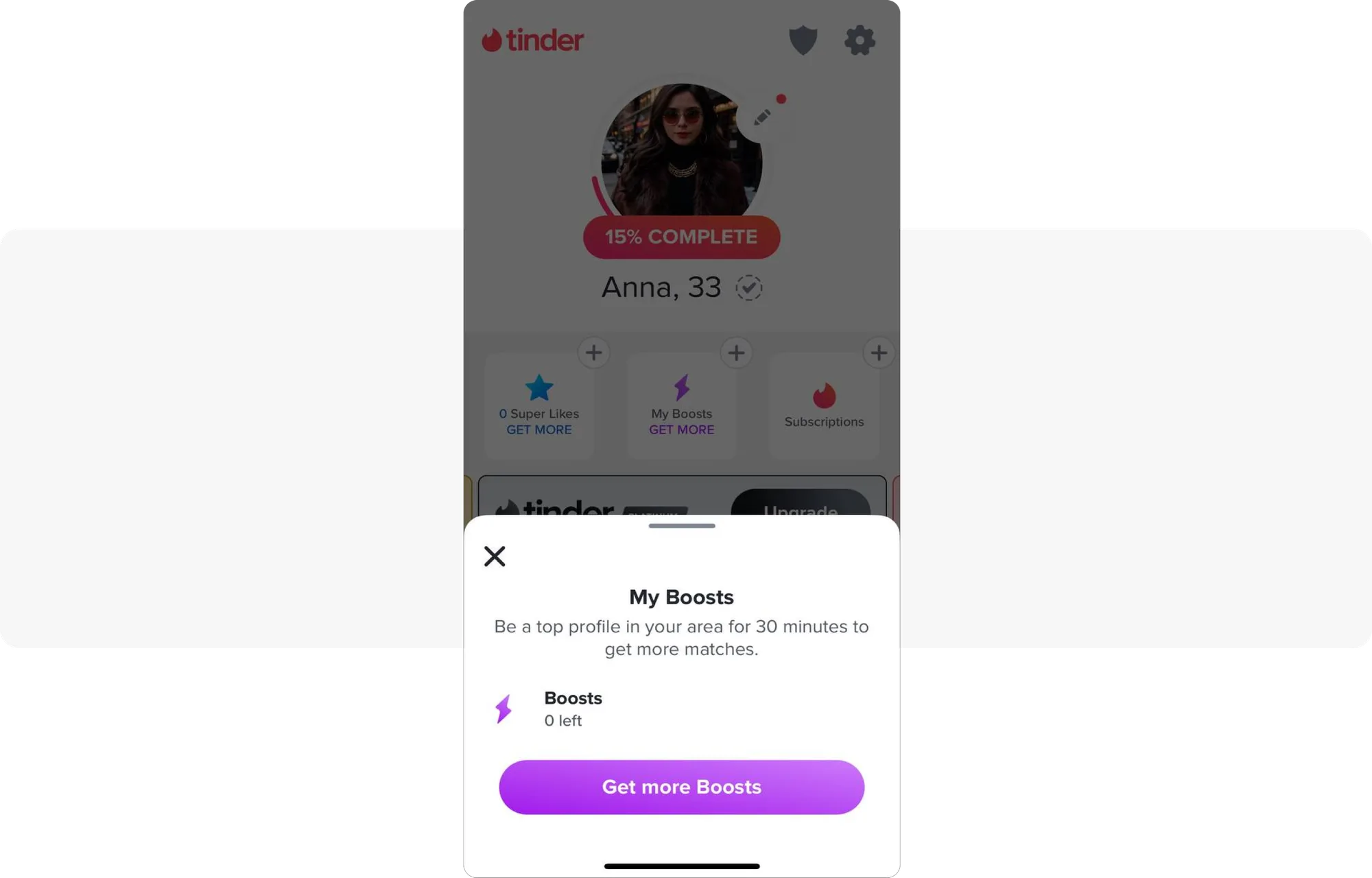
The first screenshot shows that Tinder uses modal in-app messages to promote their premium features. The benefit of these messages is that they are designed to enhance the user experience, as they don’t cover the whole screen and don’t feel intrusive.
Instead, they encourage users to explore more within the app, leading to higher engagement and additional spending opportunities:
Etsy: in-app personalization that drives sales
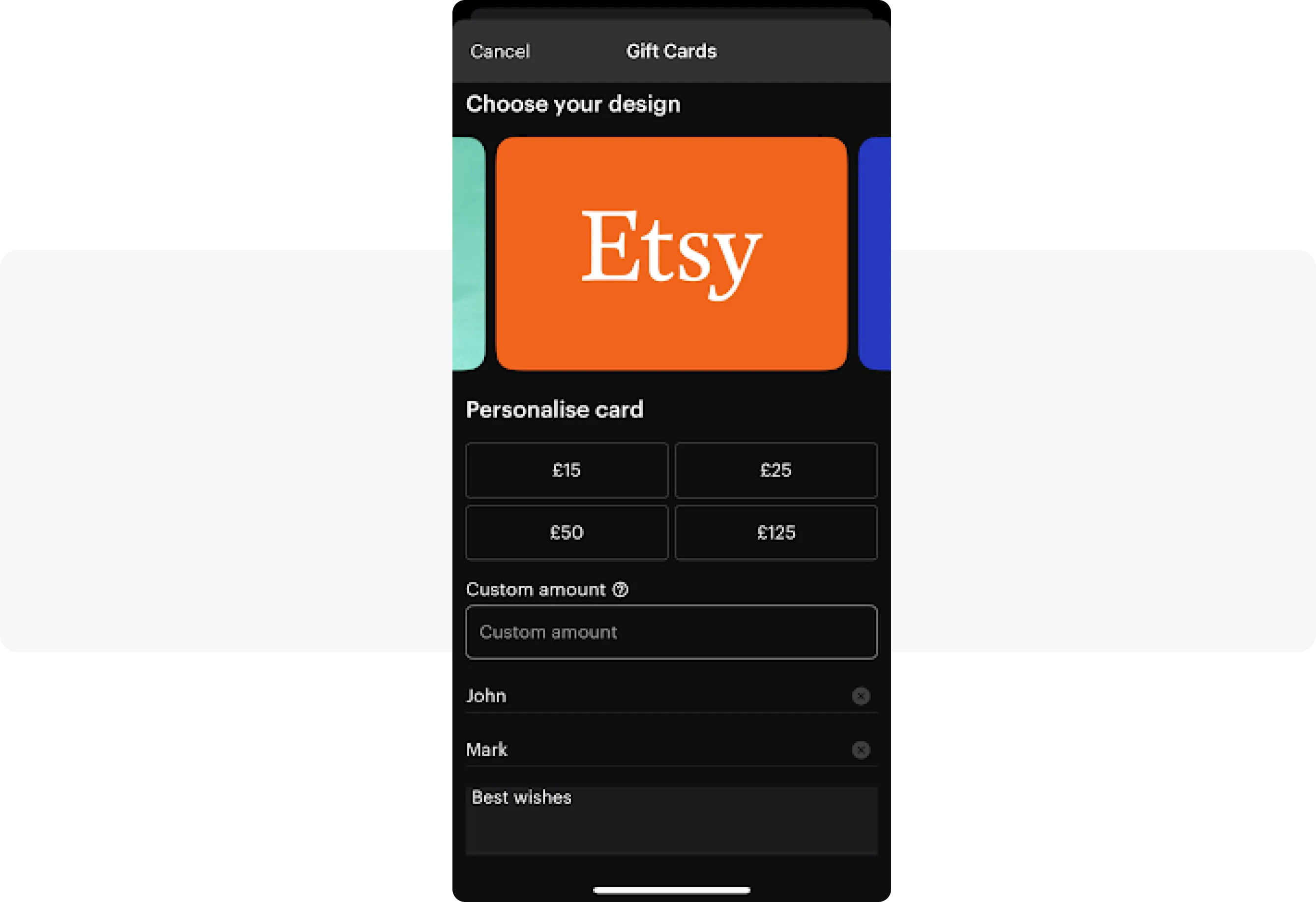
Etsy offers the option to buy gift cards directly through its app. This initiative is part of a larger strategy to establish Etsy as a premier destination for gifting. Features such as ‘Gift Mode’ and ‘curated gift suggestions’ aim to encourage more gift-related purchases.
Drive more sales with personalized in-apps
What makes Etsy’s in-app gift cards special is their personalization. These gift cards can introduce users unfamiliar with Etsy to its marketplace, potentially turning them into long-term customers. Additionally, gift cards provide Etsy with guaranteed sales since the card’s value is paid upfront, whether or not it is redeemed immediately or later:
How to personalize in-app offers with Pushwoosh
User segmentation is crucial for delivering personalized experiences. With Pushwoosh, you can categorize users based on various factors, including their behavior, purchase history, preferences, stage in the sales funnel, location, language, and OS version.
You can also create segments that focus on specific date tags, allowing you to target users on significant occasions such as their birthdays. You can enhance engagement and boost in-app sales by personalizing messaging on special days:
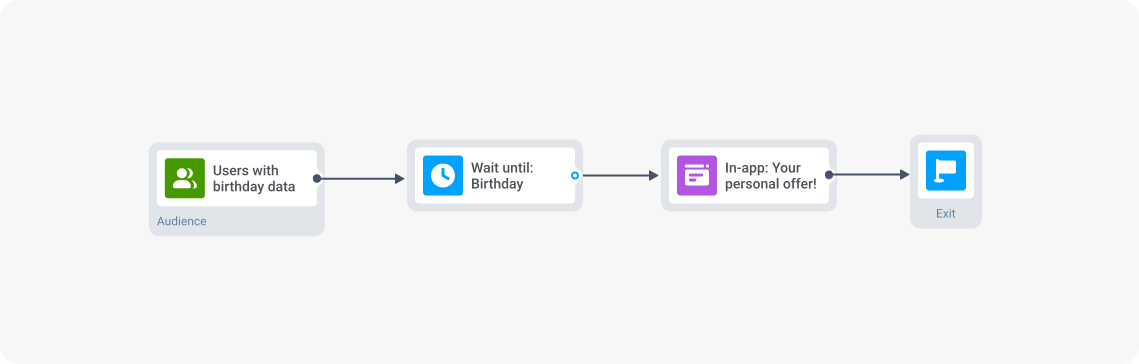
Birthday offer campaign in Pushwoosh Customer Journey Builder
Insight Timer: knows how to be subtle about in-app donations
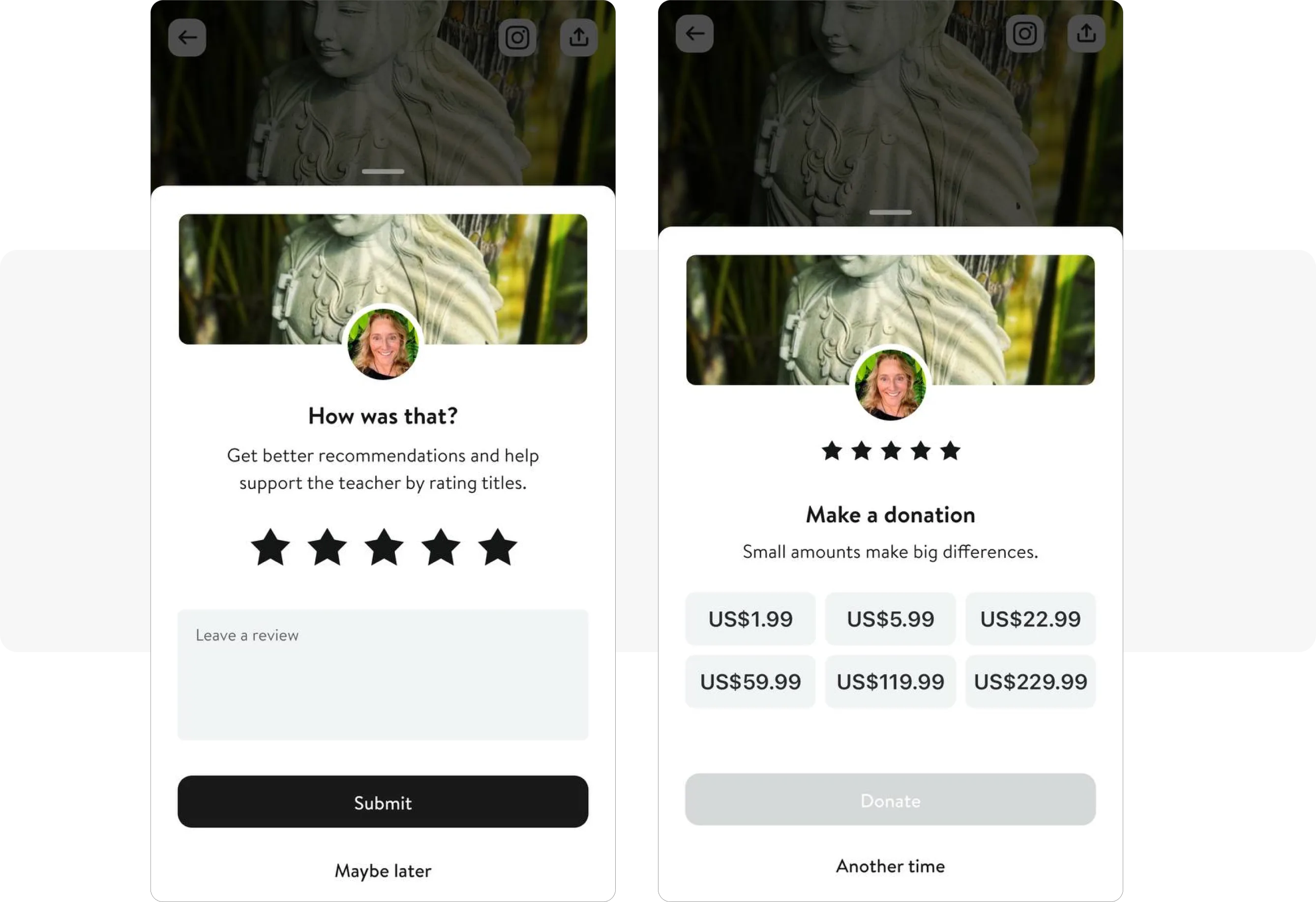
On Insight Timer, users can make in-app donations to support their teachers’ work.To encourage consistent practice, the app sends personalized push notifications. After each session, users are prompted to rate their experience and are invited to donate to their teachers:
Coursera: upselling to high-value users
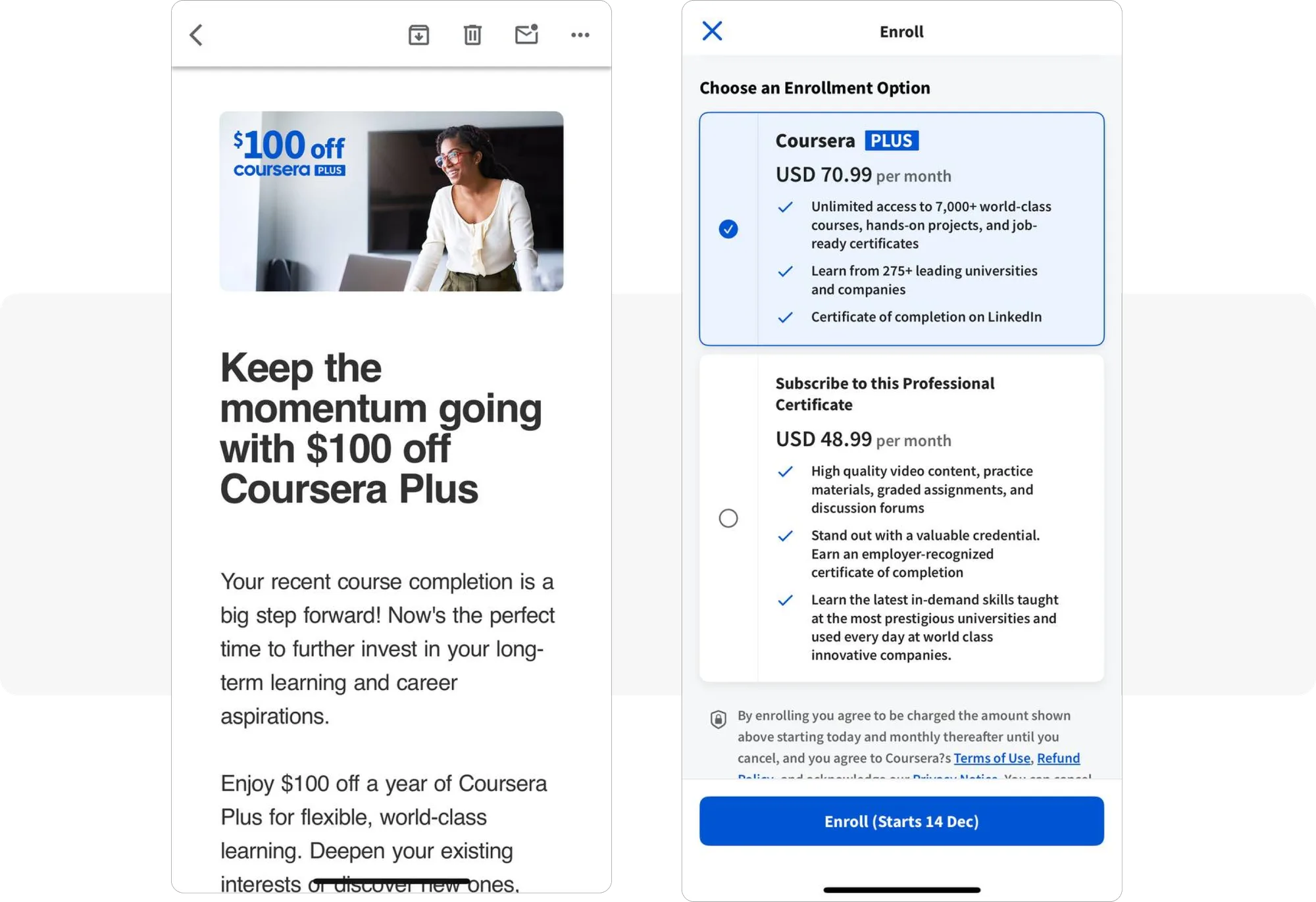
On Coursera, users have the option to purchase both subscriptions and professional certificates. Professional certificates are designed as in-app purchases for those who prefer not to buy a full Coursera subscription.
Engaging recent course graduates with targeted discounts
The platform specifically targets users who have recently completed a course by offering them a $100 discount on their annual subscription. Here’s an example of an upselling email:
Optimizing your in-app purchase strategy: how Pushwoosh helps
Now that you understand what in-app purchases are, how they work, and the different types available, the next step is to increase in-app purchases and optimize your in-app purchase strategy. Here is a checklist that combines the tactics from the brands above with Pushwoosh’s capabilities as a customer engagement platform:
| Multiple communication channels | Create multiple engagement channels + Push notifications + In-app messages + Emails + SMS + WhatsApp |
|---|---|
| User segmentation and personalization | Segment users based on: + Purchase history + Preferences + Sales funnel stage |
| Use RFM segmentation | |
| Create personalized offers | |
| Strategic timing of purchase prompts | Delay the first purchase prompt until users are deeply engaged |
| Identify the optimal time point when to send the first message about in-app purchase optimization (e.g., Candy Crush waits until level 20) | |
| Ensure users have experienced the app’s value | |
| Interaction formats and gamification | Provide real-time progress tracking |
| Create community challenges | |
| Implement streak/achievement systems | |
| Use copy and design to create a sense of urgency | |
| Invest time in writing compelling copy | |
| Offer rewards for continued engagement |
Increase in-app purchases with Pushwoosh
Improving in-app purchases isn’t about adding more “Buy” buttons. It’s about building an engagement strategy that delivers value at the right moment, through the right channel, to the right user.
Pushwoosh is a purpose-built in-app purchase platform for lifecycle marketing. With behavior-based segmentation, triggered messaging across push, in-app, email, SMS, and WhatsApp, and a visual Customer Journey Builder, you can turn every user interaction into a revenue opportunity.