When it comes to app monetization, how effective are your user communications actually? It’s pretty simple to guesstimate the numbers, as well as be completely misled by those approximations. You surely need the precise stats — from now on, Pushwoosh provides you with them, allowing you to track the exact number of in-app purchases made in your iOS app.
Use this data to estimate the effectiveness of your conversion-oriented messaging and follow up on the users who are yet to purchase any in-app items or paid subscriptions.
Keep reading to get details on how Pushwoosh makes this possible.
Track In-App Purchases as a Trigger Event in Pushwoosh
If you’ve been using Pushwoosh, you must be familiar with Custom Events that allow you to track any user behavior in your app, from viewing a particular screen to completing a three-day trial.
In the new version of Pushwoosh iOS SDK, you will find one new Custom Event in the list, named PW_InAppPurchase. The Event is triggered when a user has made an in-app purchase in your iOS app, whether they have obtained a paid subscription, a service or an in-game item. With a little help from your development team, you will get the In-App Purchase Event set up for tracking the actions that are essential for your app monetization.

Couldn’t You Monitor the Effectiveness of Your App Monetization with Pushwoosh Before?
The closest alternative to the new In-App Purchase Event is looking at the revenue in Conversion Tracking which is a sort of indirect way to assess your app monetization effectiveness. You can still use this method — but if you wish to reduce the efforts of your tech team, we recommend you work with the new In-App Purchase Event as it is available out-of-the-box. Your developers will only need to set up the values of your trigger.
How iOS Apps Can Benefit from In-App Purchase Tracking
1. Follow up on the users who haven’t purchased a paid subscription after successful activation
Imagine a user who has passed the activation point in your app — they’ve discerned the core value of your app, yet they’re taking their time to purchase a full-scale paid subscription. Can you influence their decision? Definitely, as long as you can communicate with them promptly.
1️⃣ Set up the PW_InAppPurchase Event to track Subscription Purchases.
2️⃣ Create a communication sequence in Pushwoosh Customer Journey Builder.
3️⃣ Use the Wait for Event element — specify it to consider whether your newly activated users have triggered your custom Subscription Purchase Event or not.
4️⃣ Differentiate your further communication scenarios: congratulate those who’ve decided to stay with your app as paid subscribers and, for example, tag those who haven’t opted for a paid subscription yet.
5️⃣ Make sure to track the exact number of users who’ve triggered your custom Subscription Purchase Event. It’s quite insightful to have access to accurate numbers, huh?
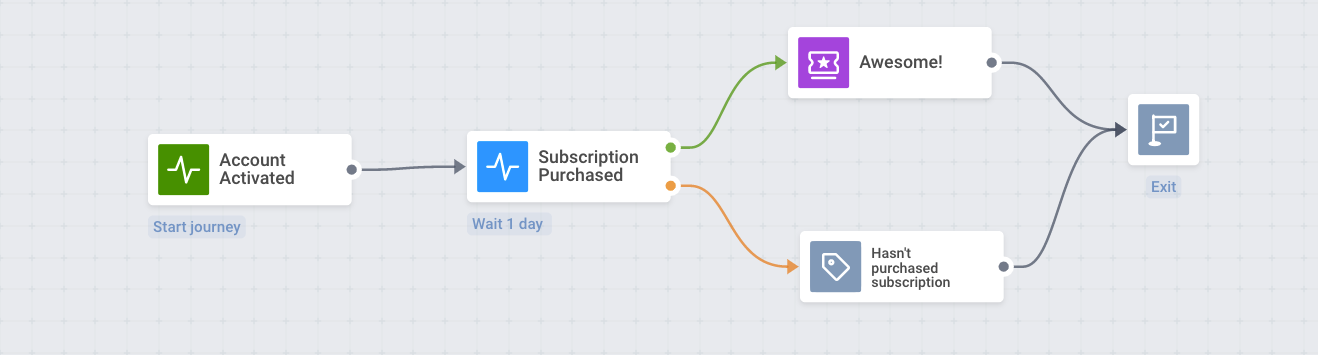
This is how you can catch up with those who haven’t converted straightway. But what if you choose to focus on the part of the audience that you’ve achieved to monetize? Take a look at the next scenario.
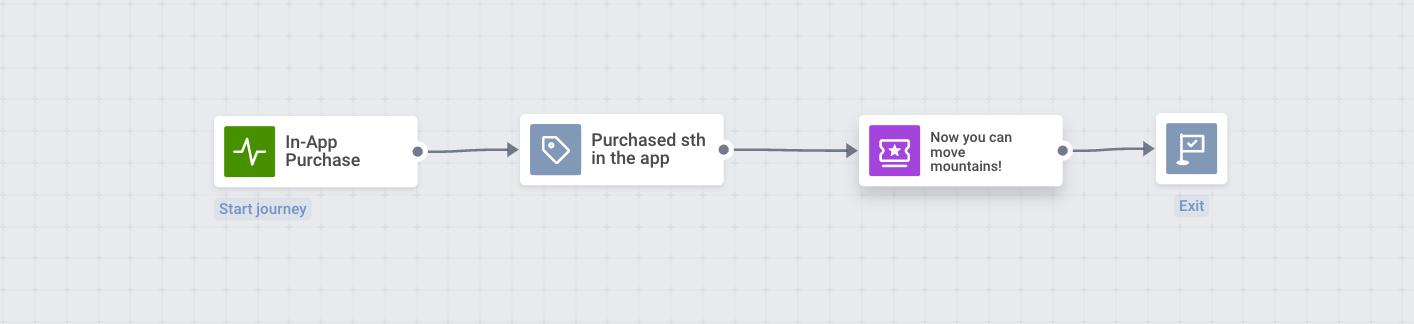
2. Congratulate users on a purchase
1️⃣ Start your Journey with the In-App Purchase Event.
2️⃣ Tag the users who’ve triggered it. This will allow you to create any kind of segmented messaging flows in the future.
3️⃣ Right there, display an in-app message that will confirm a user has made the right call: showcase the premium features that are now available to the subscriber.
3. Remind users of a subscription renewal
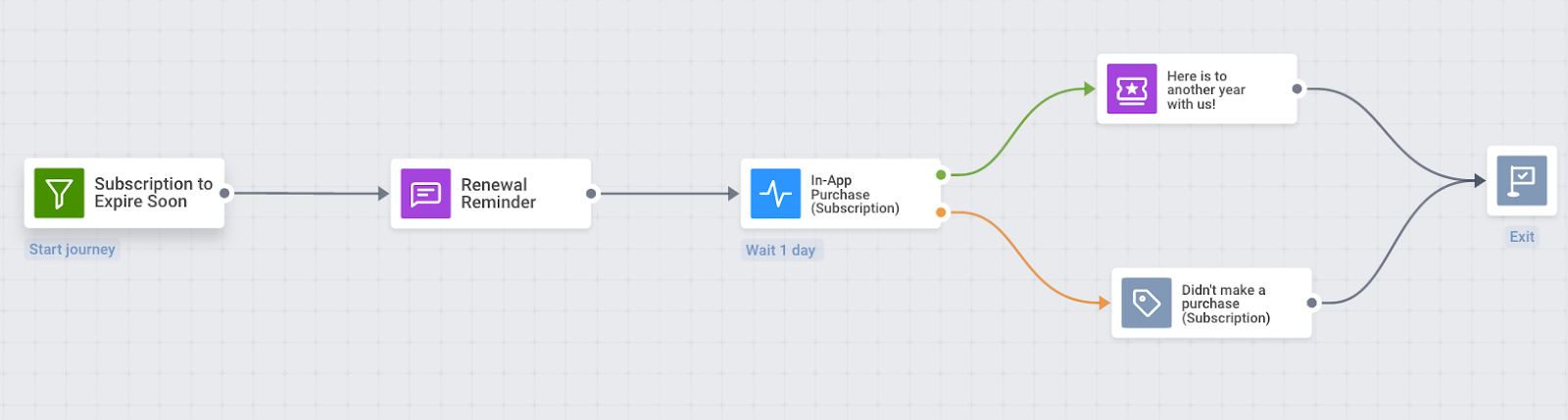
With the accurate tracking of in-app purchases, you’ll know when exactly to remind your iOS app user of the next payday.
1️⃣ Target a segment of those whose subscription is about to expire.
2️⃣ Send them a renewal reminder in a push notification.
3️⃣ Place your custom In-App Purchase Event right after that.
4️⃣ See how many users have paid after seeing the reminder. State if your communication was effective.
5️⃣ Thank the users who’ve chosen to keep using the paid version of your app and tag those who have not — you’ll get to address their doubts and motivation in a dedicated messaging flow later.
4. Upgrade users
Have you realized by now you can set up your In-App Purchase Event to track the exact kind of purchase your users have made? It can be a certain subscription plan or an in-game item. For example:
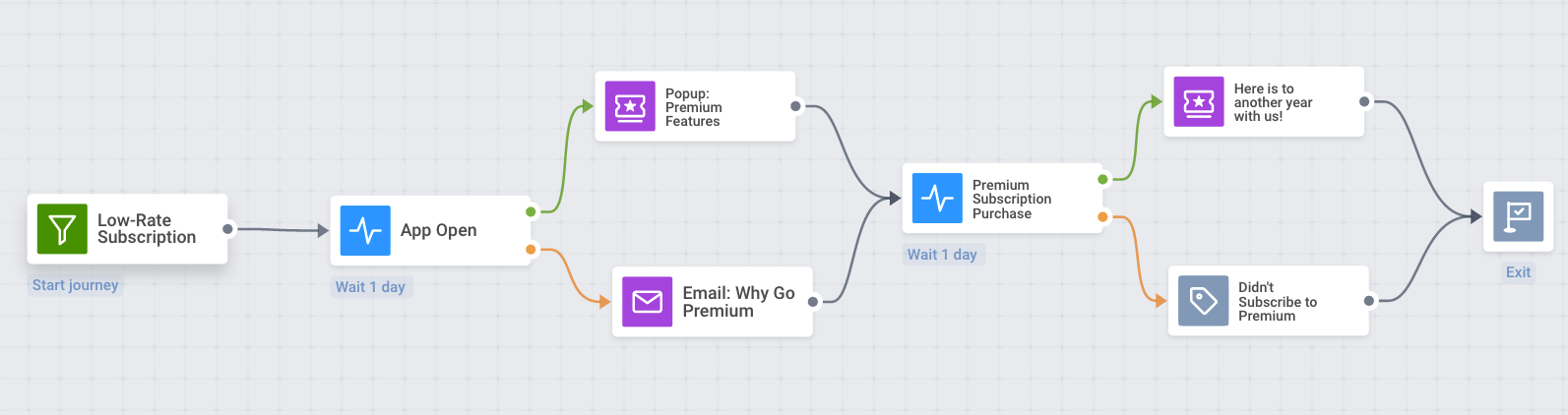
1️⃣ Target the users who’ve been using the least expensive of your subscription plans.
2️⃣ The next time they open your app, show them an in-app message suggesting to upgrade to a more advanced plan.
3️⃣ Take into account even those who don’t open your app shortly. Get in touch with them via email.
4️⃣ See how many customers will be seduced by your offer.
5️⃣ Keep communicating with your users appealing to their decision regarding a more expensive subscription plan.
5. Export in-app purchase data to your favorite analytics systems
If you use any external services for analytics, you can easily share the data on triggered In-App Purchases with it.
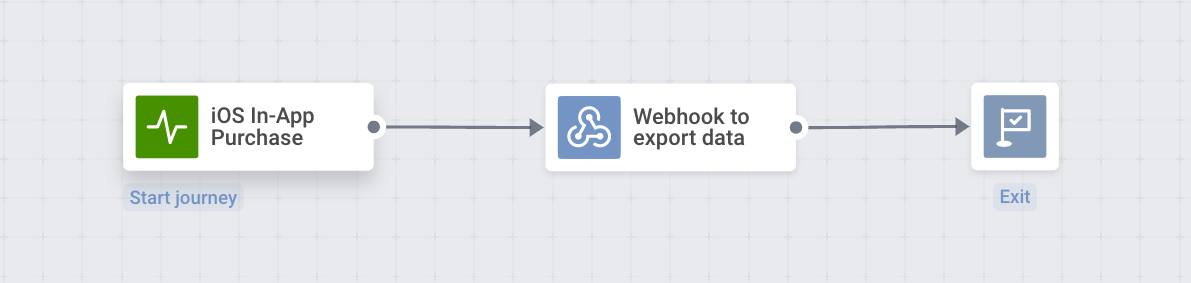
1️⃣ Start a Journey by the In-App Purchase Event.
2️⃣ Connect a Webhook to send data on the completed In-App Purchases to the analytics platform of your choice.
If you can think of any more use cases for your subscription-based, gaming or media app, please feel free to let us know. Our supporting team will be more than happy to help you accomplish your challenge.
Gauge and Boost the Effectiveness of Your iOS App Monetization with Pushwoosh
Marketing is known to be art and science. For your creativity to flourish and yield results, you surely need to be guided by accurate numbers.
Start tracking in-app purchases in your iOS app to create effective communication flows that will keep converting app visitors into paying customers.
Get access to the new functionality in Pushwoosh — PW_InAppPurchase Custom Event — with the latest version of Pushwoosh iOS SDK.
Got the most recent Pushwoosh iOS SDK yet? Start tracking in-app purchases right now.
Have you not been using Pushwoosh yet? Try the entire platform for free today.