iOS 15 has reformed push notification sending and delivery, and the changes look dramatic at marketers’ first sight. The industry was already stirred by the earlier iOS 14.5 update that introduced a new post-IDFA marketing era. App businesses had to switch their focus from user acquisition to engagement and retention, and now they are cut off access to push notifications. Or aren’t they?
Pushwoosh Team has reviewed the iOS 15 notification updates and developed a list of recommendations for your counterstrategy. Against Apple’s new limitations and for your most effective performance — the battle begins in this guide.
iOS 15 Marketers’ FAQ
When Was iOS 15 Released?
The iOS 15 public release took place on September 20, 2021. Before this date, iOS 15 had been available for developers. The iOS 15 beta version was presented in June when WWDC21 happened.
What Are the Key Features of iOS 15 Marketers Should Care About?
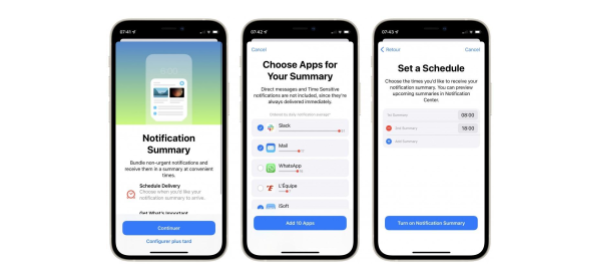
- **Notification Summary and Schedules******
iOS 15 stops push notifications from arriving on user devices randomly throughout the day.
To begin with, a very limited number of pushes make it to the Notification Summary. It is now up to iOS 15 users to select which apps they wish to include in this kind of digest. Moreover, Notification Summaries are delivered on user-specified hours named Schedules.
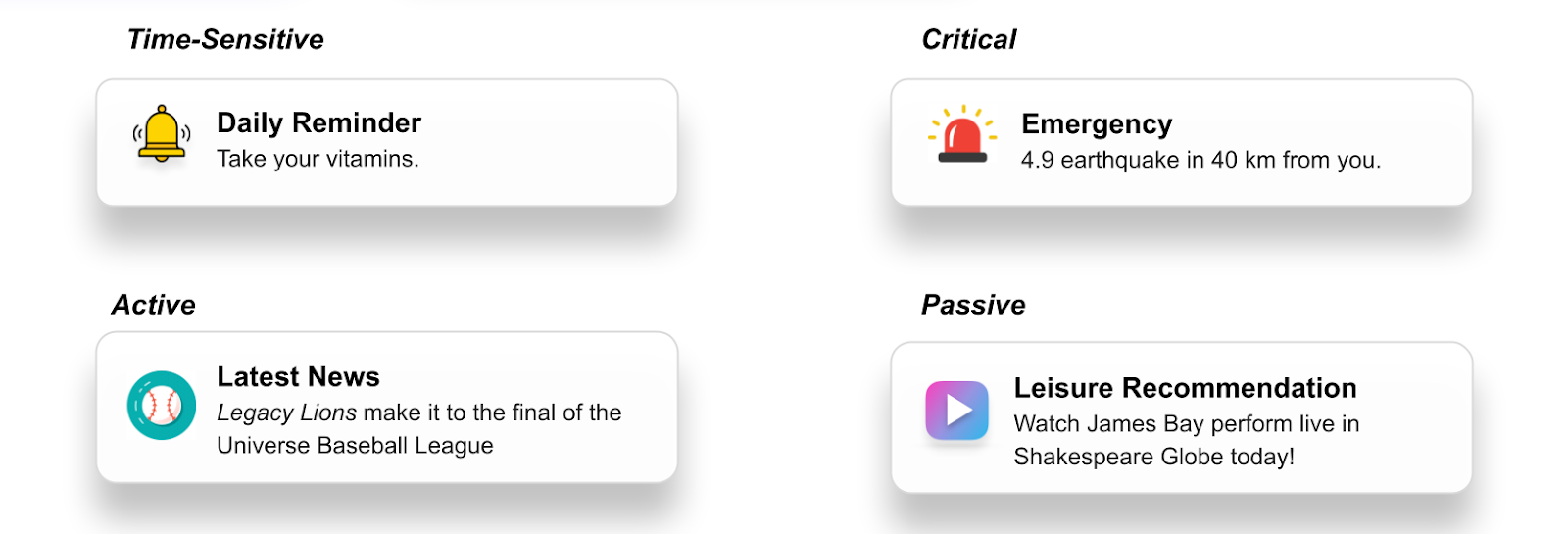
- Interruption levels for push notifications: Time-Sensitive, Critical, Active, and Passive
Developers get to set — and users get to confirm — the priority of notification delivery. Time-Sensitive pushes (explained as requiring immediate action) and Critical notifications (recommended for emergency alerts) can break through any restrictions.
In the meantime, Active pushes (default) and Passive ones (delivered silently are subject to the new limitations.
Interestingly, Apple suggests that marketers set the majority of their notifications as Passive. Would you?
- **Focus Mode******
To ensure iOS 15 users can concentrate on their chosen activity, Apple grants them the possibility to reserve some extra “limited-notification-delivery” time. Once a status is set, only user-selected apps will be permitted to display their alerts. In our example, an iOS 15 user has only allowed Time-Sensitive pushes in the Study mode.
What Are Marketers’ Biggest Fears Related to iOS 15 Notification Changes?
The most pessimistic marketers’ view on iOS 15 is that it will kill push notifications as the main retention channel just like iOS 14.5 put an end to attribution tracking.
The industry is concerned pushes will cease to be a full-fledged communication channel as it will no longer be possible to guarantee their delivery to users’ devices. Moreover, the chances for a push to be seen and clicks will decrease.
With all due respect, let’s put the drama on pause and soberly discuss the way to counteract the iOS 15 constraints on push notifications.
Take Control of Notification Schedules
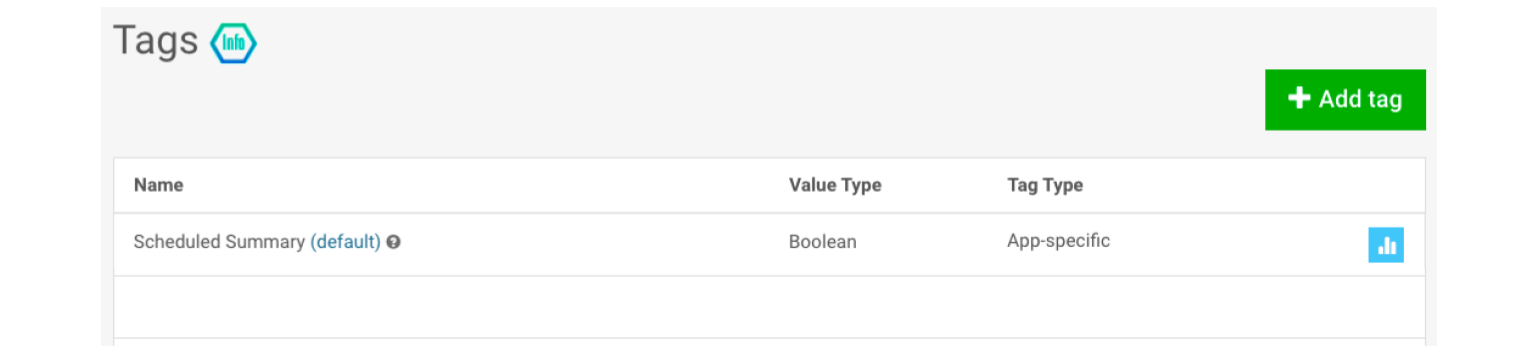
Rely on the “Scheduled Summary” Tag in Pushwoosh
Pushwoosh will grant you access to the information on whether your app has been included in a Notification Summary or not. Each iOS 15 device will receive a boolean Tag marking them as Scheduled Summary: true or Scheduled Summary: false.
You won’t know the exact time a user chose to receive their Notification Summary, but you will know if they’ve included you in their schedule whatsoever. This information can help you adjust your push notification frequency and content strategy accordingly.
Determine the Best Time to Send Pushes
Although you won’t have direct access to users’ Notification Schedules, you can try to figure them out. How? All through experiments! Run a series of A/B tests sending your push notifications at different time periods. Compare how users engage with your notifications at different hours.
You can try different times of the day — say, schedule a push for 10 a.m. vs. 4 p.m. Or you can A/B test closer time slots such as 10 a.m. against 11 a.m. to determine the best timing for your notifications.
Get on Top of Notification Summary
Adjust Your Push Notification Frequency
Since iOS 10 when Notification Center was first introduced, marketers have been sending massive amounts of pushes daily. In certain industries such as media apps, delivering up to 30 alerts per day has been the norm. In fact, our recent benchmark data study has stated it as an effective good practice for some outlets. But iOS 15 may change this.
With the Notification Summary, high push notification frequency may be useless if the alerts you send don’t reach the end user. Rather, there is a risk that your audience will notice you send way too many notifications and exclude you from their Summary completely.
We recommend you:
- Experiment to determine your audience’s actual behavior. Send your normal number of pushes to one group of users and a reduced number of notifications to another group. See if any of them shows more engagement.
- Identify the pattern: are these ‘Notification Summary: true’-tagged users who react better on fewer pushes? If so, continue sending them a reduced number of pushes — just make sure the content of these few pushes is as targeted and focused as ever.
Segment Your Audience Diligently
Your goal is to deliver a push that will stand out among all the others in the Notification Summary. Your message has to be perfectly relevant for the user, and you can achieve this relevancy with granular customer segmentation.
Track users’ in-app and purchasing behavior, discern your audience segments by interests and preferences, set Tags, and keep them updated in real time. All these steps will help you target your notifications at those customers who are most likely to engage and take the required action.
Step Up Your Personalization
Although Apple has been restricting its privacy policies, there are two layers of user data you can obtain and use to your marketing advantage. We’re talking about first- and zero-party data, and we mean users will openly share it with you as long as they’ve seen the value in it for them.
So, your job now is to explain to your audience how they will benefit from sharing their geolocation, opting in for push notifications and a newsletter, and participating in your surveys. To communicate in these and many more cases, you can use in-app messages:
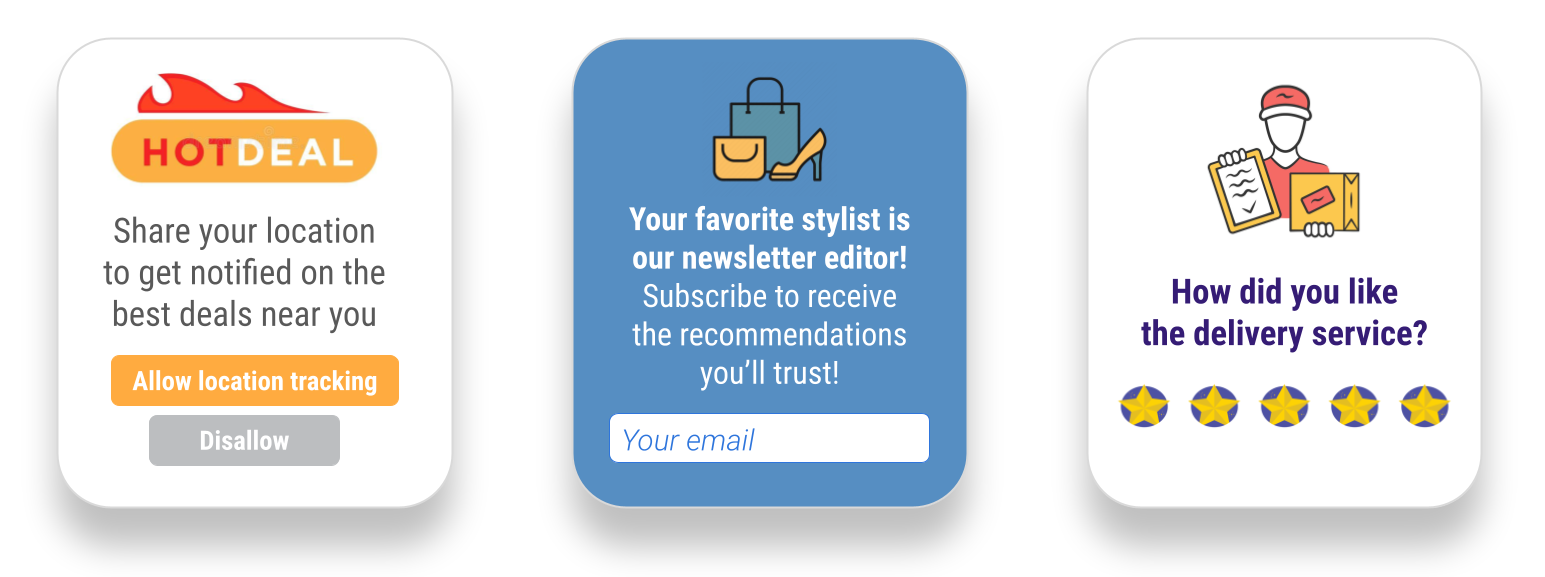
The next step is to mention some of this data in your pushes to make them as relevant as ever.
Take a Closer Look at Geo-Targeting
Offline stores and restaurants have long been benefiting from geo-targeted notifications — now, we believe, more industries can boost the relevancy of their communications with geolocation data. Ticket services, car and bike rentals, e-commerces and their delivery services, AR games, and fitness trackers can provide their app users with extra value when they align their communications with geo positions.
Add Rich Media to Your Pushes
In the Notification Summary layout, the visual appeal comes to the fore. Apps sending rich media pushes instead of plain-text notifications will have a competitive advantage.
You may notice the overall differences in push design in iOS 15: icons and images are larger than in previous versions, and personal messages include user profile photos.
You may take location-based push delivery to the next level and enrich your geo-targeted notifications with images corresponding to users’ whereabouts.
Work Wisely with Time-Sensitive Notifications
Avoid Sending All Pushes as Time-Sensitive
One would think that Time-Sensitivity is a feature that apps could easily abuse. They would just mark all of their pushes as Time-Sensitive and break through any notification delivery restrictions. In reality, it’s not that easy.
The first time a user receives a ‘Time-Sensitive’ push, they need to confirm the app’s right to send them immediate notifications. If they don’t allow it at the first encounter, an app will lose their opportunity to send pushes as Time-Sensitive. And there will be no turning back.
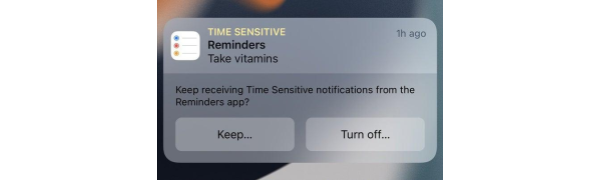
With this in mind, you may want to think twice before you send your first Time-Sensitive push — and come up with a different shortcut for unhindered notification delivery.
Find Out If Your Push Notifications Have a “Time-Sensitive” Tag
So, here is a more viable plan: Pushwoosh SDK can inform you of whether your app is given permission to send Time-Sensitive pushes to a particular device or not.
Like in the case of Scheduled Summary, Pushwoosh will display a Tag with one of the two options: Time-Sensitive true or false.
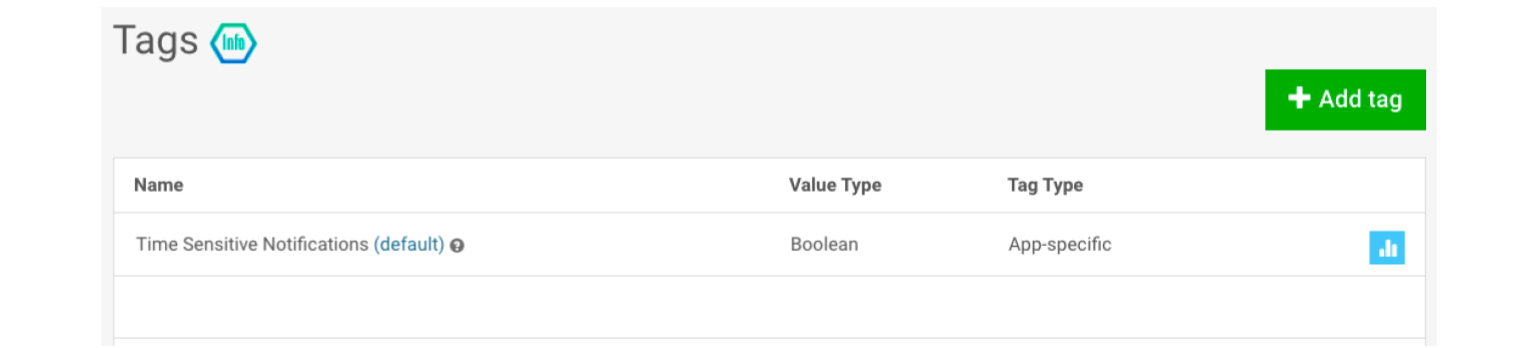
Then, you will get to align the content of your pushes to the Time-Sensitive Tag values. Probably, you will want to persuade users to allow sending immediate notifications from your app — but you will have to do it via other channels such as in-apps.
Make Sure to Send Actionable Pushes As Time-Sensitive
On the contrary, you want to set the Time-Sensitive interruption level for notifications that require users’ immediate reaction. Go out and get into a taxi, enter a secure code to complete a purchase, or take that regular pill — these are the times when a user will expect your notification to arrive no matter what.
How Will Push Notification CTRs Change in iOS 15?
CTR of push notifications with different interruption levels will be incomparable. Active pushes will naturally receive more clicks than Passive ones. As for Time-Sensitive notifications, for them, CTR may become irrelevant as a metric. The aim of a Time-Sensitive push may be purely informative rather than requiring a user’s action. In most cases, such notifications serve as reminders, and users are not expected to click on them to view some extended content.
So what should you do to analyze your push notifications CTRs correctly?
- Mind the interruption level of pushes you send. Watch out for the benchmarks you can find in open sources and make sure to only compare CTRs of pushes from the same category.
- Similarly, you may have to consider several benchmarks for your push notification conversion rates too — for each interruption level.
Get Into Focus Mode
Be Mindful About Sending Pushes
Before iOS 15, sending broadcast notifications may not have been a universal best practice, but it was OK. Now apps would have to switch to a more responsive, customer-oriented strategy. Non-segmented push sending will be useless, if not harmful for the app.
Let Users Choose the Notifications They Want to Receive
It’s high time you verified your audience preferences if you haven’t done it yet. Let users opt-in for notifications that suit their interests and that they are willing to receive.
Go Cross-Channel Instead of Focusing on Notifications
Work smart, not hard, they say, so instead of fighting the iOS 15 notification restrictions, you may choose to focus on other channels.
Utilize In-App Messages
The best thing about in-app messaging is that it finds users when you’ve already grabbed their attention with your app content. This is when they are the most engaged and the most prone to your communications.
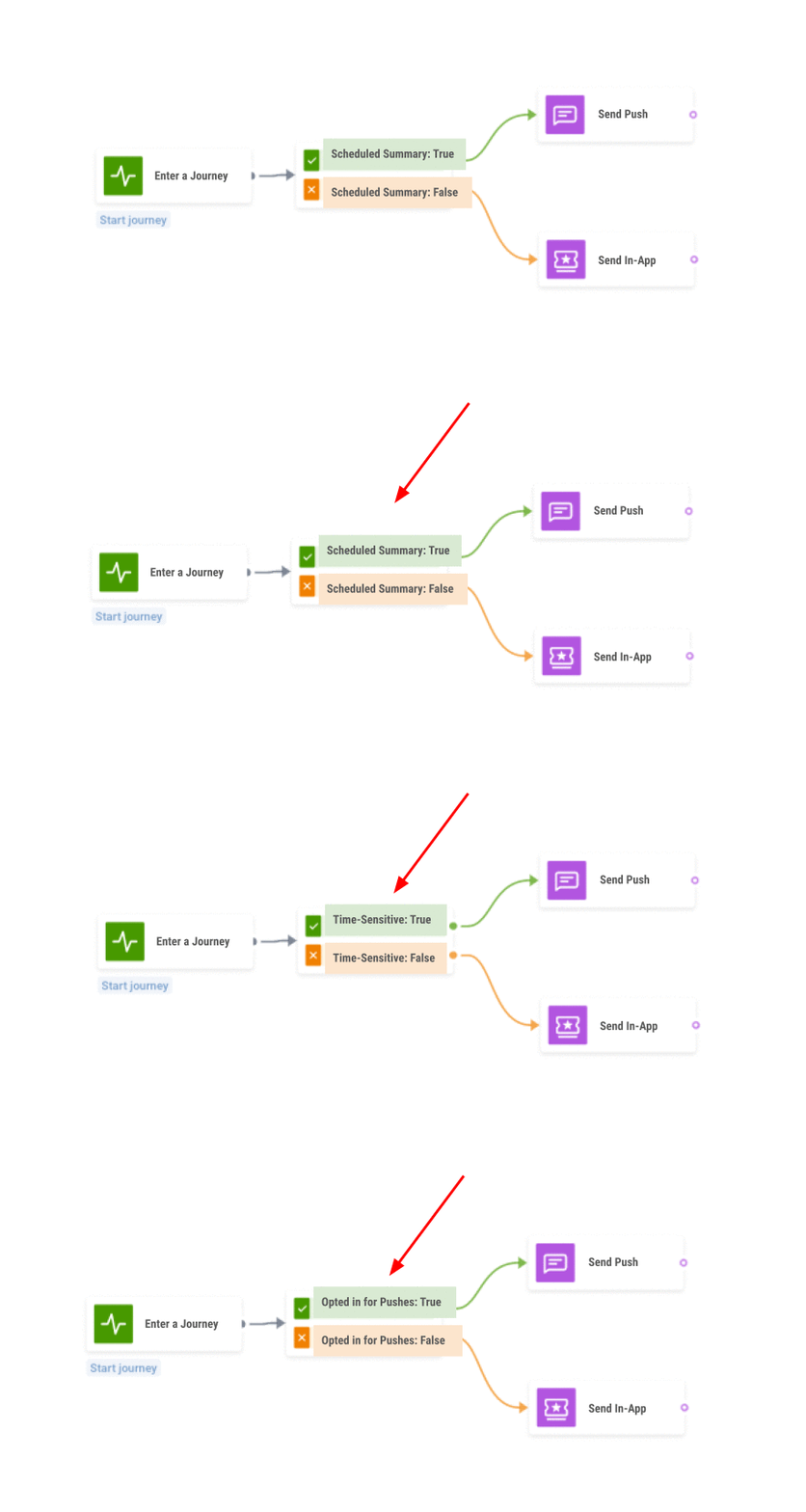
Try using in-app messages to deliver the same message as you would push. You will maximize your reach by targeting:
- Users who have excluded your app from their Notification Summaries;
- Those who haven’t listed your notifications as Time-Sensitive;
- Customers who have never opted in for your pushes, in the first place.
You can track all of these segments easily with Pushwoosh Tags.
Send Emails
Emails + push notifications = a combination that helps many of our customers convey the message more effectively and maximize the number of target actions triggered.
In the upcoming iOS 15 reality, emails are going to ensure that your audience is aware of your offers and updates even if your push notifications couldn’t break through.
Ask your customers to share their emails with you — an in-app message will be perfect for this purpose. You surely want to propose a benefit for a customer to persuade them — extra bonus points, premium features uncovered or a good old discount will do their job.
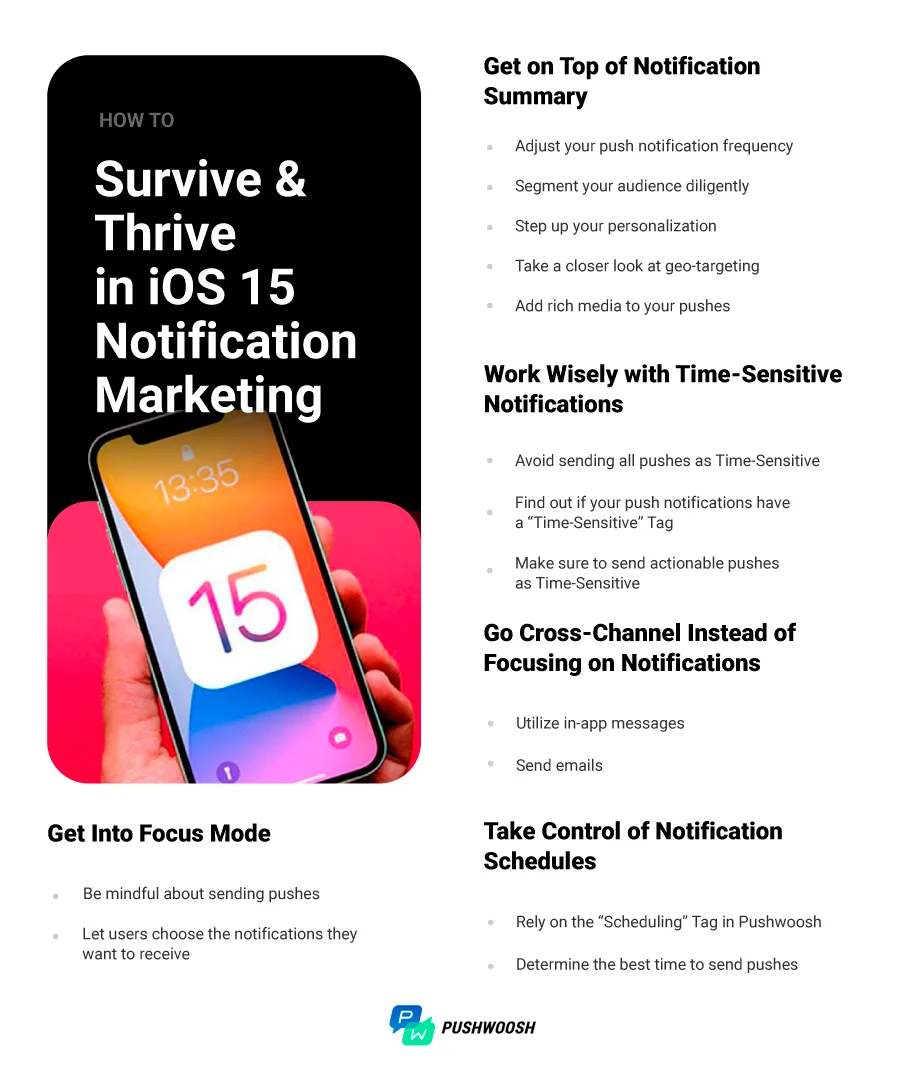
Save & use this checklist to develop your push notification marketing strategy for iOS 15
Does iOS 15 Bring Any Perks for Marketers?
- iOS 15 notification updates may be extremely beneficial to those apps that already have a refined mobile marketing strategy. If your notifications have always been targeted to relevant segments, personalized, enriched with appealing imagery, and sent at perfect timing, the transition to new iOS should be smooth.
- In fact, the Notification Summary feature may give a chance for an app to get through to its audience. It is possible if the app has persuaded its users to include its alerts in the Summary or always sends highly relevant and informative Time-Sensitive pushes.
- Niche apps like food delivery or taxi services can start to carry more weight now. Their Time-Sensitive notifications will get a chance to break through numerous promo pushes and call users to required actions, especially critical in the offline world.
iOS 15 Marketers’ Credo
It looks like starting September 2021, the iOS marketing world is going to live by the credo “The less is more”. Sending fewer pushes with higher efficiency is a whole science built on experiments and reliable software equipment. This is what Pushwoosh can help you with.
Request a personal product tour now, and see how your mobile marketing can thrive with targeted push notifications, whatever the next iOS brings.