If your brand treats Live Activities as another promo slot, iOS 27 is the release that ends it. In its June 2026 guideline update, Apple added Live Activities to its anti-spam rule: they may not be used to “spam, phish, or send unsolicited messages” to customers. The channel that was quietly becoming a place to park marketing on the lock screen is now one a reviewer can reject or pull an app over.
This is worth reading carefully, because the line between a compliant Live Activity and a violation is not about the feature. It is about whether the user asked for what you are showing them. This guide covers what the rule actually bans, where the legitimate use cases stop and the abuse begins, how to set up Live Activities inside the rules, and how to audit the campaigns you already have live. Pushwoosh is a customer engagement platform, and where the setup or the audit touches something you configure with us, we point to it.
What the rule actually says
The rule is App Store Review Guideline 4.5.3, and it is not new. It has long barred using Apple Services to spam, phish, or send unsolicited messages to customers, naming Game Center and Push Notifications among them. What the June 8, 2026 update did, alongside WWDC, was add Live Activities to that list by name. So the surface is now explicitly covered by an anti-spam rule that already had teeth. Small edit to the guideline, large consequences for anyone using the channel for marketing.
The part that raises the stakes is what it shipped next to. In the same round of changes, Apple widened its broader spam rule so it can remove apps already on the store, not only reject new submissions. So the Live Activities clause is not just a submission-time gate. An app running promotional Live Activities today can be flagged for it, not only at the next release but on a build that is already live. There is no announced grace period, and Apple has historically started enforcing new guidelines within 1 to 3 months of publishing them. That clock started in June.
Where the line sits
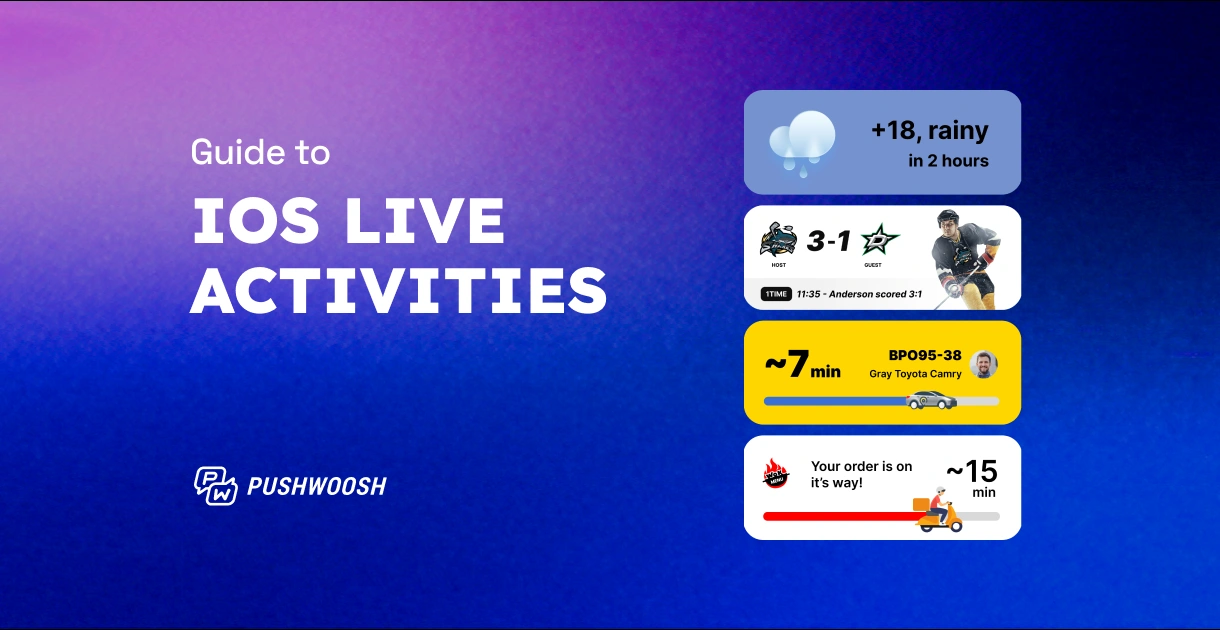
A Live Activity is built to track a real, ongoing event on the lock screen and in the Dynamic Island: a food order moving toward your door, a ride approaching, a match score climbing, a flight boarding. The user started that event, and the Live Activity reflects its state in real time. That is the entire legitimate use case, and it is a genuinely good one.
The violation is using that same surface to deliver something the user did not initiate. A countdown to a sale they never opted into. A “flash deal” Live Activity pinned to the lock screen. A re-engagement nudge dressed up as an activity. None of these tracks an event the user started. Each of them is an unsolicited message wearing the costume of a Live Activity, which is exactly what 4.5.3 now names.
The test is whether the Activity reflects something the user is actively waiting on or something you want them to see. The first is a Live Activity. The second is a promo, and a promo belongs in a channel built for promos, sent to users who opted into it.
| Use case | Compliant | Why |
|---|---|---|
| Order and delivery tracking | Yes | User placed the order; the Activity tracks its real state |
| Ride or courier en route | Yes | User booked it; live location is the point |
| Live sports score for a followed match | Yes | User chose to follow; the score is a real ongoing event |
| Countdown to a sale the user did not opt into | No | Unsolicited; no user-initiated event behind it |
| Flash-deal or promo pinned as an Activity | No | Marketing message using the Activity surface as ad space |
| Re-engagement nudge styled as an Activity | No | The “event” is manufactured to get attention |
How to use Live Activities inside the rules
Staying compliant does not mean staying away from the channel. It means using it for what it is designed to do, and routing your marketing to the channels built for it.
Anchor every Live Activity to a user-initiated event. If there is a real thing happening that the user is waiting on, track it. Order status, delivery, live scores, booking progress: these are exactly what the surface is for, and users welcome them there. The Live Activities setup in Pushwoosh is built around updating this kind of live event through its lifecycle, from start to the final state.
Keep the promotional intent out of the Activity itself. If you want the user to know about a sale, that is a push notification or an in-app message to an opted-in audience, not a pinned Activity. The moment the Activity’s job is to advertise rather than inform, you are in 4.5.3 territory.
Use push to update the Activity, not to replace it with an ad. Live Activities are updated remotely through push: the push carries the new state of the event, the Activity displays it. That is a different thing from using the Activity’s update channel to inject a message the user never asked for.
Audit the campaigns you already have live
Because the rule can reach apps already on the store, the urgent work is not your next campaign, it is your current ones. Go through everything running on the Live Activities surface and sort each one honestly.
For every active Live Activity, ask 3 things. Did the user initiate the underlying event? Does the Activity end when that event ends, or does it linger to keep the surface occupied? If you stripped out the branding and the call to action, is there still a real event being tracked? Anything that fails these is a candidate for removal before a reviewer makes the decision for you.
Pay special attention to anything labeled as an Activity that is really a scheduled marketing beat, a limited-time offer, or a win-back campaign. Those were always a stretch of the feature. Now they are a named violation, and the downside is no longer a rejected update. It is the standing of an app that is already earning.
Get your Live Activities set up the right way with Pushwoosh
Pushwoosh supports Live Activities for exactly what Apple intends them for: tracking real, user-initiated events through push updates, from order to delivery to final state. And when you do have something promotional to say, the same platform gives you push, in-app, email, and SMS to say it in the channels built for it, to the users who opted in. Compliant on the lock screen, effective everywhere else.