Real-time tracking on the lock screen used to be an iOS story. When a ride, a delivery, or an order was moving, iPhone users watched it unfold in a Live Activity — while your Android users got a string of separate push notifications, or nothing at all between “confirmed” and “delivered.”
Android 16 closes that gap. Its new Live Updates bring live, progress-style tracking to the Android lock screen, the notification drawer, and the status bar. For any lifecycle team, that means the real-time experience you designed no longer reaches only half your audience.
In this article, you’ll find out what Live Updates are, which scenarios they fit, and how to start sending Android Live Updates with Pushwoosh.
What Android Live Updates are
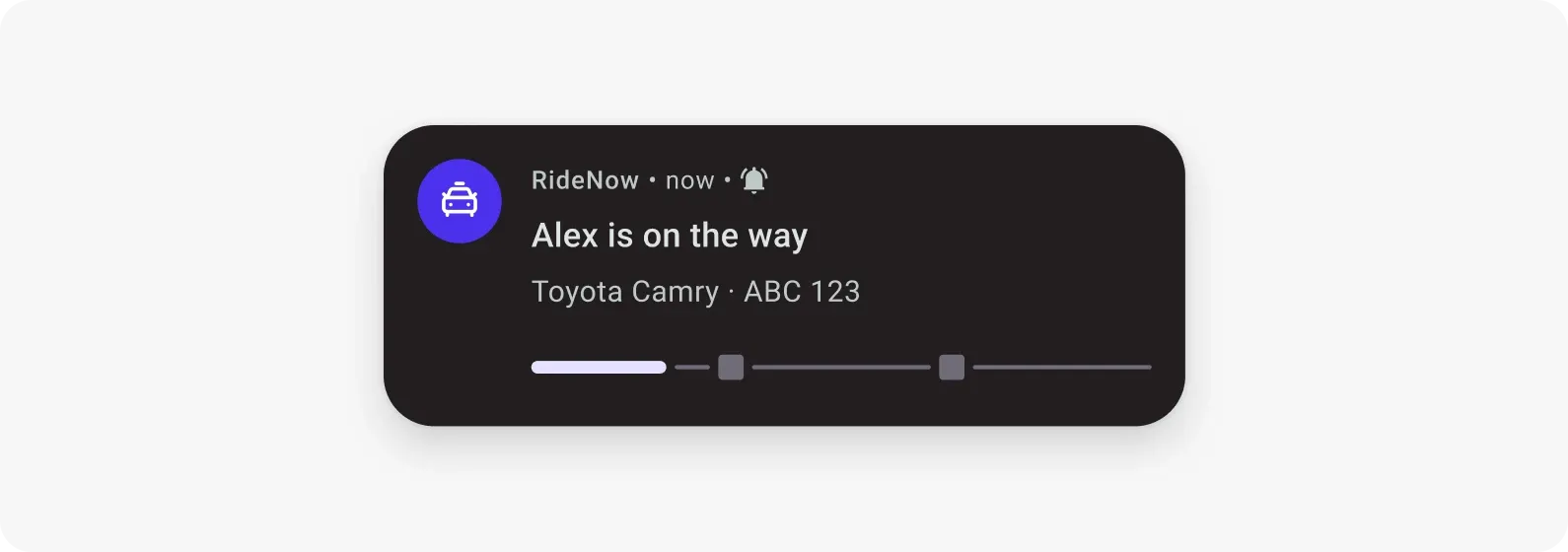
An Android Live Update is an ongoing, progress-style notification that the system promotes to the lock screen, keeps in the notification drawer, and pins as a chip in the status bar, so a user can follow an activity without opening your app.
The whole lifecycle runs from your server. You send 1 push when the activity starts, more pushes as it moves forward, and a final push when it ends. Each push updates the same notification in place instead of stacking a new one on top. 3 operations carry it: start posts the notification, update refreshes it silently, end clears it away.
If you already run iOS Live Activities, this is the Android counterpart: the same idea of a live, self-updating card for a real-time event, built on Android 16’s progress-centric notifications. The setup mechanics differ, but the marketing job is identical: keep the user informed continuously instead of pinging them at every step.
What it looks like: tracking a ride end-to-end 🚕

Take a standard ride-hailing flow. Here’s the whole trip as a single Live Update instead of a string of pushes.
1. Start — the driver is assigned. The moment a driver accepts, your backend sends the start push. A Live Update appears on the lock screen: “Alex is on the way — 4 min away,” with the car details and an ETA. The rider sees it without opening the app.
2. Update — the trip moves. As the driver approaches and the ride progresses, your backend sends an update push against the same activity. The card refreshes in place — driver en route → arriving → trip in progress — the ETA recalculates, the status keeps pace with the car. No buzz, no new notification. Just the current state, always accurate.
3. End — the trip is complete. The final push closes the Live Update: “You’ve arrived. Fare: $18.40.” The notification clears itself. The loop is closed.
The rider went from a string of pushes to zero interruptions and better visibility — a live trip tracker on the lock screen from pickup to drop-off, instead of pings that flash and vanish. And because the card stays on screen, the lock screen becomes a re-entry point: users with an active Live Update tend to open the app more, not less.
Where Live Updates earn their place, by app type
The same pattern works anywhere users track something that’s happening right now, with a clear start and end.
| App type | Start | What updates live | End |
|---|---|---|---|
| E-commerce / delivery | Order confirmed | Preparing, out for delivery, nearby, ETA | Delivered |
| Ride-hailing | Driver assigned | Driver location, ETA, trip in progress | Trip completed |
| Fintech | Transfer initiated | Verification and processing stages | Transaction complete |
| Live sports / media | Match starts | Score and match time as the game unfolds | Final result |
| Fitness | Workout begins | Elapsed time, distance, progress | Session complete |
In every row, the rule is the same: the activity is user-initiated, time-sensitive, and ongoing. The Live Update carries the state between the start and the end; a push notification only fires if something genuinely needs a decision along the way.
When not to use Live Updates 🚫
Live Updates come with one hard rule, and Android enforces it: Live Updates are for user-initiated, time-sensitive activities that are actually in progress, nothing else.
That rules out:
- Promotions, offers, and campaign messages. A Live Update is not a marketing surface. Keep those in push, in-app, and email.
- Chat messages and ambient information. No conversations, no “just so you know” updates that aren’t a live activity.
- Anything the user dismissed. Never re-post a Live Update someone has swiped away.
Read that as protection, not restriction. The reason a Live Update earns a permanent spot on the lock screen is precisely that it’s reserved for things the user asked to track. Fill it with marketing, and it stops being useful, and Android makes sure it stops being available.
How to set it up in Pushwoosh 🛠️
You won’t be sending Live Updates by hand, as they fire off events your app already tracks. Setup is a one-time job for your dev team, and it breaks down into 3 steps:
-
Pick the flow and its 3 moments
Choose one real-time activity (e.g., an order, a ride, a delivery) and mark its start, the updates in between, and the end. That's the whole map a Live Update needs.
-
Connect it to your existing events
Your dev wires the status changes you already track, so each one sends the matching moment: start when the activity begins, an update on every status change, end when it's done.
-
Let Pushwoosh render it
The SDK draws the notification for you — progress bar, icon, live chip — and refreshes it in place on each update. Nothing to design per message.
That’s it. It’s a one-time integration inside the same Pushwoosh project you already use for push, email, and in-app, and it runs itself off your real events from there.