For years, a geofence did one thing: a user crossed a line on the map, and your app fired a push. One ping, and the geofence was done with the user. If the timing was off, or the user had muted notifications, that was the end of it.
Seems like a lot of intent to spend on a single blast. Someone walking into your store, lingering in an airport terminal, or leaving their home city is handing you a real-time behavioral signal. A lone push barely reads it.
That’s changed. A geozone can now drop a user into a journey — a sequence that plays out across channels, instead of firing once and going quiet.
In Pushwoosh, a geozone fires an event on entry, dwell, and exit, and that event flows into Pushwoosh Customer Journey Builder. So a location signal can start a full omnichannel journey, not just a single push notification.
How geofencing marketing works
Geofencing works on 3 moments, and each one fires an event you can act on:
- Entry — the user crosses into the zone. The classic proximity trigger.
- Dwell — the user stays inside for a set time. This is where intent shows up: someone who lingers has stopped for a reason.
- Exit — the user leaves. Your cue for follow-up, feedback, or a win-back.
| Trigger | Event | Typical scenario | KPI to watch |
|---|---|---|---|
| Entry | PW_GeozoneEntered (or custom name) | User arrives near a store, venue, or branch → send a contextual offer | Entry-to-open rate, visit-to-conversion |
| Dwell | PW_GeozoneDwell (after the time you set) | User lingers in a mall, terminal, or dealership → prompt a relevant action | Dwell-to-action rate |
| Exit | PW_GeozoneExited (or PW_GeozoneExitedByTimeout) | User leaves the area → close the session, ask for feedback, start a follow-up | Exit-to-re-engagement rate |
PW_GeozoneEntered (or custom name)PW_GeozoneDwell (after the time you set)PW_GeozoneExited (or PW_GeozoneExitedByTimeout)One more precision upgrade: geozones aren’t limited to circles anymore. You can draw a polygon that matches the real footprint of a mall, airport, or campus, so the trigger fires on the actual boundary instead of a rough circle drawn around it.
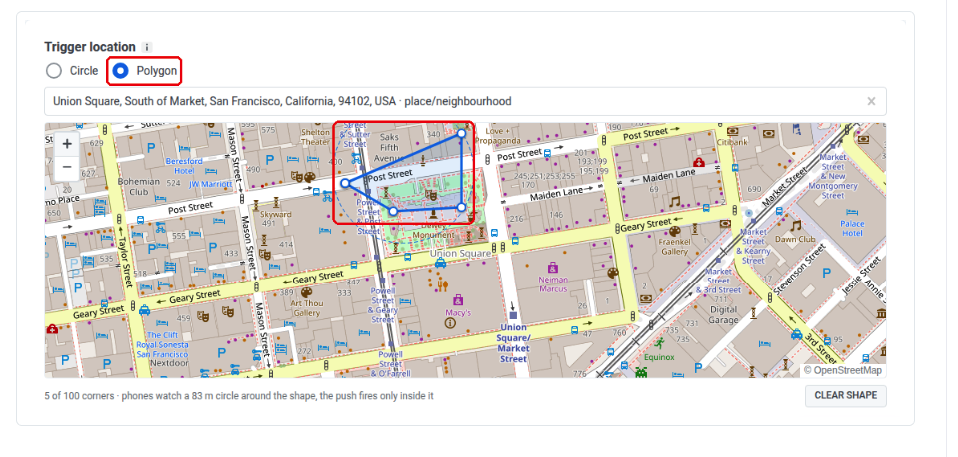
If you’re already a Pushwoosh user, it runs on your current Pushwoosh SDK. No update needed; the SDK already speaks geo 😎.
Geofencing marketing use cases & examples
The trigger is the same everywhere. What changes is the moment you’re catching and the message that fits it. Here’s how it plays out across 4 app types.
🛒 Retail & delivery: proximity re-engagement
The problem: Foot traffic near a store is warm intent your app usually misses. Someone a block away has already chosen to be in your neighborhood, and your job is to give them a reason to walk in.
The capability: The move is to trigger on dwell, not entry. Firing the instant someone crosses the boundary catches every passer-by; a dwell timer catches only the ones who actually stayed.
What it looks like: a user enters the geozone around your flagship store and stays. After 3 minutes inside, PW_GeozoneDwell fires, starting the journey (a passer-by never triggers it). It sends an in-app message: “You’re near our Downtown store — show this for 15% off today only.” If push is their reachable channel, it goes out as a push instead.
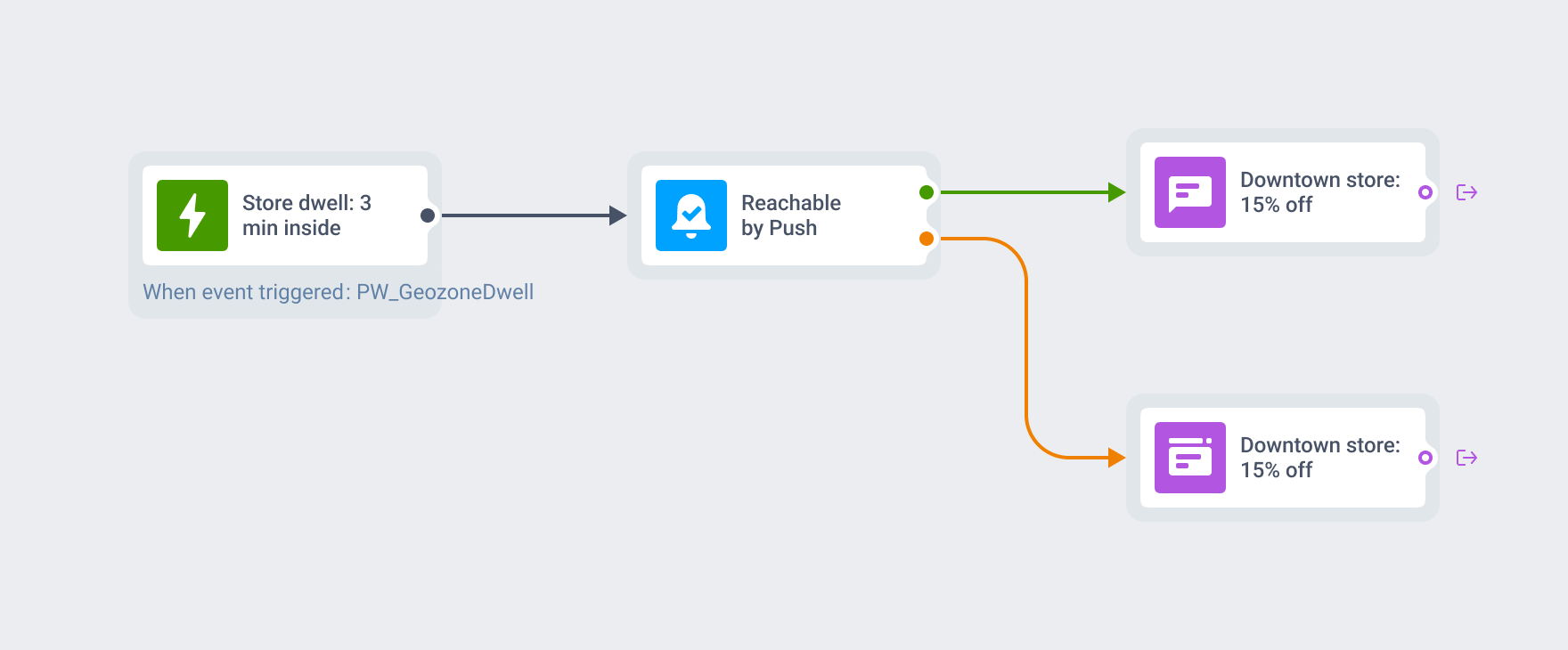
Go even better: hand potential buyers an actual discount card or coupon, not just a push. The moment a likely buyer enters, issue a wallet pass with the offer baked in. It lands on the lock screen as a card they keep with one tap.
And the best part is that because the card lives in Apple Wallet or Google Wallet, it reaches everyone in the store zone, even if your app isn’t installed.

💰 Fintech: location-aware context & security nudges
The problem: For a fintech app (a wallet, a trading app, a neobank), a change in the user’s location is real context, not noise. Knowing that someone just left their usual area lets the app feel aware without being creepy.
The capability: entry into a new region, or exit from a home zone, as a signal that the situation just changed.
What it looks like: a user exits their home-city geozone, and the app sends a light nudge: “Traveling? Turn on travel mode so your cards keep working abroad.” It reassures rather than alarms — context and convenience. Handled well, it’s the kind of touch that makes an app feel like it’s looking out for you.
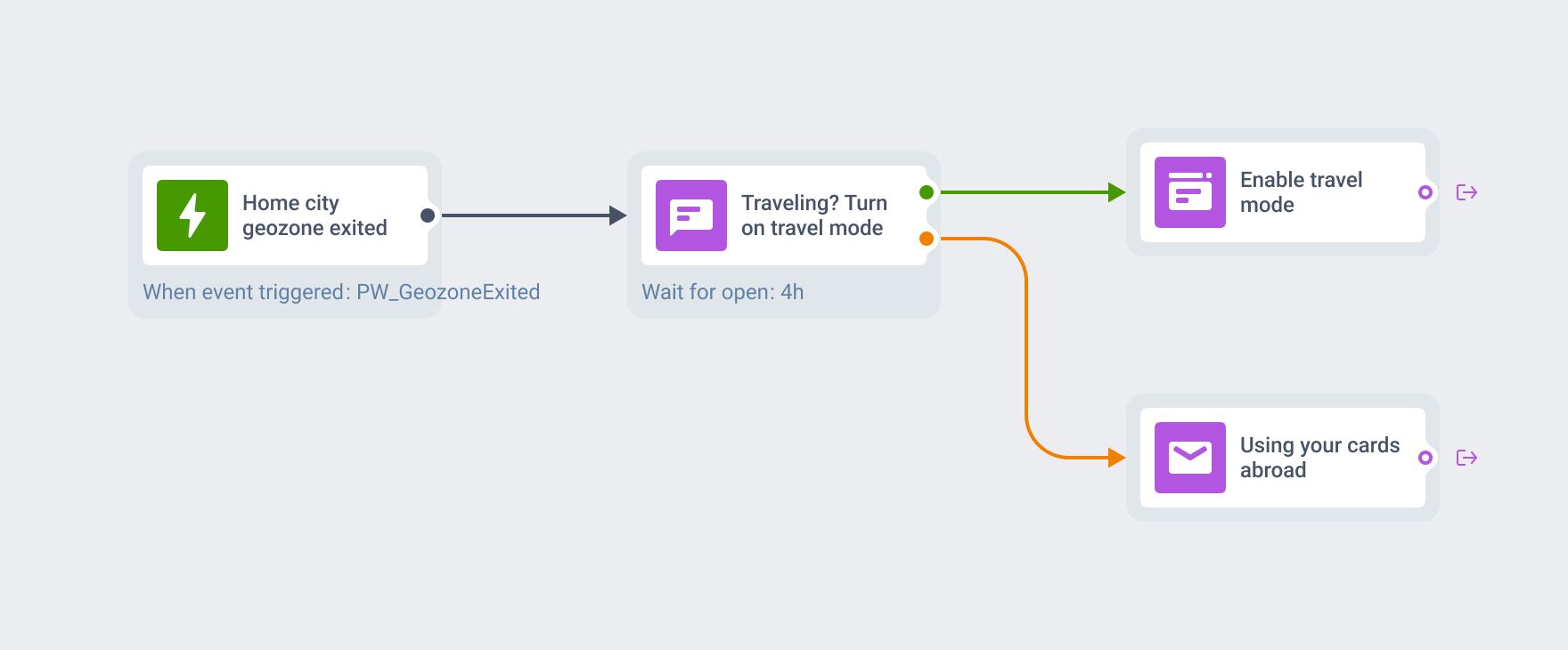
See how fintech apps run the rest of their engagement lifecycle.
🛫 Mobility & travel: dwell-based service prompts
The problem: a user who’s been in 1 place for a while is often stuck, waiting, or deciding, and that’s exactly when a well-timed prompt helps.
The capability: dwell. Fire after the user has spent real time inside the zone.
What it looks like: a user has spent 15 minutes inside an airport terminal geozone. The dwell event fires and the app offers something the moment actually calls for: “Long wait ahead? Grab a lounge pass — 20% off for the next hour.” The delay is the whole point: you’re not pinging someone who’s passing through, you’re helping someone who’s clearly waiting.
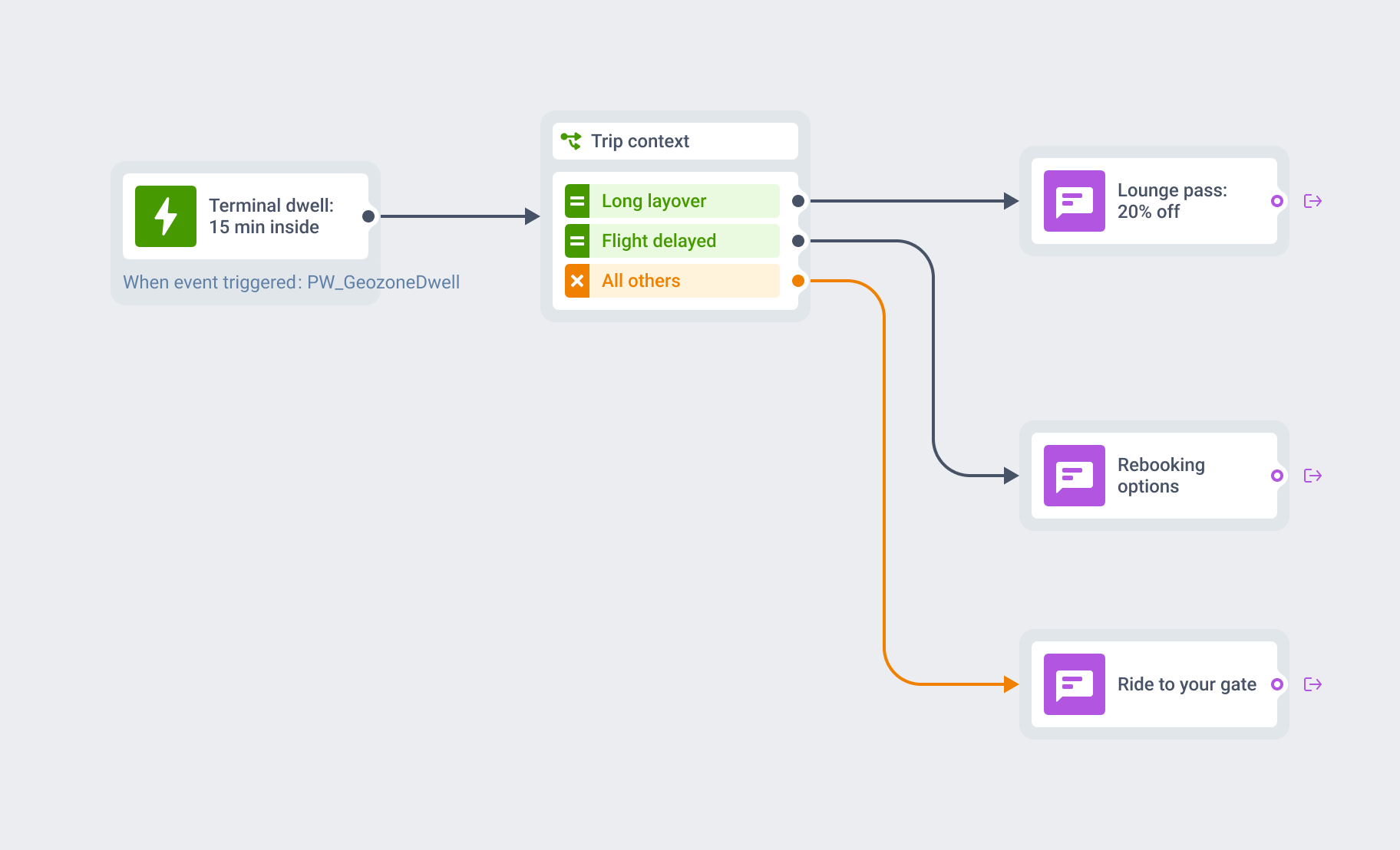
That’s the difference between useful and annoying, and it’s central to mobility and delivery apps.
🆕 Events & media: geozone-gated content
The problem: Some content only makes sense on-site: the live feed, the venue map, or the in-stadium coverage. Everywhere else, it’s clutter. Geofencing lets you switch it on and off with the user’s location.
The capability: entry opens a content series, exit closes it.
What it looks like: a user enters the stadium geozone, and the app unlocks a live-coverage journey, e.g., scores, schedule, exclusive angles: “You’re in the arena. Tap in for live stats and replays.” When they exit, the series winds down, so nobody gets followed home by content they no longer need. Location gates the experience so it stays relevant while it matters and disappears when it doesn’t.
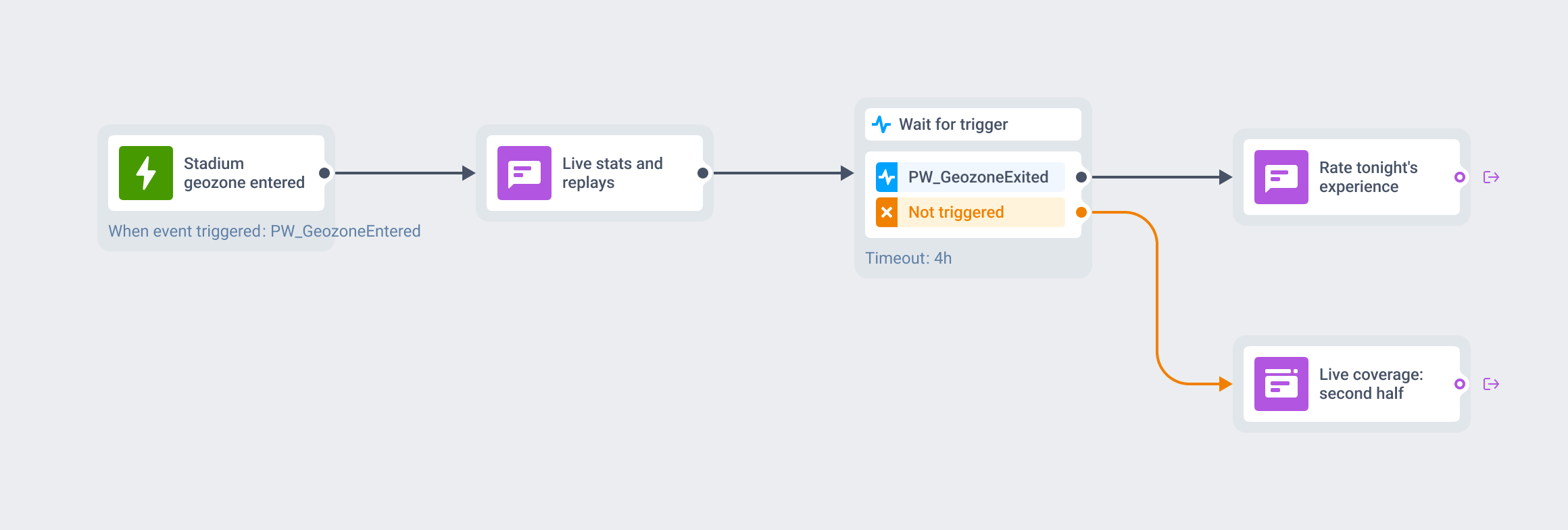
This is how media apps run event-driven engagement.
How to launch your first geofencing campaign
You don’t need a new stack. Here’s the shortest path from a zone on the map to a live campaign.
-
Create the geozone and turn on the event
Draw the zone (circle or polygon), and the entry event is created automatically the first time you add one. Enable dwell and exit if your flow needs them.
-
Set the condition
Choose the signal that starts the flow: entry, dwell after N minutes, or exit. Add the assume-exit timeout so a silent device doesn't strand a user halfway through.
-
Branch the journey
In Customer Journey Builder, use the geo event as a trigger-based entry, then branch by channel and reachability — push first, fall back to in-app or email if it doesn't land. If you're building a journey from scratch for the first time, the walkthrough in how to go from idea to live campaign in minutes covers the mechanics end to end.
-
Pick the channel per moment
Match the message to the signal. Entry wants something short and immediate; dwell can carry a richer offer; exit is for follow-up.
A few mistakes to avoid:
- Too tight a radius. 50 meters is the platform minimum, and GPS isn’t pixel-perfect, so a tight zone misses real visitors. The default is 200 meters (you can go up to 100 km) — start there and tune.
- No dwell filter. Triggering on entry alone messages everyone who walks past. Switch the trigger to dwell (
PW_GeozoneDwell) and only people who actually stayed enter the flow. - No cooldown on entry. Set a Cooldown (anywhere from 1 minute to 41 days), so someone pacing in and out of the zone isn’t pinged every time; if your zones sit in a cluster, the cooldown covers the whole cluster. It gates entry actions only, so dwell, exit, and assume-exit still follow the visit rather than the schedule.
Launch geo-triggered journeys with Pushwoosh
Location is one of the strongest real-time signals a mobile app has, and most apps still spend it on a single push. Pushwoosh turns geozone entry, dwell, and exit into events that feed straight into Customer Journey Builder, so a user crossing a boundary starts a coordinated, omnichannel flow instead of a one-off ping.